Try the key features in Tiger Data products
Tiger Cloud offers managed database services that provide a stable and reliable environment for your applications.
Each Tiger Cloud service is a single optimised Postgres instance extended with innovations such as TimescaleDB in the database engine, in a cloud infrastructure that delivers speed without sacrifice. A radically faster Postgres for transactional, analytical, and agentic workloads at scale.
Tiger Cloud scales Postgres to ingest and query vast amounts of live data. Tiger Cloud provides a range of features and optimizations that supercharge your queries while keeping the costs down. For example:
- The hypercore row-columnar engine in TimescaleDB makes queries up to 350x faster, ingests 44% faster, and reduces storage by 90%.
- Tiered storage in Tiger Cloud seamlessly moves your data from high performance storage for frequently accessed data to low cost bottomless storage for rarely accessed data.
The following figure shows how TimescaleDB optimizes your data for superfast real-time analytics:
This page shows you how to rapidly implement the features in Tiger Cloud that enable you to ingest and query data faster while keeping the costs low.
Prerequisites
To follow the steps on this page:
Create a target [Tiger Cloud service][create-service] with the Real-time analytics capability.
You need [your connection details][connection-info]. This procedure also works for [self-hosted TimescaleDB][enable-timescaledb].
Optimize time-series data in hypertables with hypercore
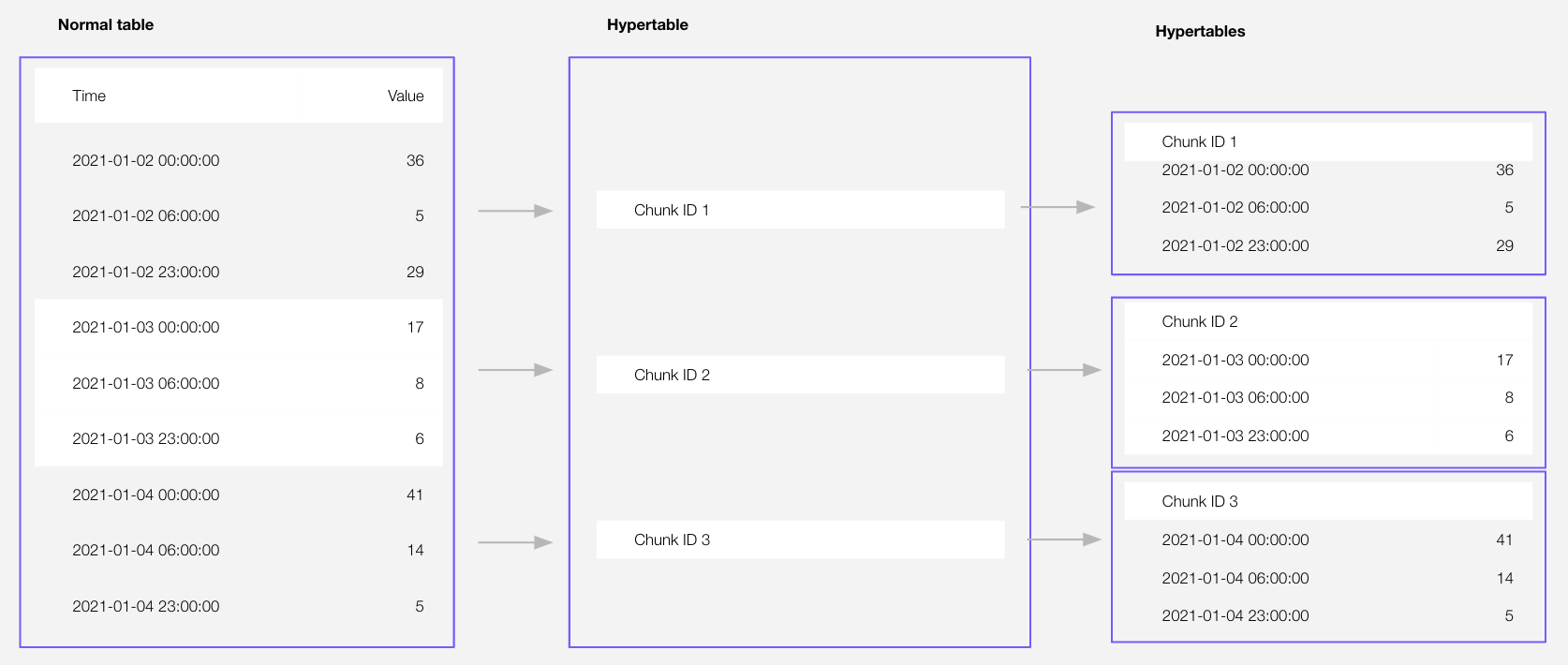
Time-series data represents the way a system, process, or behavior changes over time. Hypertables are Postgres tables that help you improve insert and query performance by automatically partitioning your data by time. Each hypertable is made up of child tables called chunks. Each chunk is assigned a range of time, and only contains data from that range. When you run a query, TimescaleDB identifies the correct chunk and runs the query on it, instead of going through the entire table. You can also tune hypertables to increase performance even more.
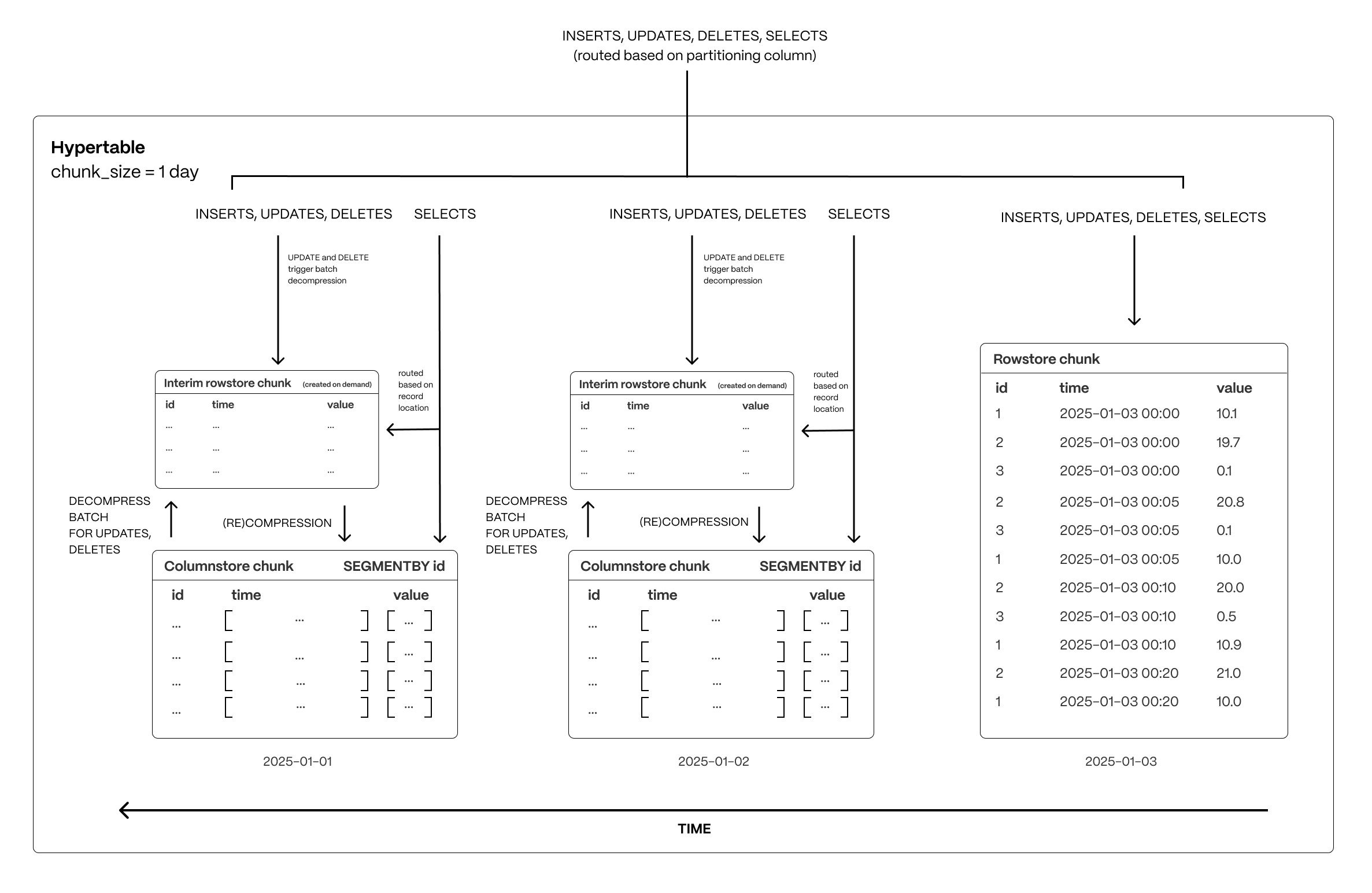
[Hypercore][hypercore] is the hybrid row-columnar storage engine in TimescaleDB used by hypertables. Traditional databases force a trade-off between fast inserts (row-based storage) and efficient analytics (columnar storage). Hypercore eliminates this trade-off, allowing real-time analytics without sacrificing transactional capabilities.
Hypercore dynamically stores data in the most efficient format for its lifecycle:
- Row-based storage for recent data: the most recent chunk (and possibly more) is always stored in the rowstore, ensuring fast inserts, updates, and low-latency single record queries. Additionally, row-based storage is used as a writethrough for inserts and updates to columnar storage.
- Columnar storage for analytical performance: chunks are automatically compressed into the columnstore, optimizing storage efficiency and accelerating analytical queries.
Unlike traditional columnar databases, hypercore allows data to be inserted or modified at any stage, making it a flexible solution for both high-ingest transactional workloads and real-time analytics—within a single database.
Hypertables exist alongside regular Postgres tables. You use regular Postgres tables for relational data, and interact with hypertables and regular Postgres tables in the same way.
This section shows you how to create regular tables and hypertables, and import relational and time-series data from external files.
Import some time-series data into hypertables
Unzip crypto_sample.zip to a
<local folder>.This test dataset contains:
- Second-by-second data for the most-traded crypto-assets. This time-series data is best suited for optimization in a [hypertable][hypertables-section].
- A list of asset symbols and company names. This is best suited for a regular relational table.
To import up to 100 GB of data directly from your current Postgres-based database, [migrate with downtime][migrate-with-downtime] using native Postgres tooling. To seamlessly import 100GB-10TB+ of data, use the [live migration][migrate-live] tooling supplied by Tiger Data. To add data from non-Postgres data sources, see [Import and ingest data][data-ingest].
Upload data into a hypertable:
To more fully understand how to create a hypertable, how hypertables work, and how to optimize them for performance by tuning chunk intervals and enabling chunk skipping, see [the hypertables documentation][hypertables-section].
The Tiger Cloud Console data upload creates hypertables and relational tables from the data you are uploading:
In [Tiger Cloud Console][portal-ops-mode], select the service to add data to, then click
Actions>Import data>Upload .CSV.Click to browse, or drag and drop
<local folder>/tutorial_sample_tick.csvto upload.Leave the default settings for the delimiter, skipping the header, and creating a new table.
In
Table, providecrypto_ticksas the new table name.Enable
hypertable partitionfor thetimecolumn and clickProcess CSV file.The upload wizard creates a hypertable containing the data from the CSV file.
When the data is uploaded, close
Upload .CSV.If you want to have a quick look at your data, press
Run.Repeat the process with
<local folder>/tutorial_sample_assets.csvand rename tocrypto_assets.There is no time-series data in this table, so you don't see the
hypertable partitionoption.In Terminal, navigate to
<local folder>and connect to your service.bash