Hypertable recipes
This section contains recipes about hypertables.
Remove duplicates from an existing hypertable
Looking to remove duplicates from an existing hypertable? One method is to run a PARTITION BY query to get ROW_NUMBER() and then the ctid of rows where row_number>1. You then delete these rows. However, you need to check tableoid and ctid. This is because ctid is not unique and might be duplicated in different chunks. The following code example took 17 hours to process a table with 40 million rows:
Shoutout to Mathias Ose and Christopher Piggott for this recipe.
Get faster JOIN queries with Common Table Expressions
Imagine there is a query that joins a hypertable to another table on a shared key:
If you run EXPLAIN on this query, you see that the query planner performs a NestedJoin between these two tables, which means querying the hypertable multiple times. Even if the hypertable is well indexed, if it is also large, the query will be slow. How do you force a once-only lookup? Use materialized Common Table Expressions (CTEs).
If you split the query into two parts using CTEs, you can materialize the hypertable lookup and force Postgres to perform it only once.
Now if you run EXPLAIN once again, you see that this query performs only one lookup. Depending on the size of your hypertable, this could result in a multi-hour query taking mere seconds.
Shoutout to Rowan Molony for this recipe.
===== PAGE: https://docs.tigerdata.com/_partials/_experimental-private-beta/ =====
This feature is experimental and offered as part of a private beta. Do not use this feature in production.
===== PAGE: https://docs.tigerdata.com/_partials/_hypershift-alternatively/ =====
Alternatively, if you have data in an existing database, you can migrate it directly into your new Tiger Cloud service using hypershift. For more information about hypershift, including instructions for how to migrate your data, see the [Migrate and sync data to Tiger Cloud][migrate].
===== PAGE: https://docs.tigerdata.com/_partials/_timescaledb_supported_windows/ =====
| Operation system | Version |
|---|---|
| Microsoft Windows | 10, 11 |
| Microsoft Windows Server | 2019, 2020 |
===== PAGE: https://docs.tigerdata.com/_partials/_migrate_post_data_dump_source_schema/ =====
--section=post-datais used to dump post-data items include definitions of indexes, triggers, rules, and constraints other than validated check constraints.--snapshotis used to specified the synchronized [snapshot][snapshot] when making a dump of the database.--no-tablespacesis required because Tiger Cloud does not support tablespaces other than the default. This is a known limitation.--no-owneris required because Tiger Cloud'stsdbadminuser is not a superuser and cannot assign ownership in all cases. This flag means that everything is owned by the user used to connect to the target, regardless of ownership in the source. This is a known limitation.--no-privilegesis required because thetsdbadminuser for your Tiger Cloud service is not a superuser and cannot assign privileges in all cases. This flag means that privileges assigned to other users must be reassigned in the target database as a manual clean-up task. This is a known limitation.
===== PAGE: https://docs.tigerdata.com/_partials/_create-hypertable/ =====
Hypertables are Postgres tables in TimescaleDB that automatically partition your time-series data by time. Time-series data represents the way a system, process, or behavior changes over time. Hypertables enable TimescaleDB to work efficiently with time-series data. Each hypertable is made up of child tables called chunks. Each chunk is assigned a range of time, and only contains data from that range. When you run a query, TimescaleDB identifies the correct chunk and runs the query on it, instead of going through the entire table.
[Hypercore][hypercore] is the hybrid row-columnar storage engine in TimescaleDB used by hypertables. Traditional databases force a trade-off between fast inserts (row-based storage) and efficient analytics (columnar storage). Hypercore eliminates this trade-off, allowing real-time analytics without sacrificing transactional capabilities.
Hypercore dynamically stores data in the most efficient format for its lifecycle:
- Row-based storage for recent data: the most recent chunk (and possibly more) is always stored in the rowstore, ensuring fast inserts, updates, and low-latency single record queries. Additionally, row-based storage is used as a writethrough for inserts and updates to columnar storage.
- Columnar storage for analytical performance: chunks are automatically compressed into the columnstore, optimizing storage efficiency and accelerating analytical queries.
Unlike traditional columnar databases, hypercore allows data to be inserted or modified at any stage, making it a flexible solution for both high-ingest transactional workloads and real-time analytics—within a single database.
Because TimescaleDB is 100% Postgres, you can use all the standard Postgres tables, indexes, stored procedures, and other objects alongside your hypertables. This makes creating and working with hypertables similar to standard Postgres.
To create a hypertable:
- Connect to your service
In Tiger Cloud Console, click Data, then select a service.
- Create a Postgres table
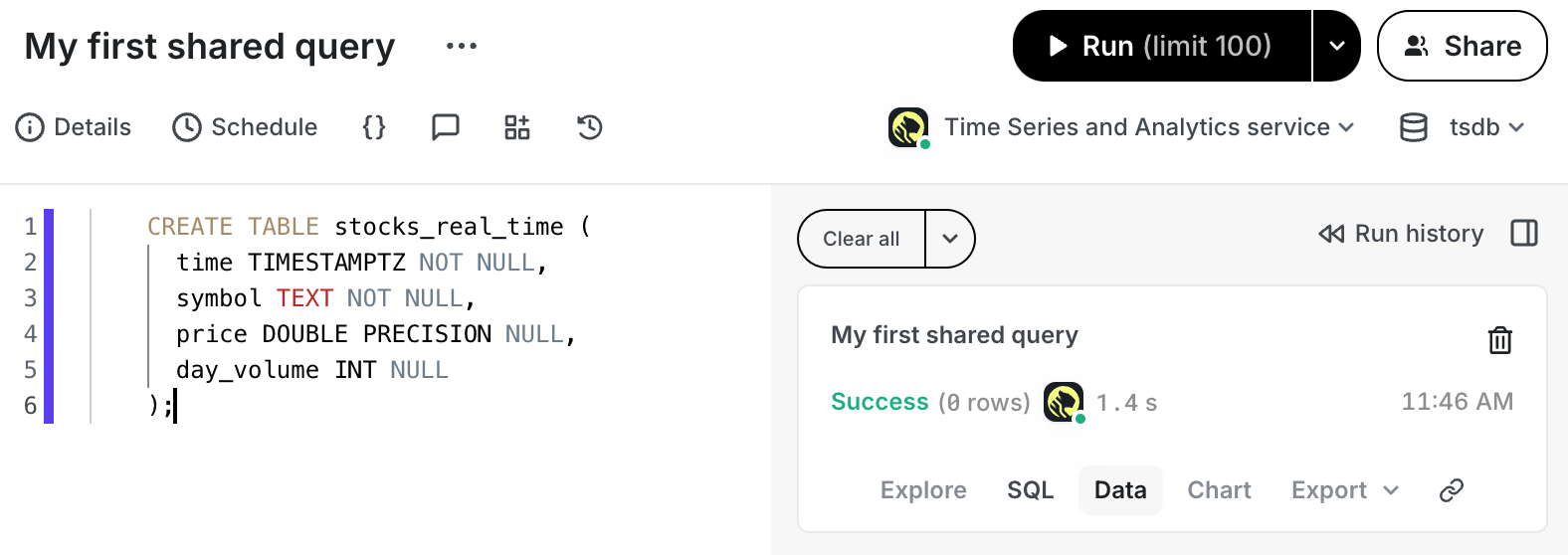
Copy the following into your query, then click Run:
If you are self-hosting TimescaleDB v2.19.3 and below, create a [Postgres relational table][pg-create-table], then convert it using [create_hypertable][create_hypertable]. You then enable hypercore with a call to [ALTER TABLE][alter_table_hypercore].
You see the result immediately:
===== PAGE: https://docs.tigerdata.com/_partials/_migrate_pre_data_dump_source_schema/ =====
--section=pre-datais used to dump only the definition of tables, sequences, check constraints and inheritance hierarchy. It excludes indexes, foreign key constraints, triggers and rules.--snapshotis used to specified the synchronized [snapshot][snapshot] when making a dump of the database.--no-tablespacesis required because Tiger Cloud does not support tablespaces other than the default. This is a known limitation.--no-owneris required because Tiger Cloud'stsdbadminuser is not a superuser and cannot assign ownership in all cases. This flag means that everything is owned by the user used to connect to the target, regardless of ownership in the source. This is a known limitation.--no-privilegesis required because thetsdbadminuser for your Tiger Cloud service is not a superuser and cannot assign privileges in all cases. This flag means that privileges assigned to other users must be reassigned in the target database as a manual clean-up task. This is a known limitation.
===== PAGE: https://docs.tigerdata.com/_partials/_hypertable-detailed-size-api/ =====
Examples:
Example 1 (bash):
rails new my_app -d=postgresql
    cd my_app
Example 2 (ruby):
gem 'timescaledb'Example 3 (bash):
bundle installExample 4 (yaml):
default: &default
         adapter: postgresql
         encoding: unicode
         pool: <%= ENV.fetch("RAILS_MAX_THREADS") { 5 } %>
         url: <%= ENV['DATABASE_URL'] %>