Creating a trigger
Create a function that inserts erroneous data into the
error_conditionstable:Create a trigger that calls this function whenever a new row is inserted into the hypertable:
All data is inserted into the
conditionstable, but rows that contain errors are also added to theerror_conditionstable.
TimescaleDB supports the full range of triggers, including BEFORE INSERT, AFTER INSERT, BEFORE UPDATE, AFTER UPDATE, BEFORE DELETE, and AFTER DELETE. For more information, see the [Postgres docs][postgres-createtrigger].
===== PAGE: https://docs.tigerdata.com/use-timescale/schema-management/foreign-data-wrappers/ =====
Examples:
Example 1 (sql):
CREATE OR REPLACE FUNCTION record_error()
      RETURNS trigger AS $record_error$
    BEGIN
     IF NEW.temperature >= 1000 OR NEW.humidity >= 1000 THEN
       INSERT INTO error_conditions
         VALUES(NEW.time, NEW.location, NEW.temperature, NEW.humidity);
     END IF;
     RETURN NEW;
    END;
    $record_error$ LANGUAGE plpgsql;
Example 2 (sql):
CREATE TRIGGER record_error
      BEFORE INSERT ON conditions
      FOR EACH ROW
      EXECUTE PROCEDURE record_error();
copy_chunk()
URL: llms-txt#copy_chunk()
Contents:
- Required arguments
- Required settings
- Failures
- Sample usage
[Multi-node support is sunsetted][multi-node-deprecation].
TimescaleDB v2.13 is the last release that includes multi-node support for Postgres versions 13, 14, and 15.
TimescaleDB allows you to copy existing chunks to a new location within a multi-node environment. This allows each data node to work both as a primary for some chunks and backup for others. If a data node fails, its chunks already exist on other nodes that can take over the responsibility of serving them.
Experimental features could have bugs. They might not be backwards compatible, and could be removed in future releases. Use these features at your own risk, and do not use any experimental features in production.
Required arguments
| Name | Type | Description |
|---|---|---|
chunk | REGCLASS | Name of chunk to be copied |
source_node | NAME | Data node where the chunk currently resides |
destination_node | NAME | Data node where the chunk is to be copied |
When copying a chunk, the destination data node needs a way to authenticate with the data node that holds the source chunk. It is currently recommended to use a [password file][password-config] on the data node.
The wal_level setting must also be set to logical or higher on data nodes from which chunks are copied. If you are copying or moving many chunks in parallel, you can increase max_wal_senders and max_replication_slots.
When a copy operation fails, it sometimes creates objects and metadata on the destination data node. It can also hold a replication slot open on the source data node. To clean up these objects and metadata, use [cleanup_copy_chunk_operation][cleanup_copy_chunk].
===== PAGE: https://docs.tigerdata.com/api/distributed-hypertables/alter_data_node/ =====
hypertable_detailed_size()
URL: llms-txt#hypertable_detailed_size()
Contents:
- Samples
- Required arguments
- Returns
Get detailed information about disk space used by a hypertable or continuous aggregate, returning size information for the table itself, any indexes on the table, any toast tables, and the total size of all. All sizes are reported in bytes. If the function is executed on a distributed hypertable, it returns size information as a separate row per node, including the access node.
When a continuous aggregate name is provided, the function transparently looks up the backing hypertable and returns its statistics instead.
For more information about using hypertables, including chunk size partitioning, see the [hypertable section][hypertable-docs].
Get the size information for a hypertable.
The access node is listed without a user-given node name. Normally, the access node holds no data, but still maintains, for example, index information that occupies a small amount of disk space.
Required arguments
| Name | Type | Description |
|---|---|---|
hypertable | REGCLASS | Hypertable or continuous aggregate to show detailed size of. |
| Column | Type | Description |
|---|---|---|
| table_bytes | BIGINT | Disk space used by main_table (like pg_relation_size(main_table)) |
| index_bytes | BIGINT | Disk space used by indexes |
| toast_bytes | BIGINT | Disk space of toast tables |
| total_bytes | BIGINT | Total disk space used by the specified table, including all indexes and TOAST data |
| node_name | TEXT | For distributed hypertables, this is the user-given name of the node for which the size is reported. NULL is returned for the access node and non-distributed hypertables. |
If executed on a relation that is not a hypertable, the function returns NULL.
===== PAGE: https://docs.tigerdata.com/api/continuous-aggregates/show_policies/ =====
Examples:
Example 1 (sql):
-- disttable is a distributed hypertable --
SELECT * FROM hypertable_detailed_size('disttable') ORDER BY node_name;

 table_bytes | index_bytes | toast_bytes | total_bytes |  node_name
-------------+-------------+-------------+-------------+-------------
       16384 |       40960 |           0 |       57344 | data_node_1
        8192 |       24576 |           0 |       32768 | data_node_2
           0 |        8192 |           0 |        8192 |
Limitations
URL: llms-txt#limitations
Contents:
- Hypertable limitations
While TimescaleDB generally offers capabilities that go beyond what Postgres offers, there are some limitations to using hypertables.
Hypertable limitations
- Time dimensions (columns) used for partitioning cannot have NULL values.
- Unique indexes must include all columns that are partitioning dimensions.
UPDATEstatements that move values between partitions (chunks) are not supported. This includes upserts (INSERT ... ON CONFLICT UPDATE).- Foreign key constraints from a hypertable referencing another hypertable are not supported.
===== PAGE: https://docs.tigerdata.com/use-timescale/tigerlake/ =====
remove_retention_policy()
URL: llms-txt#remove_retention_policy()
Contents:
- Samples
- Required arguments
- Optional arguments
Remove a policy to drop chunks of a particular hypertable.
Removes the existing data retention policy for the conditions table.
Required arguments
| Name | Type | Description |
|---|---|---|
relation | REGCLASS | Name of the hypertable or continuous aggregate from which to remove the policy |
Optional arguments
| Name | Type | Description |
|---|---|---|
if_exists | BOOLEAN | Set to true to avoid throwing an error if the policy does not exist. Defaults to false. |
===== PAGE: https://docs.tigerdata.com/api/hypertable/create_table/ =====
Examples:
Example 1 (sql):
SELECT remove_retention_policy('conditions');show_tablespaces()
URL: llms-txt#show_tablespaces()
Contents:
- Samples
- Required arguments
Show the tablespaces attached to a hypertable.
Required arguments
| Name | Type | Description |
|---|---|---|
hypertable | REGCLASS | Hypertable to show attached tablespaces for. |
===== PAGE: https://docs.tigerdata.com/api/hypertable/disable_chunk_skipping/ =====
Examples:
Example 1 (sql):
SELECT * FROM show_tablespaces('conditions');

 show_tablespaces
------------------
 disk1
 disk2
Hypertables and chunks
URL: llms-txt#hypertables-and-chunks
Contents:
- The hypertable workflow
Tiger Cloud supercharges your real-time analytics by letting you run complex queries continuously, with near-zero latency. Under the hood, this is achieved by using hypertables—Postgres tables that automatically partition your time-series data by time and optionally by other dimensions. When you run a query, Tiger Cloud identifies the correct partition, called chunk, and runs the query on it, instead of going through the entire table.
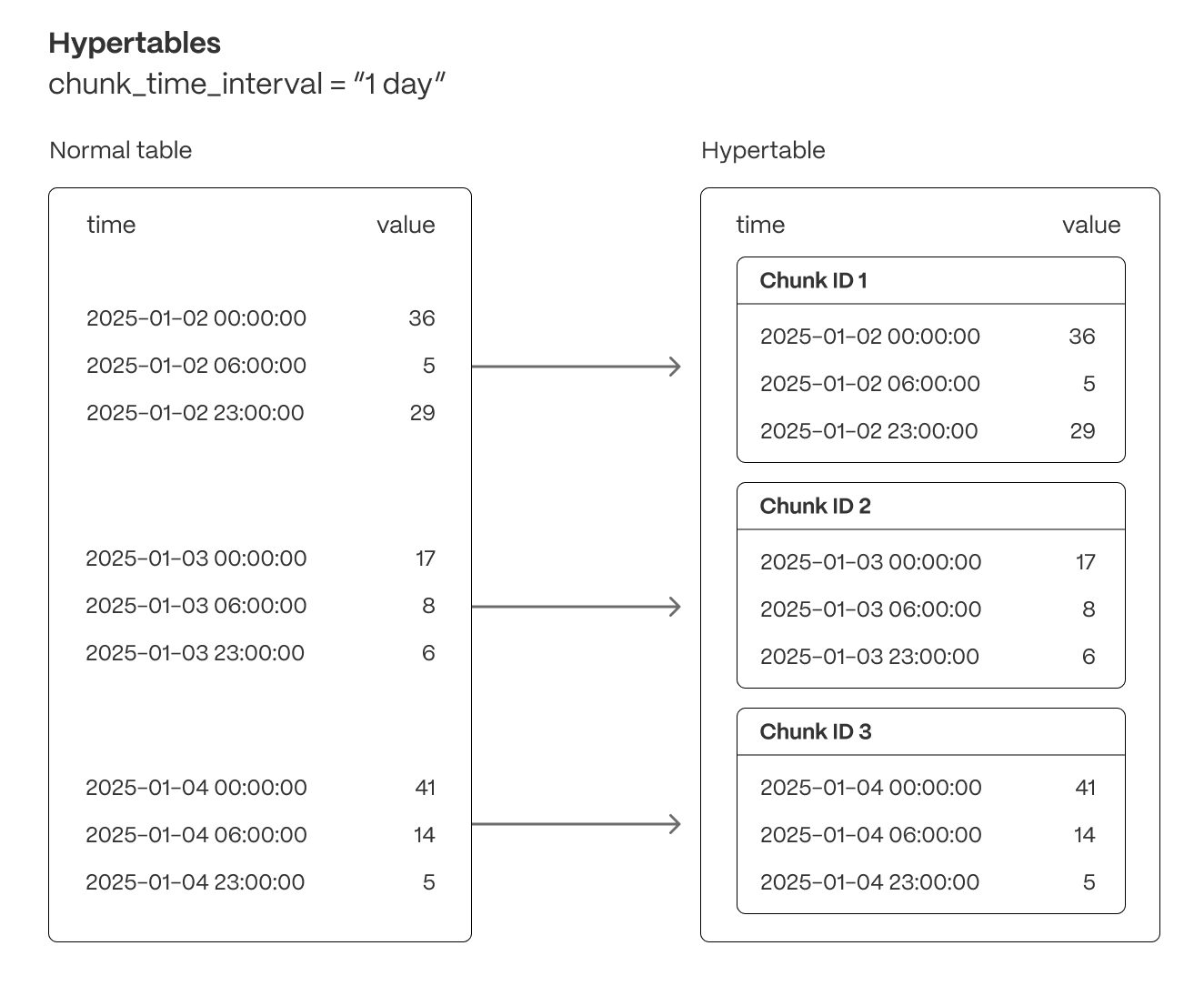
Hypertables offer the following benefits:
Efficient data management with [automated partitioning by time][chunk-size]: Tiger Cloud splits your data into chunks that hold data from a specific time range. For example, one day or one week. You can configure this range to better suit your needs.
Better performance with [strategic indexing][hypertable-indexes]: an index on time in the descending order is automatically created when you create a hypertable. More indexes are created on the chunk level, to optimize performance. You can create additional indexes, including unique indexes, on the columns you need.
Faster queries with [chunk skipping][chunk-skipping]: Tiger Cloud skips the chunks that are irrelevant in the context of your query, dramatically reducing the time and resources needed to fetch results. Even more—you can enable chunk skipping on non-partitioning columns.
Advanced data analysis with [hyperfunctions][hyperfunctions]: Tiger Cloud enables you to efficiently process, aggregate, and analyze significant volumes of data while maintaining high performance.
To top it all, there is no added complexity—you interact with hypertables in the same way as you would with regular Postgres tables. All the optimization magic happens behind the scenes.
Inheritance is not supported for hypertables and may lead to unexpected behavior.
For more information about using hypertables, including chunk size partitioning, see the [hypertable section][hypertable-docs].
The hypertable workflow
Best practice for using a hypertable is to:
- Create a hypertable
Create a [hypertable][hypertables-section] for your time-series data using [CREATE TABLE][hypertable-create-table]. For [efficient queries][secondary-indexes] on data in the columnstore, remember to segmentby the column you will use most often to filter your data. For example:
If you are self-hosting TimescaleDB v2.19.3 and below, create a [Postgres relational table][pg-create-table], then convert it using [create_hypertable][create_hypertable]. You then enable hypercore with a call to [ALTER TABLE][alter_table_hypercore].
- Set the columnstore policy
===== PAGE: https://docs.tigerdata.com/api/hypercore/ =====
Examples:
Example 1 (sql):
CREATE TABLE conditions (
      time        TIMESTAMPTZ       NOT NULL,
      location    TEXT              NOT NULL,
      device      TEXT              NOT NULL,
      temperature DOUBLE PRECISION  NULL,
      humidity    DOUBLE PRECISION  NULL
   ) WITH (
      tsdb.hypertable,
      tsdb.partition_column='time',
      tsdb.segmentby = 'device',
      tsdb.orderby = 'time DESC'
   );
Example 2 (sql):
CALL add_columnstore_policy('conditions', after => INTERVAL '1d');Create foreign keys in a distributed hypertable
URL: llms-txt#create-foreign-keys-in-a-distributed-hypertable
Contents:
- Creating foreign keys in a distributed hypertable
[Multi-node support is sunsetted][multi-node-deprecation].
TimescaleDB v2.13 is the last release that includes multi-node support for Postgres versions 13, 14, and 15.
Tables and values referenced by a distributed hypertable must be present on the access node and all data nodes. To create a foreign key from a distributed hypertable, use [distributed_exec][distributed_exec] to first create the referenced table on all nodes.
Creating foreign keys in a distributed hypertable
- Create the referenced table on the access node.
- Use [
distributed_exec][distributed_exec] to create the same table on all data nodes and update it with the correct data. - Create a foreign key from your distributed hypertable to your referenced table.
===== PAGE: https://docs.tigerdata.com/self-hosted/distributed-hypertables/triggers/ =====
CREATE TABLE
URL: llms-txt#create-table
Contents:
- Samples
- Arguments
- Returns
Create a [hypertable][hypertable-docs] partitioned on a single dimension with [columnstore][hypercore] enabled, or create a standard Postgres relational table.
A hypertable is a specialized Postgres table that automatically partitions your data by time. All actions that work on a Postgres table, work on hypertables. For example, [ALTER TABLE][alter_table_hypercore] and [SELECT][sql-select]. By default, a hypertable is partitioned on the time dimension. To add secondary dimensions to a hypertable, call [add_dimension][add-dimension]. To convert an existing relational table into a hypertable, call [create_hypertable][create_hypertable].
As the data cools and becomes more suited for analytics, [add a columnstore policy][add_columnstore_policy] so your data is automatically converted to the columnstore after a specific time interval. This columnar format enables fast scanning and aggregation, optimizing performance for analytical workloads while also saving significant storage space. In the columnstore conversion, hypertable chunks are compressed by up to 98%, and organized for efficient, large-scale queries. This columnar format enables fast scanning and aggregation, optimizing performance for analytical workloads. You can also manually [convert chunks][convert_to_columnstore] in a hypertable to the columnstore.
Hypertable to hypertable foreign keys are not allowed, all other combinations are permitted.
The [columnstore][hypercore] settings are applied on a per-chunk basis. You can change the settings by calling [ALTER TABLE][alter_table_hypercore] without first converting the entire hypertable back to the [rowstore][hypercore]. The new settings apply only to the chunks that have not yet been converted to columnstore, the existing chunks in the columnstore do not change. Similarly, if you [remove an existing columnstore policy][remove_columnstore_policy] and then [add a new one][add_columnstore_policy], the new policy applies only to the unconverted chunks. This means that chunks with different columnstore settings can co-exist in the same hypertable.
TimescaleDB calculates default columnstore settings for each chunk when it is created. These settings apply to each chunk, and not the entire hypertable. To explicitly disable the defaults, set a setting to an empty string.
CREATE TABLE extends the standard Postgres [CREATE TABLE][pg-create-table]. This page explains the features and arguments specific to TimescaleDB.
Since TimescaleDB v2.20.0
- Create a hypertable partitioned on the time dimension and enable columnstore:
Create the hypertable:
Enable hypercore by adding a columnstore policy:
Create a hypertable partitioned on the time with fewer chunks based on time interval:
Create a hypertable partitioned using [UUIDv7][uuidv7_functions]:
Enable data compression during ingestion:
When you set timescaledb.enable_direct_compress_copy your data gets compressed in memory during ingestion with COPY statements. By writing the compressed batches immediately in the columnstore, the IO footprint is significantly lower. Also, the [columnstore policy][add_columnstore_policy] you set is less important, INSERT already produces compressed chunks.
Please note that this feature is a tech preview and not production-ready. Using this feature could lead to regressed query performance and/or storage ratio, if the ingested batches are not correctly ordered or are of too high cardinality.
To enable in-memory data compression during ingestion:
Important facts
- High cardinality use cases do not produce good batches and lead to degreaded query performance.
- The columnstore is optimized to store 1000 records per batch, which is the optimal format for ingestion per segment by.
- WAL records are written for the compressed batches rather than the individual tuples.
- Currently only
COPYis support,INSERTwill eventually follow. - Best results are achieved for batch ingestion with 1000 records or more, upper boundary is 10.000 records.
- Continous Aggregates are not supported at the moment.
Create a hypertable:
- Copy data into the hypertable: You achieve the highest insert rate using binary format. CSV and text format are also supported.
- Create a Postgres relational table:
| Name | Type | Default | Required | Description |
|---|---|---|---|---|
tsdb.hypertable | BOOLEAN | true | ✖ | Create a new [hypertable][hypertable-docs] for time-series data rather than a standard Postgres relational table. |
tsdb.partition_column | TEXT | true | ✖ | Set the time column to automatically partition your time-series data by. |
tsdb.chunk_interval | TEXT | 7 days | ✖ | Change this to better suit your needs. For example, if you set chunk_interval to 1 day, each chunk stores data from the same day. Data from different days is stored in different chunks. |
tsdb.create_default_indexes | BOOLEAN | true | ✖ | Set to false to not automatically create indexes. The default indexes are: <ul><li>On all hypertables, a descending index on partition_column</li><li>On hypertables with space partitions, an index on the space parameter and partition_column</li></ul> |
tsdb.associated_schema | REGCLASS | _timescaledb_internal | ✖ | Set the schema name for internal hypertable tables. |
tsdb.associated_table_prefix | TEXT | _hyper | ✖ | Set the prefix for the names of internal hypertable chunks. |
tsdb.orderby | TEXT | Descending order on the time column in table_name. | ✖ | The order in which items are used in the columnstore. Specified in the same way as an ORDER BY clause in a SELECT query. Setting tsdb.orderby automatically creates an implicit min/max sparse index on the orderby column. |
tsdb.segmentby | TEXT | TimescaleDB looks at pg_stats and determines an appropriate column based on the data cardinality and distribution. If pg_stats is not available, TimescaleDB looks for an appropriate column from the existing indexes. | ✖ | Set the list of columns used to segment data in the columnstore for table. An identifier representing the source of the data such as device_id or tags_id is usually a good candidate. |
tsdb.sparse_index | TEXT | TimescaleDB evaluates the columns you already have indexed, checks which data types are a good fit for sparse indexing, then creates a sparse index as an optimization. | ✖ | Configure the sparse indexes for compressed chunks. Requires setting tsdb.orderby. Supported index types include: <li> bloom(<column_name>): a probabilistic index, effective for = filters. Cannot be applied to tsdb.orderby columns.</li> <li> minmax(<column_name>): stores min/max values for each compressed chunk. Setting tsdb.orderby automatically creates an implicit min/max sparse index on the orderby column. </li> Define multiple indexes using a comma-separated list. You can set only one index per column. Set to an empty string to avoid using sparse indexes and explicitly disable the default behavior. |
TimescaleDB returns a simple message indicating success or failure.
===== PAGE: https://docs.tigerdata.com/api/hypertable/drop_chunks/ =====
Examples:
Example 1 (sql):
CREATE TABLE crypto_ticks (
        "time" TIMESTAMPTZ,
        symbol TEXT,
        price DOUBLE PRECISION,
        day_volume NUMERIC
     ) WITH (
       tsdb.hypertable,
       tsdb.partition_column='time',
       tsdb.segmentby='symbol',
       tsdb.orderby='time DESC'
     );
Example 2 (sql):
CALL add_columnstore_policy('crypto_ticks', after => INTERVAL '1d');Example 3 (sql):
CREATE TABLE IF NOT EXISTS hypertable_control_chunk_interval(
    time int4 NOT NULL,
    device text,
    value float
   ) WITH (
    tsdb.hypertable,
    tsdb.partition_column='time',
    tsdb.chunk_interval=3453
   );
Example 4 (sql):
-- For optimal compression on the ID column, first enable UUIDv7 compression
     SET enable_uuid_compression=true;
     -- Then create your table
     CREATE TABLE events (
        id  uuid PRIMARY KEY DEFAULT generate_uuidv7(),
        payload jsonb
     ) WITH (tsdb.hypertable, tsdb.partition_column = 'id');
Dropping chunks times out
URL: llms-txt#dropping-chunks-times-out
When you drop a chunk, it requires an exclusive lock. If a chunk is being accessed by another session, you cannot drop the chunk at the same time. If a drop chunk operation can't get the lock on the chunk, then it times out and the process fails. To resolve this problem, check what is locking the chunk. In some cases, this could be caused by a continuous aggregate or other process accessing the chunk. When the drop chunk operation can get an exclusive lock on the chunk, it completes as expected.
For more information about locks, see the [Postgres lock monitoring documentation][pg-lock-monitoring].
===== PAGE: https://docs.tigerdata.com/_troubleshooting/hypertables-unique-index-partitioning/ =====
Create a data retention policy
URL: llms-txt#create-a-data-retention-policy
Contents:
- Add a data retention policy
- Adding a data retention policy
- Remove a data retention policy
- See scheduled data retention jobs
Automatically drop data once its time value ages past a certain interval. When you create a data retention policy, TimescaleDB automatically schedules a background job to drop old chunks.
Add a data retention policy
Add a data retention policy by using the [add_retention_policy][add_retention_policy] function.