Ingest real-time financial websocket data - Query the data
To look at OHLCV values, the most effective way is to create a continuous aggregate. You can create a continuous aggregate to aggregate data for each hour, then set the aggregate to refresh every hour, and aggregate the last two hours' worth of data.
Creating a continuous aggregate
Connect to the Tiger Cloud service
tsdbthat contains the Twelve Data stocks dataset.At the psql prompt, create the continuous aggregate to aggregate data every minute:
sqlCREATE MATERIALIZED VIEW one_hour_candle WITH (timescaledb.continuous) AS SELECT time_bucket('1 hour', time) AS bucket, symbol, FIRST(price, time) AS "open", MAX(price) AS high, MIN(price) AS low, LAST(price, time) AS "close", LAST(day_volume, time) AS day_volume FROM crypto_ticks GROUP BY bucket, symbol;When you create the continuous aggregate, it refreshes by default.
Set a refresh policy to update the continuous aggregate every hour, if there is new data available in the hypertable for the last two hours:
sqlSELECT add_continuous_aggregate_policy('one_hour_candle', start_offset => INTERVAL '3 hours', end_offset => INTERVAL '1 hour', schedule_interval => INTERVAL '1 hour');
Query the continuous aggregate
When you have your continuous aggregate set up, you can query it to get the OHLCV values.
Querying the continuous aggregate
Connect to the Tiger Cloud service that contains the Twelve Data stocks dataset.
At the psql prompt, use this query to select all
AAPLOHLCV data for the past 5 hours, by time bucket:sqlSELECT * FROM one_hour_candle WHERE symbol = 'AAPL' AND bucket >= NOW() - INTERVAL '5 hours' ORDER BY bucket;The result of the query looks like this:
sqlbucket | symbol | open | high | low | close | day_volume ------------------------+---------+---------+---------+---------+---------+------------ 2023-05-30 08:00:00+00 | AAPL | 176.31 | 176.31 | 176 | 176.01 | 2023-05-30 08:01:00+00 | AAPL | 176.27 | 176.27 | 176.02 | 176.2 | 2023-05-30 08:06:00+00 | AAPL | 176.03 | 176.04 | 175.95 | 176 | 2023-05-30 08:07:00+00 | AAPL | 175.95 | 176 | 175.82 | 175.91 | 2023-05-30 08:08:00+00 | AAPL | 175.92 | 176.02 | 175.8 | 176.02 | 2023-05-30 08:09:00+00 | AAPL | 176.02 | 176.02 | 175.9 | 175.98 | 2023-05-30 08:10:00+00 | AAPL | 175.98 | 175.98 | 175.94 | 175.94 | 2023-05-30 08:11:00+00 | AAPL | 175.94 | 175.94 | 175.91 | 175.91 | 2023-05-30 08:12:00+00 | AAPL | 175.9 | 175.94 | 175.9 | 175.94 |
Graph OHLCV data
When you have extracted the raw OHLCV data, you can use it to graph the result in a candlestick chart, using Grafana. To do this, you need to have Grafana set up to connect to your self-hosted TimescaleDB instance.
Graphing OHLCV data
Ensure you have Grafana installed, and you are using the TimescaleDB database that contains the Twelve Data dataset set up as a data source.
In Grafana, from the
Dashboardsmenu, clickNew Dashboard. In theNew Dashboardpage, clickAdd a new panel.In the
Visualizationsmenu in the top right corner, selectCandlestickfrom the list. Ensure you have set the Twelve Data dataset as your data source.Click
Edit SQLand paste in the query you used to get the OHLCV values.In the
Format assection, selectTable.Adjust elements of the table as required, and click
Applyto save your graph to the dashboard.<img class="main-content__illustration" width={1375} height={944} src="https://assets.timescale.com/docs/images/Grafana_candlestick_1day.webp" alt="Creating a candlestick graph in Grafana using 1-day OHLCV tick data" />
===== PAGE: https://docs.tigerdata.com/tutorials/nyc-taxi-geospatial/dataset-nyc/ =====
Plot geospatial time-series data tutorial - set up dataset
This tutorial uses a dataset that contains historical data from the New York City Taxi and Limousine Commission [NYC TLC][nyc-tlc], in a hypertable named rides. It also includes a separate tables of payment types and rates, in a regular Postgres table named payment_types, and rates.
Prerequisites
To follow the steps on this page:
Create a target [Tiger Cloud service][create-service] with the Real-time analytics capability.
You need [your connection details][connection-info]. This procedure also works for [self-hosted TimescaleDB][enable-timescaledb].
Optimize time-series data in hypertables
Time-series data represents how a system, process, or behavior changes over time. [Hypertables][hypertables-section] are Postgres tables that help you improve insert and query performance by automatically partitioning your data by time. Each hypertable is made up of child tables called chunks. Each chunk is assigned a range of time, and only contains data from that range.
Hypertables exist alongside regular Postgres tables. You interact with hypertables and regular Postgres tables in the same way. You use regular Postgres tables for relational data.
Create a hypertable to store the taxi trip data
sqlCREATE TABLE "rides"( vendor_id TEXT, pickup_datetime TIMESTAMP WITHOUT TIME ZONE NOT NULL, dropoff_datetime TIMESTAMP WITHOUT TIME ZONE NOT NULL, passenger_count NUMERIC, trip_distance NUMERIC, pickup_longitude NUMERIC, pickup_latitude NUMERIC, rate_code INTEGER, dropoff_longitude NUMERIC, dropoff_latitude NUMERIC, payment_type INTEGER, fare_amount NUMERIC, extra NUMERIC, mta_tax NUMERIC, tip_amount NUMERIC, tolls_amount NUMERIC, improvement_surcharge NUMERIC, total_amount NUMERIC ) WITH ( tsdb.hypertable, tsdb.partition_column='pickup_datetime', tsdb.create_default_indexes=false );If you are self-hosting TimescaleDB v2.19.3 and below, create a [Postgres relational table][pg-create-table], then convert it using [create_hypertable][create_hypertable]. You then enable hypercore with a call to [ALTER TABLE][alter_table_hypercore].
Add another dimension to partition your hypertable more efficiently
sqlSELECT add_dimension('rides', by_hash('payment_type', 2));Create an index to support efficient queries
Index by vendor, rate code, and passenger count:
sqlCREATE INDEX ON rides (vendor_id, pickup_datetime DESC); CREATE INDEX ON rides (rate_code, pickup_datetime DESC); CREATE INDEX ON rides (passenger_count, pickup_datetime DESC);
Create standard Postgres tables for relational data
When you have other relational data that enhances your time-series data, you can create standard Postgres tables just as you would normally. For this dataset, there are two other tables of data, called payment_types and rates.
Add a relational table to store the payment types data
sqlCREATE TABLE IF NOT EXISTS "payment_types"( payment_type INTEGER, description TEXT ); INSERT INTO payment_types(payment_type, description) VALUES (1, 'credit card'), (2, 'cash'), (3, 'no charge'), (4, 'dispute'), (5, 'unknown'), (6, 'voided trip');Add a relational table to store the rates data
sqlCREATE TABLE IF NOT EXISTS "rates"( rate_code INTEGER, description TEXT ); INSERT INTO rates(rate_code, description) VALUES (1, 'standard rate'), (2, 'JFK'), (3, 'Newark'), (4, 'Nassau or Westchester'), (5, 'negotiated fare'), (6, 'group ride');
You can confirm that the scripts were successful by running the \dt command in the psql command line. You should see this:
           List of relations
 Schema |     Name      | Type  |  Owner
--------+---------------+-------+----------
 public | payment_types | table | tsdbadmin
 public | rates         | table | tsdbadmin
 public | rides         | table | tsdbadmin
(3 rows)
Load trip data
When you have your database set up, you can load the taxi trip data into the rides hypertable.
This is a large dataset, so it might take a long time, depending on your network connection.
- Download the dataset:
Use your file manager to decompress the downloaded dataset, and take a note of the path to the
nyc_data_rides.csvfile.At the psql prompt, copy the data from the
nyc_data_rides.csvfile into your hypertable. Make sure you point to the correct path, if it is not in your current working directory:sql\COPY rides FROM nyc_data_rides.csv CSV;
You can check that the data has been copied successfully with this command:
SELECT * FROM rides LIMIT 5;You should get five records that look like this:
-[ RECORD 1 ]---------+--------------------
vendor_id             | 1
pickup_datetime       | 2016-01-01 00:00:01
dropoff_datetime      | 2016-01-01 00:11:55
passenger_count       | 1
trip_distance         | 1.20
pickup_longitude      | -73.979423522949219
pickup_latitude       | 40.744613647460938
rate_code             | 1
dropoff_longitude     | -73.992034912109375
dropoff_latitude      | 40.753944396972656
payment_type          | 2
fare_amount           | 9
extra                 | 0.5
mta_tax               | 0.5
tip_amount            | 0
tolls_amount          | 0
improvement_surcharge | 0.3
total_amount          | 10.3
Connect Grafana to Tiger Cloud
To visualize the results of your queries, enable Grafana to read the data in your service:
Log in to Grafana
In your browser, log in to either:
- Self-hosted Grafana: at
http://localhost:3000/. The default credentials areadmin,admin. - Grafana Cloud: use the URL and credentials you set when you created your account.
- Self-hosted Grafana: at
Add your service as a data source
Open
Connections>Data sources, then clickAdd new data source.Select
PostgreSQLfrom the list.Configure the connection:
Host URL,Database name,Username, andPasswordConfigure using your [connection details][connection-info].
Host URLis in the format<host>:<port>.TLS/SSL Mode: selectrequire.PostgreSQL options: enableTimescaleDB.Leave the default setting for all other fields.
Click
Save & test.
Grafana checks that your details are set correctly.
===== PAGE: https://docs.tigerdata.com/tutorials/nyc-taxi-geospatial/index/ =====
Plot geospatial time-series data tutorial
New York City is home to about 9 million people. This tutorial uses historical data from New York's yellow taxi network, provided by the New York City Taxi and Limousine Commission [NYC TLC][nyc-tlc]. The NYC TLC tracks over 200,000 vehicles making about 1 million trips each day. Because nearly all of this data is time-series data, proper analysis requires a purpose-built time-series database, like Timescale.
In the [beginner NYC taxis tutorial][beginner-fleet], you looked at constructing queries that looked at how many rides were taken, and when. The NYC taxi cab dataset also contains information about where each ride was picked up. This is geospatial data, and you can use a Postgres extension called PostGIS to examine where rides are originating from. Additionally, you can visualize the data in Grafana, by overlaying it on a map.
Prerequisites
Before you begin, make sure you have:
- Signed up for a [free Tiger Data account][cloud-install].
- If you want to graph your queries, signed up for a [Grafana account][grafana-setup].
Steps in this tutorial
This tutorial covers:
- [Setting up your dataset][dataset-nyc]: Set up and connect to a Timescale service, and load data into your database using
psql. - [Querying your dataset][query-nyc]: Analyze a dataset containing NYC taxi trip data using Tiger Cloud and Postgres, and plot the results in Grafana.
About querying data with Timescale
This tutorial uses the [NYC taxi data][nyc-tlc] to show you how to construct queries for geospatial time-series data. The analysis you do in this tutorial is similar to the kind of analysis civic organizations do to plan new roads and public services.
It starts by teaching you how to set up and connect to a Tiger Cloud service, create tables, and load data into the tables using psql. If you have already completed the [first NYC taxis tutorial][beginner-fleet], then you already have the dataset loaded, and you can skip [straight to the queries][plot-nyc].
You then learn how to conduct analysis and monitoring on your dataset. It walks you through using Postgres queries with the PostGIS extension to obtain information, and plotting the results in Grafana.
===== PAGE: https://docs.tigerdata.com/tutorials/nyc-taxi-geospatial/plot-nyc/ =====
Plot geospatial time-series data tutorial - query the data
When you have your dataset loaded, you can start constructing some queries to discover what your data tells you. In this section, you learn how to combine the data in the NYC taxi dataset with geospatial data from [PostGIS][postgis], to answer these questions:
- How many rides on New Year's Day 2016 originated from Times Square?
- Which rides traveled more than 5 miles in Manhattan?.
Set up your dataset for PostGIS
To answer these geospatial questions, you need the ride count data from the NYC taxi dataset, but you also need some geospatial data to work out which trips originated where. TimescaleDB is compatible with all other Postgres extensions, so you can use the [PostGIS][postgis] extension to slice the data by time and location.
With the extension loaded, you alter your hypertable so it's ready for geospatial queries. The rides table contains columns for pickup latitude and longitude, but it needs to be converted into geometry coordinates so that it works well with PostGIS.
Setting up your dataset for PostGIS
Connect to the Tiger Cloud service that contains the NYC taxi dataset.
At the psql prompt, add the PostGIS extension:
sqlCREATE EXTENSION postgis;You can check that PostGIS is installed properly by checking that it appears in the extension list when you run the
\dxcommand.Alter the hypertable to add geometry columns for ride pick up and drop off locations:
sqlALTER TABLE rides ADD COLUMN pickup_geom geometry(POINT,2163); ALTER TABLE rides ADD COLUMN dropoff_geom geometry(POINT,2163);Convert the latitude and longitude points into geometry coordinates, so that they work well with PostGIS. This could take a while, as it needs to update all the data in both columns:
sqlUPDATE rides SET pickup_geom = ST_Transform(ST_SetSRID(ST_MakePoint(pickup_longitude,pickup_latitude),4326),2163), dropoff_geom = ST_Transform(ST_SetSRID(ST_MakePoint(dropoff_longitude,dropoff_latitude),4326),2163);
How many rides on New Year's Day 2016 originated from Times Square?
When you have your database set up for PostGIS data, you can construct a query to return the number of rides on New Year's Day that originated in Times Square, in 30-minute buckets.
Finding how many rides on New Year's Day 2016 originated from Times Square
Times Square is located at (40.7589,-73.9851).
Connect to the Tiger Cloud service that contains the NYC taxi dataset.
At the psql prompt, use this query to select all rides taken in the first day of January 2016 that picked up within 400m of Times Square, and return a count of rides for each 30 minute interval:
sqlSELECT time_bucket('30 minutes', pickup_datetime) AS thirty_min, COUNT(*) AS near_times_sq FROM rides WHERE ST_Distance(pickup_geom, ST_Transform(ST_SetSRID(ST_MakePoint(-73.9851,40.7589),4326),2163)) < 400 AND pickup_datetime < '2016-01-01 14:00' GROUP BY thirty_min ORDER BY thirty_min;The data you get back looks a bit like this:
sqlthirty_min | near_times_sq ---------------------+--------------- 2016-01-01 00:00:00 | 74 2016-01-01 00:30:00 | 102 2016-01-01 01:00:00 | 120 2016-01-01 01:30:00 | 98 2016-01-01 02:00:00 | 112
Which rides traveled more than 5 miles in Manhattan?
This query is especially well suited to plot on a map. It looks at rides that were longer than 5 miles, within the city of Manhattan.
In this query, you want to return rides longer than 5 miles, but also include the distance, so that you can visualize longer distances with different visual treatments. The query also includes a WHERE clause to apply a geospatial boundary, looking for trips within 2 km of Times Square. Finally, in the GROUP BY clause, supply the trip_distance and location variables so that Grafana can plot the data properly.
Finding rides that traveled more than 5 miles in Manhattan
Connect to the Tiger Cloud service that contains the NYC taxi dataset.
At the psql prompt, use this query to find rides longer than 5 miles in Manhattan:
sqlSELECT time_bucket('5m', rides.pickup_datetime) AS time, rides.trip_distance AS value, rides.pickup_latitude AS latitude, rides.pickup_longitude AS longitude FROM rides WHERE rides.pickup_datetime BETWEEN '2016-01-01T01:41:55.986Z' AND '2016-01-01T07:41:55.986Z' AND ST_Distance(pickup_geom, ST_Transform(ST_SetSRID(ST_MakePoint(-73.9851,40.7589),4326),2163) ) < 2000 GROUP BY time, rides.trip_distance, rides.pickup_latitude, rides.pickup_longitude ORDER BY time LIMIT 500;The data you get back looks a bit like this:
sqltime | value | latitude | longitude ---------------------+-------+--------------------+--------------------- 2016-01-01 01:40:00 | 0.00 | 40.752281188964844 | -73.975021362304688 2016-01-01 01:40:00 | 0.09 | 40.755722045898437 | -73.967872619628906 2016-01-01 01:40:00 | 0.15 | 40.752742767333984 | -73.977737426757813 2016-01-01 01:40:00 | 0.15 | 40.756877899169922 | -73.969779968261719 2016-01-01 01:40:00 | 0.18 | 40.756717681884766 | -73.967330932617188 ...To visualize this in Grafana, create a new panel, and select the
Geomapvisualization. Select the NYC taxis dataset as your data source, and type the query from the previous step. In theFormat assection, selectTable. Your world map now shows a dot over New York, zoom in to see the visualization.To make this visualization more useful, change the way that the rides are displayed. In the options panel, under
Data layer, add a layer calledDistance traveledand select themarkersoption. In theColorsection, selectvalue. You can also adjust the symbol and size here.Select a color scheme so that different ride lengths are shown in different colors. In the options panel, under
Standard options, change theColor schemeto a usefulby valuerange. This example uses theBlue-Yellow-Red (by value)option.class="main-content__illustration" src="https://assets.timescale.com/docs/images/grafana-postgis.webp" width={1375} height={944} alt="Visualizing taxi journeys by distance in Grafana" />
===== PAGE: https://docs.tigerdata.com/api/configuration/tiger-postgres/ =====
TimescaleDB configuration and tuning
Just as you can tune settings in Postgres, TimescaleDB provides a number of configuration settings that may be useful to your specific installation and performance needs. These can also be set within the postgresql.conf file or as command-line parameters when starting Postgres.
Query Planning and Execution
timescaledb.enable_chunkwise_aggregation (bool)
If enabled, aggregations are converted into partial aggregations during query planning. The first part of the aggregation is executed on a per-chunk basis. Then, these partial results are combined and finalized. Splitting aggregations decreases the size of the created hash tables and increases data locality, which speeds up queries.
timescaledb.vectorized_aggregation (bool)
Enables or disables the vectorized optimizations in the query executor. For example, the sum() aggregation function on compressed chunks can be optimized in this way.
timescaledb.enable_merge_on_cagg_refresh (bool)
Set to ON to dramatically decrease the amount of data written on a continuous aggregate in the presence of a small number of changes, reduce the i/o cost of refreshing a [continuous aggregate][continuous-aggregates], and generate fewer Write-Ahead Logs (WAL). Only works for continuous aggregates that don't have compression enabled.
Please refer to the [Grand Unified Configuration (GUC) parameters][gucs] for a complete list.
Policies
timescaledb.max_background_workers (int)
Max background worker processes allocated to TimescaleDB. Set to at least 1 + the number of databases loaded with the TimescaleDB extension in a Postgres instance. Default value is 16.
Tiger Cloud service tuning
timescaledb.disable_load (bool)
Disable the loading of the actual extension
Administration
timescaledb.restoring (bool)
Set TimescaleDB in restoring mode. It is disabled by default.
timescaledb.license (string)
Change access to features based on the TimescaleDB license in use. For example, setting timescaledb.license to apache limits TimescaleDB to features that are implemented under the Apache 2 license. The default value is timescale, which allows access to all features.
timescaledb.telemetry_level (enum)
Telemetry settings level. Level used to determine which telemetry to send. Can be set to off or basic. Defaults to basic.
timescaledb.last_tuned (string)
Records last time timescaledb-tune ran.
timescaledb.last_tuned_version (string)
Version of timescaledb-tune used to tune when it runs.
===== PAGE: https://docs.tigerdata.com/api/configuration/gucs/ =====
Grand Unified Configuration (GUC) parameters
You use the following Grand Unified Configuration (GUC) parameters to optimize the behavior of your Tiger Cloud service.
The namespace of each GUC is timescaledb. To set a GUC you specify <namespace>.<GUC name>. For example:
SET timescaledb.enable_tiered_reads = true;| Name | Type | Default | Description | | -- | -- | -- | -- | --------------------------------------------------------------------------------------------------------------------------------------------------------------------------------------------------------------------------| | GUC_CAGG_HIGH_WORK_MEM_NAME | INTEGER | GUC_CAGG_HIGH_WORK_MEM_VALUE | The high working memory limit for the continuous aggregate invalidation processing.
min: 64, max: MAX_KILOBYTES | | GUC_CAGG_LOW_WORK_MEM_NAME | INTEGER | GUC_CAGG_LOW_WORK_MEM_VALUE | The low working memory limit for the continuous aggregate invalidation processing.
min: 64, max: MAX_KILOBYTES | | auto_sparse_indexes | BOOLEAN | true | The hypertable columns that are used as index keys will have suitable sparse indexes when compressed. Must be set at the moment of chunk compression, e.g. when the compress_chunk() is called. | | bgw_log_level | ENUM | WARNING | Log level for the scheduler and workers of the background worker subsystem. Requires configuration reload to change. | | cagg_processing_wal_batch_size | INTEGER | 10000 | Number of entries processed from the WAL at a go. Larger values take more memory but might be more efficient.
min: 1000, max: 10000000 | | compress_truncate_behaviour | ENUM | COMPRESS_TRUNCATE_ONLY | Defines how truncate behaves at the end of compression. 'truncate_only' forces truncation. 'truncate_disabled' deletes rows instead of truncate. 'truncate_or_delete' allows falling back to deletion. | | compression_batch_size_limit | INTEGER | 1000 | Setting this option to a number between 1 and 999 will force compression to limit the size of compressed batches to that amount of uncompressed tuples.Setting this to 0 defaults to the max batch size of 1000.
min: 1, max: 1000 | | compression_orderby_default_function | STRING | "_timescaledb_functions.get_orderby_defaults" | Function to use for calculating default order_by setting for compression | | compression_segmentby_default_function | STRING | "_timescaledb_functions.get_segmentby_defaults" | Function to use for calculating default segment_by setting for compression | | current_timestamp_mock | STRING | NULL | this is for debugging purposes | | debug_allow_cagg_with_deprecated_funcs | BOOLEAN | false | this is for debugging/testing purposes | | debug_bgw_scheduler_exit_status | INTEGER | 0 | this is for debugging purposes
min: 0, max: 255 | | debug_compression_path_info | BOOLEAN | false | this is for debugging/information purposes | | debug_have_int128 | BOOLEAN | #ifdef HAVE_INT128 true | this is for debugging purposes | | debug_require_batch_sorted_merge | ENUM | DRO_Allow | this is for debugging purposes | | debug_require_vector_agg | ENUM | DRO_Allow | this is for debugging purposes | | debug_require_vector_qual | ENUM | DRO_Allow | this is for debugging purposes, to let us check if the vectorized quals are used or not. EXPLAIN differs after PG15 for custom nodes, and using the test templates is a pain | | debug_skip_scan_info | BOOLEAN | false | Print debug info about SkipScan distinct columns | | debug_toast_tuple_target | INTEGER | /* bootValue = */ 128 | this is for debugging purposes
min: /* minValue = */ 1, max: /* maxValue = */ 65535 | | enable_bool_compression | BOOLEAN | true | Enable bool compression | | enable_bulk_decompression | BOOLEAN | true | Increases throughput of decompression, but might increase query memory usage | | enable_cagg_reorder_groupby | BOOLEAN | true | Enable group by clause reordering for continuous aggregates | | enable_cagg_sort_pushdown | BOOLEAN | true | Enable pushdown of ORDER BY clause for continuous aggregates | | enable_cagg_watermark_constify | BOOLEAN | true | Enable constifying cagg watermark for real-time caggs | | enable_cagg_window_functions | BOOLEAN | false | Allow window functions in continuous aggregate views | | enable_chunk_append | BOOLEAN | true | Enable using chunk append node | | enable_chunk_skipping | BOOLEAN | false | Enable using chunk column stats to filter chunks based on column filters | | enable_chunkwise_aggregation | BOOLEAN | true | Enable the pushdown of aggregations to the chunk level | | enable_columnarscan | BOOLEAN | true | A columnar scan replaces sequence scans for columnar-oriented storage and enables storage-specific optimizations like vectorized filters. Disabling columnar scan will make PostgreSQL fall back to regular sequence scans. | | enable_compressed_direct_batch_delete | BOOLEAN | true | Enable direct batch deletion in compressed chunks | | enable_compressed_skipscan | BOOLEAN | true | Enable SkipScan for distinct inputs over compressed chunks | | enable_compression_indexscan | BOOLEAN | false | Enable indexscan during compression, if matching index is found | | enable_compression_ratio_warnings | BOOLEAN | true | Enable warnings for poor compression ratio | | enable_compression_wal_markers | BOOLEAN | true | Enable the generation of markers in the WAL stream which mark the start and end of compression operations | | enable_compressor_batch_limit | BOOLEAN | false | Enable compressor batch limit for compressors which can go over the allocation limit (1 GB). This feature willlimit those compressors by reducing the size of the batch and thus avoid hitting the limit. | | enable_constraint_aware_append | BOOLEAN | true | Enable constraint exclusion at execution time | | enable_constraint_exclusion | BOOLEAN | true | Enable planner constraint exclusion | | enable_custom_hashagg | BOOLEAN | false | Enable creating custom hash aggregation plans | | enable_decompression_sorted_merge | BOOLEAN | true | Enable the merge of compressed batches to preserve the compression order by | | enable_delete_after_compression | BOOLEAN | false | Delete all rows after compression instead of truncate | | enable_deprecation_warnings | BOOLEAN | true | Enable warnings when using deprecated functionality | | enable_direct_compress_copy | BOOLEAN | false | Enable experimental support for direct compression during COPY | | enable_direct_compress_copy_client_sorted | BOOLEAN | false | Correct handling of data sorting by the user is required for this option. | | enable_direct_compress_copy_sort_batches | BOOLEAN | true | Enable batch sorting during direct compress COPY | | enable_dml_decompression | BOOLEAN | true | Enable DML decompression when modifying compressed hypertable | | enable_dml_decompression_tuple_filtering | BOOLEAN | true | Recheck tuples during DML decompression to only decompress batches with matching tuples | | enable_event_triggers | BOOLEAN | false | Enable event triggers for chunks creation | | enable_exclusive_locking_recompression | BOOLEAN | false | Enable getting exclusive lock on chunk during segmentwise recompression | | enable_foreign_key_propagation | BOOLEAN | true | Adjust foreign key lookup queries to target whole hypertable | | enable_job_execution_logging | BOOLEAN | false | Retain job run status in logging table | | enable_merge_on_cagg_refresh | BOOLEAN | false | Enable MERGE statement on cagg refresh | | enable_multikey_skipscan | BOOLEAN | true | Enable SkipScan for multiple distinct inputs | | enable_now_constify | BOOLEAN | true | Enable constifying now() in query constraints | | enable_null_compression | BOOLEAN | true | Enable null compression | | enable_optimizations | BOOLEAN | true | Enable TimescaleDB query optimizations | | enable_ordered_append | BOOLEAN | true | Enable ordered append optimization for queries that are ordered by the time dimension | | enable_parallel_chunk_append | BOOLEAN | true | Enable using parallel aware chunk append node | | enable_qual_propagation | BOOLEAN | true | Enable propagation of qualifiers in JOINs | | enable_rowlevel_compression_locking | BOOLEAN | false | Use only if you know what you are doing | | enable_runtime_exclusion | BOOLEAN | true | Enable runtime chunk exclusion in ChunkAppend node | | enable_segmentwise_recompression | BOOLEAN | true | Enable segmentwise recompression | | enable_skipscan | BOOLEAN | true | Enable SkipScan for DISTINCT queries | | enable_skipscan_for_distinct_aggregates | BOOLEAN | true | Enable SkipScan for DISTINCT aggregates | | enable_sparse_index_bloom | BOOLEAN | true | This sparse index speeds up the equality queries on compressed columns, and can be disabled when not desired. | | enable_tiered_reads | BOOLEAN | true | Enable reading of tiered data by including a foreign table representing the data in the object storage into the query plan | | enable_transparent_decompression | BOOLEAN | true | Enable transparent decompression when querying hypertable | | enable_tss_callbacks | BOOLEAN | true | Enable ts_stat_statements callbacks | | enable_uuid_compression | BOOLEAN | false | Enable uuid compression | | enable_vectorized_aggregation | BOOLEAN | true | Enable vectorized aggregation for compressed data | | last_tuned | STRING | NULL | records last time timescaledb-tune ran | | last_tuned_version | STRING | NULL | version of timescaledb-tune used to tune | | license | STRING | TS_LICENSE_DEFAULT | Determines which features are enabled | | materializations_per_refresh_window | INTEGER | 10 | The maximal number of individual refreshes per cagg refresh. If more refreshes need to be performed, they are merged into a larger single refresh.
min: 0, max: INT_MAX | | max_cached_chunks_per_hypertable | INTEGER | 1024 | Maximum number of chunks stored in the cache
min: 0, max: 65536 | | max_open_chunks_per_insert | INTEGER | 1024 | Maximum number of open chunk tables per insert
min: 0, max: PG_INT16_MAX | | max_tuples_decompressed_per_dml_transaction | INTEGER | 100000 | If the number of tuples exceeds this value, an error will be thrown and transaction rolled back. Setting this to 0 sets this value to unlimited number of tuples decompressed.
min: 0, max: 2147483647 | | restoring | BOOLEAN | false | In restoring mode all timescaledb internal hooks are disabled. This mode is required for restoring logical dumps of databases with timescaledb. | | shutdown_bgw_scheduler | BOOLEAN | false | this is for debugging purposes | | skip_scan_run_cost_multiplier | REAL | 1.0 | Default is 1.0 i.e. regularly estimated SkipScan run cost, 0.0 will make SkipScan to have run cost = 0
min: 0.0, max: 1.0 | | telemetry_level | ENUM | TELEMETRY_DEFAULT | Level used to determine which telemetry to send |
Version: 2.22.1
===== PAGE: https://docs.tigerdata.com/api/uuid-functions/uuid_timestamp/ =====
uuid_timestamp()
Extract a Postgres timestamp with time zone from a UUIDv7 object.

uuid contains a millisecond unix timestamp and an optional sub-millisecond fraction. This fraction is used to construct the Postgres timestamp.
To include the sub-millisecond fraction in the returned timestamp, call [uuid_timestamp_micros][uuid_timestamp_micros].
Samples
postgres=# SELECT uuid_timestamp('019913ce-f124-7835-96c7-a2df691caa98');Returns something like:
uuid_timestamp
----------------------------
 2025-09-04 10:19:13.316+02
Arguments
| Name | Type | Default | Required | Description |
|---|---|---|---|---|
uuid | UUID | - | ✔ | The UUID object to extract the timestamp from |
===== PAGE: https://docs.tigerdata.com/api/uuid-functions/uuid_version/ =====
uuid_version()
Extract the version number from a UUID object:

Samples
postgres=# SELECT uuid_version('019913ce-f124-7835-96c7-a2df691caa98');Returns something like:
 uuid_version
--------------
            7
Arguments
| Name | Type | Default | Required | Description |
|---|---|---|---|---|
uuid | UUID | - | ✔ | The UUID object to extract the version number from |
===== PAGE: https://docs.tigerdata.com/api/uuid-functions/generate_uuidv7/ =====
generate_uuidv7()
Generate a UUIDv7 object based on the current time.
The UUID contains a a UNIX timestamp split into millisecond and sub-millisecond parts, followed by random bits.
You can use this function to generate a time-ordered series of UUIDs suitable for use in a time-partitioned column in TimescaleDB.
Samples
Generate a UUIDv7 object based on the current time
sqlpostgres=# SELECT generate_uuidv7(); generate_uuidv7 -------------------------------------- 019913ce-f124-7835-96c7-a2df691caa98Insert a generated UUIDv7 object
sqlINSERT INTO alerts VALUES (generate_uuidv7(), 'high CPU');
===== PAGE: https://docs.tigerdata.com/api/uuid-functions/to_uuidv7/ =====
to_uuidv7()
Create a UUIDv7 object from a Postgres timestamp and random bits.
ts is converted to a UNIX timestamp split into millisecond and sub-millisecond parts.
Samples
SELECT to_uuidv7(ts)
FROM generate_series('2025-01-01:00:00:00'::timestamptz, '2025-01-01:00:00:03'::timestamptz, '1 microsecond'::interval) ts;
Arguments
| Name | Type | Default | Required | Description |
|---|---|---|---|---|
ts | TIMESTAMPTZ | - | ✔ | The timestamp used to return a UUIDv7 object |
===== PAGE: https://docs.tigerdata.com/api/uuid-functions/uuid_timestamp_micros/ =====
uuid_timestamp_micros()
Extract a [Postgres timestamp with time zone][pg-timestamp-timezone] from a UUIDv7 object. uuid contains a millisecond unix timestamp and an optional sub-millisecond fraction.
Unlike [uuid_timestamp][uuid_timestamp], the microsecond part of uuid is used to construct a Postgres timestamp with microsecond precision.
Unless uuid is known to encode a valid sub-millisecond fraction, use [uuid_timestamp][uuid_timestamp].
Samples
postgres=# SELECT uuid_timestamp_micros('019913ce-f124-7835-96c7-a2df691caa98');Returns something like:
uuid_timestamp_micros
-------------------------------
 2025-09-04 10:19:13.316512+02
Arguments
| Name | Type | Default | Required | Description |
|---|---|---|---|---|
uuid | UUID | - | ✔ | The UUID object to extract the timestamp from |
===== PAGE: https://docs.tigerdata.com/api/uuid-functions/to_uuidv7_boundary/ =====
to_uuidv7_boundary()
Create a UUIDv7 object from a Postgres timestamp for use in range queries.
ts is converted to a UNIX timestamp split into millisecond and sub-millisecond parts.
The random bits of the UUID are set to zero in order to create a "lower" boundary UUID.
For example, you can use the returned UUIDvs to find all rows with UUIDs where the timestamp is less than the boundary UUID's timestamp.
Samples
Create a boundary UUID from a timestamp:
sqlpostgres=# SELECT to_uuidv7_boundary('2025-09-04 11:01');Returns something like:
terminaloutputto_uuidv7_boundary -------------------------------------- 019913f5-30e0-7000-8000-000000000000Use a boundary UUID to find all UUIDs with a timestamp below
'2025-09-04 10:00':sqlSELECT * FROM uuid_events WHERE event_id < to_uuidv7_boundary('2025-09-04 10:00');
Arguments
| Name | Type | Default | Required | Description |
|---|---|---|---|---|
ts | TIMESTAMPTZ | - | ✔ | The timestamp used to return a UUIDv7 object |
===== PAGE: https://docs.tigerdata.com/api/distributed-hypertables/cleanup_copy_chunk_operation_experimental/ =====
cleanup_copy_chunk_operation()
[Multi-node support is sunsetted][multi-node-deprecation].
TimescaleDB v2.13 is the last release that includes multi-node support for Postgres versions 13, 14, and 15.
You can [copy][copy_chunk] or [move][move_chunk] a chunk to a new location within a multi-node environment. The operation happens over multiple transactions so, if it fails, it is manually cleaned up using this function. Without cleanup, the failed operation might hold a replication slot open, which in turn prevents storage from being reclaimed. The operation ID is logged in case of a failed copy or move operation and is required as input to the cleanup function.
Experimental features could have bugs. They might not be backwards compatible, and could be removed in future releases. Use these features at your own risk, and do not use any experimental features in production.
Required arguments
| Name | Type | Description |
|---|---|---|
operation_id | NAME | ID of the failed operation |
Sample usage
Clean up a failed operation:
CALL timescaledb_experimental.cleanup_copy_chunk_operation('ts_copy_1_31');Get a list of running copy or move operations:
SELECT * FROM _timescaledb_catalog.chunk_copy_operation;===== PAGE: https://docs.tigerdata.com/api/distributed-hypertables/create_distributed_restore_point/ =====
create_distributed_restore_point()
[Multi-node support is sunsetted][multi-node-deprecation].
TimescaleDB v2.13 is the last release that includes multi-node support for Postgres versions 13, 14, and 15.
Creates a same-named marker record, for example restore point, in the write-ahead logs of all nodes in a multi-node TimescaleDB cluster.
The restore point can be used as a recovery target on each node, ensuring the entire multi-node cluster can be restored to a consistent state. The function returns the write-ahead log locations for all nodes where the marker record was written.
This function is similar to the Postgres function [pg_create_restore_point][pg-create-restore-point], but it has been modified to work with a distributed database.
This function can only be run on the access node, and requires superuser privileges.
Required arguments
| Name | Description |
|---|---|
name | The restore point name |
Returns
| Column | Type | Description |
|---|---|---|
node_name | NAME | Node name, or NULL for access node |
node_type | TEXT | Node type name: access_node or data_node |
restore_point | [PG_LSN][pg-lsn] | Restore point log sequence number |
Errors
An error is given if:
- The restore point
nameis more than 64 characters - A recovery is in progress
- The current WAL level is not set to
replicaorlogical - The current user is not a superuser
- The current server is not the access node
- TimescaleDB's 2PC transactions are not enabled
Sample usage
This example create a restore point called pitr across three data nodes and the access node:
SELECT * FROM create_distributed_restore_point('pitr');
 node_name |  node_type  | restore_point
-----------+-------------+---------------
           | access_node | 0/3694A30
 dn1       | data_node   | 0/3694A98
 dn2       | data_node   | 0/3694B00
 dn3       | data_node   | 0/3694B68
(4 rows)
===== PAGE: https://docs.tigerdata.com/api/distributed-hypertables/copy_chunk_experimental/ =====
copy_chunk()
[Multi-node support is sunsetted][multi-node-deprecation].
TimescaleDB v2.13 is the last release that includes multi-node support for Postgres versions 13, 14, and 15.
TimescaleDB allows you to copy existing chunks to a new location within a multi-node environment. This allows each data node to work both as a primary for some chunks and backup for others. If a data node fails, its chunks already exist on other nodes that can take over the responsibility of serving them.
Experimental features could have bugs. They might not be backwards compatible, and could be removed in future releases. Use these features at your own risk, and do not use any experimental features in production.
Required arguments
| Name | Type | Description |
|---|---|---|
chunk | REGCLASS | Name of chunk to be copied |
source_node | NAME | Data node where the chunk currently resides |
destination_node | NAME | Data node where the chunk is to be copied |
Required settings
When copying a chunk, the destination data node needs a way to authenticate with the data node that holds the source chunk. It is currently recommended to use a [password file][password-config] on the data node.
The wal_level setting must also be set to logical or higher on data nodes from which chunks are copied. If you are copying or moving many chunks in parallel, you can increase max_wal_senders and max_replication_slots.
Failures
When a copy operation fails, it sometimes creates objects and metadata on the destination data node. It can also hold a replication slot open on the source data node. To clean up these objects and metadata, use [cleanup_copy_chunk_operation][cleanup_copy_chunk].
Sample usage
CALL timescaledb_experimental.copy_chunk('_timescaledb_internal._dist_hyper_1_1_chunk', 'data_node_2', 'data_node_3');===== PAGE: https://docs.tigerdata.com/api/distributed-hypertables/alter_data_node/ =====
alter_data_node()
[Multi-node support is sunsetted][multi-node-deprecation].
TimescaleDB v2.13 is the last release that includes multi-node support for Postgres versions 13, 14, and 15.
Change the configuration of a data node that was originally set up with [add_data_node][add_data_node] on the access node.
Only users with certain privileges can alter data nodes. When you alter the connection details for a data node, make sure that the altered configuration is reachable and can be authenticated by the access node.
Required arguments
| Name | Description |
|---|---|
node_name | Name for the data node |
Optional arguments
| Name | Description |
|---|---|
host | Host name for the remote data node |
database | Database name where remote hypertables are created. The default is the database name that was provided in add_data_node |
port | Port to use on the remote data node. The default is the Postgres port that was provided in add_data_node |
available | Configure availability of the remote data node. The default is true meaning that the data node is available for read/write queries |
Returns
| Column | Description |
|---|---|
node_name | Local name to use for the data node |
host | Host name for the remote data node |
port | Port for the remote data node |
database | Database name used on the remote data node |
available | Availability of the remote data node for read/write queries |
Errors
An error is given if:
- A remote data node with the provided
node_nameargument does not exist.
Privileges
To alter a data node, you must have the correct permissions, or be the owner of the remote server. Additionally, you must have the USAGE privilege on the timescaledb_fdw foreign data wrapper.
Sample usage
To change the port number and host information for an existing data node dn1:
SELECT alter_data_node('dn1', host => 'dn1.example.com', port => 6999);Data nodes are available for read/write queries by default. If the data node becomes unavailable for some reason, the read/write query gives an error. This API provides an optional argument, available, to mark an existing data node as available or unavailable for read/write queries. By marking a data node as unavailable you can allow read/write queries to proceed in the cluster. For more information, see the [multi-node HA section][multi-node-ha]
===== PAGE: https://docs.tigerdata.com/api/distributed-hypertables/move_chunk_experimental/ =====
move_chunk()
[Multi-node support is sunsetted][multi-node-deprecation].
TimescaleDB v2.13 is the last release that includes multi-node support for Postgres versions 13, 14, and 15.
TimescaleDB allows you to move chunks to other data nodes. Moving chunks is useful in order to rebalance a multi-node cluster or remove a data node from the cluster.
Experimental features could have bugs. They might not be backwards compatible, and could be removed in future releases. Use these features at your own risk, and do not use any experimental features in production.
Required arguments
| Name | Type | Description |
|---|---|---|
chunk | REGCLASS | Name of chunk to be copied |
source_node | NAME | Data node where the chunk currently resides |
destination_node | NAME | Data node where the chunk is to be copied |
Required settings
When moving a chunk, the destination data node needs a way to authenticate with the data node that holds the source chunk. It is currently recommended to use a [password file][password-config] on the data node.
The wal_level setting must also be set to logical or higher on data nodes from which chunks are moved. If you are copying or moving many chunks in parallel, you can increase max_wal_senders and max_replication_slots.
Failures
When a move operation fails, it sometimes creates objects and metadata on the destination data node. It can also hold a replication slot open on the source data node. To clean up these objects and metadata, use [cleanup_copy_chunk_operation][cleanup_copy_chunk].
Sample usage
CALL timescaledb_experimental.move_chunk('_timescaledb_internal._dist_hyper_1_1_chunk', 'data_node_2', 'data_node_3');===== PAGE: https://docs.tigerdata.com/api/distributed-hypertables/distributed_exec/ =====
distributed_exec()
[Multi-node support is sunsetted][multi-node-deprecation].
TimescaleDB v2.13 is the last release that includes multi-node support for Postgres versions 13, 14, and 15.
This procedure is used on an access node to execute a SQL command across the data nodes of a distributed database. For instance, one use case is to create the roles and permissions needed in a distributed database.
The procedure can run distributed commands transactionally, so a command is executed either everywhere or nowhere. However, not all SQL commands can run in a transaction. This can be toggled with the argument transactional. Note if the execution is not transactional, a failure on one of the data node requires manual dealing with any introduced inconsistency.
Note that the command is not executed on the access node itself and it is not possible to chain multiple commands together in one call.
You cannot run distributed_exec with some SQL commands. For example, ALTER EXTENSION doesn't work because it can't be called after the TimescaleDB extension is already loaded.
Required arguments
| Name | Type | Description |
|---|---|---|
query | TEXT | The command to execute on data nodes. |
Optional arguments
| Name | Type | Description |
|---|---|---|
node_list | ARRAY | An array of data nodes where the command should be executed. Defaults to all data nodes if not specified. |
transactional | BOOLEAN | Allows to specify if the execution of the statement should be transactional or not. Defaults to TRUE. |
Sample usage
Create the role testrole across all data nodes in a distributed database:
CALL distributed_exec($$ CREATE USER testrole WITH LOGIN $$);Create the role testrole on two specific data nodes:
CALL distributed_exec($$ CREATE USER testrole WITH LOGIN $$, node_list => '{ "dn1", "dn2" }');Create the table example on all data nodes:
CALL distributed_exec($$ CREATE TABLE example (ts TIMESTAMPTZ, value INTEGER) $$);Create new databases dist_database on data nodes, which requires setting transactional to FALSE:
CALL distributed_exec('CREATE DATABASE dist_database', transactional => FALSE);===== PAGE: https://docs.tigerdata.com/api/distributed-hypertables/create_distributed_hypertable/ =====
create_distributed_hypertable()
[Multi-node support is sunsetted][multi-node-deprecation].
TimescaleDB v2.13 is the last release that includes multi-node support for Postgres versions 13, 14, and 15.
Create a TimescaleDB hypertable distributed across a multinode environment.
create_distributed_hypertable() replaces [create_hypertable() (old interface)][create-hypertable-old]. Distributed tables use the old API. The new generalized [create_hypertable][create-hypertable-new] API was introduced in TimescaleDB v2.13.
Required arguments
| Name | Type | Description |
|---|---|---|
relation | REGCLASS | Identifier of the table you want to convert to a hypertable. |
time_column_name | TEXT | Name of the column that contains time values, as well as the primary column to partition by. |
Optional arguments
| Name | Type | Description |
|---|---|---|
partitioning_column | TEXT | Name of an additional column to partition by. |
number_partitions | INTEGER | Number of hash partitions to use for partitioning_column. Must be > 0. Default is the number of data_nodes. |
associated_schema_name | TEXT | Name of the schema for internal hypertable tables. Default is _timescaledb_internal. |
associated_table_prefix | TEXT | Prefix for internal hypertable chunk names. Default is _hyper. |
chunk_time_interval | INTERVAL | Interval in event time that each chunk covers. Must be > 0. Default is 7 days. |
create_default_indexes | BOOLEAN | Boolean whether to create default indexes on time/partitioning columns. Default is TRUE. |
if_not_exists | BOOLEAN | Boolean whether to print warning if table already converted to hypertable or raise exception. Default is FALSE. |
partitioning_func | REGCLASS | The function to use for calculating a value's partition. |
migrate_data | BOOLEAN | Set to TRUE to migrate any existing data from the relation table to chunks in the new hypertable. A non-empty table generates an error without this option. Large tables may take significant time to migrate. Default is FALSE. |
time_partitioning_func | REGCLASS | Function to convert incompatible primary time column values to compatible ones. The function must be IMMUTABLE. |
replication_factor | INTEGER | The number of data nodes to which the same data is written to. This is done by creating chunk copies on this amount of data nodes. Must be >= 1; If not set, the default value is determined by the timescaledb.hypertable_replication_factor_default GUC. Read [the best practices][best-practices] before changing the default. |
data_nodes | ARRAY | The set of data nodes used for the distributed hypertable. If not present, defaults to all data nodes known by the access node (the node on which the distributed hypertable is created). |
Returns
| Column | Type | Description |
|---|---|---|
hypertable_id | INTEGER | ID of the hypertable in TimescaleDB. |
schema_name | TEXT | Schema name of the table converted to hypertable. |
table_name | TEXT | Table name of the table converted to hypertable. |
created | BOOLEAN | TRUE if the hypertable was created, FALSE when if_not_exists is TRUE and no hypertable was created. |
Sample usage
Create a table conditions which is partitioned across data nodes by the 'location' column. Note that the number of space partitions is automatically equal to the number of data nodes assigned to this hypertable (all configured data nodes in this case, as data_nodes is not specified).
SELECT create_distributed_hypertable('conditions', 'time', 'location');Create a table conditions using a specific set of data nodes.
SELECT create_distributed_hypertable('conditions', 'time', 'location',
    data_nodes => '{ "data_node_1", "data_node_2", "data_node_4", "data_node_7" }');
Best practices
Hash partitions: Best practice for distributed hypertables is to enable hash partitions. With hash partitions, incoming data is divided between the data nodes. Without hash partition, all data for each time slice is written to a single data node.
Time intervals: Follow the guidelines for
chunk_time_intervaldefined in [create_hypertable] [create-hypertable-old].When you enable hash partitioning, the hypertable is evenly distributed across the data nodes. This means you can set a larger time interval. For example, you ingest 10 GB of data per day shared over five data nodes, each node has 64 GB of memory. If this is the only table being served by these data nodes, use a time interval of 1 week:
 7 days * 10 GB             70
 --------------------  ==  ---  ~= 22% of main memory used for the most recent chunks
 5 data nodes * 64 GB      320
If you do not enable hash partitioning, use the same
chunk_time_intervalsettings as a non-distributed instance. This is because all incoming data is handled by a single node.Replication factor:
replication_factordefines the number of data nodes a newly created chunk is replicated in. For example, when you setreplication_factorto3, each chunk exists on 3 separate data nodes. Rows written to a chunk are inserted into all data notes in a two-phase commit protocol.If a data node fails or is removed, no data is lost. Writes succeed on the other data nodes. However, the chunks on the lost data node are now under-replicated. When the failed data node becomes available, rebalance the chunks with a call to [copy_chunk][copy_chunk].
===== PAGE: https://docs.tigerdata.com/api/distributed-hypertables/attach_data_node/ =====
attach_data_node()
[Multi-node support is sunsetted][multi-node-deprecation].
TimescaleDB v2.13 is the last release that includes multi-node support for Postgres versions 13, 14, and 15.
Attach a data node to a hypertable. The data node should have been previously created using [add_data_node][add_data_node].
When a distributed hypertable is created, by default it uses all available data nodes for the hypertable, but if a data node is added after a hypertable is created, the data node is not automatically used by existing distributed hypertables.
If you want a hypertable to use a data node that was created later, you must attach the data node to the hypertable using this function.
Required arguments
| Name | Description |
|---|---|
node_name | Name of data node to attach |
hypertable | Name of distributed hypertable to attach node to |
Optional arguments
| Name | Description |
|---|---|
if_not_attached | Prevents error if the data node is already attached to the hypertable. A notice is printed that the data node is attached. Defaults to FALSE. |
repartition | Change the partitioning configuration so that all the attached data nodes are used. Defaults to TRUE. |
Returns
| Column | Description |
|---|---|
hypertable_id | Hypertable id of the modified hypertable |
node_hypertable_id | Hypertable id on the remote data node |
node_name | Name of the attached data node |
Sample usage
Attach a data node dn3 to a distributed hypertable conditions previously created with [create_distributed_hypertable][create_distributed_hypertable].
SELECT * FROM attach_data_node('dn3','conditions');

hypertable_id | node_hypertable_id |  node_name
--------------+--------------------+-------------
            5 |                  3 | dn3

(1 row)
You must add a data node to your distributed database first with add_data_node first before attaching it.
===== PAGE: https://docs.tigerdata.com/api/distributed-hypertables/set_number_partitions/ =====
set_number_partitions()
[Multi-node support is sunsetted][multi-node-deprecation].
TimescaleDB v2.13 is the last release that includes multi-node support for Postgres versions 13, 14, and 15.
Sets the number of partitions (slices) of a space dimension on a hypertable. The new partitioning only affects new chunks.
Required arguments
| Name | Type | Description |
|---|---|---|
hypertable | REGCLASS | Hypertable to update the number of partitions for. |
number_partitions | INTEGER | The new number of partitions for the dimension. Must be greater than 0 and less than 32,768. |
Optional arguments
| Name | Type | Description |
|---|---|---|
dimension_name | REGCLASS | The name of the space dimension to set the number of partitions for. |
The dimension_name needs to be explicitly specified only if the hypertable has more than one space dimension. An error is thrown otherwise.
Sample usage
For a table with a single space dimension:
SELECT set_number_partitions('conditions', 2);For a table with more than one space dimension:
SELECT set_number_partitions('conditions', 2, 'device_id');===== PAGE: https://docs.tigerdata.com/api/distributed-hypertables/add_data_node/ =====
add_data_node()
[Multi-node support is sunsetted][multi-node-deprecation].
TimescaleDB v2.13 is the last release that includes multi-node support for Postgres versions 13, 14, and 15.
Add a new data node on the access node to be used by distributed hypertables. The data node is automatically used by distributed hypertables that are created after the data node has been added, while existing distributed hypertables require an additional [attach_data_node][attach_data_node].
If the data node already exists, the command aborts with either an error or a notice depending on the value of if_not_exists.
For security purposes, only superusers or users with necessary privileges can add data nodes (see below for details). When adding a data node, the access node also tries to connect to the data node and therefore needs a way to authenticate with it. TimescaleDB currently supports several different such authentication methods for flexibility (including trust, user mappings, password, and certificate methods). Refer to [Setting up Multi-Node TimescaleDB][multinode] for more information about node-to-node authentication.
Unless bootstrap is false, the function attempts to bootstrap the data node by:
- Creating the database given in
databasethat serve as the new data node. - Loading the TimescaleDB extension in the new database.
- Setting metadata to make the data node part of the distributed database.
Note that user roles are not automatically created on the new data node during bootstrapping. The [distributed_exec][distributed_exec] procedure can be used to create additional roles on the data node after it is added.
Required arguments
| Name | Description |
|---|---|
node_name | Name for the data node. |
host | Host name for the remote data node. |
Optional arguments
| Name | Description |
|---|---|
database | Database name where remote hypertables are created. The default is the current database name. |
port | Port to use on the remote data node. The default is the Postgres port used by the access node on which the function is executed. |
if_not_exists | Do not fail if the data node already exists. The default is FALSE. |
bootstrap | Bootstrap the remote data node. The default is TRUE. |
password | Password for authenticating with the remote data node during bootstrapping or validation. A password only needs to be provided if the data node requires password authentication and a password for the user does not exist in a local password file on the access node. If password authentication is not used, the specified password is ignored. |
Returns
| Column | Description |
|---|---|
node_name | Local name to use for the data node |
host | Host name for the remote data node |
port | Port for the remote data node |
database | Database name used on the remote data node |
node_created | Was the data node created locally |
database_created | Was the database created on the remote data node |
extension_created | Was the extension created on the remote data node |
Errors
An error is given if:
- The function is executed inside a transaction.
- The function is executed in a database that is already a data node.
- The data node already exists and
if_not_existsisFALSE. - The access node cannot connect to the data node due to a network failure or invalid configuration (for example, wrong port, or there is no way to authenticate the user).
- If
bootstrapisFALSEand the database was not previously bootstrapped.
Privileges
To add a data node, you must be a superuser or have the USAGE privilege on the timescaledb_fdw foreign data wrapper. To grant such privileges to a regular user role, do:
GRANT USAGE ON FOREIGN DATA WRAPPER timescaledb_fdw TO <newrole>;Note, however, that superuser privileges might still be necessary on the data node in order to bootstrap it, including creating the TimescaleDB extension on the data node unless it is already installed.
Sample usage
If you have an existing hypertable conditions and want to use time as the range partitioning column and location as the hash partitioning column. You also want to distribute the chunks of the hypertable on two data nodes dn1.example.com and dn2.example.com:
SELECT add_data_node('dn1', host => 'dn1.example.com');
SELECT add_data_node('dn2', host => 'dn2.example.com');
SELECT create_distributed_hypertable('conditions', 'time', 'location');
If you want to create a distributed database with the two data nodes local to this instance, you can write:
SELECT add_data_node('dn1', host => 'localhost', database => 'dn1');
SELECT add_data_node('dn2', host => 'localhost', database => 'dn2');
SELECT create_distributed_hypertable('conditions', 'time', 'location');
Note that this does not offer any performance advantages over using a regular hypertable, but it can be useful for testing.
===== PAGE: https://docs.tigerdata.com/api/distributed-hypertables/detach_data_node/ =====
detach_data_node()
[Multi-node support is sunsetted][multi-node-deprecation].
TimescaleDB v2.13 is the last release that includes multi-node support for Postgres versions 13, 14, and 15.
Detach a data node from one hypertable or from all hypertables.
Reasons for detaching a data node include:
- A data node should no longer be used by a hypertable and needs to be removed from all hypertables that use it
- You want to have fewer data nodes for a distributed hypertable to partition across
Required arguments
| Name | Type | Description |
|---|---|---|
node_name | TEXT | Name of data node to detach from the distributed hypertable |
Optional arguments
| Name | Type | Description |
|---|---|---|
hypertable | REGCLASS | Name of the distributed hypertable where the data node should be detached. If NULL, the data node is detached from all hypertables. |
if_attached | BOOLEAN | Prevent error if the data node is not attached. Defaults to false. |
force | BOOLEAN | Force detach of the data node even if that means that the replication factor is reduced below what was set. Note that it is never allowed to reduce the replication factor below 1 since that would cause data loss. |
repartition | BOOLEAN | Make the number of hash partitions equal to the new number of data nodes (if such partitioning exists). This ensures that the remaining data nodes are used evenly. Defaults to true. |
Returns
The number of hypertables the data node was detached from.
Errors
Detaching a node is not permitted:
- If it would result in data loss for the hypertable due to the data node containing chunks that are not replicated on other data nodes
- If it would result in under-replicated chunks for the distributed hypertable (without the
forceargument)
Replication is currently experimental, and not a supported feature
Detaching a data node is under no circumstances possible if that would mean data loss for the hypertable. Nor is it possible to detach a data node, unless forced, if that would mean that the distributed hypertable would end up with under-replicated chunks.
The only safe way to detach a data node is to first safely delete any data on it or replicate it to another data node.
Sample usage
Detach data node dn3 from conditions:
SELECT detach_data_node('dn3', 'conditions');===== PAGE: https://docs.tigerdata.com/api/distributed-hypertables/set_replication_factor/ =====
set_replication_factor()
[Multi-node support is sunsetted][multi-node-deprecation].
TimescaleDB v2.13 is the last release that includes multi-node support for Postgres versions 13, 14, and 15.
Sets the replication factor of a distributed hypertable to the given value. Changing the replication factor does not affect the number of replicas for existing chunks. Chunks created after changing the replication factor are replicated in accordance with new value of the replication factor. If the replication factor cannot be satisfied, since the amount of attached data nodes is less than new replication factor, the command aborts with an error.
If existing chunks have less replicas than new value of the replication factor, the function prints a warning.
Required arguments
| Name | Type | Description |
|---|---|---|
hypertable | REGCLASS | Distributed hypertable to update the replication factor for. |
replication_factor | INTEGER | The new value of the replication factor. Must be greater than 0, and smaller than or equal to the number of attached data nodes. |
Errors
An error is given if:
hypertableis not a distributed hypertable.replication_factoris less than1, which cannot be set on a distributed hypertable.replication_factoris bigger than the number of attached data nodes.
If a bigger replication factor is desired, it is necessary to attach more data nodes by using [attach_data_node][attach_data_node].
Sample usage
Update the replication factor for a distributed hypertable to 2:
SELECT set_replication_factor('conditions', 2);Example of the warning if any existing chunk of the distributed hypertable has less than 2 replicas:
WARNING:  hypertable "conditions" is under-replicated
DETAIL:  Some chunks have less than 2 replicas.
Example of providing too big of a replication factor for a hypertable with 2 attached data nodes:
SELECT set_replication_factor('conditions', 3);
ERROR:  too big replication factor for hypertable "conditions"
DETAIL:  The hypertable has 2 data nodes attached, while the replication factor is 3.
HINT:  Decrease the replication factor or attach more data nodes to the hypertable.
===== PAGE: https://docs.tigerdata.com/api/distributed-hypertables/delete_data_node/ =====
delete_data_node()
[Multi-node support is sunsetted][multi-node-deprecation].
TimescaleDB v2.13 is the last release that includes multi-node support for Postgres versions 13, 14, and 15.
This function is executed on an access node to remove a data node from the local database. As part of the deletion, the data node is detached from all hypertables that are using it, if permissions and data integrity requirements are satisfied. For more information, see [detach_data_node][detach_data_node].
Deleting a data node is strictly a local operation; the data node itself is not affected and the corresponding remote database on the data node is left intact, including all its data. The operation is local to ensure it can complete even if the remote data node is not responding and to avoid unintentional data loss on the data node.
It is not possible to use add_data_node to add the same data node again without first deleting the database on the data node or using another database. This is to prevent adding a data node that was previously part of the same or another distributed database but is no longer synchronized.
Errors
An error is generated if the data node cannot be detached from all attached hypertables.
Required arguments
| Name | Type | Description |
|---|---|---|
node_name | TEXT | Name of the data node. |
Optional arguments
| Name | Type | Description |
|---|---|---|
if_exists | BOOLEAN | Prevent error if the data node does not exist. Defaults to false. |
force | BOOLEAN | Force removal of data nodes from hypertables unless that would result in data loss. Defaults to false. |
repartition | BOOLEAN | Make the number of hash partitions equal to the new number of data nodes (if such partitioning exists). This ensures that the remaining data nodes are used evenly. Defaults to true. |
Returns
A boolean indicating if the operation was successful or not.
Sample usage
To delete a data node named dn1:
SELECT delete_data_node('dn1');===== PAGE: https://docs.tigerdata.com/api/informational-views/chunk_compression_settings/ =====
timescaledb_information.chunk_compression_settings
Shows information about compression settings for each chunk that has compression enabled on it.
Samples
Show compression settings for all chunks:
SELECT * FROM timescaledb_information.chunk_compression_settings'
hypertable               | measurements
chunk					 | _timescaledb_internal._hyper_1_1_chunk
segmentby                |
orderby                  | "time" DESC
Find all chunk compression settings for a specific hypertable:
SELECT * FROM timescaledb_information.chunk_compression_settings WHERE hypertable::TEXT LIKE 'metrics';
hypertable               | metrics
chunk					 | _timescaledb_internal._hyper_2_3_chunk
segmentby                | metric_id
orderby                  | "time"
Arguments
| Name | Type | Description |
|---|---|---|
hypertable | REGCLASS | Hypertable which has compression enabled |
chunk | REGCLASS | Chunk which has compression enabled |
segmentby | TEXT | List of columns used for segmenting the compressed data |
orderby | TEXT | List of columns used for ordering compressed data along with ordering and NULL ordering information |
===== PAGE: https://docs.tigerdata.com/api/informational-views/jobs/ =====
timescaledb_information.jobs
Shows information about all jobs registered with the automation framework.
Samples
Shows a job associated with the refresh policy for continuous aggregates:
SELECT * FROM timescaledb_information.jobs;
job_id            | 1001
application_name  | Refresh Continuous Aggregate Policy [1001]
schedule_interval | 01:00:00
max_runtime       | 00:00:00
max_retries       | -1
retry_period      | 01:00:00
proc_schema       | _timescaledb_internal
proc_name         | policy_refresh_continuous_aggregate
owner             | postgres
scheduled         | t
config            | {"start_offset": "20 days", "end_offset": "10
days", "mat_hypertable_id": 2}
next_start        | 2020-10-02 12:38:07.014042-04
hypertable_schema | _timescaledb_internal
hypertable_name   | _materialized_hypertable_2
check_schema      | _timescaledb_internal
check_name       | policy_refresh_continuous_aggregate_check
Find all jobs related to compression policies (before TimescaleDB v2.20):
SELECT * FROM timescaledb_information.jobs where application_name like 'Compression%';
-[ RECORD 1 ]-----+--------------------------------------------------
job_id            | 1002
application_name  | Compression Policy [1002]
schedule_interval | 15 days 12:00:00
max_runtime       | 00:00:00
max_retries       | -1
retry_period      | 01:00:00
proc_schema       | _timescaledb_internal
proc_name         | policy_compression
owner             | postgres
scheduled         | t
config            | {"hypertable_id": 3, "compress_after": "60 days"}
next_start        | 2020-10-18 01:31:40.493764-04
hypertable_schema | public
hypertable_name   | conditions
check_schema      | _timescaledb_internal
check_name        | policy_compression_check
Find all jobs related to columnstore policies (TimescaleDB v2.20 and later):
SELECT * FROM timescaledb_information.jobs where application_name like 'Columnstore%';
-[ RECORD 1 ]-----+--------------------------------------------------
job_id            | 1002
application_name  | Columnstore Policy [1002]
schedule_interval | 15 days 12:00:00
max_runtime       | 00:00:00
max_retries       | -1
retry_period      | 01:00:00
proc_schema       | _timescaledb_internal
proc_name         | policy_compression
owner             | postgres
scheduled         | t
config            | {"hypertable_id": 3, "compress_after": "60 days"}
next_start        | 2025-10-18 01:31:40.493764-04
hypertable_schema | public
hypertable_name   | conditions
check_schema      | _timescaledb_internal
check_name        | policy_compression_check
Find custom jobs:
SELECT * FROM timescaledb_information.jobs where application_name like 'User-Define%';
-[ RECORD 1 ]-----+------------------------------
job_id            | 1003
application_name  | User-Defined Action [1003]
schedule_interval | 01:00:00
max_runtime       | 00:00:00
max_retries       | -1
retry_period      | 00:05:00
proc_schema       | public
proc_name         | custom_aggregation_func
owner             | postgres
scheduled         | t
config            | {"type": "function"}
next_start        | 2020-10-02 14:45:33.339885-04
hypertable_schema |
hypertable_name   |
check_schema      | NULL
check_name        | NULL
-[ RECORD 2 ]-----+------------------------------
job_id            | 1004
application_name  | User-Defined Action [1004]
schedule_interval | 01:00:00
max_runtime       | 00:00:00
max_retries       | -1
retry_period      | 00:05:00
proc_schema       | public
proc_name         | custom_retention_func
owner             | postgres
scheduled         | t
config            | {"type": "function"}
next_start        | 2020-10-02 14:45:33.353733-04
hypertable_schema |
hypertable_name   |
check_schema      | NULL
check_name        | NULL
Arguments
| Name | Type | Description |
|---|---|---|
job_id | INTEGER | The ID of the background job |
application_name | TEXT | Name of the policy or job |
schedule_interval | INTERVAL | The interval at which the job runs. Defaults to 24 hours |
max_runtime | INTERVAL | The maximum amount of time the job is allowed to run by the background worker scheduler before it is stopped |
max_retries | INTEGER | The number of times the job is retried if it fails |
retry_period | INTERVAL | The amount of time the scheduler waits between retries of the job on failure |
proc_schema | TEXT | Schema name of the function or procedure executed by the job |
proc_name | TEXT | Name of the function or procedure executed by the job |
owner | TEXT | Owner of the job |
scheduled | BOOLEAN | Set to true to run the job automatically |
fixed_schedule | BOOLEAN | Set to true for jobs executing at fixed times according to a schedule interval and initial start |
config | JSONB | Configuration passed to the function specified by proc_name at execution time |
next_start | TIMESTAMP WITH TIME ZONE | Next start time for the job, if it is scheduled to run automatically |
initial_start | TIMESTAMP WITH TIME ZONE | Time the job is first run and also the time on which execution times are aligned for jobs with fixed schedules |
hypertable_schema | TEXT | Schema name of the hypertable. Set to NULL for a job |
hypertable_name | TEXT | Table name of the hypertable. Set to NULL for a job |
check_schema | TEXT | Schema name of the optional configuration validation function, set when the job is created or updated |
check_name | TEXT | Name of the optional configuration validation function, set when the job is created or updated |
===== PAGE: https://docs.tigerdata.com/api/informational-views/hypertables/ =====
timescaledb_information.hypertables
Get metadata information about hypertables.
For more information about using hypertables, including chunk size partitioning, see the [hypertable section][hypertable-docs].
Samples
Get information about a hypertable.
CREATE TABLE metrics(time timestamptz, device int, temp float);
SELECT create_hypertable('metrics','time');

SELECT * from timescaledb_information.hypertables WHERE hypertable_name = 'metrics';

-[ RECORD 1 ]-------+--------
hypertable_schema   | public
hypertable_name     | metrics
owner               | sven
num_dimensions      | 1
num_chunks          | 0
compression_enabled | f
tablespaces         | NULL
Available columns
| Name | Type | Description |
|---|---|---|
hypertable_schema | TEXT | Schema name of the hypertable |
hypertable_name | TEXT | Table name of the hypertable |
owner | TEXT | Owner of the hypertable |
num_dimensions | SMALLINT | Number of dimensions |
num_chunks | BIGINT | Number of chunks |
compression_enabled | BOOLEAN | Is compression enabled on the hypertable? |
is_distributed | BOOLEAN | Sunsetted since TimescaleDB v2.14.0 Is the hypertable distributed? |
replication_factor | SMALLINT | Sunsetted since TimescaleDB v2.14.0 Replication factor for a distributed hypertable |
data_nodes | TEXT | Sunsetted since TimescaleDB v2.14.0 Nodes on which hypertable is distributed |
tablespaces | TEXT | Tablespaces attached to the hypertable |
===== PAGE: https://docs.tigerdata.com/api/informational-views/policies/ =====
timescaledb_experimental.policies
The policies view provides information on all policies set on continuous aggregates.
Only policies applying to continuous aggregates are shown in this view. Policies applying to regular hypertables or regular materialized views are not displayed.
Experimental features could have bugs. They might not be backwards compatible, and could be removed in future releases. Use these features at your own risk, and do not use any experimental features in production.
Samples
Select from the timescaledb_experimental.policies table to view it:
SELECT * FROM timescaledb_experimental.policies;Example of the returned output:
-[ RECORD 1 ]--------------------------------------------------------------------
relation_name     | mat_m1
relation_schema   | public
schedule_interval | @ 1 hour
proc_schema       | _timescaledb_internal
proc_name         | policy_refresh_continuous_aggregate
config            | {"end_offset": 1, "start_offset", 10, "mat_hypertable_id": 2}
hypertable_schema | _timescaledb_internal
hypertable_name   | _materialized_hypertable_2
-[ RECORD 2 ]--------------------------------------------------------------------
relation_name     | mat_m1
relation_schema   | public
schedule_interval | @ 1 day
proc_schema       | _timescaledb_internal
proc_name         | policy_compression
config            | {"hypertable_id": 2, "compress_after", 11}
hypertable_schema | _timescaledb_internal
hypertable_name   | _materialized_hypertable_2
-[ RECORD 3 ]--------------------------------------------------------------------
relation_name     | mat_m1
relation_schema   | public
schedule_interval | @ 1 day
proc_schema       | _timescaledb_internal
proc_name         | policy_retention
config            | {"drop_after": 20, "hypertable_id": 2}
hypertable_schema | _timescaledb_internal
hypertable_name   | _materialized_hypertable_2
Available columns
| Column | Type | Description |
|---|---|---|
relation_name | Name of the continuous aggregate | |
relation_schema | Schema of the continuous aggregate | |
schedule_interval | How often the policy job runs | |
proc_schema | Schema of the policy job | |
proc_name | Name of the policy job | |
config | Configuration details for the policy job | |
hypertable_schema | Schema of the hypertable that contains the actual data for the continuous aggregate view | |
hypertable_name | Name of the hypertable that contains the actual data for the continuous aggregate view |
===== PAGE: https://docs.tigerdata.com/api/informational-views/chunks/ =====
timescaledb_information.chunks
Get metadata about the chunks of hypertables.
This view shows metadata for the chunk's primary time-based dimension. For information about a hypertable's secondary dimensions, the [dimensions view][dimensions] should be used instead.
If the chunk's primary dimension is of a time datatype, range_start and range_end are set. Otherwise, if the primary dimension type is integer based, range_start_integer and range_end_integer are set.
Samples
Get information about the chunks of a hypertable.
Dimension builder by_range was introduced in TimescaleDB 2.13. The chunk_creation_time metadata was introduced in TimescaleDB 2.13.
CREATE TABLESPACE tablespace1 location '/usr/local/pgsql/data1';

CREATE TABLE hyper_int (a_col integer, b_col integer, c integer);
SELECT table_name from create_hypertable('hyper_int', by_range('a_col', 10));
CREATE OR REPLACE FUNCTION integer_now_hyper_int() returns int LANGUAGE SQL STABLE as $$ SELECT coalesce(max(a_col), 0) FROM hyper_int $$;
SELECT set_integer_now_func('hyper_int', 'integer_now_hyper_int');

INSERT INTO hyper_int SELECT generate_series(1,5,1), 10, 50;

SELECT attach_tablespace('tablespace1', 'hyper_int');
INSERT INTO hyper_int VALUES( 25 , 14 , 20), ( 25, 15, 20), (25, 16, 20);

SELECT * FROM timescaledb_information.chunks WHERE hypertable_name = 'hyper_int';

-[ RECORD 1 ]----------+----------------------
hypertable_schema      | public
hypertable_name        | hyper_int
chunk_schema           | _timescaledb_internal
chunk_name             | _hyper_7_10_chunk
primary_dimension      | a_col
primary_dimension_type | integer
range_start            |
range_end              |
range_start_integer    | 0
range_end_integer      | 10
is_compressed          | f
chunk_tablespace       |
data_nodes             |
-[ RECORD 2 ]----------+----------------------
hypertable_schema      | public
hypertable_name        | hyper_int
chunk_schema           | _timescaledb_internal
chunk_name             | _hyper_7_11_chunk
primary_dimension      | a_col
primary_dimension_type | integer
range_start            |
range_end              |
range_start_integer    | 20
range_end_integer      | 30
is_compressed          | f
chunk_tablespace       | tablespace1
data_nodes             |
Available columns
| Name | Type | Description |
|---|---|---|
hypertable_schema | TEXT | Schema name of the hypertable |
hypertable_name | TEXT | Table name of the hypertable |
chunk_schema | TEXT | Schema name of the chunk |
chunk_name | TEXT | Name of the chunk |
primary_dimension | TEXT | Name of the column that is the primary dimension |
primary_dimension_type | REGTYPE | Type of the column that is the primary dimension |
range_start | TIMESTAMP WITH TIME ZONE | Start of the range for the chunk's dimension |
range_end | TIMESTAMP WITH TIME ZONE | End of the range for the chunk's dimension |
range_start_integer | BIGINT | Start of the range for the chunk's dimension, if the dimension type is integer based |
range_end_integer | BIGINT | End of the range for the chunk's dimension, if the dimension type is integer based |
is_compressed | BOOLEAN | Is the data in the chunk compressed? Note that for distributed hypertables, this is the cached compression status of the chunk on the access node. The cached status on the access node and data node is not in sync in some scenarios. For example, if a user compresses or decompresses the chunk on the data node instead of the access node, or sets up compression policies directly on data nodes. Use chunk_compression_stats() function to get real-time compression status for distributed chunks. |
chunk_tablespace | TEXT | Tablespace used by the chunk |
data_nodes | ARRAY | Nodes on which the chunk is replicated. This is applicable only to chunks for distributed hypertables |
chunk_creation_time | TIMESTAMP WITH TIME ZONE | The time when this chunk was created for data addition |
===== PAGE: https://docs.tigerdata.com/api/informational-views/data_nodes/ =====
timescaledb_information.data_nodes
Get information on data nodes. This function is specific to running TimescaleDB in a multi-node setup.
[Multi-node support is sunsetted][multi-node-deprecation].
TimescaleDB v2.13 is the last release that includes multi-node support for Postgres versions 13, 14, and 15.
Samples
Get metadata related to data nodes.
SELECT * FROM timescaledb_information.data_nodes;

 node_name    | owner      | options
--------------+------------+--------------------------------
 dn1         | postgres   | {host=localhost,port=15431,dbname=test}
 dn2         | postgres   | {host=localhost,port=15432,dbname=test}
(2 rows)
Available columns
| Name | Type | Description |
|---|---|---|
node_name | TEXT | Data node name. |
owner | REGCLASS | Oid of the user, who added the data node. |
options | JSONB | Options used when creating the data node. |
===== PAGE: https://docs.tigerdata.com/api/informational-views/hypertable_compression_settings/ =====
timescaledb_information.hypertable_compression_settings
Shows information about compression settings for each hypertable chunk that has compression enabled on it.
Samples
Show compression settings for all hypertables:
SELECT * FROM timescaledb_information.hypertable_compression_settings;
hypertable               | measurements
chunk                    | _timescaledb_internal._hyper_2_97_chunk
segmentby                |
orderby                  | time DESC
Find compression settings for a specific hypertable:
SELECT * FROM timescaledb_information.hypertable_compression_settings WHERE hypertable::TEXT LIKE 'metrics';
hypertable               | metrics
chunk                    | _timescaledb_internal._hyper_1_12_chunk
segmentby                | metric_id
orderby                  | time DESC
Arguments
| Name | Type | Description |
|---|---|---|
hypertable | REGCLASS | Hypertable which has compression enabled |
chunk | REGCLASS | Hypertable chunk which has compression enabled |
segmentby | TEXT | List of columns used for segmenting the compressed data |
orderby | TEXT | List of columns used for ordering compressed data along with ordering and NULL ordering information |
===== PAGE: https://docs.tigerdata.com/api/informational-views/compression_settings/ =====
timescaledb_information.compression_settings
This view exists for backwards compatibility. The supported views to retrieve information about compression are:
- [timescaledb_information.hypertable_compression_settings][hypertable_compression_settings]
- [timescaledb_information.chunk_compression_settings][chunk_compression_settings].
This section describes a feature that is deprecated. We strongly recommend that you do not use this feature in a production environment. If you need more information, contact us.
Get information about compression-related settings for hypertables. Each row of the view provides information about individual orderby and segmentby columns used by compression.
How you use segmentby is the single most important thing for compression. It affects compresion rates, query performance, and what is compressed or decompressed by mutable compression.
Samples
CREATE TABLE hypertab (a_col integer, b_col integer, c_col integer, d_col integer, e_col integer);
SELECT table_name FROM create_hypertable('hypertab', by_range('a_col', 864000000));

ALTER TABLE hypertab SET (timescaledb.compress, timescaledb.compress_segmentby = 'a_col,b_col',
  timescaledb.compress_orderby = 'c_col desc, d_col asc nulls last');

SELECT * FROM timescaledb_information.compression_settings WHERE hypertable_name = 'hypertab';

-[ RECORD 1 ]----------+---------
hypertable_schema      | public
hypertable_name        | hypertab
attname                | a_col
segmentby_column_index | 1
orderby_column_index   |
orderby_asc            |
orderby_nullsfirst     |
-[ RECORD 2 ]----------+---------
hypertable_schema      | public
hypertable_name        | hypertab
attname                | b_col
segmentby_column_index | 2
orderby_column_index   |
orderby_asc            |
orderby_nullsfirst     |
-[ RECORD 3 ]----------+---------
hypertable_schema      | public
hypertable_name        | hypertab
attname                | c_col
segmentby_column_index |
orderby_column_index   | 1
orderby_asc            | f
orderby_nullsfirst     | t
-[ RECORD 4 ]----------+---------
hypertable_schema      | public
hypertable_name        | hypertab
attname                | d_col
segmentby_column_index |
orderby_column_index   | 2
orderby_asc            | t
orderby_nullsfirst     | f
The by_range dimension builder is an addition to TimescaleDB 2.13.
Available columns
| Name | Type | Description |
|---|---|---|
hypertable_schema | TEXT | Schema name of the hypertable |
hypertable_name | TEXT | Table name of the hypertable |
attname | TEXT | Name of the column used in the compression settings |
segmentby_column_index | SMALLINT | Position of attname in the compress_segmentby list |
orderby_column_index | SMALLINT | Position of attname in the compress_orderby list |
orderby_asc | BOOLEAN | True if this is used for order by ASC, False for order by DESC |
orderby_nullsfirst | BOOLEAN | True if nulls are ordered first for this column, False if nulls are ordered last |
===== PAGE: https://docs.tigerdata.com/api/informational-views/dimensions/ =====
timescaledb_information.dimensions
Returns information about the dimensions of a hypertable. Hypertables can be partitioned on a range of different dimensions. By default, all hypertables are partitioned on time, but it is also possible to partition on other dimensions in addition to time.
For hypertables that are partitioned solely on time, timescaledb_information.dimensions returns a single row of metadata. For hypertables that are partitioned on more than one dimension, the call returns a row for each dimension.
For time-based dimensions, the metadata returned indicates the integer datatype, such as BIGINT, INTEGER, or SMALLINT, and the time-related datatype, such as TIMESTAMPTZ, TIMESTAMP, or DATE. For space-based dimension, the metadata returned specifies the number of num_partitions.
If the hypertable uses time data types, the time_interval column is defined. Alternatively, if the hypertable uses integer data types, the integer_interval and integer_now_func columns are defined.
Samples
Get information about the dimensions of hypertables.
-- Create a range and hash partitioned hypertable
CREATE TABLE dist_table(time timestamptz, device int, temp float);
SELECT create_hypertable('dist_table', by_range('time', INTERVAL '7 days'));
SELECT add_dimension('dist_table', by_hash('device', 3));

SELECT * from timescaledb_information.dimensions
  ORDER BY hypertable_name, dimension_number;

-[ RECORD 1 ]-----+-------------------------
hypertable_schema | public
hypertable_name   | dist_table
dimension_number  | 1
column_name       | time
column_type       | timestamp with time zone
dimension_type    | Time
time_interval     | 7 days
integer_interval  |
integer_now_func  |
num_partitions    |
-[ RECORD 2 ]-----+-------------------------
hypertable_schema | public
hypertable_name   | dist_table
dimension_number  | 2
column_name       | device
column_type       | integer
dimension_type    | Space
time_interval     |
integer_interval  |
integer_now_func  |
num_partitions    | 2
The by_range and by_hash dimension builders are an addition to TimescaleDB 2.13.
Get information about dimensions of a hypertable that has two time-based dimensions.
CREATE TABLE hyper_2dim (a_col date, b_col timestamp, c_col integer);
SELECT table_name from create_hypertable('hyper_2dim', by_range('a_col'));
SELECT add_dimension('hyper_2dim', by_range('b_col', INTERVAL '7 days'));

SELECT * FROM timescaledb_information.dimensions WHERE hypertable_name = 'hyper_2dim';

-[ RECORD 1 ]-----+----------------------------
hypertable_schema | public
hypertable_name   | hyper_2dim
dimension_number  | 1
column_name       | a_col
column_type       | date
dimension_type    | Time
time_interval     | 7 days
integer_interval  |
integer_now_func  |
num_partitions    |
-[ RECORD 2 ]-----+----------------------------
hypertable_schema | public
hypertable_name   | hyper_2dim
dimension_number  | 2
column_name       | b_col
column_type       | timestamp without time zone
dimension_type    | Time
time_interval     | 7 days
integer_interval  |
integer_now_func  |
num_partitions    |
Available columns
| Name | Type | Description |
|---|---|---|
hypertable_schema | TEXT | Schema name of the hypertable |
hypertable_name | TEXT | Table name of the hypertable |
dimension_number | BIGINT | Dimension number of the hypertable, starting from 1 |
column_name | TEXT | Name of the column used to create this dimension |
column_type | REGTYPE | Type of the column used to create this dimension |
dimension_type | TEXT | Is this a time based or space based dimension |
time_interval | INTERVAL | Time interval for primary dimension if the column type is a time datatype |
integer_interval | BIGINT | Integer interval for primary dimension if the column type is an integer datatype |
integer_now_func | TEXT | `integer_now`` function for primary dimension if the column type is an integer datatype |
num_partitions | SMALLINT | Number of partitions for the dimension |
The time_interval and integer_interval columns are not applicable for space based dimensions.
===== PAGE: https://docs.tigerdata.com/api/informational-views/job_errors/ =====
timescaledb_information.job_errors
Shows information about runtime errors encountered by jobs run by the automation framework. This includes custom jobs and jobs run by policies created to manage data retention, continuous aggregates, columnstore, and other automation policies. For more information about automation policies, see the [policies][jobs] section.
Samples
See information about recent job failures:
SELECT job_id, proc_schema, proc_name, pid, sqlerrcode, err_message from timescaledb_information.job_errors ;

 job_id | proc_schema |  proc_name   |  pid  | sqlerrcode |                     err_message
--------+-------------+--------------+-------+------------+-----------------------------------------------------
   1001 | public      | custom_proc2 | 83111 | 40001      | could not serialize access due to concurrent update
   1003 | public      | job_fail     | 83134 | 57014      | canceling statement due to user request
   1005 | public      | job_fail     |       |            | job crash detected, see server logs
(3 rows)
Available columns
| Name | Type | Description |
|---|---|---|
job_id | INTEGER | The ID of the background job created to implement the policy |
proc_schema | TEXT | Schema name of the function or procedure executed by the job |
proc_name | TEXT | Name of the function or procedure executed by the job |
pid | INTEGER | The process ID of the background worker executing the job. This is NULL in the case of a job crash |
start_time | TIMESTAMP WITH TIME ZONE | Start time of the job |
finish_time | TIMESTAMP WITH TIME ZONE | Time when error was reported |
sqlerrcode | TEXT | The error code associated with this error, if any. See the official Postgres documentation for a full list of error codes |
err_message | TEXT | The detailed error message |
Error retention policy
The informational view timescaledb_information.job_errors is defined on top of the table _timescaledb_internal.job_errors in the internal schema. To prevent this table from growing too large, a system background job Error Log Retention Policy [2] is enabled by default, with this configuration:
id                | 2
application_name  | Error Log Retention Policy [2]
schedule_interval | 1 mon
max_runtime       | 01:00:00
max_retries       | -1
retry_period      | 01:00:00
proc_schema       | _timescaledb_internal
proc_name         | policy_job_error_retention
owner             | owner must be a user with WRITE privilege on the table `_timescaledb_internal.job_errors`
scheduled         | t
fixed_schedule    | t
initial_start     | 2000-01-01 02:00:00+02
hypertable_id     |
config            | {"drop_after": "1 month"}
check_schema      | _timescaledb_internal
check_name        | policy_job_error_retention_check
timezone          |
On TimescaleDB and Managed Service for TimescaleDB, the owner of the error retention job is tsdbadmin. In an on-premise installation, the owner of the job is the same as the extension owner. The owner of the retention job can alter it and delete it. For example, the owner can change the retention interval like this:
SELECT alter_job(id,config:=jsonb_set(config,'{drop_after}', '"2 weeks"')) FROM _timescaledb_config.bgw_job WHERE id = 2;===== PAGE: https://docs.tigerdata.com/api/informational-views/job_history/ =====
timescaledb_information.history
Shows information about the jobs run by the automation framework. This includes custom jobs and jobs run by policies created to manage data retention, continuous aggregates, columnstore, and other automation policies. For more information about automation policies, see [jobs][jobs].
Samples
To retrieve information about recent jobs:
SELECT job_id, pid, proc_schema, proc_name, succeeded, config, sqlerrcode, err_message
FROM timescaledb_information.job_history
ORDER BY id, job_id;
 job_id |   pid   | proc_schema |    proc_name     | succeeded |   config   | sqlerrcode |   err_message
--------+---------+-------------+------------------+-----------+------------+------------+------------------
   1001 | 1779278 | public      | custom_job_error | f         |            | 22012      | division by zero
   1000 | 1779407 | public      | custom_job_ok    | t         |            |            |
   1001 | 1779408 | public      | custom_job_error | f         |            | 22012      | division by zero
   1000 | 1779467 | public      | custom_job_ok    | t         | {"foo": 1} |            |
   1001 | 1779468 | public      | custom_job_error | f         | {"bar": 1} | 22012      | division by zero
(5 rows)
Available columns
| Name | Type | Description |
|---|---|---|
id | INTEGER | The sequencial ID to identify the job execution |
job_id | INTEGER | The ID of the background job created to implement the policy |
succeeded | BOOLEAN | TRUE when the job ran successfully, FALSE for failed executions |
proc_schema | TEXT | The schema name of the function or procedure executed by the job |
proc_name | TEXT | The name of the function or procedure executed by the job |
pid | INTEGER | The process ID of the background worker executing the job. This is NULL in the case of a job crash |
start_time | TIMESTAMP WITH TIME ZONE | The time the job started |
finish_time | TIMESTAMP WITH TIME ZONE | The time when the error was reported |
config | JSONB | The job configuration at the moment of execution |
sqlerrcode | TEXT | The error code associated with this error, if any. See the official Postgres documentation for a full list of error codes |
err_message | TEXT | The detailed error message |
Error retention policy
The timescaledb_information.job_history informational view is defined on top of the _timescaledb_internal.bgw_job_stat_history table in the internal schema. To prevent this table from growing too large, the Job History Log Retention Policy [3] system background job is enabled by default, with this configuration:
job_id            | 3
application_name  | Job History Log Retention Policy [3]
schedule_interval | 1 mon
max_runtime       | 01:00:00
max_retries       | -1
retry_period      | 01:00:00
proc_schema       | _timescaledb_functions
proc_name         | policy_job_stat_history_retention
owner             | owner must be a user with WRITE privilege on the table `_timescaledb_internal.bgw_job_stat_history`
scheduled         | t
fixed_schedule    | t
config            | {"drop_after": "1 month"}
next_start        | 2024-06-01 01:00:00+00
initial_start     | 2000-01-01 00:00:00+00
hypertable_schema |
hypertable_name   |
check_schema      | _timescaledb_functions
check_name        | policy_job_stat_history_retention_check
On TimescaleDB and Managed Service for TimescaleDB, the owner of the job history retention job is tsdbadmin. In an on-premise installation, the owner of the job is the same as the extension owner. The owner of the retention job can alter it and delete it. For example, the owner can change the retention interval like this:
SELECT alter_job(id,config:=jsonb_set(config,'{drop_after}', '"2 weeks"')) FROM _timescaledb_config.bgw_job WHERE id = 3;===== PAGE: https://docs.tigerdata.com/api/informational-views/job_stats/ =====
timescaledb_information.job_stats
Shows information and statistics about jobs run by the automation framework. This includes jobs set up for user defined actions and jobs run by policies created to manage data retention, continuous aggregates, columnstore, and other automation policies. (See [policies][actions]). The statistics include information useful for administering jobs and determining whether they ought be rescheduled, such as: when and whether the background job used to implement the policy succeeded and when it is scheduled to run next.
Samples
Get job success/failure information for a specific hypertable.
SELECT job_id, total_runs, total_failures, total_successes
  FROM timescaledb_information.job_stats
  WHERE hypertable_name = 'test_table';

 job_id | total_runs | total_failures | total_successes
--------+------------+----------------+-----------------
   1001 |          1 |              0 |               1
   1004 |          1 |              0 |               1
(2 rows)
Get information about continuous aggregate policy related statistics
SELECT  js.* FROM
  timescaledb_information.job_stats js, timescaledb_information.continuous_aggregates cagg
  WHERE cagg.view_name = 'max_mat_view_timestamp'
  and cagg.materialization_hypertable_name = js.hypertable_name;

-[ RECORD 1 ]----------+------------------------------
hypertable_schema      | _timescaledb_internal
hypertable_name        | _materialized_hypertable_2
job_id                 | 1001
last_run_started_at    | 2020-10-02 09:38:06.871953-04
last_successful_finish | 2020-10-02 09:38:06.932675-04
last_run_status        | Success
job_status             | Scheduled
last_run_duration      | 00:00:00.060722
next_start             | 2020-10-02 10:38:06.932675-04
total_runs             | 1
total_successes        | 1
total_failures         | 0
Available columns
| Name | Type | Description |
|---|---|---|
hypertable_schema | TEXT | Schema name of the hypertable |
hypertable_name | TEXT | Table name of the hypertable |
job_id | INTEGER | The id of the background job created to implement the policy |
last_run_started_at | TIMESTAMP WITH TIME ZONE | Start time of the last job |
last_successful_finish | TIMESTAMP WITH TIME ZONE | Time when the job completed successfully |
last_run_status | TEXT | Whether the last run succeeded or failed |
job_status | TEXT | Status of the job. Valid values are 'Running', 'Scheduled' and 'Paused' |
last_run_duration | INTERVAL | Duration of last run of the job |
next_start | TIMESTAMP WITH TIME ZONE | Start time of the next run |
total_runs | BIGINT | The total number of runs of this job |
total_successes | BIGINT | The total number of times this job succeeded |
total_failures | BIGINT | The total number of times this job failed |
===== PAGE: https://docs.tigerdata.com/api/informational-views/continuous_aggregates/ =====
timescaledb_information.continuous_aggregates
Get metadata and settings information for continuous aggregates.
Samples
SELECT * FROM timescaledb_information.continuous_aggregates;

-[ RECORD 1 ]---------------------+-------------------------------------------------
hypertable_schema                 | public
hypertable_name                   | foo
view_schema                       | public
view_name                         | contagg_view
view_owner                        | postgres
materialized_only                 | f
compression_enabled               | f
materialization_hypertable_schema | _timescaledb_internal
materialization_hypertable_name   | _materialized_hypertable_2
view_definition                   |  SELECT foo.a,                                  +
                                  |     COUNT(foo.b) AS countb                      +
                                  |    FROM foo                                     +
                                  |   GROUP BY (time_bucket('1 day', foo.a)), foo.a;
finalized                         | t
Available columns
| Name | Type | Description |
|---|---|---|
hypertable_schema | TEXT | Schema of the hypertable from the continuous aggregate view |
hypertable_name | TEXT | Name of the hypertable from the continuous aggregate view |
view_schema | TEXT | Schema for continuous aggregate view |
view_name | TEXT | User supplied name for continuous aggregate view |
view_owner | TEXT | Owner of the continuous aggregate view |
materialized_only | BOOLEAN | Return only materialized data when querying the continuous aggregate view |
compression_enabled | BOOLEAN | Is compression enabled for the continuous aggregate view? |
materialization_hypertable_schema | TEXT | Schema of the underlying materialization table |
materialization_hypertable_name | TEXT | Name of the underlying materialization table |
view_definition | TEXT | SELECT query for continuous aggregate view |
finalized | BOOLEAN | Whether the continuous aggregate stores data in finalized or partial form. Since TimescaleDB 2.7, the default is finalized. |
===== PAGE: https://docs.tigerdata.com/api/jobs-automation/alter_job/ =====
alter_job()
Jobs scheduled using the TimescaleDB automation framework run periodically in a background worker. You can change the schedule of these jobs with the alter_job function. To alter an existing job, refer to it by job_id. The job_id runs a given job, and its current schedule can be found in the timescaledb_information.jobs view, which lists information about every scheduled jobs, as well as in timescaledb_information.job_stats. The job_stats view also gives information about when each job was last run and other useful statistics for deciding what the new schedule should be.
Samples
Reschedules job ID 1000 so that it runs every two days:
SELECT alter_job(1000, schedule_interval => INTERVAL '2 days');Disables scheduling of the compression policy on the conditions hypertable:
SELECT alter_job(job_id, scheduled => false)
FROM timescaledb_information.jobs
WHERE proc_name = 'policy_compression' AND hypertable_name = 'conditions'
Reschedules continuous aggregate job ID 1000 so that it next runs at 9:00:00 on 15 March, 2020:
SELECT alter_job(1000, next_start => '2020-03-15 09:00:00.0+00');Required arguments
| Name | Type | Description |
|---|---|---|
job_id | INTEGER | The ID of the policy job being modified |
Optional arguments
| Name | Type | Description |
|---|---|---|
schedule_interval | INTERVAL | The interval at which the job runs. Defaults to 24 hours. |
max_runtime | INTERVAL | The maximum amount of time the job is allowed to run by the background worker scheduler before it is stopped. |
max_retries | INTEGER | The number of times the job is retried if it fails. |
retry_period | INTERVAL | The amount of time the scheduler waits between retries of the job on failure. |
scheduled | BOOLEAN | Set to FALSE to exclude this job from being run as background job. |
config | JSONB | Job-specific configuration, passed to the function when it runs. This includes: <li><code>verbose_log</code>: boolean, defaults to <code>false</code>. Enable verbose logging output when running the compression policy.</li><li><code>maxchunks_to_compress</code>: integer, defaults to <code>0</code> (no limit). The maximum number of chunks to compress during a policy run.</li><li><code>recompress</code>: boolean, defaults to <code>true</code>. Recompress partially compressed chunks.</li><li><code>compress_after</code>: see <code>[add_compression_policy][add-policy]</code>.</li><li><code>compress_created_before</code>: see <code>[add_compression_policy][add-policy]</code>.</li> |
next_start | TIMESTAMPTZ | The next time at which to run the job. The job can be paused by setting this value to infinity, and restarted with a value of now(). |
if_exists | BOOLEAN | Set to trueto issue a notice instead of an error if the job does not exist. Defaults to false. |
check_config | REGPROC | A function that takes a single argument, the JSONB config structure. The function is expected to raise an error if the configuration is not valid, and return nothing otherwise. Can be used to validate the configuration when updating a job. Only functions, not procedures, are allowed as values for check_config. |
fixed_schedule | BOOLEAN | To enable fixed scheduled job runs, set to TRUE. |
initial_start | TIMESTAMPTZ | Set the time when the fixed_schedule job run starts. For example, 19:10:25-07. |
timezone | TEXT | Address the 1-hour shift in start time when clocks change from Daylight Saving Time to Standard Time. For example, America/Sao_Paulo. |
When a job begins, the next_start parameter is set to infinity. This prevents the job from attempting to be started again while it is running. When the job completes, whether or not the job is successful, the parameter is automatically updated to the next computed start time.
Note that altering the next_start value is only effective for the next execution of the job in case of fixed schedules. On the next execution, it will automatically return to the schedule.
Returns
| Column | Type | Description |
|---|---|---|
job_id | INTEGER | The ID of the job being modified |
schedule_interval | INTERVAL | The interval at which the job runs. Defaults to 24 hours |
max_runtime | INTERVAL | The maximum amount of time the job is allowed to run by the background worker scheduler before it is stopped |
max_retries | INTEGER | The number of times the job is retried if it fails |
retry_period | INTERVAL | The amount of time the scheduler waits between retries of the job on failure |
scheduled | BOOLEAN | Returns true if the job is executed by the TimescaleDB scheduler |
config | JSONB | Jobs-specific configuration, passed to the function when it runs |
next_start | TIMESTAMPTZ | The next time to run the job |
check_config | TEXT | The function used to validate updated job configurations |
Calculation of next start on failure
When a job run results in a runtime failure, the next start of the job is calculated taking into account both its retry_period and schedule_interval. The next_start time is calculated using the following formula:
next_start = finish_time + consecutive_failures * retry_period ± jitterwhere jitter (± 13%) is added to avoid the "thundering herds" effect.
To ensure that the next_start time is not put off indefinitely or produce timestamps so large they end up out of range, it is capped at 5*schedule_interval. Also, more than 20 consecutive failures are not considered, so if the number of consecutive failures is higher, then it multiplies by 20.
Additionally, for jobs with fixed schedules, the system ensures that if the next start ( calculated as specified), surpasses the next scheduled execution, the job is executed again at the next scheduled slot and not after that. This ensures that the job does not miss scheduled executions.
There is a distinction between runtime failures that do not cause the job to crash and job crashes. In the event of a job crash, the next start calculation follows the same formula, but it is always at least 5 minutes after the job's last finish, to give an operator enough time to disable it before another crash.
===== PAGE: https://docs.tigerdata.com/api/jobs-automation/delete_job/ =====
delete_job()
Delete a job registered with the automation framework. This works for jobs as well as policies.
If the job is currently running, the process is terminated.
Samples
Delete the job with the job id 1000:
SELECT delete_job(1000);Required arguments
| Name | Type | Description |
|---|---|---|
job_id | INTEGER | TimescaleDB background job id |
===== PAGE: https://docs.tigerdata.com/api/jobs-automation/run_job/ =====
run_job()
Run a previously registered job in the current session. This works for job as well as policies. Since run_job is implemented as stored procedure it cannot be executed inside a SELECT query but has to be executed with CALL.
Any background worker job can be run in the foreground when executed with run_job. You can use this with an increased log level to help debug problems.
Samples
Set log level shown to client to DEBUG1 and run the job with the job ID 1000:
SET client_min_messages TO DEBUG1;
CALL run_job(1000);
Required arguments
| Name | Description |
|---|---|
job_id | (INTEGER) TimescaleDB background job ID |
===== PAGE: https://docs.tigerdata.com/api/jobs-automation/add_job/ =====
add_job()
Register a job for scheduling by the automation framework. For more information about scheduling, including example jobs, see the [jobs documentation section][using-jobs].
Samples
Register the user_defined_action procedure to run every hour:
CREATE OR REPLACE PROCEDURE user_defined_action(job_id int, config jsonb) LANGUAGE PLPGSQL AS
$$
BEGIN
  RAISE NOTICE 'Executing action % with config %', job_id, config;
END
$$;

SELECT add_job('user_defined_action','1h');
SELECT add_job('user_defined_action','1h', fixed_schedule => false);
Register the user_defined_action procedure to run at midnight every Sunday. The initial_start provided must satisfy these requirements, so it must be a Sunday midnight:
-- December 4, 2022 is a Sunday
SELECT add_job('user_defined_action','1 week', initial_start => '2022-12-04 00:00:00+00'::timestamptz);
-- if subject to DST
SELECT add_job('user_defined_action','1 week', initial_start => '2022-12-04 00:00:00+00'::timestamptz, timezone => 'Europe/Berlin');
Required arguments
| Name | Type | Description |
|---|---|---|
proc | REGPROC | Name of the function or procedure to register as a job. |
schedule_interval | INTERVAL | Interval between executions of this job. Defaults to 24 hours |
Optional arguments
| Name | Type | Description |
|---|---|---|
config | JSONB | Jobs-specific configuration, passed to the function when it runs |
initial_start | TIMESTAMPTZ | Time the job is first run. In the case of fixed schedules, this also serves as the origin on which job executions are aligned. If omitted, the current time is used as origin in the case of fixed schedules. |
scheduled | BOOLEAN | Set to FALSE to exclude this job from scheduling. Defaults to TRUE. |
check_config | REGPROC | A function that takes a single argument, the JSONB config structure. The function is expected to raise an error if the configuration is not valid, and return nothing otherwise. Can be used to validate the configuration when adding a job. Only functions, not procedures, are allowed as values for check_config. |
fixed_schedule | BOOLEAN | Set to FALSE if you want the next start of a job to be determined as its last finish time plus the schedule interval. Set to TRUE if you want the next start of a job to begin schedule_interval after the last start. Defaults to TRUE |
timezone | TEXT | A valid time zone. If fixed_schedule is TRUE, subsequent executions of the job are aligned on its initial start. However, daylight savings time (DST) changes may shift this alignment. Set to a valid time zone if you want to mitigate this issue. Defaults to NULL. |
Returns
| Column | Type | Description |
|---|---|---|
job_id | INTEGER | TimescaleDB background job ID |
===== PAGE: https://docs.tigerdata.com/api/data-retention/add_retention_policy/ =====
add_retention_policy()
Create a policy to drop chunks older than a given interval of a particular hypertable or continuous aggregate on a schedule in the background. For more information, see the [drop_chunks][drop_chunks] section. This implements a data retention policy and removes data on a schedule. Only one retention policy may exist per hypertable.
When you create a retention policy on a hypertable with an integer based time column, you must set the [integer_now_func][set_integer_now_func] to match your data. If you are seeing invalid value issues when you call add_retention_policy, set VERBOSITY verbose to see the full context.
Samples
Create a data retention policy to discard chunks greater than 6 months old:
sqlSELECT add_retention_policy('conditions', drop_after => INTERVAL '6 months');When you call
drop_after, the time data range present in the partitioning time column is used to select the target chunks.Create a data retention policy with an integer-based time column:
sqlSELECT add_retention_policy('conditions', drop_after => BIGINT '600000');Create a data retention policy to discard chunks created before 6 months:
sqlSELECT add_retention_policy('conditions', drop_created_before => INTERVAL '6 months');When you call
drop_created_before, chunks created 3 months ago are selected.
Arguments
| Name | Type | Default | Required | Description |
|---|---|---|---|---|
relation | REGCLASS | - | ✔ | Name of the hypertable or continuous aggregate to create the policy for |
drop_after | INTERVAL or INTEGER | - | ✔ | Chunks fully older than this interval when the policy is run are dropped. You specify drop_after differently depending on the hypertable time column type: <ul><li>TIMESTAMP, TIMESTAMPTZ, and DATE: use INTERVAL type</li><li>Integer-based timestamps: use INTEGER type. You must set <a href="https://docs.tigerdata.com/api/latest/hypertable/set_integer_now_func/">integer_now_func</a> to match your data</li></ul> |
schedule_interval | INTERVAL | NULL | ✖ | The interval between the finish time of the last execution and the next start. |
initial_start | TIMESTAMPTZ | NULL | ✖ | Time the policy is first run. If omitted, then the schedule interval is the interval between the finish time of the last execution and the next start. If provided, it serves as the origin with respect to which the next_start is calculated. |
timezone | TEXT | NULL | ✖ | A valid time zone. If initial_start is also specified, subsequent executions of the retention policy are aligned on its initial start. However, daylight savings time (DST) changes may shift this alignment. Set to a valid time zone if this is an issue you want to mitigate. If omitted, UTC bucketing is performed. |
if_not_exists | BOOLEAN | false | ✖ | Set to true to avoid an error if the drop_chunks_policy already exists. A notice is issued instead. |
drop_created_before | INTERVAL | NULL | ✖ | Chunks with creation time older than this cut-off point are dropped. The cut-off point is computed as now() - drop_created_before. Not supported for continuous aggregates yet. |
You specify drop_after differently depending on the hypertable time column type:
- TIMESTAMP, TIMESTAMPTZ, and DATE time columns: the time interval should be an INTERVAL type.
- Integer-based timestamps: the time interval should be an integer type. You must set the [integer_now_func][set_integer_now_func].
Returns
| Column | Type | Description |
|---|---|---|
job_id | INTEGER | TimescaleDB background job ID created to implement this policy |
===== PAGE: https://docs.tigerdata.com/api/data-retention/remove_retention_policy/ =====
remove_retention_policy()
Remove a policy to drop chunks of a particular hypertable.
Samples
SELECT remove_retention_policy('conditions');Removes the existing data retention policy for the conditions table.
Required arguments
| Name | Type | Description |
|---|---|---|
relation | REGCLASS | Name of the hypertable or continuous aggregate from which to remove the policy |
Optional arguments
| Name | Type | Description |
|---|---|---|
if_exists | BOOLEAN | Set to true to avoid throwing an error if the policy does not exist. Defaults to false. |
===== PAGE: https://docs.tigerdata.com/api/hypertable/create_table/ =====
CREATE TABLE
Create a [hypertable][hypertable-docs] partitioned on a single dimension with [columnstore][hypercore] enabled, or create a standard Postgres relational table.
A hypertable is a specialized Postgres table that automatically partitions your data by time. All actions that work on a Postgres table, work on hypertables. For example, [ALTER TABLE][alter_table_hypercore] and [SELECT][sql-select]. By default, a hypertable is partitioned on the time dimension. To add secondary dimensions to a hypertable, call [add_dimension][add-dimension]. To convert an existing relational table into a hypertable, call [create_hypertable][create_hypertable].
As the data cools and becomes more suited for analytics, [add a columnstore policy][add_columnstore_policy] so your data is automatically converted to the columnstore after a specific time interval. This columnar format enables fast scanning and aggregation, optimizing performance for analytical workloads while also saving significant storage space. In the columnstore conversion, hypertable chunks are compressed by up to 98%, and organized for efficient, large-scale queries. This columnar format enables fast scanning and aggregation, optimizing performance for analytical workloads. You can also manually [convert chunks][convert_to_columnstore] in a hypertable to the columnstore.
Hypertable to hypertable foreign keys are not allowed, all other combinations are permitted.
The [columnstore][hypercore] settings are applied on a per-chunk basis. You can change the settings by calling [ALTER TABLE][alter_table_hypercore] without first converting the entire hypertable back to the [rowstore][hypercore]. The new settings apply only to the chunks that have not yet been converted to columnstore, the existing chunks in the columnstore do not change. Similarly, if you [remove an existing columnstore policy][remove_columnstore_policy] and then [add a new one][add_columnstore_policy], the new policy applies only to the unconverted chunks. This means that chunks with different columnstore settings can co-exist in the same hypertable.
TimescaleDB calculates default columnstore settings for each chunk when it is created. These settings apply to each chunk, and not the entire hypertable. To explicitly disable the defaults, set a setting to an empty string.
CREATE TABLE extends the standard Postgres [CREATE TABLE][pg-create-table]. This page explains the features and arguments specific to TimescaleDB.
Since TimescaleDB v2.20.0
Samples
Create a hypertable partitioned on the time dimension and enable columnstore:
- Create the hypertable:
sqlCREATE TABLE crypto_ticks ( "time" TIMESTAMPTZ, symbol TEXT, price DOUBLE PRECISION, day_volume NUMERIC ) WITH ( tsdb.hypertable, tsdb.partition_column='time', tsdb.segmentby='symbol', tsdb.orderby='time DESC' );Enable hypercore by adding a columnstore policy:
sqlCALL add_columnstore_policy('crypto_ticks', after => INTERVAL '1d');
Create a hypertable partitioned on the time with fewer chunks based on time interval:
sqlCREATE TABLE IF NOT EXISTS hypertable_control_chunk_interval( time int4 NOT NULL, device text, value float ) WITH ( tsdb.hypertable, tsdb.partition_column='time', tsdb.chunk_interval=3453 );Create a hypertable partitioned using [UUIDv7][uuidv7_functions]:
sql-- For optimal compression on the ID column, first enable UUIDv7 compression SET enable_uuid_compression=true; -- Then create your table CREATE TABLE events ( id uuid PRIMARY KEY DEFAULT generate_uuidv7(), payload jsonb ) WITH (tsdb.hypertable, tsdb.partition_column = 'id');sql-- For optimal compression on the ID column, first enable UUIDv7 compression SET enable_uuid_compression=true; -- Then create your table CREATE TABLE events ( id uuid PRIMARY KEY DEFAULT uuidv7(), payload jsonb ) WITH (tsdb.hypertable, tsdb.partition_column = 'id');Enable data compression during ingestion:
When you set
timescaledb.enable_direct_compress_copyyour data gets compressed in memory during ingestion withCOPYstatements. By writing the compressed batches immediately in the columnstore, the IO footprint is significantly lower. Also, the [columnstore policy][add_columnstore_policy] you set is less important,INSERTalready produces compressed chunks.
Please note that this feature is a tech preview and not production-ready. Using this feature could lead to regressed query performance and/or storage ratio, if the ingested batches are not correctly ordered or are of too high cardinality.
To enable in-memory data compression during ingestion:
SET timescaledb.enable_direct_compress_copy=on;Important facts
High cardinality use cases do not produce good batches and lead to degreaded query performance.
The columnstore is optimized to store 1000 records per batch, which is the optimal format for ingestion per segment by.
WAL records are written for the compressed batches rather than the individual tuples.
Currently only
COPYis support,INSERTwill eventually follow.Best results are achieved for batch ingestion with 1000 records or more, upper boundary is 10.000 records.
Continous Aggregates are not supported at the moment.
- Create a hypertable:
sqlCREATE TABLE t(time timestamptz, device text, value float) WITH (tsdb.hypertable,tsdb.partition_column='time');- Copy data into the hypertable: You achieve the highest insert rate using binary format. CSV and text format are also supported.
sqlCOPY t FROM '/tmp/t.binary' WITH (format binary);Create a Postgres relational table:
sqlCREATE TABLE IF NOT EXISTS relational_table( device text, value float );
Arguments
The syntax is:
CREATE TABLE  (
   -- Standard Postgres syntax for CREATE TABLE
)
WITH (
   tsdb.hypertable = true | false
   tsdb.partition_column = '<column_name> ',
   tsdb.chunk_interval = '<interval>'
   tsdb.create_default_indexes =  true | false
   tsdb.associated_schema = '<schema_name>',
   tsdb.associated_table_prefix = '<prefix>'
   tsdb.orderby = '<column_name> [ASC | DESC] [ NULLS { FIRST | LAST } ] [, ...]',
   tsdb.segmentby = '<column_name> [, ...]',
   tsdb.sparse_index = '<index>(<column_name>), index(<column_name>)'
)| Name | Type | Default | Required | Description |
|---|---|---|---|---|
tsdb.hypertable | BOOLEAN | true | ✖ | Create a new [hypertable][hypertable-docs] for time-series data rather than a standard Postgres relational table. |
tsdb.partition_column | TEXT | true | ✖ | Set the time column to automatically partition your time-series data by. |
tsdb.chunk_interval | TEXT | 7 days | ✖ | Change this to better suit your needs. For example, if you set chunk_interval to 1 day, each chunk stores data from the same day. Data from different days is stored in different chunks. |
tsdb.create_default_indexes | BOOLEAN | true | ✖ | Set to false to not automatically create indexes. The default indexes are: <ul><li>On all hypertables, a descending index on partition_column</li><li>On hypertables with space partitions, an index on the space parameter and partition_column</li></ul> |
tsdb.associated_schema | REGCLASS | _timescaledb_internal | ✖ | Set the schema name for internal hypertable tables. |
tsdb.associated_table_prefix | TEXT | _hyper | ✖ | Set the prefix for the names of internal hypertable chunks. |
tsdb.orderby | TEXT | Descending order on the time column in table_name. | ✖ | The order in which items are used in the columnstore. Specified in the same way as an ORDER BY clause in a SELECT query. Setting tsdb.orderby automatically creates an implicit min/max sparse index on the orderby column. |
tsdb.segmentby | TEXT | TimescaleDB looks at pg_stats and determines an appropriate column based on the data cardinality and distribution. If pg_stats is not available, TimescaleDB looks for an appropriate column from the existing indexes. | ✖ | Set the list of columns used to segment data in the columnstore for table. An identifier representing the source of the data such as device_id or tags_id is usually a good candidate. |
tsdb.sparse_index | TEXT | TimescaleDB evaluates the columns you already have indexed, checks which data types are a good fit for sparse indexing, then creates a sparse index as an optimization. | ✖ | Configure the sparse indexes for compressed chunks. Requires setting tsdb.orderby. Supported index types include: <li> bloom(<column_name>): a probabilistic index, effective for = filters. Cannot be applied to tsdb.orderby columns.</li> <li> minmax(<column_name>): stores min/max values for each compressed chunk. Setting tsdb.orderby automatically creates an implicit min/max sparse index on the orderby column. </li> Define multiple indexes using a comma-separated list. You can set only one index per column. Set to an empty string to avoid using sparse indexes and explicitly disable the default behavior. |
Returns
TimescaleDB returns a simple message indicating success or failure.
===== PAGE: https://docs.tigerdata.com/api/hypertable/drop_chunks/ =====
drop_chunks()
Removes data chunks whose time range falls completely before (or after) a specified time. Shows a list of the chunks that were dropped, in the same style as the show_chunks [function][show_chunks].
Chunks are constrained by a start and end time and the start time is always before the end time. A chunk is dropped if its end time is older than the older_than timestamp or, if newer_than is given, its start time is newer than the newer_than timestamp.
Note that, because chunks are removed if and only if their time range falls fully before (or after) the specified timestamp, the remaining data may still contain timestamps that are before (or after) the specified one.
Chunks can only be dropped based on their time intervals. They cannot be dropped based on a hash partition.
Samples
Drop all chunks from hypertable conditions older than 3 months:
SELECT drop_chunks('conditions', INTERVAL '3 months');Example output:
              drop_chunks
----------------------------------------
 _timescaledb_internal._hyper_3_5_chunk
 _timescaledb_internal._hyper_3_6_chunk
 _timescaledb_internal._hyper_3_7_chunk
 _timescaledb_internal._hyper_3_8_chunk
 _timescaledb_internal._hyper_3_9_chunk
(5 rows)
Drop all chunks from hypertable conditions created before 3 months:
SELECT drop_chunks('conditions', created_before => now() - INTERVAL '3 months');Drop all chunks more than 3 months in the future from hypertable conditions. This is useful for correcting data ingested with incorrect clocks:
SELECT drop_chunks('conditions', newer_than => now() + interval '3 months');Drop all chunks from hypertable conditions before 2017:
SELECT drop_chunks('conditions', '2017-01-01'::date);Drop all chunks from hypertable conditions before 2017, where time column is given in milliseconds from the UNIX epoch:
SELECT drop_chunks('conditions', 1483228800000);Drop all chunks older than 3 months ago and newer than 4 months ago from hypertable conditions:
SELECT drop_chunks('conditions', older_than => INTERVAL '3 months', newer_than => INTERVAL '4 months')Drop all chunks created 3 months ago and created 4 months before from hypertable conditions:
SELECT drop_chunks('conditions', created_before => INTERVAL '3 months', created_after => INTERVAL '4 months')Drop all chunks older than 3 months ago across all hypertables:
SELECT drop_chunks(format('%I.%I', hypertable_schema, hypertable_name)::regclass, INTERVAL '3 months')
  FROM timescaledb_information.hypertables;
Required arguments
| Name | Type | Description |
|---|---|---|
relation | REGCLASS | Hypertable or continuous aggregate from which to drop chunks. |
Optional arguments
| Name | Type | Description |
|---|---|---|
older_than | ANY | Specification of cut-off point where any chunks older than this timestamp should be removed. |
newer_than | ANY | Specification of cut-off point where any chunks newer than this timestamp should be removed. |
verbose | BOOLEAN | Setting to true displays messages about the progress of the reorder command. Defaults to false. |
created_before | ANY | Specification of cut-off point where any chunks created before this timestamp should be removed. |
created_after | ANY | Specification of cut-off point where any chunks created after this timestamp should be removed. |
The older_than and newer_than parameters can be specified in two ways:
interval type: The cut-off point is computed as
now() - older_thanand similarlynow() - newer_than. An error is returned if an INTERVAL is supplied and the time column is not one of aTIMESTAMP,TIMESTAMPTZ, orDATE.timestamp, date, or integer type: The cut-off point is explicitly given as a
TIMESTAMP/TIMESTAMPTZ/DATEor as aSMALLINT/INT/BIGINT. The choice of timestamp or integer must follow the type of the hypertable's time column.
The created_before and created_after parameters can be specified in two ways:
interval type: The cut-off point is computed as
now() - created_beforeand similarlynow() - created_after. This uses the chunk creation time relative to the current time for the filtering.timestamp, date, or integer type: The cut-off point is explicitly given as a
TIMESTAMP/TIMESTAMPTZ/DATEor as aSMALLINT/INT/BIGINT. The choice of integer value must follow the type of the hypertable's partitioning column. Otherwise the chunk creation time is used for the filtering.
When using just an interval type, the function assumes that you are removing things in the past. If you want to remove data in the future, for example to delete erroneous entries, use a timestamp.
When both older_than and newer_than arguments are used, the function returns the intersection of the resulting two ranges. For example, specifying newer_than => 4 months and older_than => 3 months drops all chunks between 3 and 4 months old. Similarly, specifying newer_than => '2017-01-01' and older_than => '2017-02-01' drops all chunks between '2017-01-01' and '2017-02-01'. Specifying parameters that do not result in an overlapping intersection between two ranges results in an error.
When both created_before and created_after arguments are used, the function returns the intersection of the resulting two ranges. For example, specifying created_after => 4 monthsandcreated_before=> 3 months drops all chunks created between 3 and 4 months from now. Similarly, specifying created_after=> '2017-01-01'andcreated_before => '2017-02-01' drops all chunks created between '2017-01-01' and '2017-02-01'. Specifying parameters that do not result in an overlapping intersection between two ranges results in an error.
The created_before/created_after parameters cannot be used together with older_than/newer_than.
===== PAGE: https://docs.tigerdata.com/api/hypertable/detach_chunk/ =====
detach_chunk()
Separate a chunk from a [hypertable][hypertables-section].
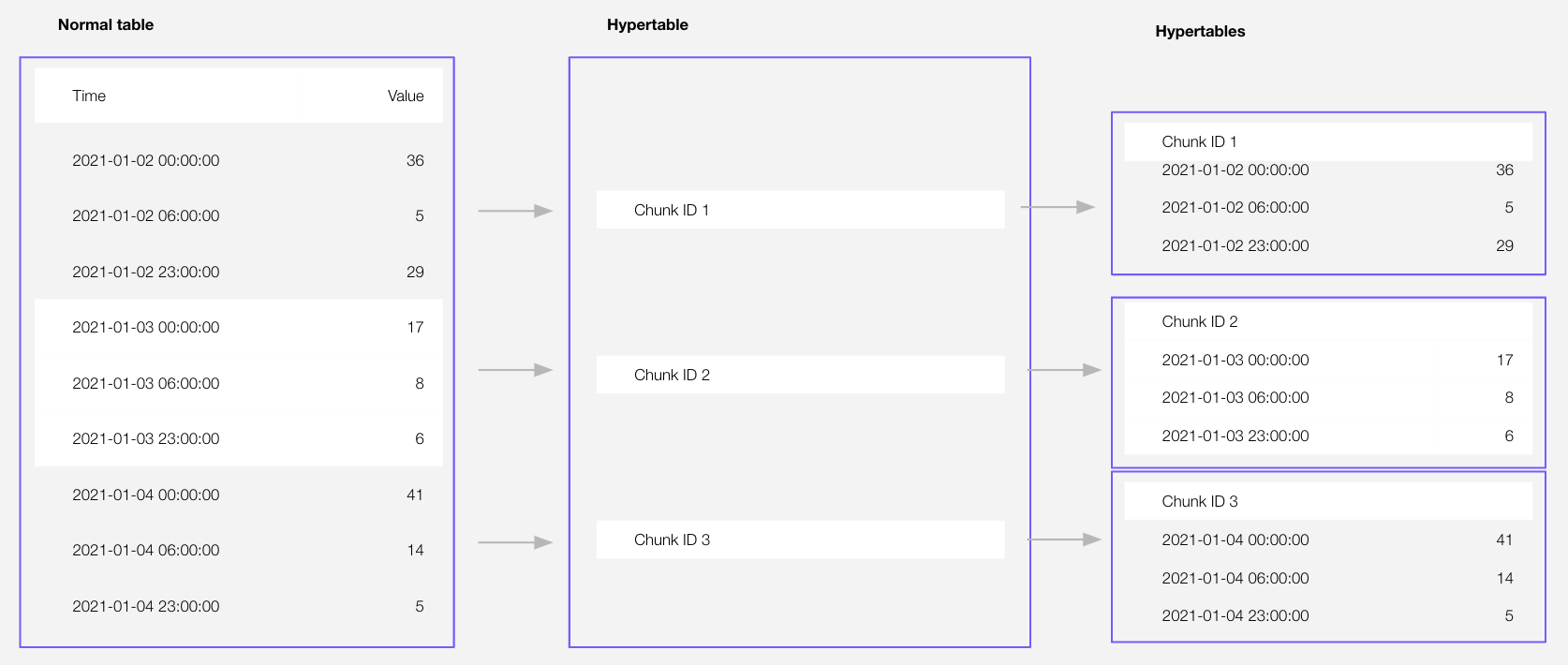
chunk becomes a standalone hypertable with the same name and schema. All existing constraints and indexes on chunk are preserved after detaching. Foreign keys are dropped.
In this initial release, you cannot detach a chunk that has been [converted to the columnstore][setup-hypercore].
Since TimescaleDB v2.21.0
Samples
Detach a chunk from a hypertable:
CALL detach_chunk('_timescaledb_internal._hyper_1_2_chunk');Arguments
| Name | Type | Description |
|---|---|---|
chunk | REGCLASS | Name of the chunk to detach. |
Returns
This function returns void.
===== PAGE: https://docs.tigerdata.com/api/hypertable/attach_tablespace/ =====
attach_tablespace()
Attach a tablespace to a hypertable and use it to store chunks. A [tablespace][postgres-tablespaces] is a directory on the filesystem that allows control over where individual tables and indexes are stored on the filesystem. A common use case is to create a tablespace for a particular storage disk, allowing tables to be stored there. To learn more, see the [Postgres documentation on tablespaces][postgres-tablespaces].
TimescaleDB can manage a set of tablespaces for each hypertable, automatically spreading chunks across the set of tablespaces attached to a hypertable. If a hypertable is hash partitioned, TimescaleDB tries to place chunks that belong to the same partition in the same tablespace. Changing the set of tablespaces attached to a hypertable may also change the placement behavior. A hypertable with no attached tablespaces has its chunks placed in the database's default tablespace.
Samples
Attach the tablespace disk1 to the hypertable conditions:
SELECT attach_tablespace('disk1', 'conditions');
SELECT attach_tablespace('disk2', 'conditions', if_not_attached => true);
Required arguments
| Name | Type | Description |
|---|---|---|
tablespace | TEXT | Name of the tablespace to attach. |
hypertable | REGCLASS | Hypertable to attach the tablespace to. |
Tablespaces need to be [created][postgres-createtablespace] before being attached to a hypertable. Once created, tablespaces can be attached to multiple hypertables simultaneously to share the underlying disk storage. Associating a regular table with a tablespace using the TABLESPACE option to CREATE TABLE, prior to calling create_hypertable, has the same effect as calling attach_tablespace immediately following create_hypertable.
Optional arguments
| Name | Type | Description |
|---|---|---|
if_not_attached | BOOLEAN | Set to true to avoid throwing an error if the tablespace is already attached to the table. A notice is issued instead. Defaults to false. |
===== PAGE: https://docs.tigerdata.com/api/hypertable/hypertable_size/ =====
hypertable_size()
hypertable_size()
Get the total disk space used by a hypertable or continuous aggregate, that is, the sum of the size for the table itself including chunks, any indexes on the table, and any toast tables. The size is reported in bytes. This is equivalent to computing the sum of total_bytes column from the output of hypertable_detailed_size function.
When a continuous aggregate name is provided, the function transparently looks up the backing hypertable and returns its statistics instead.
For more information about using hypertables, including chunk size partitioning, see the [hypertable section][hypertable-docs].
Samples
Get the size information for a hypertable.
SELECT hypertable_size('devices');

 hypertable_size
-----------------
           73728
Get the size information for all hypertables.
SELECT hypertable_name, hypertable_size(format('%I.%I', hypertable_schema, hypertable_name)::regclass)
  FROM timescaledb_information.hypertables;
Get the size information for a continuous aggregate.
SELECT hypertable_size('device_stats_15m');

 hypertable_size
-----------------
           73728
Required arguments
| Name | Type | Description |
|---|---|---|
hypertable | REGCLASS | Hypertable or continuous aggregate to show size of. |
Returns
| Name | Type | Description |
|---|---|---|
| hypertable_size | BIGINT | Total disk space used by the specified hypertable, including all indexes and TOAST data |
NULL is returned if the function is executed on a non-hypertable relation.
===== PAGE: https://docs.tigerdata.com/api/hypertable/hypertable_approximate_size/ =====
hypertable_approximate_size()
Get the approximate total disk space used by a hypertable or continuous aggregate, that is, the sum of the size for the table itself including chunks, any indexes on the table, and any toast tables. The size is reported in bytes. This is equivalent to computing the sum of total_bytes column from the output of hypertable_approximate_detailed_size function.
When a continuous aggregate name is provided, the function transparently looks up the backing hypertable and returns its statistics instead.
This function relies on the per backend caching using the in-built Postgres storage manager layer to compute the approximate size cheaply. The PG cache invalidation clears off the cached size for a chunk when DML happens into it. That size cache is thus able to get the latest size in a matter of minutes. Also, due to the backend caching, any long running session will only fetch latest data for new or modified chunks and can use the cached data (which is calculated afresh the first time around) effectively for older chunks. Thus it is recommended to use a single connected Postgres backend session to compute the approximate sizes of hypertables to get faster results.
For more information about using hypertables, including chunk size partitioning, see the [hypertable section][hypertable-docs].
Samples
Get the approximate size information for a hypertable.
SELECT * FROM hypertable_approximate_size('devices');
 hypertable_approximate_size
-----------------------------
                        8192
Get the approximate size information for all hypertables.
SELECT hypertable_name, hypertable_approximate_size(format('%I.%I', hypertable_schema, hypertable_name)::regclass)
  FROM timescaledb_information.hypertables;
Get the approximate size information for a continuous aggregate.
SELECT hypertable_approximate_size('device_stats_15m');

 hypertable_approximate_size
-----------------------------
                        8192
Required arguments
| Name | Type | Description |
|---|---|---|
hypertable | REGCLASS | Hypertable or continuous aggregate to show size of. |
Returns
| Name | Type | Description |
|---|---|---|
| hypertable_approximate_size | BIGINT | Total approximate disk space used by the specified hypertable, including all indexes and TOAST data |
NULL is returned if the function is executed on a non-hypertable relation.
===== PAGE: https://docs.tigerdata.com/api/hypertable/split_chunk/ =====
split_chunk()
Split a large chunk at a specific point in time. If you do not specify the timestamp to split at, chunk is split equally.
Samples
Split a chunk at a specific time:
sqlCALL split_chunk('chunk_1', split_at => '2025-03-01 00:00');Split a chunk in two:
For example, If the chunk duration is, 24 hours, the following command splits
chunk_1into two chunks of 12 hours each.sqlCALL split_chunk('chunk_1');
Required arguments
| Name | Type | Required | Description |
|---|---|---|---|
chunk | REGCLASS | ✔ | Name of the chunk to split. |
split_at | TIMESTAMPTZ | ✖ | Timestamp to split the chunk at. |
Returns
This function returns void.
===== PAGE: https://docs.tigerdata.com/api/hypertable/attach_chunk/ =====
attach_chunk()
Attach a hypertable as a chunk in another [hypertable][hypertables-section] at a given slice in a dimension.
The schema, name, existing constraints, and indexes of chunk do not change, even if a constraint conflicts with a chunk constraint in hypertable.
The hypertable you attach chunk to does not need to have the same dimension columns as the hypertable you previously [detached chunk][hypertable-detach-chunk] from.
While attaching chunk to hypertable:
- Dimension columns in
chunkare set asNOT NULL. - Any foreign keys in
hypertableare created inchunk.
You cannot:
- Attaching a chunk that is still attached to another hypertable. First call [detach_chunk][hypertable-detach-chunk].
- Attaching foreign tables are not supported.
Since TimescaleDB v2.21.0
Samples
Attach a hypertable as a chunk in another hypertable for a specific slice in a dimension:
CALL attach_chunk('ht', '_timescaledb_internal._hyper_1_2_chunk', '{"device_id": [0, 1000]}');Arguments
| Name | Type | Description |
|---|---|---|
hypertable | REGCLASS | Name of the hypertable to attach chunk to. |
chunk | REGCLASS | Name of the chunk to attach. |
slices | JSONB | The slice chunk will occupy in hypertable. slices cannot clash with the slice already occupied by an existing chunk in hypertable. |
Returns
This function returns void.
===== PAGE: https://docs.tigerdata.com/api/hypertable/detach_tablespaces/ =====
detach_tablespaces()
Detach all tablespaces from a hypertable. After issuing this command on a hypertable, it no longer has any tablespaces attached to it. New chunks are instead placed in the database's default tablespace.
Samples
Detach all tablespaces from the hypertable conditions:
SELECT detach_tablespaces('conditions');Required arguments
| Name | Type | Description |
|---|---|---|
hypertable | REGCLASS | Hypertable to detach a the tablespace from. |
===== PAGE: https://docs.tigerdata.com/api/hypertable/create_hypertable/ =====
create_hypertable()
Replace a standard Postgres relational table with a [hypertable][hypertable-docs] that is partitioned on a single dimension. To create a new hypertable, best practice is to call <a href="https://docs.tigerdata.com/api/latest/hypertable/create_table/">CREATE TABLE</a>.
A hypertable is a Postgres table that automatically partitions your data by time. A dimension defines the way your data is partitioned. All actions work on the resulting hypertable. For example, ALTER TABLE, and SELECT.
If the table to convert already contains data, set [migrate_data][migrate-data] to TRUE. However, this may take a long time and there are limitations when the table contains foreign key constraints.
You cannot run create_hypertable() on a table that is already partitioned using [declarative partitioning][declarative-partitioning] or [inheritance][inheritance]. The time column must be defined as NOT NULL. If this is not already specified on table creation, create_hypertable automatically adds this constraint on the table when it is executed.
This page describes the generalized hypertable API introduced in TimescaleDB v2.13. The old interface for create_hypertable is also available.
Samples
Before you call create_hypertable, you create a standard Postgres relational table. For example:
CREATE TABLE conditions (
   time        TIMESTAMPTZ         NOT NULL,
   location    text                NOT NULL,
   temperature DOUBLE PRECISION    NULL
);
The following examples show you how to create a hypertable from an existing table or a function:
- [Time partition a hypertable by time range][sample-time-range]
- [Time partition a hypertable using composite columns and immutable functions][sample-composite-columns]
- [Time partition a hypertable using ISO formatting][sample-iso-formatting]
- [Time partition a hypertable using UUIDv7][sample-uuidv7]
Time partition a hypertable by time range
The following examples show different ways to create a hypertable:
Convert with range partitioning on the
timecolumn:sqlSELECT create_hypertable('conditions', by_range('time'));Convert with a [set_chunk_time_interval][set_chunk_time_interval] of 24 hours: Either:
sqlSELECT create_hypertable('conditions', by_range('time', 86400000000));or:
sqlSELECT create_hypertable('conditions', by_range('time', INTERVAL '1 day'));with range partitioning on the
timecolumn, do not raise a warning ifconditionsis already a hypertable:sqlSELECT create_hypertable('conditions', by_range('time'), if_not_exists => TRUE);
If you call SELECT * FROM create_hypertable(...) the return value is formatted as a table with column headings.
Time partition a hypertable using composite columns and immutable functions
The following example shows how to time partition the measurements relational table on a composite column type using a range partitioning function.
Create the report type, then an immutable function that converts the column value into a supported column value:
sqlCREATE TYPE report AS (reported timestamp with time zone, contents jsonb); CREATE FUNCTION report_reported(report) RETURNS timestamptz LANGUAGE SQL IMMUTABLE AS 'SELECT $1.reported';Create the hypertable using the immutable function:
sqlSELECT create_hypertable('measurements', by_range('report', partition_func => 'report_reported'));
Time partition a hypertable using ISO formatting
The following example shows how to time partition the events table on a jsonb (event) column type, which has a top level started key that contains an ISO 8601 formatted timestamp:
CREATE FUNCTION event_started(jsonb)
    RETURNS timestamptz
    LANGUAGE SQL
    IMMUTABLE AS
  $func$SELECT ($1->>'started')::timestamptz$func$;

SELECT create_hypertable('events', by_range('event', partition_func => 'event_started'));
Time partition a hypertable using [UUIDv7][uuidv7_functions]:
Create a table with a UUIDv7 column:
sqlCREATE TABLE events ( id uuid PRIMARY KEY DEFAULT generate_uuidv7(), payload jsonb );sqlCREATE TABLE events ( id uuid PRIMARY KEY DEFAULT uuidv7(), payload jsonb );Partition the table based on the timestamps embedded within the UUID values:
sqlSELECT create_hypertable( 'events', by_range('id', INTERVAL '1 month') );
Subsequent data insertion and queries automatically leverage the UUIDv7-based partitioning.
Arguments
| Name | Type | Default | Required | Description |
|---|---|---|---|---|
create_default_indexes | BOOLEAN | TRUE | ✖ | Create default indexes on time/partitioning columns. |
dimension | [DIMENSION_INFO][dimension-info] | - | ✔ | To create a _timescaledb_internal.dimension_info instance to partition a hypertable, you call [by_range][by-range] and [by_hash][by-hash]. |
if_not_exists | BOOLEAN | FALSE | ✖ | Set to TRUE to print a warning if relation is already a hypertable. By default, an exception is raised. |
migrate_data | BOOLEAN | FALSE | ✖ | Set to TRUE to migrate any existing data in relation in to chunks in the new hypertable. Depending on the amount of data to be migrated, setting migrate_data can lock the table for a significant amount of time. If there are foreign key constraints to other tables in the data to be migrated, create_hypertable() can run into deadlock. A hypertable can only contain foreign keys to another hypertable. UNIQUE and PRIMARY constraints must include the partitioning key. </br> Deadlock may happen when concurrent transactions simultaneously try to insert data into tables that are referenced in the foreign key constraints, and into the converting table itself. To avoid deadlock, manually obtain a SHARE ROW EXCLUSIVE lock on the referenced tables before you call create_hypertable in the same transaction. </br> If you leave migrate_data set to the default, non-empty tables generate an error when you call create_hypertable. |
relation | REGCLASS | - | ✔ | Identifier of the table to convert to a hypertable. |
Dimension info
To create a _timescaledb_internal.dimension_info instance, you call [add_dimension][add_dimension] to an existing hypertable.