8.4 Building an Intelligent Document Q&A Assistant
In the previous sections, we detailed the design and implementation of HelloAgents' memory system and RAG system. Now, let's demonstrate through a complete practical case how to organically combine these two systems to build an intelligent document Q&A assistant.
8.4.1 Case Background and Objectives
In actual work, we often need to process a large number of technical documents, research papers, product manuals, and other PDF files. Traditional document reading methods are inefficient, making it difficult to quickly locate key information, let alone establish associations between knowledge.
This case will use the public beta PDF document Happy-LLM-0727.pdf from Datawhale's another hands-on large model tutorial Happy-LLM as an example to build a Gradio-based Web application, demonstrating how to use RAGTool and MemoryTool to build a complete interactive learning assistant. The PDF can be obtained from this link.
We hope to implement the following functions:
Intelligent Document Processing: Use MarkItDown to achieve unified conversion from PDF to Markdown, intelligent chunking strategy based on Markdown structure, efficient vectorization and index construction
Advanced Retrieval Q&A: Multi-Query Expansion (MQE) to improve recall, Hypothetical Document Embeddings (HyDE) to improve retrieval accuracy, context-aware intelligent Q&A
Multi-level Memory Management: Working memory manages current learning tasks and context, episodic memory records learning events and query history, semantic memory stores conceptual knowledge and understanding, perceptual memory processes document features and multimodal information
Personalized Learning Support: Personalized recommendations based on learning history, memory consolidation and selective forgetting, learning report generation and progress tracking
To more clearly demonstrate the workflow of the entire system, Figure 8.6 shows the relationships and data flow between the five steps. The five steps form a complete closed loop: Step 1 records information from processed PDF documents to the memory system, Step 2's retrieval results are also recorded to the memory system, Step 3 demonstrates the complete functions of the memory system (add, retrieve, consolidate, forget), Step 4 integrates RAG and Memory to provide intelligent routing, and Step 5 collects all statistical information to generate learning reports.

Figure 8.6 Five-step Execution Workflow of Intelligent Q&A Assistant
Next, we will demonstrate how to implement this Web application. The entire application is divided into three core parts:
- Core Assistant Class (PDFLearningAssistant): Encapsulates the calling logic of RAGTool and MemoryTool
- Gradio Web Interface: Provides a friendly user interaction interface, this part can refer to the example code for learning
- Other Core Functions: Note recording, learning review, statistics viewing, and report generation
8.4.2 Implementation of Core Assistant Class
First, we implement the core assistant class PDFLearningAssistant, which encapsulates the calling logic of RAGTool and MemoryTool.
(1) Class Initialization
class PDFLearningAssistant:
    """Intelligent document Q&A assistant"""

    def __init__(self, user_id: str = "default_user"):
        """Initialize learning assistant

        Args:
            user_id: User ID, used to isolate data for different users
        """
        self.user_id = user_id
        self.session_id = f"session_{datetime.now().strftime('%Y%m%d_%H%M%S')}"

        # Initialize tools
        self.memory_tool = MemoryTool(user_id=user_id)
        self.rag_tool = RAGTool(rag_namespace=f"pdf_{user_id}")

        # Learning statistics
        self.stats = {
            "session_start": datetime.now(),
            "documents_loaded": 0,
            "questions_asked": 0,
            "concepts_learned": 0
        }

        # Currently loaded document
        self.current_document = None
In this initialization process, we made several key design decisions:
MemoryTool Initialization: Implements user-level memory isolation through the user_id parameter. Learning memories of different users are completely independent, and each user has their own working memory, episodic memory, semantic memory, and perceptual memory space.
RAGTool Initialization: Implements knowledge base namespace isolation through the rag_namespace parameter. Using f"pdf_\{user_id\}" as the namespace, each user has their own independent PDF knowledge base.
Session Management: session_id is used to track the complete process of a single learning session, facilitating subsequent learning journey review and analysis.
Statistical Information: The stats dictionary records key learning metrics for generating learning reports.
(2) Loading PDF Documents
def load_document(self, pdf_path: str) -> Dict[str, Any]:
    """Load PDF document into knowledge base

    Args:
        pdf_path: PDF file path

    Returns:
        Dict: Result containing success and message
    """
    if not os.path.exists(pdf_path):
        return {"success": False, "message": f"File does not exist: {pdf_path}"}

    start_time = time.time()

    # [RAGTool] Process PDF: MarkItDown conversion → Intelligent chunking → Vectorization
    result = self.rag_tool.execute(
        "add_document",
        file_path=pdf_path,
        chunk_size=1000,
        chunk_overlap=200
    )

    process_time = time.time() - start_time

    if result.get("success", False):
        self.current_document = os.path.basename(pdf_path)
        self.stats["documents_loaded"] += 1

        # [MemoryTool] Record to learning memory
        self.memory_tool.execute(
            "add",
            content=f"Loaded document 《{self.current_document}》",
            memory_type="episodic",
            importance=0.9,
            event_type="document_loaded",
            session_id=self.session_id
        )

        return {
            "success": True,
            "message": f"Loading successful! (Time: {process_time:.1f}s)",
            "document": self.current_document
        }
    else:
        return {
            "success": False,
            "message": f"Loading failed: {result.get('error', 'Unknown error')}"
        }
We can complete PDF processing with just one line of code:
result = self.rag_tool.execute(
    "add_document",
    file_path=pdf_path,
    chunk_size=1000,
    chunk_overlap=200
)
This call triggers the complete processing workflow of RAGTool (MarkItDown conversion, enhanced processing, intelligent chunking, vectorization storage). These internal details have been introduced in detail in Section 8.3. We only need to focus on:
- Operation Type:
"add_document"- Add document to knowledge base - File Path:
file_path- Path to the PDF file - Chunking Parameters:
chunk_size=1000, chunk_overlap=200- Control text chunking - Return Result: Dictionary containing processing status and statistical information
After the document is successfully loaded, we use MemoryTool to record it to episodic memory:
self.memory_tool.execute(
    "add",
    content=f"Loaded document 《{self.current_document}》",
    memory_type="episodic",
    importance=0.9,
    event_type="document_loaded",
    session_id=self.session_id
)
Why use episodic memory? Because this is a specific, timestamped event, suitable for recording with episodic memory. The session_id parameter associates this event with the current learning session, facilitating subsequent review of the learning journey.
This memory record lays the foundation for subsequent personalized services:
- User asks "What documents have I loaded before?" → Retrieve from episodic memory
- System can track user's learning journey and document usage
8.4.3 Intelligent Q&A Function
After the document is loaded, users can ask questions about the document. We implement an ask method to handle user questions:
def ask(self, question: str, use_advanced_search: bool = True) -> str:
    """Ask questions about the document

    Args:
        question: User question
        use_advanced_search: Whether to use advanced retrieval (MQE + HyDE)

    Returns:
        str: Answer
    """
    if not self.current_document:
        return "⚠️ Please load a document first!"

    # [MemoryTool] Record question to working memory
    self.memory_tool.execute(
        "add",
        content=f"Question: {question}",
        memory_type="working",
        importance=0.6,
        session_id=self.session_id
    )

    # [RAGTool] Use advanced retrieval to get answer
    answer = self.rag_tool.execute(
        "ask",
        question=question,
        limit=5,
        enable_advanced_search=use_advanced_search,
        enable_mqe=use_advanced_search,
        enable_hyde=use_advanced_search
    )

    # [MemoryTool] Record to episodic memory
    self.memory_tool.execute(
        "add",
        content=f"Learning about '{question}'",
        memory_type="episodic",
        importance=0.7,
        event_type="qa_interaction",
        session_id=self.session_id
    )

    self.stats["questions_asked"] += 1

    return answer
When we call self.rag_tool.execute("ask", ...), RAGTool internally executes the following advanced retrieval workflow:
Multi-Query Expansion (MQE):
python# Generate diverse queries expanded_queries = self._generate_multi_queries(question) # For example, for "What is a large language model?", it might generate: # - "What is the definition of a large language model?" # - "Please explain large language models" # - "What does LLM mean?"MQE generates semantically equivalent but differently expressed queries through LLM, understanding user intent from multiple angles, improving recall by 30%-50%.
Hypothetical Document Embeddings (HyDE):
- Generate hypothetical answer documents, bridging the semantic gap between queries and documents
- Use vectors of hypothetical answers for retrieval
The internal implementation of these advanced retrieval techniques has been introduced in detail in Section 8.3.5.
8.4.4 Other Core Functions
In addition to loading documents and intelligent Q&A, we also need to implement functions such as note recording, learning review, statistics viewing, and report generation:
def add_note(self, content: str, concept: Optional[str] = None):
    """Add learning note"""
    self.memory_tool.execute(
        "add",
        content=content,
        memory_type="semantic",
        importance=0.8,
        concept=concept or "general",
        session_id=self.session_id
    )
    self.stats["concepts_learned"] += 1

def recall(self, query: str, limit: int = 5) -> str:
    """Review learning journey"""
    result = self.memory_tool.execute(
        "search",
        query=query,
        limit=limit
    )
    return result

def get_stats(self) -> Dict[str, Any]:
    """Get learning statistics"""
    duration = (datetime.now() - self.stats["session_start"]).total_seconds()
    return {
        "Session Duration": f"{duration:.0f}s",
        "Documents Loaded": self.stats["documents_loaded"],
        "Questions Asked": self.stats["questions_asked"],
        "Learning Notes": self.stats["concepts_learned"],
        "Current Document": self.current_document or "Not loaded"
    }

def generate_report(self, save_to_file: bool = True) -> Dict[str, Any]:
    """Generate learning report"""
    memory_summary = self.memory_tool.execute("summary", limit=10)
    rag_stats = self.rag_tool.execute("stats")

    duration = (datetime.now() - self.stats["session_start"]).total_seconds()
    report = {
        "session_info": {
            "session_id": self.session_id,
            "user_id": self.user_id,
            "start_time": self.stats["session_start"].isoformat(),
            "duration_seconds": duration
        },
        "learning_metrics": {
            "documents_loaded": self.stats["documents_loaded"],
            "questions_asked": self.stats["questions_asked"],
            "concepts_learned": self.stats["concepts_learned"]
        },
        "memory_summary": memory_summary,
        "rag_status": rag_stats
    }

    if save_to_file:
        report_file = f"learning_report_{self.session_id}.json"
        with open(report_file, 'w', encoding='utf-8') as f:
            json.dump(report, f, ensure_ascii=False, indent=2, default=str)
        report["report_file"] = report_file

    return report
These methods respectively implement:
- add_note: Save learning notes to semantic memory
- recall: Retrieve learning journey from memory system
- get_stats: Get statistical information of current session
- generate_report: Generate detailed learning report and save as JSON file
8.4.5 Running Effect Demonstration
Next is the running effect demonstration. As shown in Figure 8.7, after entering the main page, you need to first initialize the assistant, which is to load our database, model, API and other loading operations. Then pass in the PDF document and click to load the document.
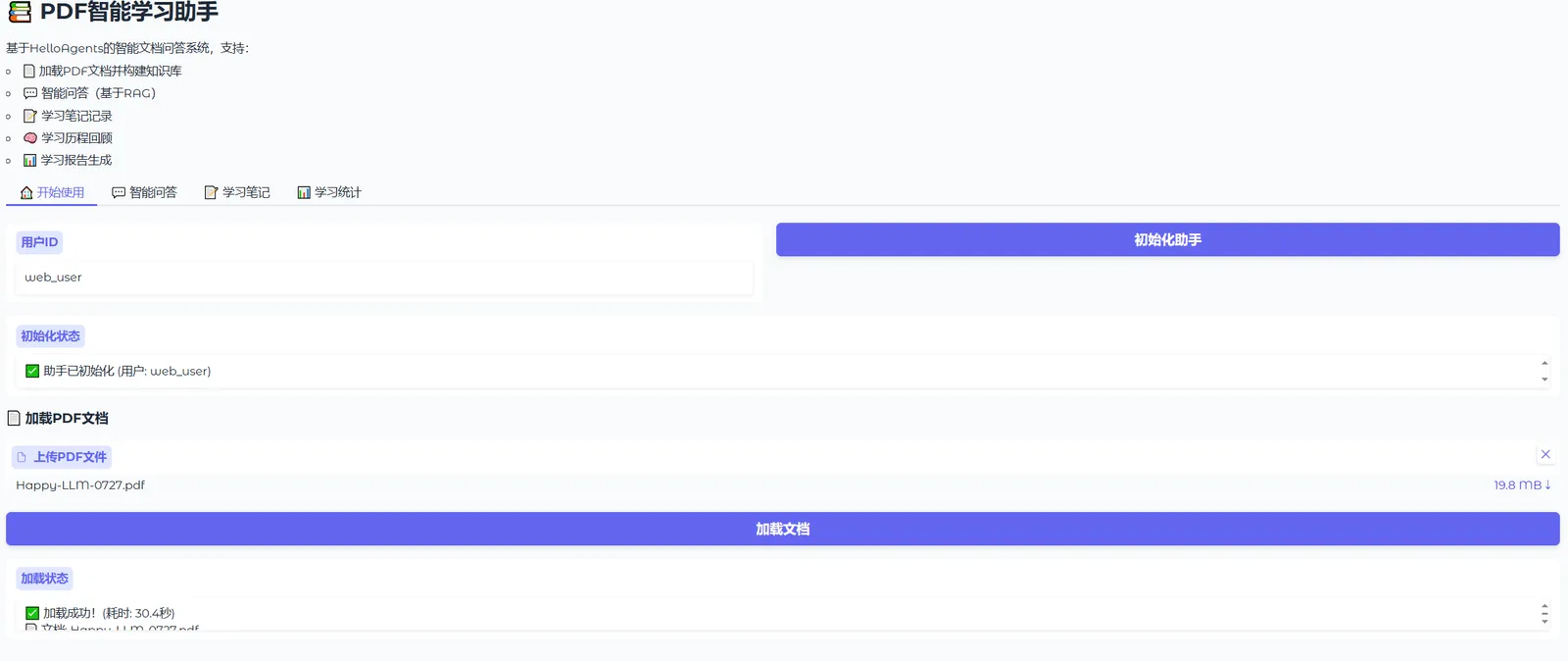
Figure 8.7 Q&A Assistant Main Page
The first function is intelligent Q&A, which can retrieve based on uploaded documents and return reference sources and similarity calculations of related materials. This is a demonstration of RAG tool capabilities, as shown in Figure 8.8.
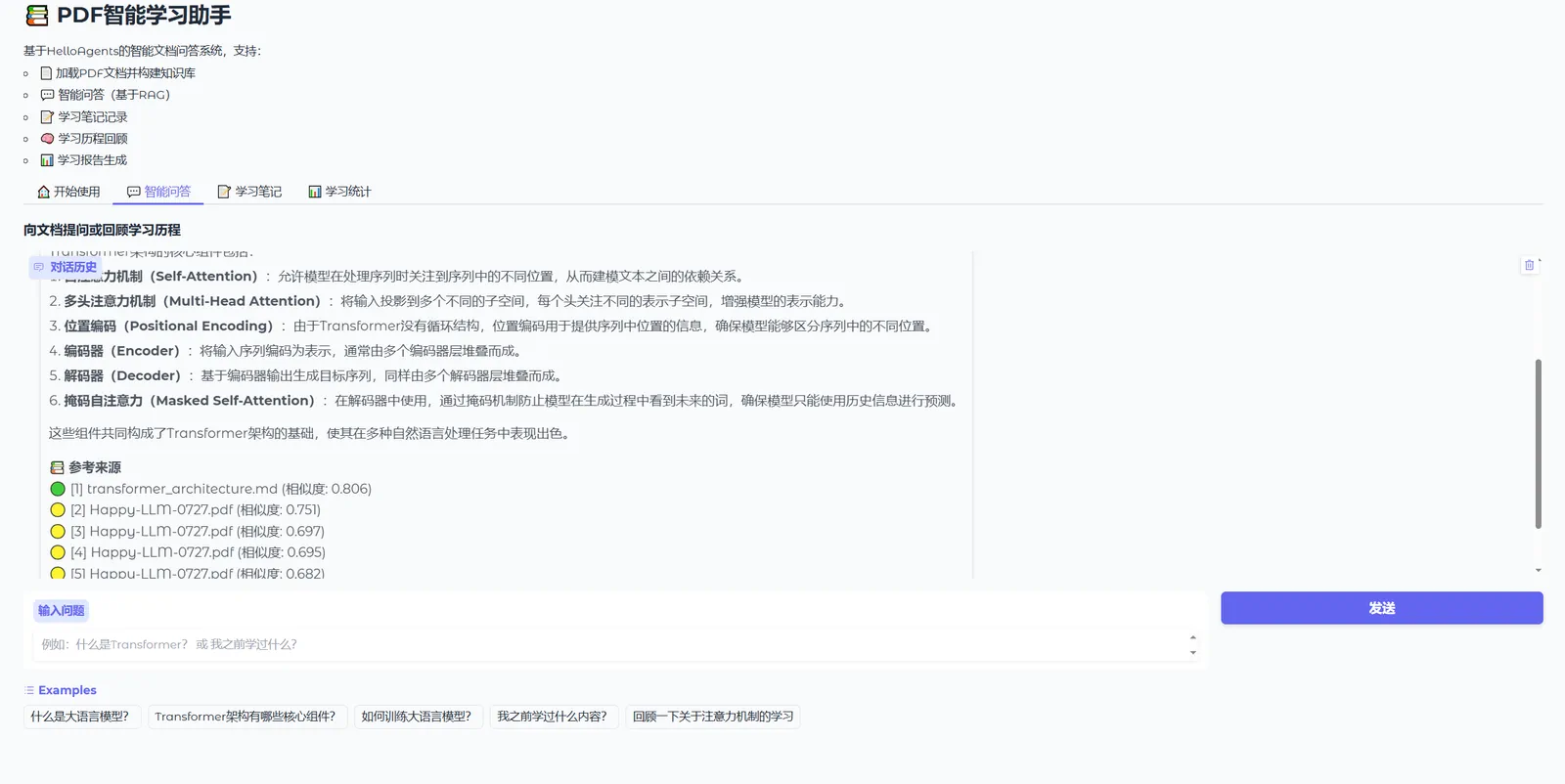
Figure 8.8 Q&A Assistant Main Page
The second function is learning notes. As shown in Figure 8.9, you can select related concepts and write note content. This part uses Memory tool and will store your personal notes in the database for easy statistics and subsequent return of overall learning reports.
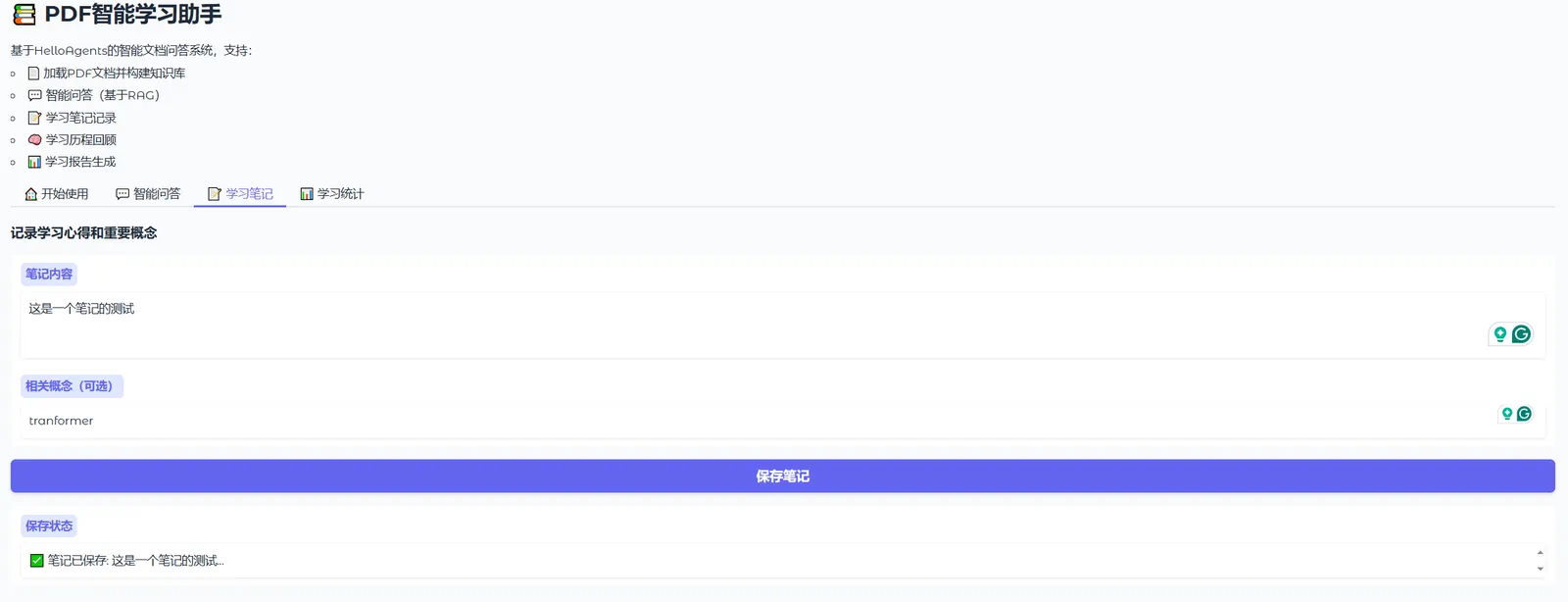
Figure 8.9 Q&A Assistant Main Page
Finally, there are statistics on learning progress and report generation. As shown in Figure 8.10, we can see the number of documents loaded, number of questions asked, and number of notes during the use of the assistant. Finally, our Q&A results and notes are organized into a JSON document and returned.
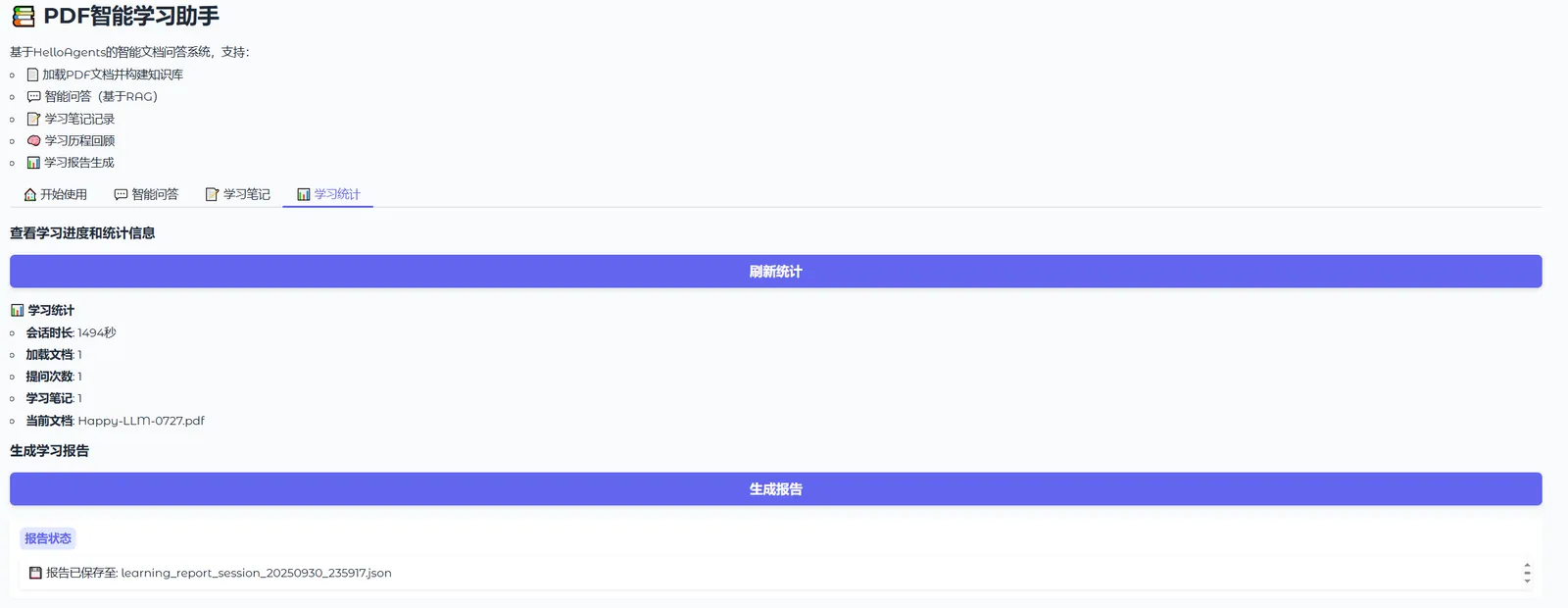
Figure 8.10 Q&A Assistant Main Page
Through this Q&A assistant case, we demonstrated how to use RAGTool and MemoryTool to build a complete Web-based intelligent document Q&A system. The complete code can be found in code/chapter8/11_Q&A_Assistant.py. After starting, visit http://localhost:7860 to use this intelligent learning assistant.
Readers are advised to run this case personally, experience the capabilities of RAG and Memory, and expand and customize on this basis to build intelligent applications that meet their own needs!