7.2 HelloAgentsLLM Extension
The content of this section will be an iterative upgrade based on the HelloAgentsLLM created in Section 4.1.3. We will transform this basic client into a more adaptive model invocation hub. This upgrade mainly revolves around the following three goals:
- Multi-provider Support: Achieve seamless switching between various mainstream LLM service providers such as OpenAI, ModelScope, Zhipu AI, etc., avoiding framework binding to specific vendors.
- Local Model Integration: Introduce VLLM and Ollama, two high-performance local deployment solutions, as production-grade supplements to the Hugging Face Transformers solution in Section 3.2.3, meeting the needs of data privacy and cost control.
- Automatic Detection Mechanism: Establish an automatic recognition mechanism that enables the framework to intelligently infer the type of LLM service used based on environment information, simplifying the user's configuration process.
7.2.1 Supporting Multiple Providers
The HelloAgentsLLM class we previously defined can already connect to any service compatible with the OpenAI interface through the two core parameters api_key and base_url. This theoretically guarantees universality, but in practical applications, different service providers have differences in environment variable naming, default API addresses, and recommended models. If users need to manually query and modify code every time they switch service providers, it will greatly affect development efficiency. To solve this problem, we introduce provider. The improvement idea is: let HelloAgentsLLM handle the configuration details of different service providers internally, thereby providing users with a unified and concise invocation experience. We will elaborate on the specific implementation details in Section 7.2.3 "Automatic Detection Mechanism." Here, we first focus on how to use this mechanism to extend the framework.
Below, we will demonstrate how to add support for the ModelScope platform by inheriting HelloAgentsLLM. We hope readers will not only learn how to "use" the framework but also master how to "extend" it. Directly modifying the source code of installed libraries is not a recommended practice because it makes subsequent library upgrades difficult.
(1) Create Custom LLM Class and Inherit
Suppose we have a my_llm.py file in our project directory. We first import the HelloAgentsLLM base class from the hello_agents library, then create a new class named MyLLM that inherits from it.
# my_llm.py
import os
from typing import Optional
from openai import OpenAI
from hello_agents import HelloAgentsLLM

class MyLLM(HelloAgentsLLM):
    """
    A custom LLM client that adds support for ModelScope through inheritance.
    """
    pass # Leave empty for now
(2) Override __init__ Method to Support New Provider
Next, we override the __init__ method in the MyLLM class. Our goal is: when the user passes provider="modelscope", execute our custom logic; otherwise, call the original logic of the parent class HelloAgentsLLM, enabling it to continue supporting other built-in providers like OpenAI.
class MyLLM(HelloAgentsLLM):
    def __init__(
        self,
        model: Optional[str] = None,
        api_key: Optional[str] = None,
        base_url: Optional[str] = None,
        provider: Optional[str] = "auto",
        **kwargs
    ):
        # Check if provider is 'modelscope' that we want to handle
        if provider == "modelscope":
            print("Using custom ModelScope Provider")
            self.provider = "modelscope"

            # Parse ModelScope credentials
            self.api_key = api_key or os.getenv("MODELSCOPE_API_KEY")
            self.base_url = base_url or "https://api-inference.modelscope.cn/v1/"

            # Validate credentials exist
            if not self.api_key:
                raise ValueError("ModelScope API key not found. Please set MODELSCOPE_API_KEY environment variable.")

            # Set default model and other parameters
            self.model = model or os.getenv("LLM_MODEL_ID") or "Qwen/Qwen2.5-VL-72B-Instruct"
            self.temperature = kwargs.get('temperature', 0.7)
            self.max_tokens = kwargs.get('max_tokens')
            self.timeout = kwargs.get('timeout', 60)

            # Create OpenAI client instance with obtained parameters
            self._client = OpenAI(api_key=self.api_key, base_url=self.base_url, timeout=self.timeout)

        else:
            # If not modelscope, use parent class's original logic to handle
            super().__init__(model=model, api_key=api_key, base_url=base_url, provider=provider, **kwargs)
This code demonstrates the idea of "overriding": we intercept the case of provider="modelscope" and handle it specially. For all other cases, we hand it back to the parent class through super().__init__(...), preserving all the original framework functionality.
(3) Using the Custom MyLLM Class
Now, we can use our own MyLLM class in the project's business logic just like using the native HelloAgentsLLM.
First, configure the ModelScope API key in the .env file:
# .env file
MODELSCOPE_API_KEY="your-modelscope-api-key"
Then, import and use MyLLM in the main program:
# my_main.py
from dotenv import load_dotenv
from my_llm import MyLLM # Note: Import our own class here

# Load environment variables
load_dotenv()

# Instantiate our overridden client and specify provider
llm = MyLLM(provider="modelscope")

# Prepare messages
messages = [{"role": "user", "content": "Hello, please introduce yourself."}]

# Make the call, think and other methods are inherited from parent class, no need to override
response_stream = llm.think(messages)

# Print response
print("ModelScope Response:")
for chunk in response_stream:
    # Chunk already printed in my_llm, just pass here
    # print(chunk, end="", flush=True)
    pass
Through the above steps, we have successfully extended new functionality to the hello-agents library without modifying its source code. This method not only ensures code cleanliness and maintainability but also ensures that our customized functionality will not be lost when upgrading the hello-agents library in the future.
7.2.2 Local Model Invocation
In Section 3.2.3, we learned how to use the Hugging Face Transformers library to run open-source models locally. This method is very suitable for introductory learning and functional verification, but its underlying implementation has limited performance when handling high-concurrency requests and is usually not the first choice for production environments.
To achieve high-performance, production-grade model inference services locally, the community has produced excellent tools such as VLLM and Ollama. They significantly improve model throughput and operational efficiency through techniques such as continuous batching and PagedAttention, and encapsulate models as API services compatible with OpenAI standards. This means we can seamlessly integrate them into HelloAgentsLLM.
VLLM
VLLM is a high-performance Python library designed for LLM inference. Through advanced technologies such as PagedAttention, it can achieve throughput several times higher than standard Transformers implementations. Below are the complete steps to deploy a VLLM service locally:
First, you need to install VLLM according to your hardware environment (especially CUDA version). It is recommended to follow its official documentation for installation to avoid version mismatch issues.
pip install vllmAfter installation, use the following command to start an OpenAI-compatible API service. VLLM will automatically download the specified model weights from Hugging Face Hub (if they don't exist locally). We still use the Qwen1.5-0.5B-Chat model as an example:
# Start VLLM service and load Qwen1.5-0.5B-Chat model
python -m vllm.entrypoints.openai.api_server \
    --model Qwen/Qwen1.5-0.5B-Chat \
    --host 0.0.0.0 \
    --port 8000
After the service starts, it will provide an OpenAI-compatible API at the http://localhost:8000/v1 address.
Ollama
Ollama further simplifies local model management and deployment by encapsulating model download, configuration, and service startup into a single command, making it very suitable for quick start. Visit the Ollama official website to download and install the client for your operating system.
After installation, open the terminal and execute the following command to download and run a model (using Llama 3 as an example). Ollama will automatically handle model download, service encapsulation, and hardware acceleration configuration.
# First run will automatically download the model, subsequent runs will directly start the service
ollama run llama3
When you see the model's interactive prompt in the terminal, it indicates that the service has successfully started in the background. Ollama will expose an OpenAI-compatible API interface at the http://localhost:11434/v1 address by default.
Integrating with HelloAgentsLLM
Since both VLLM and Ollama follow industry-standard APIs, integrating them into HelloAgentsLLM is very simple. We only need to treat them as a new provider when instantiating the client.
For example, connecting to a locally running VLLM service:
llm_client = HelloAgentsLLM(
    provider="vllm",
    model="Qwen/Qwen1.5-0.5B-Chat", # Must match the model specified when starting the service
    base_url="http://localhost:8000/v1",
    api_key="vllm" # Local services usually don't need a real API Key, can fill in any non-empty string
)
Or, by setting environment variables and letting the client auto-detect, achieve zero code modification:
# Set in .env file
LLM_BASE_URL="http://localhost:8000/v1"
LLM_API_KEY="vllm"

# Directly instantiate in Python code
llm_client = HelloAgentsLLM() # Will automatically detect as vllm
Similarly, connecting to a local Ollama service is just as simple:
llm_client = HelloAgentsLLM(
    provider="ollama",
    model="llama3", # Must match the model specified in `ollama run`
    base_url="http://localhost:11434/v1",
    api_key="ollama" # Local services also don't need a real Key
)
Through this unified design, our agent core code requires no modifications to freely switch between cloud APIs and local models. This provides great flexibility for subsequent application development, deployment, cost control, and data privacy protection.
7.2.3 Automatic Detection Mechanism
To minimize the user's configuration burden as much as possible and follow the principle of "convention over configuration," HelloAgentsLLM internally designs two core auxiliary methods: _auto_detect_provider and _resolve_credentials. They work together, with _auto_detect_provider responsible for inferring the service provider based on environment information, while _resolve_credentials completes specific parameter configuration based on the inference result.
The _auto_detect_provider method is responsible for automatically inferring the service provider based on environment information, according to the following priority order:
Highest Priority: Check Environment Variables for Specific Service Providers This is the most direct and reliable basis for judgment. The framework will sequentially check whether environment variables such as
MODELSCOPE_API_KEY,OPENAI_API_KEY,ZHIPU_API_KEY, etc. exist. Once any one is found, it will immediately determine the corresponding service provider.Second Highest Priority: Determine Based on
base_urlIf the user has not set a specific service provider's key but has set the genericLLM_BASE_URL, the framework will parse this URL instead.Domain Matching: Identify cloud service providers by checking whether the URL contains characteristic strings such as
"api-inference.modelscope.cn","api.openai.com", etc.Port Matching: Identify local deployment solutions by checking whether the URL contains standard ports for local services such as
:11434(Ollama),:8000(VLLM), etc.
Auxiliary Judgment: Analyze API Key Format In some cases, if neither of the above two methods can determine, the framework will try to analyze the format of the generic environment variable
LLM_API_KEY. For example, some service providers' API keys have fixed prefixes or unique encoding formats. However, since this method may have ambiguity (e.g., multiple service providers have similar key formats), its priority is lower and is only used as an auxiliary means.
Some key code is as follows:
def _auto_detect_provider(self, api_key: Optional[str], base_url: Optional[str]) -> str:
    """
    Automatically detect LLM provider
    """
    # 1. Check environment variables for specific providers (highest priority)
    if os.getenv("MODELSCOPE_API_KEY"): return "modelscope"
    if os.getenv("OPENAI_API_KEY"): return "openai"
    if os.getenv("ZHIPU_API_KEY"): return "zhipu"
    # ... Other service provider environment variable checks

    # Get generic environment variables
    actual_api_key = api_key or os.getenv("LLM_API_KEY")
    actual_base_url = base_url or os.getenv("LLM_BASE_URL")

    # 2. Determine based on base_url
    if actual_base_url:
        base_url_lower = actual_base_url.lower()
        if "api-inference.modelscope.cn" in base_url_lower: return "modelscope"
        if "open.bigmodel.cn" in base_url_lower: return "zhipu"
        if "localhost" in base_url_lower or "127.0.0.1" in base_url_lower:
            if ":11434" in base_url_lower: return "ollama"
            if ":8000" in base_url_lower: return "vllm"
            return "local" # Other local ports

    # 3. Auxiliary judgment based on API key format
    if actual_api_key:
        if actual_api_key.startswith("ms-"): return "modelscope"
        # ... Other key format judgments

    # 4. Default return 'auto', use generic configuration
    return "auto"
Once the provider is determined (whether user-specified or auto-detected), the _resolve_credentials method takes over to handle the differentiated configuration of service providers. It will actively search for corresponding environment variables based on the value of provider and set default base_url for it. Some key implementations are as follows:
def _resolve_credentials(self, api_key: Optional[str], base_url: Optional[str]) -> tuple[str, str]:
    """Resolve API key and base_url based on provider"""
    if self.provider == "openai":
        resolved_api_key = api_key or os.getenv("OPENAI_API_KEY") or os.getenv("LLM_API_KEY")
        resolved_base_url = base_url or os.getenv("LLM_BASE_URL") or "https://api.openai.com/v1"
        return resolved_api_key, resolved_base_url

    elif self.provider == "modelscope":
        resolved_api_key = api_key or os.getenv("MODELSCOPE_API_KEY") or os.getenv("LLM_API_KEY")
        resolved_base_url = base_url or os.getenv("LLM_BASE_URL") or "https://api-inference.modelscope.cn/v1/"
        return resolved_api_key, resolved_base_url

    # ... Logic for other service providers
Let's experience the convenience brought by automatic detection through a simple example. Suppose a user wants to use the local Ollama service, they only need to configure the .env file as follows:
LLM_BASE_URL="http://localhost:11434/v1"
LLM_MODEL_ID="llama3"
They don't need to configure LLM_API_KEY at all or specify provider in the code. Then, in Python code, they simply instantiate HelloAgentsLLM:
from dotenv import load_dotenv
from hello_agents import HelloAgentsLLM

load_dotenv()

# No need to pass provider, framework will auto-detect
llm = HelloAgentsLLM()
# Framework internal logs will show provider detected as 'ollama'

# Subsequent invocation methods remain completely unchanged
messages = [{"role": "user", "content": "Hello!"}]
for chunk in llm.think(messages):
    print(chunk, end="")
In this process, the _auto_detect_provider method successfully infers the provider as "ollama" by parsing "localhost" and :11434 in LLM_BASE_URL. Subsequently, the _resolve_credentials method sets the correct default parameters for Ollama.
Compared to the basic implementation in Section 4.1.3, the current HelloAgentsLLM has the following significant advantages:
Table 7.1 Comparison of HelloAgentLLM Different Version Features
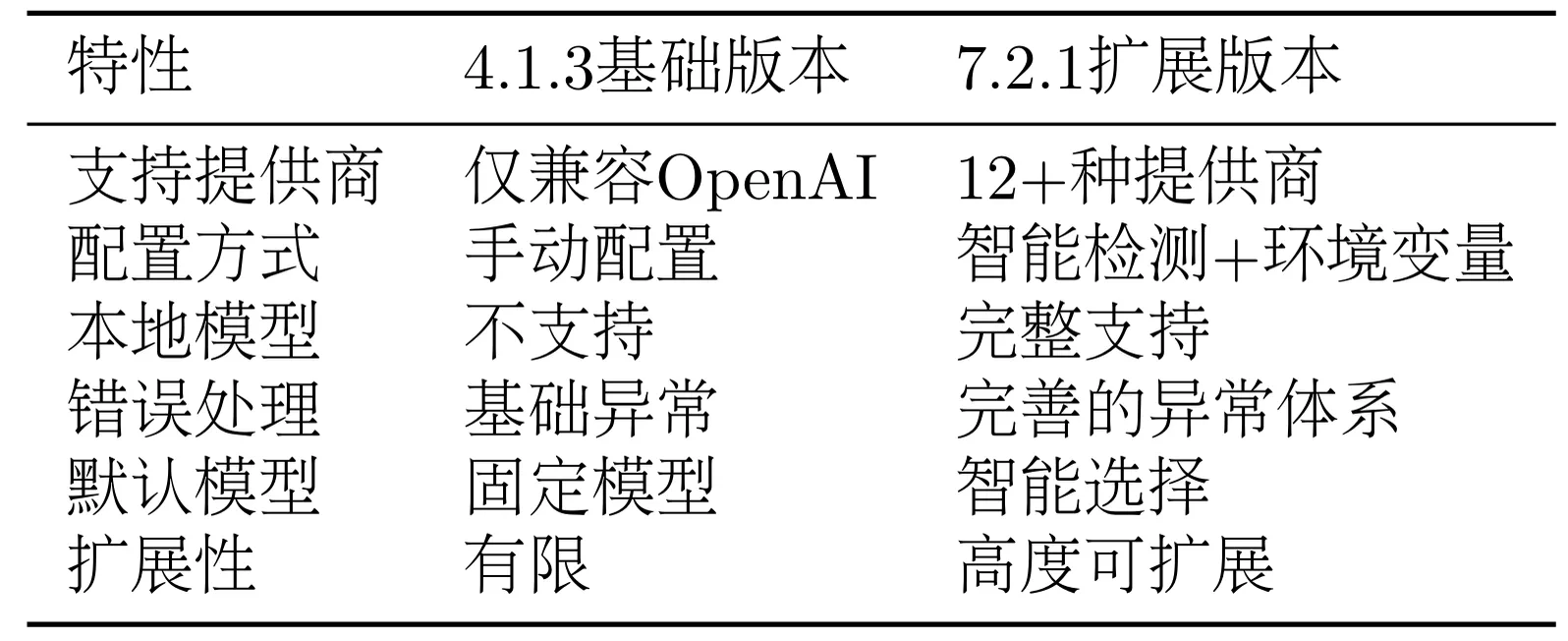
As shown in Table 7.1 above, this evolution embodies an important principle of framework design: start simple, gradually improve. We enhanced functional completeness while maintaining interface simplicity.