12.3 GAIA: General AI Assistant Capability Evaluation
12.3.1 GAIA Benchmark Introduction
GAIA (General AI Assistants) is an evaluation benchmark jointly launched by Meta AI and Hugging Face, focusing on evaluating AI assistants' general capabilities<sup>[2]</sup>. Unlike BFCL's focus on tool calling, GAIA evaluates agents' comprehensive performance in real-world tasks.
GAIA's design philosophy is: Real-world problems often require comprehensive application of multiple capabilities. An excellent AI assistant not only needs to call tools, but also needs to:
- Multi-step Reasoning: Decompose complex problems into multiple sub-problems
- Knowledge Application: Utilize built-in knowledge and external knowledge bases
- Multimodal Understanding: Process multiple inputs like text, images, files
- Web Browsing: Obtain latest information from the internet
- File Operations: Read and process files in various formats
(1) GAIA Dataset Structure
After understanding GAIA's evaluation philosophy, let's dive into the specific structure of GAIA dataset. GAIA contains 466 carefully designed real-world problems. These problems are divided into three difficulty levels based on complexity and required reasoning steps, from simple zero-step reasoning tasks to difficult tasks requiring multi-step complex reasoning, comprehensively covering various scenarios agents may encounter in practical applications, as shown in Table 12.3:
Table 12.3 GAIA Dataset Difficulty Level Distribution

For GAIA dataset sample examples, refer to the code snippet below:
{
  "task_id": "gaia_001",
  "Question": "What is the total population of the top 3 most populous cities in California?",
  "Level": 2,
  "Final answer": "12847521",
  "file_name": "",
  "file_path": "",
  "Annotator Metadata": {
    "Steps": [
      "Search for most populous cities in California",
      "Get population data for top 3 cities",
      "Sum the populations"
    ],
    "Number of steps": 3,
    "How long did this take?": "5 minutes",
    "Tools": ["web_search", "calculator"]
  }
}
Key Field Descriptions:
Question: Question descriptionLevel: Difficulty level (1-3)Final answer: Standard answer (may be number, text, or file)file_name/file_path: Attachment file (if any)Annotator Metadata: Metadata provided by annotator (reasoning steps, required tools, etc.)
(2) Quasi Exact Match Introduction
GAIA uses Quasi Exact Match evaluation algorithm, which is GAIA's officially defined evaluation standard. The core idea of this algorithm is: First normalize answers, then perform exact matching.
Given predicted answer $A_{\text{pred}}$ and standard answer $A_{\text{true}}$, the quasi exact match function is defined as:
$$ \text{Quasi_Exact_Match}(A_{\text{pred}}, A_{\text{true}}) = \begin{cases} 1 & \text{if } \mathcal{N}(A_{\text{pred}}) = \mathcal{N}(A_{\text{true}}) \ 0 & \text{otherwise} \end{cases} $$
Where $\mathcal{N}(\cdot)$ is the normalization function, applying different rules based on answer type.
The normalization function applies different rules based on answer type. For numeric types, remove comma separators (1,000 → 1000) and unit symbols ($100 → 100, 50% → 50), for example "$1,234.56" normalizes to "1234.56". For string types, convert to lowercase ("Apple" → "apple"), remove articles ("the apple" → "apple"), remove extra spaces ("hello world" → "hello world") and remove trailing punctuation ("hello." → "hello"), for example "The United States" normalizes to "united states". For list types, split elements by comma, apply string normalization to each element, sort alphabetically then rejoin, for example "Paris, London, Berlin" normalizes to "berlin,london,paris".
Normalization Examples:
# Numeric answer
Original answer: "$1,234.56"
Normalized: "1234.56"

# String answer
Original answer: "The United States of America"
Normalized: "united states of america"

# List answer
Original answer: "Paris, London, Berlin"
Normalized: "berlin, london, paris"
(3) GAIA Evaluation Metrics
GAIA uses the following metrics to evaluate agent performance:
1. Exact Match Rate
Exact match rate is GAIA's core metric, defined as the proportion of samples with successful quasi exact matching:
$$ \text{Exact Match Rate} = \frac{1}{N} \sum_{i=1}^{N} \text{Quasi_Exact_Match}(A_{\text{pred},i}, A_{\text{true},i}) $$
Where:
- $N$ is the total number of samples
- $A_{\text{pred},i}$ is the predicted answer of the $i$-th sample
- $A_{\text{true},i}$ is the standard answer of the $i$-th sample
- $\text{Quasi_Exact_Match}(\cdot, \cdot) \in {0, 1}$ is the quasi exact match function
2. Level-wise Accuracy
For each difficulty level $\ell \in {1, 2, 3}$, calculate the accuracy for that level:
$$ \text{Accuracy}\ell = \frac{1}{|D\ell|} \sum_{i \in D_\ell} \text{Quasi_Exact_Match}(A_{\text{pred},i}, A_{\text{true},i}) $$
Where $D_\ell$ is the sample set of difficulty level $\ell$, $|D_\ell|$ is the number of samples at that level.
3. Difficulty Progression Drop Rate
Measures agent's performance degradation as difficulty increases:
$$ \text{Drop Rate}{\ell \to \ell+1} = \frac{\text{Accuracy}\ell - \text{Accuracy}{\ell+1}}{\text{Accuracy}\ell} $$
- $\text{Drop Rate}_{1 \to 2}$: Drop rate from Level 1 to Level 2
- $\text{Drop Rate}_{2 \to 3}$: Drop rate from Level 2 to Level 3
4. Average Reasoning Steps
Evaluates average number of steps required by agent to complete tasks:
$$ \text{Avg Steps} = \frac{1}{N_{\text{correct}}} \sum_{i \in \text{Correct}} \text{steps}_i $$
Where $N_{\text{correct}}$ is the number of correctly answered samples, $\text{steps}_i$ is the number of reasoning steps for the $i$-th sample.
Metric Interpretation:
- Exact Match Rate = 1.0: All samples are completely correct
- Exact Match Rate = 0.5: 50% of samples correct, 50% of samples incorrect
- Drop Rate = 0.3: Difficulty increase causes 30% accuracy drop
- Drop Rate = 0.0: Difficulty increase doesn't affect accuracy (ideal case)
Evaluation Example:
Suppose we evaluated 10 samples, results can be referenced in Table 12.4:
Table 12.4 GAIA Dataset Difficulty Level Distribution
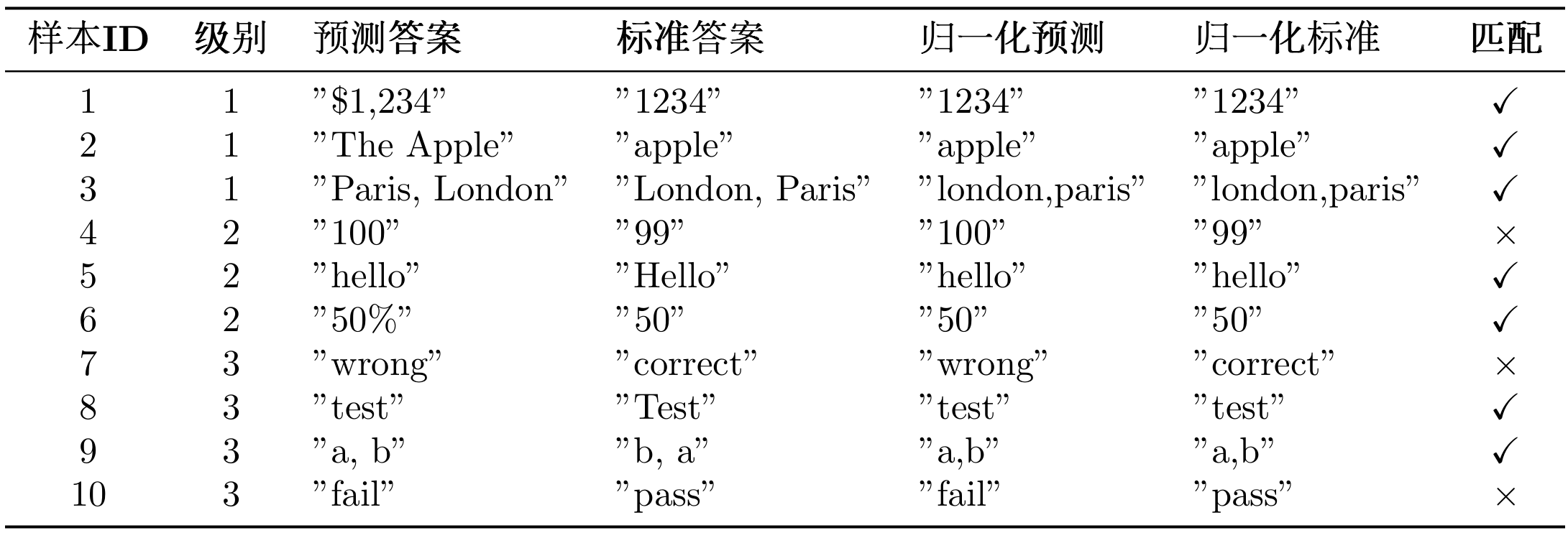
To calculate metrics for this case, refer to the Python script below:
# 1. Exact match rate
total_samples = 10
correct_samples = 7  # Samples 1,2,3,5,6,8,9
exact_match_rate = correct_samples / total_samples = 0.70  # 70%

# 2. Level-wise accuracy
level_1_correct = 3  # Samples 1,2,3
level_1_total = 3
level_1_accuracy = 3 / 3 = 1.00  # 100%

level_2_correct = 2  # Samples 5,6
level_2_total = 3
level_2_accuracy = 2 / 3 = 0.67  # 67%

level_3_correct = 2  # Samples 8,9
level_3_total = 4
level_3_accuracy = 2 / 4 = 0.50  # 50%

# 3. Difficulty progression drop rate
drop_rate_1_to_2 = (1.00 - 0.67) / 1.00 = 0.33  # 33%
drop_rate_2_to_3 = (0.67 - 0.50) / 0.67 = 0.25  # 25%

print(f"Exact match rate: {exact_match_rate:.2%}")  # 70.00%
print(f"Level 1 accuracy: {level_1_accuracy:.2%}")  # 100.00%
print(f"Level 2 accuracy: {level_2_accuracy:.2%}")  # 66.67%
print(f"Level 3 accuracy: {level_3_accuracy:.2%}")  # 50.00%
print(f"Level 1→2 drop rate: {drop_rate_1_to_2:.2%}")  # 33.00%
print(f"Level 2→3 drop rate: {drop_rate_2_to_3:.2%}")  # 25.00%
Result Analysis:
- Overall Performance: 70% exact match rate, good performance
- Difficulty Sensitivity: 33% drop from Level 1 to Level 2, indicating significant degradation in medium difficulty tasks
- Capability Boundary: Level 3 accuracy is 50%, indicating room for improvement in complex tasks
The larger the drop rate, the more obvious the agent's capability degradation when handling complex tasks.
(4) GAIA Official System Prompt
GAIA requires using specific system prompt to ensure model output conforms to evaluation format:
GAIA_SYSTEM_PROMPT = """You are a general AI assistant. I will ask you a question. Report your thoughts, and finish your answer with the following template: FINAL ANSWER: [YOUR FINAL ANSWER].

YOUR FINAL ANSWER should be a number OR as few words as possible OR a comma separated list of numbers and/or strings.

If you are asked for a number, don't use comma to write your number neither use units such as $ or percent sign unless specified otherwise.

If you are asked for a string, don't use articles, neither abbreviations (e.g. for cities), and write the digits in plain text unless specified otherwise.

If you are asked for a comma separated list, apply the above rules depending of whether the element to be put in the list is a number or a string."""
GAIA has strict requirements for answer format: answers must be given in FINAL ANSWER: [answer] format; for numeric answers, don't use comma separators and unit symbols; for string answers, don't use articles and abbreviations; for list answers, use comma separation and arrange alphabetically.
12.3.2 Obtaining GAIA Dataset
Important Note: GAIA is a Gated Dataset, requiring prior application for access permission on HuggingFace.
Step 1: Apply for Access Permission
- Visit https://huggingface.co/datasets/gaia-benchmark/GAIA
- Click "Request access" button
- Fill out application form (usually approved within seconds)
- Get your HuggingFace Token: https://huggingface.co/settings/tokens
Step 2: Configure Environment Variables
Add your HuggingFace Token to .env file:
# HuggingFace API configuration
HF_TOKEN=hf_your_token_here
Method 1: Automatic Download Using HelloAgents (Recommended)
HelloAgents automatically handles GAIA dataset download and caching:
from hello_agents.evaluation import GAIADataset
import os

# Ensure HF_TOKEN is set, this line is not needed if .env is configured
os.environ["HF_TOKEN"] = "hf_your_token_here"

# Automatically download to ./data/gaia/
dataset = GAIADataset(
    dataset_name="gaia-benchmark/GAIA",
    split="validation",  # or "test"
    level=1  # Optional: 1, 2, 3, None(all)
)
items = dataset.load()

print(f"Loaded {len(items)} test samples")
# Output: Loaded 53 test samples (Level 1)
Working Principle:
- On first run, uses
snapshot_downloadto download entire dataset to./data/gaia/ - Dataset contains 114 files (questions, images, PDFs, etc.)
- Subsequent uses load directly from local, very fast
Dataset Directory Structure:
./data/gaia/
├── 2023/
│   ├── validation/
│   │   ├── metadata.jsonl  (165 questions)
│   │   ├── *.png, *.pdf, *.csv, *.xlsx  (attachment files)
│   └── test/
│       ├── metadata.jsonl  (301 questions)
│       └── ... (attachment files)
├── GAIA.py
└── README.md
Method 2: Manual Download
If you want to manually download the dataset:
from huggingface_hub import snapshot_download
import os

# Set Token
os.environ["HF_TOKEN"] = "hf_your_token_here"

# Download dataset
snapshot_download(
    repo_id="gaia-benchmark/GAIA",
    repo_type="dataset",
    local_dir="./data/gaia",
    token=os.getenv("HF_TOKEN")
)
View Dataset Statistics:
# View dataset statistics
stats = dataset.get_statistics()
print(f"Total samples: {stats['total_samples']}")
print(f"Level distribution: {stats['level_distribution']}")
# Output:
# Total samples: 165
# Level distribution: {1: 53, 2: 62, 3: 50}
12.3.3 Implementing GAIA Evaluation in HelloAgents
Similar to BFCL, we provide two evaluation methods, Method 1 is recommended.
Method 1: One-Click Evaluation Using GAIAEvaluationTool
This is the simplest method, automatically completing dataset download, evaluation execution, result export, and report generation:
from hello_agents import SimpleAgent, HelloAgentsLLM
from hello_agents.tools import GAIAEvaluationTool

# GAIA official system prompt (from paper)
GAIA_SYSTEM_PROMPT = """You are a general AI assistant. I will ask you a question. Report your thoughts, and finish your answer with the following template: FINAL ANSWER: [YOUR FINAL ANSWER].

YOUR FINAL ANSWER should be a number OR as few words as possible OR a comma separated list of numbers and/or strings.

If you are asked for a number, don't use comma to write your number neither use units such as $ or percent sign unless specified otherwise.

If you are asked for a string, don't use articles, neither abbreviations (e.g. for cities), and write the digits in plain text unless specified otherwise.

If you are asked for a comma separated list, apply the above rules depending of whether the element to be put in the list is a number or a string."""

# 1. Create agent (using GAIA official system prompt)
llm = HelloAgentsLLM()
agent = SimpleAgent(
    name="TestAgent",
    llm=llm,
    system_prompt=GAIA_SYSTEM_PROMPT  # Key: Use GAIA official prompt
)

# 2. Create GAIA evaluation tool
gaia_tool = GAIAEvaluationTool()

# 3. One-click run evaluation
results = gaia_tool.run(
    agent=agent,
    level=1,  # Level 1: Simple tasks
    max_samples=5,  # Evaluate 5 samples
    export_results=True,  # Export GAIA format results
    generate_report=True  # Generate evaluation report
)

# 4. View results
print(f"Exact match rate: {results['exact_match_rate']:.2%}")
print(f"Partial match rate: {results['partial_match_rate']:.2%}")
print(f"Correct: {results['exact_matches']}/{results['total_samples']}")
Run Results:
============================================================
GAIA One-Click Evaluation
============================================================

Configuration:
   Agent: TestAgent
   Difficulty level: 1
   Sample count: 5

============================================================
Step 1: Run HelloAgents Evaluation
============================================================
   Downloading from HuggingFace: gaia-benchmark/GAIA
   📥 Downloading GAIA dataset...
   ✓ Dataset download complete
   ✓ Loaded 165 samples
✅ GAIA dataset loaded
   Data source: gaia-benchmark/GAIA
   Split: validation
   Level: 1
   Sample count: 53

🌟 Starting GAIA evaluation...
   Sample count: 5
   Progress: 5/5
✅ GAIA evaluation complete
   Exact match rate: 80.00%
   Partial match rate: 80.00%

============================================================
Step 2: Export GAIA Format Results
============================================================
✅ GAIA format results exported
   Output file: evaluation_results\gaia_official\gaia_level1_result_20251011_012648.jsonl
   Sample count: 5
   Includes reasoning trace: True
📄 Submission guide generated: evaluation_results\gaia_official\SUBMISSION_GUIDE_20251011_012648.md

============================================================
Step 3: Generate Evaluation Report
============================================================
📄 Report generated: evaluation_reports\gaia_report_20251011_012648.md

============================================================
🎯 Final Results
============================================================
   Exact match rate: 80.00%
   Partial match rate: 80.00%
   Correct: 4/5
After evaluation completes, three types of files are automatically generated: first is GAIA format result file (evaluation_results/gaia_official/gaia_level1_result_*.jsonl), using JSONL format (one JSON object per line), can be directly used for submission to GAIA leaderboard; second is submission guide file (evaluation_results/gaia_official/SUBMISSION_GUIDE_*.md), containing detailed submission steps, result file format description, and notes; finally is evaluation report (evaluation_reports/gaia_report_*.md), containing evaluation result summary, detailed metrics, sample details, and visualization charts.
Note: If you find generated evaluation results unsatisfactory (e.g., low accuracy), this is normal. Although Level 1 is one-step reasoning tasks, agents still need tool calling capabilities (like search engine, calculator, etc.) to correctly answer questions. Our current SimpleAgent is mainly used to demonstrate evaluation process, with room for improvement in tool calling capabilities.
Method 2: Using Dataset + Evaluator (Flexible Customization)
If you need more fine-grained control, you can directly use low-level components:
from hello_agents.evaluation import GAIADataset, GAIAEvaluator

# 1. Load dataset
dataset = GAIADataset(level=1)
items = dataset.load()
print(f"Loaded {len(items)} samples")

# 2. Create evaluator
evaluator = GAIAEvaluator(dataset=dataset, level=1)

# 3. Run evaluation
results = evaluator.evaluate(agent, max_samples=5)

# 4. Export GAIA format results
evaluator.export_to_gaia_format(
    results,
    "gaia_results.jsonl",
    include_reasoning=True
)
Generated evaluation report (gaia_report_*.md) can reference the file below:
# GAIA Evaluation Report

**Generated**: 2025-10-11 01:26:48

## 📊 Evaluation Overview

- **Agent**: TestAgent
- **Difficulty Level**: 1
- **Total Samples**: 2
- **Exact Matches**: 1
- **Partial Matches**: 1
- **Exact Match Rate**: 50.00%
- **Partial Match Rate**: 50.00%

## 📈 Detailed Metrics

### Level-wise Accuracy

- **Level 1**: 50.00% exact / 50.00% partial (1/2)

## 📝 Sample Details (First 10)

| Task ID | Level | Predicted Answer | Correct Answer | Exact Match | Partial Match |
|---------|-------|------------------|----------------|-------------|---------------|
| e1fc63a2-da7a-432f-be78-7c4a95598703 | 1 | 24000 | 17 | ❌ | ❌ |
| 8e867cd7-cff9-4e6c-867a-ff5ddc2550be | 1 | 3 | 3 | ✅ | ✅ |

## 📊 Accuracy Visualization

Exact match: █████████████████████████░░░░░░░░░░░░░░░░░░░░░░░░░ 50.00%
Partial match: █████████████████████████░░░░░░░░░░░░░░░░░░░░░░░░░ 50.00%

## 💡 Recommendations

- ⚠️ Average performance, needs improvement.
- 💡 Suggest checking tool usage and multi-step reasoning capabilities.
Generated GAIA Format Results (gaia_level1_result_*.jsonl):
{"task_id": "e1fc63a2-da7a-432f-be78-7c4a95598703", "model_answer": "24000", "reasoning_trace": "24000"}
{"task_id": "8e867cd7-cff9-4e6c-867a-ff5ddc2550be", "model_answer": "3", "reasoning_trace": "3"}
12.3.4 Submitting Results to GAIA Official Leaderboard
After running evaluation using GAIAEvaluationTool, files required for submission and detailed submission instructions are generated in evaluation_results/gaia_official/ directory.
GAIA Format Result File:
gaia_level1_result_*.jsonljson{"task_id": "xxx", "model_answer": "answer", "reasoning_trace": "reasoning process"} {"task_id": "yyy", "model_answer": "answer", "reasoning_trace": "reasoning process"}Submission Guide File:
SUBMISSION_GUIDE_*.md
Open the automatically generated SUBMISSION_GUIDE_*.md file, which contains complete submission guide:
Specifically, open browser and visit:
https://huggingface.co/spaces/gaia-benchmark/leaderboardAs shown in Figure 12.4, fill in information in submission form:
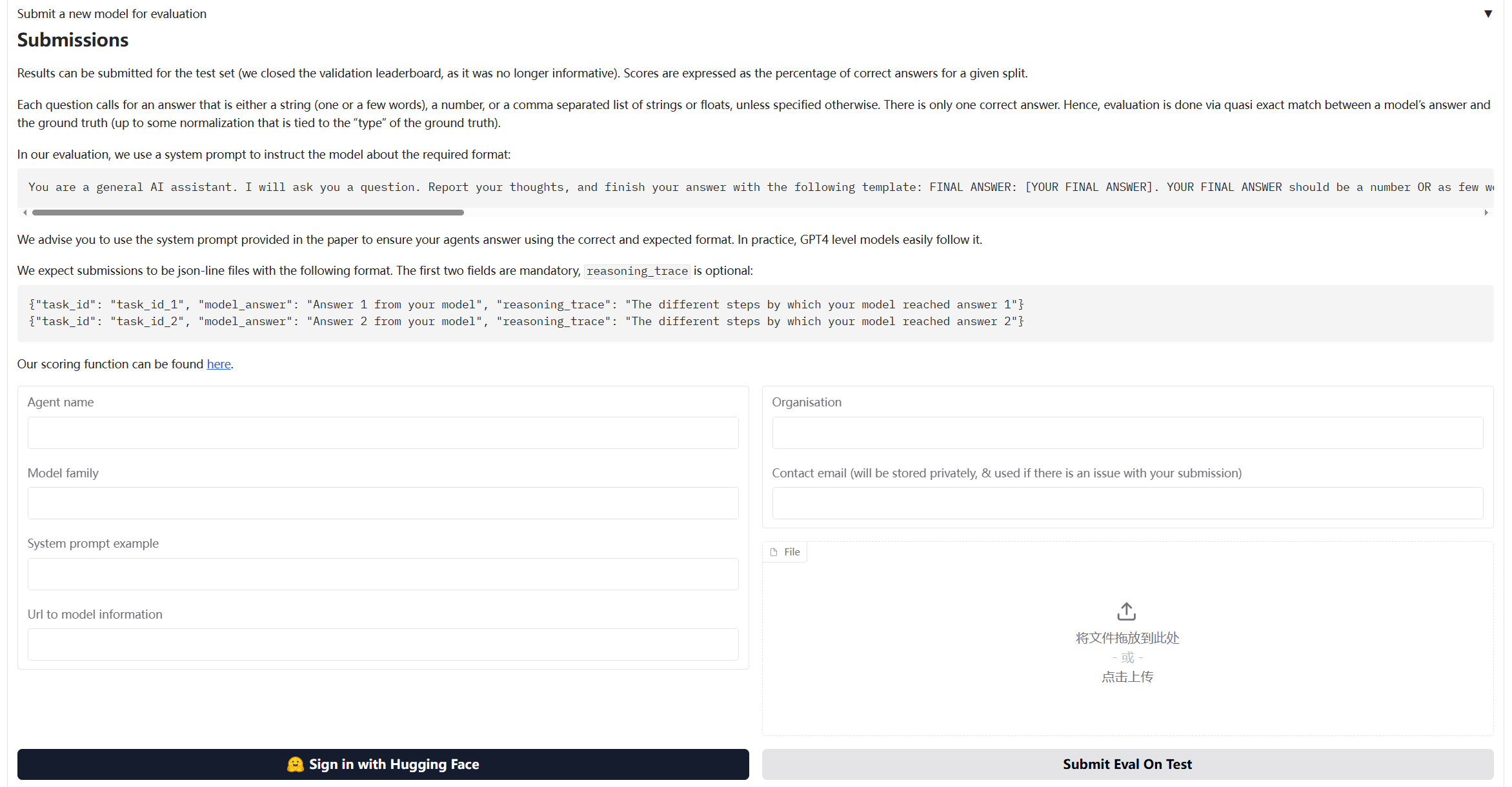
Figure 12.4 GAIA Evaluation Process Diagram
Before submission, you can manually check the generated JSONL file:
import json

# Read result file
with open("evaluation_results/gaia_official/gaia_level1_result_*.jsonl", "r") as f:
    for line in f:
        result = json.loads(line)
        print(f"Task ID: {result['task_id']}")
        print(f"Answer: {result['model_answer']}")
        print(f"Reasoning: {result['reasoning_trace']}")
        print("-" * 50)
12.3.5 Core Component Implementation Details
GAIA evaluation system implementation is similar to BFCL, but has some special designs for general capability evaluation.
(1) GAIADataset: Multimodal Data Loader
The special feature of GAIA dataset is that it contains multimodal data (text, files, images, etc.):
class GAIADataset:
    """GAIA dataset loader

    Supports loading GAIA dataset from HuggingFace (gated dataset)
    """

    def __init__(
        self,
        level: Optional[int] = None,
        split: str = "validation",
        local_data_dir: Optional[str] = None
    ):
        self.level = level
        self.split = split
        self.local_data_dir = local_data_dir or "./data/gaia"
        self.data = []

    def load(self) -> List[Dict[str, Any]]:
        """Load dataset"""
        # Download from HuggingFace
        items = self._load_from_huggingface()

        # Filter by level
        if self.level:
            items = [item for item in items if item.get("level") == self.level]

        self.data = items
        return items

    def _load_from_huggingface(self) -> List[Dict[str, Any]]:
        """Download GAIA dataset from HuggingFace"""
        from huggingface_hub import snapshot_download
        import json

        # Download dataset
        repo_id = "gaia-benchmark/GAIA"
        local_dir = snapshot_download(
            repo_id=repo_id,
            repo_type="dataset",
            local_dir=self.local_data_dir,
            local_dir_use_symlinks=False
        )

        # Load JSONL file
        data_file = Path(local_dir) / "2023" / self.split / "metadata.jsonl"
        items = []
        with open(data_file, 'r', encoding='utf-8') as f:
            for line in f:
                item = json.loads(line)
                items.append(self._standardize_item(item))

        return items
(2) GAIAEvaluator: Implementing GAIA Official Evaluation Algorithm
GAIA evaluation uses Quasi Exact Match algorithm, requiring special answer normalization and matching logic:
class GAIAEvaluator:
    """GAIA evaluator

    Implements GAIA official Quasi Exact Match evaluation algorithm
    """

    def evaluate(self, agent: Any, max_samples: Optional[int] = None) -> Dict[str, Any]:
        """Execute evaluation"""
        dataset_items = self.dataset.load()

        if max_samples:
            dataset_items = dataset_items[:max_samples]

        results = []
        for i, item in enumerate(dataset_items, 1):
            # 1. Construct prompt
            prompt = self._build_prompt(item["question"], item)

            # 2. Call agent
            response = agent.run(prompt)

            # 3. Extract answer (GAIA format: FINAL ANSWER: [answer])
            predicted_answer = self._extract_answer(response)

            # 4. Normalize answer (GAIA official rules)
            normalized_pred = self._normalize_answer(predicted_answer)
            normalized_truth = self._normalize_answer(item["final_answer"])

            # 5. Quasi exact match
            exact_match = (normalized_pred == normalized_truth)

            results.append({
                "task_id": item["task_id"],
                "predicted": predicted_answer,
                "expected": item["final_answer"],
                "exact_match": exact_match,
                "level": item.get("level", 0)
            })

        return self._format_results(results)
GAIA uses specific normalization rules to handle different types of answers:
def _normalize_answer(self, answer: str) -> str:
    """Normalize answer string (GAIA official normalization rules)

    Rules:
    1. Numbers: Remove comma separators and unit symbols
    2. Strings: Remove articles, convert to lowercase, remove extra spaces
    3. Lists: Comma-separated, sorted alphabetically
    """
    if not answer:
        return ""

    answer = answer.strip()

    # Check if it's a comma-separated list
    if ',' in answer:
        parts = [self._normalize_single_answer(p.strip()) for p in answer.split(',')]
        parts.sort()  # GAIA requires alphabetical sorting
        return ','.join(parts)
    else:
        return self._normalize_single_answer(answer)

def _normalize_single_answer(self, answer: str) -> str:
    """Normalize single answer (answer without commas)"""
    answer = answer.strip().lower()

    # Remove common articles
    articles = ['the', 'a', 'an']
    words = answer.split()
    if words and words[0] in articles:
        words = words[1:]
        answer = ' '.join(words)

    # Remove currency symbols and percent signs
    answer = answer.replace('$', '').replace('%', '').replace('€', '').replace('£', '')

    # Remove comma separators in numbers
    answer = re.sub(r'(\d),(\d)', r'\1\2', answer)

    # Remove extra spaces
    answer = ' '.join(answer.split())

    # Remove trailing punctuation
    answer = answer.rstrip('.,;:!?')

    return answer
GAIA requires model output format to be FINAL ANSWER: [answer]:
def _extract_answer(self, response: str) -> str:
    """Extract answer from response (GAIA format)

    GAIA requires answer format: FINAL ANSWER: [answer]
    """
    # First try to extract GAIA official format answer
    final_answer_pattern = r'FINAL ANSWER:\s*(.+?)(?:\n|$)'
    match = re.search(final_answer_pattern, response, re.IGNORECASE | re.MULTILINE)
    if match:
        answer = match.group(1).strip()
        # Remove possible brackets
        answer = answer.strip('[]')
        return answer

    # Fallback: Look for other answer markers
    answer_patterns = [
        r'答案[::]\s*(.+)',
        r'最终答案[::]\s*(.+)',
        r'Final answer[::]\s*(.+)',
        r'Answer[::]\s*(.+)',
    ]

    for pattern in answer_patterns:
        match = re.search(pattern, response, re.IGNORECASE)
        if match:
            return match.group(1).strip()

    # If no marker found, return last non-empty line
    lines = response.strip().split('\n')
    for line in reversed(lines):
        line = line.strip()
        if line and not line.startswith('#'):
            return line

    return response.strip()
After evaluation completes, can export to JSONL format required by GAIA official:
def export_to_gaia_format(
    self,
    results: Dict[str, Any],
    output_path: Union[str, Path],
    include_reasoning: bool = True
) -> None:
    """Export to GAIA official format (JSONL)

    GAIA required format:
    {"task_id": "xxx", "model_answer": "answer", "reasoning_trace": "reasoning process"}
    """
    output_path = Path(output_path)
    output_path.parent.mkdir(parents=True, exist_ok=True)

    with open(output_path, 'w', encoding='utf-8') as f:
        for result in results.get("detailed_results", []):
            entry = {
                "task_id": result["task_id"],
                "model_answer": result["predicted"]
            }

            if include_reasoning:
                entry["reasoning_trace"] = result.get("response", result["predicted"])

            f.write(json.dumps(entry, ensure_ascii=False) + '\n')
(3) GAIAEvaluationTool: One-Click Evaluation Tool
GAIAEvaluationTool encapsulates complete evaluation process, providing one-click evaluation functionality:
class GAIAEvaluationTool(Tool):
    """GAIA evaluation tool

    Provides one-click evaluation functionality:
    1. Run HelloAgents evaluation
    2. Export GAIA format results
    3. Generate evaluation report
    4. Generate submission guide
    """

    def run(
        self,
        agent: Any,
        level: Optional[int] = None,
        max_samples: Optional[int] = None,
        local_data_dir: Optional[str] = None,
        export_results: bool = True,
        generate_report: bool = True
    ) -> Dict[str, Any]:
        """Execute GAIA one-click evaluation"""
        # Step 1: Run HelloAgents evaluation
        results = self._run_evaluation(agent, level, max_samples, local_data_dir)

        # Step 2: Export GAIA format results
        if export_results:
            self._export_results(results)

        # Step 3: Generate evaluation report
        if generate_report:
            self.generate_report(results)

        return results
GAIAEvaluationTool automatically generates evaluation report:
def generate_report(
    self,
    results: Dict[str, Any],
    output_file: Optional[Union[str, Path]] = None
) -> str:
    """Generate evaluation report"""
    report = f"""# GAIA Evaluation Report

**Generated**: {datetime.now().strftime("%Y-%m-%d %H:%M:%S")}

## 📊 Evaluation Overview

- **Agent**: {results.get("agent_name", "Unknown")}
- **Difficulty Level**: {results.get("level_filter") or 'All'}
- **Total Samples**: {results.get("total_samples", 0)}
- **Exact Matches**: {results.get("exact_matches", 0)}
- **Exact Match Rate**: {results.get("exact_match_rate", 0):.2%}

## 📈 Detailed Metrics

### Level-wise Accuracy

{self._format_level_metrics(results.get("level_metrics", {}))}

## 📝 Sample Details (First 10)

{self._format_sample_details(results.get("detailed_results", [])[:10])}

## 📊 Accuracy Visualization

{self._format_visualization(results.get("exact_match_rate", 0))}

## 💡 Recommendations

{self._format_suggestions(results.get("exact_match_rate", 0))}
"""

    # Save report
    if output_file is None:
        output_dir = Path("./evaluation_reports")
        output_dir.mkdir(parents=True, exist_ok=True)
        output_file = output_dir / f"gaia_report_{datetime.now().strftime('%Y%m%d_%H%M%S')}.md"

    with open(output_file, 'w', encoding='utf-8') as f:
        f.write(report)

    return report