6.2 Framework One: AutoGen
As mentioned earlier, AutoGen's design philosophy is rooted in "driving collaboration through conversation." It cleverly maps complex task-solving processes to a series of automated conversations between agents with different roles. Based on this core concept, the AutoGen framework continues to evolve. We will use version 0.7.4 as an example because it is the latest version to date and represents an important architectural refactoring, transitioning from class inheritance design to a more flexible compositional architecture. To deeply understand and apply this framework, we first need to explain its most core constituent elements and underlying conversation interaction mechanisms.
6.2.1 Core Mechanisms of AutoGen
The release of version 0.7.4 is an important milestone in AutoGen's development, marking a fundamental innovation in the framework's underlying design. This update is not a simple addition of features but a rethinking of the overall architecture, aimed at improving the framework's modularity, concurrency performance, and developer experience.
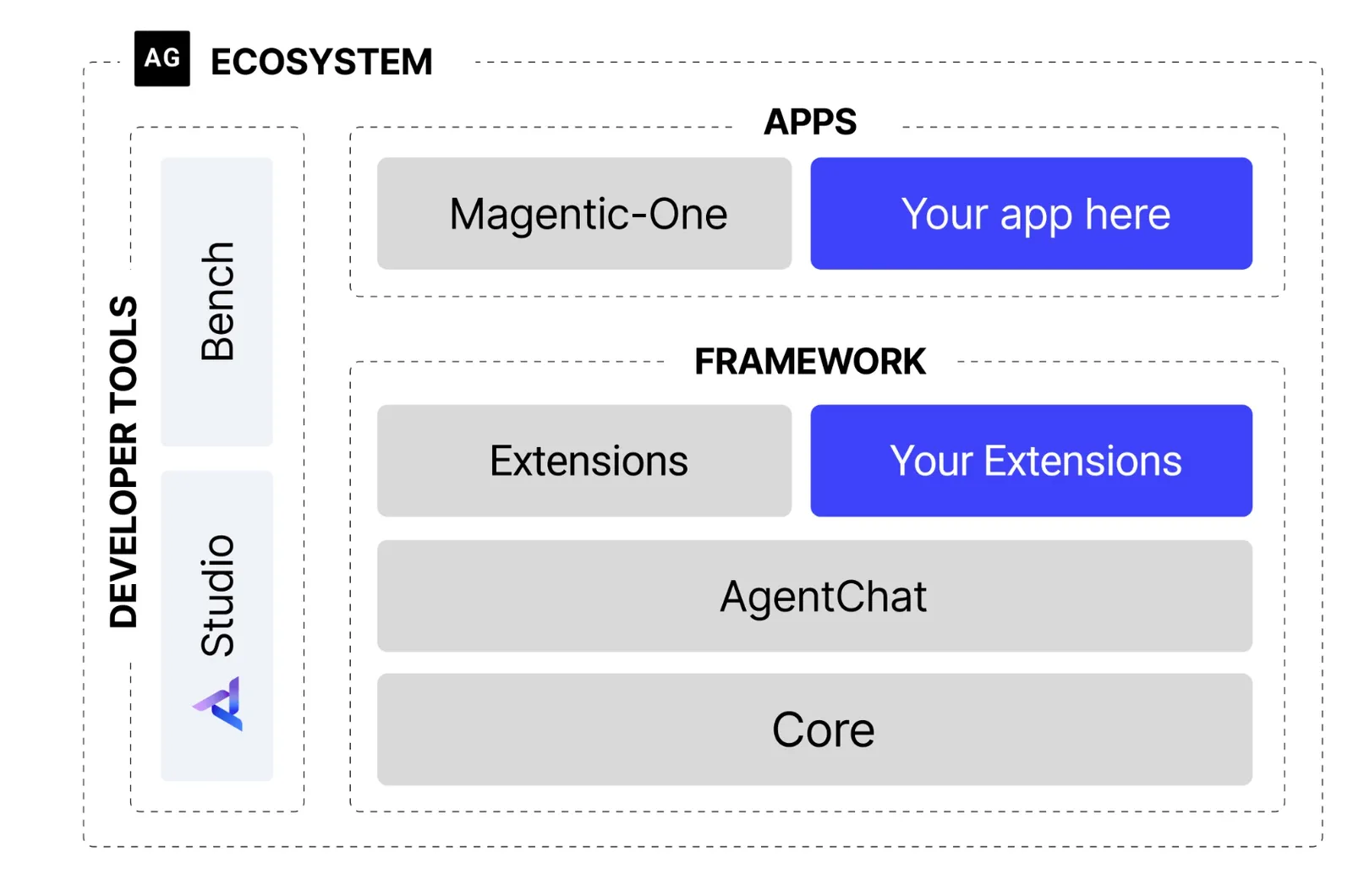
Figure 6.1 AutoGen Architecture Diagram
(1) Evolution of Framework Structure
As shown in Figure 6.1, the most significant change in the new architecture is the introduction of clear layering and asynchronous-first design philosophy.
- Layered Design: The framework is split into two core modules:
autogen-core: As the underlying foundation of the framework, it encapsulates core functions such as interaction with language models and message passing. Its existence ensures the stability and future extensibility of the framework.autogen-agentchat: Built on top ofcore, it provides high-level interfaces for developing conversational agent applications, simplifying the development process of multi-agent applications. This layering strategy makes each component's responsibilities clear and reduces system coupling.
- Asynchronous First: The new architecture fully transitions to asynchronous programming (
async/await). In multi-agent collaboration scenarios, network requests (such as calling LLM APIs) are the main time-consuming operations. Asynchronous mode allows the system to handle other tasks while waiting for one agent's response, thus avoiding thread blocking and significantly improving concurrent processing capabilities and system resource utilization efficiency.
(2) Core Agent Components
Agents are the basic units for executing tasks. In version 0.7.4, agent design is more focused and modular.
- AssistantAgent (Assistant Agent): This is the main task solver, whose core is encapsulating a large language model (LLM). Its responsibility is to generate logical and knowledgeable replies based on conversation history, such as proposing plans, writing articles, or writing code. Through different system messages (System Message), we can assign it different "expert" roles.
- UserProxyAgent (User Proxy Agent): This is a functionally unique component in AutoGen. It plays a dual role: it is both the "spokesperson" for human users, responsible for initiating tasks and conveying intentions; and a reliable "executor" that can be configured to execute code or call tools and feed results back to other agents. This design clearly distinguishes "thinking" (completed by
AssistantAgent) from "action."
(3) From GroupChatManager to Team
When tasks require multiple agents to collaborate, a mechanism is needed to coordinate the conversation process. In earlier versions, GroupChatManager assumed this responsibility. In the new architecture, a more flexible Team or group chat concept is introduced, such as RoundRobinGroupChat.
- Round Robin Group Chat (RoundRobinGroupChat): This is a clear, sequential conversation coordination mechanism. It will have participating agents speak in turn according to a predefined order. This mode is very suitable for tasks with fixed processes, such as a typical software development process: the product manager first proposes requirements, then the engineer writes code, and finally the code reviewer checks.
- Workflow:
- First, create a
RoundRobinGroupChatinstance and add all agents participating in collaboration (such as product managers, engineers, etc.) to it. - When a task starts, the group chat will activate the corresponding agents in turn according to the preset order.
- The selected agent responds based on the current conversation context.
- The group chat adds the new reply to the conversation history and activates the next agent.
- This process continues until the maximum number of conversation rounds is reached or preset termination conditions are met.
- First, create a
In this way, AutoGen simplifies complex collaborative relationships into an automated "round table meeting" with a clear process that is easy to manage. Developers only need to define the role and speaking order of each team member, and the rest of the collaboration process can be autonomously driven by the group chat mechanism.
In the next section, we will personally experience how to define agents with different roles in the new architecture and organize them in a group chat coordinated by RoundRobinGroupChat to collaboratively complete a real programming task by building an instance of a simulated software development team.
6.2.2 Software Development Team
After understanding AutoGen's core components and conversation mechanisms, this section will specifically demonstrate how to apply these new features through a complete practical case. We will build a simulated software development team composed of multiple agents with different professional skills, who will collaborate to complete a real software development task.
(1) Business Objective
Our goal is to develop a web application with a clear function: display the current price of Bitcoin in real-time. Although this task is small, it completely covers typical stages of software development: from requirement analysis, technology selection, coding implementation to code review and final testing. This makes it an ideal scenario for testing AutoGen's automated collaboration process.
(2) Agent Team Roles
To simulate a real software development process, we designed four agents with distinct responsibilities:
- ProductManager (Product Manager): Responsible for transforming users' vague requirements into clear, executable development plans.
- Engineer: Based on the development plan, responsible for writing specific application code.
- CodeReviewer (Code Reviewer): Responsible for reviewing code submitted by engineers to ensure its quality, readability, and robustness.
- UserProxy (User Proxy): Represents the end user, initiates the initial task, and is responsible for executing and verifying the final delivered code.
This role division is a key step in multi-agent system design, breaking down a complex task into multiple subtasks handled by domain "experts."
6.2.3 Core Code Implementation
Below, we will analyze the core code of this automated team step by step.
(1) Model Client Configuration
All LLM-based agents need a model client to interact with language models. AutoGen 0.7.4 provides a standardized OpenAIChatCompletionClient that can conveniently interface with any model service compatible with the OpenAI API specification (including OpenAI official service, Azure OpenAI, and local model services such as Ollama, etc.).
We create and configure the model client through an independent function and manage API Key and service address through environment variables. This is a good engineering practice that enhances code flexibility and security.
from autogen_ext.models.openai import OpenAIChatCompletionClient

def create_openai_model_client():
    """Create and configure OpenAI model client"""
    return OpenAIChatCompletionClient(
        model=os.getenv("LLM_MODEL_ID", "gpt-4o"),
        api_key=os.getenv("LLM_API_KEY"),
        base_url=os.getenv("LLM_BASE_URL", "https://api.openai.com/v1")
    )
(2) Definition of Agent Roles
The core of defining agents lies in writing high-quality system messages (System Message). System messages are like setting "behavioral guidelines" and "professional knowledge bases" for agents, precisely specifying the agent's role, responsibilities, workflow, and even the way it interacts with other agents. A well-designed system message is key to ensuring that multi-agent systems can collaborate efficiently and accurately. In our software development team, we created an independent function for each role to encapsulate its definition.
Product Manager (ProductManager)
The product manager is responsible for initiating the entire process. Its system message not only defines its responsibilities but also standardizes the structure of its output and includes clear instructions to guide the conversation to the next stage (engineer).
def create_product_manager(model_client):
    """Create product manager agent"""
    system_message = """You are an experienced product manager specializing in requirement analysis and project planning for software products.

Your core responsibilities include:
1. **Requirement Analysis**: Deeply understand user needs, identify core functions and boundary conditions
2. **Technical Planning**: Develop clear technical implementation paths based on requirements
3. **Risk Assessment**: Identify potential technical risks and user experience issues
4. **Coordination and Communication**: Communicate effectively with engineers and other team members

When receiving a development task, please analyze it according to the following structure:
1. Requirement understanding and analysis
2. Functional module division
3. Technology selection recommendations
4. Implementation priority sorting
5. Acceptance criteria definition

Please respond concisely and clearly, and say "Please engineer start implementation" after completing the analysis."""

    return AssistantAgent(
        name="ProductManager",
        model_client=model_client,
        system_message=system_message,
    )
Engineer
The engineer's system message focuses on technical implementation. It lists the engineer's technical expertise and specifies the specific action steps after receiving a task, also including instructions to guide the process to the code reviewer.
def create_engineer(model_client):
    """Create software engineer agent"""
    system_message = """You are a senior software engineer skilled in Python development and web application construction.

Your technical expertise includes:
1. **Python Programming**: Proficient in Python syntax and best practices
2. **Web Development**: Expert in frameworks such as Streamlit, Flask, Django
3. **API Integration**: Rich experience in third-party API integration
4. **Error Handling**: Focus on code robustness and exception handling

When receiving a development task, please:
1. Carefully analyze technical requirements
2. Choose appropriate technical solutions
3. Write complete code implementation
4. Add necessary comments and explanations
5. Consider boundary cases and exception handling

Please provide complete runnable code and say "Please code reviewer check" after completion."""

    return AssistantAgent(
        name="Engineer",
        model_client=model_client,
        system_message=system_message,
    )
Code Reviewer (CodeReviewer)
The code reviewer's definition focuses on code quality, security, and standardization. Its system message details the review focus and process, ensuring a quality checkpoint before code delivery.
def create_code_reviewer(model_client):
    """Create code reviewer agent"""
    system_message = """You are an experienced code review expert focusing on code quality and best practices.

Your review focus includes:
1. **Code Quality**: Check code readability, maintainability, and performance
2. **Security**: Identify potential security vulnerabilities and risk points
3. **Best Practices**: Ensure code follows industry standards and best practices
4. **Error Handling**: Verify the completeness and rationality of exception handling

Review process:
1. Carefully read and understand code logic
2. Check code standards and best practices
3. Identify potential issues and improvement points
4. Provide specific modification suggestions
5. Evaluate overall code quality

Please provide specific review comments and say "Code review completed, please user proxy test" after completion."""

    return AssistantAgent(
        name="CodeReviewer",
        model_client=model_client,
        system_message=system_message,
    )
User Proxy (UserProxy)
UserProxyAgent is a special agent that does not rely on LLM for replies but acts as a user's proxy in the system. Its description field clearly describes its responsibilities. Especially important is that it is responsible for issuing the TERMINATE instruction after the task is finally completed to normally end the entire collaboration process.
def create_user_proxy():
    """Create user proxy agent"""
    return UserProxyAgent(
        name="UserProxy",
        description="""User proxy, responsible for the following duties:
1. Propose development requirements on behalf of users
2. Execute final code implementation
3. Verify whether functions meet expectations
4. Provide user feedback and suggestions

Please reply TERMINATE after completing the test.""",
    )
Through these four independent definition functions, we not only built a fully functional "virtual team" but also demonstrated that "prompt engineering" through system messages is a core part of designing efficient multi-agent applications.
(3) Define Team Collaboration Process
In this case, the software development process is relatively fixed (requirements -> coding -> review -> testing), so RoundRobinGroupChat (round-robin group chat) is the ideal choice. We add the four agents to the participant list in business logic order.
from autogen_agentchat.teams import RoundRobinGroupChat
from autogen_agentchat.conditions import TextMentionTermination

# Define team chat and collaboration rules
team_chat = RoundRobinGroupChat(
    participants=[
        product_manager,
        engineer,
        code_reviewer,
        user_proxy
    ],
    termination_condition=TextMentionTermination("TERMINATE"),
    max_turns=20,
)- Participant Order: The order of the
participantslist determines the order in which agents speak. - Termination Condition:
termination_conditionis key to controlling when the collaboration process ends. Here we set that when any message contains the keyword "TERMINATE," the conversation ends. In our design, this instruction is issued byUserProxyafter completing the final test. - Maximum Turns:
max_turnsis a safety valve used to prevent conversations from falling into infinite loops and avoid unnecessary resource consumption.
(4) Startup and Execution
Since AutoGen 0.7.4 adopts an asynchronous architecture, the startup and execution of the entire collaboration process are completed in an asynchronous function and finally executed through asyncio.run().
async def run_software_development_team():
    # ... Initialize client and agents ...

    # Define task description
    task = """We need to develop a Bitcoin price display application with the following specific requirements:
            Core functions:
            - Display Bitcoin current price in real-time (USD)
            - Display 24-hour price change trend (percentage and amount of increase/decrease)
            - Provide price refresh function

            Technical requirements:
            - Use Streamlit framework to create web application
            - Simple and beautiful interface, user-friendly
            - Add appropriate error handling and loading status

            Please team collaborate to complete this task, from requirement analysis to final implementation."""

    # Asynchronously execute team collaboration and stream output conversation process
    result = await Console(team_chat.run_stream(task=task))
    return result

# Main program entry
if __name__ == "__main__":
    result = asyncio.run(run_software_development_team())
When the program runs, task is passed into team_chat as the initial message, the product manager receives the message as the first participant, and then the entire automated collaboration process begins.
(5) Expected Collaboration Effect
When we run this software development team, we can observe a complete collaboration process:
🔧 Initializing model client...
👥 Creating agent team...
🚀 Starting AutoGen software development team collaboration...
============================================================
---------- TextMessage (user) ----------
We need to develop a Bitcoin price display application with the following specific requirements:
...
Please team collaborate to complete this task, from requirement analysis to final implementation.
---------- TextMessage (ProductManager) ----------
### 1. Requirement Understanding and Analysis
...
Please engineer start implementation.
---------- TextMessage (Engineer) ----------
### Technical Solution Implementation
...
Please code reviewer check.
---------- TextMessage (CodeReviewer) ----------
### Code Review
...
Code review completed, please user proxy test.
---------- TextMessage (UserProxy) ----------
Requirements completed
---------- TextMessage (ProductManager) ----------
Great, thank you for your feedback! If you have any questions during use, or have other functional requirements and improvement suggestions, please feel free to let us know. We will continue to provide support and improvements. Looking forward to you having a pleasant experience with our application!
---------- TextMessage (Engineer) ----------
Glad to hear the project was completed successfully. If you or users have any questions or need help, please feel free to contact us. Thank you for your support of our work, let's work together to ensure the application runs stably and continuously optimize user experience!
---------- TextMessage (CodeReviewer) ----------
Thank you very much for everyone's efforts and collaboration, which enabled the project to be completed successfully. In the future, if there are more technical support needs or areas that need improvement, we are willing to contribute to the continuous optimization of the project. Looking forward to users enjoying a smooth experience, and also welcome more feedback and suggestions. Thank you again for the team's cooperation!
---------- TextMessage (UserProxy) ----------
Enter your response: TERMINATE
============================================================
✅ Team collaboration completed!

📋 Collaboration result summary:
- Number of participating agents: 4
- Task completion status: Success
The entire collaboration process demonstrates the advantages of the AutoGen framework: natural conversation-driven collaboration, role specialization division, process automation management, and complete development closed loop.
6.2.4 Analysis of AutoGen's Advantages and Limitations
Any technical framework has its specific applicable scenarios and design trade-offs. In this section, we will objectively analyze AutoGen's core advantages and the limitations and challenges it may face in practical applications.
(1) Advantages
- As shown in the case, we do not need to design complex state machines or control flow logic for the agent team, but naturally map a complete software development process to conversations between product managers, engineers, and reviewers. This approach is closer to the collaboration mode of human teams and significantly lowers the threshold for modeling complex tasks. Developers can focus more energy on defining "who (role)" and "what to do (responsibility)" rather than "how to do it (process control)."
- The framework allows assigning highly specialized roles to each agent through system messages (System Message). In the case,
ProductManagerfocuses on requirements, whileCodeReviewerfocuses on quality. A well-designed agent can be reused in different projects, easy to maintain and extend. - For process-oriented tasks, mechanisms like
RoundRobinGroupChatprovide clear, predictable collaboration processes. At the same time, the design ofUserProxyAgentprovides a natural interface for "Human-in-the-loop." It can serve as both the initiator of tasks and the supervisor and final acceptor of the process. This design ensures that automated systems are always under human supervision.
(2) Limitations
- Although
RoundRobinGroupChatprovides a sequential process, conversations based on LLM are inherently uncertain. Agents may produce replies that deviate from expectations, causing conversations to go in unexpected directions or even fall into loops. - When the work results of the agent team do not meet expectations, the debugging process can be very tricky. Unlike traditional programs, we don't get a clear error stack but a long conversation history. This is called the "conversational debugging" dilemma.
(3) Configuration Supplement for Non-OpenAI Models
If you want to use non-OpenAI series models (such as DeepSeek, Tongyi Qianwen, etc.), in version 0.7.4, you need to pass a model information dictionary in the parameters of OpenAIChatCompletionClient. Taking DeepSeek as an example:
from autogen_ext.models.openai import OpenAIChatCompletionClient

model_client = OpenAIChatCompletionClient(
    model="deepseek-chat",
    api_key=os.getenv("DEEPSEEK_API_KEY"),
    base_url="https://api.deepseek.com/v1",
    model_info={
        "function_calling": True,
        "max_tokens": 4096,
        "context_length": 32768,
        "vision": False,
        "json_output": True,
        "family": "deepseek",
        "structured_output": True,
    }
)
This model_info dictionary helps AutoGen understand the model's capability boundaries, thereby better adapting to different model services.