14.1 Project Overview and Architecture Design
14.1.1 Why We Need a Deep Research Assistant
In the era of information explosion, we need to quickly understand new technologies, concepts, or events every day. Traditional research methods have several pain points. First is information overload. Search engines return thousands of results, and you need to click on links one by one and read a lot of content to find useful information. Second is lack of structure. Even if you find relevant information, this information is often fragmented and lacks systematic organization. Finally is repetitive labor. Every time you research a new topic, you need to repeat the process of "search → read → summarize → organize".
This is the problem that the deep research assistant needs to solve. It's not just a search tool, but a research assistant that can autonomously plan, execute, and summarize.
Core Value of Deep Research Assistant:
- Save Time: Compress 1-2 hours of research work into 5-10 minutes
- Improve Quality: Systematic research process to avoid missing important information
- Traceable: Record all search results and sources for easy verification and citation
- Extensible: Easily add new search engines, data sources, and analysis tools
14.1.2 Technical Architecture Overview
This system still adopts the classic front-end and back-end separation architecture, as shown in Figure 14.1.
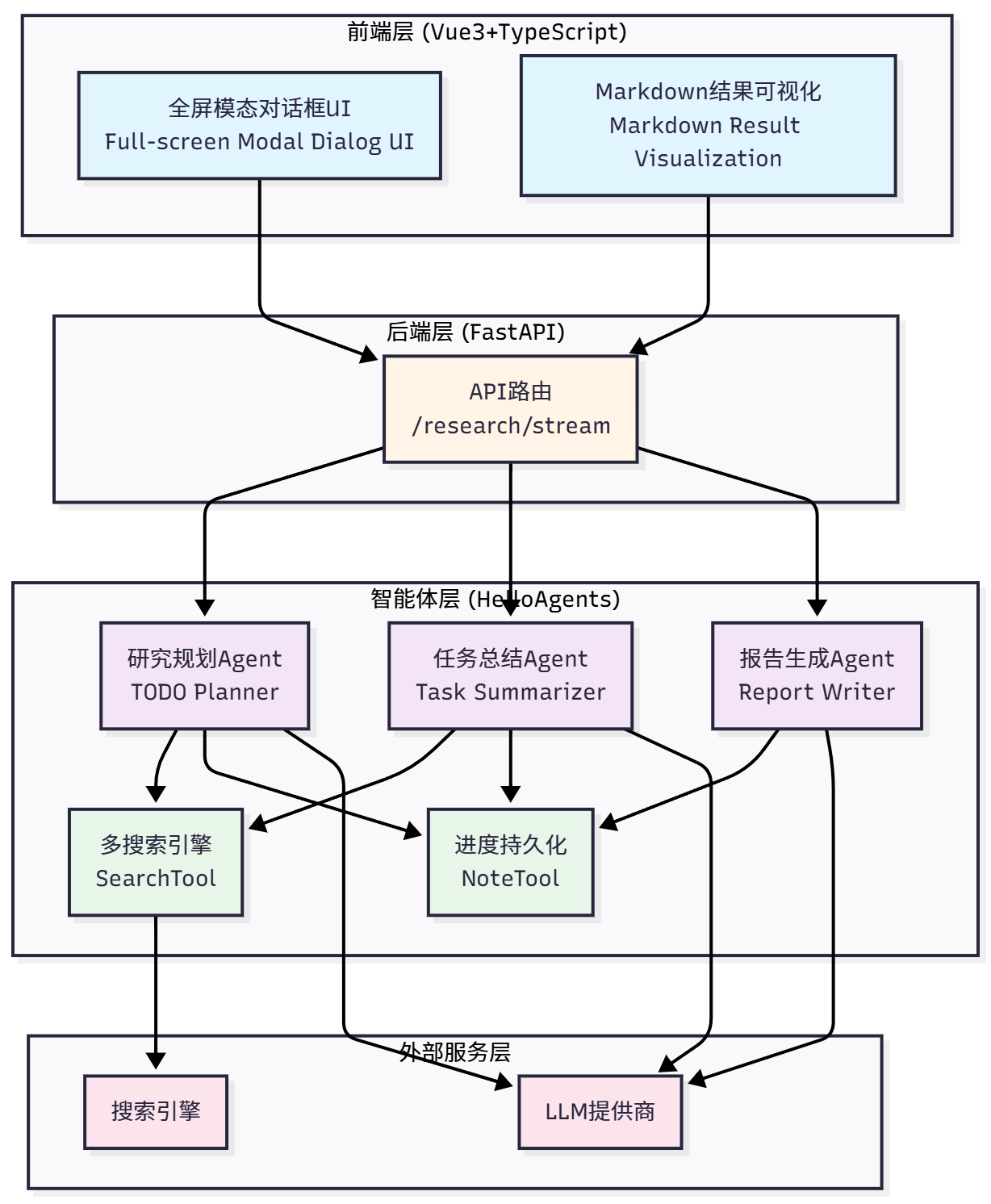
Figure 14.1 Deep Research Assistant Technical Architecture
The system is designed with a four-layer architecture:
Front-End Layer (Vue3+TypeScript): Full-screen modal dialog UI, Markdown result visualization
Back-End Layer (FastAPI): API routing (/research/stream)
Agent Layer (HelloAgents): Three specialized Agents (TODO Planner, Task Summarizer, Report Writer) + Two core tools (SearchTool, NoteTool)
External Service Layer: Search engines + LLM providers
Let's see how a complete research request flows through the system, as shown in Figure 14.2:
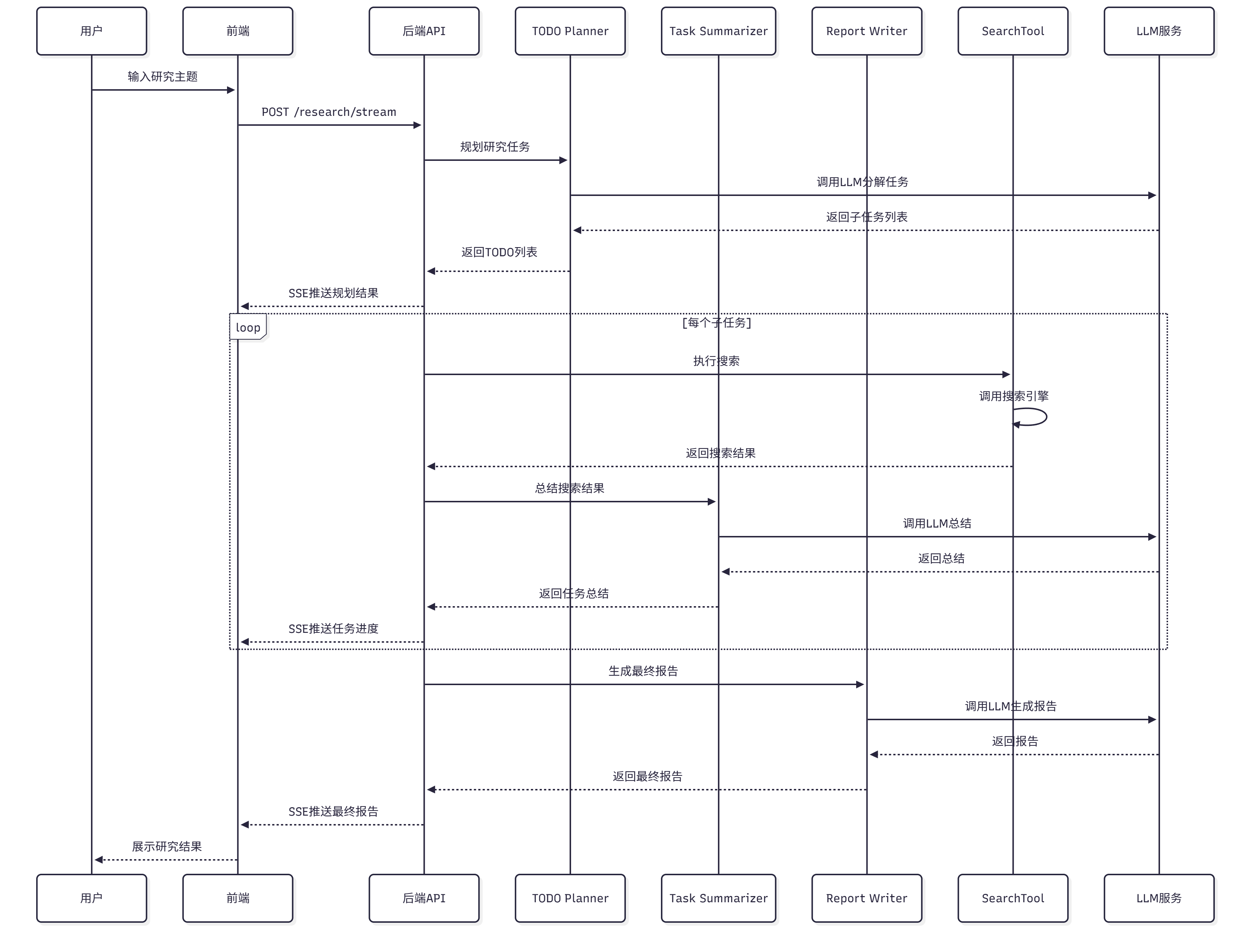
Figure 14.2 Deep Research Assistant Data Flow Process
- User Input: User enters research topic on the front-end
- Front-End Sends: Front-end connects to
/research/streamvia SSE - Back-End Receives: FastAPI receives request, creates research state
- Planning Phase: Calls research planning Agent, decomposes into 3 subtasks
- Execution Phase: Executes each subtask one by one
- Use SearchTool to search
- Call task summarization Agent to summarize
- Use NoteTool to record results
- Report Phase: Call report generation Agent, integrate all summaries
- Stream Return: Push progress and results to front-end via SSE
- Front-End Display: Front-end updates task status, progress bar, logs, and report in real-time
The project directory structure is as follows:
helloagents-deepresearch/
├── backend/                    # Back-end code
│   ├── src/
│   │   ├── agent.py           # Core coordinator
│   │   ├── main.py            # FastAPI entry
│   │   ├── models.py          # Data models
│   │   ├── prompts.py         # Prompt templates
│   │   ├── config.py          # Configuration management
│   │   └── services/          # Service layer
│   │       ├── planner.py     # Planning service
│   │       ├── summarizer.py  # Summarization service
│   │       ├── reporter.py    # Report service
│   │       └── search.py      # Search service
│   ├── .env                   # Environment variables
│   ├── pyproject.toml         # Dependency management
│   └── workspace/             # Research notes
│
└── frontend/                   # Front-end code
    ├── src/
    │   ├── App.vue            # Main component
    │   ├── components/        # UI components
    │   │   └── ResearchModal.vue
    │   └── composables/       # Composable functions
    │       └── useResearch.ts
    ├── package.json           # npm dependencies
    └── vite.config.ts         # Build configuration
14.1.3 Quick Experience: Run the Project in 5 Minutes
Before diving into implementation details, let's first run the project to see the final result. This way you'll have an intuitive understanding of the entire system.
You can check versions with the following commands:
python --version  # Should show Python 3.10.x or higher
node --version    # Should show v16.x.x or higher
npm --version     # Should show 8.x.x or higher
(1) Start the Back-End
# 1. Enter back-end directory
cd helloagents-deepresearch/backend

# 2. Install dependencies
# Method 1: Using uv (recommended, faster Python package manager)
uv sync

# Method 2: Using pip
pip install -e .

# 3. Configure environment variables
cp .env.example .env

# 4. Edit .env file, fill in your API keys
# Open .env file with your favorite editor
# At minimum, configure:
# - LLM_PROVIDER (e.g., openai, deepseek, qwen)
# - LLM_API_KEY (your LLM API key)
# - SEARCH_API (e.g., duckduckgo, tavily)

# 5. Start back-end
python src/main.py
If everything is normal, you'll see output similar to:
INFO:     Started server process [12345]
INFO:     Waiting for application startup.
INFO:     Application startup complete.
INFO:     Uvicorn running on http://0.0.0.0:8000 (Press CTRL+C to quit)
(2) Start the Front-End
Open a new terminal window:
# 1. Enter front-end directory
cd helloagents-deepresearch/frontend

# 2. Install dependencies
npm install

# 3. Start front-end
npm run dev
If everything is normal, you'll see output similar to:
  VITE v5.0.0  ready in 500 ms

  ➜  Local:   http://localhost:5174/
  ➜  Network: use --host to expose
  ➜  press h + enter to show help
(3) Start Research
Open your browser and visit http://localhost:5174. You'll see a centered input card, as shown in Figure 14.3. Enter a research topic, for example What kind of organization is Datawhale?, select a search engine (if multiple are configured), and click the "Start Research" button.
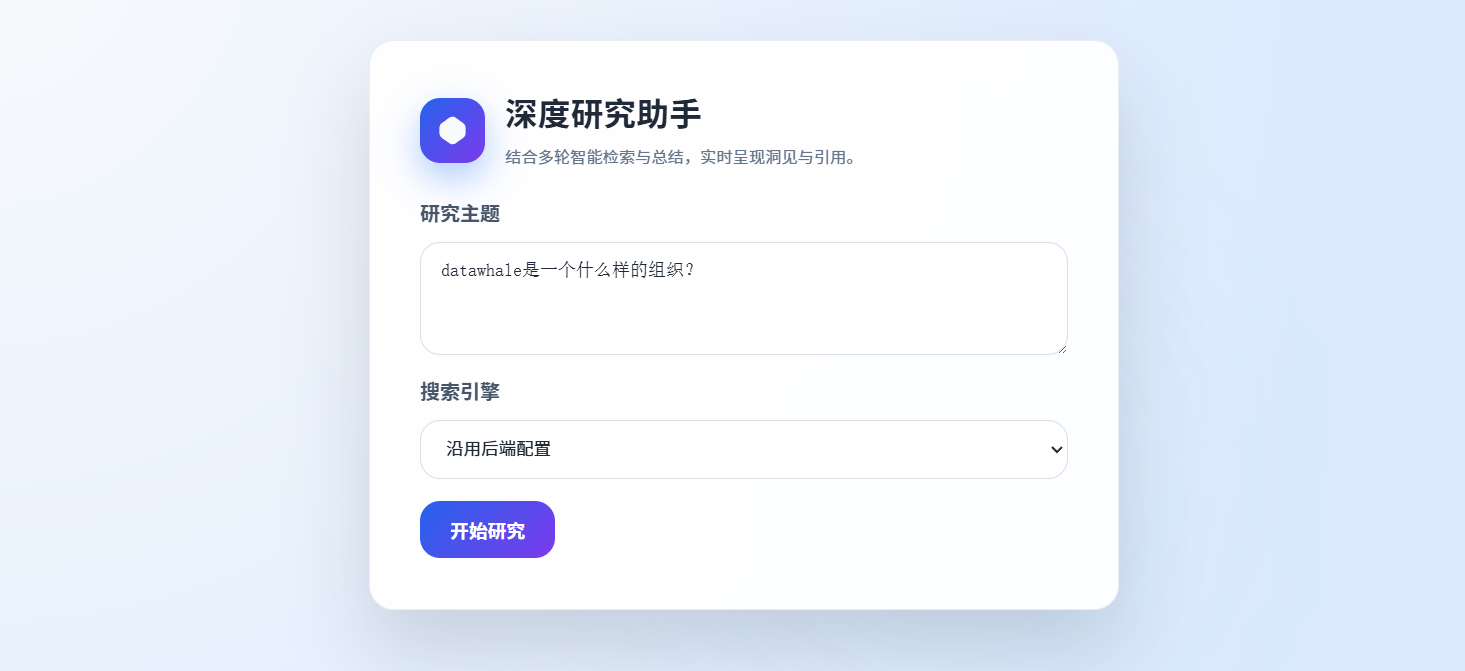
Figure 14.3 Deep Research Assistant Search Page
As shown in Figure 14.4, the system will automatically expand to full screen, with research information displayed on the left and research progress and results displayed in real-time on the right. The entire research process takes about 1-3 minutes, depending on the complexity of the topic and the response speed of the search engine.
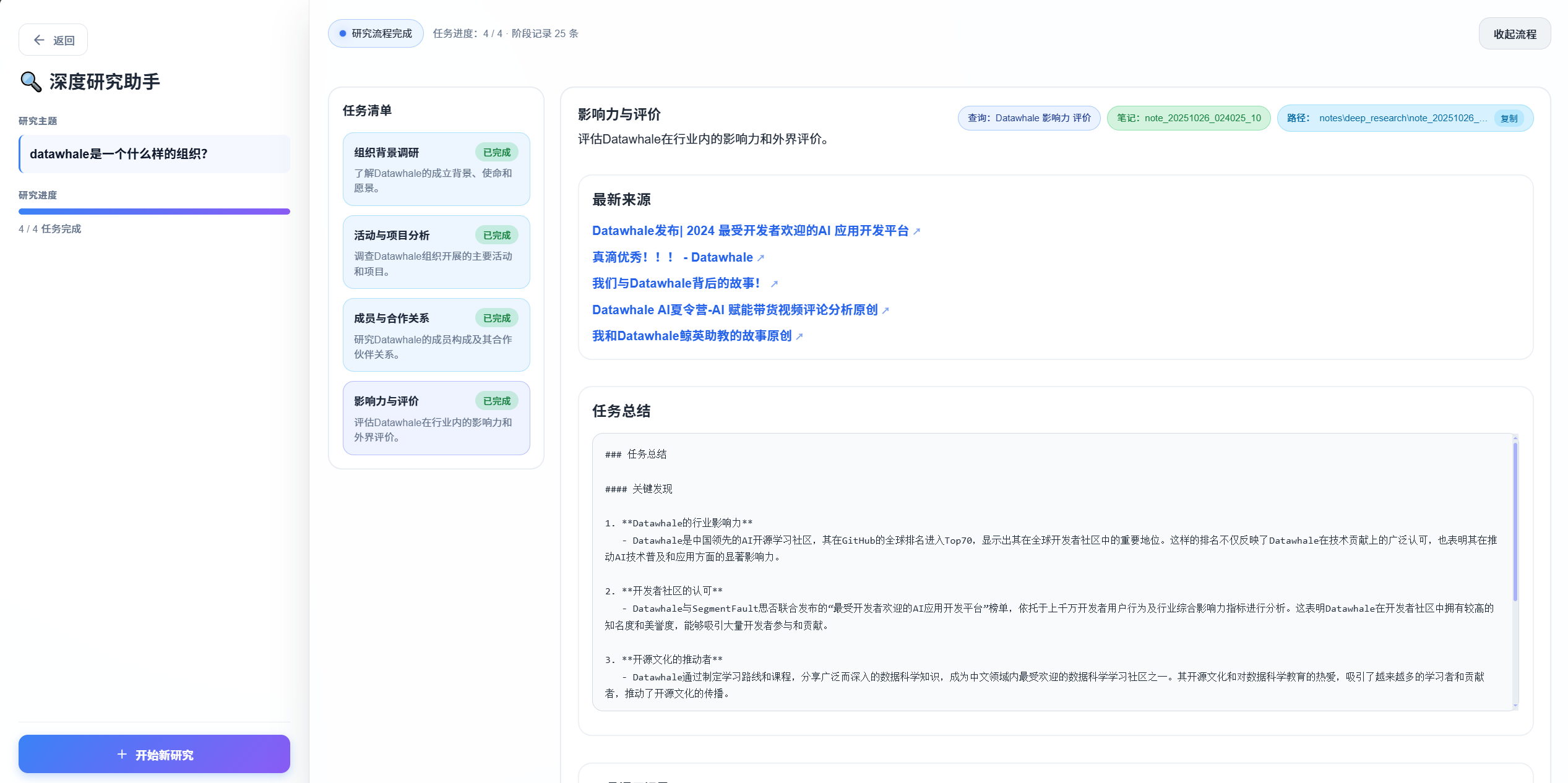
Figure 14.4 Deep Research Assistant Expanded Research
After research is complete, you'll see:
- Task List: Shows all subtasks and their status
- Progress Log: Shows all operations during the research process
- Final Report: Structured Markdown report containing summaries of all subtasks and source citations
Now you've successfully run the deep research assistant and have an intuitive understanding of the system.