15.4 Back-End Service Implementation
15.4.1 FastAPI Application Structure
The back-end of Cyber Town is built using the FastAPI framework, responsible for handling requests from the Godot front-end, calling HelloAgents' NPC Agents, managing NPC state and affection, and recording logs. A clear application structure makes code easier to maintain and extend.
Our FastAPI application adopts a modular design, separating different functions into different files, as shown in Figure 15.10:
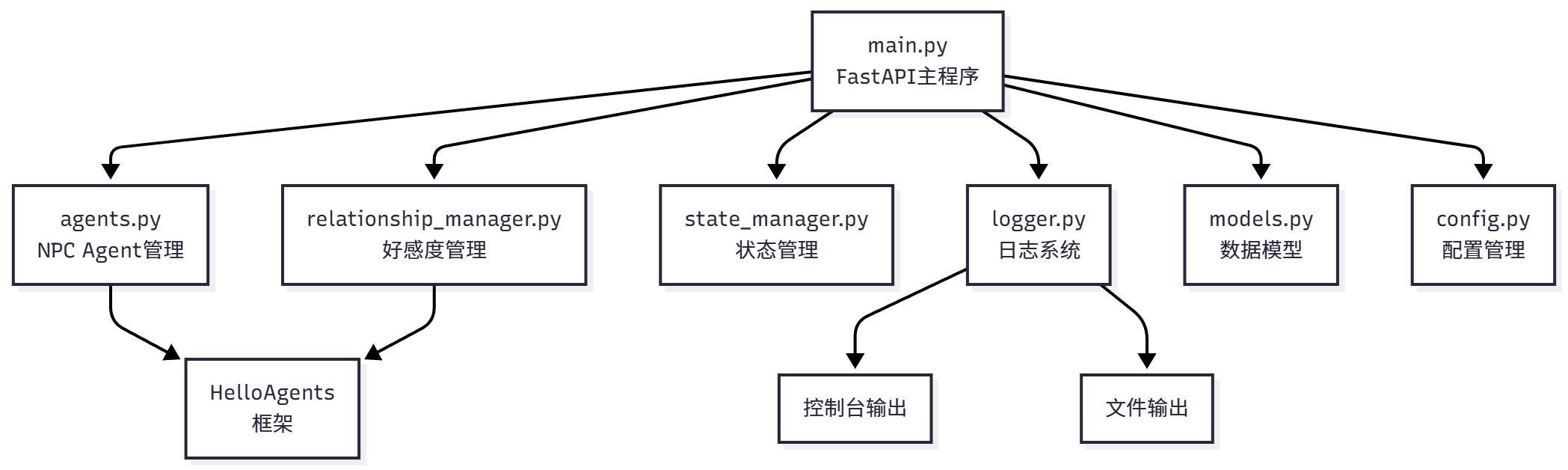
Figure 15.10 Back-End Application Structure
Let's start with main.py, the entry file for the FastAPI application:
from fastapi import FastAPI, HTTPException
from fastapi.middleware.cors import CORSMiddleware
from pydantic import BaseModel, Field
from typing import Optional
import uvicorn

from agents import NPCAgentManager
from relationship_manager import RelationshipManager
from state_manager import StateManager
from logger import DialogueLogger
from config import settings

# Create FastAPI application
app = FastAPI(
    title="Cyber Town Back-End Service",
    description="AI NPC dialogue system based on HelloAgents",
    version="1.0.0"
)

# Configure CORS, allow Godot front-end access
app.add_middleware(
    CORSMiddleware,
    allow_origins=["*"],  # Production environment should limit specific domains
    allow_credentials=True,
    allow_methods=["*"],
    allow_headers=["*"],
)

# Initialize各个managers
agent_manager = NPCAgentManager()
relationship_manager = RelationshipManager()
state_manager = StateManager()
dialogue_logger = DialogueLogger()

@app.on_event("startup")
async def startup_event():
    """Initialization on application startup"""
    print("=" * 60)
    print("🎮 Cyber Town back-end service starting...")
    print("=" * 60)

    # Initialize NPC Agents
    agent_manager.initialize_npcs()
    print("✅ NPC Agents initialized")

    # Initialize state manager
    state_manager.initialize_npcs()
    print("✅ State manager initialized")

@app.get("/")
async def root():
    """Health check"""
    return {
        "status": "running",
        "message": "Cyber Town back-end service is running",
        "version": "1.0.0",
        "npcs": state_manager.get_npc_count()
    }

if __name__ == "__main__":
    uvicorn.run(
        app,
        host=settings.HOST,
        port=settings.PORT,
        log_level="info"
    )
This main program file defines the basic structure of the FastAPI application, configures CORS middleware to allow cross-origin requests, and initializes各个managers on startup. Next we will implement specific API routes.
15.4.2 API Route Design
The back-end of Cyber Town needs to provide several core API endpoints to handle requests from the Godot front-end. We add these routes to main.py.
Get NPC Status
This API returns the current status of all NPCs, including location, whether busy, etc.:
from models import NPCStatusResponse

@app.get("/npcs/status", response_model=NPCStatusResponse)
async def get_npc_status():
    """Get status of all NPCs"""
    npcs = state_manager.get_all_npc_states()
    return {"npcs": npcs}

@app.get("/npcs/{npc_id}/status")
async def get_single_npc_status(npc_id: str):
    """Get status of a single NPC"""
    npc = state_manager.get_npc_state(npc_id)
    if not npc:
        raise HTTPException(status_code=404, detail=f"NPC {npc_id} does not exist")
    return npc
Dialogue Interface
This is the most core API, handling player-NPC conversations:
from models import DialogueRequest, DialogueResponse

@app.post("/dialogue", response_model=DialogueResponse)
async def dialogue(request: DialogueRequest):
    """Handle player-NPC dialogue"""
    # 1. Verify NPC exists
    if not agent_manager.has_npc(request.npc_id):
        raise HTTPException(status_code=404, detail=f"NPC {request.npc_id} does not exist")

    # 2. Check if NPC is busy
    if state_manager.is_npc_busy(request.npc_id):
        raise HTTPException(status_code=409, detail=f"NPC {request.npc_id} is talking with another player")

    # 3. Mark NPC as busy
    state_manager.set_npc_busy(request.npc_id, True)

    try:
        # 4. Get current affection
        affinity_info = relationship_manager.get_affinity(
            request.npc_id,
            request.player_name
        )

        # 5. Call Agent to generate reply
        agent = agent_manager.get_agent(request.npc_id, affinity_info["level"])
        reply = agent.run(request.player_message)

        # 6. Update affection
        new_affinity = relationship_manager.update_affinity(
            request.npc_id,
            request.player_name,
            request.player_message,
            reply
        )

        # 7. Record log
        dialogue_logger.log_dialogue(
            npc_id=request.npc_id,
            player_name=request.player_name,
            player_message=request.player_message,
            npc_reply=reply,
            affinity_info=new_affinity
        )

        # 8. Return reply
        return DialogueResponse(
            npc_reply=reply,
            affinity_level=new_affinity["level"],
            affinity_score=new_affinity["score"]
        )

    except Exception as e:
        dialogue_logger.log_error(f"Dialogue processing failed: {str(e)}")
        raise HTTPException(status_code=500, detail=f"Dialogue processing failed: {str(e)}")

    finally:
        # 9. Release NPC status
        state_manager.set_npc_busy(request.npc_id, False)
Affection Query
This API allows querying player-NPC affection:
from models import AffinityInfo

@app.get("/affinity/{npc_id}/{player_name}", response_model=AffinityInfo)
async def get_affinity(npc_id: str, player_name: str):
    """Get player-NPC affection"""
    if not agent_manager.has_npc(npc_id):
        raise HTTPException(status_code=404, detail=f"NPC {npc_id} does not exist")

    affinity = relationship_manager.get_affinity(npc_id, player_name)
    return affinity
The API route call flow is shown in Figure 15.11:
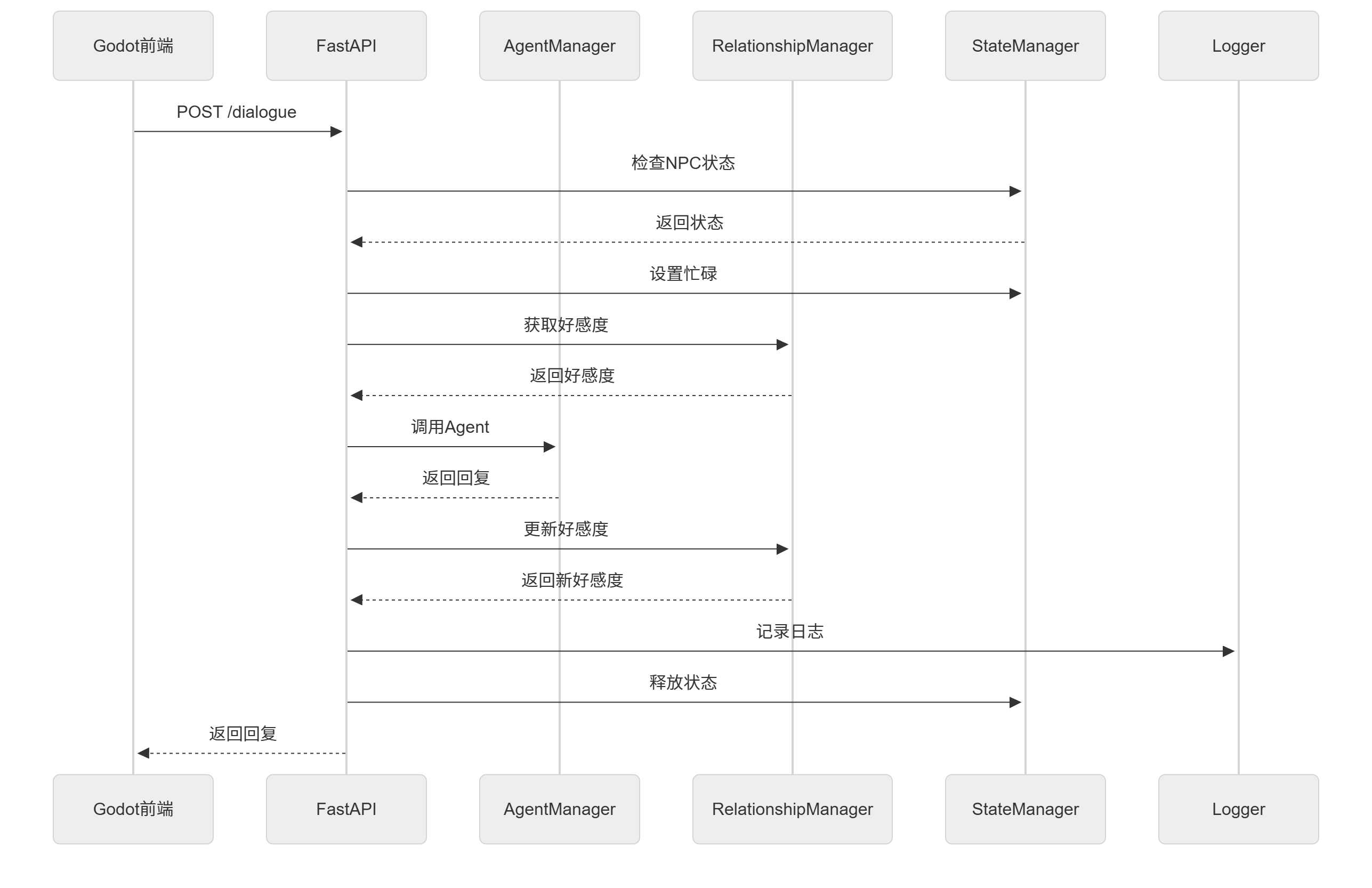
Figure 15.11 API Call Flow
15.4.3 State Management and Logging System
State Manager
The state manager is responsible for tracking the current state of each NPC, including location, whether busy, current action, etc. This is important for preventing concurrency issues, such as avoiding an NPC talking with multiple players simultaneously.
# state_manager.py
from typing import Dict, List, Optional
from datetime import datetime

class StateManager:
    """NPC state manager"""

    def __init__(self):
        self.npc_states: Dict[str, dict] = {}

    def initialize_npcs(self):
        """Initialize NPC states"""
        npcs = [
            {
                "npc_id": "zhang_san",
                "name": "Zhang San",
                "role": "Python Engineer",
                "position": {"x": 300, "y": 200}
            },
            {
                "npc_id": "li_si",
                "name": "Li Si",
                "role": "Product Manager",
                "position": {"x": 500, "y": 200}
            },
            {
                "npc_id": "wang_wu",
                "name": "Wang Wu",
                "role": "UI Designer",
                "position": {"x": 700, "y": 200}
            }
        ]

        for npc in npcs:
            self.npc_states[npc["npc_id"]] = {
                **npc,
                "is_busy": False,
                "current_action": "idle",
                "last_interaction": None
            }

    def get_npc_state(self, npc_id: str) -> Optional[dict]:
        """Get NPC state"""
        return self.npc_states.get(npc_id)

    def get_all_npc_states(self) -> List[dict]:
        """Get all NPC states"""
        return list(self.npc_states.values())

    def is_npc_busy(self, npc_id: str) -> bool:
        """Check if NPC is busy"""
        npc = self.npc_states.get(npc_id)
        return npc["is_busy"] if npc else False

    def set_npc_busy(self, npc_id: str, busy: bool):
        """Set NPC busy status"""
        if npc_id in self.npc_states:
            self.npc_states[npc_id]["is_busy"] = busy
            if busy:
                self.npc_states[npc_id]["last_interaction"] = datetime.now().isoformat()

    def get_npc_count(self) -> int:
        """Get NPC count"""
        return len(self.npc_states)
Logging System
The logging system implements dual output: console and file. This makes it convenient to view in real-time and save historical records.
# logger.py
import logging
from datetime import datetime
from pathlib import Path

class DialogueLogger:
    """Dialogue logger"""

    def __init__(self, log_dir: str = "logs"):
        self.log_dir = Path(log_dir)
        self.log_dir.mkdir(exist_ok=True)

        # Create log file name (by date)
        today = datetime.now().strftime("%Y-%m-%d")
        log_file = self.log_dir / f"dialogue_{today}.log"

        # Configure logging
        self.logger = logging.getLogger("DialogueLogger")
        self.logger.setLevel(logging.INFO)

        # Console handler
        console_handler = logging.StreamHandler()
        console_handler.setLevel(logging.INFO)
        console_formatter = logging.Formatter(
            '%(asctime)s - %(levelname)s - %(message)s',
            datefmt='%H:%M:%S'
        )
        console_handler.setFormatter(console_formatter)

        # File handler
        file_handler = logging.FileHandler(log_file, encoding='utf-8')
        file_handler.setLevel(logging.INFO)
        file_formatter = logging.Formatter(
            '%(asctime)s - %(levelname)s - %(message)s',
            datefmt='%Y-%m-%d %H:%M:%S'
        )
        file_handler.setFormatter(file_formatter)

        # Add handlers
        self.logger.addHandler(console_handler)
        self.logger.addHandler(file_handler)

    def log_dialogue(self, npc_id: str, player_name: str,
                    player_message: str, npc_reply: str,
                    affinity_info: dict):
        """Log dialogue"""
        log_message = f"""
{'='*60}
NPC: {npc_id}
Player: {player_name}
Player message: {player_message}
NPC reply: {npc_reply}
Affection: {affinity_info['level']} ({affinity_info['score']}/100)
Interaction count: {affinity_info['interaction_count']}
{'='*60}
"""
        self.logger.info(log_message)

    def log_error(self, error_message: str):
        """Log error"""
        self.logger.error(error_message)
This logging system displays dialogue content in real-time on the console while saving it to files. Each day's logs are saved in separate files for easy subsequent analysis.
15.4.4 Understanding Godot's Scene System
Before starting to build game scenes, we need to first understand Godot's core concepts - Scene and Node. This is the biggest difference between Godot and other game engines, and also one of its most powerful features.
What is a Node?
Nodes are the most basic building blocks in Godot. You can think of nodes as Lego bricks, each node has a specific function. For example, Sprite2D nodes are used to display images, AudioStreamPlayer nodes are used to play audio, and CharacterBody2D nodes are used to handle character physics movement. Godot provides hundreds of different types of nodes, each focusing on doing one thing well.
Nodes can form parent-child relationships, forming a tree structure. Parent nodes can affect child nodes, for example, moving a parent node will simultaneously move all child nodes, hiding a parent node will simultaneously hide all child nodes. This hierarchical relationship allows us to easily organize and manage complex game objects.
What is a Scene?
A scene is a collection of nodes, saved in a .tscn file. You can think of a scene as a "prefab". For example, we can create a "player" scene containing all related nodes such as character sprites, collision bodies, sound effects, etc. Then use this scene multiple times in the game, each use will create an independent instance.
The power of scenes lies in their reusability and modularity. We can instantiate one scene within another scene, forming nested structures. For example, the main scene can contain player scenes, multiple NPC scenes, and UI scenes. Modifying the NPC scene will automatically affect all NPC instances, greatly simplifying development and maintenance.
A Simple Example
Let's use a simple example to understand scenes and nodes. Suppose we want to create a "player" scene:
Player (CharacterBody2D)  ← Root node, responsible for physics movement
├─ AnimatedSprite2D       ← Child node, displays character animation
├─ CollisionShape2D       ← Child node, defines collision shape
└─ Camera2D               ← Child node, camera follows player
This scene contains 4 nodes forming a tree structure. CharacterBody2D is the root node, the other three are its child nodes. We can add scripts to each node to control its behavior, or add a script to the root node to coordinate all child nodes.
When we instantiate this Player scene in the main scene, Godot creates a copy of this entire node tree. We can create multiple player instances, each instance is independent with its own position, state, and behavior.
Advantages of Scene Instantiation
In Cyber Town, we have three NPCs: Zhang San, Li Si, and Wang Wu. Without using the scene system, we would need to create nodes, set properties, and write scripts for each NPC separately, leading to a lot of repetitive work. Using the scene system, we only need to create a generic NPC scene, then instantiate it three times, setting different names and role information through script parameters.
The benefit of this design is: if we want to add a new feature to all NPCs (such as displaying dialogue bubbles above their heads), we only need to modify the NPC scene, and all instances will automatically get this feature.