11.2 Datasets and Reward Functions
Datasets and reward functions are the two cornerstones of reinforcement learning training. Datasets define the tasks the agent needs to learn, and reward functions define what good behavior is. In this section, we will learn how to prepare training data and design reward functions.
11.2.1 GSM8K Mathematical Reasoning Dataset
Mathematical reasoning is an ideal task for evaluating LLM reasoning capabilities. First, math problems have clear correct answers that can be automatically evaluated without manual annotation or complex reward models. Second, solving math problems requires decomposing problems and step-by-step derivation, which is a typical scenario for multi-step reasoning. Finally, learned reasoning capabilities can transfer to other domains with strong generalization. In contrast, open-ended Q&A tasks (such as "How to learn programming?") have answer quality that is difficult to objectively evaluate and requires extensive manual annotation.
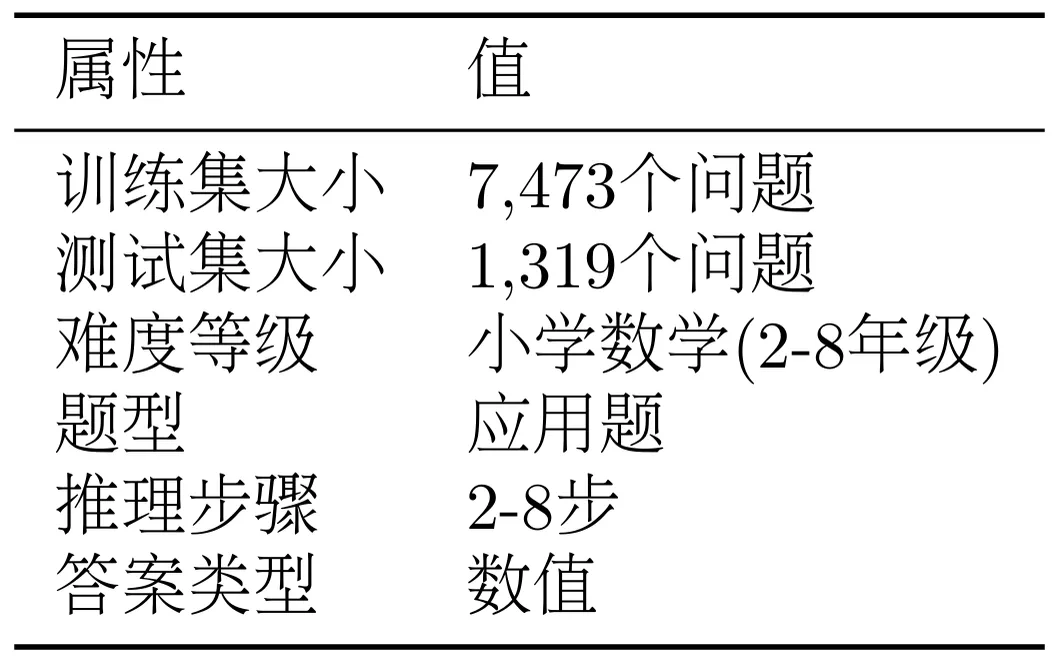
GSM8K (Grade School Math 8K)<sup>[4]</sup> is a high-quality elementary school math word problem dataset. As shown in Table 11.2, the dataset contains 7,473 training samples and 1,319 test samples, with difficulty at elementary school math level (grades 2-8), problem types are word problems, requiring 2-8 steps of reasoning to arrive at answers.
Table 11.2 GSM8K Dataset Statistics
Let's look at a typical GSM8K problem:
Question: Natalia sold clips to 48 of her friends in April, and then she sold half
      as many clips in May. How many clips did Natalia sell altogether in April
      and May?

Answer: Natalia sold 48/2 = <<48/2=24>>24 clips in May.
      Natalia sold 48+24 = <<48+24=72>>72 clips altogether in April and May.
      #### 72

Final Answer: 72
This problem requires two steps of reasoning: first calculate the quantity sold in May (half of 48), then calculate the total (April + May). The <<48/2=24>> in the answer is a marker for intermediate calculation steps, and #### 72 marks the final answer.
The GSM8K dataset needs to be converted to different formats to adapt to different training methods, as shown in Figure 11.4.
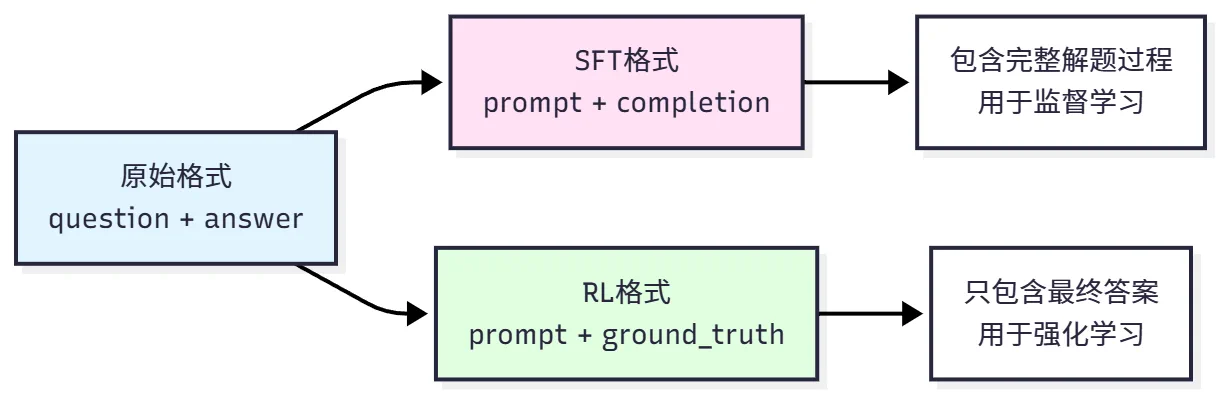
Figure 11.4 GSM8K Data Format Conversion
The original format comes directly from the dataset, containing question and answer (with solution steps), suitable for human reading. SFT format is used for supervised fine-tuning, converting questions to dialogue format prompts, with complete solutions as completion. For example:
{
    "prompt": "<|im_start|>user\nNatalia sold clips to 48 of her friends...<|im_end|>\n<|im_start|>assistant\n",
    "completion": "Let me solve this step by step.\n\nStep 1: ...\n\nFinal Answer: 72<|im_end|>"
}
Key points are using the model's dialogue template (such as Qwen's <|im_start|> marker), prompt contains user question, completion contains complete solution process and answer. This way the model can learn how to format output and how to reason step by step.
RL format is used for reinforcement learning, only providing questions and correct answers, not solution processes. For example:
{
    "prompt": "<|im_start|>user\nNatalia sold clips to 48 of her friends...<|im_end|>\n<|im_start|>assistant\n",
    "ground_truth": "72"
}
Key points are prompt is the same as SFT, but ground_truth only contains the final answer (used to calculate reward), and the model needs to generate the complete reasoning process itself. This design forces the model to learn autonomous reasoning rather than simply memorizing answers.
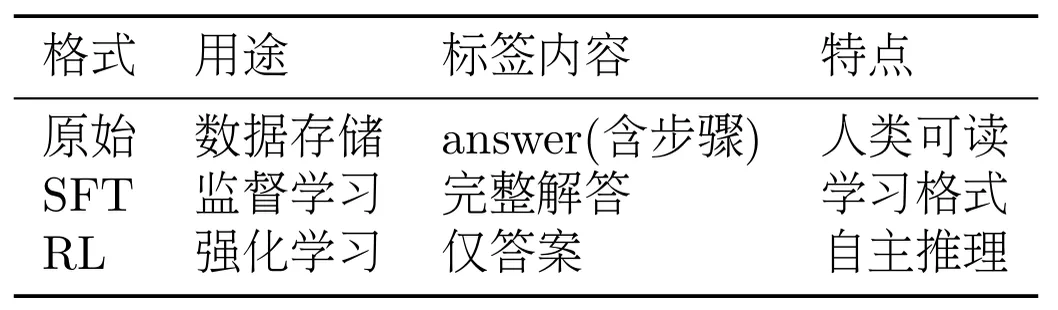
As shown in Table 11.3, the three formats each have their uses.
Table 11.3 Data Format Comparison
HelloAgents provides convenient dataset loading functions. Let's load and view the dataset through code:
from hello_agents.tools import RLTrainingTool
import json

# Create tool
rl_tool = RLTrainingTool()

# 1. Load SFT format dataset
sft_result = rl_tool.run({
    "action": "load_dataset",
    "format": "sft",
    "max_samples": 5  # Only load 5 samples to view
})
sft_data = json.loads(sft_result)

print(f"Dataset size: {sft_data['dataset_size']}")
print(f"Data format: {sft_data['format']}")
print(f"Sample keys: {sft_data['sample_keys']}")

# 2. Load RL format dataset
rl_result = rl_tool.run({
    "action": "load_dataset",
    "format": "rl",
    "max_samples": 5
})
rl_data = json.loads(rl_result)

print(f"Dataset size: {rl_data['dataset_size']}")
print(f"Data format: {rl_data['format']}")
print(f"Sample keys: {rl_data['sample_keys']}")
As can be seen, SFT format contains complete solution processes for supervised learning; RL format only contains final answers, and the model needs to generate reasoning processes itself. The max_samples parameter controls the number of samples loaded, convenient for quick testing.
11.2.2 Reward Function Design
Reward functions are the core of reinforcement learning, defining what "good behavior" is. A good reward function can guide agents to learn correct strategies, while a poor reward function may lead to training failure or learning wrong behaviors.
In reinforcement learning, the reward function $r(s, a)$ or $r(s, a, s')$ assigns a numerical reward to each action of the agent. The agent's goal is to maximize cumulative reward:
$$ J(\theta) = \mathbb{E}{\tau \sim \pi\theta} \left[\sum_{t=0}^{T} \gamma^t r(s_t, a_t)\right] $$
For mathematical reasoning tasks, we can simplify to:
$$ r(q, a) = f(a, a^*) $$
Where $q$ is the question, $a$ is the answer generated by the model, $a^*$ is the correct answer, and $f$ is the evaluation function.
Reward function design directly affects training effectiveness. Good reward functions should clearly define what success is, provide gradient signals, not produce excessive variance, and be easy to adjust and combine. Poor reward functions may only give rewards at task end with no intermediate feedback, have reward hacking where agents find "cheating" ways to get high rewards, have multiple conflicting objectives, or have excessive variance preventing convergence.
HelloAgents provides three built-in reward functions that can be used individually or in combination, as shown in Figure 11.5.
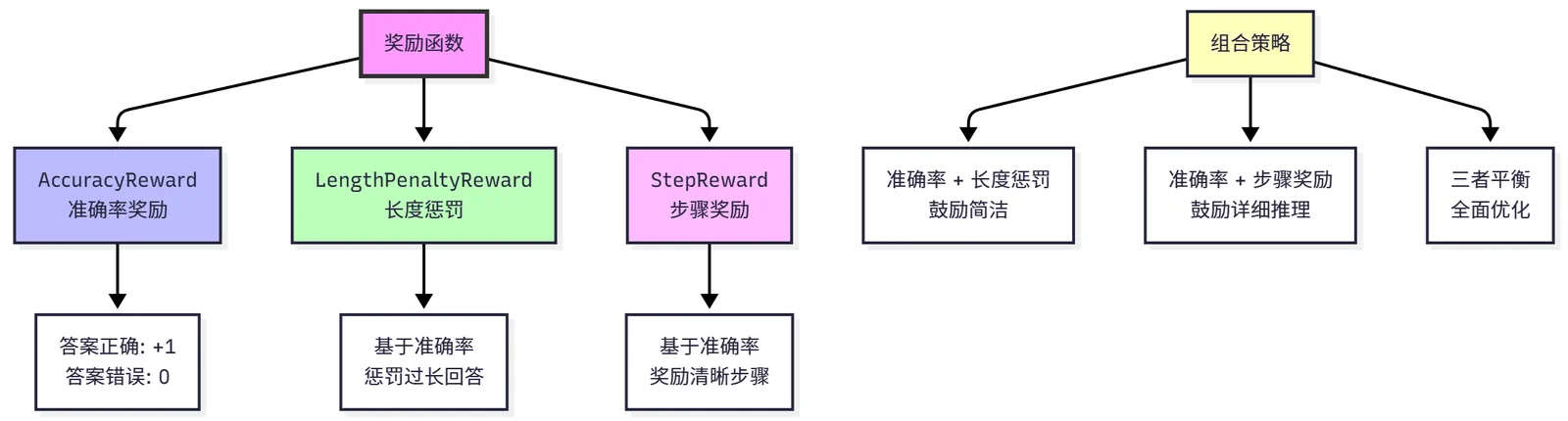
Figure 11.5 Reward Function Design
(1) Accuracy Reward
Accuracy Reward (AccuracyReward) is the most basic reward function, only caring whether the answer is correct. Mathematical definition:
$$ r_{\text{acc}}(a, a^) = \begin{cases} 1 & \text{if } a = a^ \ 0 & \text{otherwise} \end{cases} $$
Where $a$ is the answer generated by the model and $a^*$ is the correct answer. This is a binary reward function, getting 1 point for correct answers and 0 for incorrect ones.
Implementation requires handling answer extraction and comparison. Model output may contain large amounts of text, and we need to extract the final answer. Common extraction methods include: finding numbers after "Final Answer:", finding numbers after "####" marker, using regular expressions to extract the last number. Answer comparison needs to handle numerical precision (such as 72.0 and 72 should be considered the same), unit conversion (such as 1000 and 1k), and format differences (such as "72" and "seventy-two").
Usage example:
from hello_agents.tools import RLTrainingTool
import json
rl_tool = RLTrainingTool()

# Create accuracy reward function
reward_result = rl_tool.run({
    "action": "create_reward",
    "reward_type": "accuracy"
})
reward_data = json.loads(reward_result)

print(f"Reward type: {reward_data['reward_type']}")
print(f"Description: {reward_data['description']}")

# Note: The create_reward operation of RLTrainingTool returns configuration information,
# the actual reward function will be automatically created and used during training
Output:
Prediction: 72, Ground truth: 72, Reward: 1.0
Prediction: 72.0, Ground truth: 72, Reward: 1.0
Prediction: 73, Ground truth: 72, Reward: 0.0
Advantages of accuracy reward: simple and direct, easy to understand and implement, suitable for tasks with clear correct answers. Disadvantages: sparse reward, only fully correct answers get rewards, cannot distinguish between "close to correct" and "completely wrong", may lead to lack of effective feedback in early training.
(2) Length Penalty
Length Penalty (LengthPenaltyReward) encourages the model to generate concise answers, avoiding verbosity. Mathematical definition:
$$ r_{\text{length}}(a, a^, l) = r_{\text{acc}}(a, a^) - \alpha \cdot \max(0, l - l_{\text{target}}) $$
Where $l$ is the length of generated text (character count or token count), $l_{\text{target}}$ is the target length, and $\alpha$ is the penalty coefficient (default 0.001). Length penalty is only applied when the answer is correct, avoiding the model generating incorrect short answers to reduce penalty.
Design rationale: if answer is incorrect, reward is 0 (regardless of length); if answer is correct and length is reasonable, reward is 1; if answer is correct but too long, reward is $1 - \alpha \cdot (l - l_{\text{target}})$. For example, target length 200 characters, actual length 500 characters, penalty coefficient 0.001, then reward is $1 - 0.001 \times (500 - 200) = 0.7$.
Usage example:
# Create length penalty reward function
reward_result = rl_tool.run({
    "action": "create_reward",
    "reward_type": "length_penalty",
    "max_length": 1024,      # Maximum length
    "penalty_weight": 0.001  # Penalty weight
})
reward_data = json.loads(reward_result)

print(f"Reward type: {reward_data['reward_type']}")
print(f"Description: {reward_data['description']}")
print(f"Max length: {reward_data['max_length']}")
print(f"Penalty weight: {reward_data['penalty_weight']}")
Output:
Prediction: 72, Ground truth: 72, Length: 50, Reward: 1.000
Prediction: 72, Ground truth: 72, Length: 200, Reward: 1.000
Prediction: 72, Ground truth: 72, Length: 500, Reward: 0.700
Prediction: 73, Ground truth: 72, Length: 50, Reward: 0.000
Advantages of length penalty: encourages concise expression, avoids model generating redundant content, can control reasoning cost (shorter output means less token consumption). Disadvantages: may suppress detailed reasoning, requires careful adjustment of penalty coefficient, optimal length varies greatly across different tasks.
(3) Step Reward
Step Reward (StepReward) encourages the model to generate clear reasoning steps, improving interpretability. Mathematical definition:
$$ r_{\text{step}}(a, a^, s) = r_{\text{acc}}(a, a^) + \beta \cdot s $$
Where $s$ is the number of detected reasoning steps and $\beta$ is the step reward coefficient (default 0.1). Similarly, step rewards are only given when the answer is correct.
Step detection methods include: finding "Step 1:", "Step 2:" markers, counting newline characters, using regular expressions to match reasoning patterns. For example, a correct answer with 3 clear steps gets reward $1 + 0.1 \times 3 = 1.3$.
Usage example:
# Create step reward function
reward_result = rl_tool.run({
    "action": "create_reward",
    "reward_type": "step",
    "step_bonus": 0.1  # 0.1 reward per step
})
reward_data = json.loads(reward_result)

print(f"Reward type: {reward_data['reward_type']}")
print(f"Description: {reward_data['description']}")
print(f"Step bonus: {reward_data['step_bonus']}")
Output:
Prediction: 72, Ground truth: 72, Steps: 0, Reward: 1.00
Prediction: 72, Ground truth: 72, Steps: 2, Reward: 1.20
Prediction: 72, Ground truth: 72, Steps: 5, Reward: 1.50
Prediction: 73, Ground truth: 72, Steps: 5, Reward: 0.00
Advantages of step reward: encourages interpretable reasoning, generated answers are easier to verify and debug, helps model learn systematic thinking. Disadvantages: may lead model to generate redundant steps to get more rewards, needs to balance step quantity and answer quality, step detection may be inaccurate.
In practical applications, we typically combine multiple reward functions to balance different objectives. Common combination strategies include:
Accuracy + Length Penalty: Encourages concise correct answers, suitable for dialogue systems and Q&A systems. Formula:
$$ r = r_{\text{acc}} - \alpha \cdot \max(0, l - l_{\text{target}}) $$
Accuracy + Step Reward: Encourages detailed reasoning processes, suitable for educational scenarios and explainable AI. Formula:
$$ r = r_{\text{acc}} + \beta \cdot s $$
Three-way Balance: Comprehensively optimizes answer quality, conciseness, and interpretability. Formula:
$$ r = r_{\text{acc}} - \alpha \cdot \max(0, l - l_{\text{target}}) + \beta \cdot s $$
Weights $\alpha$ and $\beta$ need to be carefully adjusted to avoid one objective dominating excessively.
Usage example:
# Combined reward function: accuracy + length penalty + step reward
# Note: RLTrainingTool currently supports single reward type
# Combined rewards need to be specified through reward_fn parameter in training configuration
# This shows how to configure different types of reward functions

# Accuracy reward
accuracy_result = rl_tool.run({
    "action": "create_reward",
    "reward_type": "accuracy"
})
print("Accuracy reward:", json.loads(accuracy_result)['description'])

# Length penalty reward
length_result = rl_tool.run({
    "action": "create_reward",
    "reward_type": "length_penalty",
    "max_length": 1024,
    "penalty_weight": 0.001
})
print("Length penalty reward:", json.loads(length_result)['description'])

# Step reward
step_result = rl_tool.run({
    "action": "create_reward",
    "reward_type": "step",
    "step_bonus": 0.1
})
print("Step reward:", json.loads(step_result)['description'])
Output:
Combined reward: 1.200
  - Accuracy: 1.0
  - Length penalty: -0.100
  - Step reward: +0.3
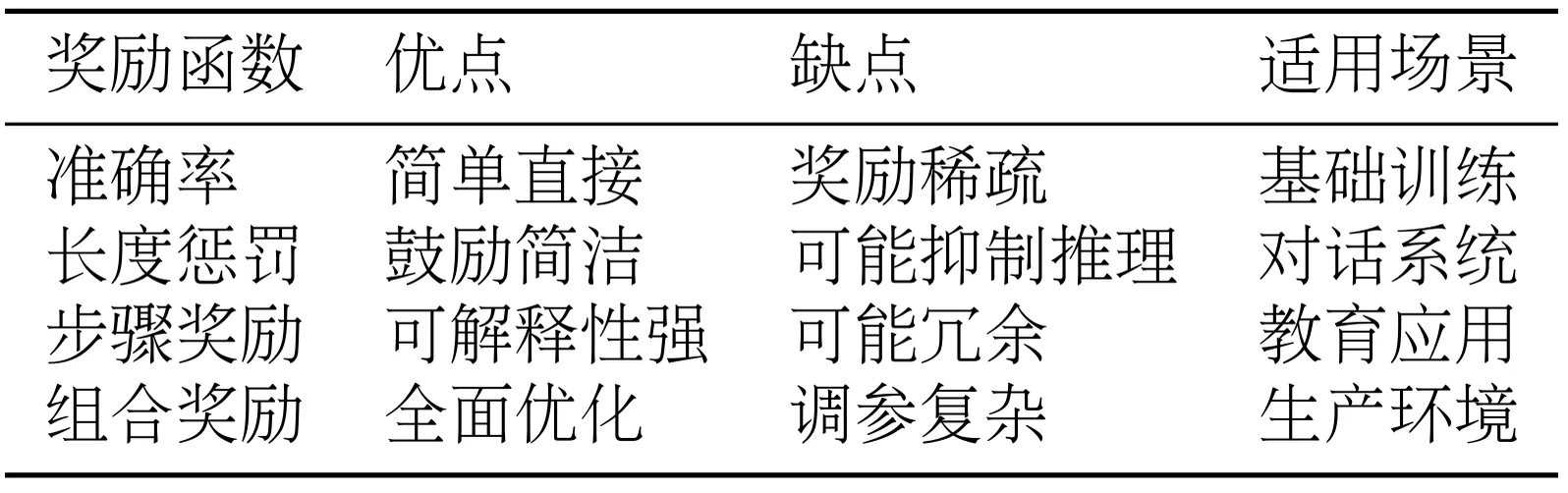
As shown in Table 11.4, different reward functions are suitable for different application scenarios.
Table 11.4 Reward Function Comparison
11.2.3 Custom Datasets and Reward Functions
Although HelloAgents provides the GSM8K dataset and common reward functions, in practical applications you may need to use your own dataset or design specific reward functions. This section will introduce how to extend the framework.
Before using custom datasets, you need to understand the data requirements for two training formats:
SFT Format: Used for supervised fine-tuning, needs to contain the following fields:
prompt: Input prompt (containing system and user messages)completion: Expected outputtext: Complete dialogue text (optional)
RL Format: Used for reinforcement learning, needs to contain the following fields:
question: Original questionprompt: Input prompt (containing system and user messages)ground_truth: Correct answerfull_answer: Complete answer (including reasoning process)
(1) Converting with format_math_dataset
The simplest method is to prepare raw data containing question and answer fields, then use the format_math_dataset() function for automatic conversion:
from datasets import Dataset
from hello_agents.rl import format_math_dataset

# 1. Prepare raw data
custom_data = [
    {
        "question": "What is 2+2?",
        "answer": "2+2=4. #### 4"
    },
    {
        "question": "What is 5*3?",
        "answer": "5*3=15. #### 15"
    },
    {
        "question": "What is 10+7?",
        "answer": "10+7=17. #### 17"
    }
]

# 2. Convert to Dataset object
raw_dataset = Dataset.from_list(custom_data)

# 3. Convert to SFT format
sft_dataset = format_math_dataset(
    dataset=raw_dataset,
    format_type="sft",
    model_name="Qwen/Qwen3-0.6B"
)
print(f"SFT dataset: {len(sft_dataset)} samples")
print(f"Fields: {sft_dataset.column_names}")

# 4. Convert to RL format
rl_dataset = format_math_dataset(
    dataset=raw_dataset,
    format_type="rl",
    model_name="Qwen/Qwen3-0.6B"
)
print(f"RL dataset: {len(rl_dataset)} samples")
print(f"Fields: {rl_dataset.column_names}")
(2) Directly Passing Custom Dataset
When using RLTrainingTool, you can directly pass a custom dataset through the custom_dataset parameter:
from hello_agents.tools import RLTrainingTool

rl_tool = RLTrainingTool()

# SFT training
result = rl_tool.run({
    "action": "train",
    "algorithm": "sft",
    "model_name": "Qwen/Qwen3-0.6B",
    "output_dir": "./models/custom_sft",
    "num_epochs": 3,
    "batch_size": 4,
    "use_lora": True,
    "custom_dataset": sft_dataset  # Directly pass custom dataset
})

# GRPO training
result = rl_tool.run({
    "action": "train",
    "algorithm": "grpo",
    "model_name": "Qwen/Qwen3-0.6B",
    "output_dir": "./models/custom_grpo",
    "num_epochs": 2,
    "batch_size": 2,
    "use_lora": True,
    "custom_dataset": rl_dataset  # Directly pass custom dataset
})
(3) Registering Custom Dataset (Recommended)
For datasets that need to be used multiple times, registration is recommended:
# 1. Register dataset
rl_tool.register_dataset("my_math_dataset", rl_dataset)

# 2. Use registered dataset
result = rl_tool.run({
    "action": "train",
    "algorithm": "grpo",
    "dataset": "my_math_dataset",  # Use registered dataset name
    "output_dir": "./models/custom_grpo",
    "num_epochs": 2,
    "use_lora": True
})
Reward functions are used to evaluate the quality of answers generated by the model. Custom reward functions need to follow this signature:
from typing import List
import re

def custom_reward_function(
    completions: List[str],
    **kwargs
) -> List[float]:
    """
    Custom reward function

    Args:
        completions: List of completion texts generated by the model
        **kwargs: Other parameters, typically including:
            - ground_truth: List of correct answers
            - Other dataset fields

    Returns:
        List of reward values (each value between 0.0-1.0)
    """
    ground_truths = kwargs.get("ground_truth", [])
    rewards = []

    for completion, truth in zip(completions, ground_truths):
        reward = 0.0

        # Extract answer
        numbers = re.findall(r'-?\d+\.?\d*', completion)
        if numbers:
            try:
                pred = float(numbers[-1])
                truth_num = float(truth)
                error = abs(pred - truth_num)

                # Give different rewards based on error
                if error < 0.01:
                    reward = 1.0  # Completely correct
                elif error < 1.0:
                    reward = 0.8  # Very close
                elif error < 5.0:
                    reward = 0.5  # Close

                # Extra reward: encourage showing reasoning steps
                if "step" in completion.lower() or "=" in completion:
                    reward += 0.1

            except ValueError:
                reward = 0.0

        rewards.append(min(reward, 1.0))  # Limit maximum value to 1.0

    return rewards
There are two ways to use custom reward functions:
(1) Direct Passing
result = rl_tool.run({
    "action": "train",
    "algorithm": "grpo",
    "model_name": "Qwen/Qwen3-0.6B",
    "output_dir": "./models/custom_grpo",
    "custom_dataset": rl_dataset,
    "custom_reward": custom_reward_function  # Directly pass reward function
})
(2) Registration (Recommended)
# 1. Register reward function
rl_tool.register_reward_function("my_reward", custom_reward_function)

# 2. Use registered reward function
result = rl_tool.run({
    "action": "train",
    "algorithm": "grpo",
    "dataset": "my_math_dataset",
    "output_dir": "./models/custom_grpo"
    # Reward function will automatically use registered function with same name as dataset
})
Here is a complete example of custom dataset and reward function:
from datasets import Dataset
from hello_agents.tools import RLTrainingTool
from hello_agents.rl import format_math_dataset
import re
from typing import List

# 1. Prepare custom data
custom_data = [
    {"question": "What is 2+2?", "answer": "2+2=4. #### 4"},
    {"question": "What is 5+3?", "answer": "5+3=8. #### 8"},
    {"question": "What is 10+7?", "answer": "10+7=17. #### 17"}
]

# 2. Convert to training format
raw_dataset = Dataset.from_list(custom_data)
rl_dataset = format_math_dataset(raw_dataset, format_type="rl")

# 3. Define custom reward function
def tolerant_reward(completions: List[str], **kwargs) -> List[float]:
    """Reward function with tolerance"""
    ground_truths = kwargs.get("ground_truth", [])
    rewards = []

    for completion, truth in zip(completions, ground_truths):
        numbers = re.findall(r'-?\d+\.?\d*', completion)
        if numbers:
            try:
                pred = float(numbers[-1])
                truth_num = float(truth)
                error = abs(pred - truth_num)

                if error < 0.01:
                    reward = 1.0
                elif error < 5.0:
                    reward = 0.5
                else:
                    reward = 0.0
            except ValueError:
                reward = 0.0
        else:
            reward = 0.0

        rewards.append(reward)

    return rewards

# 4. Create tool and register
rl_tool = RLTrainingTool()
rl_tool.register_dataset("my_dataset", rl_dataset)
rl_tool.register_reward_function("my_dataset", tolerant_reward)

# 5. Train
result = rl_tool.run({
    "action": "train",
    "algorithm": "grpo",
    "model_name": "Qwen/Qwen3-0.6B",
    "dataset": "my_dataset",
    "output_dir": "./models/custom_grpo",
    "num_epochs": 2,
    "batch_size": 2,
    "use_lora": True
})