7.4 Framework Implementation of Agent Paradigms
The content of this section will perform framework refactoring based on the three classic Agent paradigms (ReAct, Plan-and-Solve, Reflection) built in Chapter 4, and add SimpleAgent as a basic conversation paradigm. We will transform these independent Agent implementations into framework components based on a unified architecture. This refactoring mainly revolves around the following three core goals:
- Systematic Improvement of Prompt Engineering: Deeply optimize the prompts from Chapter 4, transitioning from specific task-oriented to generalized design, while enhancing format constraints and role definitions.
- Standardization and Unification of Interfaces and Formats: Establish a unified Agent base class and standardized running interface, with all Agents following the same initialization parameters, method signatures, and history management mechanisms.
- Highly Configurable Customization Capabilities: Support user-defined prompt templates, configuration parameters, and execution strategies.
7.4.1 SimpleAgent
SimpleAgent is the most basic Agent implementation, demonstrating how to build a complete conversational agent on the framework foundation. We will extend the existing SimpleAgent class and override its core methods to build a more extensible version. First, create a my_simple_agent.py file in your project directory:
# my_simple_agent.py
from typing import Optional, Iterator
from hello_agents import SimpleAgent, HelloAgentsLLM, Config, Message

class MySimpleAgent(SimpleAgent):
    """
    Rewritten simple conversation Agent
    Demonstrates how to build a custom Agent by extending SimpleAgent
    """

    def __init__(
        self,
        name: str,
        llm: HelloAgentsLLM,
        system_prompt: Optional[str] = None,
        config: Optional[Config] = None,
        tool_registry: Optional['ToolRegistry'] = None,
        enable_tool_calling: bool = True
    ):
        super().__init__(name, llm, system_prompt, config)
        self.tool_registry = tool_registry
        self.enable_tool_calling = enable_tool_calling and tool_registry is not None
        print(f"✅ {name} initialization complete, tool calling: {'enabled' if self.enable_tool_calling else 'disabled'}")
Next, we need to override the run method. SimpleAgent supports optional tool calling functionality, which also facilitates expansion in subsequent chapters:
# Continue adding in my_simple_agent.py
import re

class MySimpleAgent(SimpleAgent):
    # ... previous __init__ method

    def run(self, input_text: str, max_tool_iterations: int = 3, **kwargs) -> str:
        """
        Rewritten run method - implements simple conversation logic, supports optional tool calling
        """
        print(f"🤖 {self.name} is processing: {input_text}")

        # Build message list
        messages = []

        # Add system message (may include tool information)
        enhanced_system_prompt = self._get_enhanced_system_prompt()
        messages.append({"role": "system", "content": enhanced_system_prompt})

        # Add history messages
        for msg in self._history:
            messages.append({"role": msg.role, "content": msg.content})

        # Add current user message
        messages.append({"role": "user", "content": input_text})

        # If tool calling is not enabled, use simple conversation logic
        if not self.enable_tool_calling:
            response = self.llm.invoke(messages, **kwargs)
            self.add_message(Message(input_text, "user"))
            self.add_message(Message(response, "assistant"))
            print(f"✅ {self.name} response complete")
            return response

        # Logic supporting multiple rounds of tool calling
        return self._run_with_tools(messages, input_text, max_tool_iterations, **kwargs)

    def _get_enhanced_system_prompt(self) -> str:
        """Build enhanced system prompt, including tool information"""
        base_prompt = self.system_prompt or "You are a helpful AI assistant."

        if not self.enable_tool_calling or not self.tool_registry:
            return base_prompt

        # Get tool description
        tools_description = self.tool_registry.get_tools_description()
        if not tools_description or tools_description == "No tools available":
            return base_prompt

        tools_section = "\n\n## Available Tools\n"
        tools_section += "You can use the following tools to help answer questions:\n"
        tools_section += tools_description + "\n"

        tools_section += "\n## Tool Calling Format\n"
        tools_section += "When you need to use a tool, please use the following format:\n"
        tools_section += "`[TOOL_CALL:{tool_name}:{parameters}]`\n"
        tools_section += "For example: `[TOOL_CALL:search:Python programming]` or `[TOOL_CALL:memory:recall=user information]`\n\n"
        tools_section += "Tool calling results will be automatically inserted into the conversation, and then you can continue answering based on the results.\n"

        return base_prompt + tools_section
Now we implement the core logic of tool calling:
# Continue adding in my_simple_agent.py
class MySimpleAgent(SimpleAgent):
    # ... previous methods

    def _run_with_tools(self, messages: list, input_text: str, max_tool_iterations: int, **kwargs) -> str:
        """Running logic supporting tool calling"""
        current_iteration = 0
        final_response = ""

        while current_iteration < max_tool_iterations:
            # Call LLM
            response = self.llm.invoke(messages, **kwargs)

            # Check if there are tool calls
            tool_calls = self._parse_tool_calls(response)

            if tool_calls:
                print(f"🔧 Detected {len(tool_calls)} tool calls")
                # Execute all tool calls and collect results
                tool_results = []
                clean_response = response

                for call in tool_calls:
                    result = self._execute_tool_call(call['tool_name'], call['parameters'])
                    tool_results.append(result)
                    # Remove tool call markers from response
                    clean_response = clean_response.replace(call['original'], "")

                # Build message containing tool results
                messages.append({"role": "assistant", "content": clean_response})

                # Add tool results
                tool_results_text = "\n\n".join(tool_results)
                messages.append({"role": "user", "content": f"Tool execution results:\n{tool_results_text}\n\nPlease provide a complete answer based on these results."})

                current_iteration += 1
                continue

            # No tool calls, this is the final answer
            final_response = response
            break

        # If maximum iterations exceeded, get last response
        if current_iteration >= max_tool_iterations and not final_response:
            final_response = self.llm.invoke(messages, **kwargs)

        # Save to history
        self.add_message(Message(input_text, "user"))
        self.add_message(Message(final_response, "assistant"))
        print(f"✅ {self.name} response complete")

        return final_response

    def _parse_tool_calls(self, text: str) -> list:
        """Parse tool calls in text"""
        pattern = r'\[TOOL_CALL:([^:]+):([^\]]+)\]'
        matches = re.findall(pattern, text)

        tool_calls = []
        for tool_name, parameters in matches:
            tool_calls.append({
                'tool_name': tool_name.strip(),
                'parameters': parameters.strip(),
                'original': f'[TOOL_CALL:{tool_name}:{parameters}]'
            })

        return tool_calls

    def _execute_tool_call(self, tool_name: str, parameters: str) -> str:
        """Execute tool call"""
        if not self.tool_registry:
            return f"❌ Error: Tool registry not configured"

        try:
            # Intelligent parameter parsing
            if tool_name == 'calculator':
                # Calculator tool directly passes expression
                result = self.tool_registry.execute_tool(tool_name, parameters)
            else:
                # Other tools use intelligent parameter parsing
                param_dict = self._parse_tool_parameters(tool_name, parameters)
                tool = self.tool_registry.get_tool(tool_name)
                if not tool:
                    return f"❌ Error: Tool '{tool_name}' not found"
                result = tool.run(param_dict)

            return f"🔧 Tool {tool_name} execution result:\n{result}"

        except Exception as e:
            return f"❌ Tool call failed: {str(e)}"

    def _parse_tool_parameters(self, tool_name: str, parameters: str) -> dict:
        """Intelligently parse tool parameters"""
        param_dict = {}

        if '=' in parameters:
            # Format: key=value or action=search,query=Python
            if ',' in parameters:
                # Multiple parameters: action=search,query=Python,limit=3
                pairs = parameters.split(',')
                for pair in pairs:
                    if '=' in pair:
                        key, value = pair.split('=', 1)
                        param_dict[key.strip()] = value.strip()
            else:
                # Single parameter: key=value
                key, value = parameters.split('=', 1)
                param_dict[key.strip()] = value.strip()
        else:
            # Directly pass parameters, intelligently infer based on tool type
            if tool_name == 'search':
                param_dict = {'query': parameters}
            elif tool_name == 'memory':
                param_dict = {'action': 'search', 'query': parameters}
            else:
                param_dict = {'input': parameters}

        return param_dict
We can also add streaming response functionality and convenience methods to the custom Agent:
# Continue adding in my_simple_agent.py
class MySimpleAgent(SimpleAgent):
    # ... previous methods

    def stream_run(self, input_text: str, **kwargs) -> Iterator[str]:
        """
        Custom streaming run method
        """
        print(f"🌊 {self.name} starting streaming processing: {input_text}")

        messages = []

        if self.system_prompt:
            messages.append({"role": "system", "content": self.system_prompt})

        for msg in self._history:
            messages.append({"role": msg.role, "content": msg.content})

        messages.append({"role": "user", "content": input_text})

        # Stream call LLM
        full_response = ""
        print("📝 Real-time response: ", end="")
        for chunk in self.llm.stream_invoke(messages, **kwargs):
            full_response += chunk
            print(chunk, end="", flush=True)
            yield chunk

        print()  # New line

        # Save complete conversation to history
        self.add_message(Message(input_text, "user"))
        self.add_message(Message(full_response, "assistant"))
        print(f"✅ {self.name} streaming response complete")

    def add_tool(self, tool) -> None:
        """Add tool to Agent (convenience method)"""
        if not self.tool_registry:
            from hello_agents import ToolRegistry
            self.tool_registry = ToolRegistry()
            self.enable_tool_calling = True

        self.tool_registry.register_tool(tool)
        print(f"🔧 Tool '{tool.name}' added")

    def has_tools(self) -> bool:
        """Check if tools are available"""
        return self.enable_tool_calling and self.tool_registry is not None

    def remove_tool(self, tool_name: str) -> bool:
        """Remove tool (convenience method)"""
        if self.tool_registry:
            self.tool_registry.unregister(tool_name)
            return True
        return False

    def list_tools(self) -> list:
        """List all available tools"""
        if self.tool_registry:
            return self.tool_registry.list_tools()
        return []
Create a test file test_simple_agent.py:
# test_simple_agent.py
from dotenv import load_dotenv
from hello_agents import HelloAgentsLLM, ToolRegistry
from hello_agents.tools import CalculatorTool
from my_simple_agent import MySimpleAgent

# Load environment variables
load_dotenv()

# Create LLM instance
llm = HelloAgentsLLM()

# Test 1: Basic conversation Agent (no tools)
print("=== Test 1: Basic Conversation ===")
basic_agent = MySimpleAgent(
    name="Basic Assistant",
    llm=llm,
    system_prompt="You are a friendly AI assistant, please answer questions in a concise and clear manner."
)

response1 = basic_agent.run("Hello, please introduce yourself")
print(f"Basic conversation response: {response1}\n")

# Test 2: Agent with tools
print("=== Test 2: Tool-Enhanced Conversation ===")
tool_registry = ToolRegistry()
calculator = CalculatorTool()
tool_registry.register_tool(calculator)

enhanced_agent = MySimpleAgent(
    name="Enhanced Assistant",
    llm=llm,
    system_prompt="You are an intelligent assistant that can use tools to help users.",
    tool_registry=tool_registry,
    enable_tool_calling=True
)

response2 = enhanced_agent.run("Please help me calculate 15 * 8 + 32")
print(f"Tool-enhanced response: {response2}\n")

# Test 3: Streaming response
print("=== Test 3: Streaming Response ===")
print("Streaming response: ", end="")
for chunk in basic_agent.stream_run("Please explain what artificial intelligence is"):
    pass  # Content already printed in real-time in stream_run

# Test 4: Dynamic tool addition
print("\n=== Test 4: Dynamic Tool Management ===")
print(f"Before adding tool: {basic_agent.has_tools()}")
basic_agent.add_tool(calculator)
print(f"After adding tool: {basic_agent.has_tools()}")
print(f"Available tools: {basic_agent.list_tools()}")

# View conversation history
print(f"\nConversation history: {len(basic_agent.get_history())} messages")
In this section, by inheriting the Agent base class, we successfully built a fully functional basic conversational agent MySimpleAgent that follows framework specifications. It not only supports basic conversation but also has optional tool calling capabilities, streaming response, and convenient tool management methods.
7.4.2 ReActAgent
The framework-based ReActAgent maintains the core logic unchanged while improving code organization and maintainability, mainly through prompt optimization and integration with the framework's tool system.
(1) Improvement of Prompt Template
Maintains the original format requirements, emphasizing "only one step can be executed at a time" to avoid confusion, and clarifies the usage scenarios of two types of Actions.
MY_REACT_PROMPT = """You are an AI assistant with reasoning and action capabilities. You can analyze problems through thinking, then call appropriate tools to obtain information, and finally provide accurate answers.

## Available Tools
{tools}

## Workflow
Please respond strictly in the following format, executing only one step at a time:

Thought: Analyze the current problem and think about what information is needed or what action to take.
Action: Choose an action, the format must be one of the following:
- `{{tool_name}}[{{tool_input}}]` - Call specified tool
- `Finish[final answer]` - When you have enough information to give a final answer

## Important Reminders
1. Each response must include both Thought and Action parts
2. Tool call format must strictly follow: tool_name[parameters]
3. Only use Finish when you are confident you have enough information to answer the question
4. If the information returned by the tool is insufficient, continue using other tools or different parameters of the same tool

## Current Task
**Question:** {question}

## Execution History
{history}

Now begin your reasoning and action:
"""
(2) Complete Implementation of Rewritten ReActAgent
Create a my_react_agent.py file to rewrite ReActAgent:
# my_react_agent.py
import re
from typing import Optional, List, Tuple
from hello_agents import ReActAgent, HelloAgentsLLM, Config, Message, ToolRegistry

class MyReActAgent(ReActAgent):
    """
    Rewritten ReAct Agent - Agent combining reasoning and action
    """

    def __init__(
        self,
        name: str,
        llm: HelloAgentsLLM,
        tool_registry: ToolRegistry,
        system_prompt: Optional[str] = None,
        config: Optional[Config] = None,
        max_steps: int = 5,
        custom_prompt: Optional[str] = None
    ):
        super().__init__(name, llm, system_prompt, config)
        self.tool_registry = tool_registry
        self.max_steps = max_steps
        self.current_history: List[str] = []
        self.prompt_template = custom_prompt if custom_prompt else MY_REACT_PROMPT
        print(f"✅ {name} initialization complete, max steps: {max_steps}")
The meaning of its initialization parameters is as follows:
name: Name of the Agent.llm: Instance ofHelloAgentsLLM, responsible for communicating with the large language model.tool_registry: Instance ofToolRegistry, used to manage and execute tools available to the Agent.system_prompt: System prompt, used to set the Agent's role and behavioral guidelines.config: Configuration object, used to pass framework-level settings.max_steps: Maximum execution steps of the ReAct loop, preventing infinite loops.custom_prompt: Custom prompt template, used to replace the default ReAct prompt.
The framework-based ReActAgent decomposes the execution process into clear steps:
def run(self, input_text: str, **kwargs) -> str:
    """Run ReAct Agent"""
    self.current_history = []
    current_step = 0

    print(f"\n🤖 {self.name} starting to process question: {input_text}")

    while current_step < self.max_steps:
        current_step += 1
        print(f"\n--- Step {current_step} ---")

        # 1. Build prompt
        tools_desc = self.tool_registry.get_tools_description()
        history_str = "\n".join(self.current_history)
        prompt = self.prompt_template.format(
            tools=tools_desc,
            question=input_text,
            history=history_str
        )

        # 2. Call LLM
        messages = [{"role": "user", "content": prompt}]
        response_text = self.llm.invoke(messages, **kwargs)

        # 3. Parse output
        thought, action = self._parse_output(response_text)

        # 4. Check completion condition
        if action and action.startswith("Finish"):
            final_answer = self._parse_action_input(action)
            self.add_message(Message(input_text, "user"))
            self.add_message(Message(final_answer, "assistant"))
            return final_answer

        # 5. Execute tool call
        if action:
            tool_name, tool_input = self._parse_action(action)
            observation = self.tool_registry.execute_tool(tool_name, tool_input)
            self.current_history.append(f"Action: {action}")
            self.current_history.append(f"Observation: {observation}")

    # Reached maximum steps
    final_answer = "Sorry, I cannot complete this task within the limited number of steps."
    self.add_message(Message(input_text, "user"))
    self.add_message(Message(final_answer, "assistant"))
    return final_answer
Through the above refactoring, we successfully integrated the ReAct paradigm into the framework. The core improvement lies in utilizing the unified ToolRegistry interface and improving the stability of the agent's think-action loop execution through a configurable, more rigorous prompt template. For ReAct test cases, since tool calls are required, test code is provided at the end of the document.
7.4.3 ReflectionAgent
Since these types of Agents have already implemented core logic in Chapter 4, only the corresponding Prompts are provided here. Unlike the prompts specifically for code generation in Chapter 4, the framework version adopts a generalized design, making it suitable for various scenarios such as text generation, analysis, and creation, and supports deep customization by users through the custom_prompts parameter.
DEFAULT_PROMPTS = {
    "initial": """
Please complete the task according to the following requirements:

Task: {task}

Please provide a complete and accurate answer.
""",
    "reflect": """
Please carefully review the following answer and identify possible problems or areas for improvement:

# Original Task:
{task}

# Current Answer:
{content}

Please analyze the quality of this answer, point out deficiencies, and provide specific improvement suggestions.
If the answer is already good, please respond "No improvement needed".
""",
    "refine": """
Please improve your answer based on the feedback:

# Original Task:
{task}

# Previous Answer:
{last_attempt}

# Feedback:
{feedback}

Please provide an improved answer.
"""
}
You can try to build your own MyReflectionAgent based on the code from Chapter 4 and the ReAct implementation above. Below is a test code for verifying ideas.
# test_reflection_agent.py
from dotenv import load_dotenv
from hello_agents import HelloAgentsLLM
from my_reflection_agent import MyReflectionAgent

load_dotenv()
llm = HelloAgentsLLM()

# Use default general prompts
general_agent = MyReflectionAgent(name="My Reflection Assistant", llm=llm)

# Use custom code generation prompts (similar to Chapter 4)
code_prompts = {
    "initial": "You are a Python expert, please write a function: {task}",
    "reflect": "Please review the algorithm efficiency of the code:\nTask: {task}\nCode: {content}",
    "refine": "Please optimize the code based on feedback:\nTask: {task}\nFeedback: {feedback}"
}
code_agent = MyReflectionAgent(
    name="My Code Generation Assistant",
    llm=llm,
    custom_prompts=code_prompts
)

# Test usage
result = general_agent.run("Write a short article about the development history of artificial intelligence")
print(f"Final result: {result}")
7.4.4 PlanAndSolveAgent
Unlike the free-text plan output in Chapter 4, the framework version mandates that the Planner output the plan in Python list format and provides a complete exception handling mechanism to ensure stable execution of subsequent steps. Framework-based Plan-and-Solve prompts:
# Default planner prompt template
DEFAULT_PLANNER_PROMPT = """
You are a top AI planning expert. Your task is to decompose complex problems raised by users into an action plan consisting of multiple simple steps.
Please ensure that each step in the plan is an independent, executable subtask and is strictly arranged in logical order.
Your output must be a Python list, where each element is a string describing a subtask.

Question: {question}

Please output your plan strictly in the following format:
```python
["Step 1", "Step 2", "Step 3", ...]
```
"""

# Default executor prompt template
DEFAULT_EXECUTOR_PROMPT = """
You are a top AI execution expert. Your task is to solve problems step by step strictly according to the given plan.
You will receive the original question, the complete plan, and the steps and results completed so far.
Please focus on solving the "current step" and only output the final answer for that step, without any additional explanations or dialogue.

# Original Question:
{question}

# Complete Plan:
{plan}

# Historical Steps and Results:
{history}

# Current Step:
{current_step}

Please only output the answer for the "current step":
"""
This section still provides a comprehensive test file test_plan_solve_agent.py, which you can design and implement yourself.
# test_plan_solve_agent.py
from dotenv import load_dotenv
from hello_agents.core.llm import HelloAgentsLLM
from my_plan_solve_agent import MyPlanAndSolveAgent

# Load environment variables
load_dotenv()

# Create LLM instance
llm = HelloAgentsLLM()

# Create custom PlanAndSolveAgent
agent = MyPlanAndSolveAgent(
    name="My Planning Execution Assistant",
    llm=llm
)

# Test complex problem
question = "A fruit store sold 15 apples on Monday. The number of apples sold on Tuesday was twice that of Monday. The number sold on Wednesday was 5 less than Tuesday. How many apples were sold in total over these three days?"

result = agent.run(question)
print(f"\nFinal result: {result}")

# View conversation history
print(f"Conversation history: {len(agent.get_history())} messages")
Finally, you can add a new prompt and try implementing custom_prompt to load custom prompts.
# Create custom prompts specifically for math problems
math_prompts = {
    "planner": """
You are a math problem planning expert. Please decompose the math problem into calculation steps:

Question: {question}

Output format:
python
["Calculation step 1", "Calculation step 2", "Sum total"]

""",
    "executor": """
You are a math calculation expert. Please calculate the current step:

Question: {question}
Plan: {plan}
History: {history}
Current step: {current_step}

Please only output the numerical result:
"""
}

# Create math-specific Agent using custom prompts
math_agent = MyPlanAndSolveAgent(
    name="Math Calculation Assistant",
    llm=llm,
    custom_prompts=math_prompts
)

# Test math problem
math_result = math_agent.run(question)
print(f"Math-specific Agent result: {math_result}")
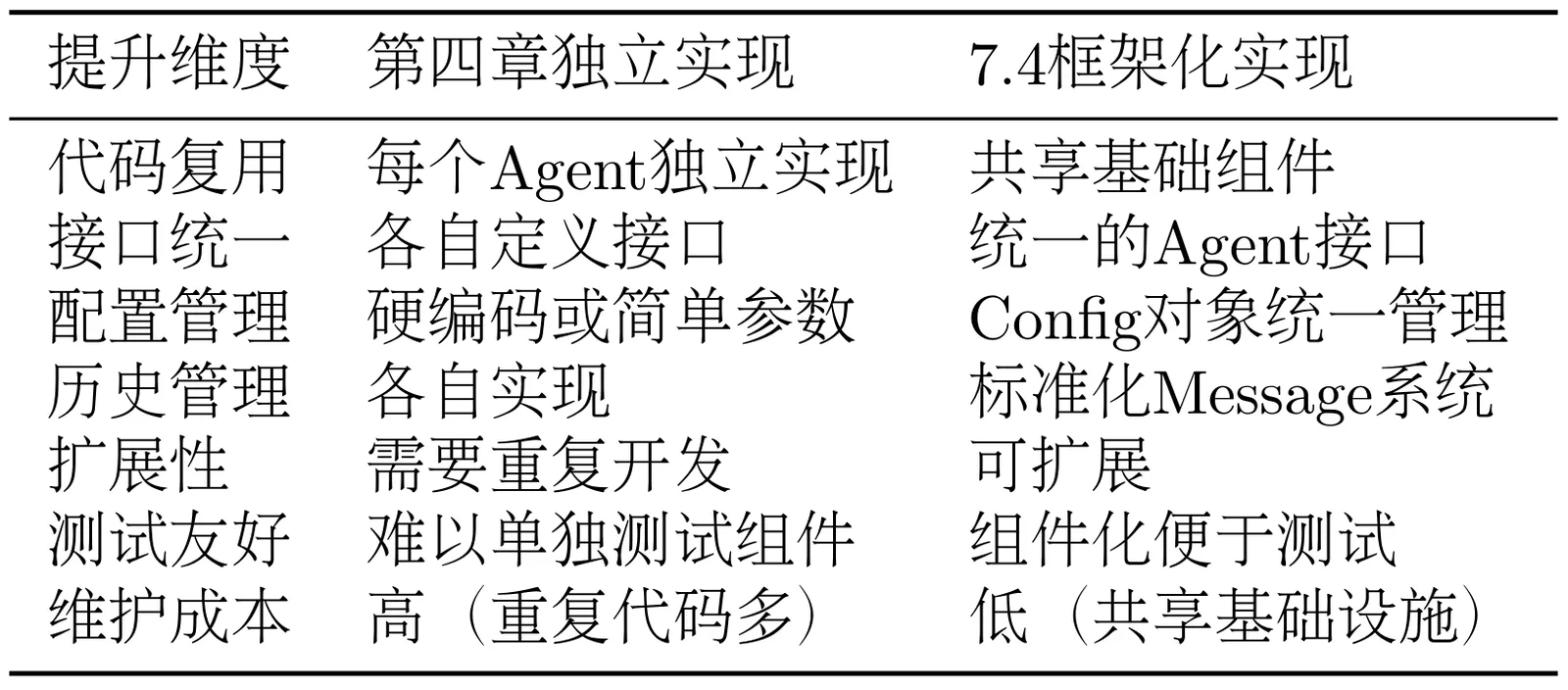
As shown in Table 7.2, through this framework refactoring, we not only maintained the core functionality of various Agent paradigms from Chapter 4 but also significantly improved code organization, maintainability, and extensibility. All Agents now share a unified infrastructure while maintaining their respective characteristics and advantages.
Table 7.2 Comparison of Agent Implementations Across Chapters
7.4.5 FunctionCallAgent
FunctionCallAgent is an Agent introduced in hello-agents after version 0.2.8, based on OpenAI's native function calling mechanism. It demonstrates how to build an Agent using OpenAI's function calling capabilities. It supports the following features:
- _build_tool_schemas: Constructs OpenAI function calling schema through tool descriptions
- _extract_message_content: Extracts text content from OpenAI responses
- _parse_function_call_arguments: Parses JSON string parameters returned by the model
- _convert_parameter_types: Converts parameter types
These features enable native OpenAI Function Calling capabilities, providing stronger robustness compared to prompt-constrained approaches.
def _invoke_with_tools(self, messages: list[dict[str, Any]], tools: list[dict[str, Any]], tool_choice: Union[str, dict], **kwargs):
        """Invoke underlying OpenAI client to execute function calls"""
        client = getattr(self.llm, "_client", None)
        if client is None:
            raise RuntimeError("HelloAgentsLLM client not properly initialized, cannot execute function calls.")

        client_kwargs = dict(kwargs)
        client_kwargs.setdefault("temperature", self.llm.temperature)
        if self.llm.max_tokens is not None:
            client_kwargs.setdefault("max_tokens", self.llm.max_tokens)

        return client.chat.completions.create(
            model=self.llm.model,
            messages=messages,
            tools=tools,
            tool_choice=tool_choice,
            **client_kwargs,
        )

# Internal logic wraps OpenAI native function calling
# OpenAI native function calling example
from openai import OpenAI
client = OpenAI()

tools = [
  {
    "type": "function",
    "function": {
      "name": "get_current_weather",
      "description": "Get the current weather in a given location",
      "parameters": {
        "type": "object",
        "properties": {
          "location": {
            "type": "string",
            "description": "The city and state, e.g. San Francisco, CA",
          },
          "unit": {"type": "string", "enum": ["celsius", "fahrenheit"]},
        },
        "required": ["location"],
      },
    }
  }
]
messages = [{"role": "user", "content": "What's the weather like in Boston today?"}]
completion = client.chat.completions.create(
  model="gpt-5",
  messages=messages,
  tools=tools,
  tool_choice="auto"
)

print(completion)