13.1 Project Overview and Architecture Design
13.1.1 Why We Need an Intelligent Travel Assistant
Planning a trip is both exciting and frustrating. You need to search for attraction information online, compare different guides, check weather forecasts, book hotels, calculate budgets, and plan routes. This process may take several hours or even days. And even after spending so much time, you're not sure whether the planned itinerary is reasonable, whether you've missed any important attractions, or whether the budget is accurate.
Traditional travel planning methods have several pain points. First is scattered information. Attraction information is on travel websites, weather information is on weather websites, hotel information is on booking websites - you need to switch between multiple websites and manually integrate this information. Second is lack of personalization. Most guides are generic and don't consider your personal preferences, budget constraints, travel time and other factors. Finally is difficulty in adjustment. When you want to modify the itinerary, you may need to replan the entire trip, because the order of attractions, time arrangements, and budget are all interconnected.
AI technology provides new possibilities for solving these problems. Imagine that you only need to tell the system "I want to visit Beijing for 3 days, like history and culture, medium budget", and the system can automatically generate a complete itinerary plan for you, including which attractions to visit each day, where to eat, which hotel to stay at, and how much budget is needed. Moreover, this plan is adjustable - you can delete attractions you don't like, adjust the tour order, and the system will automatically update the map and budget.
This is the intelligent travel assistant we want to build. It's not just a technical demonstration, but a truly useful application. Through this project, you will learn how to apply AI technology to practical problems, how to design multi-agent systems, and how to build complete Web applications.
13.1.2 Technical Architecture Overview
The system adopts the classic front-end and back-end separation architecture, divided into four layers, as shown in Figure 13.1:
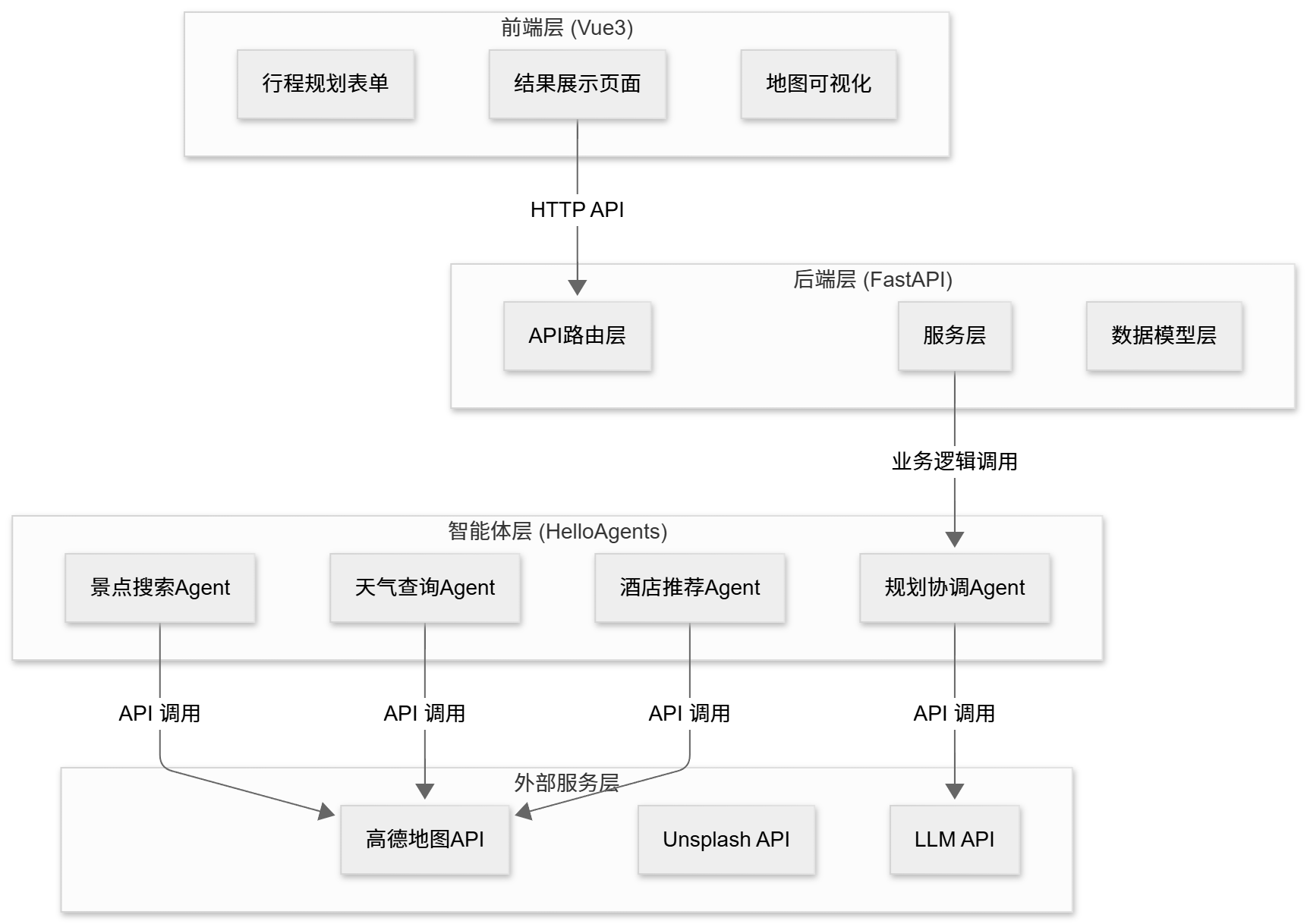
Figure 13.1 Intelligent Travel Assistant Technical Architecture
(1) Front-end Layer (Vue3+TypeScript): Responsible for user interaction and data display, including form input, result display, and map visualization.
(2) Back-end Layer (FastAPI): Responsible for API routing, data validation, and business logic.
(3) Agent Layer (HelloAgents): Responsible for task decomposition, tool invocation, and result integration. Includes 4 specialized Agents.
(4) External Service Layer: Provides data and capabilities, including Amap API, Unsplash API, and LLM API.
The data flow process is as follows: User fills out form on front-end → Back-end validates data → Calls agent system → Agents sequentially call attraction search, weather query, hotel recommendation, itinerary planning Agents → Each Agent calls external APIs through MCP protocol → Integrate results and return to front-end → Front-end renders and displays.
The project structure reference is as follows, provided for easy source code location:
helloagents-trip-planner/
├── backend/                    # Backend code
│   ├── app/
│   │   ├── agents/            # Agent implementation
│   │   ├── api/               # API routes
│   │   ├── models/            # Data models
│   │   ├── services/          # Service layer
│   │   └── config.py          # Configuration file
│   └── requirements.txt       # Python dependencies
│
└── frontend/                   # Frontend code
    ├── src/
    │   ├── views/             # Page components
    │   ├── services/          # API services
    │   ├── types/             # Type definitions
    │   └── router/            # Route configuration
    └── package.json           # npm dependencies
Detailed architecture design and data flow will be introduced in subsequent sections.
13.1.3 Quick Experience: Run the Project in 5 Minutes
Before diving into implementation details, let's first run the project to see the final effect. This way you will have an intuitive understanding of the entire system.
Environment Requirements:
- Python 3.10 or higher
- Node.js 16.0 or higher
- npm 8.0 or higher
Obtain API Keys:
You need to prepare the following API keys:
- LLM API (OpenAI, DeepSeek, etc.)
- Amap Web Service Key: Visit https://console.amap.com/ to register and create an application
- Unsplash Access Key: Visit https://unsplash.com/developers to register and create an application
Put all API keys in the .env file.
Start the backend:
# 1. Enter backend directory
cd helloagents-trip-planner/backend

# 2. Install dependencies
pip install -r requirements.txt

# 3. Configure environment variables
cp .env.example .env
# Edit .env file, fill in your API keys

# 4. Start backend service
uvicorn app.api.main:app --reload
# or
python run.py
After successful startup, visit http://localhost:8000/docs to see the API documentation.
Open a new terminal window:
# 1. Enter frontend directory
cd helloagents-trip-planner/frontend

# 2. Install dependencies
npm install

# 3. Start frontend service
npm run dev
After successful startup, visit http://localhost:5173 to use the application.
Experience core functions:
First, fill in the destination city, travel dates, preferences, budget, transportation and accommodation types in the homepage form. After clicking the "Start Planning" button, the system will display a loading progress bar and quickly generate a result page, as shown in Figure 13.2.
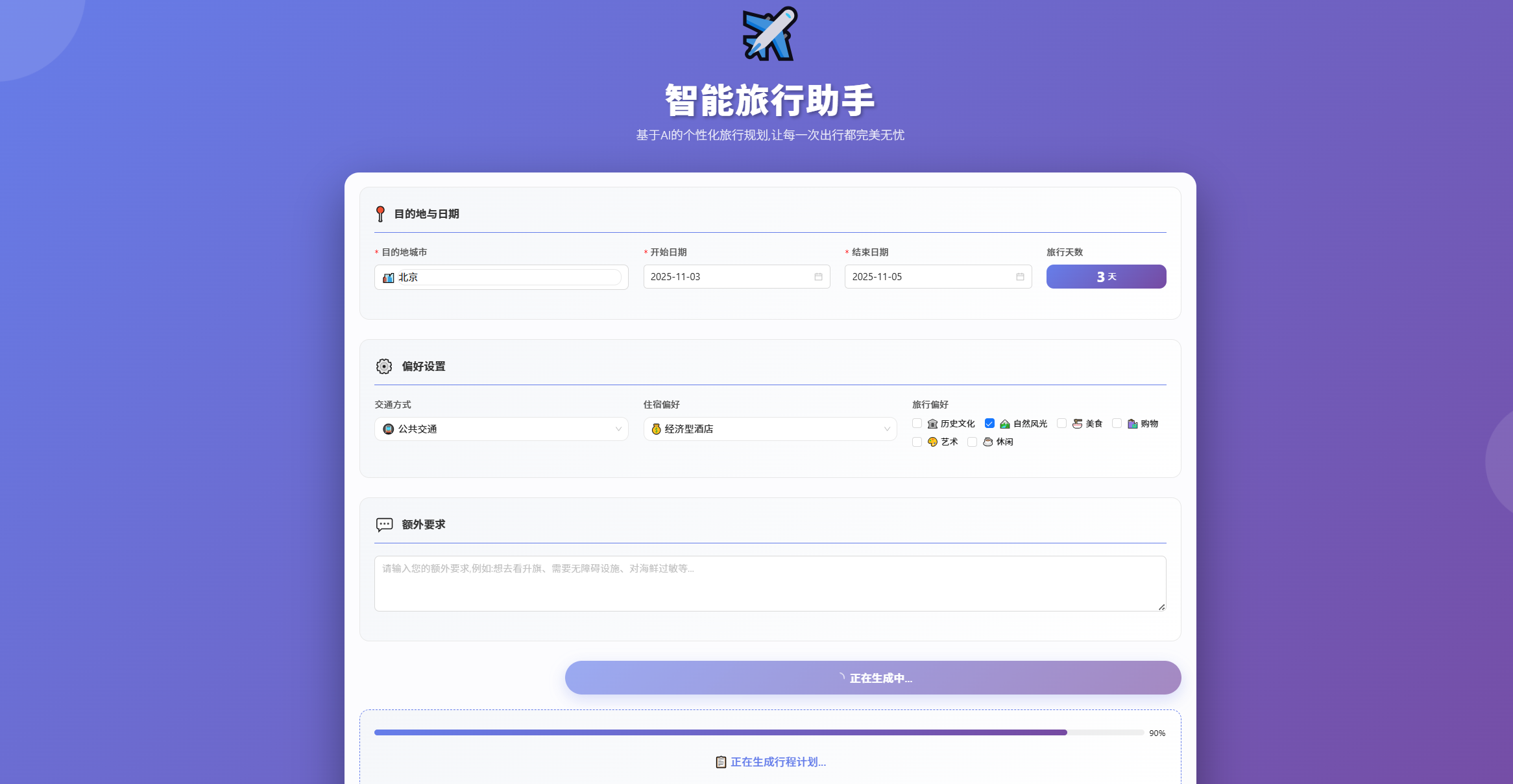
Figure 13.2 Travel Assistant Planning Progress Page
After successful loading, the page will clearly display itinerary overview, budget details, attraction map, daily itinerary details and weather information, as shown in Figures 13.3 and 13.4.
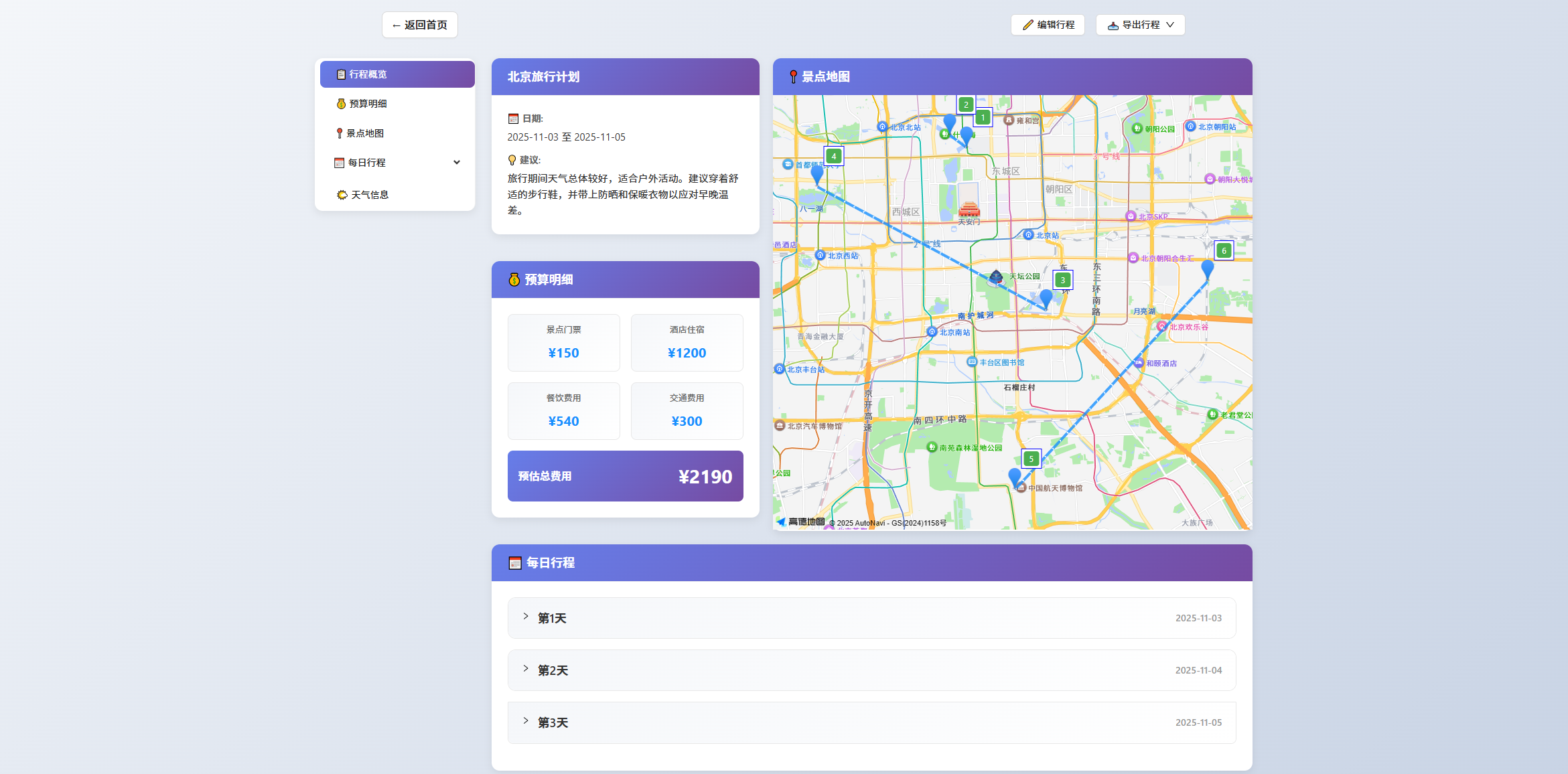
Figure 13.3 Travel Assistant Planning Completion Page
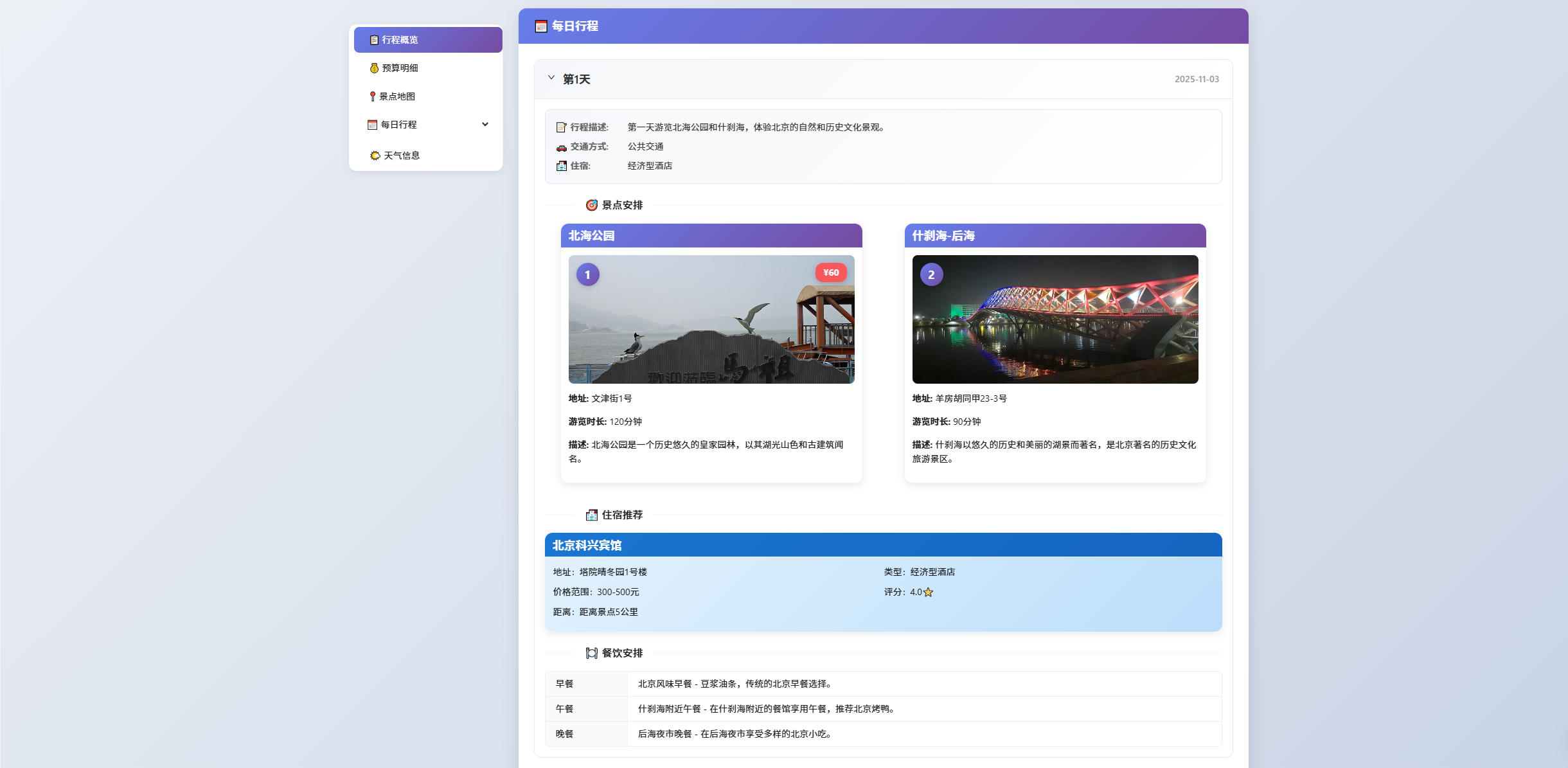
Figure 13.4 Travel Assistant Planning Completion Page
If users need personalized adjustments, they can click the "Edit Itinerary" button to freely adjust the order of attractions or delete certain attractions, as shown in Figure 13.5. After planning is complete, through the "Export Itinerary" dropdown menu, the final plan can be easily saved as an image or PDF file for convenient reference at any time.
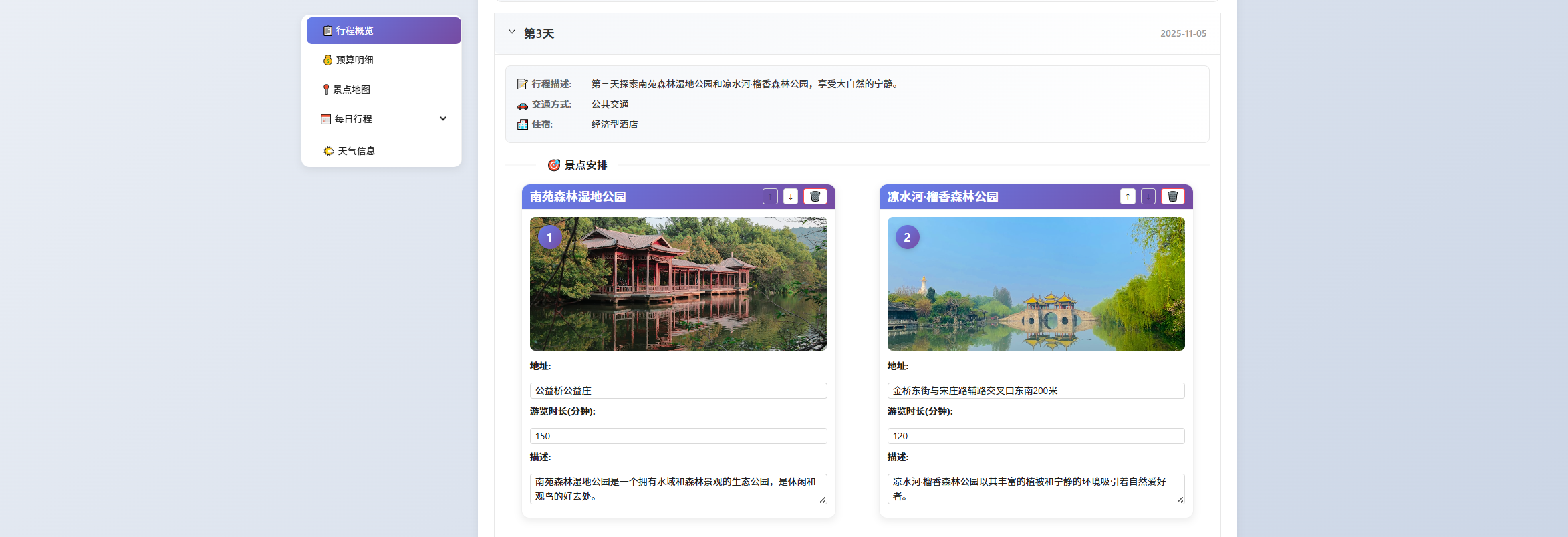
Figure 13.5 Travel Assistant Planning Completion Page