15.6 Front-End and Back-End Communication Implementation
15.6.1 API Client Encapsulation
The Godot front-end needs to communicate with the FastAPI back-end via HTTP. We create an API client script api_client.gd, encapsulating all API calls, and set it as an AutoLoad (auto-load) singleton so other scripts can conveniently use it.
The API client uses Godot's HTTPRequest node to send HTTP requests. HTTPRequest is an asynchronous node that doesn't block the game after sending requests, but notifies request completion through signals. This ensures game fluidity - even with high network latency, there's no stuttering. We use the signal mechanism to notify other scripts of API responses rather than using await, allowing multiple scripts to simultaneously listen for the same API response.
# api_client.gd
extends Node

# Signal definitions
signal chat_response_received(npc_name: String, message: String)
signal chat_error(error_message: String)
signal npc_status_received(dialogues: Dictionary)
signal npc_list_received(npcs: Array)

# HTTP request nodes
var http_chat: HTTPRequest
var http_status: HTTPRequest
var http_npcs: HTTPRequest

func _ready():
    # Create HTTP request nodes
    http_chat = HTTPRequest.new()
    http_status = HTTPRequest.new()
    http_npcs = HTTPRequest.new()

    add_child(http_chat)
    add_child(http_status)
    add_child(http_npcs)

    # Connect signals
    http_chat.request_completed.connect(_on_chat_request_completed)
    http_status.request_completed.connect(_on_status_request_completed)
    http_npcs.request_completed.connect(_on_npcs_request_completed)

# ==================== Chat API ====================
func send_chat(npc_name: String, message: String) -> void:
    """Send chat request"""
    var data = {
        "npc_name": npc_name,
        "message": message
    }

    var json_string = JSON.stringify(data)
    var headers = ["Content-Type: application/json"]

    var error = http_chat.request(
        Config.API_CHAT,
        headers,
        HTTPClient.METHOD_POST,
        json_string
    )

    if error != OK:
        print("[ERROR] Failed to send chat request: ", error)
        chat_error.emit("Network request failed")

func _on_chat_request_completed(_result: int, response_code: int, _headers: PackedStringArray, body: PackedByteArray) -> void:
    """Handle chat response"""
    if response_code != 200:
        print("[ERROR] Chat request failed: HTTP ", response_code)
        chat_error.emit("Server error: " + str(response_code))
        return

    var json = JSON.new()
    var parse_result = json.parse(body.get_string_from_utf8())

    if parse_result != OK:
        print("[ERROR] Failed to parse response")
        chat_error.emit("Response parsing failed")
        return

    var response = json.data

    if response.has("success") and response["success"]:
        var npc_name = response["npc_name"]
        var msg = response["message"]
        print("[INFO] Received NPC reply: ", npc_name, " -> ", msg)
        chat_response_received.emit(npc_name, msg)
    else:
        chat_error.emit("Chat failed")

# ==================== NPC Status API ====================
func get_npc_status() -> void:
    """Get NPC status"""
    # Check if request is being processed
    if http_status.get_http_client_status() != HTTPClient.STATUS_DISCONNECTED:
        print("[WARN] NPC status request is being processed, skipping this request")
        return

    var error = http_status.request(Config.API_NPC_STATUS)

    if error != OK:
        print("[ERROR] Failed to get NPC status: ", error)

func _on_status_request_completed(_result: int, response_code: int, _headers: PackedStringArray, body: PackedByteArray) -> void:
    """Handle NPC status response"""
    if response_code != 200:
        print("[ERROR] NPC status request failed: HTTP ", response_code)
        return

    var json = JSON.new()
    var parse_result = json.parse(body.get_string_from_utf8())

    if parse_result != OK:
        print("[ERROR] Failed to parse NPC status")
        return

    var response = json.data

    if response.has("dialogues"):
        var dialogues = response["dialogues"]
        print("[INFO] Received NPC status update: ", dialogues.size(), " NPCs")
        npc_status_received.emit(dialogues)

# ==================== NPC List API ====================
func get_npc_list() -> void:
    """Get NPC list"""
    var error = http_npcs.request(Config.API_NPCS)

    if error != OK:
        print("[ERROR] Failed to get NPC list: ", error)

func _on_npcs_request_completed(_result: int, response_code: int, _headers: PackedStringArray, body: PackedByteArray) -> void:
    """Handle NPC list response"""
    if response_code != 200:
        print("[ERROR] NPC list request failed: HTTP ", response_code)
        return

    var json = JSON.new()
    var parse_result = json.parse(body.get_string_from_utf8())

    if parse_result != OK:
        print("[ERROR] Failed to parse NPC list")
        return

    var response = json.data

    if response.has("npcs"):
        var npcs = response["npcs"]
        print("[INFO] Received NPC list: ", npcs.size(), " NPCs")
        npc_list_received.emit(npcs)
This API client encapsulates three core functions: send chat request (send_chat), get NPC status (get_npc_status), and get NPC list (get_npc_list). All HTTP requests are asynchronous, notifying response results through signals. We created independent HTTPRequest nodes for each API, allowing multiple requests to be sent simultaneously without interfering with each other. API URLs are obtained from the Config singleton for convenient unified management. The dialogue system listens to the chat_response_received signal to receive NPC replies, and the main scene listens to the npc_status_received signal to update NPC dialogue bubbles.
15.6.2 Dialogue UI Implementation
The dialogue UI is the interface for player-NPC interaction. We need to design a simple and beautiful dialogue box containing NPC name, title, dialogue content display, input box, and buttons.
The dialogue UI structure is shown in Figure 15.13:
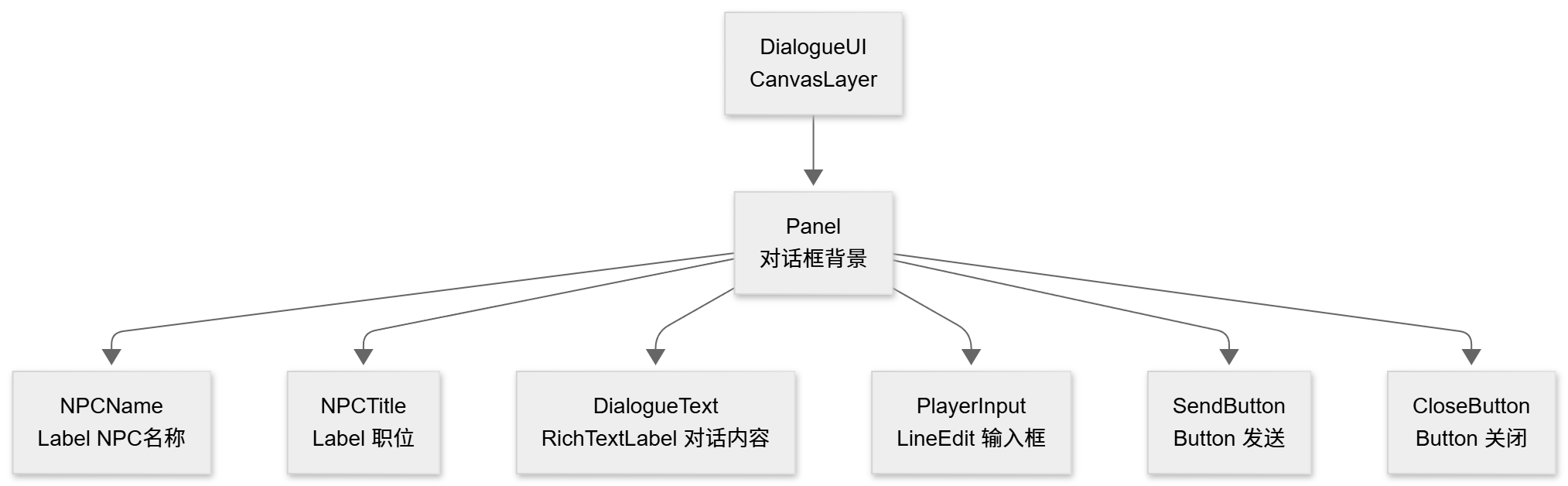
Figure 15.13 Dialogue UI Structure
The dialogue UI design is very simple. DialogueUI is a CanvasLayer node, meaning it will always display on top of the game screen and won't be obscured by other game objects. Panel is the dialogue box background, anchored at the bottom of the screen. Under Panel are 6 UI elements placed directly: NPCName displays the NPC's name, NPCTitle displays the title, DialogueText uses RichTextLabel to display dialogue content (supports rich text format), PlayerInput is a LineEdit for player input, and SendButton and CloseButton are used to send messages and close the dialogue box respectively.
The dialogue UI script dialogue_ui.gd implements the dialogue interface logic:
# dialogue_ui.gd
extends CanvasLayer

# UI node references
@onready var panel = $Panel
@onready var npc_name_label = $Panel/NPCName
@onready var npc_title_label = $Panel/NPCTitle
@onready var dialogue_text = $Panel/DialogueText
@onready var input_field = $Panel/PlayerInput
@onready var send_button = $Panel/SendButton
@onready var close_button = $Panel/CloseButton

# API client
var api_client: Node = null

# Current NPC in dialogue
var current_npc_name: String = ""

func _ready():
    # Hide dialogue box on initialization
    visible = false

    # Connect button signals
    send_button.pressed.connect(_on_send_button_pressed)
    close_button.pressed.connect(_on_close_button_pressed)
    input_field.text_submitted.connect(_on_text_submitted)

    # Get API client
    api_client = get_node_or_null("/root/APIClient")

func start_dialogue(npc_name: String):
    """Start dialogue with NPC"""
    current_npc_name = npc_name

    # Set NPC information
    npc_name_label.text = npc_name
    npc_title_label.text = get_npc_title(npc_name)

    # Clear dialogue content
    dialogue_text.clear()
    dialogue_text.append_text("[color=gray]Conversation with " + npc_name + " started...[/color]\n")

    # Clear input field
    input_field.text = ""

    # Show dialogue box
    show_dialogue()

    # Focus input field
    input_field.grab_focus()

func show_dialogue():
    """Show dialogue box"""
    visible = true

    # Notify player to enter interaction state (disable movement)
    var player = get_tree().get_first_node_in_group("player")
    if player and player.has_method("set_interacting"):
        player.set_interacting(true)

func hide_dialogue():
    """Hide dialogue box"""
    visible = false
    current_npc_name = ""

    # Notify player to exit interaction state (enable movement)
    var player = get_tree().get_first_node_in_group("player")
    if player and player.has_method("set_interacting"):
        player.set_interacting(false)

func _on_send_button_pressed():
    """Send button clicked"""
    send_message()

func _on_close_button_pressed():
    """Close button clicked"""
    hide_dialogue()

func _on_text_submitted(_text: String):
    """Input field enter pressed"""
    send_message()

func send_message():
    """Send message"""
    var message = input_field.text.strip_edges()

    if message.is_empty():
        return

    if current_npc_name.is_empty():
        return

    # Display player message
    dialogue_text.append_text("\n[color=cyan]Player:[/color] " + message + "\n")

    # Clear input field
    input_field.text = ""

    # Disable input
    input_field.editable = false
    send_button.disabled = true

    # Send API request
    if api_client:
        api_client.send_chat_request(current_npc_name, message)

func on_chat_response_received(npc_name: String, response: String):
    """Received NPC reply"""
    if npc_name == current_npc_name:
        # Display NPC reply
        dialogue_text.append_text("[color=yellow]" + npc_name + ":[/color] " + response + "\n")

        # Enable input
        input_field.editable = true
        send_button.disabled = false
        input_field.grab_focus()

func get_npc_title(npc_name: String) -> String:
    """Get NPC title"""
    var titles = {
        "Zhang San": "Python Engineer",
        "Li Si": "Product Manager",
        "Wang Wu": "UI Designer"
    }
    return titles.get(npc_name, "")
This dialogue UI implements complete dialogue functionality. Players can input and send messages, and the UI uses RichTextLabel's append_text method to display dialogue content, supporting rich text format (colors, bold, etc.). All API calls are asynchronous, disabling the input box while waiting for responses to prevent duplicate sends. When the dialogue box is displayed, it notifies the player to enter interaction state, disabling movement, and restores movement when closed.
15.6.3 Main Scene Integration
Finally, we need to integrate all functions in the main scene: player control, NPC interaction, dialogue UI, and NPC status updates. The main scene script main.gd coordinates these components and periodically obtains NPC status from the back-end to update NPC dialogue bubbles.
# main.gd
extends Node2D

# NPC node references
@onready var npc_zhang: Node2D = $NPCs/NPC_Zhang
@onready var npc_li: Node2D = $NPCs/NPC_Li
@onready var npc_wang: Node2D = $NPCs/NPC_Wang

# API client
var api_client: Node = null

# NPC status update timer
var status_update_timer: float = 0.0

func _ready():
    print("[INFO] Main scene initialization")

    # Get API client
    api_client = get_node_or_null("/root/APIClient")
    if api_client:
        api_client.npc_status_received.connect(_on_npc_status_received)

        # Immediately get NPC status once
        api_client.get_npc_status()
    else:
        print("[ERROR] API client not found")

func _process(delta: float):
    # Periodically update NPC status
    status_update_timer += delta
    if status_update_timer >= Config.NPC_STATUS_UPDATE_INTERVAL:
        status_update_timer = 0.0
        if api_client:
            api_client.get_npc_status()

func _on_npc_status_received(dialogues: Dictionary):
    """Received NPC status update"""
    print("[INFO] Update NPC status: ", dialogues)

    # Update each NPC's dialogue
    for npc_name in dialogues:
        var dialogue = dialogues[npc_name]
        update_npc_dialogue(npc_name, dialogue)

func update_npc_dialogue(npc_name: String, dialogue: String):
    """Update specified NPC's dialogue"""
    var npc_node = get_npc_node(npc_name)
    if npc_node and npc_node.has_method("update_dialogue"):
        npc_node.update_dialogue(dialogue)

func get_npc_node(npc_name: String) -> Node2D:
    """Get NPC node by name"""
    match npc_name:
        "Zhang San":
            return npc_zhang
        "Li Si":
            return npc_li
        "Wang Wu":
            return npc_wang
        _:
            return null
The core function of the main scene script is to periodically obtain NPC status from the back-end. In _ready(), we get a reference to the APIClient singleton and connect the npc_status_received signal. Then we immediately call get_npc_status() to get NPC status once. In _process(), we use a timer to call get_npc_status() every Config.NPC_STATUS_UPDATE_INTERVAL seconds (default 30 seconds). When NPC status updates are received, the _on_npc_status_received() callback function traverses all NPCs and calls their update_dialogue() method to update dialogue bubbles. This way, even if the player doesn't interact with NPCs, they can still see autonomous dialogue between NPCs.
The complete front-end and back-end communication process is shown in Figure 15.14:
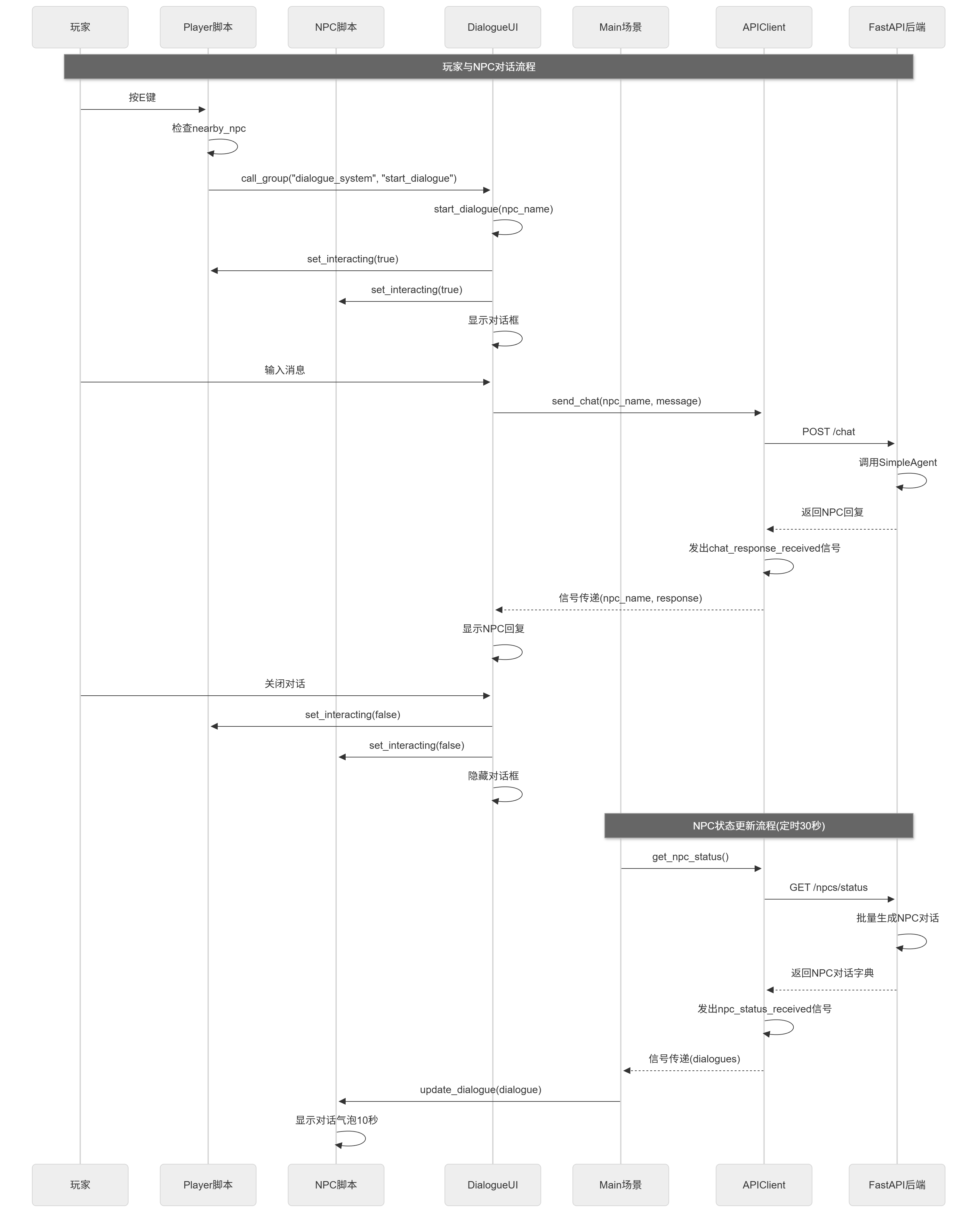
Figure 15.14 Complete Front-End and Back-End Communication Process
At this point, all front-end and back-end communication functions have been implemented. Players can move freely in the game, interact with NPCs, and have natural language conversations. Meanwhile, the main scene periodically obtains NPC status from the back-end, updates NPC dialogue bubbles, and displays autonomous dialogue between NPCs. The entire system uses a signal mechanism for communication, with loose coupling between components, making it easy to maintain and extend.