14.6 Front-End Interaction Design
In the previous sections, we implemented the complete back-end system. This section will introduce the front-end interaction design in detail, including full-screen modal dialog UI, real-time progress display, and research result visualization.
14.6.1 Full-Screen Modal Dialog UI Design
The deep research assistant adopts a full-screen modal dialog UI design, which has the following advantages:
- Immersive experience: Full-screen display, avoiding distractions, focusing on research
- Clear hierarchy: Main page and research page are separated, with clear hierarchy
- Easy to close: Click the close button or press ESC key to return to the main page
- Responsive design: Adapts to different screen sizes
As shown in Figure 14.9, the full-screen modal dialog contains the following parts:
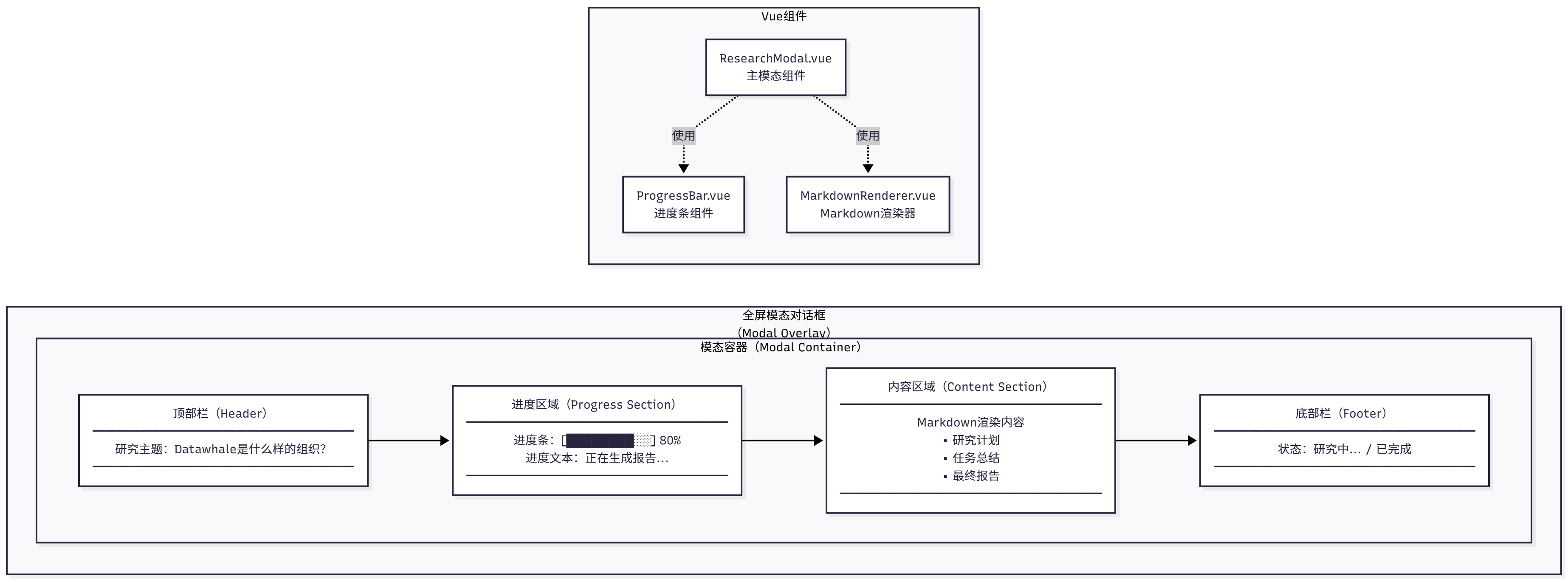
Figure 14.9 Full-Screen Modal Dialog UI
UI Components:
- Top bar: Contains research topic and close button
- Progress area: Shows current research progress (planning, execution, reporting)
- Content area: Shows research results (Markdown format)
- Bottom bar: Shows status information (such as "Researching...", "Completed")
The corresponding Vue implementation is as follows (ResearchModal.vue):
<template>
  <div v-if="isOpen" class="modal-overlay" @click.self="close">
    <div class="modal-container">

      <div class="modal-header">
        <h2>{{ researchTopic }}</h2>
        <button @click="close" class="close-button">
          <svg></svg>
        </button>
      </div>


      <div class="progress-section">
        <div class="progress-bar">
          <div
            class="progress-fill"
            :style="{ width: progressPercentage + '%' }"
          ></div>
        </div>
        <div class="progress-text">{{ progressText }}</div>
      </div>


      <div class="content-section">
        <div v-if="isLoading" class="loading-spinner">
          <div class="spinner"></div>
          <p>Researching, please wait...</p>
        </div>

        <div v-else class="markdown-content" v-html="renderedMarkdown"></div>
      </div>


      <div class="modal-footer">
        <span class="status-text">{{ statusText }}</span>
      </div>
    </div>
  </div>
</template>
To adapt to different screen sizes, we add media queries:
/* Tablet devices */
@media (max-width: 768px) {
  .modal-container {
    width: 95vw;
    height: 95vh;
  }

  .modal-header,
  .progress-section,
  .content-section,
  .modal-footer {
    padding: 15px 20px;
  }
}

/* Mobile devices */
@media (max-width: 480px) {
  .modal-container {
    width: 100vw;
    height: 100vh;
    border-radius: 0;
  }

  .modal-header h2 {
    font-size: 18px;
  }
}
14.6.2 Real-Time Progress Display
The deep research assistant uses SSE to implement real-time progress display. SSE is a server push technology that allows the server to actively send data to the client, which is also explained in the protocol chapter.
As shown in Figure 14.10, the SSE process includes the following steps:
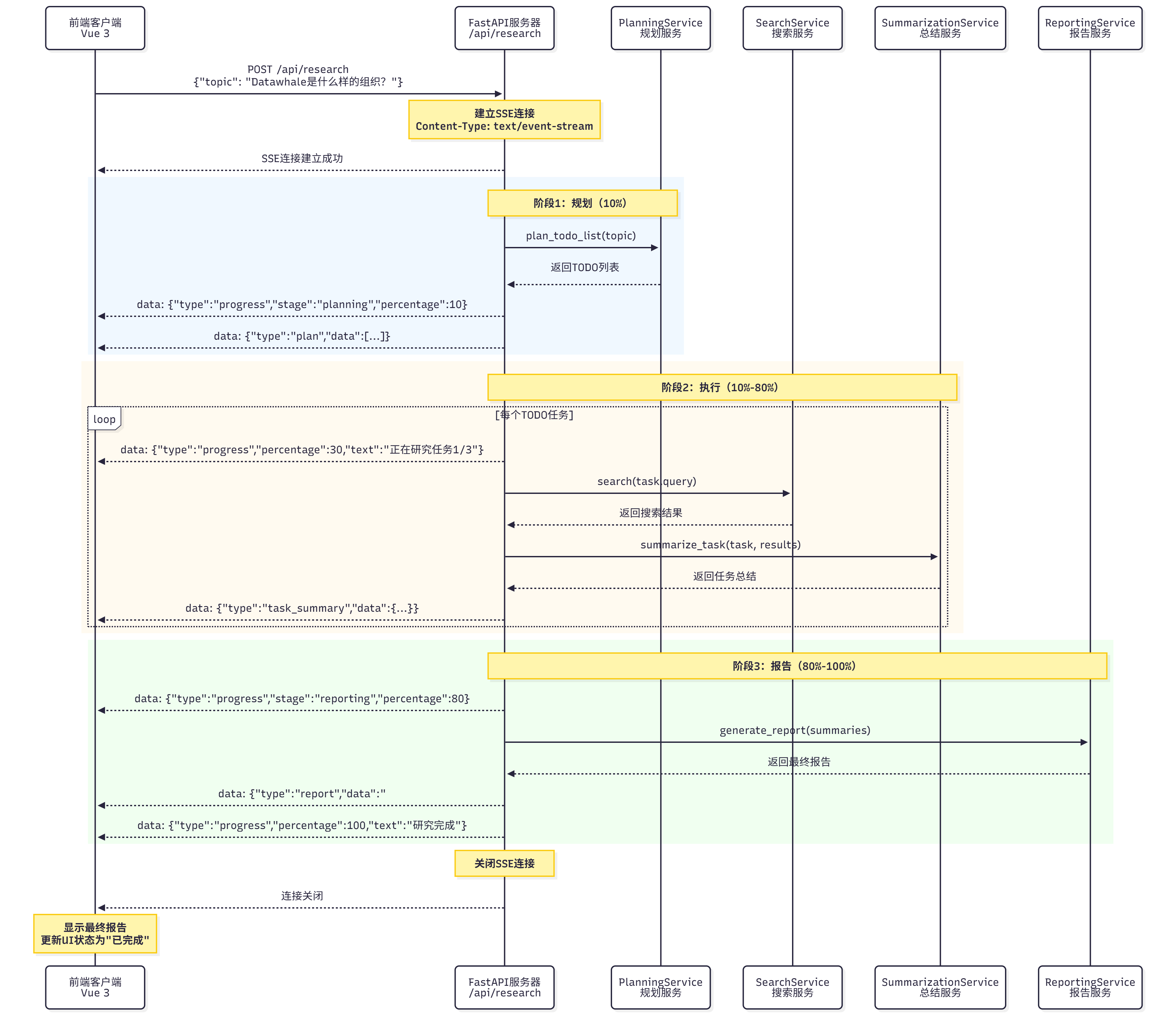
Figure 14.10 SSE Process
Process Description:
- Client initiates request: Send POST request to
/api/research, containing research topic - Server establishes SSE connection: Return
text/event-streamresponse - Server pushes progress: Periodically push research progress (planning, execution, reporting)
- Client receives progress: Listen for SSE events, update UI
- Research complete: Server pushes final report, closes connection
If you want to use SSE in front-end and back-end projects, you also need to make the following configurations.
Back-End FastAPI SSE Endpoint:
from fastapi import FastAPI
from fastapi.responses import StreamingResponse
from typing import AsyncGenerator
import asyncio
import json

app = FastAPI()

async def research_stream(topic: str) -> AsyncGenerator[str, None]:
    """Research streaming generator

    Generate SSE format data:
    data: {"type": "progress", "data": {...}}

    """
    try:
        # 1. Planning stage
        yield f"data: {json.dumps({'type': 'progress', 'stage': 'planning', 'percentage': 10, 'text': 'Planning research tasks...'})}\n\n"

        # Call PlanningService
        todo_items = await planning_service.plan_todo_list(topic)

        yield f"data: {json.dumps({'type': 'plan', 'data': [item.dict() for item in todo_items]})}\n\n"

        # 2. Execution stage
        task_summaries = []
        for idx, task in enumerate(todo_items, start=1):
            # Update progress
            percentage = 10 + (idx / len(todo_items)) * 70
            yield f"data: {json.dumps({'type': 'progress', 'stage': 'executing', 'percentage': percentage, 'text': f'Researching task {idx}/{len(todo_items)}: {task.title}'})}\n\n"

            # Search
            search_results = await search_service.search(task.query)

            # Summarize
            summary, source_urls = await summarization_service.summarize_task(task, search_results)

            task_summaries.append((task, summary, source_urls))

            # Push task summary
            yield f"data: {json.dumps({'type': 'task_summary', 'task_id': task.id, 'summary': summary})}\n\n"

        # 3. Reporting stage
        yield f"data: {json.dumps({'type': 'progress', 'stage': 'reporting', 'percentage': 90, 'text': 'Generating final report...'})}\n\n"

        # Generate report
        report = await reporting_service.generate_report(topic, task_summaries)

        # Push final report
        yield f"data: {json.dumps({'type': 'report', 'data': report})}\n\n"

        # Complete
        yield f"data: {json.dumps({'type': 'progress', 'stage': 'completed', 'percentage': 100, 'text': 'Research complete!'})}\n\n"

    except Exception as e:
        # Error handling
        yield f"data: {json.dumps({'type': 'error', 'message': str(e)})}\n\n"

@app.post("/api/research")
async def research(request: ResearchRequest):
    """Research endpoint (SSE)"""
    return StreamingResponse(
        research_stream(request.topic),
        media_type="text/event-stream",
        headers={
            "Cache-Control": "no-cache",
            "Connection": "keep-alive",
        }
    )
Front-End Using EventSource to Receive SSE:
// composables/useResearch.ts
import { ref } from 'vue'

export function useResearch() {
  const isLoading = ref(false)
  const progressPercentage = ref(0)
  const progressText = ref('')
  const markdownContent = ref('')
  const error = ref<string | null>(null)

  const startResearch = (topic: string) => {
    isLoading.value = true
    error.value = null

    // Create EventSource
    const eventSource = new EventSource(`/api/research?topic=${encodeURIComponent(topic)}`)

    // Listen for messages
    eventSource.onmessage = (event) => {
      const data = JSON.parse(event.data)

      switch (data.type) {
        case 'progress':
          progressPercentage.value = data.percentage
          progressText.value = data.text
          break

        case 'plan':
          // Display planning results
          console.log('Planning results:', data.data)
          break

        case 'task_summary':
          // Append task summary to Markdown
          markdownContent.value += `\n\n## Task ${data.task_id}\n\n${data.summary}`
          break

        case 'report':
          // Display final report
          markdownContent.value = data.data
          break

        case 'error':
          error.value = data.message
          eventSource.close()
          isLoading.value = false
          break

        case 'completed':
          eventSource.close()
          isLoading.value = false
          break
      }
    }

    // Error handling
    eventSource.onerror = (err) => {
      console.error('SSE error:', err)
      error.value = 'Connection failed, please retry'
      eventSource.close()
      isLoading.value = false
    }
  }

  return {
    isLoading,
    progressPercentage,
    progressText,
    markdownContent,
    error,
    startResearch,
  }
}
Using in Component:
14.6.3 Research Result Visualization
Research results are displayed in Markdown format, including titles, paragraphs, lists, quotes, and other elements. We use the marked library to convert Markdown to HTML and add custom styles.
Rendering Markdown:
import { marked } from 'marked'

// Configure marked
marked.setOptions({
  breaks: true,  // Support line breaks
  gfm: true,     // Support GitHub Flavored Markdown
})

// Render
const renderedHtml = marked(markdownContent.value)
Research reports contain a large number of source citations, which we need to handle specially:
## References

### Task 1: Basic Information about Datawhale
- [Datawhale GitHub](https://github.com/datawhalechina)
- [Datawhale Official Website](https://datawhale.club)

### Task 2: Main Projects of Datawhale
- [Hello-Agents Tutorial](https://github.com/datawhalechina/Hello-Agents)
...
Through full-screen modal dialog UI, SSE real-time progress display, and Markdown result visualization, we built a user-friendly front-end interface. Users can clearly see the research progress and view research results in a beautiful format.