13.3 Multi-Agent Collaboration Design
13.3.1 Why We Need Multi-Agent
In Chapter 7, we learned how to build agents using SimpleAgent. The design philosophy of SimpleAgent is simple and direct: each time the run() method is called, the Agent analyzes the user's question, decides whether to call tools, and then returns the result. This design is very effective when handling simple tasks, but when facing tasks like travel planning, some problems arise.
If we use a single Agent to complete travel planning, what does this Agent need to do? First, it needs to search for attraction information, which requires calling Amap's POI search tool. Then, it needs to query weather information, which requires calling the weather query tool. Next, it needs to search for hotel information, which again requires calling the POI search tool. Finally, it needs to integrate all this information to generate a complete travel plan.
This sounds simple, but in actual operation, the first problem is encountered: tool calling limitations. SimpleAgent can only execute one tool per run() call. This means we need to call the run() method multiple times, with each call handling one task. But this brings a new problem: how to pass information between multiple calls? How to pass the attraction information obtained from the first call to the second call? We need to manually manage these intermediate results, and the code becomes very complex.
Of course, we can use ReactAgent to solve this problem. ReactAgent can execute multiple tools in one call, and it will automatically perform multiple rounds of thinking and action. But this brings new problems: time cost. Each round of thinking by ReactAgent requires calling the LLM. If three tools need to be called, at least three rounds of thinking are needed, which means at least three LLM calls. Moreover, these calls are serial - the next one can only start after the previous one is complete, so the total time will be very long.
The second problem is prompt complexity. If we want one Agent to complete all tasks, we need to describe the execution logic of each task in detail in the prompt. For example:
COMPLEX_PROMPT = """You are a travel planning assistant. You need to:
1. Use maps_text_search to search for attractions, keywords determined by user preferences
2. Use maps_weather to query weather, get weather forecast for the next few days
3. Use maps_text_search to search for hotels, type determined by user needs
4. Integrate all information to generate travel plan, including daily attractions, dining, accommodation arrangements
Note: Must execute in order, each tool can only be called once, output must be in JSON format...
"""
This kind of prompt has several problems. First is difficult to maintain. If we want to modify the attraction search logic (such as adding rating filtering), we need to modify the entire prompt, which can easily affect other parts. Second is error-prone. The LLM needs to understand the requirements of multiple tasks simultaneously, and can easily confuse the formats and parameters of different tasks. Finally is difficult to debug. When the generated plan doesn't meet expectations, it's hard to know which part went wrong - is the attraction search inaccurate, did the weather query fail, or is there a problem with the integration logic?
Facing these problems, a natural idea is: can we decompose complex tasks into multiple simple tasks and let different Agents each do their own job? This is the core idea of multi-Agent collaboration.
Imagine a travel agency in the real world. When you go to a travel agency to consult about a travel plan, you won't be served by just one person. Usually there will be a dedicated attraction consultant responsible for recommending attractions; a hotel consultant responsible for booking hotels; and an itinerary planner responsible for integrating all information into a complete itinerary. Each person focuses on their area of expertise, and finally the itinerary planner summarizes all the information. This division of labor and collaboration is much more efficient than having one person do everything.
13.3.2 Agent Role Design
Based on the task decomposition principle, we designed four specialized Agents, as shown in Figure 13.6:
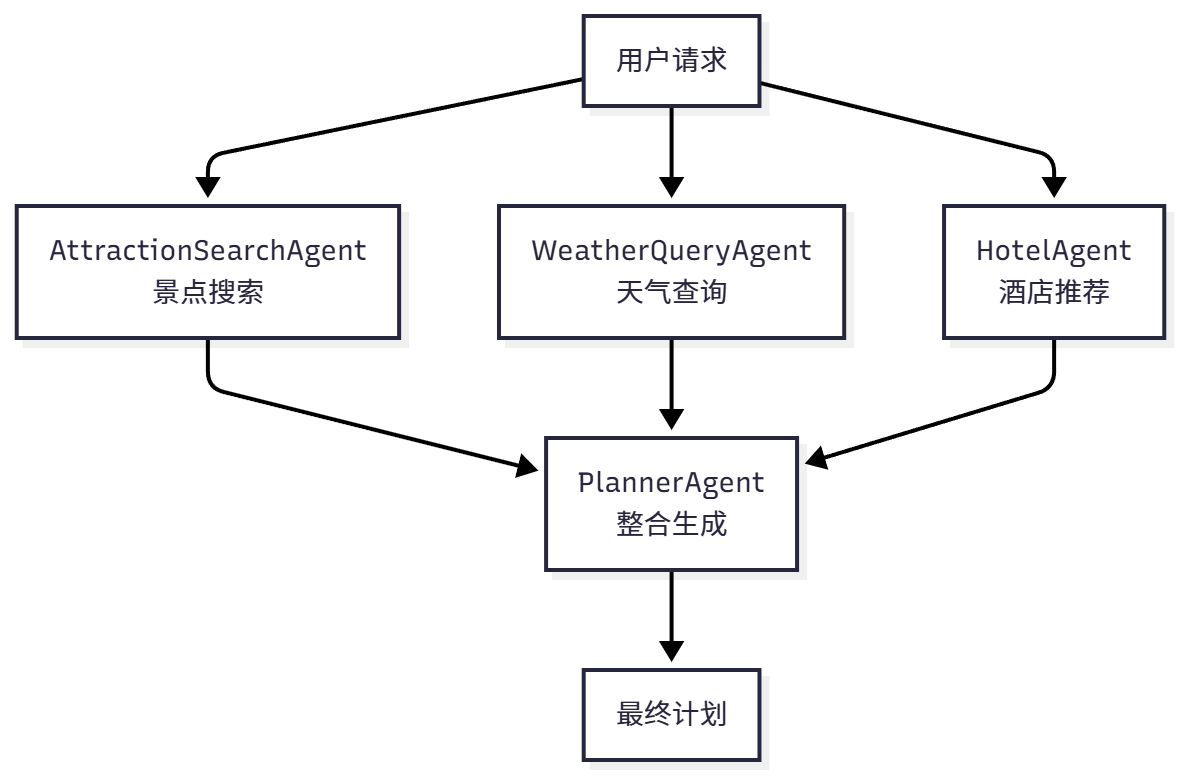
Figure 13.6 Multi-Agent Collaboration Flow
AttractionSearchAgent (Attraction Search Expert) focuses on searching for attraction information. It only needs to understand user preferences (such as "history and culture", "natural scenery"), then call Amap's POI search tool and return a list of related attractions. Its prompt is very simple, only needing to explain how to choose keywords based on preferences and how to call tools.
WeatherQueryAgent (Weather Query Expert) focuses on querying weather information. It only needs to know the city name, then call the weather query tool and return the weather forecast for the next few days. Its task is very clear and almost error-free.
HotelAgent (Hotel Recommendation Expert) focuses on searching for hotel information. It needs to understand user accommodation needs (such as "budget", "luxury"), then call the POI search tool and return a list of hotels that meet the requirements.
PlannerAgent (Itinerary Planning Expert) is responsible for integrating all information. It receives the output from the first three Agents, plus the user's original requirements (dates, budget, etc.), and then generates a complete travel plan. It doesn't need to call any external tools, only needs to focus on information integration and itinerary arrangement.
Now let's design the role and prompt for each Agent in detail. When designing prompts, we need to consider several key questions: What input does this Agent need? What output should it produce? What tools does it need to call? What problems might it encounter?
AttractionSearchAgent's task is to search for attractions based on user preferences. Its input is the city name and user preferences (such as "history and culture", "natural scenery"). It needs to call the amap_maps_text_search tool with parameters being keywords and city. Its output is a list of attractions, including name, address, rating, and other information.
ATTRACTION_AGENT_PROMPT = """You are an attraction search expert.

**Tool Call Format:**
`[TOOL_CALL:amap_maps_text_search:keywords=attraction,city=city_name]`

**Examples:**
- `[TOOL_CALL:amap_maps_text_search:keywords=attraction,city=Beijing]`
- `[TOOL_CALL:amap_maps_text_search:keywords=museum,city=Shanghai]`

**Important:**
- Must use tools to search, don't fabricate information
- Search for attractions in {city} based on user preferences ({preferences})
"""
This prompt is concise but contains all necessary information. It clearly explains the tool call format, provides specific examples, and emphasizes two important principles: must use tools (can't fabricate) and search based on user preferences.
WeatherQueryAgent's task is simpler, only needing to query weather. Its input is the city name, and output is weather information.
WEATHER_AGENT_PROMPT = """You are a weather query expert.

**Tool Call Format:**
`[TOOL_CALL:amap_maps_weather:city=city_name]`

Please query weather information for {city}.
"""HotelAgent's task is to search for hotels. Its input is the city name and accommodation type, and output is a hotel list.
HOTEL_AGENT_PROMPT = """You are a hotel recommendation expert.

**Tool Call Format:**
`[TOOL_CALL:amap_maps_text_search:keywords=hotel,city=city_name]`

Please search for {accommodation} hotels in {city}.
"""
PlannerAgent is the most complex because it needs to integrate all information. Its input is user requirements and the output from the first three Agents, and output is a complete travel plan (JSON format).
PLANNER_AGENT_PROMPT = """You are an itinerary planning expert.

**Output Format:**
Strictly return in the following JSON format:
{
  "city": "city name",
  "start_date": "YYYY-MM-DD",
  "end_date": "YYYY-MM-DD",
  "days": [...],
  "weather_info": [...],
  "overall_suggestions": "overall suggestions",
  "budget": {...}
}

**Planning Requirements:**
1. weather_info must include weather for each day
2. Temperature as pure numbers (without °C)
3. Arrange 2-3 attractions per day
4. Consider attraction distance and visit time
5. Include breakfast, lunch, and dinner
6. Provide practical suggestions
7. Include budget information
"""
13.3.3 Agent Collaboration Flow
Now let's see how these four Agents collaborate to complete the travel planning task. The entire flow can be divided into five steps:
class TripPlannerAgent:
    def __init__(self):
        self.attraction_agent = SimpleAgent(name="Attraction Search", prompt=ATTRACTION_PROMPT)
        self.weather_agent = SimpleAgent(name="Weather Query", prompt=WEATHER_PROMPT)
        self.hotel_agent = SimpleAgent(name="Hotel Recommendation", prompt=HOTEL_PROMPT)
        self.planner_agent = SimpleAgent(name="Itinerary Planning", prompt=PLANNER_PROMPT)

    def plan_trip(self, request: TripPlanRequest) -> TripPlan:
        # Step 1: Attraction search
        attraction_response = self.attraction_agent.run(
            f"Please search for {request.preferences} attractions in {request.city}"
        )

        # Step 2: Weather query
        weather_response = self.weather_agent.run(
            f"Please query weather for {request.city}"
        )

        # Step 3: Hotel recommendation
        hotel_response = self.hotel_agent.run(
            f"Please search for {request.accommodation} hotels in {request.city}"
        )

        # Step 4: Integrate and generate plan
        planner_query = self._build_planner_query(
            request, attraction_response, weather_response, hotel_response
        )
        planner_response = self.planner_agent.run(planner_query)

        # Step 5: Parse JSON
        trip_plan = self._parse_trip_plan(planner_response)
        return trip_plan
This flow executes four steps sequentially, with the output of each step serving as input for the next step. Note that we use the TripPlanRequest and TripPlan Pydantic models defined in Section 13.2.
13.3.4 Query Construction
PlannerAgent needs to integrate all information. This query needs to include all necessary information and be organized clearly and orderly so that the LLM can accurately understand it.
def _build_planner_query(
    self,
    request: TripPlanRequest,
    attraction_response: str,
    weather_response: str,
    hotel_response: str
) -> str:
    """Build query for planning Agent"""
    return f"""
Please generate a {request.days}-day travel plan for {request.city} based on the following information:

**User Requirements:**
- Destination: {request.city}
- Dates: {request.start_date} to {request.end_date}
- Days: {request.days} days
- Preferences: {request.preferences}
- Budget: {request.budget}
- Transportation: {request.transportation}
- Accommodation: {request.accommodation}

**Attraction Information:**
{attraction_response}

**Weather Information:**
{weather_response}

**Hotel Information:**
{hotel_response}

Please generate a detailed travel plan, including daily attraction arrangements, dining recommendations, accommodation information, and budget details.
"""
Through this multi-Agent collaboration design, we decompose a complex travel planning task into four simple subtasks. Each Agent focuses on its area of expertise, and also lays a good foundation for future feature expansion (such as adding restaurant recommendation Agent, transportation planning Agent).