4.2 ReAct
After preparing the LLM client, we will build the first and most classic agent paradigm: ReAct (Reason + Act). ReAct was proposed by Shunyu Yao in 2022<sup>[1]</sup>. Its core idea is to mimic how humans solve problems by explicitly combining Reasoning and Acting to form a "think-act-observe" loop.
4.2.1 ReAct Workflow
Before ReAct emerged, mainstream methods could be divided into two categories: one is the "pure thinking" type, such as Chain-of-Thought, which can guide models to perform complex logical reasoning but cannot interact with the external world and is prone to factual hallucinations; the other is the "pure action" type, where models directly output actions to execute but lack planning and error correction capabilities.
The ingenuity of ReAct lies in recognizing that thinking and acting are complementary. Thinking guides action, while action results in turn correct thinking. To this end, the ReAct paradigm uses a special prompt engineering to guide the model so that each step of its output follows a fixed trajectory:
- Thought (Thinking): This is the agent's "inner monologue." It analyzes the current situation, decomposes tasks, formulates the next plan, or reflects on the results of the previous step.
- Action (Acting): This is the specific action the agent decides to take, usually calling an external tool, such as
Search['Huawei's latest phone']. - Observation (Observing): This is the result returned from the external tool after executing the
Action, such as a summary of search results or an API return value.
The agent will continuously repeat this Thought -> Action -> Observation loop, appending new observation results to the history to form a continuously growing context until it determines in Thought that it has found the final answer and then outputs the result. This process forms a powerful synergy: reasoning makes actions more purposeful, while actions provide factual basis for reasoning.
We can formally express this process, as shown in Figure 4.1. Specifically, at each time step $t$, the agent's policy (i.e., the large language model $\pi$) generates the current thought $th_t$ and action $a_t$ based on the initial question $q$ and the historical trajectory of all previous "action-observation" steps $((a_1,o_1),\dots,(a_{t-1},o_{t-1}))$:
$$\left(th_t,a_t\right)=\pi\left(q,(a_1,o_1),\ldots,(a_{t-1},o_{t-1})\right)$$
Subsequently, the tool $T$ in the environment executes action $a_t$ and returns a new observation result $o_t$:
$$o_t = T(a_t)$$
This loop continues, appending new $(a_t,o_t)$ pairs to the history until the model determines in thought $th_t$ that the task is complete.
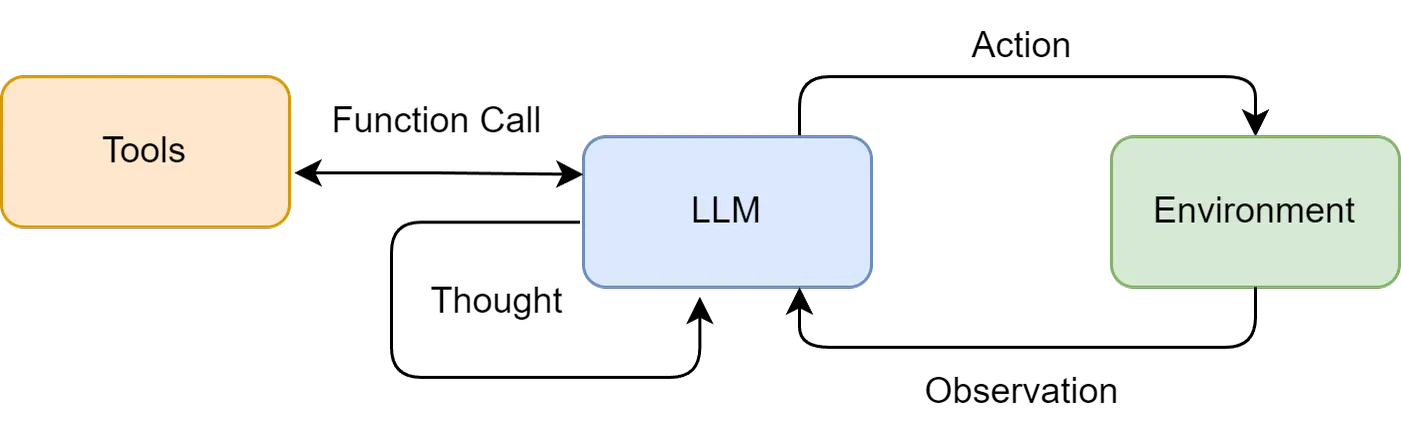
Figure 4.1 Think-Act-Observe Synergistic Loop in ReAct Paradigm
This mechanism is particularly suitable for the following scenarios:
- Tasks requiring external knowledge: Such as querying real-time information (weather, news, stock prices), searching for knowledge in professional domains, etc.
- Tasks requiring precise calculations: Delegating mathematical problems to calculator tools to avoid LLM calculation errors.
- Tasks requiring API interaction: Such as operating databases, calling a service's API to complete specific functions.
Therefore, we will build a ReAct agent with the capability to use external tools to answer questions that large language models cannot directly answer with their own knowledge base alone. For example: "What is Huawei's latest phone? What are its main selling points?" This question requires the agent to understand that it needs to search online, call tools to search for results, and summarize the answer.
4.2.2 Tool Definition and Implementation
If large language models are the brain of an agent, then Tools are its "hands and feet" for interacting with the external world. To enable the ReAct paradigm to truly solve the problems we set, the agent needs the capability to call external tools.
For the goal set in this section—answering questions about "Huawei's latest phone"—we need to provide the agent with a web search tool. Here we choose SerpApi, which provides structured Google search results through an API and can directly return "answer summary boxes" or precise knowledge graph information.
First, you need to install the library:
pip install google-search-resultsAt the same time, you need to go to the SerpApi official website to register a free account, obtain your API key, and add it to the .env file in our project root directory:
# .env file
# ... (Keep previous LLM configuration)
SERPAPI_API_KEY="YOUR_SERPAPI_API_KEY"
Next, we will define and manage this tool through code. We will proceed step by step: first implement the core functionality of the tool, then build a general tool manager.
(1) Implementing the Core Logic of the Search Tool
A well-defined tool should contain the following three core elements:
- Name: A concise, unique identifier for the agent to call in
Action, such asSearch. - Description: A clear natural language description explaining the purpose of this tool. This is the most critical part of the entire mechanism because the large language model will rely on this description to determine when to use which tool.
- Execution Logic: The function or method that actually performs the task.
Our first tool is the search function, which receives a query string and then returns search results.
from serpapi import SerpApiClient

def search(query: str) -> str:
    """
    A practical web search engine tool based on SerpApi.
    It intelligently parses search results, prioritizing direct answers or knowledge graph information.
    """
    print(f"🔍 Executing [SerpApi] web search: {query}")
    try:
        api_key = os.getenv("SERPAPI_API_KEY")
        if not api_key:
            return "Error: SERPAPI_API_KEY not configured in .env file."

        params = {
            "engine": "google",
            "q": query,
            "api_key": api_key,
            "gl": "cn",  # Country code
            "hl": "zh-cn", # Language code
        }

        client = SerpApiClient(params)
        results = client.get_dict()

        # Intelligent parsing: prioritize finding the most direct answer
        if "answer_box_list" in results:
            return "\n".join(results["answer_box_list"])
        if "answer_box" in results and "answer" in results["answer_box"]:
            return results["answer_box"]["answer"]
        if "knowledge_graph" in results and "description" in results["knowledge_graph"]:
            return results["knowledge_graph"]["description"]
        if "organic_results" in results and results["organic_results"]:
            # If no direct answer, return summaries of the first three organic results
            snippets = [
                f"[{i+1}] {res.get('title', '')}\n{res.get('snippet', '')}"
                for i, res in enumerate(results["organic_results"][:3])
            ]
            return "\n\n".join(snippets)

        return f"Sorry, no information found about '{query}'."

    except Exception as e:
        return f"Error occurred during search: {e}"
In the above code, it first checks whether answer_box (Google's answer summary box) or knowledge_graph (knowledge graph) information exists. If it does, it directly returns these most precise answers. If not, it falls back to returning summaries of the first three regular search results. This "intelligent parsing" can provide higher-quality information input for the LLM.
(2) Building a General Tool Executor
When an agent needs to use multiple tools (for example, in addition to search, it may also need calculation, database queries, etc.), we need a unified manager to register and dispatch these tools. For this, we create a ToolExecutor class.
from typing import Dict, Any

class ToolExecutor:
    """
    A tool executor responsible for managing and executing tools.
    """
    def __init__(self):
        self.tools: Dict[str, Dict[str, Any]] = {}

    def registerTool(self, name: str, description: str, func: callable):
        """
        Register a new tool in the toolbox.
        """
        if name in self.tools:
            print(f"Warning: Tool '{name}' already exists and will be overwritten.")
        self.tools[name] = {"description": description, "func": func}
        print(f"Tool '{name}' registered.")

    def getTool(self, name: str) -> callable:
        """
        Get a tool's execution function by name.
        """
        return self.tools.get(name, {}).get("func")

    def getAvailableTools(self) -> str:
        """
        Get a formatted description string of all available tools.
        """
        return "\n".join([
            f"- {name}: {info['description']}"
            for name, info in self.tools.items()
        ])
(3) Testing
Now, we will register the search tool in the ToolExecutor and simulate a call to verify that the entire process works properly.
# --- Tool Initialization and Usage Example ---
if __name__ == '__main__':
    # 1. Initialize tool executor
    toolExecutor = ToolExecutor()

    # 2. Register our practical search tool
    search_description = "A web search engine. Use this tool when you need to answer questions about current events, facts, and information not found in your knowledge base."
    toolExecutor.registerTool("Search", search_description, search)

    # 3. Print available tools
    print("\n--- Available Tools ---")
    print(toolExecutor.getAvailableTools())

    # 4. Agent's Action call, this time we ask a real-time question
    print("\n--- Execute Action: Search['What is NVIDIA's latest GPU model'] ---")
    tool_name = "Search"
    tool_input = "What is NVIDIA's latest GPU model"

    tool_function = toolExecutor.getTool(tool_name)
    if tool_function:
        observation = tool_function(tool_input)
        print("--- Observation ---")
        print(observation)
    else:
        print(f"Error: Tool named '{tool_name}' not found.")

>>>
Tool 'Search' registered.

--- Available Tools ---
- Search: A web search engine. Use this tool when you need to answer questions about current events, facts, and information not found in your knowledge base.

--- Execute Action: Search['What is NVIDIA's latest GPU model'] ---
🔍 Executing [SerpApi] web search: What is NVIDIA's latest GPU model
--- Observation ---
[1] GeForce RTX 50 Series Graphics Cards
GeForce RTX™ 50 Series GPUs are powered by NVIDIA Blackwell architecture, bringing new gameplay for gamers and creators. RTX 50 Series has powerful AI computing power, bringing upgraded experience and more realistic graphics.

[2] Compare GeForce Series Latest Generation and Previous Generation Graphics Cards
Compare the latest RTX 30 series graphics cards with previous RTX 20 series, GTX 10 and 900 series graphics cards. View specifications, features, technical support, etc.

[3] GeForce Graphics Cards | NVIDIA
DRIVE AGX. Powerful in-vehicle computing power for AI-driven intelligent vehicle systems · Clara AGX. AI computing for innovative medical devices and imaging. Gaming and Creation. GeForce. Explore graphics cards, gaming solutions, AI ...
So far, we have equipped the agent with a Search tool that connects to the real-world internet, providing a solid foundation for the subsequent ReAct loop.
4.2.3 Coding Implementation of ReAct Agent
Now, we will assemble all independent components—the LLM client and tool executor—to build a complete ReAct agent. We will encapsulate its core logic through a ReActAgent class. For ease of understanding, we will break down the implementation process of this class into the following key parts for explanation.
(1) System Prompt Design
The prompt is the cornerstone of the entire ReAct mechanism, providing operational instructions for the large language model. We need to carefully design a template that will dynamically insert available tools, user questions, and the interaction history of intermediate steps.
# ReAct Prompt Template
REACT_PROMPT_TEMPLATE = """
Please note that you are an intelligent assistant capable of calling external tools.

Available tools are as follows:
{tools}

Please respond strictly in the following format:

Thought: Your thinking process, used to analyze problems, decompose tasks, and plan the next action.
Action: The action you decide to take, must be in one of the following formats:
- {{tool_name}}[{{tool_input}}]`: Call an available tool.
- `Finish[final answer]`: When you believe you have obtained the final answer.
- When you have collected enough information to answer the user's final question, you must use `Finish[final answer]` after the Action: field to output the final answer.

Now, please start solving the following problem:
Question: {question}
History: {history}
"""
This template defines the specification for interaction between the agent and the LLM:
- Role Definition: "You are an intelligent assistant capable of calling external tools" sets the LLM's role.
- Tool List (
\{tools\}): Informs the LLM what "hands and feet" it has available. - Format Convention (
Thought/Action): This is the most important part, forcing the LLM's output to be structured so we can precisely parse its intent through code. - Dynamic Context (
\{question\}/\{history\}): Injects the user's original question and continuously accumulated interaction history, allowing the LLM to make decisions based on complete context.
(2) Core Loop Implementation
The core of ReActAgent is a loop that continuously "formats prompt -> calls LLM -> executes action -> integrates results" until the task is complete or the maximum step limit is reached.
class ReActAgent:
    def __init__(self, llm_client: HelloAgentsLLM, tool_executor: ToolExecutor, max_steps: int = 5):
        self.llm_client = llm_client
        self.tool_executor = tool_executor
        self.max_steps = max_steps
        self.history = []

    def run(self, question: str):
        """
        Run the ReAct agent to answer a question.
        """
        self.history = [] # Reset history for each run
        current_step = 0

        while current_step < self.max_steps:
            current_step += 1
            print(f"--- Step {current_step} ---")

            # 1. Format prompt
            tools_desc = self.tool_executor.getAvailableTools()
            history_str = "\n".join(self.history)
            prompt = REACT_PROMPT_TEMPLATE.format(
                tools=tools_desc,
                question=question,
                history=history_str
            )

            # 2. Call LLM to think
            messages = [{"role": "user", "content": prompt}]
            response_text = self.llm_client.think(messages=messages)

            if not response_text:
                print("Error: LLM failed to return a valid response.")
                break

            # ... (Subsequent parsing, execution, integration steps)
The run method is the entry point of the agent. Its while loop constitutes the main body of the ReAct paradigm, and the max_steps parameter is an important safety valve to prevent the agent from falling into an infinite loop and exhausting resources.
(3) Output Parser Implementation
The LLM returns plain text, and we need to precisely extract Thought and Action from it. This is accomplished through several auxiliary parsing functions, which typically use regular expressions.
# (These methods are part of the ReActAgent class)
    def _parse_output(self, text: str):
        """Parse LLM output to extract Thought and Action.
        """
        # Thought: match until Action: or end of text
        thought_match = re.search(r"Thought:\s*(.*?)(?=\nAction:|$)", text, re.DOTALL)
        # Action: match until end of text
        action_match = re.search(r"Action:\s*(.*?)$", text, re.DOTALL)
        thought = thought_match.group(1).strip() if thought_match else None
        action = action_match.group(1).strip() if action_match else None
        return thought, action

    def _parse_action(self, action_text: str):
        """Parse Action string to extract tool name and input.
        """
        match = re.match(r"(\w+)\[(.*)\]", action_text, re.DOTALL)
        if match:
            return match.group(1), match.group(2)
return None, None_parse_output: Responsible for separating the two main partsThoughtandActionfrom the LLM's complete response._parse_action: Responsible for further parsing theActionstring, for example, extracting the tool nameSearchand tool inputHuawei's latest phonefromSearch[Huawei's latest phone].
(4) Tool Invocation and Execution
# (This logic is inside the while loop of the run method)
            # 3. Parse LLM output
            thought, action = self._parse_output(response_text)

            if thought:
                print(f"Thought: {thought}")

            if not action:
                print("Warning: Failed to parse valid Action, process terminated.")
                break

            # 4. Execute Action
            if action.startswith("Finish"):
                # If it's a Finish instruction, extract the final answer and end
                final_answer = re.match(r"Finish\[(.*)\]", action).group(1)
                print(f"🎉 Final Answer: {final_answer}")
                return final_answer

            tool_name, tool_input = self._parse_action(action)
            if not tool_name or not tool_input:
                # ... Handle invalid Action format ...
                continue

            print(f"🎬 Action: {tool_name}[{tool_input}]")

            tool_function = self.tool_executor.getTool(tool_name)
            if not tool_function:
                observation = f"Error: Tool named '{tool_name}' not found."
            else:
                observation = tool_function(tool_input) # Call real tool
This code is the execution center of Action. It first checks whether it's a Finish instruction; if so, the process ends. Otherwise, it obtains the corresponding tool function through tool_executor and executes it to get the observation.
(5) Integration of Observation Results
The last step, and the key to forming a closed loop, is to add the Action itself and the Observation after tool execution back to the history, providing new context for the next loop.
# (This logic follows tool invocation, at the end of the while loop)
            print(f"👀 Observation: {observation}")

            # Add this round's Action and Observation to history
            self.history.append(f"Action: {action}")
            self.history.append(f"Observation: {observation}")

        # Loop ends
        print("Maximum steps reached, process terminated.")
        return None
By appending Observation to self.history, the agent can "see" the results of the previous action when generating the prompt in the next round, and conduct new thinking and planning accordingly.
(6) Running Instance and Analysis
Combining all the above parts, we get the complete ReActAgent class. The complete code running instance can be found in the code folder of this book's accompanying code repository.
Below is a real running record:
Tool 'Search' registered.

--- Step 1 ---
🧠 Calling xxxxxx model...
✅ Large language model response successful:
Thought: To answer this question, I need to search for Huawei's latest released phone model and its main features. This information may be outside my existing knowledge base, so I need to use a search engine to obtain the latest data.
Action: Search[Huawei latest phone model and main selling points]
🤔 Thought: To answer this question, I need to search for Huawei's latest released phone model and its main features. This information may be outside my existing knowledge base, so I need to use a search engine to obtain the latest data.
🎬 Action: Search[Huawei latest phone model and main selling points]
🔍 Executing [SerpApi] web search: Huawei latest phone model and main selling points
👀 Observation: [1] Huawei Phones - Huawei Official Website
Smartphones ; Mate Series. Extraordinary Flagship · HUAWEI Mate XTs. Extraordinary Master ; Pura Series. Pioneer Imaging · HUAWEI Pura 80 Pro+ ; Pocket Series. Aesthetic New Chapter. HUAWEI Pocket 2 ; nova Series. Professional Portrait.

[2] Which Huawei phone has the best value in 2025? Huawei phone recommendations and market analysis ...
Now the biggest selling point of Huawei phones is only the HarmonyOS system, and the controversial brand faith. Here are several Huawei series phones worth buying, choose according to different budgets:. Huawei's currently most popular, also equipped with ...

[3] Which new Huawei phone has the best value in 2025? 10 new Huawei phone recommendations
Choosing Huawei mainly recommends high-end phones, Mate 70 and Pura 70 series are the latest flagship models. HUAWEI Mate 70. Advantages are, photography configuration is still top-level, full focal length coverage, suitable for professional photography, excellent workmanship, outdoor drop resistance ...

--- Step 2 ---
🧠 Calling xxxxxx model...
✅ Large language model response successful:
Thought: Based on the search results, Huawei's latest flagship models include Mate 70 and Pura 80 Pro+. To determine the latest model and its main selling points, I will focus on this information. From the provided links, both Mate 70 series and Pura 80 Pro+ are recently released products, but which one is "latest" needs further confirmation. Meanwhile, I can extract their main selling points from this information.
Action: Finish[According to the latest information, Huawei's latest phones may be HUAWEI Pura 80 Pro+ or HUAWEI Mate 70. Among them, HUAWEI Mate 70's main selling points include top-level photography configuration, full focal length coverage, suitable for professional photography, excellent workmanship, and good outdoor drop resistance. While HUAWEI Pura 80 Pro+ emphasizes pioneer imaging technology.]
🤔 Thought: Based on the search results, Huawei's latest flagship models include Mate 70 and Pura 80 Pro+. To determine the latest model and its main selling points, I will focus on this information. From the provided links, both Mate 70 series and Pura 80 Pro+ are recently released products, but which one is "latest" needs further confirmation. Meanwhile, I can extract their main selling points from this information.
🎉 Final Answer: According to the latest information, Huawei's latest phones may be HUAWEI Pura 80 Pro+ or HUAWEI Mate 70. Among them, HUAWEI Mate 70's main selling points include top-level photography configuration, full focal length coverage, suitable for professional photography, excellent workmanship, and good outdoor drop resistance. While HUAWEI Pura 80 Pro+ emphasizes pioneer imaging technology.
From the above output, we can see that the agent clearly demonstrates its chain of thought: it first realizes its knowledge is insufficient and needs to use the search tool; then, it reasons and summarizes based on search results, arriving at the final answer within two steps.
It's worth noting that since the model's knowledge and internet information are constantly updated, your running results may not be exactly the same as this. As of September 8, 2025, when this section was written, the HUAWEI Mate 70 and HUAWEI Pura 80 Pro+ mentioned in search results were indeed Huawei's latest flagship series phones at that time. This fully demonstrates the powerful capability of the ReAct paradigm in handling time-sensitive issues.
4.2.4 Characteristics, Limitations, and Debugging Techniques of ReAct
By implementing a ReAct agent firsthand, we not only mastered its workflow but should also have a deeper understanding of its internal mechanisms. Any technical paradigm has its highlights and areas for improvement; this section will summarize ReAct.
(1) Main Characteristics of ReAct
- High Interpretability: One of ReAct's greatest advantages is transparency. Through the
Thoughtchain, we can clearly see the agent's "mental journey" at each step—why it chose this tool and what it plans to do next. This is crucial for understanding, trusting, and debugging agent behavior. - Dynamic Planning and Error Correction Capability: Unlike paradigms that generate complete plans at once, ReAct is "take one step, look one step." It dynamically adjusts subsequent
ThoughtandActionbased onObservationobtained from the external world at each step. If the previous search results are unsatisfactory, it can correct the search terms in the next step and try again. - Tool Synergy Capability: The ReAct paradigm naturally combines the reasoning capability of large language models with the execution capability of external tools. LLMs are responsible for strategizing (planning and reasoning), tools are responsible for solving specific problems (searching, calculating), and the two work synergistically, breaking through the inherent limitations of single LLMs in knowledge timeliness, computational accuracy, etc.
(2) Inherent Limitations of ReAct
- Strong Dependence on LLM's Own Capabilities: The success of the ReAct process highly depends on the comprehensive capabilities of the underlying LLM. If the LLM's logical reasoning ability, instruction-following ability, or formatted output ability is insufficient, it's easy to produce wrong planning in the
Thoughtstage or generate instructions that don't conform to the format in theActionstage, causing the entire process to be interrupted. - Execution Efficiency Issues: Due to its step-by-step nature, completing a task usually requires multiple LLM calls. Each call is accompanied by network latency and computational cost. For complex tasks requiring many steps, this serial "think-act" loop may lead to high total time and cost.
- Prompt Fragility: The stable operation of the entire mechanism is built on a carefully designed prompt template. Any minor change in the template, even differences in wording, may affect LLM behavior. Additionally, not all models can consistently follow preset formats, increasing uncertainty in practical applications.
- May Fall into Local Optima: The step-by-step decision-making mode means the agent lacks a global, long-term plan. It may choose a path that seems correct in the short term but is not optimal in the long run due to immediate
Observation, or even fall into a "spinning in place" loop in some cases.
(3) Debugging Techniques
When your built ReAct agent behaves unexpectedly, you can debug from the following aspects:
- Check Complete Prompt: Before each LLM call, print out the final formatted complete prompt containing all history. This is the most direct way to trace the source of LLM decisions.
- Analyze Raw Output: When output parsing fails (for example, regular expressions didn't match
Action), be sure to print out the raw, unprocessed text returned by the LLM. This can help you determine whether the LLM didn't follow the format or your parsing logic is wrong. - Verify Tool Input and Output: Check whether the
tool_inputgenerated by the agent is in the format expected by the tool function, and also ensure theobservationreturned by the tool is in a format the agent can understand and process. - Adjust Examples in Prompt (Few-shot Prompting): If the model frequently makes errors, you can add one or two complete successful "Thought-Action-Observation" cases in the prompt to guide the model to better follow your instructions through examples.
- Try Different Models or Parameters: Switching to a more capable model or adjusting the
temperatureparameter (usually set to 0 to ensure output determinism) can sometimes directly solve the problem.