7.5 Tool System
The content of this section will deeply explore the design and implementation of the tool system based on the Agent infrastructure built earlier. We will start from infrastructure construction and gradually delve into custom development design. The learning objectives of this section revolve around the following three core aspects:
Unified Tool Abstraction and Management: Establish a standardized Tool base class and ToolRegistry registration mechanism to provide unified infrastructure for tool development, registration, discovery, and execution.
Practice-Driven Tool Development: Using mathematical calculation tools as a case study, demonstrate how to design and implement custom tools, allowing readers to master the complete process of tool development.
Advanced Integration and Optimization Strategies: Through the design of multi-source search tools, demonstrate how to integrate multiple external services, implement intelligent backend selection, result merging, and fault tolerance, reflecting the design thinking of the tool system in complex scenarios.
7.5.1 Tool Base Class and Registration Mechanism Design
When building an extensible tool system, we need to first establish a set of standardized infrastructure. This infrastructure includes the Tool base class, ToolRegistry registry, and tool management mechanisms.
(1) Abstract Design of Tool Base Class
The Tool base class is the core abstraction of the entire tool system, defining the interface specifications that all tools must follow:
class Tool(ABC):
    """Tool base class"""

    def __init__(self, name: str, description: str):
        self.name = name
        self.description = description

    @abstractmethod
    def run(self, parameters: Dict[str, Any]) -> str:
        """Execute tool"""
        pass

    @abstractmethod
    def get_parameters(self) -> List[ToolParameter]:
        """Get tool parameter definitions"""
        pass
This design embodies the core idea of object-oriented design: through the unified run method interface, all tools can be executed in a consistent manner, accepting dictionary parameters and returning string results, ensuring framework consistency. At the same time, tools have self-description capabilities. Through the get_parameters method, they can clearly tell callers what parameters they need. This introspection mechanism provides a foundation for automated documentation generation and parameter validation. The design of metadata such as name and description gives the tool system good discoverability and understandability.
(2) ToolParameter Parameter Definition System
To support complex parameter validation and documentation generation, we designed the ToolParameter class:
class ToolParameter(BaseModel):
    """Tool parameter definition"""
    name: str
    type: str
    description: str
    required: bool = True
    default: Any = None
This design allows tools to precisely describe their parameter requirements, supporting type checking, default value setting, and automatic documentation generation.
(3) Implementation of ToolRegistry
ToolRegistry is the management hub of the tool system, providing core functions such as tool registration, discovery, and execution. In this section, we mainly use the following functions:
class ToolRegistry:
    """HelloAgents tool registry"""

    def __init__(self):
        self._tools: dict[str, Tool] = {}
        self._functions: dict[str, dict[str, Any]] = {}

    def register_tool(self, tool: Tool):
        """Register Tool object"""
        if tool.name in self._tools:
            print(f"⚠️ Warning: Tool '{tool.name}' already exists and will be overwritten.")
        self._tools[tool.name] = tool
        print(f"✅ Tool '{tool.name}' registered.")

    def register_function(self, name: str, description: str, func: Callable[[str], str]):
        """
        Directly register a function as a tool (convenient method)

        Args:
            name: Tool name
            description: Tool description
            func: Tool function, accepts string parameter, returns string result
        """
        if name in self._functions:
            print(f"⚠️ Warning: Tool '{name}' already exists and will be overwritten.")

        self._functions[name] = {
            "description": description,
            "func": func
        }
        print(f"✅ Tool '{name}' registered.")
ToolRegistry supports two registration methods:
- Tool Object Registration: Suitable for complex tools, supports complete parameter definition and validation
- Direct Function Registration: Suitable for simple tools, quickly integrates existing functions
(4) Tool Discovery and Management Mechanism
The registry provides rich tool management functions:
def get_tools_description(self) -> str:
    """Get formatted description string of all available tools"""
    descriptions = []

    # Tool object descriptions
    for tool in self._tools.values():
        descriptions.append(f"- {tool.name}: {tool.description}")

    # Function tool descriptions
    for name, info in self._functions.items():
        descriptions.append(f"- {name}: {info['description']}")

    return "\n".join(descriptions) if descriptions else "No tools available"
The description string generated by this method can be directly used to build the Agent's prompt, letting the Agent know what tools are available.
7.5.2 Custom Tool Development
With the infrastructure in place, let's see how to develop a complete custom tool. A mathematical calculation tool is a good example because it is simple and intuitive. The most direct way is to use ToolRegistry's function registration feature.
Let's create a custom mathematical calculation tool. First, create my_calculator_tool.py in your project directory:
# my_calculator_tool.py
import ast
import operator
import math
from hello_agents import ToolRegistry

def my_calculate(expression: str) -> str:
    """Simple mathematical calculation function"""
    if not expression.strip():
        return "Calculation expression cannot be empty"

    # Supported basic operations
    operators = {
        ast.Add: operator.add,      # +
        ast.Sub: operator.sub,      # -
        ast.Mult: operator.mul,     # *
        ast.Div: operator.truediv,  # /
    }

    # Supported basic functions
    functions = {
        'sqrt': math.sqrt,
        'pi': math.pi,
    }

    try:
        node = ast.parse(expression, mode='eval')
        result = _eval_node(node.body, operators, functions)
        return str(result)
    except:
        return "Calculation failed, please check expression format"

def _eval_node(node, operators, functions):
    """Simplified expression evaluation"""
    if isinstance(node, ast.Constant):
        return node.value
    elif isinstance(node, ast.BinOp):
        left = _eval_node(node.left, operators, functions)
        right = _eval_node(node.right, operators, functions)
        op = operators.get(type(node.op))
        return op(left, right)
    elif isinstance(node, ast.Call):
        func_name = node.func.id
        if func_name in functions:
            args = [_eval_node(arg, operators, functions) for arg in node.args]
            return functions[func_name](*args)
    elif isinstance(node, ast.Name):
        if node.id in functions:
            return functions[node.id]

def create_calculator_registry():
    """Create tool registry containing calculator"""
    registry = ToolRegistry()

    # Register calculator function
    registry.register_function(
        name="my_calculator",
        description="Simple mathematical calculation tool, supports basic operations (+,-,*,/) and sqrt function",
        func=my_calculate
    )

    return registry
The tool not only supports basic arithmetic operations but also covers commonly used mathematical functions and constants, meeting the needs of most calculation scenarios. You can also extend this file yourself to create a more complete calculation function. We provide a test file test_my_calculator.py to help you verify the functionality:
# test_my_calculator.py
from dotenv import load_dotenv
from my_calculator_tool import create_calculator_registry

# Load environment variables
load_dotenv()

def test_calculator_tool():
    """Test custom calculator tool"""

    # Create registry containing calculator
    registry = create_calculator_registry()

    print("🧪 Testing Custom Calculator Tool\n")

    # Simple test cases
    test_cases = [
        "2 + 3",           # Basic addition
        "10 - 4",          # Basic subtraction
        "5 * 6",           # Basic multiplication
        "15 / 3",          # Basic division
        "sqrt(16)",        # Square root
    ]

    for i, expression in enumerate(test_cases, 1):
        print(f"Test {i}: {expression}")
        result = registry.execute_tool("my_calculator", expression)
        print(f"Result: {result}\n")

def test_with_simple_agent():
    """Test integration with SimpleAgent"""
    from hello_agents import HelloAgentsLLM

    # Create LLM client
    llm = HelloAgentsLLM()

    # Create registry containing calculator
    registry = create_calculator_registry()

    print("🤖 Integration Test with SimpleAgent:")

    # Simulate scenario where SimpleAgent uses tool
    user_question = "Please help me calculate sqrt(16) + 2 * 3"

    print(f"User question: {user_question}")

    # Use tool to calculate
    calc_result = registry.execute_tool("my_calculator", "sqrt(16) + 2 * 3")
    print(f"Calculation result: {calc_result}")

    # Build final answer
    final_messages = [
        {"role": "user", "content": f"The calculation result is {calc_result}, please answer the user's question in natural language: {user_question}"}
    ]

    print("\n🎯 SimpleAgent's answer:")
    response = llm.think(final_messages)
    for chunk in response:
        print(chunk, end="", flush=True)
    print("\n")

if __name__ == "__main__":
    test_calculator_tool()
    test_with_simple_agent()
Through this simplified mathematical calculation tool case, we learned how to quickly develop custom tools: write a simple calculation function, register it through ToolRegistry, and then integrate it with SimpleAgent. For more intuitive observation, Figure 7.1 is provided here to clearly understand the code's running logic.
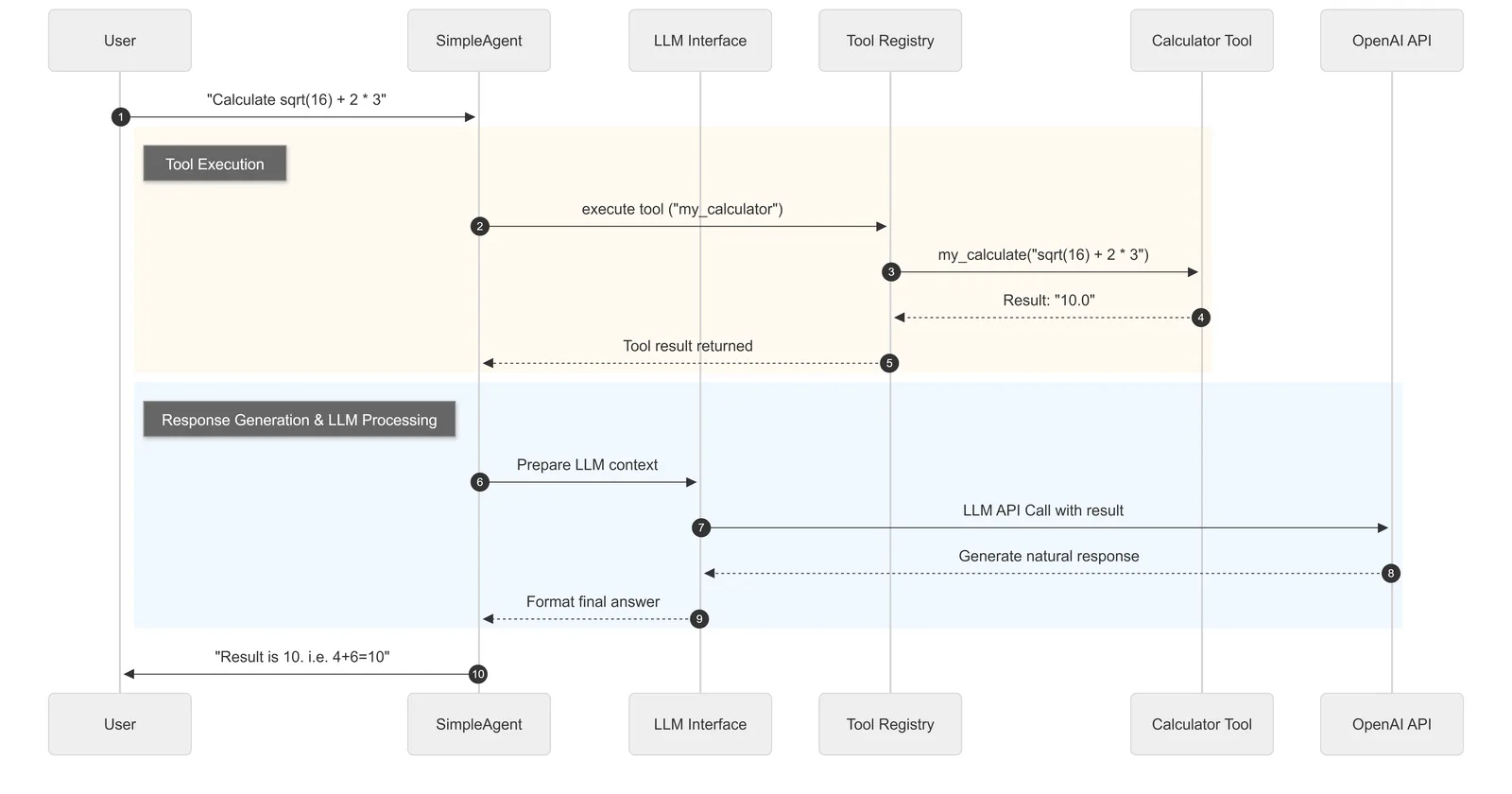
Figure 7.1 SimpleAgent Workflow Based on HelloAgents
7.5.3 Multi-Source Search Tool
In practical applications, we often need to integrate multiple external services to provide more powerful functionality. Search tools are a typical example, integrating multiple search engines to provide more complete real information. In Chapter 1, we used Tavily's search API, and in Chapter 4, we used SerpApi's search API. Therefore, this time we use these two APIs to implement multi-source search functionality. If you haven't installed the corresponding Python dependencies, you can run the following script:
pip install "hello-agents[search]==0.1.1"(1) Unified Interface Design for Search Tools
The SearchTool built into the HelloAgents framework demonstrates how to design an advanced multi-source search tool:
class SearchTool(Tool):
    """
    Intelligent hybrid search tool

    Supports multiple search engine backends, intelligently selects the best search source:
    1. Hybrid mode (hybrid) - Intelligently selects TAVILY or SERPAPI
    2. Tavily API (tavily) - Professional AI search
    3. SerpApi (serpapi) - Traditional Google search
    """

    def __init__(self, backend: str = "hybrid", tavily_key: Optional[str] = None, serpapi_key: Optional[str] = None):
        super().__init__(
            name="search",
            description="An intelligent web search engine. Supports hybrid search mode, automatically selects the best search source."
        )
        self.backend = backend
        self.tavily_key = tavily_key or os.getenv("TAVILY_API_KEY")
        self.serpapi_key = serpapi_key or os.getenv("SERPAPI_API_KEY")
        self.available_backends = []
        self._setup_backends()
The core idea of this design is to automatically select the best search backend based on available API keys and dependency libraries.
(2) Integration Strategy for TAVILY and SERPAPI Search Sources
The framework implements intelligent backend selection logic:
def _search_hybrid(self, query: str) -> str:
    """Hybrid search - intelligently select the best search source"""
    # Prioritize Tavily (AI-optimized search)
    if "tavily" in self.available_backends:
        try:
            return self._search_tavily(query)
        except Exception as e:
            print(f"⚠️ Tavily search failed: {e}")
            # If Tavily fails, try SerpApi
            if "serpapi" in self.available_backends:
                print("🔄 Switching to SerpApi search")
                return self._search_serpapi(query)

    # If Tavily is unavailable, use SerpApi
    elif "serpapi" in self.available_backends:
        try:
            return self._search_serpapi(query)
        except Exception as e:
            print(f"⚠️ SerpApi search failed: {e}")

    # If both are unavailable, prompt user to configure API
    return "❌ No available search sources, please configure TAVILY_API_KEY or SERPAPI_API_KEY environment variables"
This design embodies the core concept of high-availability systems: through degradation mechanisms, the system can gradually degrade from the optimal search source to available alternatives. When all search sources are unavailable, it clearly prompts the user to configure the correct API keys.
(3) Unified Formatting of Search Results
Different search engines return results in different formats. The framework handles this through a unified formatting method:
def _search_tavily(self, query: str) -> str:
    """Search using Tavily"""
    response = self.tavily_client.search(
        query=query,
        search_depth="basic",
        include_answer=True,
        max_results=3
    )

    result = f"🎯 Tavily AI search results: {response.get('answer', 'No direct answer found')}\n\n"

    for i, item in enumerate(response.get('results', [])[:3], 1):
        result += f"[{i}] {item.get('title', '')}\n"
        result += f"    {item.get('content', '')[:200]}...\n"
        result += f"    Source: {item.get('url', '')}\n\n"

    return result
Based on the framework's design philosophy, we can create our own advanced search tool. This time we use a class-based approach to demonstrate different implementation methods. Create my_advanced_search.py:
# my_advanced_search.py
import os
from typing import Optional, List, Dict, Any
from hello_agents import ToolRegistry

class MyAdvancedSearchTool:
    """
    Custom advanced search tool class
    Demonstrates design patterns for multi-source integration and intelligent selection
    """

    def __init__(self):
        self.name = "my_advanced_search"
        self.description = "Intelligent search tool, supports multiple search sources, automatically selects best results"
        self.search_sources = []
        self._setup_search_sources()

    def _setup_search_sources(self):
        """Set up available search sources"""
        # Check Tavily availability
        if os.getenv("TAVILY_API_KEY"):
            try:
                from tavily import TavilyClient
                self.tavily_client = TavilyClient(api_key=os.getenv("TAVILY_API_KEY"))
                self.search_sources.append("tavily")
                print("✅ Tavily search source enabled")
            except ImportError:
                print("⚠️ Tavily library not installed")

        # Check SerpApi availability
        if os.getenv("SERPAPI_API_KEY"):
            try:
                import serpapi
                self.search_sources.append("serpapi")
                print("✅ SerpApi search source enabled")
            except ImportError:
                print("⚠️ SerpApi library not installed")

        if self.search_sources:
            print(f"🔧 Available search sources: {', '.join(self.search_sources)}")
        else:
            print("⚠️ No available search sources, please configure API keys")

    def search(self, query: str) -> str:
        """Execute intelligent search"""
        if not query.strip():
            return "❌ Error: Search query cannot be empty"

        # Check if there are available search sources
        if not self.search_sources:
            return """❌ No available search sources, please configure one of the following API keys:

1. Tavily API: Set environment variable TAVILY_API_KEY
   Get it at: https://tavily.com/

2. SerpAPI: Set environment variable SERPAPI_API_KEY
   Get it at: https://serpapi.com/

Restart the program after configuration."""

        print(f"🔍 Starting intelligent search: {query}")

        # Try multiple search sources, return best result
        for source in self.search_sources:
            try:
                if source == "tavily":
                    result = self._search_with_tavily(query)
                    if result and "not found" not in result.lower():
                        return f"📊 Tavily AI search results:\n\n{result}"

                elif source == "serpapi":
                    result = self._search_with_serpapi(query)
                    if result and "not found" not in result.lower():
                        return f"🌐 SerpApi Google search results:\n\n{result}"

            except Exception as e:
                print(f"⚠️ {source} search failed: {e}")
                continue

        return "❌ All search sources failed, please check network connection and API key configuration"

    def _search_with_tavily(self, query: str) -> str:
        """Search using Tavily"""
        response = self.tavily_client.search(query=query, max_results=3)

        if response.get('answer'):
            result = f"💡 AI direct answer: {response['answer']}\n\n"
        else:
            result = ""

        result += "🔗 Related results:\n"
        for i, item in enumerate(response.get('results', [])[:3], 1):
            result += f"[{i}] {item.get('title', '')}\n"
            result += f"    {item.get('content', '')[:150]}...\n\n"

        return result

    def _search_with_serpapi(self, query: str) -> str:
        """Search using SerpApi"""
        import serpapi

        search = serpapi.GoogleSearch({
            "q": query,
            "api_key": os.getenv("SERPAPI_API_KEY"),
            "num": 3
        })

        results = search.get_dict()

        result = "🔗 Google search results:\n"
        if "organic_results" in results:
            for i, res in enumerate(results["organic_results"][:3], 1):
                result += f"[{i}] {res.get('title', '')}\n"
                result += f"    {res.get('snippet', '')}\n\n"

        return result

def create_advanced_search_registry():
    """Create registry containing advanced search tool"""
    registry = ToolRegistry()

    # Create search tool instance
    search_tool = MyAdvancedSearchTool()

    # Register search tool's method as function
    registry.register_function(
        name="advanced_search",
        description="Advanced search tool, integrates Tavily and SerpAPI multiple search sources, provides more comprehensive search results",
        func=search_tool.search
    )

    return registry
Next, we can test the tool we wrote ourselves. Create test_advanced_search.py:
# test_advanced_search.py
from dotenv import load_dotenv
from my_advanced_search import create_advanced_search_registry, MyAdvancedSearchTool

# Load environment variables
load_dotenv()

def test_advanced_search():
    """Test advanced search tool"""

    # Create registry containing advanced search tool
    registry = create_advanced_search_registry()

    print("🔍 Testing Advanced Search Tool\n")

    # Test queries
    test_queries = [
        "History of Python programming language",
        "Latest developments in artificial intelligence",
        "2024 technology trends"
    ]

    for i, query in enumerate(test_queries, 1):
        print(f"Test {i}: {query}")
        result = registry.execute_tool("advanced_search", query)
        print(f"Result: {result}\n")
        print("-" * 60 + "\n")

def test_api_configuration():
    """Test API configuration check"""
    print("🔧 Testing API Configuration Check:")

    # Directly create search tool instance
    search_tool = MyAdvancedSearchTool()

    # If API is not configured, configuration prompt will be displayed
    result = search_tool.search("machine learning algorithms")
    print(f"Search result: {result}")

def test_with_agent():
    """Test integration with Agent"""
    print("\n🤖 Integration Test with Agent:")
    print("Advanced search tool is ready and can be integrated with Agent")

    # Display tool description
    registry = create_advanced_search_registry()
    tools_desc = registry.get_tools_description()
    print(f"Tool description:\n{tools_desc}")

if __name__ == "__main__":
    test_advanced_search()
    test_api_configuration()
    test_with_agent()
Through this advanced search tool design practice, we learned how to use classes to build complex tool systems. Compared to the function approach, the class approach is more suitable for tools that need to maintain state (such as API clients, configuration information).
7.5.4 Advanced Features of Tool System
After mastering basic tool development and multi-source integration, let's explore advanced features of the tool system. These features enable the tool system to run stably in complex production environments and provide more powerful capabilities for Agents.
(1) Tool Chain Invocation Mechanism
In practical applications, Agents often need to combine multiple tools to complete complex tasks. We can design a tool chain manager to support this scenario, borrowing the graph concept mentioned in Chapter 6:
# tool_chain_manager.py
from typing import List, Dict, Any, Optional
from hello_agents import ToolRegistry

class ToolChain:
    """Tool chain - supports sequential execution of multiple tools"""

    def __init__(self, name: str, description: str):
        self.name = name
        self.description = description
        self.steps: List[Dict[str, Any]] = []

    def add_step(self, tool_name: str, input_template: str, output_key: str = None):
        """
        Add tool execution step

        Args:
            tool_name: Tool name
            input_template: Input template, supports variable substitution
            output_key: Key name for output result, used for reference in subsequent steps
        """
        self.steps.append({
            "tool_name": tool_name,
            "input_template": input_template,
            "output_key": output_key or f"step_{len(self.steps)}_result"
        })

    def execute(self, registry: ToolRegistry, initial_input: str, context: Dict[str, Any] = None) -> str:
        """Execute tool chain"""
        context = context or {}
        context["input"] = initial_input

        print(f"🔗 Starting tool chain execution: {self.name}")

        for i, step in enumerate(self.steps, 1):
            tool_name = step["tool_name"]
            input_template = step["input_template"]
            output_key = step["output_key"]

            # Replace variables in template
            try:
                tool_input = input_template.format(**context)
            except KeyError as e:
                return f"❌ Tool chain execution failed: Template variable {e} not found"

            print(f"  Step {i}: Using {tool_name} to process '{tool_input[:50]}...'")

            # Execute tool
            result = registry.execute_tool(tool_name, tool_input)
            context[output_key] = result

            print(f"  ✅ Step {i} completed, result length: {len(result)} characters")

        # Return result of last step
        final_result = context[self.steps[-1]["output_key"]]
        print(f"🎉 Tool chain '{self.name}' execution completed")
        return final_result

class ToolChainManager:
    """Tool chain manager"""

    def __init__(self, registry: ToolRegistry):
        self.registry = registry
        self.chains: Dict[str, ToolChain] = {}

    def register_chain(self, chain: ToolChain):
        """Register tool chain"""
        self.chains[chain.name] = chain
        print(f"✅ Tool chain '{chain.name}' registered")

    def execute_chain(self, chain_name: str, input_data: str, context: Dict[str, Any] = None) -> str:
        """Execute specified tool chain"""
        if chain_name not in self.chains:
            return f"❌ Tool chain '{chain_name}' does not exist"

        chain = self.chains[chain_name]
        return chain.execute(self.registry, input_data, context)

    def list_chains(self) -> List[str]:
        """List all tool chains"""
        return list(self.chains.keys())

# Usage example
def create_research_chain() -> ToolChain:
    """Create a research tool chain: search -> calculate -> summarize"""
    chain = ToolChain(
        name="research_and_calculate",
        description="Search for information and perform related calculations"
    )

    # Step 1: Search for information
    chain.add_step(
        tool_name="search",
        input_template="{input}",
        output_key="search_result"
    )

    # Step 2: Perform calculations based on search results (if needed)
    chain.add_step(
        tool_name="my_calculator",
        input_template="Calculate relevant values based on the following information: {search_result}",
        output_key="calculation_result"
    )

    return chain
(2) Asynchronous Tool Execution Support
For time-consuming tool operations, we can provide asynchronous execution support:
# async_tool_executor.py
import asyncio
import concurrent.futures
from typing import Dict, Any, List, Callable
from hello_agents import ToolRegistry

class AsyncToolExecutor:
    """Asynchronous tool executor"""

    def __init__(self, registry: ToolRegistry, max_workers: int = 4):
        self.registry = registry
        self.executor = concurrent.futures.ThreadPoolExecutor(max_workers=max_workers)

    async def execute_tool_async(self, tool_name: str, input_data: str) -> str:
        """Asynchronously execute a single tool"""
        loop = asyncio.get_event_loop()

        def _execute():
            return self.registry.execute_tool(tool_name, input_data)

        result = await loop.run_in_executor(self.executor, _execute)
        return result

    async def execute_tools_parallel(self, tasks: List[Dict[str, str]]) -> List[str]:
        """Execute multiple tools in parallel"""
        print(f"🚀 Starting parallel execution of {len(tasks)} tool tasks")

        # Create async tasks
        async_tasks = []
        for task in tasks:
            tool_name = task["tool_name"]
            input_data = task["input_data"]
            async_task = self.execute_tool_async(tool_name, input_data)
            async_tasks.append(async_task)

        # Wait for all tasks to complete
        results = await asyncio.gather(*async_tasks)

        print(f"✅ All tool tasks completed")
        return results

    def __del__(self):
        """Clean up resources"""
        if hasattr(self, 'executor'):
            self.executor.shutdown(wait=True)

# Usage example
async def test_parallel_execution():
    """Test parallel tool execution"""
    from hello_agents import ToolRegistry

    registry = ToolRegistry()
    # Assume search and calculator tools are already registered

    executor = AsyncToolExecutor(registry)

    # Define parallel tasks
    tasks = [
        {"tool_name": "search", "input_data": "Python programming"},
        {"tool_name": "search", "input_data": "machine learning"},
        {"tool_name": "my_calculator", "input_data": "2 + 2"},
        {"tool_name": "my_calculator", "input_data": "sqrt(16)"},
    ]

    # Execute in parallel
    results = await executor.execute_tools_parallel(tasks)

    for i, result in enumerate(results):
        print(f"Task {i+1} result: {result[:100]}...")
Based on the above design and implementation experience, we can summarize the core concepts of tool system development: At the design level, each tool should follow the single responsibility principle, focusing on specific functionality while maintaining interface uniformity, and treating comprehensive exception handling and security-first input validation as basic requirements. In terms of performance optimization, use asynchronous execution to improve concurrent processing capabilities while reasonably managing external connections and system resources.