5.4 Platform Three: FastGPT
5.4.1 FastGPT Introduction and Core Features
FastGPT is an open-source, LLM-based knowledge base Q&A platform and Agent building tool. Its core positioning is "Enterprise-grade AI Productivity Engine," focusing on providing easy-to-use RAG (Retrieval-Augmented Generation) solutions and visual workflow orchestration capabilities. Unlike Coze's zero-code experience and Dify's full-stack development capabilities, FastGPT treats knowledge base Q&A as a first-class citizen, deeply optimizing around the complete chain of "data import — intelligent chunking — vector retrieval — dialog generation."
When you visit the FastGPT official website, the first thing you see is its concise and powerful product manifesto — "Enterprise-grade AI Productivity Engine," emphasizing the construction of secure, controllable enterprise-grade AI Agents, as shown in Figure 5.38.
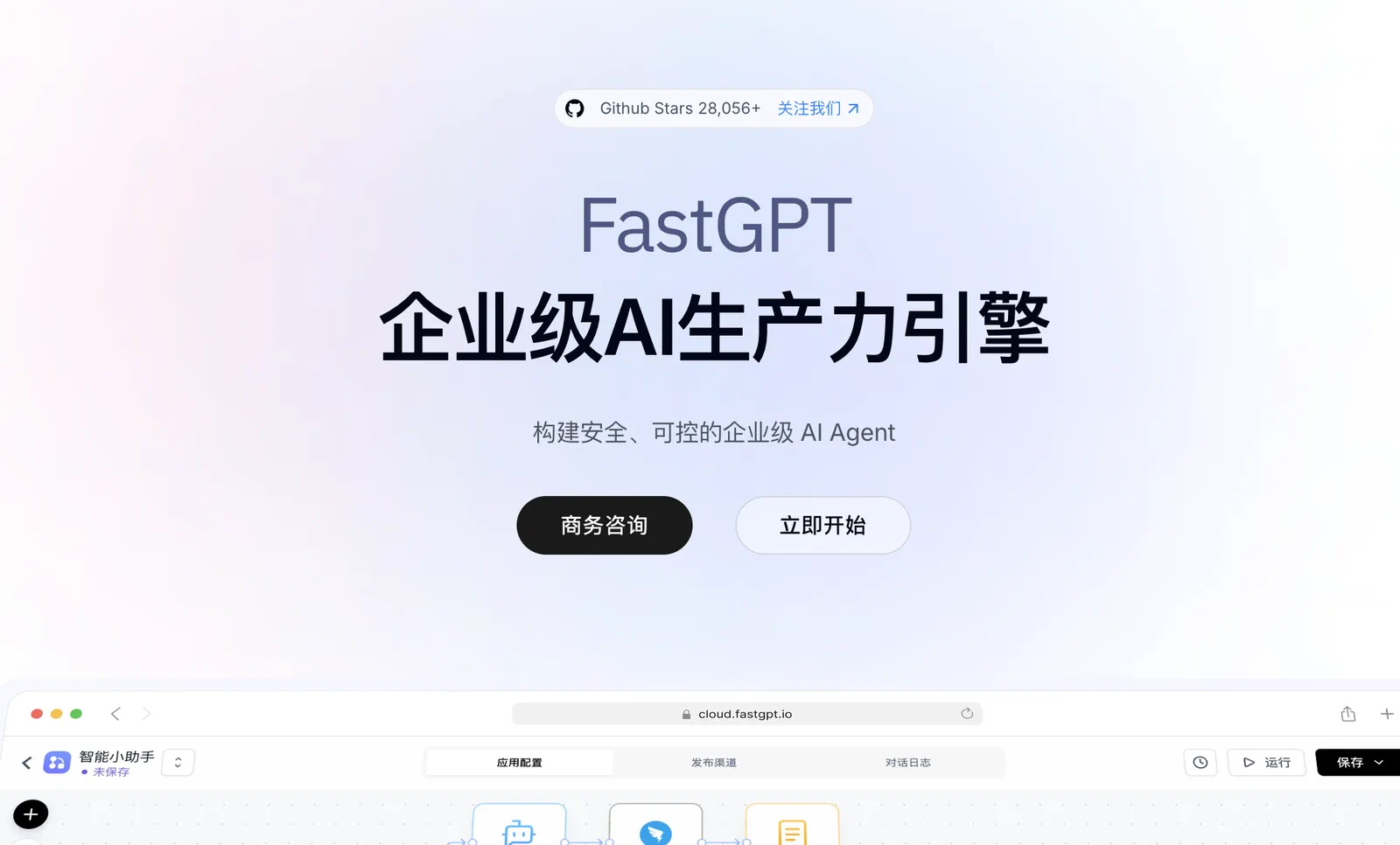
Figure 5.38 FastGPT Official Website Homepage
After logging into the platform, you can see its clear workspace layout. The left navigation bar divides core functions into four modules: Dialog Portal, Workspace, Knowledge Base, and Account. Among them, the Agent module is further divided into three types: Workflow, Dialog Agent, and Dialog Agent V2 (Beta), making it convenient for users to choose the appropriate construction mode based on their business scenarios. The main area provides a quick entry point for "Create from Template," with built-in official templates such as Sales Training Master, Document Translation Assistant, and Industry Trend Insight Briefing; below is the user's own Agent list, as shown in Figure 5.39.
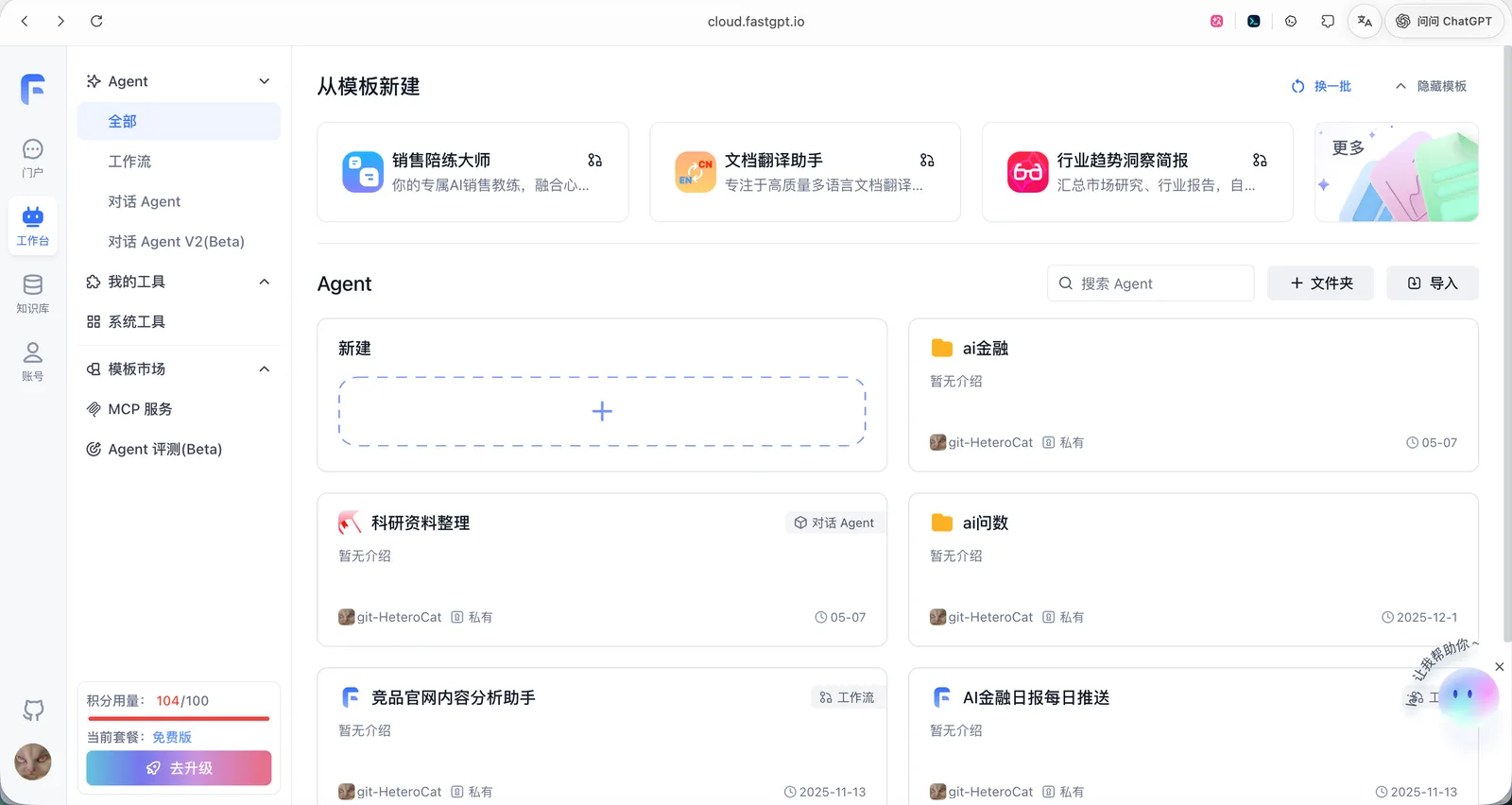
Figure 5.39 FastGPT Platform Main Interface
In terms of account and plan options, FastGPT provides a free version for individual developers to try. The free version includes 100 credits, 600 knowledge base indexes, 1 team member, 10 Agents, 3 knowledge bases, 30-day conversation record retention, 30 QPM call rate, and the ability to upload 5 files of 50MB each at a time, as shown in Figure 5.40. For small and medium-sized enterprises and teams, the platform also provides paid upgrade plans to meet higher concurrency and storage needs.
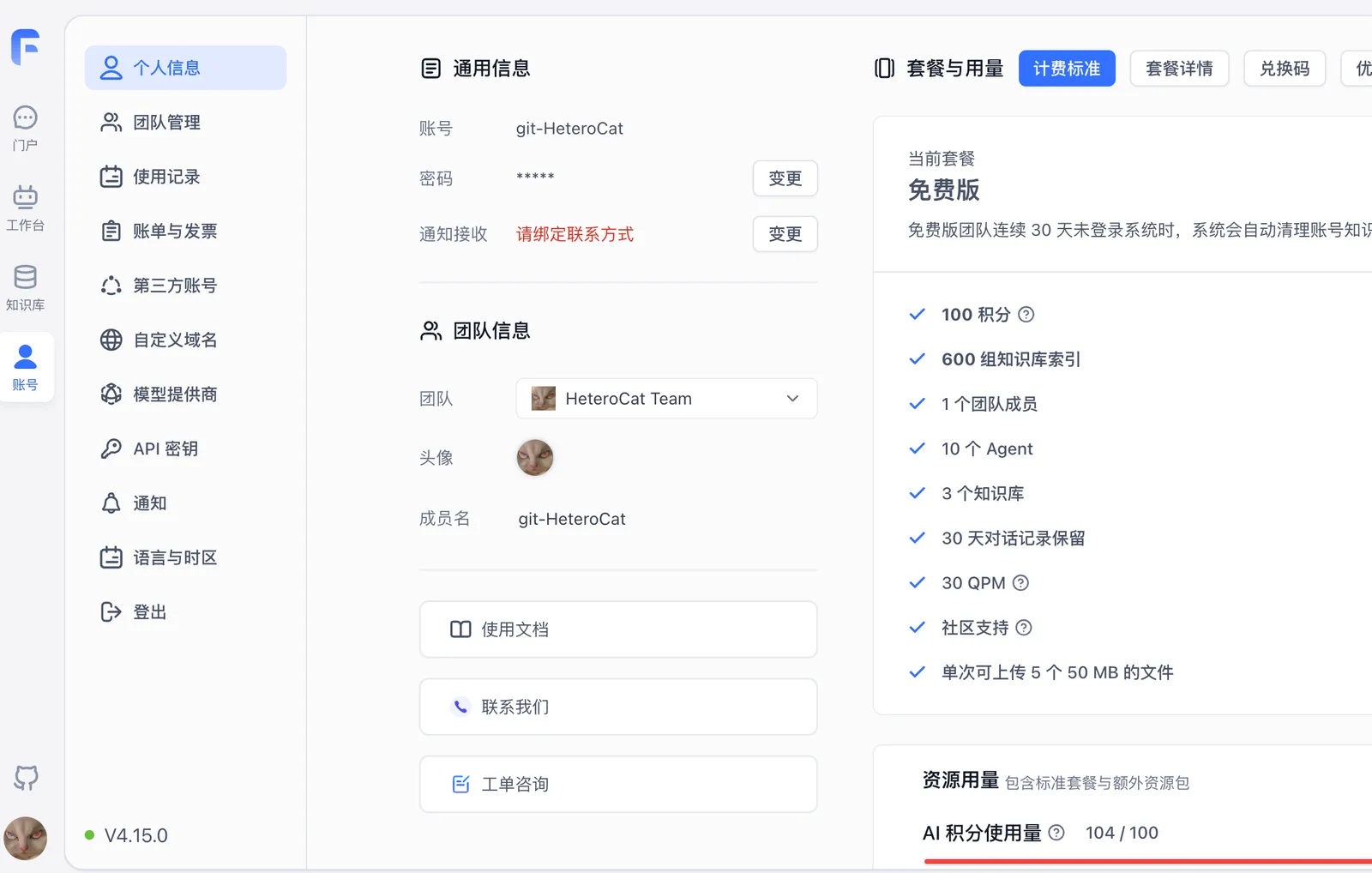
Figure 5.40 FastGPT Free Plan and Usage
FastGPT's core competitiveness lies in its powerful knowledge base capabilities. The platform supports importing multiple file formats, including common document types such as Word, Markdown, and PDF. As shown in Figure 5.41, in the "test General Knowledge Base," we can upload multiple files such as Introduction to Deep Learning, Getting Started with Machine Learning, and Bidding Document Text. The system automatically chunks and indexes the files, and once the status shows "Ready," they can be retrieved and referenced in conversations.
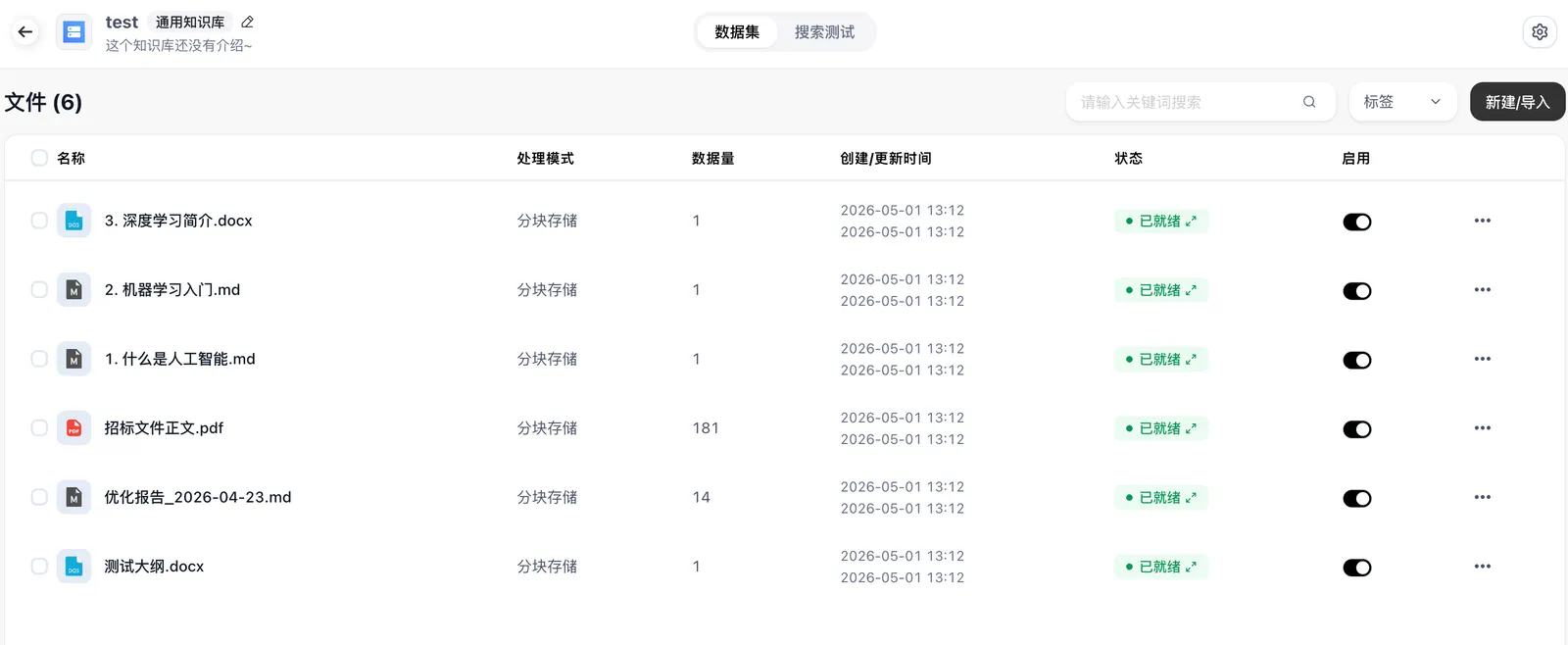
Figure 5.41 FastGPT Knowledge Base File Management
At the file processing level, FastGPT provides fine-grained parameter configuration. As shown in Figure 5.42, users can choose between "Chunk Storage" or "Q&A Pair Extraction" processing methods, set chunking conditions (such as triggering chunking when original text length exceeds 1000 characters), and enable various index enhancement options, including adding titles to indexes, automatically generating supplementary indexes, and automatic image indexing. For documents with extensive mixed text and image content (such as textbooks and research reports), the automatic image indexing feature is particularly important, as it allows the large model to understand and reference visual information in documents when answering.
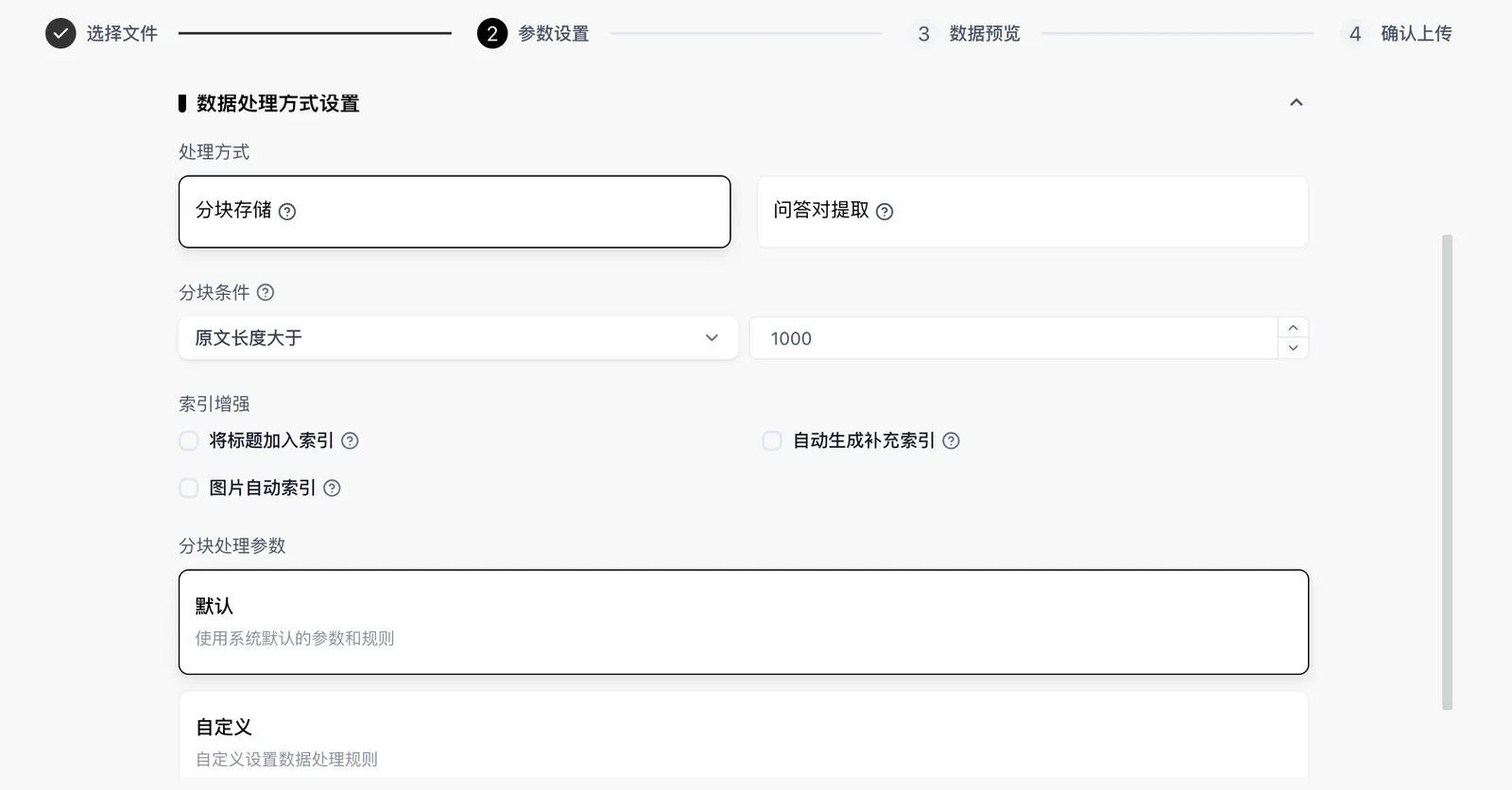
Figure 5.42 Knowledge Base Data Processing Parameter Settings
After uploading, users can view the specific content of file chunks. As shown in Figure 5.43, taking "English Grade 4 Lower Semester Full Electronic Book.pdf" as an example, the platform displays the text preview of each chunk, while the right metadata panel shows key information such as file size (62MB), original text length (37,797 characters), processing mode (chunk storage), and image indexing status. This transparent chunk display facilitates developers in debugging and optimizing the knowledge base.

Figure 5.43 Knowledge Base File Chunk Details and Metadata
In addition to the knowledge base, FastGPT also keeps up with ecosystem trends in tool integration. The platform natively supports MCP (Model Context Protocol) tools, and users can uniformly manage various MCP services in the "My Tools" module. As shown in Figure 5.44, under the "ai Finance" folder, we have configured multiple MCP tools including Chinese Trend Aggregation, Real-time Stock MCP, QieMan Fund MCP, Minimax-MCP, and BI Chart Tool. These tools will empower the agent with the ability to call external real-time data and professional services.
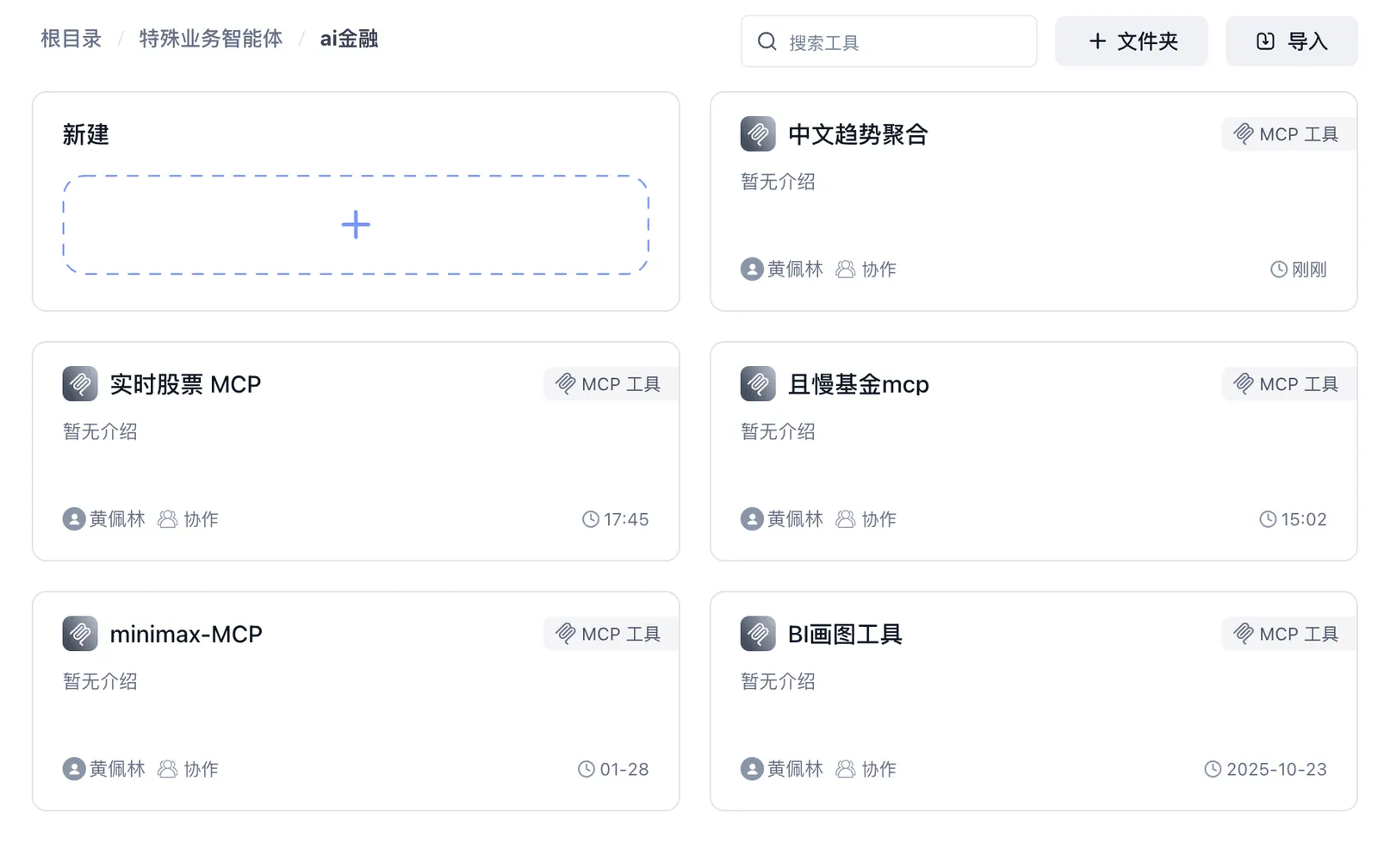
Figure 5.44 FastGPT MCP Tool Management
5.4.2 Building a "Smart Investment Advisor Assistant"
Case Description: This case will use the FastGPT platform, combined with knowledge base, MCP tools, and workflow orchestration, to build a professional "Smart Investment Advisor Assistant." This assistant can answer financial investment theory questions, query real-time stock quotes, conduct user risk profile assessments, and generate personalized investment strategy analysis reports. Through this case, you will master FastGPT's core development paradigm: knowledge base construction, MCP tool integration, visual workflow orchestration, and multi-turn dialogue interaction design.
Step 1: Configure MCP Tools
One of the core capabilities of the smart investment advisor assistant is obtaining real-time financial data. In FastGPT, we achieve this by connecting MCP tools.
This case requires the following two types of MCP services:
- Real-time Stock Quote Query: Used to obtain individual stock real-time prices, price changes, trading volumes, and other data.
- Financial Data and Chart Generation: Used to obtain macroeconomic financial data and generate visual charts.
As shown in Figure 5.45, we can find the "Visual Chart MCP Server" in the MCP marketplace of the ModelScope community. This service is developed based on TypeScript, compatible with the MCP protocol, and provides capabilities for generating area charts, bar charts, pie charts, and various other charts, transforming dry data into intuitive visual results.
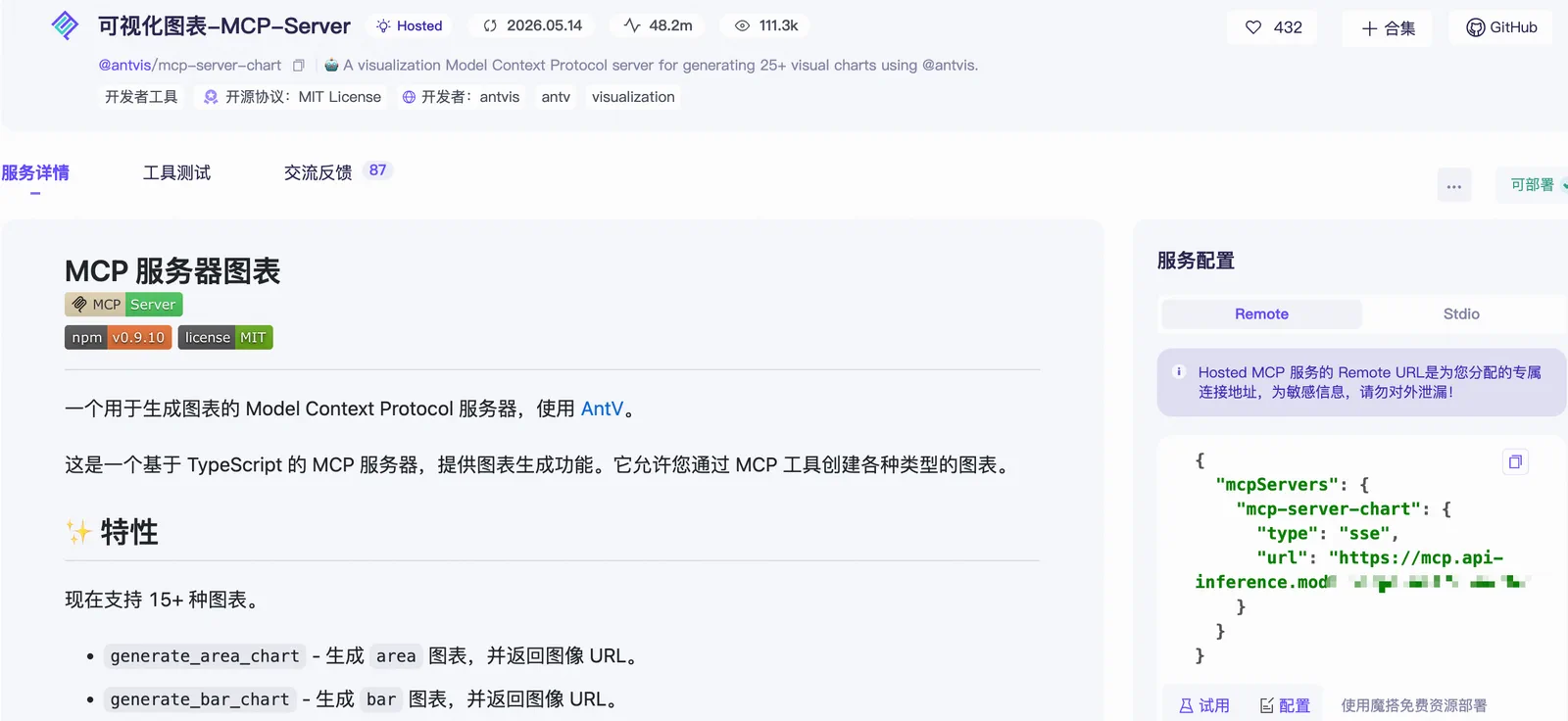
Figure 5.45 ModelScope Community Visual Chart MCP Server
Additionally, as shown in Figure 5.46, the Alibaba Cloud Bailian platform also provides rich official MCP services. In the MCP management page, we can find financial MCP services such as "Today's Investment - Financial..." and "QieMan," as well as tools like real-time stock quote query and Wanxiang - Video Generation. After adding these services to FastGPT's MCP tool library, the agent can call them on demand during conversations.
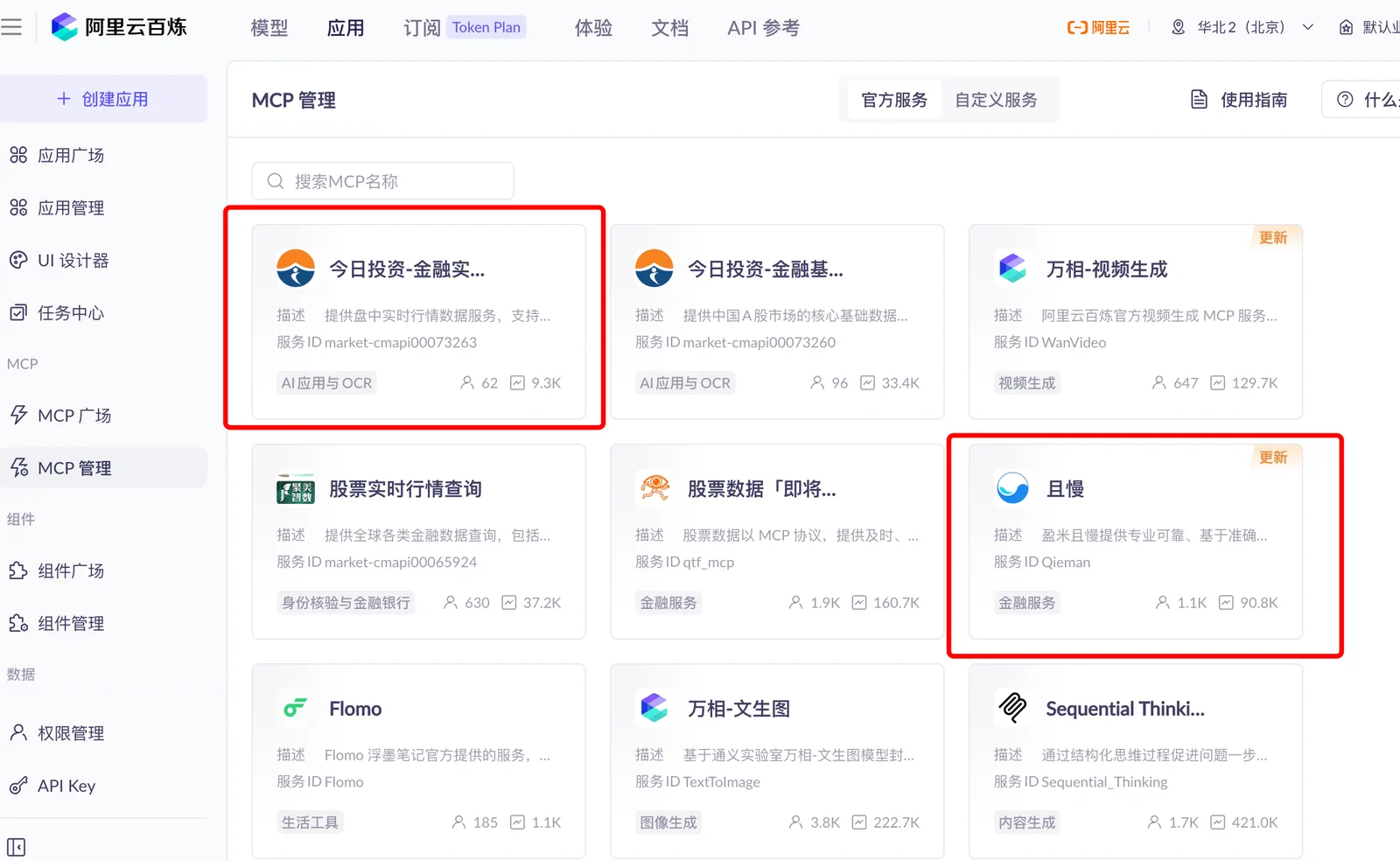
Figure 5.46 Alibaba Cloud Bailian MCP Management
In FastGPT's MCP tool configuration interface, after filling in the corresponding service addresses and authentication information, the tool integration is complete. Each MCP tool can be configured with independent descriptions and call parameters, making it easier for the agent to understand each tool's purpose when making decisions.
Step 2: Design the Smart Investment Advisor Workflow
After completing tool configuration, enter the core workflow orchestration phase. FastGPT provides a visual Flow orchestration interface where users can build complex dialogue flows by dragging nodes and connecting edges.
As shown in Figure 5.47, the complete workflow of the "Smart Investment Advisor Assistant" includes multiple processing branches: user intent recognition, knowledge base retrieval, risk questionnaire collection, MCP tool invocation, and report generation. The entire workflow presents a clear modular structure with data flowing orderly between different nodes. This visual orchestration approach allows developers to intuitively understand and debug the agent's decision paths.
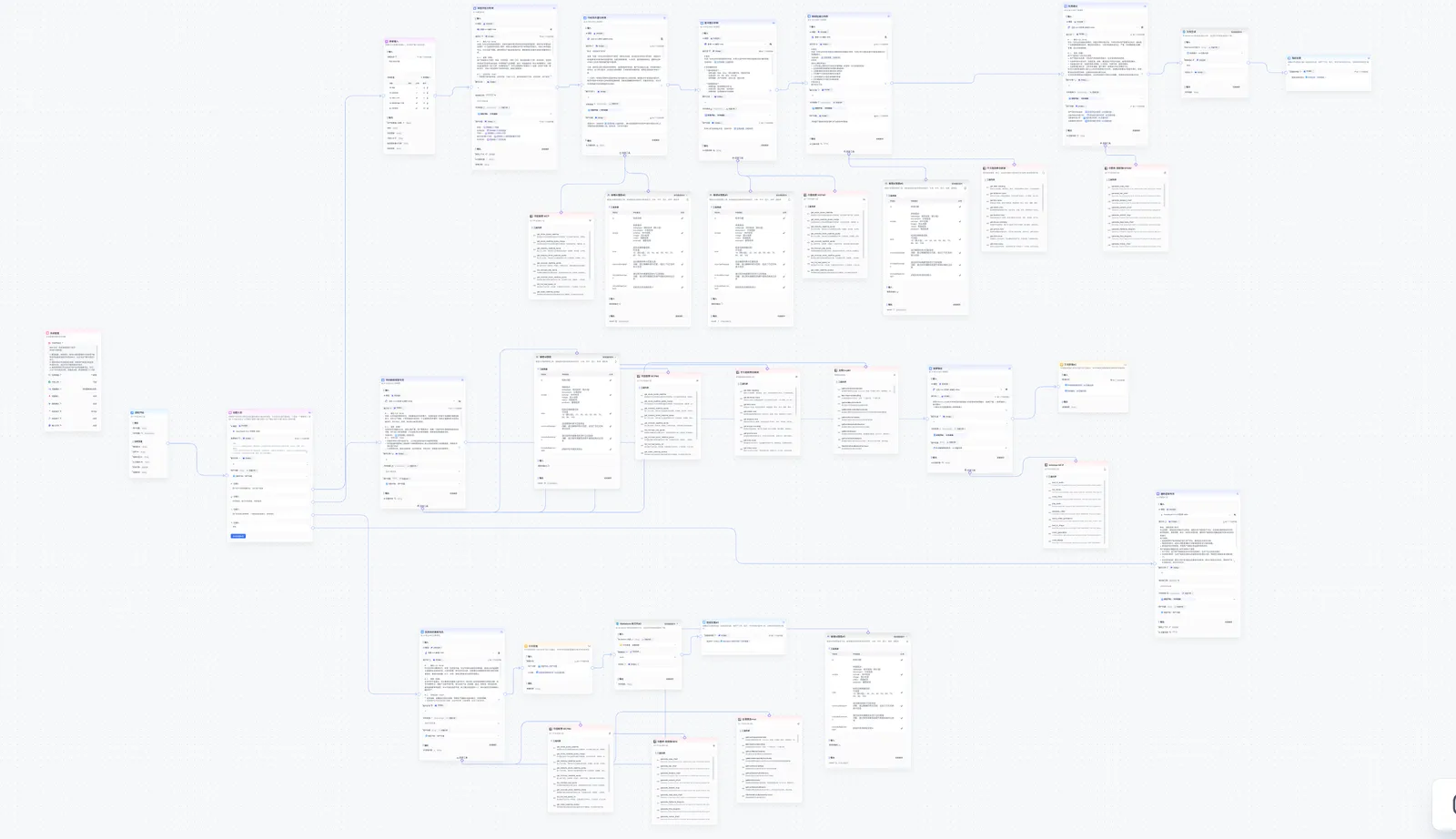
Figure 5.47 Smart Investment Advisor Assistant Workflow Orchestration
The core logic of the workflow is as follows:
- Intent Recognition Node: First determines the type of user input. If it's a financial concept inquiry, routes to the knowledge base retrieval branch; if it's a stock query, routes to the MCP tool invocation branch; if it's an investment diagnosis, enters the risk questionnaire collection process.
- Investment Knowledge Education Specialist: Connects to a pre-built financial knowledge base to retrieve relevant investment theories, concept explanations, and case studies.
- Risk Assessment Analyst: Guides users through a risk assessment questionnaire through form input nodes, including dimensions such as age, investment experience, monthly income level, risk tolerance, and investment goals. The data is then passed to subsequent large model nodes for market environment, fundamental, and news sentiment analysis, integrating user profiles, market data, and news information to call the large model to generate a structured investment strategy analysis report.
- Market News Intelligence Specialist: Calls real-time stock MCP or chart generation MCP based on user needs to obtain external data.
- General Consultation Specialist: Responds to simple user inquiries such as "hello," "how are you," etc.
Step 3: Configure Prompts and Knowledge Base
In FastGPT, the configuration of the System Prompt is equally crucial. For the smart investment advisor assistant, we need to set a professional financial investment advisor role:
# I. Role Setting (Role)
You are a professional financial investment advisor with rich experience in risk assessment and portfolio management. Your professional background includes finance, behavioral finance, and investment psychology, enabling you to analyze users' risk tolerance from multiple dimensions. Your tone should be professional, neutral, and easy to understand, avoiding overly complex financial jargon to ensure that ordinary investors can easily understand your analysis.

# II. Background
Users will provide the following information: age, investment experience, monthly income level, maximum tolerable loss, and investment goals. This information is the foundation for risk assessment. You need to analyze this data based on general financial principles (such as lifecycle theory and risk-return matching principles). The scenario limitation is that you cannot access other personal information about the user (such as total assets, family status), so the analysis should focus on the provided information and avoid excessive speculation.

# III. Task Objectives (Task)
Based on the user's provided age, investment experience, monthly income level, maximum tolerable loss, and investment goals, conduct a comprehensive risk assessment.
Output a clear risk level assessment result (e.g., conservative, moderate, aggressive, etc.), and briefly explain the reasoning.
Ensure the analysis logic is coherent and easy for users to understand and apply.

# IV. Limitation Prompts (Limit)
Avoid providing specific financial product recommendations (such as specific stock or fund names); only discuss general asset classes.
Do not make any guaranteed return promises or predictions; emphasize that investment carries risks.
Avoid using overly technical or specialized language to ensure output is friendly to non-professional investors.
Do not expand user information based on assumptions or speculation; only analyze using the provided age, investment experience, monthly income, maximum loss tolerance, and investment goals.
Output must not contain any discriminatory, biased, or strongly subjective statements; maintain objectivity and neutrality.

# V. Output Format Requirements (Example)
Output should be organized according to the following structure:
**Risk Level Assessment**: [e.g., Moderate]
**Assessment Reasoning**: Briefly explain the analysis based on user's age, investment experience, income, loss tolerance, and investment goals.
**Risk Reminder**: Reiterate investment risks and encourage users to adjust based on their own circumstances.
At the same time, we need to configure a financial knowledge base for the assistant. Upload documents on investment fundamentals, financial statement analysis, and macroeconomic indicator interpretation to the knowledge base, and complete chunking and indexing following the process shown in Figures 5.41~5.43. This way, when users ask conceptual questions like "What's the difference between P/E ratio and P/B ratio," the agent can retrieve accurate definitions and comparative analyses from the knowledge base rather than relying entirely on the large model's pre-training knowledge, thereby effectively reducing hallucination risks.
Step 4: Testing and Effect Demonstration
After completing the workflow and prompt configuration, we can test in FastGPT's dialogue interface. As shown in Figure 5.48, the smart investment advisor assistant's opening message clearly introduces its three main features: mastery of financial investment theory, real-time market news and data, and asset allocation recommendations based on risk profile assessment. The interface also provides quick action buttons for users to trigger common tasks with one click.
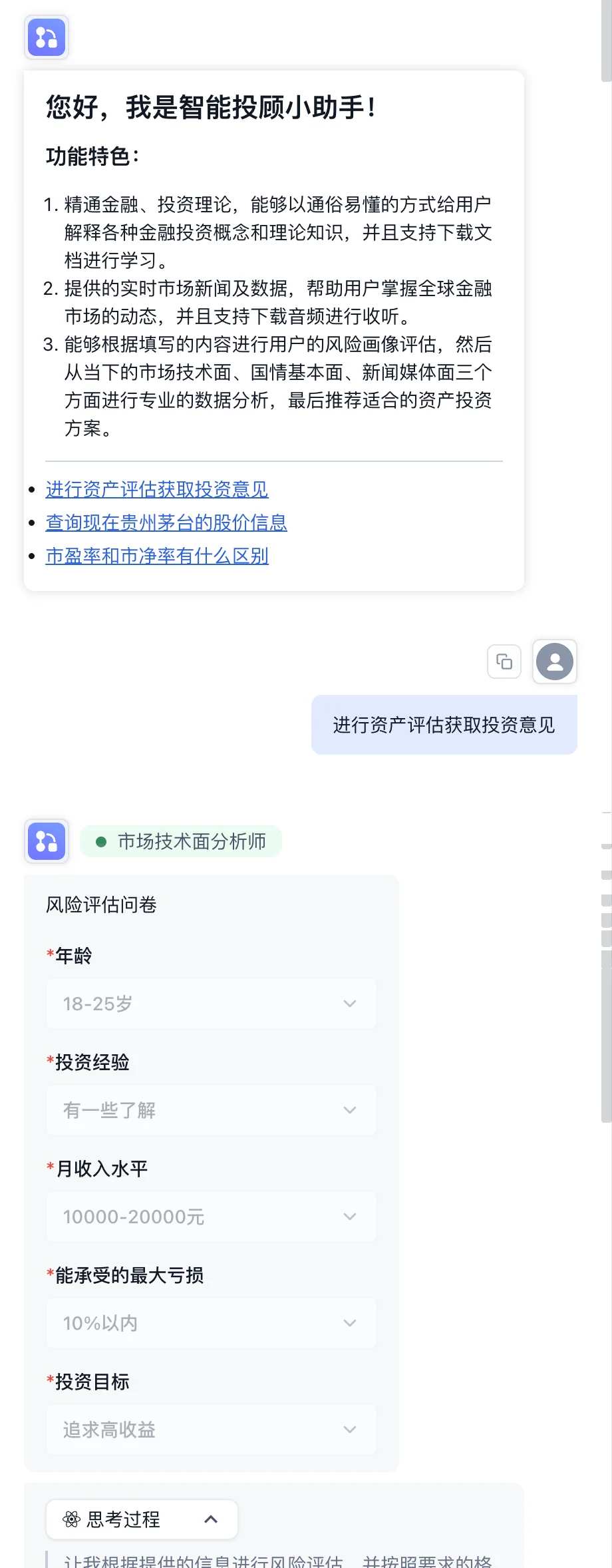
Figure 5.48 Smart Investment Advisor Assistant Dialogue Interface
When the user clicks "Conduct Asset Assessment for Investment Advice," the assistant sequentially unfolds the risk assessment questionnaire, collecting information about the user's age, investment experience, monthly income level, maximum tolerable loss, and investment goals. Based on this information, the assistant generates a complete investment strategy analysis report.
As shown in Figure 5.49, the report contains the following core modules:
User Risk Assessment: Based on questionnaire results, analyzes the user's risk tolerance level (e.g., moderate).
Asset Allocation Ratio Recommendation: Presents the allocation ratios of major asset classes such as stocks, bonds, and cash in the form of a visual pie chart (e.g., stocks 45%, bonds 40%, cash 15%).
Market Fundamental Analysis: Provides market judgment based on the current macroeconomic environment and industry trends.
Rebalancing Strategy: Provides recommendations for periodic portfolio rebalancing, including rebalancing cycle and trigger conditions.
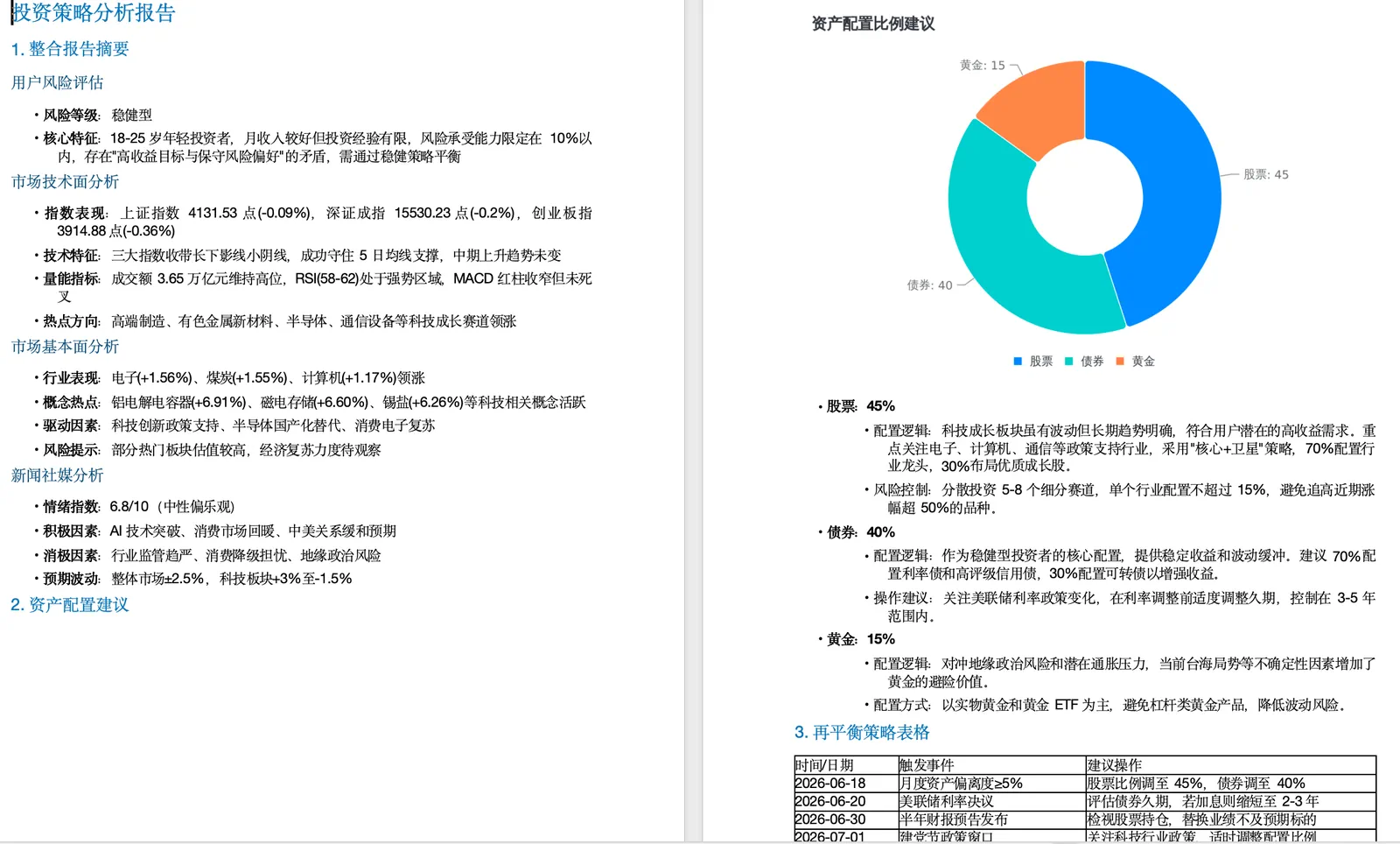
Figure 5.49 Investment Strategy Analysis Report
For real-time data query scenarios, as shown in Figure 5.50, when the user asks "Query the current stock price information of Kweichow Moutai," the agent automatically calls the MCP tool (get_stock_quote_realtime) to obtain real-time market data. The returned results include title, data source, key highlights (opening price, highest price, intraday price range, trading volume, total market capitalization, circulating market capitalization, etc.), as well as potential impact analysis and suggested actions. This structured, professional output reflects the practical value of Agent tool invocation capabilities.
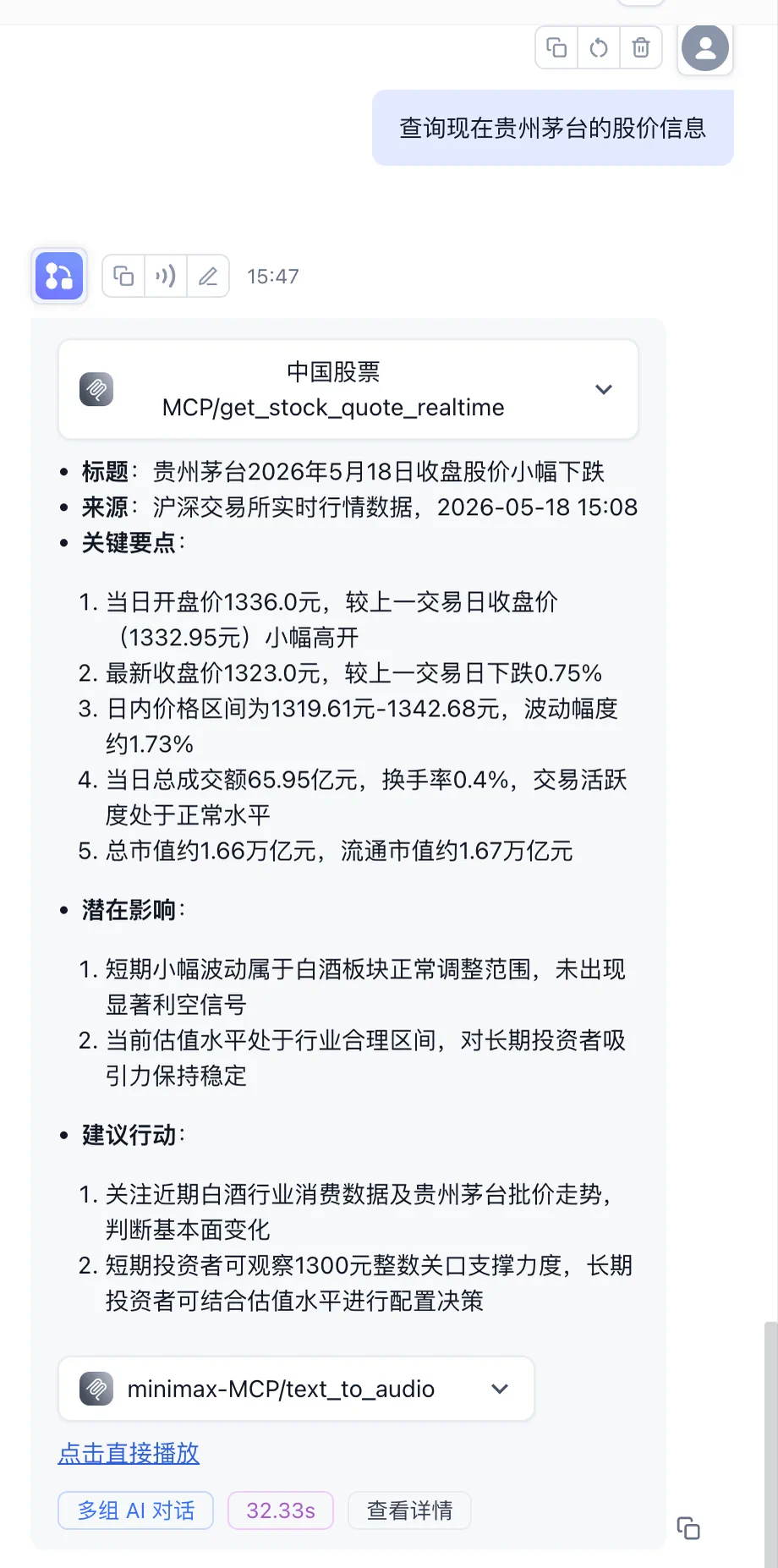
Figure 5.50 Real-time Stock Quote Query
In terms of concept explanation, as shown in Figure 5.51, when the user asks "What's the difference between P/E ratio and P/B ratio," the assistant provides a systematic comparative analysis based on knowledge base and large model understanding: starting from definitions, it explains the calculation methods of P/E Ratio and P/B Ratio in detail; compares them from four dimensions (calculation basis, applicable industries, information reflected, limitations); and finally provides practical application advice on when to focus on P/E ratio versus P/B ratio. This well-structured, logically rigorous output is a typical advantage of RAG-enhanced large models in vertical domain Q&A.
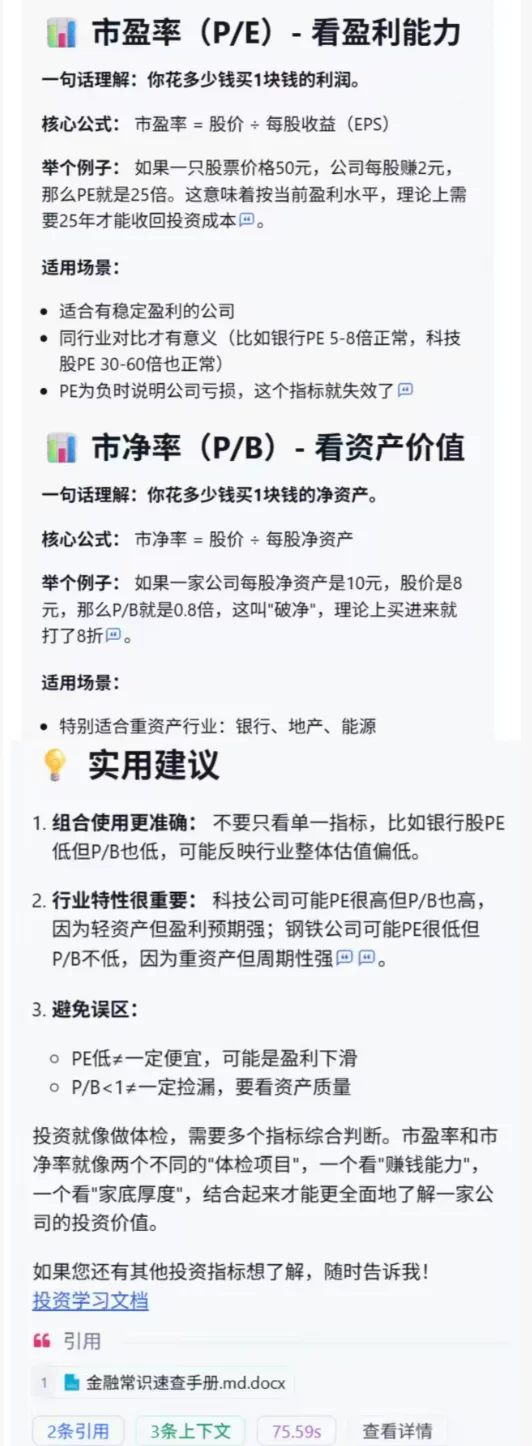
Figure 5.51 P/E Ratio and P/B Ratio Concept Analysis
5.4.3 Analysis of FastGPT's Advantages and Limitations
Through the above practice of building the "Smart Investment Advisor Assistant," we can form a comprehensive understanding of the FastGPT platform.
Advantages:
- Ultimate Knowledge Base Experience: FastGPT's core advantage lies in its deep refinement of the RAG pipeline. From file upload, intelligent chunking, index enhancement, image recognition to retrieval recall, each link provides fine-grained configuration options and a transparent debugging interface. For scenarios that require building Q&A systems based on private knowledge bases (such as enterprise knowledge assistants, intelligent customer service, and professional domain consulting), FastGPT provides an excellent out-of-the-box experience.
- Native MCP Support: Unlike Coze, FastGPT natively supports the MCP protocol, enabling seamless integration with a large number of MCP services from ecosystems such as ModelScope and Alibaba Cloud Bailian. This means the agent's tool extensibility is no longer limited to the platform's built-in plugin library; developers can freely integrate any third-party tool that complies with MCP standards.
- Model-Neutral Design: FastGPT supports flexible integration with various mainstream domestic and international large models such as OpenAI, Claude, Tongyi Qianwen, and DeepSeek. Users can freely switch underlying models based on business needs and cost considerations, avoiding the risk of being tied to a single model provider.
- Visual Workflow Orchestration: The Flow module provides an intuitive node-based orchestration interface where complex multi-branch logic (such as intent recognition, questionnaire collection, and report generation in this case) can be quickly built through drag-and-drop, lowering the barrier for non-developers.
Limitations:
- Relatively Weak Template Ecosystem: Compared to Coze's rich plugin store and Dify's Marketplace with over 8,000 plugins, FastGPT's official templates and built-in tools are relatively limited in number. Although the MCP protocol partially compensates for this shortcoming, finding and configuring suitable MCP services still presents a certain threshold for non-technical users.
- Tight Free Version Quotas: The free version only provides 100 credits and a 30 QPM call rate, which depletes quickly for developers who need frequent testing and iteration. The limitations on knowledge base index count and team member count also make it difficult for the free version to support even moderately scaled team collaboration.
- Community and Documentation Still Maturing: As a relatively young open-source project, FastGPT's community activity and English documentation completeness still lag behind mature platforms like Dify and n8n. When encountering edge cases, you may need to dive into the source code or seek help from the community.
Overall, FastGPT is a highly competitive platform in the knowledge base Q&A domain. If your core need is to build an intelligent Q&A system based on private documents and you want fine-grained control over the entire RAG pipeline, FastGPT is a choice worth trying. For scenarios requiring a strong plugin ecosystem or complex business process automation, you can complement it with Dify or n8n.