8.1 From Cognitive Science to Agent Memory
8.1.1 Inspiration from Human Memory Systems
Before building an agent's memory system, let's first understand from a cognitive science perspective how humans process and store information. Human memory is a multi-level cognitive system that not only stores information but also classifies and organizes information based on importance, time, and context. Cognitive psychology provides a classic theoretical framework for understanding the structure and processes of memory<sup>[1]</sup>, as shown in Figure 8.1.
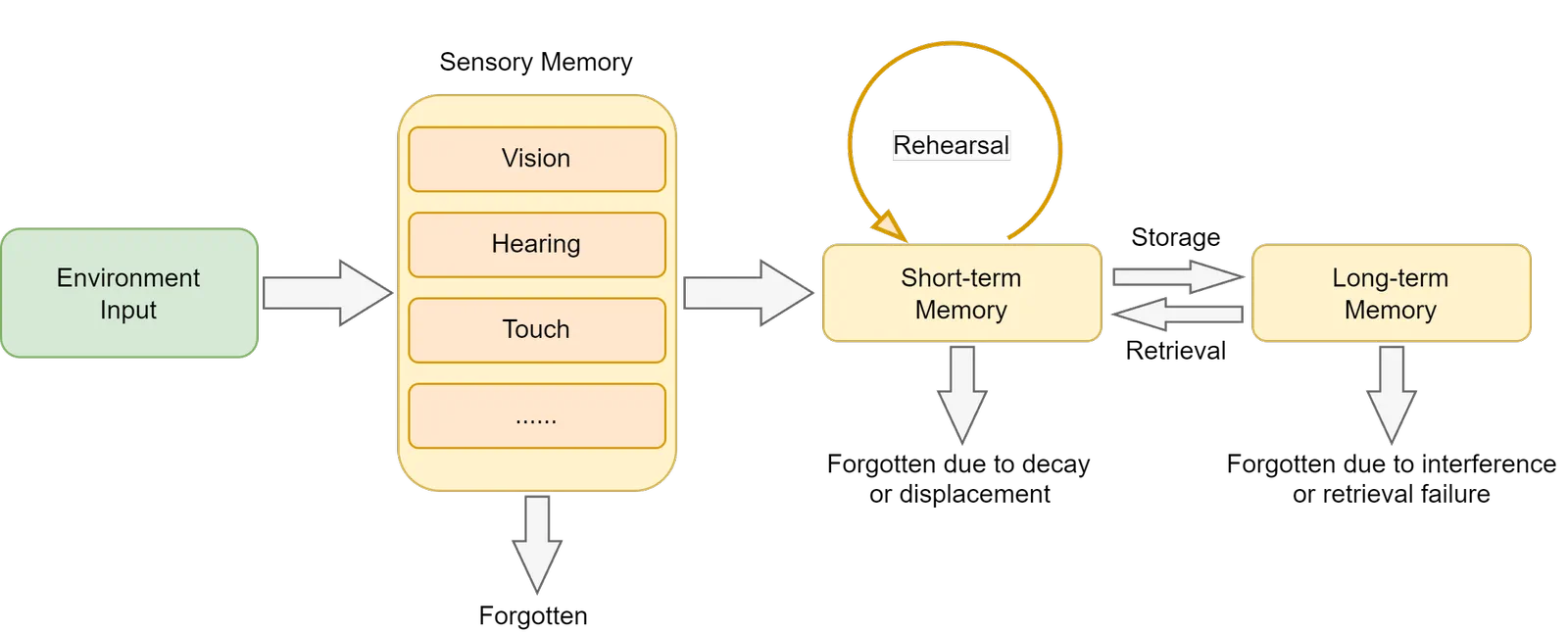
Figure 8.1 Hierarchical Structure of Human Memory System
According to cognitive psychology research, human memory can be divided into the following levels:
- Sensory Memory: Very short duration (0.5-3 seconds), huge capacity, responsible for temporarily storing all information received by the senses
- Working Memory: Short duration (15-30 seconds), limited capacity (7±2 items), responsible for information processing in current tasks
- Long-term Memory: Long duration (can last a lifetime), almost unlimited capacity, further divided into:
- Procedural Memory: Skills and habits (such as riding a bicycle)
- Declarative Memory: Knowledge that can be expressed in language, further divided into:
- Semantic Memory: General knowledge and concepts (such as "Paris is the capital of France")
- Episodic Memory: Personal experiences and events (such as "yesterday's meeting content")
8.1.2 Why Agents Need Memory and RAG
Drawing on the design of human memory systems, we can understand why agents also need similar memory capabilities. An important characteristic of human intelligence is the ability to remember past experiences, learn from them, and apply these experiences to new situations. Similarly, a truly intelligent agent also needs memory capabilities. For LLM-based agents, they typically face two fundamental limitations: forgetting of conversation state and limitations of built-in knowledge.
(1) Limitation 1: Conversation Forgetting Due to Statelessness
Current large language models, although powerful, are designed to be stateless. This means that each user request (or API call) is an independent, unrelated computation. The model itself does not automatically "remember" the content of the previous conversation. This brings several problems:
- Context Loss: In long conversations, important early information may be lost due to context window limitations
- Lack of Personalization: The agent cannot remember user preferences, habits, or specific needs
- Limited Learning Ability: Cannot learn and improve from past successes or failures
- Consistency Issues: May provide contradictory answers in multi-turn conversations
Let's understand this problem through a specific example:
# How to use Agent from Chapter 7
from hello_agents import SimpleAgent, HelloAgentsLLM

agent = SimpleAgent(name="Learning Assistant", llm=HelloAgentsLLM())

# First conversation
response1 = agent.run("My name is Zhang San, I'm learning Python and have mastered basic syntax")
print(response1)  # "Great! Python basic syntax is an important foundation for programming..."

# Second conversation (new session, such as after restarting the program and creating a new Agent)
agent = SimpleAgent(name="Learning Assistant", llm=HelloAgentsLLM())
response2 = agent.run("Do you remember my learning progress?")
print(response2)  # "Sorry, I don't know your learning progress..."
Note that the SimpleAgent from Chapter 7 temporarily stores the current dialogue in _history within the same instance, so consecutive turns in the same process and instance can carry recent context. However, this history is only a temporary message list. It is not persisted across sessions and does not support long-term retrieval, forgetting, or consolidation.
To solve this problem, our framework needs to introduce a memory system.
(2) Limitation 2: Limitations of Model's Built-in Knowledge
Besides forgetting conversation history, another core limitation of LLMs is that their knowledge is static and limited. This knowledge comes entirely from their training data, bringing a series of problems:
- Knowledge Timeliness: Large models have a training data cutoff date and cannot access the latest information
- Domain-Specific Knowledge: General models may lack sufficient depth in specific domains
- Factual Accuracy: Reduce model hallucinations through retrieval verification
- Explainability: Provide information sources to enhance answer credibility
To overcome this limitation, RAG technology emerged. Its core idea is to retrieve the most relevant information from an external knowledge base (such as documents, databases, APIs) before the model generates an answer, and provide this information as context to the model.
8.1.3 Memory and RAG System Architecture Design
Based on the framework foundation established in Chapter 7 and inspiration from cognitive science, we designed a layered memory and RAG system architecture, as shown in Figure 8.2. This architecture not only draws on the hierarchical structure of human memory systems but also fully considers the scalability of engineering implementation. In implementation, we design memory and RAG as two independent tools: memory_tool is responsible for storing and maintaining interaction information during conversations, while rag_tool is responsible for retrieving relevant information from user-provided knowledge bases as context and can automatically store important retrieval results in the memory system.
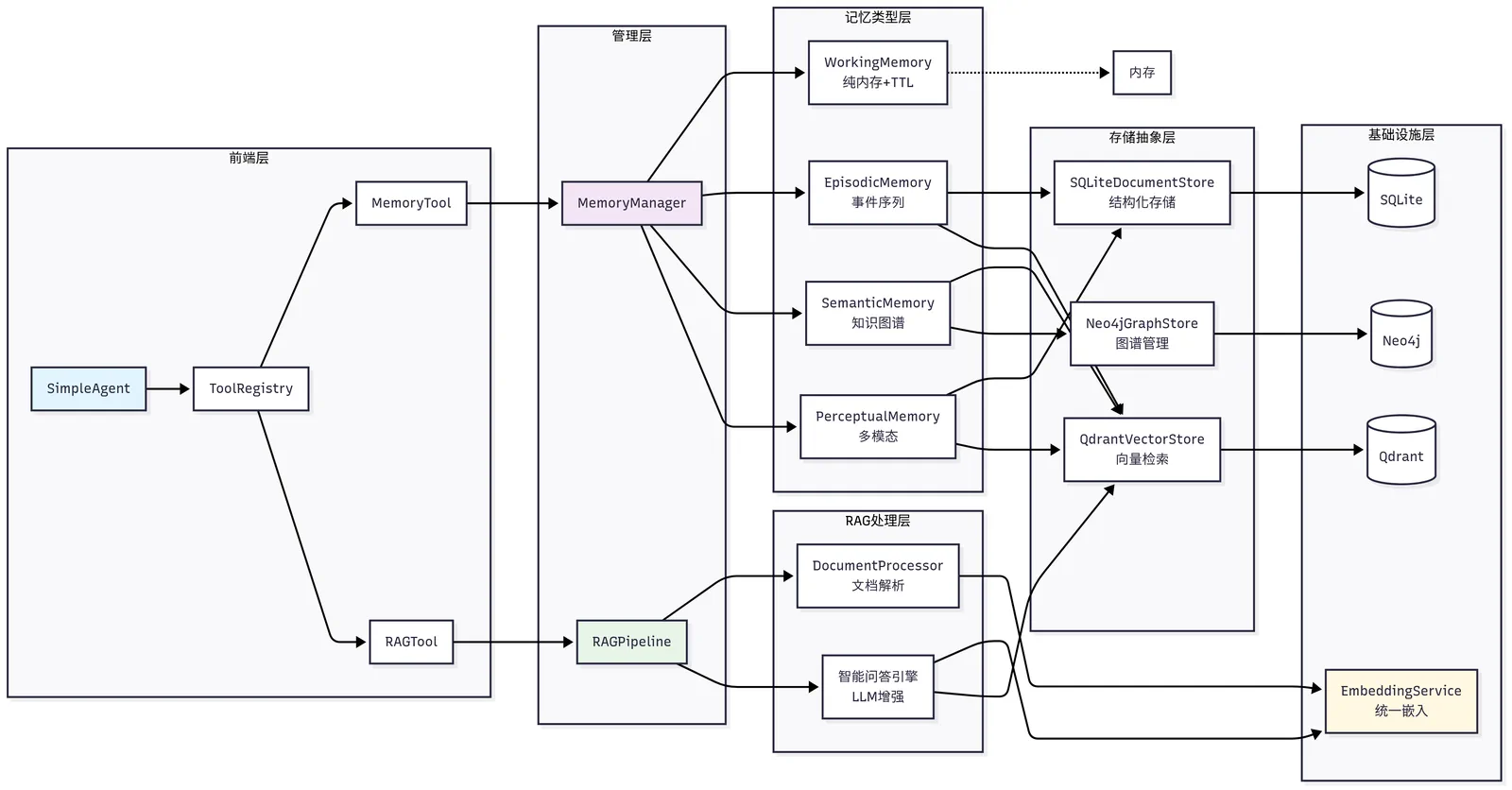
Figure 8.2 Overall Architecture of HelloAgents Memory and RAG System
The memory system adopts a four-layer architecture design:
HelloAgents Memory System
├── Infrastructure Layer
│   ├── MemoryManager - Memory manager (unified scheduling and coordination)
│   ├── MemoryItem - Memory data structure (standardized memory items)
│   ├── MemoryConfig - Configuration management (system parameter settings)
│   └── BaseMemory - Memory base class (common interface definition)
├── Memory Types Layer
│   ├── WorkingMemory - Working memory (temporary information, TTL management)
│   ├── EpisodicMemory - Episodic memory (specific events, time series)
│   ├── SemanticMemory - Semantic memory (abstract knowledge, graph relationships)
│   └── PerceptualMemory - Perceptual memory (multimodal data)
├── Storage Backend Layer
│   ├── QdrantVectorStore - Vector storage (high-performance semantic retrieval)
│   ├── Neo4jGraphStore - Graph storage (knowledge graph management)
│   └── SQLiteDocumentStore - Document storage (structured persistence)
└── Embedding Service Layer
    ├── DashScopeEmbedding - Tongyi Qianwen embedding (cloud API)
    ├── LocalTransformerEmbedding - Local embedding (offline deployment)
    └── TFIDFEmbedding - TFIDF embedding (lightweight fallback)
The RAG system focuses on acquiring and utilizing external knowledge:
HelloAgents RAG System
├── Document Processing Layer
│   ├── DocumentProcessor - Document processor (multi-format parsing)
│   ├── Document - Document object (metadata management)
│   └── Pipeline - RAG pipeline (end-to-end processing)
├── Embedding Layer
│   └── Unified Embedding Interface - Reuses memory system's embedding service
├── Vector Storage Layer
│   └── QdrantVectorStore - Vector database (namespace isolation)
└── Intelligent Q&A Layer
    ├── Multi-strategy Retrieval - Vector retrieval + MQE + HyDE
    ├── Context Construction - Intelligent fragment merging and truncation
    └── LLM-Enhanced Generation - Accurate Q&A based on context
8.1.4 Learning Objectives and Quick Experience
Let's first look at the core learning content of Chapter 8:
hello-agents/
├── hello_agents/
│   ├── memory/                   # Memory system module
│   │   ├── base.py               # Basic data structures (MemoryItem, MemoryConfig, BaseMemory)
│   │   ├── manager.py            # Memory manager (unified coordination and scheduling)
│   │   ├── embedding.py          # Unified embedding service (DashScope/Local/TFIDF)
│   │   ├── types/                # Memory type implementations
│   │   │   ├── working.py        # Working memory (TTL management, pure in-memory)
│   │   │   ├── episodic.py       # Episodic memory (event sequence, SQLite+Qdrant)
│   │   │   ├── semantic.py       # Semantic memory (knowledge graph, Qdrant+Neo4j)
│   │   │   └── perceptual.py     # Perceptual memory (multimodal, SQLite+Qdrant)
│   │   ├── storage/              # Storage backend implementations
│   │   │   ├── qdrant_store.py   # Qdrant vector storage (high-performance vector retrieval)
│   │   │   ├── neo4j_store.py    # Neo4j graph storage (knowledge graph management)
│   │   │   └── document_store.py # SQLite document storage (structured persistence)
│   │   └── rag/                  # RAG system
│   │       ├── pipeline.py       # RAG pipeline (end-to-end processing)
│   │       └── document.py       # Document processor (multi-format parsing)
│   └── tools/builtin/            # Extended built-in tools
│       ├── memory_tool.py        # Memory tool (Agent memory capability)
│       └── rag_tool.py           # RAG tool (intelligent Q&A capability)
└──
Quick Start: Installing the HelloAgents Framework
To allow readers to quickly experience the complete functionality of this chapter, we provide a directly installable Python package. You can install the version corresponding to this chapter with the following commands:
# If you encounter model unavailability in version 0.2.0, please refer to issue#320 or switch to version 0.2.9 for testing.
pip install "hello-agents[all]==0.2.0"
python -m spacy download zh_core_web_sm
python -m spacy download en_core_web_sm
In addition, you need to configure the graph database, vector database, LLM, and Embedding solution API in .env. In the tutorial, Qdrant is used for the vector database, Neo4J for the graph database, and Bailian platform is preferred for Embedding. If no API is available, you can switch to a local deployment model solution.
# ================================
# Qdrant Vector Database Configuration - Get API key: https://cloud.qdrant.io/
# ================================
# Use Qdrant cloud service (recommended)
QDRANT_URL=https://your-cluster.qdrant.tech:6333
QDRANT_API_KEY=your_qdrant_api_key_here

# Or use local Qdrant (requires Docker)
# QDRANT_URL=http://localhost:6333
# QDRANT_API_KEY=

# Qdrant collection configuration
QDRANT_COLLECTION=hello_agents_vectors
QDRANT_VECTOR_SIZE=384
QDRANT_DISTANCE=cosine
QDRANT_TIMEOUT=30

# ================================
# Neo4j Graph Database Configuration - Get API key: https://neo4j.com/cloud/aura/
# ================================
# Use Neo4j Aura cloud service (recommended)
NEO4J_URI=neo4j+s://your-instance.databases.neo4j.io
NEO4J_USERNAME=neo4j
NEO4J_PASSWORD=your_neo4j_password_here

# Or use local Neo4j (requires Docker)
# NEO4J_URI=bolt://localhost:7687
# NEO4J_USERNAME=neo4j
# NEO4J_PASSWORD=hello-agents-password

# Neo4j connection configuration
NEO4J_DATABASE=neo4j
NEO4J_MAX_CONNECTION_LIFETIME=3600
NEO4J_MAX_CONNECTION_POOL_SIZE=50
NEO4J_CONNECTION_TIMEOUT=60

# ==========================
# Embedding Configuration Example - Get from Alibaba Cloud Console: https://dashscope.aliyun.com/
# ==========================
# - If empty, dashscope defaults to text-embedding-v3; local defaults to sentence-transformers/all-MiniLM-L6-v2
EMBED_MODEL_TYPE=dashscope
EMBED_MODEL_NAME=
EMBED_API_KEY=
EMBED_BASE_URL=
Learning in this chapter can be done in two ways:
- Experiential Learning: Directly install the framework using
pip, run example code, and quickly experience various functions - Deep Learning: Follow the chapter content, implement each component from scratch, and deeply understand the framework's design philosophy and implementation details
We recommend adopting a "experience first, then implement" learning path. In this chapter, we provide complete test files. You can rewrite core functions and run tests to verify whether your implementation is correct.
Following the design principles established in Chapter 7, we encapsulate memory and RAG capabilities as standard tools rather than creating new Agent classes. Before starting, let's spend 30 seconds experiencing building an agent with memory and RAG capabilities using Hello-agents!
# Configure the LLM API in .env in the same folder
from hello_agents import SimpleAgent, HelloAgentsLLM, ToolRegistry
from hello_agents.tools import MemoryTool, RAGTool

# Create LLM instance
llm = HelloAgentsLLM()

# Create tool registry
tool_registry = ToolRegistry()

# Add memory tool
memory_tool = MemoryTool(user_id="user123")
tool_registry.register_tool(memory_tool)

# Add RAG tool
rag_tool = RAGTool(knowledge_base_path="./knowledge_base")
tool_registry.register_tool(rag_tool)

# Create Agent and configure tools
agent = SimpleAgent(
    name="Intelligent Assistant",
    llm=llm,
    system_prompt="You are an AI assistant with memory and knowledge retrieval capabilities",
    tool_registry=tool_registry
)

# Start conversation
response = agent.run("Hello! Please remember my name is Zhang San, I am a Python developer")
print(response)
If everything is configured correctly, you can see the following content:
[OK] SQLite database tables and indexes created
[OK] SQLite document storage initialized: ./memory_data\memory.db
INFO:hello_agents.memory.storage.qdrant_store:✅ Successfully connected to Qdrant cloud service: https://0c517275-2ad0-4442-8309-11c36dc7e811.us-east-1-1.aws.cloud.qdrant.io:6333
INFO:hello_agents.memory.storage.qdrant_store:✅ Using existing Qdrant collection: hello_agents_vectors
INFO:hello_agents.memory.types.semantic:✅ Embedding model ready, dimension: 1024
INFO:hello_agents.memory.types.semantic:✅ Qdrant vector database initialization complete
INFO:hello_agents.memory.storage.neo4j_store:✅ Successfully connected to Neo4j cloud service: neo4j+s://851b3a28.databases.neo4j.io
INFO:hello_agents.memory.types.semantic:✅ Neo4j graph database initialization complete
INFO:hello_agents.memory.storage.neo4j_store:✅ Neo4j index creation complete
INFO:hello_agents.memory.types.semantic:✅ Neo4j graph database initialization complete
INFO:hello_agents.memory.types.semantic:🏥 Database health status: Qdrant=✅, Neo4j=✅
INFO:hello_agents.memory.types.semantic:✅ Loaded Chinese spaCy model: zh_core_web_sm
INFO:hello_agents.memory.types.semantic:✅ Loaded English spaCy model: en_core_web_sm
INFO:hello_agents.memory.types.semantic:📚 Available language models: Chinese, English
INFO:hello_agents.memory.types.semantic:Enhanced semantic memory initialization complete (using Qdrant+Neo4j professional databases)
INFO:hello_agents.memory.manager:MemoryManager initialization complete, enabled memory types: ['working', 'episodic', 'semantic']
✅ Tool 'memory' registered.
INFO:hello_agents.memory.storage.qdrant_store:✅ Successfully connected to Qdrant cloud service: https://0c517275-2ad0-4442-8309-11c36dc7e811.us-east-1-1.aws.cloud.qdrant.io:6333
INFO:hello_agents.memory.storage.qdrant_store:✅ Using existing Qdrant collection: rag_knowledge_base
✅ RAG tool initialization successful: namespace=default, collection=rag_knowledge_base
✅ Tool 'rag' registered.
Hello, Zhang San! Nice to meet you. As a Python developer, you must be passionate about programming. If you have any technical questions or need to discuss Python-related topics, feel free to reach out to me anytime. I'll do my best to help you. Is there anything I can help you with right now?