11.6 Complete Training Pipeline Practice
In previous sections, we learned about data preparation, SFT training, GRPO training, and model evaluation separately. Now, let's integrate this knowledge to complete an end-to-end Agentic RL training pipeline.
11.6.1 End-to-End Training Pipeline
A complete Agentic RL training pipeline includes the following stages: data preparation, SFT training, SFT evaluation, GRPO training, GRPO evaluation, and model deployment. As shown in Figure 11.9.

Figure 11.9 End-to-End Training Pipeline
Let's implement this pipeline through a complete script:
"""
Complete Agentic RL Training Pipeline
End-to-end example from data preparation to model deployment
"""

from hello_agents.tools import RLTrainingTool
import json
from datetime import datetime

class AgenticRLPipeline:
    """Agentic RL Training Pipeline"""

    def __init__(self, config_path="config.json"):
        """
        Initialize training pipeline

        Args:
            config_path: Configuration file path
        """
        self.rl_tool = RLTrainingTool()
        self.config = self.load_config(config_path)
        self.results = {}

    def load_config(self, config_path):
        """Load configuration file"""
        with open(config_path, 'r') as f:
            return json.load(f)

    def log(self, message):
        """Log message"""
        timestamp = datetime.now().strftime("%Y-%m-%d %H:%M:%S")
        print(f"[{timestamp}] {message}")

    def stage1_prepare_data(self):
        """Stage 1: Data Preparation"""
        self.log("=" * 50)
        self.log("Stage 1: Data Preparation")
        self.log("=" * 50)

        # Load and check dataset
        result = self.rl_tool.run({
            "action": "load_dataset",
            "format": "sft",
            "max_samples": self.config["data"]["max_samples"],
        })

        # Parse JSON result
        dataset_info = json.loads(result)

        self.log(f"✓ Dataset loaded")
        self.log(f"  - Samples: {dataset_info['dataset_size']}")
        self.log(f"  - Format: {dataset_info['format']}")
        self.log(f"  - Data columns: {', '.join(dataset_info['sample_keys'])}")

        self.results["data"] = dataset_info

        return dataset_info

    def stage2_sft_training(self):
        """Stage 2: SFT Training"""
        self.log("\n" + "=" * 50)
        self.log("Stage 2: SFT Training")
        self.log("=" * 50)

        sft_config = self.config["sft"]

        result = self.rl_tool.run({
            "action": "train",
            "algorithm": "sft",
            "model_name": self.config["model"]["base_model"],
            "output_dir": sft_config["output_dir"],
            "max_samples": self.config["data"]["max_samples"],
            "num_epochs": sft_config["num_epochs"],
            "batch_size": sft_config["batch_size"],
            "use_lora": True,
            # Training monitoring configuration
            "use_wandb": self.config.get("monitoring", {}).get("use_wandb", False),
            "use_tensorboard": self.config.get("monitoring", {}).get("use_tensorboard", True),
            "wandb_project": self.config.get("monitoring", {}).get("wandb_project", None),
        })

        # Parse JSON result
        result_data = json.loads(result)

        self.log(f"✓ SFT training completed")
        self.log(f"  - Model path: {result_data['output_dir']}")
        self.log(f"  - Status: {result_data['status']}")

        self.results["sft_training"] = result_data

        return result_data["output_dir"]

    def stage3_sft_evaluation(self, model_path):
        """Stage 3: SFT Evaluation"""
        self.log("\n" + "=" * 50)
        self.log("Stage 3: SFT Evaluation")
        self.log("=" * 50)

        result = self.rl_tool.run({
            "action": "evaluate",
            "model_path": model_path,
            "max_samples": self.config["eval"]["max_samples"],
            "use_lora": True,
        })
        eval_data = json.loads(result)

        self.log(f"✓ SFT evaluation completed")
        self.log(f"  - Accuracy: {eval_data['accuracy']}")
        self.log(f"  - Average reward: {eval_data['average_reward']}")

        self.results["sft_evaluation"] = eval_data

        return eval_data

    def stage4_grpo_training(self, sft_model_path):
        """Stage 4: GRPO Training"""
        self.log("\n" + "=" * 50)
        self.log("Stage 4: GRPO Training")
        self.log("=" * 50)

        grpo_config = self.config["grpo"]

        result = self.rl_tool.run({
            "action": "train",
            "algorithm": "grpo",
            "model_name": sft_model_path,
            "output_dir": grpo_config["output_dir"],
            "max_samples": self.config["data"]["max_samples"],
            "num_epochs": grpo_config["num_epochs"],
            "batch_size": grpo_config["batch_size"],
            "use_lora": True,
            # Training monitoring configuration
            "use_wandb": self.config.get("monitoring", {}).get("use_wandb", False),
            "use_tensorboard": self.config.get("monitoring", {}).get("use_tensorboard", True),
            "wandb_project": self.config.get("monitoring", {}).get("wandb_project", None),
        })

        # Parse JSON result
        result_data = json.loads(result)

        self.log(f"✓ GRPO training completed")
        self.log(f"  - Model path: {result_data['output_dir']}")
        self.log(f"  - Status: {result_data['status']}")

        self.results["grpo_training"] = result_data

        return result_data["output_dir"]

    def stage5_grpo_evaluation(self, model_path):
        """Stage 5: GRPO Evaluation"""
        self.log("\n" + "=" * 50)
        self.log("Stage 5: GRPO Evaluation")
        self.log("=" * 50)

        result = self.rl_tool.run({
            "action": "evaluate",
            "model_path": model_path,
            "max_samples": self.config["eval"]["max_samples"],
            "use_lora": True,
        })
        eval_data = json.loads(result)

        self.log(f"✓ GRPO evaluation completed")
        self.log(f"  - Accuracy: {eval_data['accuracy']}")
        self.log(f"  - Average reward: {eval_data['average_reward']}")

        self.results["grpo_evaluation"] = eval_data

        return eval_data

    def stage6_save_results(self):
        """Stage 6: Save Results"""
        self.log("\n" + "=" * 50)
        self.log("Stage 6: Save Results")
        self.log("=" * 50)

        # Save training results
        results_path = "training_results.json"
        with open(results_path, 'w') as f:
            json.dump(self.results, f, indent=2)

        self.log(f"✓ Results saved to: {results_path}")

    def run(self):
        """Run complete pipeline"""
        try:
            # Stage 1: Data preparation
            self.stage1_prepare_data()

            # Stage 2: SFT training
            sft_model_path = self.stage2_sft_training()

            # Stage 3: SFT evaluation
            self.stage3_sft_evaluation(sft_model_path)

            # Stage 4: GRPO training
            grpo_model_path = self.stage4_grpo_training(sft_model_path)

            # Stage 5: GRPO evaluation
            self.stage5_grpo_evaluation(grpo_model_path)

            # Stage 6: Save results
            self.stage6_save_results()

            self.log("\n" + "=" * 50)
            self.log("✓ Training pipeline completed!")
            self.log("=" * 50)

        except Exception as e:
            self.log(f"\n✗ Training failed: {str(e)}")
            raise

# Usage example
if __name__ == "__main__":
    # Create configuration file
    config = {
        "model": {
            "base_model": "Qwen/Qwen3-0.6B"
        },
        "data": {
            "max_samples": 1000  # Use 1000 samples
        },
        "sft": {
            "output_dir": "./models/sft_model",
            "num_epochs": 3,
            "batch_size": 8,
        },
        "grpo": {
            "output_dir": "./models/grpo_model",
            "num_epochs": 3,
            "batch_size": 4,
        },
        "eval": {
            "max_samples": 200,
            "sft_accuracy_threshold": 0.40  # SFT accuracy threshold
        },
        "monitoring": {
            "use_wandb": False,  # Whether to use Wandb
            "use_tensorboard": True,  # Whether to use TensorBoard
            "wandb_project": "agentic-rl-pipeline"  # Wandb project name
        }
    }

    # Save configuration
    with open("config.json", 'w') as f:
        json.dump(config, f, indent=2)

    # Run training pipeline
    pipeline = AgenticRLPipeline("config.json")
    pipeline.run()
Running this script, you will see the complete training process.
Running tips:
Start Small: Don't start training with all data at once. First use 100-1000 samples for quick iteration, validate process and parameters, and scale up after confirming effectiveness. This can save significant time and computational resources.
Data Quality Check: Check data quality before training, ensure correct format, accurate answers, and no duplicate samples. You can use the following code:
def check_data_quality(dataset):
    """Check data quality"""
    issues = []

    # Check required fields
    required_fields = ["prompt", "completion"]
    for field in required_fields:
        if field not in dataset.column_names:
            issues.append(f"Missing field: {field}")

    # Check null values
    for i, sample in enumerate(dataset):
        if not sample["prompt"] or not sample["completion"]:
            issues.append(f"Sample {i} contains null values")

    # Check duplicates
    prompts = [s["prompt"] for s in dataset]
    duplicates = len(prompts) - len(set(prompts))
    if duplicates > 0:
        issues.append(f"Found {duplicates} duplicate samples")

    return issues

# Usage
issues = check_data_quality(dataset)
if issues:
    print("Data quality issues:")
    for issue in issues:
        print(f"  - {issue}")
else:
    print("✓ Data quality check passed")
Data Augmentation: If data volume is insufficient, consider data augmentation, such as rewriting questions (keeping answers unchanged), generating similar questions, or back translation. But be careful to maintain data quality and avoid introducing noise.
11.6.2 Hyperparameter Tuning
Hyperparameter tuning is key to improving model performance. Here are some commonly used tuning strategies.
(1) Grid Search
Grid Search is the simplest tuning method, traversing all parameter combinations and selecting the best set.
# Define parameter grid
param_grid = {
    "learning_rate": [1e-5, 5e-5, 1e-4],
    "lora_rank": [8, 16, 32],
    "kl_coef": [0.05, 0.1, 0.2],
}

best_accuracy = 0
best_params = None

# Traverse all combinations
for lr in param_grid["learning_rate"]:
    for rank in param_grid["lora_rank"]:
        for kl in param_grid["kl_coef"]:
            print(f"Testing parameters: lr={lr}, rank={rank}, kl={kl}")

            # Train model
            result = rl_tool.run({
                "action": "train",
                "algorithm": "grpo",
                "learning_rate": lr,
                "lora_rank": rank,
                "kl_coef": kl,
                # Other parameters...
            })

            # Evaluate model
            eval_result = rl_tool.run({
                "action": "evaluate",
                "model_path": result["model_path"],
            })

            # Update best parameters
            if eval_result["accuracy"] > best_accuracy:
                best_accuracy = eval_result["accuracy"]
                best_params = {"lr": lr, "rank": rank, "kl": kl}

print(f"Best parameters: {best_params}")
print(f"Best accuracy: {best_accuracy:.2%}")
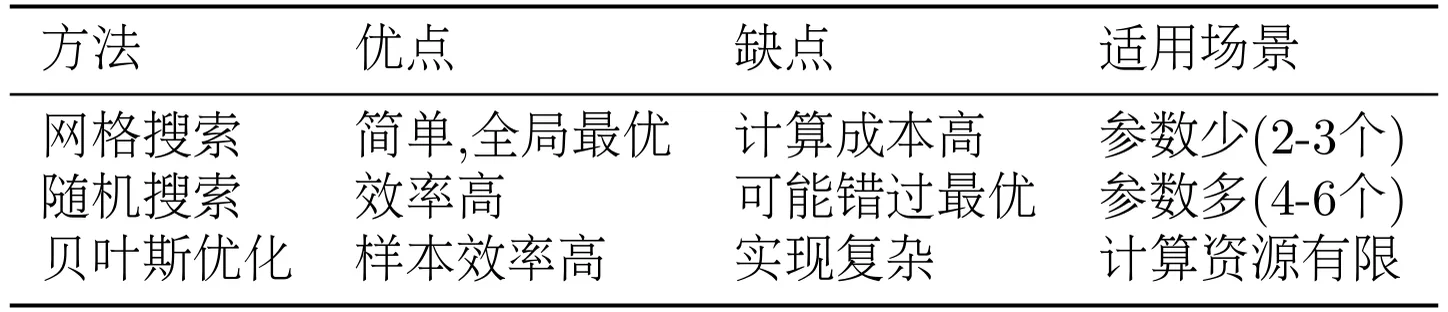
Grid search advantages are simple and direct, can find global optimum. Disadvantages are high computational cost, impractical when many parameters.
(2) Random Search
Random Search randomly samples parameter combinations, more efficient than grid search.
import random

# Define parameter ranges
param_ranges = {
    "learning_rate": (1e-6, 1e-4),  # Log-uniform distribution
    "lora_rank": [4, 8, 16, 32, 64],
    "kl_coef": (0.01, 0.5),
}

best_accuracy = 0
best_params = None

# Random sampling N times
N = 10
for i in range(N):
    # Randomly sample parameters
    lr = 10 ** random.uniform(-6, -4)  # Log-uniform
    rank = random.choice(param_ranges["lora_rank"])
    kl = random.uniform(0.01, 0.5)

    print(f"[{i+1}/{N}] Testing parameters: lr={lr:.2e}, rank={rank}, kl={kl:.3f}")

    # Train and evaluate (same as above)
    # ...

print(f"Best parameters: {best_params}")
print(f"Best accuracy: {best_accuracy:.2%}")
Random search advantages are high efficiency, suitable for large parameter spaces. Disadvantages are may miss optimal solution.
(3) Bayesian Optimization
Bayesian Optimization uses probabilistic models to guide search, more intelligent. Can use libraries like Optuna:
import optuna

def objective(trial):
    """Optimization objective function"""
    # Sample parameters
    lr = trial.suggest_loguniform("learning_rate", 1e-6, 1e-4)
    rank = trial.suggest_categorical("lora_rank", [8, 16, 32])
    kl = trial.suggest_uniform("kl_coef", 0.01, 0.5)

    # Train model
    result = rl_tool.run({
        "action": "train",
        "algorithm": "grpo",
        "learning_rate": lr,
        "lora_rank": rank,
        "kl_coef": kl,
        # Other parameters...
    })

    # Evaluate model
    eval_result = rl_tool.run({
        "action": "evaluate",
        "model_path": result["model_path"],
    })

    return eval_result["accuracy"]

# Create study
study = optuna.create_study(direction="maximize")
study.optimize(objective, n_trials=20)

# Print best parameters
print(f"Best parameters: {study.best_params}")
print(f"Best accuracy: {study.best_value:.2%}")
Bayesian optimization advantages are high sample efficiency, can quickly find good parameters. Disadvantages are complex implementation, requires additional libraries.
As shown in Table 11.8, comparison of different tuning methods.
Table 11.8 Hyperparameter Tuning Method Comparison
11.6.3 Distributed Training
When data volume and model scale increase, single GPU training becomes very slow. At this point we need to use distributed training to accelerate the training process. HelloAgents is based on TRL and Hugging Face Accelerate, naturally supporting multi-GPU and multi-node distributed training.
Solution Selection Recommendations:
- Single Machine Multi-GPU (2-8 cards): Use DDP, simple and efficient
- Large Models (>7B): Use DeepSpeed ZeRO-2 or ZeRO-3
- Multi-Node Cluster: Use DeepSpeed ZeRO-3 + Offload
(1) Configure Accelerate
First need to create Accelerate configuration file. Run the following command:
accelerate configSelect configuration according to prompts:
In which compute environment are you running?
> This machine

Which type of machine are you using?
> multi-GPU

How many different machines will you use?
> 1

Do you wish to optimize your script with torch dynamo?
> NO

Do you want to use DeepSpeed?
> YES

Which DeepSpeed config file do you want to use?
> ZeRO-2

How many GPU(s) should be used for distributed training?
> 4
This will generate a configuration file at ~/.cache/huggingface/accelerate/default_config.yaml.
(2) Training with DDP
Data Parallel (DDP) is the simplest distributed solution, each GPU holds a complete model copy, data is split across GPUs.
Accelerate Configuration File (multi_gpu_ddp.yaml):
compute_environment: LOCAL_MACHINE
distributed_type: MULTI_GPU
num_processes: 4  # Number of GPUs
machine_rank: 0
num_machines: 1
gpu_ids: all
mixed_precision: fp16
Training Script (no modification needed):
from hello_agents.tools import RLTrainingTool

rl_tool = RLTrainingTool()

# Training code remains unchanged
result = rl_tool.run({
    "action": "train",
    "algorithm": "grpo",
    "model_name": "Qwen/Qwen3-0.6B",
    "output_dir": "./models/grpo_ddp",
    "num_epochs": 3,
    "batch_size": 4,  # Batch size per GPU
    "use_lora": True,
})
Launch Training:
# Using configuration file
accelerate launch --config_file multi_gpu_ddp.yaml train_script.py

# Or directly specify parameters
accelerate launch --num_processes 4 --mixed_precision fp16 train_script.py
(3) Training with DeepSpeed ZeRO
DeepSpeed ZeRO significantly reduces memory usage by sharding optimizer states, gradients, and model parameters, supporting larger models and batch sizes.
ZeRO-2 Configuration File (deepspeed_zero2.yaml):
compute_environment: LOCAL_MACHINE
distributed_type: DEEPSPEED
num_processes: 4
machine_rank: 0
num_machines: 1
gpu_ids: all
mixed_precision: fp16
deepspeed_config:
  gradient_accumulation_steps: 4
  gradient_clipping: 1.0
  offload_optimizer_device: none
  offload_param_device: none
  zero3_init_flag: false
  zero_stage: 2  # ZeRO-2
ZeRO-3 Configuration File (deepspeed_zero3.yaml):
compute_environment: LOCAL_MACHINE
distributed_type: DEEPSPEED
num_processes: 4
machine_rank: 0
num_machines: 1
gpu_ids: all
mixed_precision: fp16
deepspeed_config:
  gradient_accumulation_steps: 4
  gradient_clipping: 1.0
  offload_optimizer_device: cpu  # Offload optimizer states to CPU
  offload_param_device: cpu      # Offload parameters to CPU
  zero3_init_flag: true
  zero_stage: 3  # ZeRO-3
Launch Training:
# ZeRO-2
accelerate launch --config_file deepspeed_zero2.yaml train_script.py

# ZeRO-3
accelerate launch --config_file deepspeed_zero3.yaml train_script.py
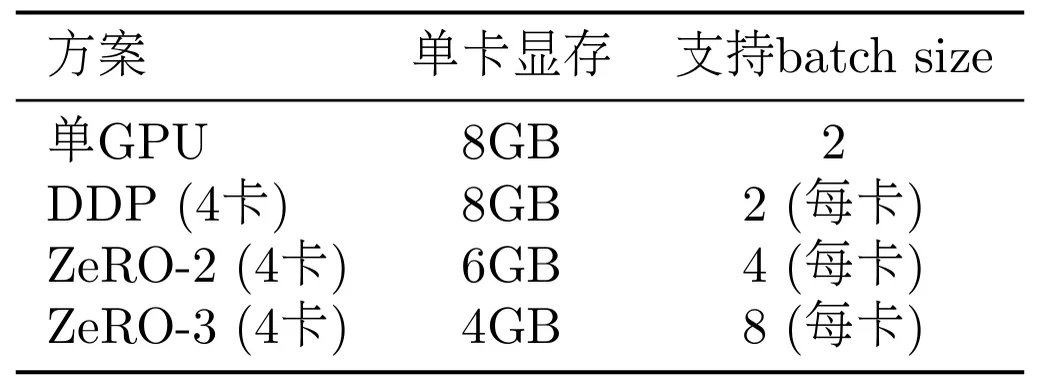
As shown in Table 11.9, this is a memory comparison for training Qwen3-0.6B model with different methods:
Table 11.9 Memory Comparison (Qwen3-0.6B Model)
(4) Multi-Node Training
For ultra-large-scale training, multiple nodes (machines) can be used.
Main Node Configuration (multi_node_main.yaml):
compute_environment: LOCAL_MACHINE
distributed_type: DEEPSPEED
num_processes: 16  # 4 nodes x 4 GPUs
machine_rank: 0    # Main node
num_machines: 4
main_process_ip: 192.168.1.100  # Main node IP
main_process_port: 29500
gpu_ids: all
mixed_precision: fp16
deepspeed_config:
  zero_stage: 3
  offload_optimizer_device: cpu
  offload_param_device: cpu
Worker Node Configuration (modify machine_rank to 1, 2, 3):
machine_rank: 1  # Worker node 1
# Other configurations same
Launch Training:
# On main node
accelerate launch --config_file multi_node_main.yaml train_script.py

# On worker node 1
accelerate launch --config_file multi_node_worker1.yaml train_script.py

# On worker node 2
accelerate launch --config_file multi_node_worker2.yaml train_script.py

# On worker node 3
accelerate launch --config_file multi_node_worker3.yaml train_script.py
(5) Distributed Training Best Practices
1. Batch Size Adjustment
In distributed training, total batch size = per_device_batch_size × num_gpus × gradient_accumulation_steps
# Single GPU: batch_size=4, gradient_accumulation=4, total_batch=16
# 4GPU DDP: batch_size=4, gradient_accumulation=1, total_batch=16 (keep consistent)
2. Learning Rate Scaling
Use linear scaling rule: lr_new = lr_base × sqrt(total_batch_size_new / total_batch_size_base)
# Baseline: single GPU, batch=16, lr=5e-5
# 4GPU: batch=64, lr=5e-5 × sqrt(64/16) = 1e-4
3. Monitoring and Debugging
# Enable verbose logging
export ACCELERATE_LOG_LEVEL=INFO

# Enable NCCL debugging (multi-node)
export NCCL_DEBUG=INFO

# Check GPU utilization
watch -n 1 nvidia-smi
11.6.4 Production Deployment
After training is complete, we need to deploy the model to production environment. Here are some deployment recommendations.
(1) Model Export
Merge LoRA weights into base model for easier deployment:
from transformers import AutoModelForCausalLM, AutoTokenizer
from peft import PeftModel

# Load base model
base_model = AutoModelForCausalLM.from_pretrained("Qwen/Qwen3-0.6B")

# Load LoRA weights
model = PeftModel.from_pretrained(base_model, "./models/grpo_model")

# Merge weights
merged_model = model.merge_and_unload()

# Save merged model
merged_model.save_pretrained("./models/merged_model")

# Save tokenizer
tokenizer = AutoTokenizer.from_pretrained("Qwen/Qwen3-0.6B")
tokenizer.save_pretrained("./models/merged_model")

print("✓ Model exported to: ./models/merged_model")
(2) Inference Optimization
Use quantization and optimization techniques to accelerate inference:
from transformers import AutoModelForCausalLM, AutoTokenizer
import torch

# Load model (using 8-bit quantization)
model = AutoModelForCausalLM.from_pretrained(
    "./models/merged_model",
    load_in_8bit=True,  # 8-bit quantization
    device_map="auto",  # Auto device allocation
)

tokenizer = AutoTokenizer.from_pretrained("./models/merged_model")

# Inference
def generate_answer(question):
    prompt = f"<|im_start|>user\n{question}<|im_end|>\n<|im_start|>assistant\n"
    inputs = tokenizer(prompt, return_tensors="pt").to(model.device)

    outputs = model.generate(
        **inputs,
        max_new_tokens=512,
        temperature=0.7,
        do_sample=True,
    )

    response = tokenizer.decode(outputs[0], skip_special_tokens=False)
    return response

# Test
question = "What is 48 + 24?"
answer = generate_answer(question)
print(answer)
(3) API Service
Create inference service using FastAPI:
from fastapi import FastAPI
from pydantic import BaseModel
from transformers import AutoModelForCausalLM, AutoTokenizer

app = FastAPI()

# Load model
model = AutoModelForCausalLM.from_pretrained("./models/merged_model")
tokenizer = AutoTokenizer.from_pretrained("./models/merged_model")

class Question(BaseModel):
    text: str
    max_tokens: int = 512

class Answer(BaseModel):
    text: str
    confidence: float

@app.post("/generate", response_model=Answer)
def generate(question: Question):
    """Generate answer"""
    prompt = f"<|im_start|>user\n{question.text}<|im_end|>\n<|im_start|>assistant\n"
    inputs = tokenizer(prompt, return_tensors="pt")

    outputs = model.generate(
        **inputs,
        max_new_tokens=question.max_tokens,
        temperature=0.7,
        return_dict_in_generate=True,
        output_scores=True,
    )

    response = tokenizer.decode(outputs.sequences[0], skip_special_tokens=False)

    # Calculate confidence (simplified version)
    confidence = 0.8  # Should actually be calculated based on output probabilities

    return Answer(text=response, confidence=confidence)

# Run: uvicorn api:app --host 0.0.0.0 --port 8000