12.2 BFCL: Tool Invocation Capability Evaluation
12.2.1 BFCL Benchmark Introduction
BFCL (Berkeley Function Calling Leaderboard) is a function calling capability evaluation benchmark launched by UC Berkeley<sup>[1]</sup>. In agent systems, tool calling is one of the core capabilities. Agents need to complete the following tasks:
- Understand Task Requirements: Extract key information from user's natural language description
- Select Appropriate Tools: Choose the most suitable tool from available tool set
- Construct Function Calls: Correctly fill in function name and parameters
- Handle Complex Scenarios: Support advanced scenarios like multi-function calls, parallel calls
The BFCL benchmark contains four evaluation categories with increasing difficulty. Starting from the most basic single function call (Simple), gradually increasing to scenarios requiring multiple function calls (Multiple), then to complex scenarios requiring parallel calls of multiple functions (Parallel), and finally to scenarios requiring judgment of whether function calls are needed (Irrelevance). These four categories cover various tool calling scenarios that agents may encounter in practical applications, as shown in Table 12.1:
Table 12.1 Four Evaluation Categories in BFCL Benchmark

The BFCL evaluation process follows standard benchmark testing procedures: first load dataset and select evaluation category, then run agent to obtain prediction results, next parse prediction results into Abstract Syntax Tree (AST), and finally judge whether predictions are correct through AST matching algorithm. The entire process traverses all test samples, ultimately calculating evaluation metrics like accuracy and generating evaluation reports. The complete evaluation process is shown in Figure 12.2:

Figure 12.2 BFCL Evaluation Process Diagram
(1) BFCL Dataset Structure
The BFCL dataset uses JSON format, with each test sample containing the following fields:
{
  "id": "simple_001",
  "question": "What's the weather like in Beijing today?",
  "function": [
    {
      "name": "get_weather",
      "description": "Get the current weather for a location",
      "parameters": {
        "type": "object",
        "properties": {
          "location": {
            "type": "string",
            "description": "The city name"
          }
        },
        "required": ["location"]
      }
    }
  ],
  "ground_truth": [
    {
      "name": "get_weather",
      "arguments": {
        "location": "Beijing"
      }
    }
  ]
}
Key Field Descriptions:
question: User's natural language requestfunction: List of available functions (including function signatures and descriptions)ground_truth: Standard answer (expected function call)
(2) AST Matching Explanation
BFCL uses AST Matching (Abstract Syntax Tree Matching) as the core evaluation algorithm, so let's understand the evaluation strategy below.
BFCL uses Abstract Syntax Tree (AST) for intelligent matching, rather than simple string matching. The core idea of AST matching is: Parse function calls into syntax trees, then compare tree structure and node values.
Given predicted function call $P$ and standard answer $G$, the AST matching function is defined as:
$$ \text{AST_Match}(P, G) = \begin{cases} 1 & \text{if } \text{AST}(P) \equiv \text{AST}(G) \ 0 & \text{otherwise} \end{cases} $$
Where $\text{AST}(x)$ represents parsing function call into abstract syntax tree, $\equiv$ represents syntax tree equivalence.
Two syntax trees are equivalent if they satisfy three core conditions: function names must be completely identical (exact match), parameter key-value pair sets are equal (ignoring order), and each parameter value is semantically equivalent (e.g., 2+3 is equivalent to 5). In the specific matching process, function name matching requires exact string matching, for example get_weather and get_temperature are considered different functions. Parameter matching uses AST for intelligent comparison, allowing different parameter orders (f(a=1, b=2) is equivalent to f(b=2, a=1)), allowing equivalent expressions (f(x=2+3) is equivalent to f(x=5)), and also allowing different string representations (f(s="hello") is equivalent to f(s='hello')). For multi-function call scenarios, the matching algorithm requires calling the same number of functions, each function call must match, but call order can differ (using set matching).
AST Matching Examples:
# Example 1: Different parameter order (match successful)
Prediction: get_weather(city="Beijing", unit="celsius")
Standard: get_weather(unit="celsius", city="Beijing")
Result: ✅ Match successful

# Example 2: Equivalent expression (match successful)
Prediction: calculate(x=2+3)
Standard: calculate(x=5)
Result: ✅ Match successful

# Example 3: Wrong function name (match failed)
Prediction: get_temperature(city="Beijing")
Standard: get_weather(city="Beijing")
Result: ❌ Match failed

# Example 4: Wrong parameter value (match failed)
Prediction: get_weather(city="Shanghai")
Standard: get_weather(city="Beijing")
Result: ❌ Match failed
(3) BFCL Evaluation Metrics
BFCL uses the following metrics to evaluate agent performance:
1. Accuracy
Accuracy is the most core metric, defined as the proportion of samples with successful AST matching:
$$ \text{Accuracy} = \frac{1}{N} \sum_{i=1}^{N} \text{AST_Match}(P_i, G_i) $$
Where:
- $N$ is the total number of samples
- $P_i$ is the prediction result of the $i$-th sample
- $G_i$ is the standard answer of the $i$-th sample
- $\text{AST_Match}(P_i, G_i) \in {0, 1}$ is the AST matching function
2. AST Match Rate
Same as accuracy, emphasizing use of AST matching algorithm:
$$ \text{AST Match Rate} = \text{Accuracy} $$
3. Category-wise Accuracy
For each category $c \in {\text{simple}, \text{multiple}, \text{parallel}, \ldots}$, calculate the accuracy for that category:
$$ \text{Accuracy}c = \frac{1}{|D_c|} \sum{i \in D_c} \text{AST_Match}(P_i, G_i) $$
Where $D_c$ is the sample set of category $c$, $|D_c|$ is the number of samples in that category.
4. Weighted Accuracy
Considering difficulty weights of different categories:
$$ \text{Weighted Accuracy} = \sum_{c} w_c \cdot \text{Accuracy}_c $$
Where $w_c$ is the weight of category $c$, satisfying $\sum_c w_c = 1$.
5. Error Rate
Proportion of samples that failed to correctly call functions:
$$ \text{Error Rate} = 1 - \text{Accuracy} = \frac{1}{N} \sum_{i=1}^{N} (1 - \text{AST_Match}(P_i, G_i)) $$
Metric Interpretation:
- Accuracy = 1.0: All samples are completely correct
- Accuracy = 0.8: 80% of samples correct, 20% of samples incorrect
- Accuracy = 0.0: All samples are incorrect
Category Accuracy Example:
# Assume evaluation results
simple_accuracy = 0.95      # Simple category: 95% correct
multiple_accuracy = 0.82    # Multiple category: 82% correct
parallel_accuracy = 0.68    # Parallel category: 68% correct

# Weighted accuracy (assuming equal weights)
weighted_accuracy = (0.95 + 0.82 + 0.68) / 3 = 0.817
(4) BFCL Official Evaluation Tool
BFCL provides official CLI tool for evaluation:
# Install BFCL evaluation tool
pip install bfcl

# Run official evaluation
bfcl evaluate \
    --model-result-path ./results.json \
    --test-category simple_python
Advantages of using the official evaluation tool: it uses the official AST matching algorithm, evaluation results are completely consistent with the leaderboard, supports all BFCL v4 categories, and can automatically generate detailed evaluation reports.
12.2.2 Obtaining BFCL Dataset
The BFCL dataset can be obtained through the following methods:
Method 1: Clone from Official GitHub Repository (Recommended)
This is the most reliable method, obtaining complete dataset and ground truth:
# Clone BFCL repository
git clone https://github.com/ShishirPatil/gorilla.git temp_gorilla
cd temp_gorilla/berkeley-function-call-leaderboard

# View BFCL v4 dataset
ls bfcl_eval/data/
# Output: BFCL_v4_simple_python.json  BFCL_v4_multiple.json  BFCL_v4_parallel.json  ...

# View ground truth
ls bfcl_eval/data/possible_answer/
# Output: BFCL_v4_simple_python.json  BFCL_v4_multiple.json  ...
Reasons for recommending this method: it contains complete ground truth (standard answers), data format is completely consistent with official evaluation tool, can directly use official evaluation scripts, and supports BFCL v4 latest version.
Method 2: Load Official Data Using HelloAgents
After cloning repository, load data using HelloAgents:
from hello_agents.evaluation import BFCLDataset

# Load BFCL official data
dataset = BFCLDataset(
    bfcl_data_dir="./temp_gorilla/berkeley-function-call-leaderboard/bfcl_eval/data",
    category="simple_python"  # BFCL v4 category
)

# Load data (including test data and ground truth)
data = dataset.load()

print(f"✅ Loaded {len(data)} test samples")
print(f"✅ Loaded {len(dataset.ground_truth)} ground truth")
# Output:
# ✅ Loaded 400 test samples
# ✅ Loaded 400 ground truth
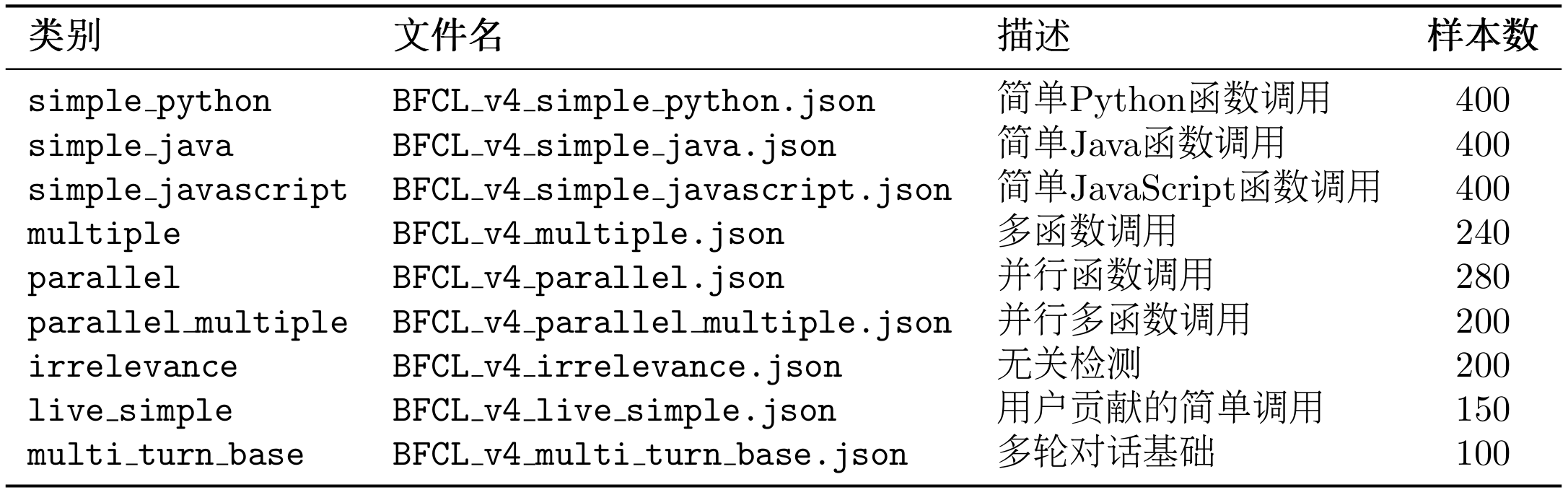
The working principle of this loader is: first load test data from bfcl_eval/data/, then load ground truth from bfcl_eval/data/possible_answer/, next automatically merge test data and ground truth, and finally preserve original BFCL data format. BFCL v4 dataset categories can be viewed in Table 12.2.
Table 12.2 Four Evaluation Categories in BFCL Benchmark
You can also view available categories through code:
# Get all supported categories
categories = dataset.get_available_categories()
print(f"Supported categories: {categories}")
# Output: ['simple_python', 'simple_java', 'simple_javascript', 'multiple', ...]
12.2.3 Implementing BFCL Evaluation in HelloAgents
Now let's see how to implement BFCL evaluation in the HelloAgents framework. We provide three usage methods:
Method 1: Using BFCLEvaluationTool (Recommended)
This is the simplest method, completing evaluation, report generation, and official evaluation with one line of code:
from hello_agents import SimpleAgent, HelloAgentsLLM
from hello_agents.tools import BFCLEvaluationTool

# 1. Create agent to be evaluated
llm = HelloAgentsLLM()
agent = SimpleAgent(name="TestAgent", llm=llm)

# 2. Create BFCL evaluation tool
bfcl_tool = BFCLEvaluationTool()

# 3. Run evaluation (automatically complete all steps)
results = bfcl_tool.run(
    agent=agent,
    category="simple_python",  # Evaluation category
    max_samples=5              # Number of evaluation samples (0 means all)
)

# 4. View results
print(f"Accuracy: {results['overall_accuracy']:.2%}")
print(f"Correct: {results['correct_samples']}/{results['total_samples']}")
Run Output:
============================================================
BFCL One-Click Evaluation
============================================================

Configuration:
   Evaluation category: simple_python
   Sample count: 5
   Agent: TestAgent

============================================================
Step 1: Run HelloAgents Evaluation
============================================================
✅ BFCL dataset loaded
   Data directory: ./temp_gorilla/berkeley-function-call-leaderboard/bfcl_eval/data
   Category: simple_python
   Sample count: 400
   Ground truth count: 400

🔧 Starting BFCL evaluation...
   Progress: 1/5
   Progress: 5/5

✅ BFCL evaluation complete
   Overall accuracy: 100.00%
   simple_python: 100.00% (5/5)

📊 Evaluation results:
   Accuracy: 100.00%
   Correct: 5/5

============================================================
Step 2: Export BFCL Format Results
============================================================
✅ BFCL format results exported
   Output file: ./evaluation_results/bfcl_official/BFCL_v4_simple_python_result.json

============================================================
Step 3: Run BFCL Official Evaluation
============================================================
✅ Result file copied to: ./result/Qwen_Qwen3-8B/BFCL_v4_simple_python_result.json

🔄 Running command: bfcl evaluate --model Qwen/Qwen3-8B --test-category simple_python --partial-eval

============================================================
BFCL Official Evaluation Results
============================================================
📊 Evaluation results summary:
Model,Overall Acc,simple_python
Qwen/Qwen3-8B,100.00,100.00

🎯 Final results:
   Accuracy: 100.00%
   Correct: 5/5

============================================================
Step 4: Generate Evaluation Report
============================================================
📄 Report generated: ./evaluation_reports/bfcl_report_20251011_005938.md

Accuracy: 100.00%
Correct: 5/5
Auto-generated Markdown Report:
After evaluation completes, a detailed Markdown report is automatically generated, including:
# BFCL Evaluation Report
**Generated**: 2025-10-11 00:59:38

## 📊 Evaluation Overview

- **Agent**: TestAgent
- **Evaluation Category**: simple_python
- **Overall Accuracy**: 100.00%
- **Correct Samples**: 5/5

## 📈 Detailed Metrics

### Category Accuracy

- **simple_python**: 100.00% (5/5)

## 📝 Sample Details

| Sample ID | Question | Prediction | Ground Truth | Correct |
|-----------|----------|------------|--------------|---------|
| simple_python_0 | Find the area of a triangle... | [{'name': 'calculate_triangle_area'...}] | [{'function_name': {'base': [10]...}}] | ✅ |
| simple_python_1 | Calculate the factorial of 5... | [{'name': 'calculate_factorial'...}] | [{'function_name': {'number': [5]}}] | ✅ |
...

## 📊 Accuracy Visualization
Accuracy: ██████████████████████████████████████████████████ 100.00%

## 💡 Recommendations
- ✅ Excellent performance! Agent shows outstanding tool calling capabilities.
Method 2: Using One-Click Evaluation Script
Suitable for quick command-line evaluation. In this chapter's accompanying code examples, we provide 04_run_bfcl_evaluation.py, supporting direct command-line evaluation:
# Run evaluation script
python chapter12/04_run_bfcl_evaluation.py --category simple_python --samples 10

# Specify model name (for BFCL official evaluation)
python examples/04_run_bfcl_evaluation.py \
    --category simple_python \
    --samples 10 \
    --model-name "Qwen/Qwen3-8B"
The script supports three parameters: --category specifies evaluation category (default simple_python), --samples specifies number of evaluation samples (default 5, 0 means all), --model-name specifies model name for BFCL official evaluation (default Qwen/Qwen3-8B).
Method 3: Directly Using Dataset and Evaluator
Suitable for scenarios requiring custom evaluation process:
from hello_agents import SimpleAgent, HelloAgentsLLM
from hello_agents.evaluation import BFCLDataset, BFCLEvaluator

# 1. Create agent
llm = HelloAgentsLLM()
agent = SimpleAgent(name="TestAgent", llm=llm)

# 2. Load dataset
dataset = BFCLDataset(
    bfcl_data_dir="./temp_gorilla/berkeley-function-call-leaderboard/bfcl_eval/data",
    category="simple_python"
)
data = dataset.load()

# 3. Create evaluator
evaluator = BFCLEvaluator(
    dataset=dataset,
    category="simple_python",
    evaluation_mode="ast"  # Use AST matching mode
)

# 4. Run evaluation
results = evaluator.evaluate(agent, max_samples=10)

# 5. View results
print(f"Accuracy: {results['overall_accuracy']:.2%}")
print(f"Correct: {results['correct_samples']}/{results['total_samples']}")

# 6. Export BFCL format results (optional)
evaluator.export_to_bfcl_format(
    results,
    output_path="./evaluation_results/my_results.json"
)
Through these three methods, we can choose appropriate evaluation methods based on different needs. If you just want to quickly understand agent performance, using BFCLEvaluationTool's one-click evaluation is most convenient; if you need batch evaluation or integration into CI/CD pipeline, using command-line scripts is more suitable; if you need deep customization of evaluation process or integration into your own system, directly using Dataset and Evaluator provides maximum flexibility.
12.2.4 BFCL Official Evaluation Tool Integration
Previously we learned how to use HelloAgents' built-in evaluation functionality. In fact, BFCLEvaluationTool has automatically integrated BFCL official evaluation tool, allowing you to obtain authoritative, comparable evaluation results.
The entire evaluation process includes four steps: first load test data from BFCL v4 dataset, then use HelloAgents to run evaluation and obtain agent prediction results, next export results to BFCL official format (JSONL), and finally use official evaluation script to calculate final scores. This process ensures evaluation results are completely consistent with BFCL leaderboard, as shown in Figure 12.3:

Figure 12.3 HelloAgents Loading BFCL Evaluation Process
When using BFCLEvaluationTool, official evaluation runs automatically (enabled by default):
from hello_agents import SimpleAgent, HelloAgentsLLM
from hello_agents.tools import BFCLEvaluationTool

# Create agent
llm = HelloAgentsLLM()
agent = SimpleAgent(name="TestAgent", llm=llm)

# Create evaluation tool
bfcl_tool = BFCLEvaluationTool()

# Run evaluation (automatically runs official evaluation)
results = bfcl_tool.run(
    agent=agent,
    category="simple_python",
    max_samples=5,
    # run_official_eval=True  # Default is True, can be omitted
    model_name="Qwen/Qwen3-8B"  # Optional, specify model name
)
The tool automatically executes the complete evaluation process: first run HelloAgents evaluation to obtain prediction results, then export results to BFCL format and save to evaluation_results/bfcl_official/ directory, next copy result file to result/\{model_name\}/ directory to meet official evaluation tool requirements, then run BFCL official evaluation command to calculate scores, and finally display official evaluation results and generate Markdown format evaluation report.
Official Evaluation Output Example:
============================================================
Step 3: Run BFCL Official Evaluation
============================================================

✅ Result file copied to:
   ./result/Qwen_Qwen3-8B/BFCL_v4_simple_python_result.json

🔄 Running command: bfcl evaluate --model Qwen/Qwen3-8B --test-category simple_python --partial-eval

============================================================
BFCL Official Evaluation Results
============================================================

📊 Evaluation results summary:
Model,Overall Acc,simple_python
Qwen/Qwen3-8B,100.00,100.00

🎯 Final results:
   Accuracy: 100.00%
   Correct: 5/5
If you want to manually control the evaluation process, you can disable automatic official evaluation:
# Disable official evaluation
results = bfcl_tool.run(
    agent=agent,
    category="simple_python",
    max_samples=5,
    run_official_eval=False  # Disable official evaluation
)

# Then manually run official evaluation
import subprocess
subprocess.run([
    "bfcl", "evaluate",
    "--model", "Qwen/Qwen3-8B",
    "--test-category", "simple_python",
    "--partial-eval"
])
You can also manually generate reports:
# Run evaluation
results = bfcl_tool.run(agent, category="simple_python", max_samples=5)

# Manually generate report
report = bfcl_tool.generate_report(
    results,
    output_file="./my_reports/custom_report.md"
)

# Print report content
print(report)
12.2.5 Core Component Implementation Details
In previous sections, we learned how to use BFCL evaluation tools. Now let's dive into how HelloAgents evaluation system's core components are implemented. Understanding these implementation details not only helps you better use the evaluation system, but also allows you to customize and extend according to your own needs.
(1) BFCLDataset: Dataset Loader
BFCLDataset is responsible for loading and managing BFCL dataset:
class BFCLDataset:
    """BFCL dataset loader"""

    def __init__(self, category: str = "simple", local_data_path: Optional[str] = None):
        self.category = category
        self.local_data_path = local_data_path
        self.data = []

    def load(self) -> List[Dict[str, Any]]:
        """Load dataset"""
        # Load from local first
        if self.local_data_path:
            return self._load_from_local()
        # Otherwise load from Hugging Face
        return self._load_from_huggingface()
Because BFCL's dataset is in the official repository, the recommended approach here is to directly clone a local copy for evaluation. Only when not found will it load from Hugging Face.
(2) BFCLEvaluator: Evaluation Executor
BFCLEvaluator is responsible for executing the evaluation process. Its core is the evaluate() method, which coordinates the entire evaluation process:
class BFCLEvaluator:
    """BFCL evaluator"""

    def evaluate(self, agent: Any, max_samples: Optional[int] = None) -> Dict[str, Any]:
        """Execute evaluation"""
        results = []

        for item in self.dataset[:max_samples]:
            # 1. Construct prompt
            prompt = self._build_prompt(item)

            # 2. Call agent
            response = agent.run(prompt)

            # 3. Extract function calls
            predicted_calls = self._extract_function_calls(response)

            # 4. Compare with ground truth
            is_correct = self._compare_calls(predicted_calls, item["ground_truth"])

            results.append({
                "id": item["id"],
                "prediction": predicted_calls,
                "ground_truth": item["ground_truth"],
                "is_correct": is_correct
            })

        return {"results": results, "total_samples": len(results)}
This evaluator's design contains three core points: first is prompt construction, needing to convert questions and function definitions in dataset into prompts understandable by agent; second is function call extraction, needing to extract function calls from agent's response and support multiple formats (JSON, code blocks, etc.); finally is AST matching, using abstract syntax tree for function call comparison, which is more accurate than simple string matching.
Let's look at the implementation of function call extraction:
def _extract_function_calls(self, response: str) -> List[Dict[str, Any]]:
    """Extract function calls from response

    Supports multiple formats:
    1. JSON format: {"name": "func", "arguments": {...}}
    2. Code block format: ```python\nfunc(arg1=val1)\n```
    3. Plain text format: func(arg1=val1)
    """
    calls = []

    # Try JSON parsing
    try:
        json_match = re.search(r'\{.*\}', response, re.DOTALL)
        if json_match:
            data = json.loads(json_match.group())
            if isinstance(data, dict) and "name" in data:
                calls.append(data)
            elif isinstance(data, list):
                calls.extend(data)
    except json.JSONDecodeError:
        pass

    # Try code block extraction
    code_blocks = re.findall(r'```(?:python)?\n(.*?)\n```', response, re.DOTALL)
    for code in code_blocks:
        # Parse Python function calls
        parsed_calls = self._parse_python_calls(code)
        calls.extend(parsed_calls)

    return calls
(3) BFCLMetrics: Metrics Calculator
BFCLMetrics is responsible for calculating various evaluation metrics:
class BFCLMetrics:
    """BFCL metrics calculator"""

    def compute_metrics(self, results: List[Dict[str, Any]]) -> Dict[str, Any]:
        """Compute all metrics"""
        return {
            "accuracy": self._compute_accuracy(results),
            "ast_match_rate": self._compute_ast_match_rate(results),
            "parameter_accuracy": self._compute_parameter_accuracy(results),
            "f1_score": self._compute_f1_score(results),
            "category_statistics": self._compute_category_stats(results)
        }
AST Matching Implementation:
AST matching is the core technology of BFCL evaluation. It is more intelligent than simple string matching and can identify semantically equivalent function calls:
def _ast_match(self, pred_call: Dict, true_call: Dict) -> bool:
    """Match function calls using AST

    Advantages of AST matching:
    1. Ignore parameter order: func(a=1, b=2) equivalent to func(b=2, a=1)
    2. Recognize equivalent expressions: 2+3 equivalent to 5
    3. Ignore whitespace and format differences
    """
    # 1. Function name must match exactly
    if pred_call.get("name") != true_call.get("name"):
        return False

    # 2. Convert parameters to AST nodes
    pred_args = self._args_to_ast(pred_call.get("arguments", {}))
    true_args = self._args_to_ast(true_call.get("arguments", {}))

    # 3. Compare AST nodes
    return ast.dump(pred_args) == ast.dump(true_args)

def _args_to_ast(self, args: Dict[str, Any]) -> ast.AST:
    """Convert parameter dictionary to AST node"""
    # Construct a virtual function call
    code = f"func({', '.join(f'{k}={repr(v)}' for k, v in args.items())})"
    tree = ast.parse(code)
    return tree.body[0].value  # Return Call node
(4) Tool Encapsulation: BFCLEvaluationTool
Finally, we encapsulate these components into a Tool so it can be directly called by agents:
class BFCLEvaluationTool(Tool):
    """BFCL evaluation tool"""

    def __init__(self, local_data_path: Optional[str] = None):
        super().__init__(
            name="bfcl_evaluation",
            description="Evaluate agent's tool calling capability"
        )
        self.dataset = None
        self.evaluator = None
        self.metrics_calculator = BFCLMetrics()

    def run(self, parameters: Dict[str, Any]) -> str:
        """Execute evaluation"""
        # 1. Load dataset
        self.dataset = BFCLDataset(...)

        # 2. Create evaluator
        self.evaluator = BFCLEvaluator(...)

        # 3. Run evaluation
        results = self.evaluator.evaluate(...)

        # 4. Calculate metrics
        metrics = self.metrics_calculator.compute_metrics(...)

        # 5. Return JSON results
        return json.dumps(results, ensure_ascii=False)
This tool's design follows three core principles: first inherit Tool base class to follow HelloAgents' tool specification, ensuring seamless integration with framework; second perform strict parameter validation, checking required parameters and providing friendly error prompts, improving user experience; finally format results, returning JSON string for easy parsing and display. Through this modular design, we implemented an evaluation system that is both easy to use and flexible. Users can directly use high-level Tool interface to quickly complete evaluation, or dive into low-level components for customization to meet special needs.
12.2.6 Extension and Optimization Recommendations
Through previous learning, we have mastered how to use HelloAgents for BFCL evaluation. It should be noted that our current implementation is a simple reproduction based on SimpleAgent, mainly completing basic BFCL evaluation functionality. In practical applications, BFCL benchmark contains multiple difficulty levels and scenarios. To achieve higher scores on the leaderboard, further optimization and extension are needed.
(1) Limitations of Current Implementation
Our current SimpleAgent implementation mainly focuses on building the evaluation process, with room for improvement in tool calling capabilities. SimpleAgent uses custom tool calling format [TOOL_CALL:tool_name:parameters], which requires LLM to actively learn and use. In complex scenarios, performance may not match agents using native function calling. Additionally, we currently only test basic categories like simple_python. For more complex scenarios like multiple, parallel, irrelevance, targeted optimization is still needed.
(2) Directions for Improving BFCL Scores
To further improve BFCL evaluation scores, you can start from the following directions. First is optimizing agent's tool calling capability - consider using LLMs that support native function calling (like GPT-4, Claude, etc.), or improve prompts to help LLM better understand tool calling format. Second is expanding tool library - BFCL tests involve various types of functions, you can pre-implement common tool types based on test dataset characteristics to improve agent's tool coverage. Third is designing different strategies for different difficulty levels - for example, in multiple scenarios agents need to plan multi-step tool calling sequences, in parallel scenarios they need to identify tool calls that can be executed in parallel, in irrelevance scenarios they need to judge whether tool calling is truly needed.
(3) Practice Recommendations
For developers wanting to achieve better results on BFCL, the following practice strategies are recommended. First, start from simple category, ensure basic single function calls work stably - this is the foundation for subsequent optimization. Then, gradually test more complex categories like multiple, parallel, analyze failure cases, find agent's weak points. During optimization, you can refer to high-scoring models on BFCL leaderboard, learn their design ideas and optimization techniques. Meanwhile, it's recommended to use official evaluation tools for validation, ensuring optimized results are consistent with leaderboard standards.
Here are some suggestions for further processing during evaluation:
1. Progressive Evaluation
Start from small samples, gradually increase sample count:
# Step 1: Quick test (5 samples)
results_quick = bfcl_tool.run(agent, category="simple_python", max_samples=5)

# Step 2: Medium-scale test (50 samples)
if results_quick['overall_accuracy'] > 0.8:
    results_medium = bfcl_tool.run(agent, category="simple_python", max_samples=50)

# Step 3: Full evaluation (all samples)
if results_medium['overall_accuracy'] > 0.8:
    results_full = bfcl_tool.run(agent, category="simple_python", max_samples=0)
2. Multi-Category Evaluation
Evaluate tasks of different difficulties:
categories = ["simple_python", "multiple", "parallel", "irrelevance"]

for category in categories:
    print(f"\nEvaluating category: {category}")
    results = bfcl_tool.run(agent, category=category, max_samples=10)
    print(f"Accuracy: {results['overall_accuracy']:.2%}")
3. Comparative Evaluation
Compare agents with different configurations:
# Configuration 1: Default prompt
agent1 = SimpleAgent(name="Agent-Default", llm=llm)
results1 = bfcl_tool.run(agent1, category="simple_python", max_samples=10)

# Configuration 2: Optimized prompt
agent2 = SimpleAgent(name="Agent-Optimized", llm=llm)
# ... Set optimized system prompt ...
results2 = bfcl_tool.run(agent2, category="simple_python", max_samples=10)

# Compare results
print(f"Default configuration accuracy: {results1['overall_accuracy']:.2%}")
print(f"Optimized configuration accuracy: {results2['overall_accuracy']:.2%}")
If your evaluation results are good, consider submitting to BFCL official leaderboard!
Step 1: Prepare Submission Materials
- Model description document
- Evaluation result files (all categories)
- Model access method (API or open-source link)
Step 2: Submit to GitHub
Visit BFCL official repository and submit Pull Request according to instructions:
- Repository: https://github.com/ShishirPatil/gorilla
- Submission guide: Refer to
CONTRIBUTING.md
Step 3: Wait for Review
BFCL team will review your submission and verify result accuracy. After approval, your model will appear on the official leaderboard!