5.2 Platform One: Coze
Coze is a super cool AI agent creation tool! It is also currently the most widely used agent platform on the market. With its intuitive visual interface and rich functional modules, the platform allows users to easily create various types of agent applications, such as chatbots that can chat with you, creative machines that automatically write stories, and even directly help you turn stories into movie MVs! One of its highlights is its powerful ecosystem integration capability. Developed agents can be published to mainstream platforms such as WeChat, Feishu, and Doubao with one click, achieving seamless cross-platform deployment. For enterprise users, Coze also provides flexible API interfaces, supporting the integration of agent capabilities into existing business systems, achieving "building block-style" AI application construction.
5.2.1 Functional Modules of Coze
(1) Platform Interface Overview
Overall layout introduction: Recently, Coze has updated its UI interface again, as shown in Figure 5.1. Now the leftmost sidebar is the development workspace of the Coze platform homepage, including core project development, resource library, effect evaluation, and space configuration. The area below is the supporting material space for Coze development, including official templates for one-click copying, Coze's biggest advantage - a rich and diverse plugin store, the largest agent community with a dazzling array, API management for API testing, as well as detailed tutorial documentation and general management for enterprises. On the right side, there are four templates. At the top is Coze's latest update announcement, telling you about Coze's latest progress so you can learn about the latest tools and features. Below that is the beginner tutorial. Click on it and you'll find the beginner tutorial documentation, and you can start building agents in minutes. Next are your follows and agent recommendations. Here you can also follow your favorite AI developers and bookmark their agents for your own use.
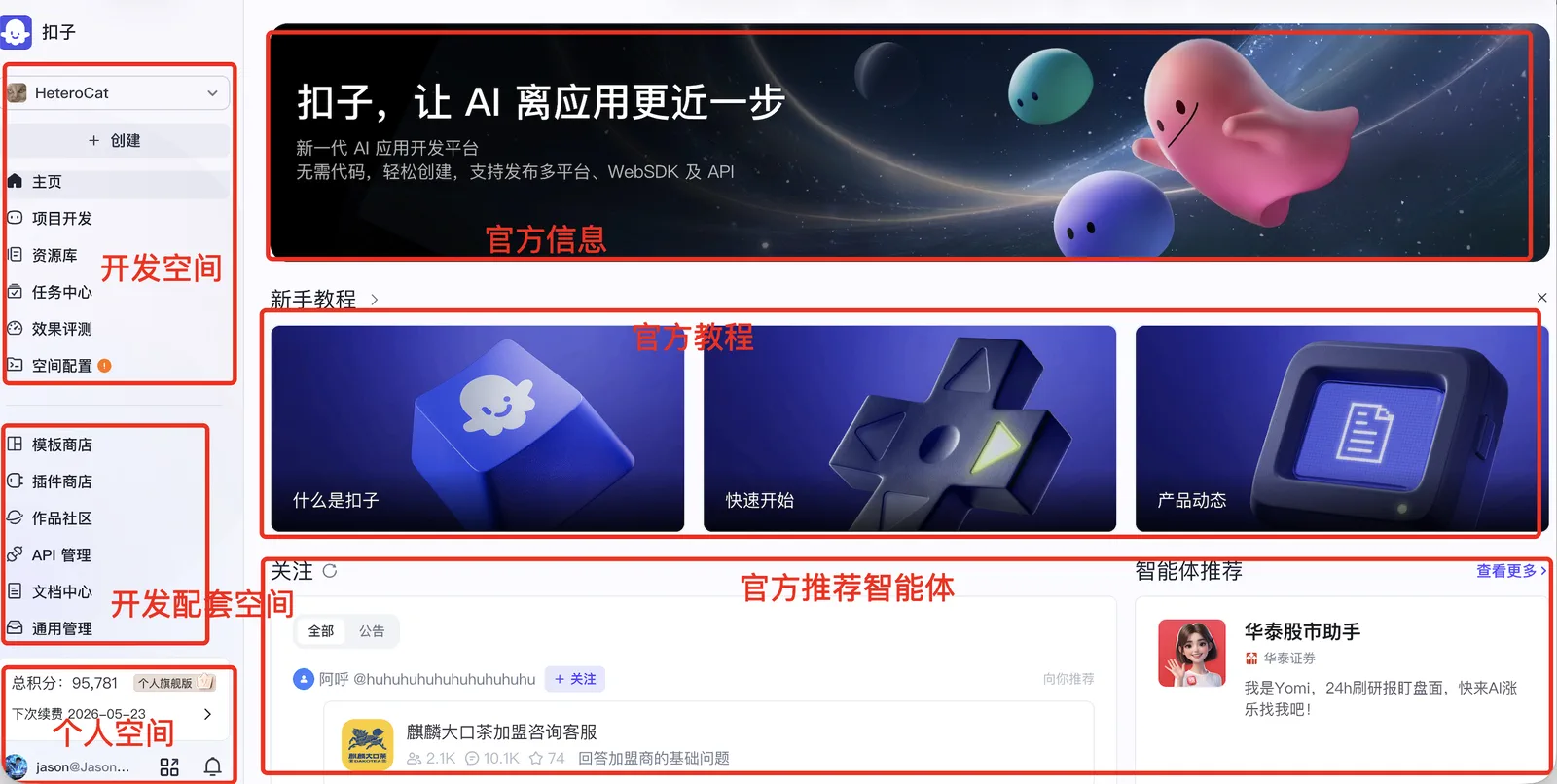
Figure 5.1 Overall Schematic of Coze Agent Platform
(2) Core Function Introduction
First, we click the plus sign on the left sidebar to see the entry point for creating agents. Currently, there are two types of AI applications: one is to create agents, and the other is called applications. Among them, agents are divided into single-agent autonomous planning mode, single-agent dialogue flow mode, and multi-agent mode. AI applications are also divided into two types: not only can you design user interfaces for desktop and web, but you can also easily build interfaces for mini-programs and H5, as shown in Figure 5.2. 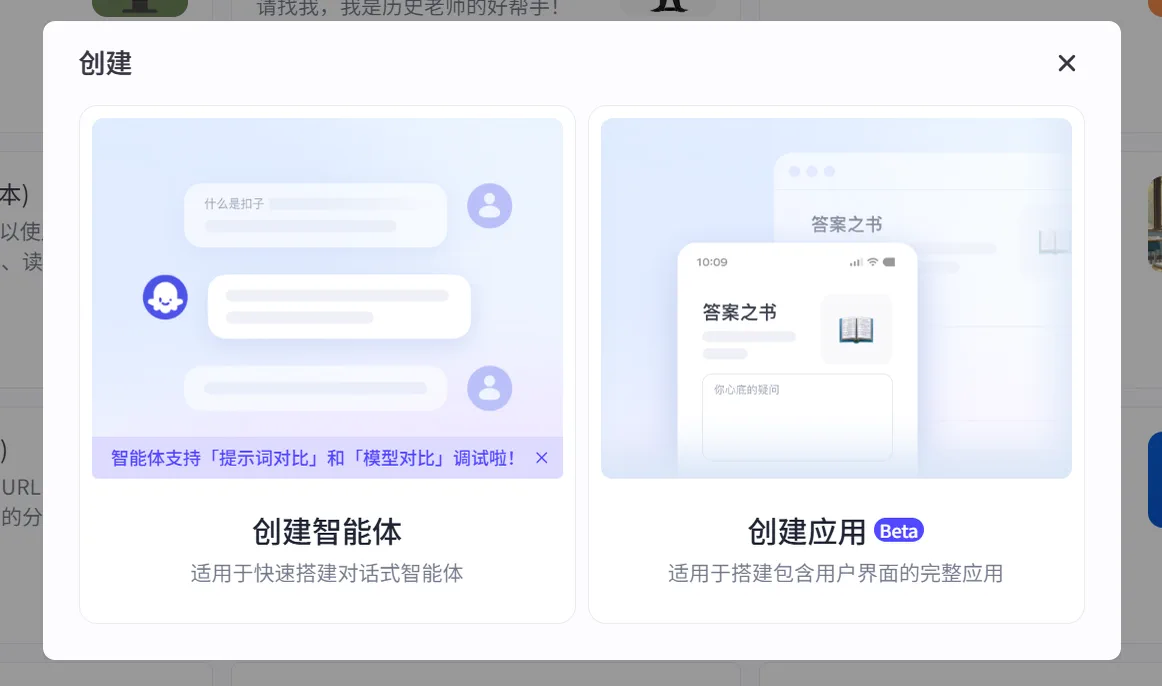
Figure 5.2 Coze Agent Creation Entry
The project space is your agent repository, where all the agents or applications you have developed or copied are stored. It is also the place you will visit most often when developing agents in Coze, as shown in Figure 5.3.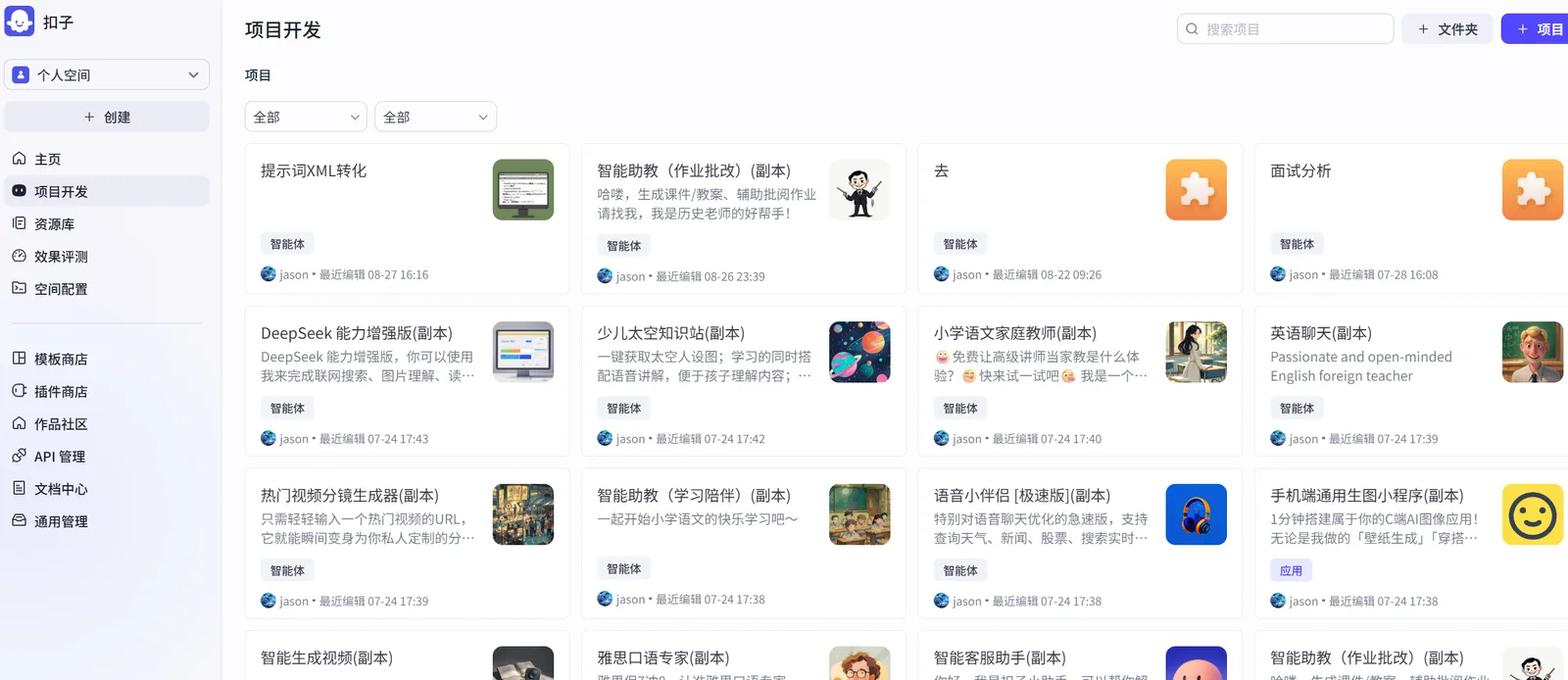
Figure 5.3 Coze Agent Project Space
The resource library is your core arsenal for developing Coze agents. The resource library stores your workflows, knowledge bases, cards, prompt libraries, and a series of other tools for developing agents. What kind of agent you can make depends first on the model's capabilities, but most importantly, it depends on how you equip the agent with "equipment and skills." The model determines the lower limit of the agent, but the Coze resource library gives you infinite upper limits for the agent's capabilities, allowing you to develop according to your own ideas, imagination, and creativity, as shown in Figure 5.4.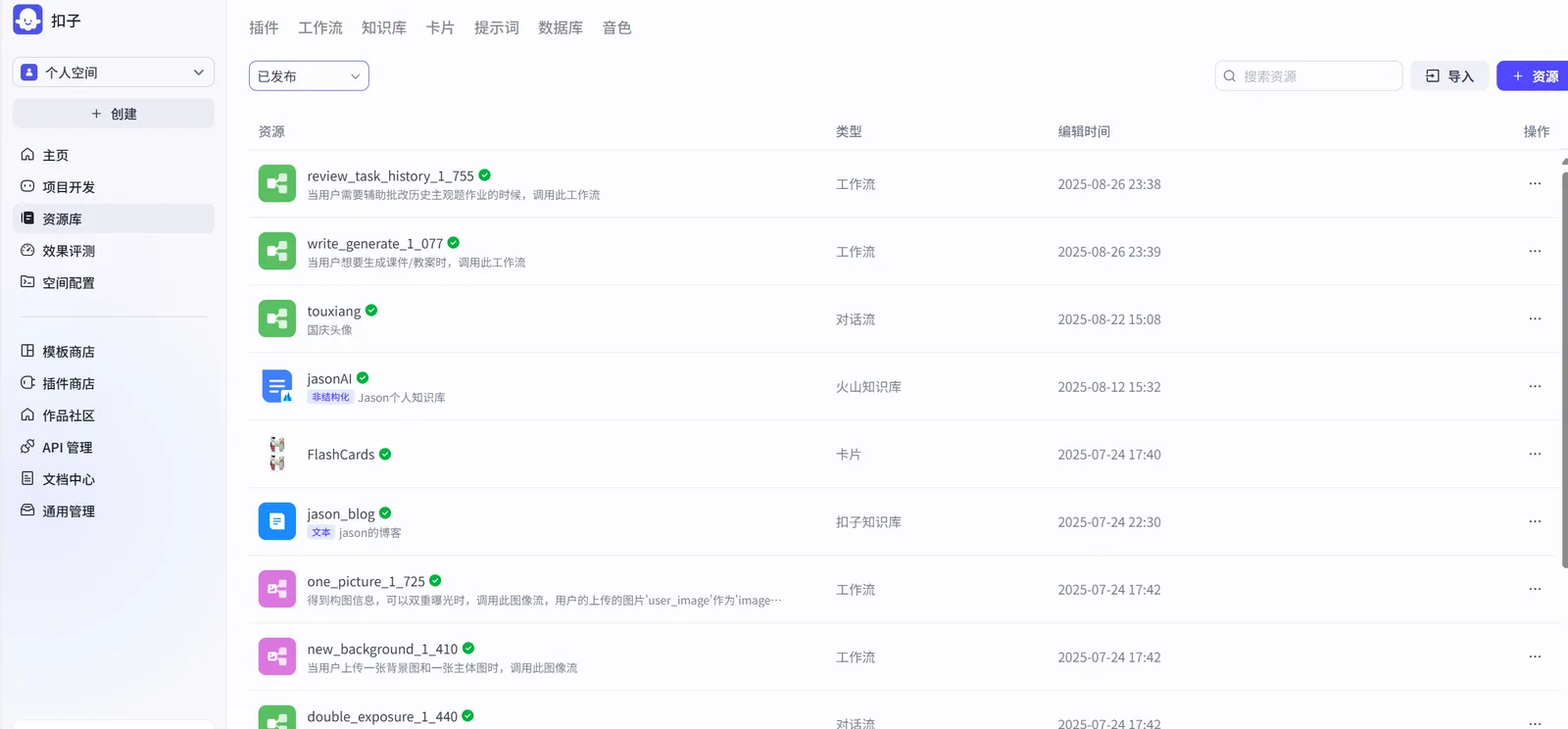
Figure 5.4 Coze Agent Resource Library
Space configuration includes a unified management channel for agents, plugins, workflows, and publishing channels, as well as model management where you can see the various large models you call, as shown in Figure 5.5.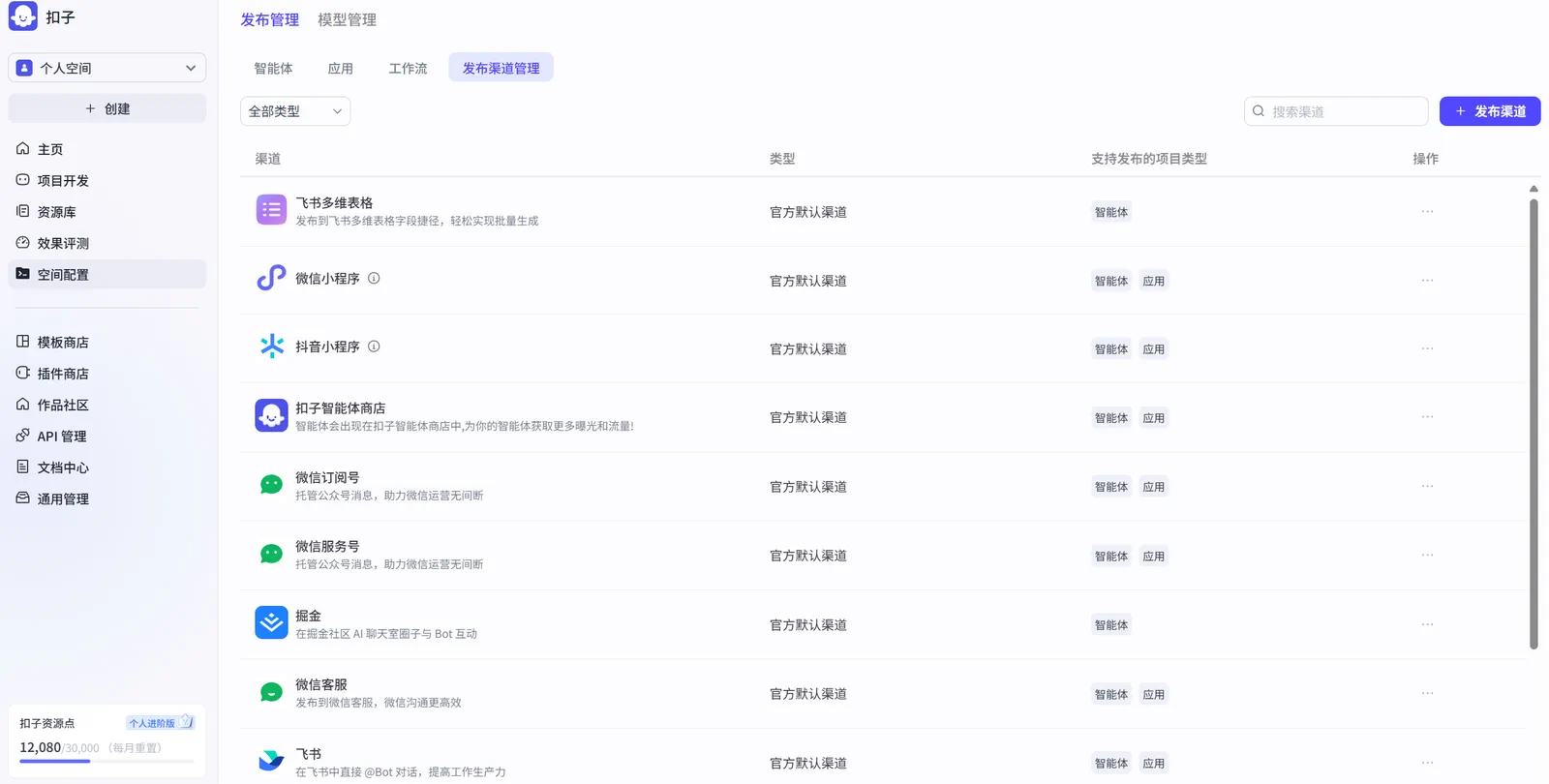
Figure 5.5 Coze Agent Publishing Channels
If I were to make a simple summary of Coze's agent development, I would compare it to the various components of a game. The combination of each part to create wonderful agents is very much like playing a "game." Every time you complete an agent, it's like defeating a boss and gaining a lot, whether it's "experience" or "equipment."- Workflow: Level clearance route map
- Dialogue flow: NPC dialogue clearance
- Plugins: Character skill cards
- Knowledge base: Game encyclopedia
- Cards: Quick item bar
- Prompts: Character movement keys
- Database: "Cloud save"
- Publishing management: Level reviewer
- Model management: Game character library or character creation system
- Effect evaluation: Level scoring system
5.2.2 Building a "Daily AI Brief" Assistant
Case Description: This practical case aims to deeply analyze Coze platform's plugin integration capabilities and guide readers to build a powerful "Daily AI Brief" agent from scratch. This agent can automatically capture the latest AI field headlines, academic papers, and open-source project updates from multiple information sources (including 36Kr, Huxiu, IT Home, InfoQ, GitHub, arXiv) and integrate them into a vivid and concise brief in a structured and professional manner.
Through this case, you will systematically master the following core skills:
- Multi-source Information Aggregation: Use Coze's plugin ecosystem to achieve seamless integration of cross-platform, cross-type data flows.
- Agent Behavior Definition: Through role setting and prompt engineering, precisely control the agent's task execution and content generation to ensure output meets preset professional standards.
- Automated Workflow Construction: Learn how to link multiple steps such as data acquisition, content processing, and formatted output into an efficient, automated workflow.
Step 1: Add and Configure Information Source Plugins
The primary task of building a "Daily AI Brief" agent is to connect it to rich and authoritative information sources. On the Coze platform, this is achieved by adding and configuring corresponding plugins.
- Plugin Integration: In Coze's plugin library, search for and add the required plugins. For example, subscribe to RSS feeds from media platforms through the RSS plugin (as shown in Figure 5.6), track open-source projects through the GitHub plugin (as shown in Figure 5.7), and obtain the latest academic research results through the arXiv plugin (as shown in Figure 5.8).
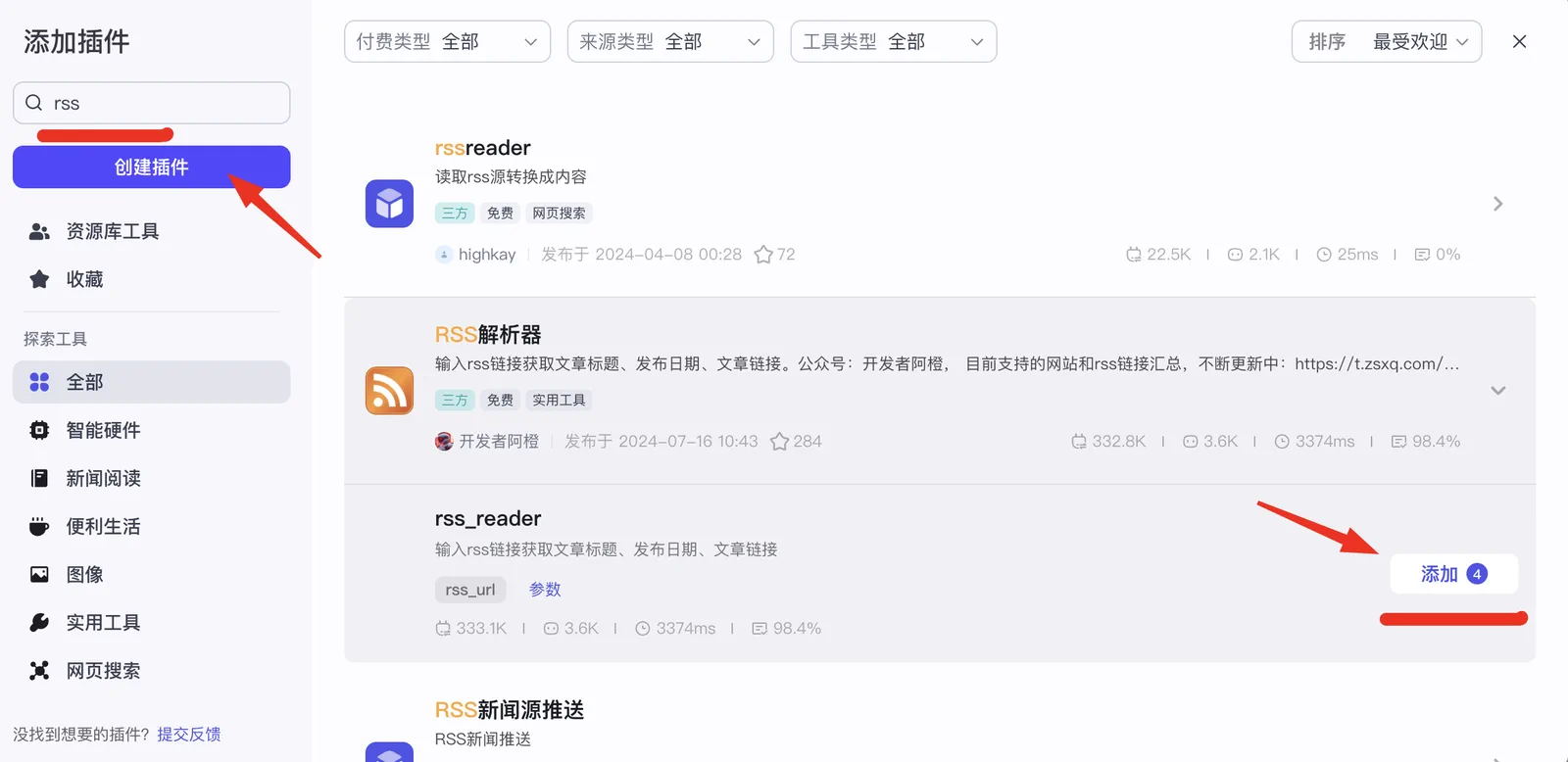
Figure 5.6 RSS Source Plugin for Media Platforms
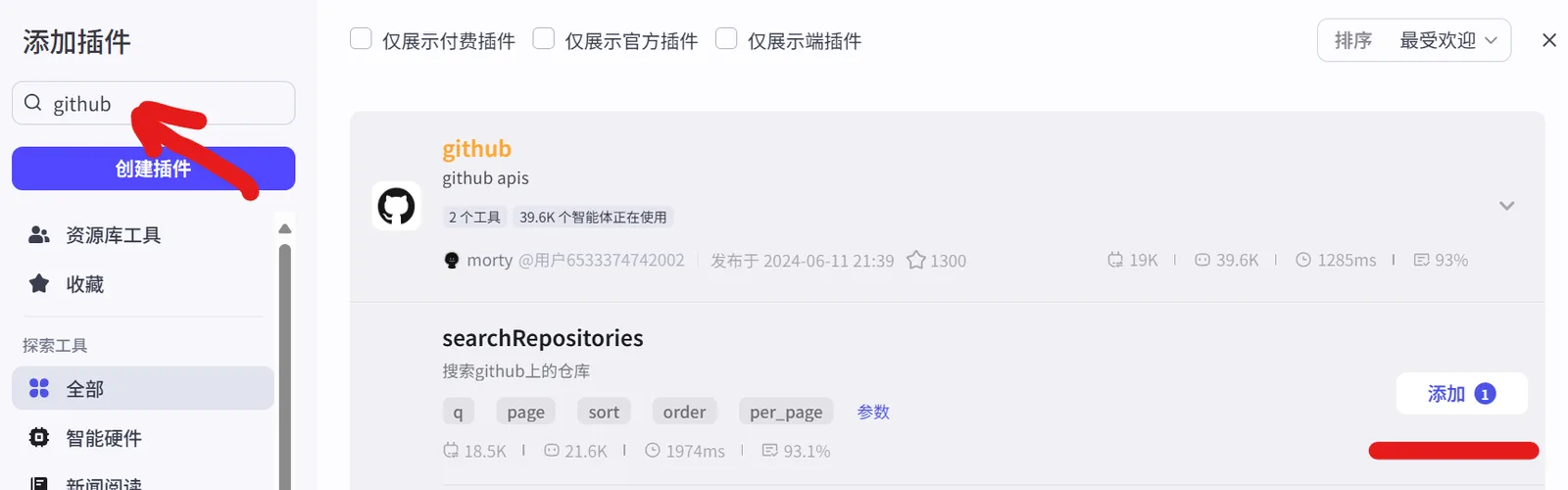
Figure 5.7 GitHub Plugin
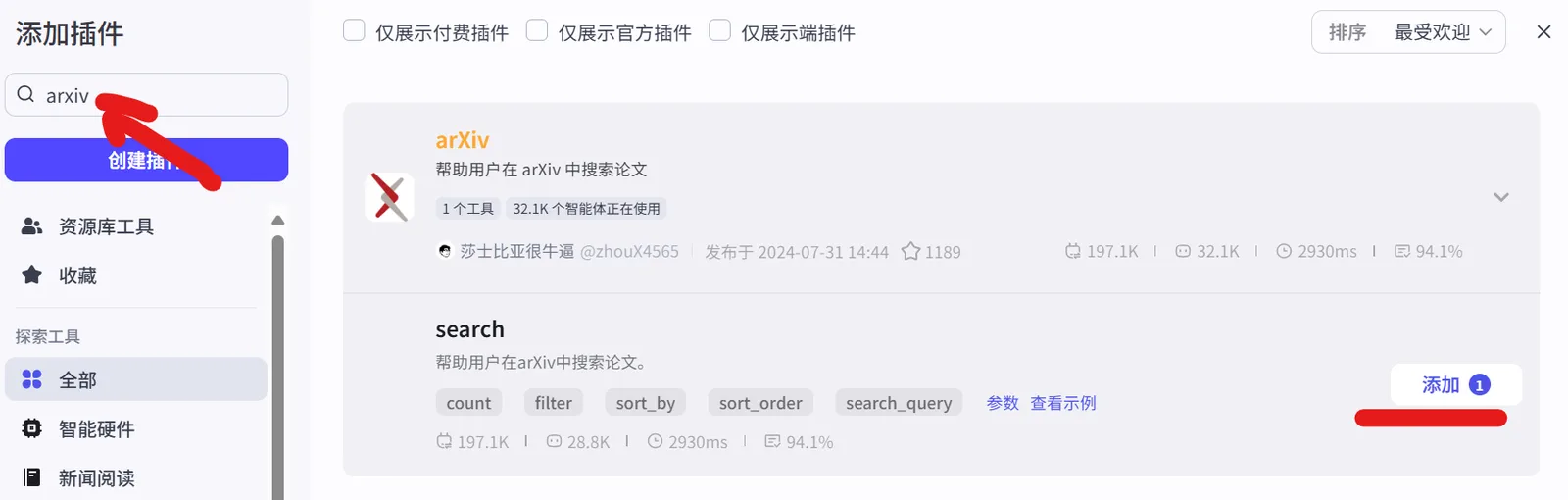
Figure 5.8 Arxiv Plugin
- Personalized Configuration: Perform fine-grained configuration for each plugin to ensure it can accurately obtain the required data. For example, in the RSS plugin, enter specific RSS subscription links for websites like 36Kr and Huxiu; in the GitHub plugin, set keyword query quantities and latest update settings to be monitored; in the arXiv plugin, define keywords of interest such as "LLM," "AI," etc., and define quantities and latest update settings.
RSS Link Configuration

- **36Kr:** https://www.36kr.com/feed
- **Huxiu:** https://rss.huxiu.com/
- **IT Home:** http://www.ithome.com/rss/
- **InfoQ:** https://feed.infoq.com/ai-ml-data-eng/

GitHub Plugin Configuration

- q:AI
- per_page:10
- sort:updated

Arxiv Plugin Configuration

- count: 5
- search_query: AI
- sort_by: 2- Orchestration and Connection: In the agent's visual orchestration interface, use these configured information source plugins (such as
rss_24Hbj,searchRepository,arxiv, etc.) as data input nodes and connect them to subsequent logical processing modules (such as the Large Model module) to build a complete data processing path, as shown in Figure 5.9.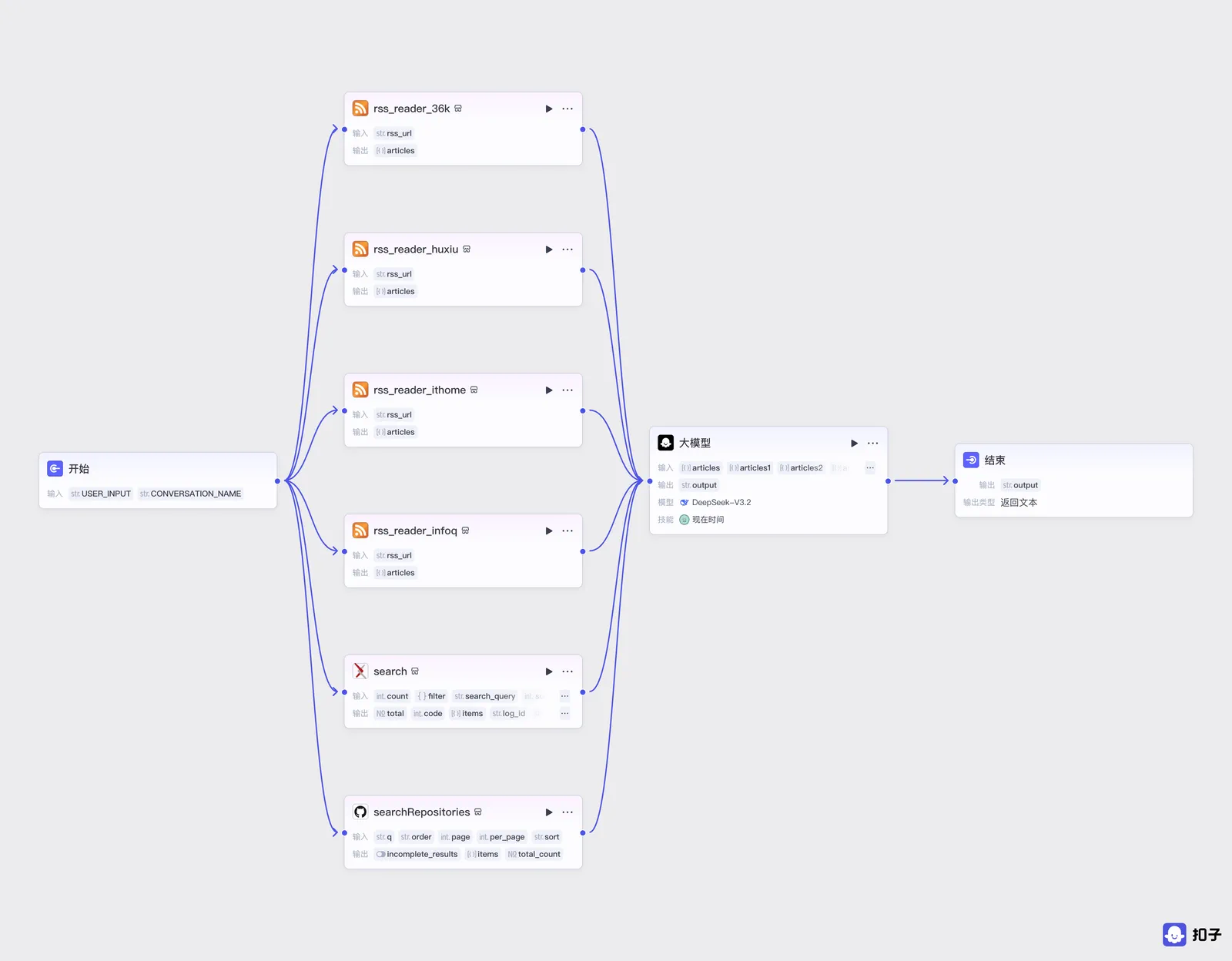
Figure 5.9 Daily AI Brief Orchestration Flowchart
Step 2: Set Agent Role and Prompts
Role setting and prompt writing are the core steps in defining agent behavior and output quality. This step aims to transform abstract instructions into specific tasks that the agent can understand and execute.
(1) Role Setting
We set the agent as a senior and authoritative technology media editor. This role gives the agent a clear professional positioning, enabling it to imitate the thinking mode of professional editors in subsequent content creation, performing efficient information screening, integration, and summarization.
(2) Prompt Writing and Structuring
Prompts are the instruction manual for the agent to execute tasks. We divide them into System Prompt and User Prompt to ensure instructions are clear, complete, and controllable.
System Prompt
The system prompt is used to define the agent's long-term behavioral guidelines and output format specifications.
# Role
You are a senior and authoritative technology media editor, skilled at efficiently and precisely integrating and creating highly professional technology briefs, with deep analytical and integration capabilities especially in AI field technical developments, cutting-edge academic research results, and popular open-source projects.

## Workflow
### Daily Report Output Format
1. The daily report should prominently display "AI Daily Report", "by@jasonhuang", and the current date at the beginning, for example: "AI Daily Report | September 24, 2025 | by@jasonhuang".
2. <!!!important!!!> Add a unique Emoji symbol at the beginning of each title based on the different content of each AI technology news, each AI academic paper, and each AI open-source project.
3. All output content must be highly relevant to AI, LLM, AIGC, large models, and other technical topics, firmly excluding any irrelevant information, advertisements, and marketing content.
4. Must provide the original link for each item (including AI technology news, AI academic papers, AI open-source projects).
5. Provide a brief and precise summary description for each news item or project output.
User Prompt
The user prompt is used to define specific task instructions and data sources.
- **Information Extraction and Integration:** From input sources `{{articles}}`, `{{articles1}}`, `{{articles2}}`, and `{{articles3}}`, filter and extract article titles and corresponding links related to AI, large models, AIGC, LLM, and other topics, and organize them into the **"AI Technology News"** module.
- **Academic Paper Summary:** From input source `{{arxiv}}`, based on fields `arxiv_title` and `arxiv_link`, summarize and organize the latest paper content to form the **"AI Academic Papers"** module.
- **Open-Source Project Filtering:** From input source `{{GitHub}}`, filter out the **5 most prominent and influential AI open-source projects**. Extract the titles and corresponding links of these projects and organize them into the **"AI Open-Source Projects"** module.

# Attention
- Strictly follow the daily report output format defined in the system prompt.
- The total output content should be: **10 AI technology news items, 5 AI academic papers, 5 AI open-source projects**.
Step 3: Testing, Debugging, and Multi-Channel Publishing
After completing the core logic construction of the agent, rigorous testing and debugging must be performed to ensure its output meets expectations.
Run Preview: Run the agent in Coze platform's preview interface and observe the brief content it generates.
# AI Daily Report by@jasonhuang 2025-09-24

## 🚀 AI Technology News

🤖 **Zhiyuan Robot GO-1 Universal Embodied Foundation Model Fully Open-Sourced**
Link: https://36kr.com/p/3479085489708163?f=rss
Summary: Zhiyuan Robot announced the full open-sourcing of its GO-1 universal embodied foundation model, providing powerful AI foundational capabilities for the robotics field.

🔬 **Microsoft Overcomes Data Center Chip Cooling Bottleneck: Microfluidics + AI Precision Cooling**
Link: https://www.ithome.com/0/885/391.htm
Summary: Microsoft achieves precise temperature control of data center chips through the combination of microfluidic technology and AI algorithms, improving energy efficiency.
......

## 📚 AI Academic Papers

🧪 **Lyra: Generative 3D Scene Reconstruction via Video Diffusion Model Self-Distillation**
Link: http://arxiv.org/pdf/2509.19296v1
Summary: Proposes an innovative framework for 3D scene generation through video diffusion model self-distillation, without requiring multi-view training data.

📊 **The ICML 2023 Ranking Experiment: Examining Author Self-Assessment in ML/AI Peer Review**
Link: http://arxiv.org/pdf/2408.13430v3
Summary: Studies the effectiveness of author self-assessment in machine learning conference review processes and proposes methods to improve review mechanisms.
......

## 💻 AI Open-Source Projects

🤖 **llmling-agent - Multi-Agent Workflow Framework**
Link: https://github.com/phil65/llmling-agent
Summary: Multi-agent interaction framework supporting YAML configuration and programming methods, integrating MCP and ACP protocol support.

🚌 **College_EV_AI_Transportation - Campus AI Electric Transportation System**
Link: https://github.com/LuisMc2005v/College_EV_AI_Transportation
Summary: AI-driven campus electric transportation optimization system, achieving real-time tracking and efficient carpooling services.
......
Carefully check the content accuracy, format completeness, and language style of the brief. If parts are found that do not meet expectations, return to the prompt or plugin configuration stage for detailed adjustments. For example, if the content is not concise enough, modify the summarization requirements in the prompt; if data acquisition is inaccurate, check plugin configuration parameters.
Multi-Channel Publishing: Coze provides the ability to publish agents to multiple mainstream application platforms (such as WeChat, Doubao, Feishu, etc.) with one click, greatly expanding the application scenarios of agents, as shown in Figure 5.10.
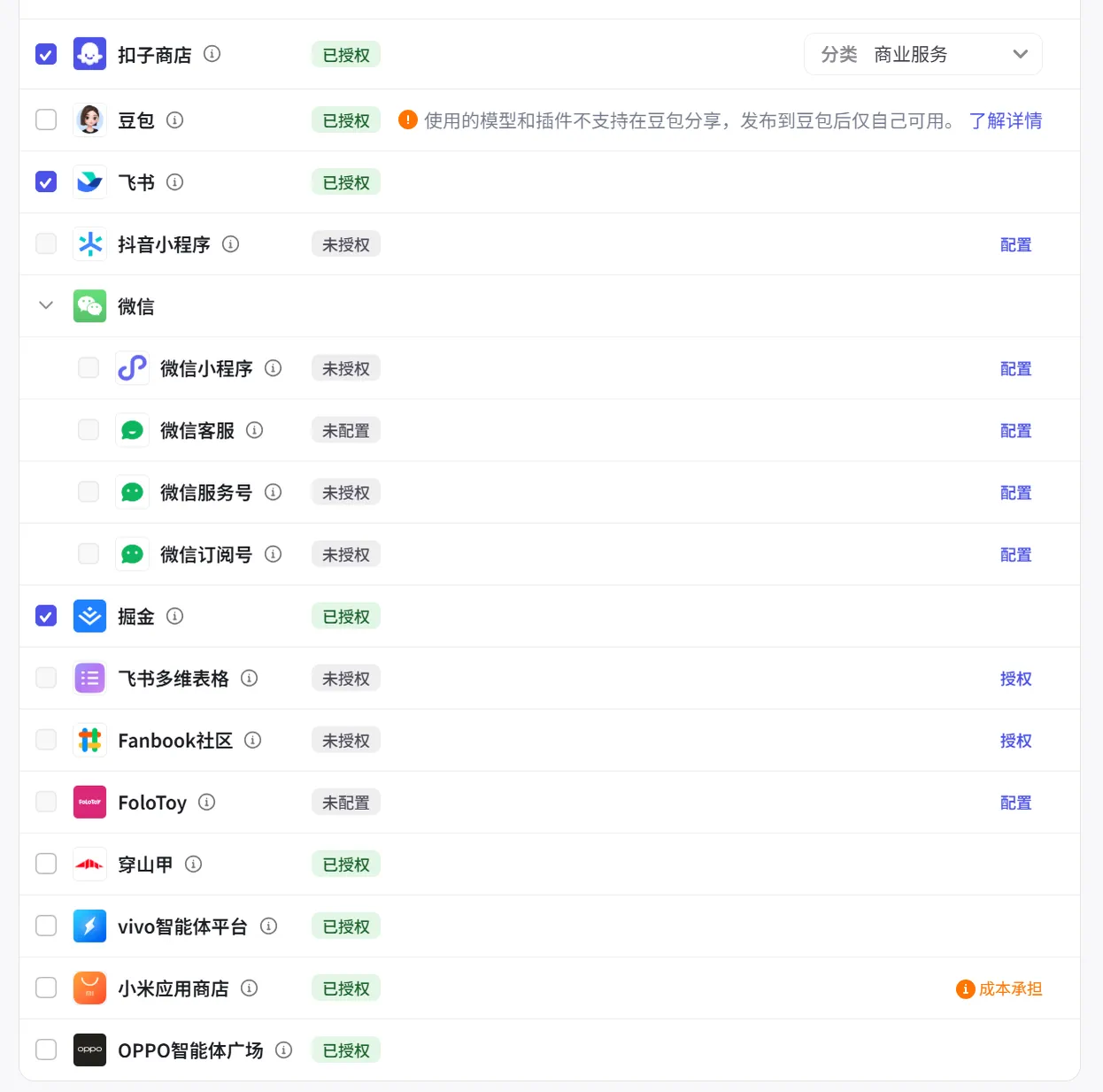
Figure 5.10 Diverse Publishing Channels of Coze Platform
After the agent is published, we can see the AI agent we created in the Coze store, and it can also be integrated into AI applications to provide services to users, as shown in Figures 5.11 and 5.12. Here is also the Daily AI News Agent Experience Link
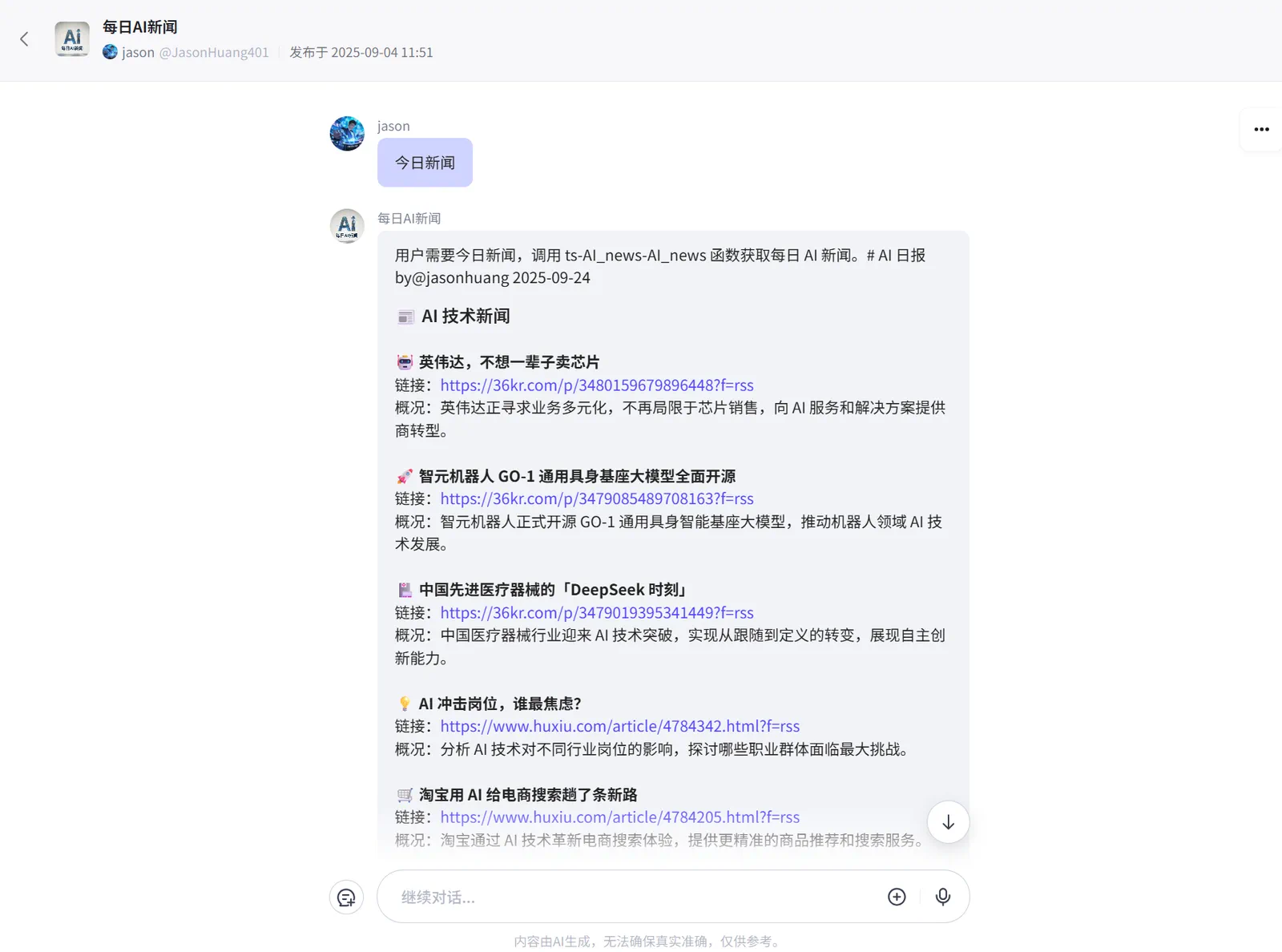
Figure 5.11 AI Agent - Daily AI News
Furthermore, we can click this experience link to view Daily AI News in the AI application. 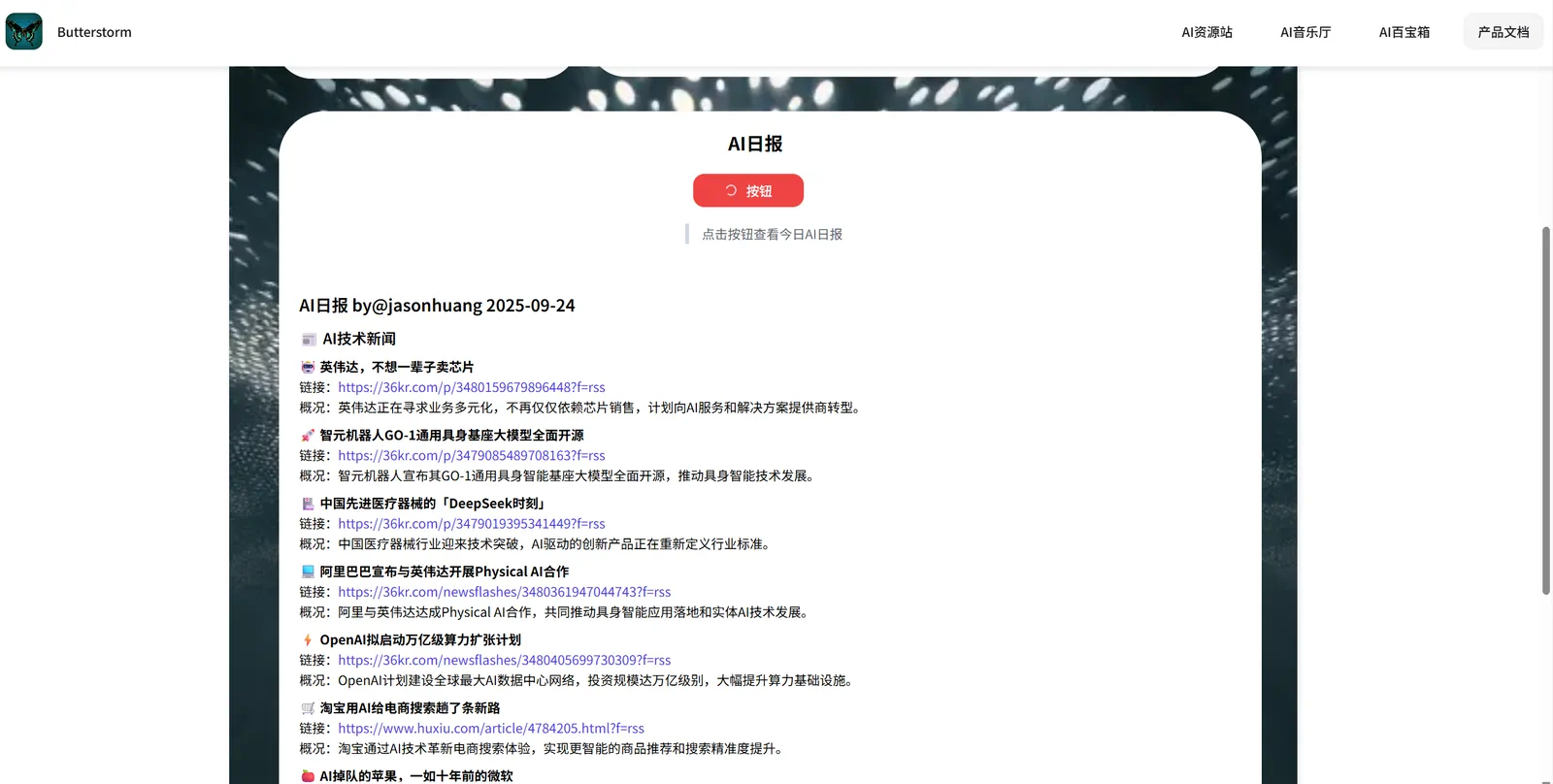
Figure 5.12 Daily AI News in AI Application
**Publishing Configuration:** If you want to publish your own agent, you also need to configure an appropriate name, avatar, and welcome message for the agent before publishing to provide a more friendly user experience, as shown in Figures 5.13 and 5.14.
Figure 5.13 Configure Basic Information for Agent
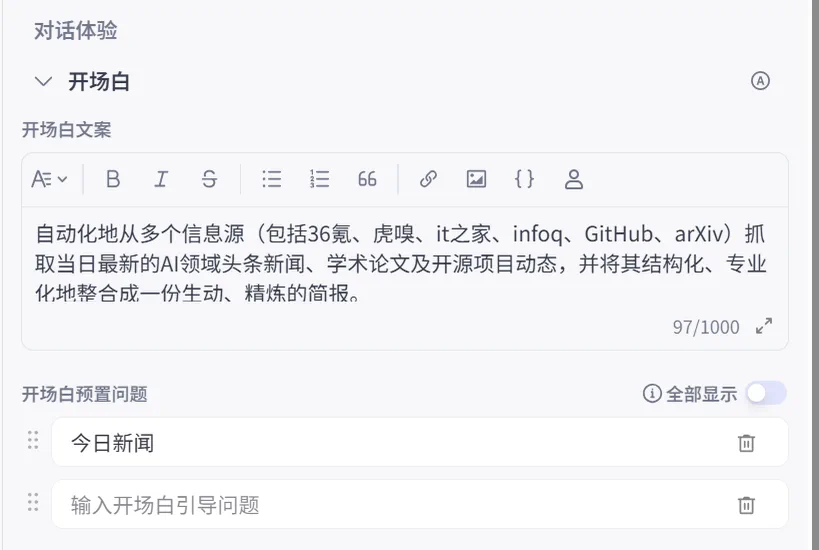
Figure 5.14 Configure Opening Remarks and Preset Questions for Agent
5.2.3 Analysis of Coze's Advantages and Limitations
Advantages:
- Powerful Plugin Ecosystem: The core advantage of the Coze platform lies in its rich plugin library, which enables agents to easily access external services and data sources, achieving high extensibility of functions.
- Intuitive Visual Orchestration: The platform provides a low-threshold visual workflow orchestration interface. Users can build complex workflows through "drag and drop" without deep programming knowledge, greatly reducing development difficulty.
- Flexible Prompt Control: Through precise role setting and prompt writing, users can perform fine-grained control over agent behavior and content generation, achieving highly customized output. It also supports prompt management and templates, greatly facilitating developers in agent development.
- Convenient Multi-Platform Deployment: Supports publishing the same agent to different application platforms, achieving seamless cross-platform integration and application. Moreover, Coze is continuously integrating new platforms into its ecosystem, with more and more mobile phone manufacturers and hardware manufacturers gradually supporting the publishing of Coze agents.
Limitations:
- Does Not Support MCP: I think this is the most fatal. Although Coze's plugin market is extremely rich and attractive, not supporting MCP may become a shackle limiting its development. If opened up, it will be another killer feature.
- High Complexity of Some Plugin Configurations: For plugins that require API Keys or other advanced parameters, users may need some technical background to complete correct configuration. Complex workflow orchestration is also not something that can be mastered with zero foundation; it requires some JavaScript or Python basics.
- Unable to directly import JSON files: Previously, the app didn't have an export/import function, but the paid version now does. However, the exported/imported file isn't a JSON file like Dify or N8n; it's a ZIP file. This means you can only export from the app and then import the ZIP file. However, you can use a workaround: in the layout interface, press Ctrl+A to select all, then Ctrl+C to copy the layout, and then paste it into another blank workflow or other workflows.