8.3 RAG System: Knowledge Retrieval Enhancement
8.3.1 RAG Fundamentals
Before diving into the RAG system implementation of HelloAgents, let's first understand the basic concepts, development history, and core principles of RAG technology. Since this text is not created based on RAG as a foundation, we will only quickly review the relevant concepts here to better understand the technical choices and innovations in system design.
(1) What is RAG?
Retrieval-Augmented Generation (RAG) is a technology that combines information retrieval and text generation. Its core idea is: before generating an answer, first retrieve relevant information from an external knowledge base, then provide the retrieved information as context to the large language model, thereby generating more accurate and reliable answers.
Therefore, Retrieval-Augmented Generation can be broken down into three words. Retrieval refers to querying relevant content from the knowledge base; Augmented means integrating retrieval results into prompts to assist model generation; Generation outputs answers that combine accuracy and transparency.
(2) Basic Workflow
A complete RAG application workflow is mainly divided into two core stages. In the data preparation stage, the system builds external knowledge into a retrievable database through data extraction, text segmentation, and vectorization. Subsequently, in the application stage, the system responds to user queries, retrieves relevant information from the database, injects it into the prompt, and finally drives the large language model to generate answers.
(3) Development History
First stage: Naive RAG (2020-2021). This is the embryonic stage of RAG technology, with a direct and simple process, commonly referred to as the "Retrieve-Read" mode. Retrieval method: Mainly relies on traditional keyword matching algorithms such as TF-IDF or BM25. These methods calculate term frequency and document frequency to evaluate relevance, with good literal matching effects, but difficulty understanding semantic similarity. Generation mode: Directly concatenates retrieved document content into the prompt context without processing, then sends it to the generation model.
Second stage: Advanced RAG (2022-2023). With the maturity of vector databases and text embedding technology, RAG entered a rapid development stage. Researchers and developers introduced a large number of optimization techniques in various stages of "retrieval" and "generation". Retrieval method: Shifted to semantic retrieval based on dense embedding. By converting text into high-dimensional vectors, the model can understand and match semantic similarity, not just keywords. Generation mode: Introduced many optimization techniques, such as query rewriting, document chunking, reranking, etc.
Third stage: Modular RAG (2023-present). Building on advanced RAG, modern RAG systems further develop toward modularization, automation, and intelligence. Various parts of the system are designed as pluggable, composable independent modules to adapt to more diverse and complex application scenarios. Retrieval methods: Such as hybrid retrieval, multi-query expansion, hypothetical document embedding, etc. Generation modes: Chain-of-thought reasoning, self-reflection and correction, etc.
8.3.2 RAG System Working Principle
Before diving into implementation details, we can use a flowchart to outline the complete workflow of HelloAgents' RAG system:
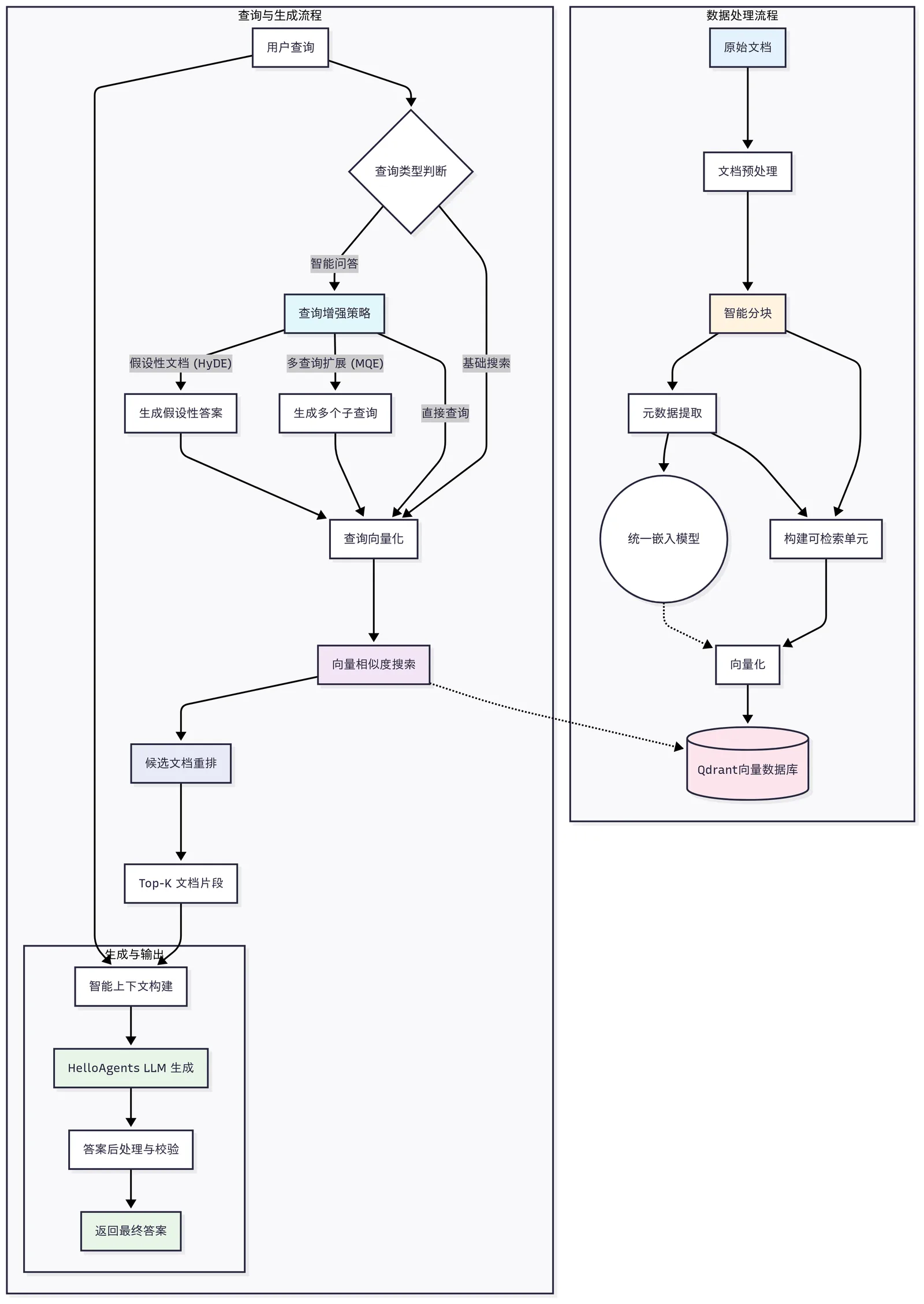
Figure 8.5 Core Working Principle of RAG System
As shown in Figure 8.5, it demonstrates the two main working modes of the RAG system:
- Data Processing Workflow: Processing and storing knowledge documents. Here we adopt the tool
Markitdown, with the design idea of uniformly converting all incoming external knowledge sources into Markdown format for processing. - Query and Generation Workflow: Retrieving relevant information based on queries and generating answers.
8.3.3 Quick Experience: Get Started with RAG Features in 30 Seconds
Let's quickly experience the basic functions of the RAG system:
from hello_agents import SimpleAgent, HelloAgentsLLM, ToolRegistry
from hello_agents.tools import RAGTool

# Create LLM instance
llm = HelloAgentsLLM()

# Create RAG tool
rag_tool = RAGTool(
    knowledge_base_path="./knowledge_base",
    collection_name="test_collection",
    rag_namespace="test"
)

tool_registry = ToolRegistry()
tool_registry.register_tool(rag_tool)

# Create Agent with RAG capability
agent = SimpleAgent(name="Knowledge Assistant", llm=llm, tool_registry=tool_registry)

# Experience RAG features
# Add first knowledge
result1 = rag_tool.execute("add_text",
    text="Python is a high-level programming language first released by Guido van Rossum in 1991. Python's design philosophy emphasizes code readability and concise syntax.",
    document_id="python_intro")
print(f"Knowledge 1: {result1}")

# Add second knowledge
result2 = rag_tool.execute("add_text",
    text="Machine learning is a branch of artificial intelligence that uses algorithms to enable computers to learn patterns from data. It mainly includes three types: supervised learning, unsupervised learning, and reinforcement learning.",
    document_id="ml_basics")
print(f"Knowledge 2: {result2}")

# Add third knowledge
result3 = rag_tool.execute("add_text",
    text="RAG (Retrieval-Augmented Generation) is an AI technology that combines information retrieval and text generation. It enhances the generation capability of large language models by retrieving relevant knowledge.",
    document_id="rag_concept")
print(f"Knowledge 3: {result3}")

print("\n=== Search Knowledge ===")
result = rag_tool.execute("search",
    query="History of Python programming language",
    limit=3,
    min_score=0.1
)
print(result)

print("\n=== Knowledge Base Statistics ===")
result = rag_tool.execute("stats")
print(result)
Next, we will delve into the specific implementation of the HelloAgents RAG system.
8.3.4 RAG System Architecture Design
In this section, we adopt a different approach from the memory system explanation. Because Memory_tool is a systematic implementation, while RAG in our design is defined as a tool that can be organized as a pipeline. The core architecture of our RAG system can be summarized as a "five-layer seven-step" design pattern:
User Layer: RAGTool unified interface
  ↓
Application Layer: Intelligent Q&A, search, management
  ↓
Processing Layer: Document parsing, chunking, vectorization
  ↓
Storage Layer: Vector database, document storage
  ↓
Foundation Layer: Embedding model, LLM, database
The advantage of this layered design is that each layer can be independently optimized and replaced while maintaining the stability of the overall system. For example, you can easily switch the embedding model from sentence-transformers to Bailian API without affecting the upper-level business logic. Similarly, the processing workflow code is completely reusable, and you can also select the parts you need and put them into your own project. RAGTool serves as the unified entry point of the RAG system, providing a concise API interface.
class RAGTool(Tool):
    """RAG tool

    Provides complete RAG capabilities:
    - Add multi-format documents (PDF, Office, images, audio, etc.)
    - Intelligent retrieval and recall
    - LLM-enhanced Q&A
    - Knowledge base management
    """

    def __init__(
        self,
        knowledge_base_path: str = "./knowledge_base",
        qdrant_url: str = None,
        qdrant_api_key: str = None,
        collection_name: str = "rag_knowledge_base",
        rag_namespace: str = "default"
    ):
        # Initialize RAG pipeline
        self._pipelines: Dict[str, Dict[str, Any]] = {}
        self.llm = HelloAgentsLLM()

        # Create default pipeline
        default_pipeline = create_rag_pipeline(
            qdrant_url=self.qdrant_url,
            qdrant_api_key=self.qdrant_api_key,
            collection_name=self.collection_name,
            rag_namespace=self.rag_namespace
        )
        self._pipelines[self.rag_namespace] = default_pipeline
The entire processing workflow is as follows:
Any format document → MarkItDown conversion → Markdown text → Intelligent chunking → Vectorization → Storage and retrieval(1) Multimodal Document Loading
One of the core advantages of the RAG system is its powerful multimodal document processing capability. The system uses MarkItDown as a unified document conversion engine, supporting almost all common document formats. MarkItDown is an open-source universal document conversion tool from Microsoft. It is a core component of the HelloAgents RAG system, responsible for uniformly converting documents of any format into structured Markdown text. Whether the input is PDF, Word, Excel, images, or audio, it will ultimately be converted to standard Markdown format, then enter the unified chunking, vectorization, and storage workflow.
def _convert_to_markdown(path: str) -> str:
    """
    Universal document reader using MarkItDown with enhanced PDF processing.
    Core function: Convert documents of any format to Markdown text

    Supported formats:
    - Documents: PDF, Word, Excel, PowerPoint
    - Images: JPG, PNG, GIF (via OCR)
    - Audio: MP3, WAV, M4A (via transcription)
    - Text: TXT, CSV, JSON, XML, HTML
    - Code: Python, JavaScript, Java, etc.
    """
    if not os.path.exists(path):
        return ""

    # Use enhanced processing for PDF files
    ext = (os.path.splitext(path)[1] or '').lower()
    if ext == '.pdf':
        return _enhanced_pdf_processing(path)

    # Use MarkItDown unified conversion for other formats
    md_instance = _get_markitdown_instance()
    if md_instance is None:
        return _fallback_text_reader(path)

    try:
        result = md_instance.convert(path)
        markdown_text = getattr(result, "text_content", None)
        if isinstance(markdown_text, str) and markdown_text.strip():
            print(f"[RAG] MarkItDown conversion successful: {path} -> {len(markdown_text)} chars Markdown")
            return markdown_text
        return ""
    except Exception as e:
        print(f"[WARNING] MarkItDown conversion failed {path}: {e}")
        return _fallback_text_reader(path)
(2) Intelligent Chunking Strategy
After MarkItDown conversion, all documents are unified into standard Markdown format. This provides a structured foundation for subsequent intelligent chunking. HelloAgents implements an intelligent chunking strategy specifically for Markdown format, fully utilizing the structured characteristics of Markdown for precise segmentation.
Markdown structure-aware chunking workflow:
Standard Markdown text → Heading hierarchy parsing → Paragraph semantic segmentation → Token calculation chunking → Overlap strategy optimization → Vectorization preparation
       ↓                ↓              ↓            ↓           ↓            ↓
   Unified format      #/##/###      Semantic boundary  Size control  Information continuity  Embedding vector
   Clear structure     Hierarchy recognition  Integrity guarantee  Retrieval optimization  Context preservation  Similarity matching
Since all documents have been converted to Markdown format, the system can use Markdown's heading structure (#, ##, ###, etc.) for precise semantic segmentation:
def _split_paragraphs_with_headings(text: str) -> List[Dict]:
    """Split paragraphs based on heading hierarchy, maintaining semantic integrity"""
    lines = text.splitlines()
    heading_stack: List[str] = []
    paragraphs: List[Dict] = []
    buf: List[str] = []
    char_pos = 0

    def flush_buf(end_pos: int):
        if not buf:
            return
        content = "\n".join(buf).strip()
        if not content:
            return
        paragraphs.append({
            "content": content,
            "heading_path": " > ".join(heading_stack) if heading_stack else None,
            "start": max(0, end_pos - len(content)),
            "end": end_pos,
        })

    for ln in lines:
        raw = ln
        if raw.strip().startswith("#"):
            # Process heading line
            flush_buf(char_pos)
            level = len(raw) - len(raw.lstrip('#'))
            title = raw.lstrip('#').strip()

            if level <= 0:
                level = 1
            if level <= len(heading_stack):
                heading_stack = heading_stack[:level-1]
            heading_stack.append(title)

            char_pos += len(raw) + 1
            continue

        # Accumulate paragraph content
        if raw.strip() == "":
            flush_buf(char_pos)
            buf = []
        else:
            buf.append(raw)
        char_pos += len(raw) + 1

    flush_buf(char_pos)

    if not paragraphs:
        paragraphs = [{"content": text, "heading_path": None, "start": 0, "end": len(text)}]

    return paragraphs
Based on Markdown paragraph segmentation, the system further performs intelligent chunking based on token count. Since the input is already structured Markdown text, the system can more precisely control chunk boundaries, ensuring that each chunk is both suitable for vectorization processing and maintains the integrity of the Markdown structure:
def _chunk_paragraphs(paragraphs: List[Dict], chunk_tokens: int, overlap_tokens: int) -> List[Dict]:
    """Intelligent chunking based on token count"""
    chunks: List[Dict] = []
    cur: List[Dict] = []
    cur_tokens = 0
    i = 0

    while i < len(paragraphs):
        p = paragraphs[i]
        p_tokens = _approx_token_len(p["content"]) or 1

        if cur_tokens + p_tokens <= chunk_tokens or not cur:
            cur.append(p)
            cur_tokens += p_tokens
            i += 1
        else:
            # Generate current chunk
            content = "\n\n".join(x["content"] for x in cur)
            start = cur[0]["start"]
            end = cur[-1]["end"]
            heading_path = next((x["heading_path"] for x in reversed(cur) if x.get("heading_path")), None)

            chunks.append({
                "content": content,
                "start": start,
                "end": end,
                "heading_path": heading_path,
            })

            # Build overlap section
            if overlap_tokens > 0 and cur:
                kept: List[Dict] = []
                kept_tokens = 0
                for x in reversed(cur):
                    t = _approx_token_len(x["content"]) or 1
                    if kept_tokens + t > overlap_tokens:
                        break
                    kept.append(x)
                    kept_tokens += t
                cur = list(reversed(kept))
                cur_tokens = kept_tokens
            else:
                cur = []
                cur_tokens = 0

    # Process last chunk
    if cur:
        content = "\n\n".join(x["content"] for x in cur)
        start = cur[0]["start"]
        end = cur[-1]["end"]
        heading_path = next((x["heading_path"] for x in reversed(cur) if x.get("heading_path")), None)

        chunks.append({
            "content": content,
            "start": start,
            "end": end,
            "heading_path": heading_path,
        })

    return chunks
At the same time, to be compatible with different languages, the system implements a token estimation algorithm for Chinese-English mixed text, which is crucial for accurately controlling chunk size:
def _approx_token_len(text: str) -> int:
    """Approximate token length estimation, supports Chinese-English mixed text"""
    # CJK characters counted as 1 token each
    cjk = sum(1 for ch in text if _is_cjk(ch))
    # Other characters counted by whitespace tokenization
    non_cjk_tokens = len([t for t in text.split() if t])
    return cjk + non_cjk_tokens

def _is_cjk(ch: str) -> bool:
    """Determine if character is CJK"""
    code = ord(ch)
    return (
        0x4E00 <= code <= 0x9FFF or  # CJK Unified Ideographs
        0x3400 <= code <= 0x4DBF or  # CJK Extension A
        0x20000 <= code <= 0x2A6DF or # CJK Extension B
        0x2A700 <= code <= 0x2B73F or # CJK Extension C
        0x2B740 <= code <= 0x2B81F or # CJK Extension D
        0x2B820 <= code <= 0x2CEAF or # CJK Extension E
        0xF900 <= code <= 0xFAFF      # CJK Compatibility Ideographs
    )
(3) Unified Embedding and Vector Storage
The embedding model is the core of the RAG system. It is responsible for converting text into high-dimensional vectors, enabling computers to understand and compare semantic similarity of text. The retrieval capability of the RAG system largely depends on the quality of the embedding model and the efficiency of vector storage. HelloAgents implements a unified embedding interface. For demonstration purposes, we use the Bailian API here. If not yet configured, you can switch to the local all-MiniLM-L6-v2 model. If both solutions are not supported, the TF-IDF algorithm is also configured as a fallback. In actual use, you can replace it with your desired model or API, or try to extend the framework content~
def index_chunks(
    store = None,
    chunks: List[Dict] = None,
    cache_db: Optional[str] = None,
    batch_size: int = 64,
    rag_namespace: str = "default"
) -> None:
    """
    Index markdown chunks with unified embedding and Qdrant storage.
    Uses Bailian API with fallback to sentence-transformers.
    """
    if not chunks:
        print("[RAG] No chunks to index")
        return

    # Use unified embedding model
    embedder = get_text_embedder()
    dimension = get_dimension(384)

    # Create default Qdrant storage
    if store is None:
        store = _create_default_vector_store(dimension)
        print(f"[RAG] Created default Qdrant store with dimension {dimension}")

    # Preprocess Markdown text for better embedding quality
    processed_texts = []
    for c in chunks:
        raw_content = c["content"]
        processed_content = _preprocess_markdown_for_embedding(raw_content)
        processed_texts.append(processed_content)

    print(f"[RAG] Embedding start: total_texts={len(processed_texts)} batch_size={batch_size}")

    # Batch encoding
    vecs: List[List[float]] = []
    for i in range(0, len(processed_texts), batch_size):
        part = processed_texts[i:i+batch_size]
        try:
            # Use unified embedder (handles caching internally)
            part_vecs = embedder.encode(part)

            # Standardize to List[List[float]] format
            if not isinstance(part_vecs, list):
                if hasattr(part_vecs, "tolist"):
                    part_vecs = [part_vecs.tolist()]
                else:
                    part_vecs = [list(part_vecs)]

            # Process vector format and dimension
            for v in part_vecs:
                try:
                    if hasattr(v, "tolist"):
                        v = v.tolist()
                    v_norm = [float(x) for x in v]

                    # Dimension check and adjustment
                    if len(v_norm) != dimension:
                        print(f"[WARNING] Vector dimension anomaly: expected {dimension}, actual {len(v_norm)}")
                        if len(v_norm) < dimension:
                            v_norm.extend([0.0] * (dimension - len(v_norm)))
                        else:
                            v_norm = v_norm[:dimension]

                    vecs.append(v_norm)
                except Exception as e:
                    print(f"[WARNING] Vector conversion failed: {e}, using zero vector")
                    vecs.append([0.0] * dimension)

        except Exception as e:
            print(f"[WARNING] Batch {i} encoding failed: {e}")
            # Implement retry mechanism
            # ... retry logic ...

        print(f"[RAG] Embedding progress: {min(i+batch_size, len(processed_texts))}/{len(processed_texts)}")
8.3.5 Advanced Retrieval Strategies
The retrieval capability of the RAG system is its core competitiveness. In practical applications, there may be wording differences between user queries and actual content in documents, resulting in relevant documents not being retrieved. To solve this problem, HelloAgents implements three complementary advanced retrieval strategies: Multi-Query Expansion (MQE), Hypothetical Document Embeddings (HyDE), and a unified extended retrieval framework.
(1) Multi-Query Expansion (MQE)
Multi-Query Expansion (MQE) is a technique that improves retrieval recall by generating semantically equivalent diverse queries. The core insight of this method is: the same question can have multiple different expressions, and different expressions may match different relevant documents. For example, "how to learn Python" can be expanded to "Python beginner tutorial", "Python learning methods", "Python programming guide", and other queries. By executing these expanded queries in parallel and merging the results, the system can cover a wider range of relevant documents, avoiding missing important information due to wording differences.
The advantage of MQE is that it can automatically understand multiple possible meanings of user queries, especially effective for ambiguous queries or professional terminology queries. The system uses LLM to generate expanded queries, ensuring diversity and semantic relevance of expansions:
def _prompt_mqe(query: str, n: int) -> List[str]:
    """Use LLM to generate diverse query expansions"""
    try:
        from ...core.llm import HelloAgentsLLM
        llm = HelloAgentsLLM()
        prompt = [
            {"role": "system", "content": "You are a retrieval query expansion assistant. Generate semantically equivalent or complementary diverse queries. Use Chinese, keep it short, avoid punctuation."},
            {"role": "user", "content": f"Original query: {query}\nPlease provide {n} differently phrased queries, one per line."}
        ]
        text = llm.invoke(prompt)
        lines = [ln.strip("- \t") for ln in (text or "").splitlines()]
        outs = [ln for ln in lines if ln]
        return outs[:n] or [query]
    except Exception:
        return [query]
(2) Hypothetical Document Embeddings (HyDE)
Hypothetical Document Embeddings (HyDE) is an innovative retrieval technique. Its core idea is "use answers to find answers". Traditional retrieval methods use questions to match documents, but there is often a difference in the distribution of questions and answers in semantic space—questions are usually interrogative sentences, while document content is declarative sentences. HyDE has the LLM first generate a hypothetical answer paragraph, then uses this answer paragraph to retrieve real documents, thereby narrowing the semantic gap between queries and documents.
The advantage of this method is that hypothetical answers are closer to real answers in semantic space, thus enabling more accurate matching to relevant documents. Even if the content of the hypothetical answer is not completely correct, the key terms, concepts, and expression styles it contains can effectively guide the retrieval system to find the correct documents. Especially for professional domain queries, HyDE can generate hypothetical documents containing domain terminology, significantly improving retrieval accuracy:
def _prompt_hyde(query: str) -> Optional[str]:
    """Generate hypothetical document to improve retrieval"""
    try:
        from ...core.llm import HelloAgentsLLM
        llm = HelloAgentsLLM()
        prompt = [
            {"role": "system", "content": "Based on the user's question, first write a possible answer paragraph for use as a query document in vector retrieval (no analysis process)."},
            {"role": "user", "content": f"Question: {query}\nPlease directly write a medium-length, objective paragraph containing key terminology."}
        ]
        return llm.invoke(prompt)
    except Exception:
        return None
(3) Extended Retrieval Framework
HelloAgents integrates the two strategies of MQE and HyDE into a unified extended retrieval framework. The system allows users to choose which strategies to enable based on specific scenarios through the enable_mqe and enable_hyde parameters: for scenarios requiring high recall, both strategies can be enabled simultaneously; for performance-sensitive scenarios, only basic retrieval can be used.
The core mechanism of extended retrieval is a three-step "expand-retrieve-merge" workflow. First, the system generates multiple expanded queries based on the original query (including diverse queries generated by MQE and hypothetical documents generated by HyDE); then, it executes vector retrieval in parallel for each expanded query to obtain a candidate document pool; finally, it merges all results through deduplication and score sorting, returning the most relevant top-k documents. The ingenuity of this design is that it expands the candidate pool through the candidate_pool_multiplier parameter (default is 4), ensuring sufficient candidate documents for screening, while avoiding returning duplicate content through intelligent deduplication.
def search_vectors_expanded(
    store = None,
    query: str = "",
    top_k: int = 8,
    rag_namespace: Optional[str] = None,
    only_rag_data: bool = True,
    score_threshold: Optional[float] = None,
    enable_mqe: bool = False,
    mqe_expansions: int = 2,
    enable_hyde: bool = False,
    candidate_pool_multiplier: int = 4,
) -> List[Dict]:
    """
    Search with query expansion using unified embedding and Qdrant.
    """
    if not query:
        return []

    # Create default storage
    if store is None:
        store = _create_default_vector_store()

    # Query expansion
    expansions: List[str] = [query]

    if enable_mqe and mqe_expansions > 0:
        expansions.extend(_prompt_mqe(query, mqe_expansions))
    if enable_hyde:
        hyde_text = _prompt_hyde(query)
        if hyde_text:
            expansions.append(hyde_text)

    # Deduplication and trimming
    uniq: List[str] = []
    for e in expansions:
        if e and e not in uniq:
            uniq.append(e)
    expansions = uniq[: max(1, len(uniq))]

    # Allocate candidate pool
    pool = max(top_k * candidate_pool_multiplier, 20)
    per = max(1, pool // max(1, len(expansions)))

    # Build RAG data filter
    where = {"memory_type": "rag_chunk"}
    if only_rag_data:
        where["is_rag_data"] = True
        where["data_source"] = "rag_pipeline"
    if rag_namespace:
        where["rag_namespace"] = rag_namespace

    # Collect results from all expanded queries
    agg: Dict[str, Dict] = {}
    for q in expansions:
        qv = embed_query(q)
        hits = store.search_similar(
            query_vector=qv,
            limit=per,
            score_threshold=score_threshold,
            where=where
        )
        for h in hits:
            mid = h.get("metadata", {}).get("memory_id", h.get("id"))
            s = float(h.get("score", 0.0))
            if mid not in agg or s > float(agg[mid].get("score", 0.0)):
                agg[mid] = h

    # Sort by score and return
    merged = list(agg.values())
    merged.sort(key=lambda x: float(x.get("score", 0.0)), reverse=True)
    return merged[:top_k]
In practical applications, the combined use of these three strategies works best. MQE excels at handling wording diversity issues, HyDE excels at handling semantic gap issues, and the unified framework ensures result quality and diversity. For general queries, it is recommended to enable MQE; for professional domain queries, it is recommended to enable both MQE and HyDE simultaneously; for performance-sensitive scenarios, only basic retrieval or only MQE can be used.
Of course, there are many other interesting methods. This is just an appropriate extension introduction for everyone. In actual usage scenarios, you also need to try to find solutions suitable for the problem.