13.4 MCP Tool Integration Details
13.4.1 Why Not Call APIs Directly
In Section 13.3, we designed four Agents to collaborate on the travel planning task. Among them, AttractionSearchAgent, WeatherQueryAgent, and HotelAgent all need to call Amap's API to obtain data. A natural question is: why not call Amap's HTTP API directly in the Agent?
Let's first see what calling the API directly would look like. Amap provides a POI search API, and we need to construct HTTP requests, pass parameters, and parse responses:
import requests

def search_poi(keywords: str, city: str, api_key: str):
    """Directly call Amap POI search API"""
    url = "https://restapi.amap.com/v3/place/text"
    params = {
        "keywords": keywords,
        "city": city,
        "key": api_key,
        "output": "json"
    }
    response = requests.get(url, params=params)
    data = response.json()
    return data
This approach looks simple, but will encounter several problems in actual use. First is Agent cannot call autonomously. In our HelloAgents framework, Agents call tools by recognizing tool call markers in prompts (such as [TOOL_CALL:tool_name:arg1=value1]). If we call the API directly in code, the Agent loses its autonomous decision-making ability and becomes a simple function call.
Second is complex parameter passing. Amap's API has many parameters. For example, POI search has more than a dozen parameters such as keywords, city, types, offset, page, etc. If we want the Agent to use these parameters flexibly, we need to explain the meaning and format of each parameter in detail in the prompt, which will make the prompt very complex.
Third is difficult response parsing. The data returned by Amap API is in JSON format with a relatively complex structure. We need to write code to parse this data and extract the fields we need. If the API's response format changes, we need to modify the parsing code.
Finally is chaotic tool management. Amap provides more than a dozen different APIs (POI search, weather query, route planning, etc.). If we write a function for each API and then manually register it to the Agent's tool list, the code will become very lengthy. And when we want to add a new API, we need to modify multiple places.
13.4.2 Amap MCP Integration
MCP (Model Context Protocol) is a standardized protocol proposed by Anthropic for connecting LLMs and external tools. This section will introduce how to integrate the Amap MCP server in the project. Our project uses amap-mcp-server, which is an MCP server implemented in Node.js:
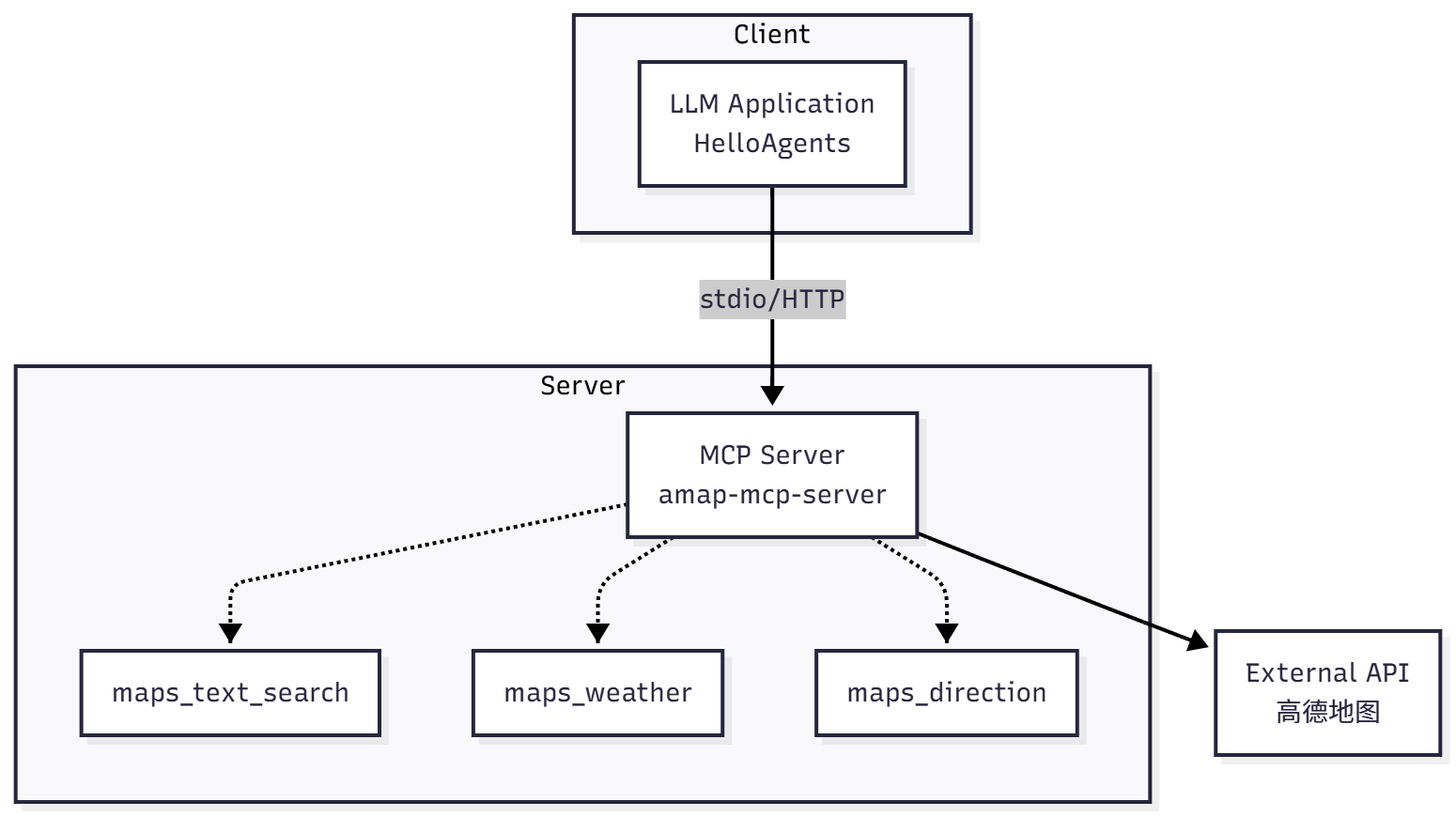
Figure 13.7 amap-mcp-server Tools
The Amap MCP server provides various tools, mainly divided into the following categories, as shown in Table 13.1:
Table 13.1 Amap MCP Tool Categories
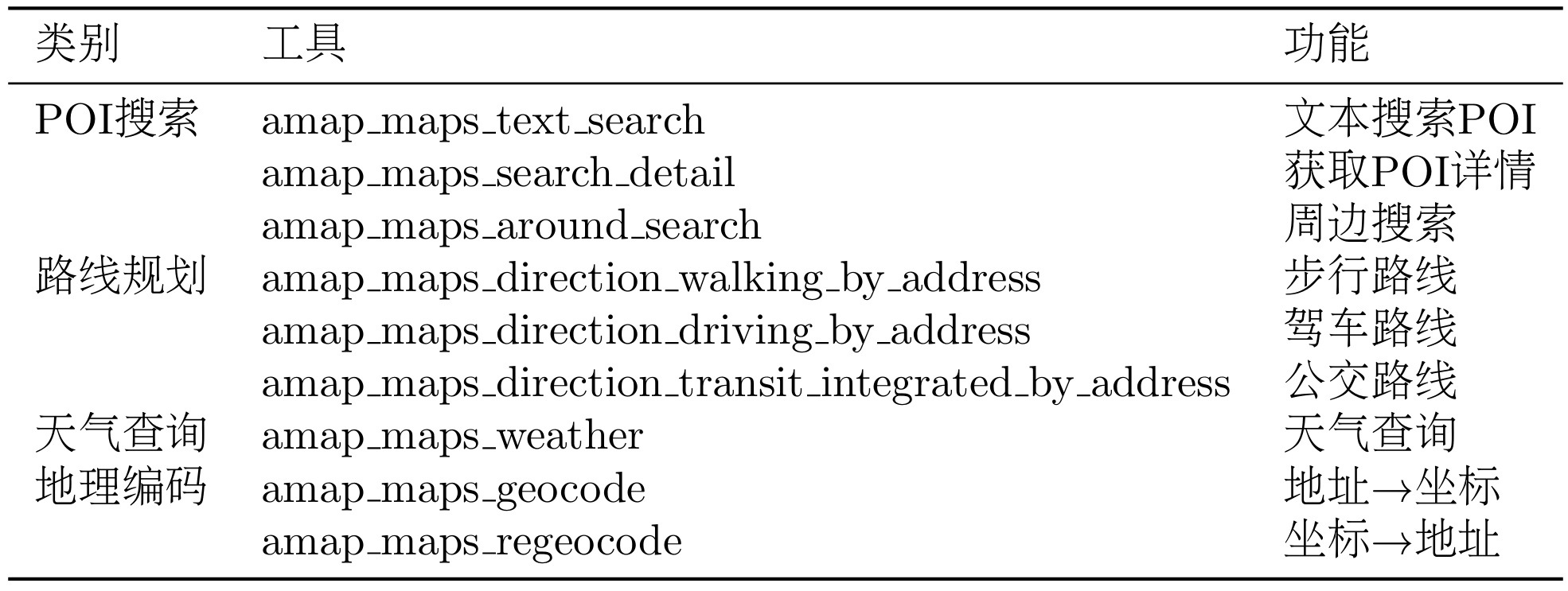
Through the MCP protocol, we can easily integrate in HelloAgents:
from hello_agents.tools import MCPTool
from app.config import get_settings

settings = get_settings()

# Create MCP tool
mcp_tool = MCPTool(
    name="amap_mcp",
    command="npx",
    args=["-y", "@sugarforever/amap-mcp-server"],
    env={"AMAP_API_KEY": settings.amap_api_key},
    auto_expand=True
)
What does this code do? First, command and args specify how to start the MCP server. npx -y @sugarforever/amap-mcp-server will download and run the amap-mcp-server package from the npm repository. The env parameter passes environment variables, here we pass the Amap API key.
Note: Some examples in this document use npx to launch MCP (Model Context Protocol) services. However,in the code repository corresponding to this section of content, we actually use uvx. It’s important to note that npx and uvx share nearly identical design principles—the only difference lies in their ecosystems: npx targets JavaScript/Node.js (packages from npm), while uvx targets Python (packages from PyPI).There is no superiority or inferiority between the two methods. Please choose according to your needs when using them.
When we create the MCPTool object, it will start the MCP server process in the background and communicate with the server through standard input/output (stdin/stdout). This is a feature of the MCP protocol: using inter-process communication instead of HTTP, which is more efficient and easier to manage.
The most critical parameter is auto_expand=True. When set to True, MCPTool will automatically query what tools the MCP server provides, and then create an independent Tool object for each tool. This is why we only created one MCPTool, but the Agent got 16 tools. Let's see this process:
# Create one MCPTool
mcp_tool = MCPTool(..., auto_expand=True)
agent.add_tool(mcp_tool)

# Agent actually gets 16 tools!
print(list(agent.tools.keys()))
# ['amap_maps_text_search', 'amap_maps_weather', ...]
As shown in Figure 13.8, suppose the user wants to search for attractions in Beijing. AttractionSearchAgent receives the query "Please search for historical and cultural attractions in Beijing". The Agent analyzes this query and decides to call the amap_maps_text_search tool with parameters keywords=attraction, city=Beijing.
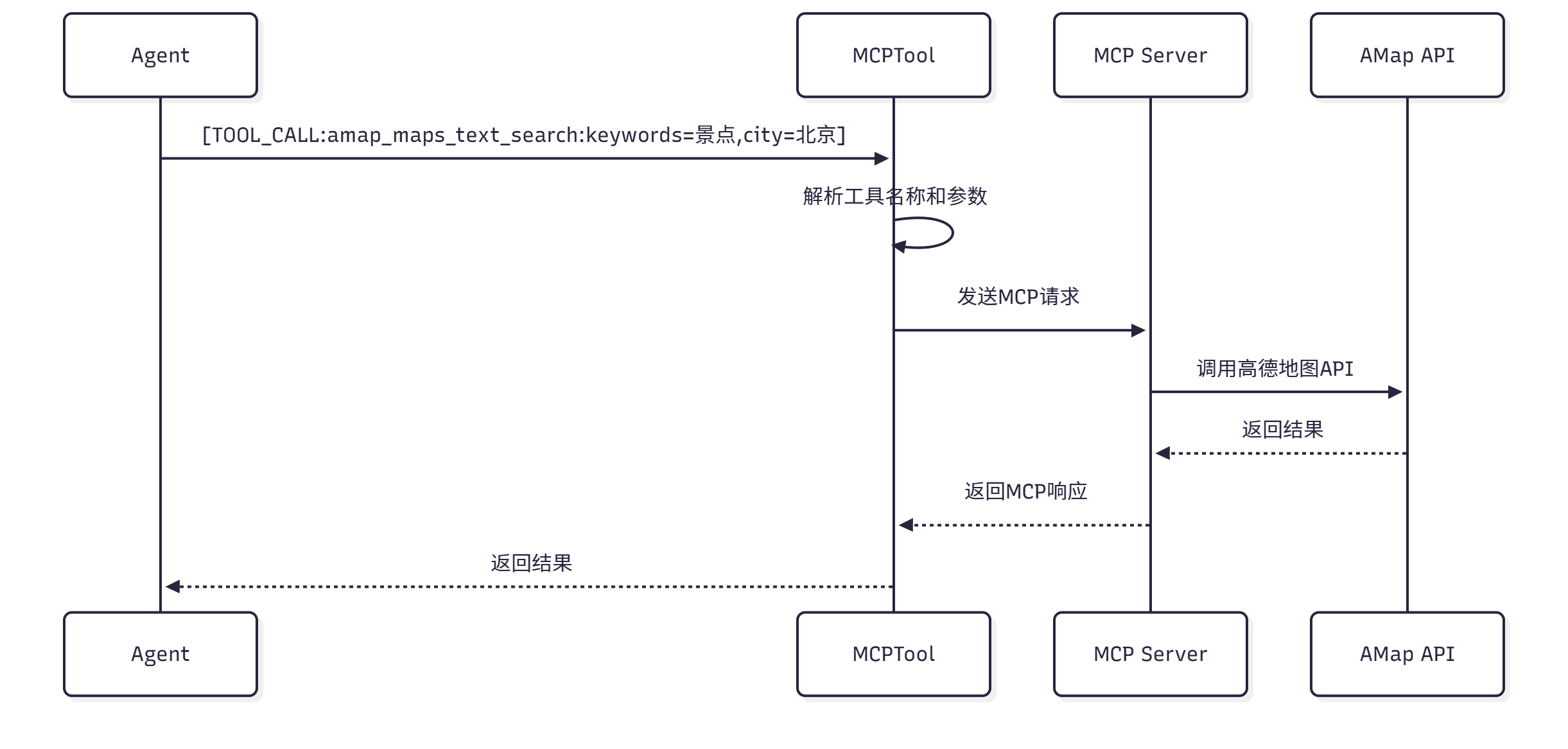
Figure 13.8 MCP Tool Call Flow
The Agent generates a tool call marker: [TOOL_CALL:amap_maps_text_search:keywords=attraction,city=Beijing]. The HelloAgents framework parses this marker, extracts the tool name and parameters, and then calls the corresponding Tool object.
The Tool object is automatically created by MCPTool, and it will send the call request to the MCP server. Specifically, it will construct a JSON-RPC format message and send it to the server process through stdin:
{
  "jsonrpc": "2.0",
  "method": "tools/call",
  "params": {
    "name": "amap_maps_text_search",
    "arguments": {
      "keywords": "attraction",
      "city": "Beijing"
    }
  }
}
The MCP server receives this message, parses the parameters, and then calls Amap's HTTP API. It will construct an HTTP request, add the API key, send the request, and receive the response.
Amap API returns JSON format data containing attraction list, address, coordinates, and other information. The MCP server parses this data, extracts key fields, and then constructs a response message, returning it to MCPTool through stdout:
{
  "jsonrpc": "2.0",
  "result": {
    "content": [
      {
        "type": "text",
        "text": "Found the following attractions:\n1. Forbidden City Museum - Address: No. 4 Jingshan Front Street, Dongcheng District\n2. Temple of Heaven Park - Address: Tiantan Road, Dongcheng District\n..."
      }
    ]
  }
}
MCPTool receives the response, extracts the text content, and returns it to the Agent. The Agent uses this result as the output of the tool call and continues to generate the final reply.
This process looks complex, but for the Agent, it only needs to know that there is a tool called amap_maps_text_search that can search for attractions. All the underlying details are encapsulated by the MCP protocol and MCPTool.
13.4.3 Sharing MCP Instances
In our multi-Agent system, three Agents all need to use Amap tools. So should each Agent create its own MCPTool instance, or share the same instance?
If each Agent creates a MCPTool instance, this means three server processes will run simultaneously. Each process will independently call the Amap API, which may exceed the API's rate limit. Moreover, multiple processes will occupy more memory and CPU resources.
A better approach is to let all Agents share the same MCPTool instance. This way, only one MCP server process needs to be started, and all API calls go through this process. This not only saves resources but also allows better control of API call frequency.
In the code, we create a MCPTool instance in the constructor of TripPlannerAgent, and then add it to each sub-Agent's tool list:
class TripPlannerAgent:
    def __init__(self):
        settings = get_settings()
        self.llm = HelloAgentsLLM()

        # Create shared MCP tool instance (create only once)
        self.mcp_tool = MCPTool(
            name="amap_mcp",
            command="npx",
            args=["-y", "@sugarforever/amap-mcp-server"],
            env={"AMAP_API_KEY": settings.amap_api_key},
            auto_expand=True
        )

        # Create multiple Agents, sharing the same MCP tool
        self.attraction_agent = SimpleAgent(
            name="AttractionSearchAgent",
            llm=self.llm,
            system_prompt=ATTRACTION_AGENT_PROMPT
        )
        self.attraction_agent.add_tool(self.mcp_tool)  # Share

        self.weather_agent = SimpleAgent(
            name="WeatherQueryAgent",
            llm=self.llm,
            system_prompt=WEATHER_AGENT_PROMPT
        )
        self.weather_agent.add_tool(self.mcp_tool)  # Share

        self.hotel_agent = SimpleAgent(
            name="HotelAgent",
            llm=self.llm,
            system_prompt=HOTEL_AGENT_PROMPT
        )
        self.hotel_agent.add_tool(self.mcp_tool)  # Share
This way, all three Agents can use Amap's 16 tools, but only one MCP server process is running underneath. When we call the plan_trip method of TripPlannerAgent, the three Agents will call tools in sequence, and all requests are sent to the Amap API through the same MCP server.
13.4.4 Unsplash Image API Integration
In addition to Amap, we also need to obtain images for attractions to make the travel plan more vivid and intuitive. We use the Unsplash API to search for attraction images. Note that Unsplash is a foreign service and is one of the few image APIs that can be used for free, so search results may not be accurate enough. In actual projects, you can consider using Bing, Baidu, or Amap's POI image API, but these services usually require payment.
The integration of Unsplash API is relatively simple. We create an UnsplashService class to encapsulate API calls:
# backend/app/services/unsplash_service.py
import requests
from typing import Optional, List, Dict
import logging

logger = logging.getLogger(__name__)

class UnsplashService:
    """Unsplash image service"""

    def __init__(self, access_key: str):
        self.access_key = access_key
        self.base_url = "https://api.unsplash.com"

    def search_photos(self, query: str, per_page: int = 10) -> List[Dict]:
        """Search for images"""
        try:
            url = f"{self.base_url}/search/photos"
            params = {
                "query": query,
                "per_page": per_page,
                "client_id": self.access_key
            }

            response = requests.get(url, params=params, timeout=10)
            response.raise_for_status()

            data = response.json()
            results = data.get("results", [])

            # Extract image URLs
            photos = []
            for result in results:
                photos.append({
                    "url": result["urls"]["regular"],
                    "description": result.get("description", ""),
                    "photographer": result["user"]["name"]
                })

            return photos

        except Exception as e:
            logger.error(f"Image search failed: {e}")
            return []

    def get_photo_url(self, query: str) -> Optional[str]:
        """Get single image URL"""
        photos = self.search_photos(query, per_page=1)
        return photos[0].get("url") if photos else None
This service class provides two methods: search_photos searches for multiple images, and get_photo_url gets the URL of a single image. We use this service in the API route to get images for each attraction:
# backend/app/api/routes/trip.py
from app.services.unsplash_service import UnsplashService

unsplash_service = UnsplashService(settings.unsplash_access_key)

@router.post("/plan", response_model=TripPlan)
async def create_trip_plan(request: TripPlanRequest) -> TripPlan:
    # Generate travel plan
    trip_plan = trip_planner_agent.plan_trip(request)

    # Get images for each attraction
    for day in trip_plan.days:
        for attraction in day.attractions:
            if not attraction.image_url:
                image_url = unsplash_service.get_photo_url(
                    f"{attraction.name} {trip_plan.city}"
                )
                attraction.image_url = image_url

    return trip_plan
Note that we didn't encapsulate Unsplash as a Tool or MCP tool, but called it directly in the API route. This is because image search doesn't require the Agent's intelligent decision-making, it's just a simple data enhancement step. If you want the Agent to autonomously decide whether images are needed or choose different image sources, you can consider encapsulating it as a Tool.