14.4 Tool System Integration
14.4.1 SearchTool Extension
In Chapter 7, we implemented the basic version of SearchTool, integrating Tavily and SerpApi search engines, demonstrating the design idea of multi-source search. In this chapter's deep research assistant, we further extended the capabilities of SearchTool, adding DuckDuckGo, Perplexity, SearXNG and other search engines, and implementing Advanced mode (combining multiple search engines). Search is the most core function of the deep research assistant, and these extensions enable the system to adapt to different usage scenarios and needs.
As shown in Table 14.2, the search engines added this time have different characteristics and applicable scenarios.
Table 14.2 Multi-Search Engine Comparison
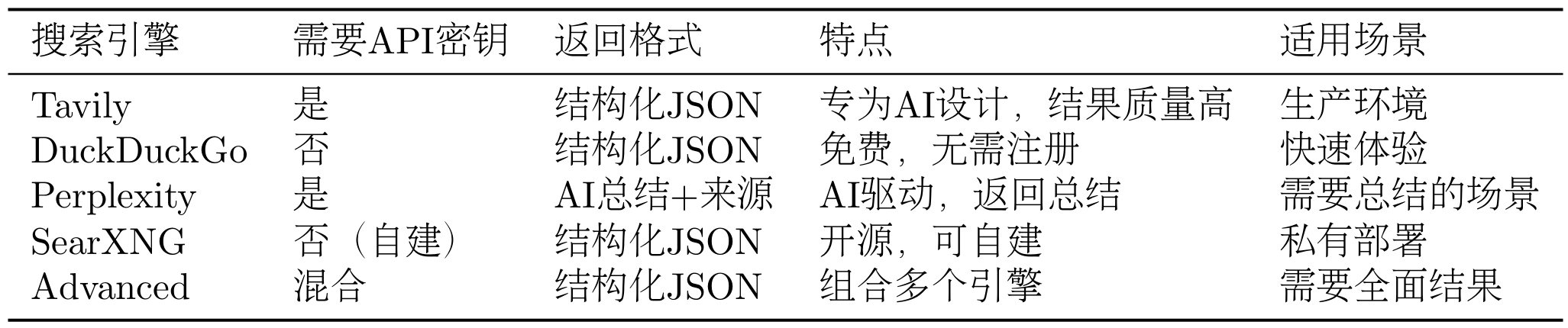
We will no longer discuss how to extend separately. You can refer to the source code and the extension cases in Chapter 7 for implementation. SearchTool provides a unified search interface. No matter which search engine is used, the calling method is the same.
In the deep research assistant, we select the search engine through the configuration file:
# config.py
class SearchAPI(str, Enum):
    TAVILY = "tavily"
    DUCKDUCKGO = "duckduckgo"
    PERPLEXITY = "perplexity"
    SEARXNG = "searxng"
    ADVANCED = "advanced"

class Configuration(BaseModel):
    search_api: SearchAPI = SearchAPI.DUCKDUCKGO
# ...# .env
SEARCH_API=tavilyThis way, users can select the search engine by modifying the .env file without modifying the code.
The result returned by SearchTool is a dictionary containing:
results: List of search results, each result contains title, URL, snippetbackend: Search engine usedanswer: AI-generated answer (Perplexity only)notices: Notification information (such as API limits, errors, etc.)
Here are some special case handling.
Search results may contain duplicate URLs, we need to deduplicate:
def deduplicate_sources(sources: List[dict]) -> List[dict]:
    """Remove duplicate URLs"""
    seen_urls = set()
    unique_sources = []

    for source in sources:
        if source["url"] not in seen_urls:
            seen_urls.add(source["url"])
            unique_sources.append(source)

    return unique_sources
Search results may contain a large amount of text, we need to limit the number of tokens for each source:
def limit_source_tokens(source: dict, max_tokens: int = 2000) -> dict:
    """Limit the number of tokens for a source"""
    snippet = source["snippet"]

    # Simple token estimation: 1 token is approximately 4 characters
    max_chars = max_tokens * 4

    if len(snippet) > max_chars:
        snippet = snippet[:max_chars] + "..."

    return {
        **source,
        "snippet": snippet
    }
14.4.2 NoteTool Usage
In the deep research assistant, we use NoteTool to persist research progress. NoteTool is a built-in tool integrated in Chapter 9, used to create, read, update, and delete notes.
During the research process, we need to record the search results, summaries, and final research report for each subtask. This information needs to be persisted to disk so that research can continue from the last progress when interrupted, and it is also convenient to view all operations during the research process and analyze the quality and efficiency of the research.
NoteTool stores notes in the specified workspace directory, with each note being a Markdown file. The note filename is the task ID, and the content includes task title, task intent, search query, search results, and summary.
The final generated file style will be in the following tree structure:
workspace/
├── notes/
│   ├── 1.md  # Notes for task 1
│   ├── 2.md  # Notes for task 2
│   ├── 3.md  # Notes for task 3
│   └── ...
└── reports/
    └── final_report.md  # Final report
In the deep research assistant, we use NoteTool to record the research progress of each subtask:
class NotesService:
    def __init__(self, workspace: str):
        self.note_tool = NoteTool(workspace=workspace)

    def save_task_summary(
        self,
        task: TodoItem,
        search_results: List[dict],
        summary: str
    ):
        """Save task summary"""
        # Format note content
        content = self._format_note_content(
            task=task,
            search_results=search_results,
            summary=summary
        )

        # Create note
        self.note_tool.run({
            "action": "create",
            "title": f"Task {task.id}: {task.title}",
            "content": content,
            "tags": ["research", "summary"]
        })

    def _format_note_content(
        self,
        task: TodoItem,
        search_results: List[dict],
        summary: str
    ) -> str:
        """Format note content"""
        content = f"# Task {task.id}: {task.title}\n\n"
        content += f"## Task Information\n\n"
        content += f"- **Intent**: {task.intent}\n"
        content += f"- **Query**: {task.query}\n\n"

        content += f"## Search Results\n\n"
        for idx, result in enumerate(search_results, start=1):
            content += f"[{idx}] {result['title']}\n"
            content += f"URL: {result['url']}\n"
            content += f"Snippet: {result['snippet']}\n\n"

        content += f"## Summary\n\n{summary}\n"

        return content
14.4.3 ToolRegistry Tool Management
ToolRegistry is the tool registry of the HelloAgents framework, also supported in our Chapter 7, used to manage the registration and invocation of all tools. In the deep research assistant, we use ToolRegistry to manage SearchTool and NoteTool.
Before creating an Agent, we need to register tools first:
from hello_agents import ToolAwareSimpleAgent
from hello_agents.tools import ToolRegistry
from hello_agents.tools import SearchTool
from hello_agents.tools import NoteTool

# Create tools
search_tool = SearchTool(backend="hybrid")
note_tool = NoteTool(workspace="./workspace/notes")

# Create registry
registry = ToolRegistry()

# Register tools
registry.register_tool(search_tool)
registry.register_tool(note_tool)

# Create Agent
agent = ToolAwareSimpleAgent(
    name="Research Assistant",
    system_prompt="You are a research assistant",
    llm=llm,
    tool_registry=registry
)
When an Agent needs to call a tool, it generates a tool call instruction, as shown in Figure 14.7.
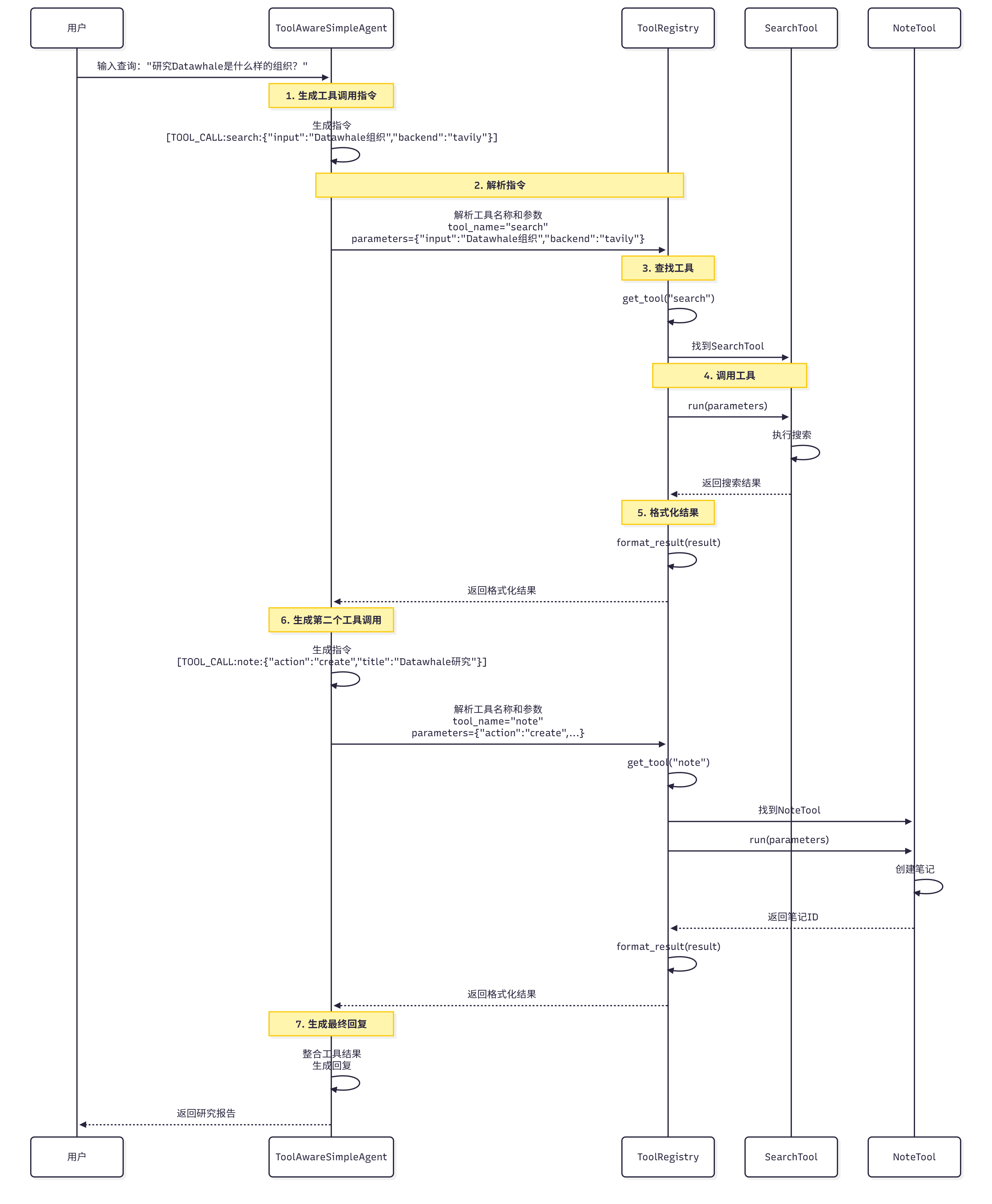
Figure 14.7 Tool Call Process
Tool Call Process:
- Agent generates instruction: Agent generates tool call instruction, such as
[TOOL_CALL:search_tool:\{"input": "Datawhale organization", "backend": "tavily"\}] - Parse instruction:
ToolRegistryparses the instruction, extracts tool name and parameters - Find tool:
ToolRegistryfinds the corresponding tool based on the tool name - Call tool: Call the tool's
runmethod, passing in parameters - Return result: Tool returns execution result
- Format result: Format the result as a string and return it to the Agent