6. MCP Integration
Confidence: 100% (Tier 1 - Official) Source: code.claude.com/docs/en/mcp
MCP (Model Context Protocol) servers extend Claude Code with additional tools.
MCP Architecture Overview
💡 Visual Guide: The following diagram illustrates how MCP creates a secure control layer between LLMs and real systems. The LLM layer has no direct data access - the MCP Server enforces security policies before tools can interact with databases, APIs, or files.
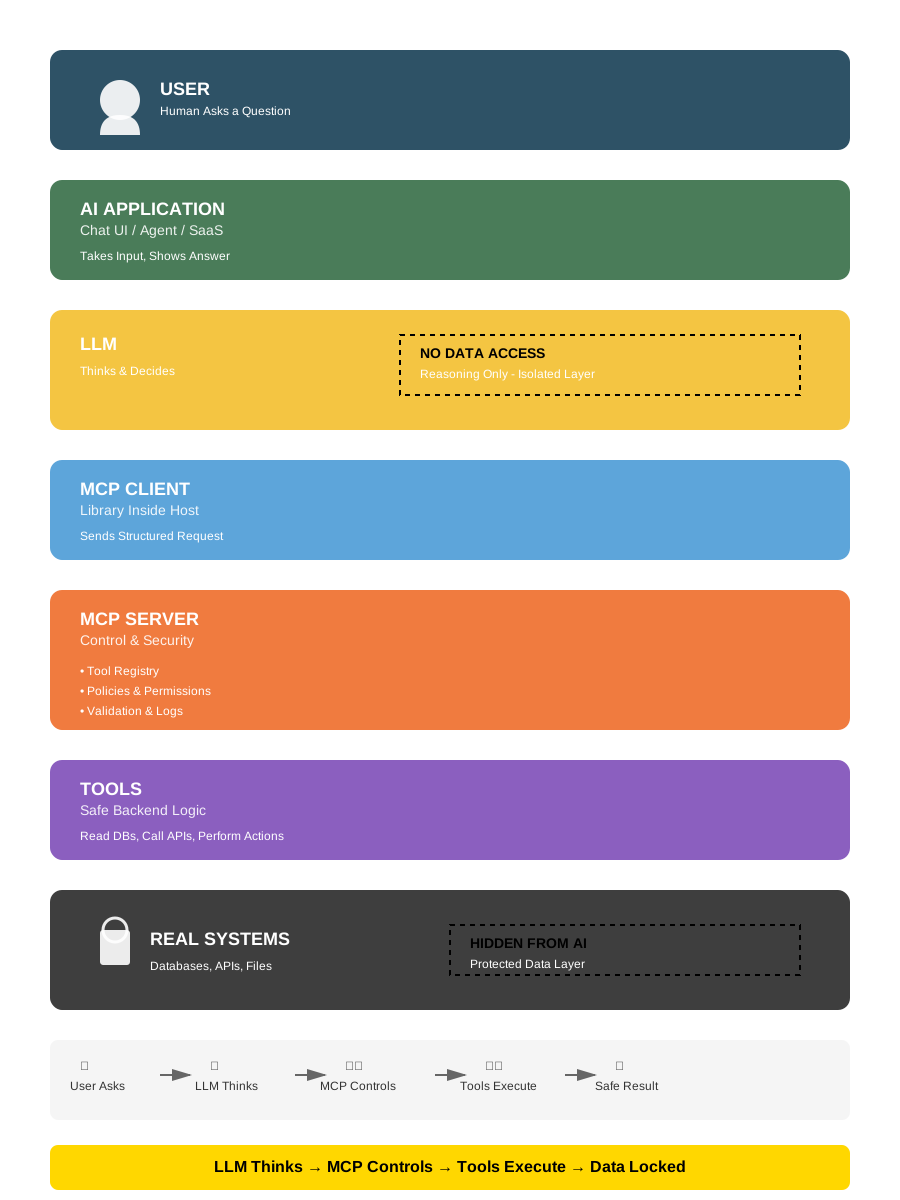
Figure 1: MCP Architecture showing separation between thinking (LLM), control (MCP Server), and execution (Tools). Design inspired by Dinesh Kumar's LinkedIn visualization, recreated under Apache-2.0 license.
Key security boundaries:
- Yellow layer (LLM): Reasoning only - No Data Access
- Orange layer (MCP Server): Security control point (policies, validation, logs)
- Grey layer (Real Systems): Protected data - Hidden From AI
How MCP Works (Technical Details)
┌─────────────────────────────────────────────────────────────┐
│                    MCP INTEGRATION                          │
├─────────────────────────────────────────────────────────────┤
│                                                             │
│  ┌─────────────────────────────────────────────────────┐    │
│  │                  CLAUDE CODE                        │    │
│  │                                                     │    │
│  │   Native Tools        MCP Tools                     │    │
│  │   ┌─────────┐        ┌─────────────────────────┐    │    │
│  │   │ Bash    │        │ mcp__serena__*          │    │    │
│  │   │ Read    │        │ mcp__context7__*        │    │    │
│  │   │ Edit    │        │ mcp__playwright__*      │    │    │
│  │   │ ...     │        │ mcp__custom__*          │    │    │
│  │   └─────────┘        └───────────┬─────────────┘    │    │
│  │                                  │                  │    │
│  └──────────────────────────────────┼──────────────────┘    │
│                                     │                       │
│                           JSON-RPC 2.0                      │
│                                     │                       │
│                                     ▼                       │
│  ┌─────────────────────────────────────────────────────┐    │
│  │                  MCP SERVER                         │    │
│  │                                                     │    │
│  │   stdio/HTTP transport                              │    │
│  │   Tool definitions (JSON Schema)                    │    │
│  │   Tool implementations                              │    │
│  │                                                     │    │
│  └─────────────────────────────────────────────────────┘    │
│                                                             │
└─────────────────────────────────────────────────────────────┘
Key MCP Facts
| Aspect | Behavior |
|---|---|
| Protocol | JSON-RPC 2.0 over stdio or HTTP |
| Tool naming | mcp__<server>__<tool> convention |
| Context sharing | Only via tool parameters and return values |
| Lifecycle | Server starts on first use, stays alive during session |
| Permissions | Same system as native tools |
What MCP Cannot Do
| Limitation | Explanation |
|---|---|
| Access conversation history | Only sees tool params, not full context |
| Maintain state across calls | Each call is independent (unless server implements caching) |
| Modify Claude's system prompt | Tools only, no prompt injection |
| Bypass permissions | Same security layer as native tools |
→ Cross-reference: See Section 8.6 - MCP Security for security considerations.
MCP Extensions: Apps (SEP-1865)
Status: Stable (January 26, 2026) Spec: SEP-1865 on GitHubCo-authored by: OpenAI, Anthropic, MCP-UI creators
What Are MCP Apps?
MCP Apps is the first official extension to the Model Context Protocol, enabling MCP servers to deliver interactive user interfaces alongside traditional tool responses.
The problem solved: Traditional text-based responses create friction for workflows requiring exploration. Each interaction (sort, filter, drill-down) demands a new prompt cycle. MCP Apps eliminates this "context gap" by rendering interactive UIs directly in the conversation.
Technical Architecture
Two core primitives:
Tools with UI metadata:
json{ "name": "query_database", "description": "Query customer database", "_meta": { "ui": { "resourceUri": "ui://dashboard/customers" } } }UI Resources (
ui://scheme):- Server-side HTML/JavaScript bundles
- Rendered in sandboxed iframes by host
- Bidirectional JSON-RPC communication via
postMessage
Communication flow:
┌─────────────────────────────────────────────────────────┐
│                  MCP APPS ARCHITECTURE                  │
├─────────────────────────────────────────────────────────┤
│                                                         │
│  ┌──────────────┐         ┌──────────────┐             │
│  │  MCP Client  │◄───────►│  MCP Server  │             │
│  │ (Claude/IDE) │ JSON-RPC│  (Your App)  │             │
│  └──────┬───────┘         └──────────────┘             │
│         │                                               │
│         │ Fetches ui:// resource                       │
│         ▼                                               │
│  ┌─────────────────────────────────────────┐            │
│  │     Sandboxed Iframe (UI Render)        │            │
│  │  ┌───────────────────────────────────┐  │            │
│  │  │  HTML/JS Bundle from Server       │  │            │
│  │  │  - Interactive dashboard           │  │            │
│  │  │  - Forms with validation           │  │            │
│  │  │  - Real-time data visualization    │  │            │
│  │  └───────────────────────────────────┘  │            │
│  │                                          │            │
│  │  postMessage ◄─────► JSON-RPC           │            │
│  └─────────────────────────────────────────┘            │
│                                                         │
└─────────────────────────────────────────────────────────┘
Security Model
Multi-layered protection:
| Layer | Protection |
|---|---|
| Iframe sandbox | Restricted permissions (no direct system access) |
| Pre-declared templates | Hosts review HTML/JS before rendering |
| Auditable messaging | All UI-to-host communication via JSON-RPC logs |
| User consent | Optional requirement for UI-initiated tool calls |
| Content blocking | Hosts can reject suspicious resources pre-render |
→ Cross-reference: See Section 8.6 - MCP Security for broader MCP security considerations.
SDK: @modelcontextprotocol/ext-apps
Installation:
npm install @modelcontextprotocol/ext-appsCore API (framework-agnostic):
import { App } from '@modelcontextprotocol/ext-apps';

const app = new App();

// 1. Establish communication with host
await app.connect();

// 2. Receive tool results from host
app.ontoolresult = (result) => {
  // Update UI with tool execution results
  updateDashboard(result.data);
};

// 3. Call server tools from UI
await app.callServerTool('fetch_analytics', {
  timeRange: '7d',
  metrics: ['users', 'revenue']
});

// 4. Update model context asynchronously
await app.updateModelContext({
  selectedFilters: ['region:EU', 'status:active']
});

// Additional capabilities:
app.logDebug('User action', { filter: 'applied' });
app.openBrowserLink('https://docs.example.com');
app.sendFollowUpMessage('Applied filters: EU, Active');
Standard communication: All features operate over postMessage (no framework lock-in).
Platform Support
| Platform | MCP Apps Support | Notes |
|---|---|---|
| Claude Desktop | ✅ Available now | claude.ai/directory (Pro/Max/Team/Enterprise) |
| Claude Cowork | 🔄 Coming soon | Agentic workflow integration planned |
| VS Code | ✅ Insiders build | Official blog post |
| ChatGPT | 🔄 Rolling out | Week of Jan 26, 2026 |
| Goose | ✅ Available now | Open-source CLI with UI support |
| Claude Code CLI | ❌ N/A | Terminal text-only (no iframe rendering) |
Relevance for Claude Code Users
Direct usage: None (CLI is text-only, cannot render iframes)
Indirect benefits:
- Ecosystem understanding: MCP Apps represents the future of agentic workflows
- MCP server development: If building custom MCP servers, Apps is now a design option
- Hybrid workflows:
- Use Claude Desktop to explore data with Apps (dashboards, visualizations)
- Switch to Claude Code CLI for implementation (scripting, automation)
- Context for configuration: MCP servers may advertise UI capabilities in metadata
Example Implementations
Official example servers (in ext-apps repository):
- threejs-server: 3D visualization and manipulation
- map-server: Interactive geographic data exploration
- pdf-server: Document viewing with inline highlights
- system-monitor-server: Real-time metrics dashboards
- sheet-music-server: Music notation rendering
Production adoption (January 2026):
| Tool | Provider | Capabilities |
|---|---|---|
| Asana | Asana | Project timelines, task boards |
| Slack | Salesforce | Message drafting with formatting preview |
| Figma | Figma | Flowcharts, Gantt charts in FigJam |
| Amplitude | Amplitude | Analytics charts with interactive filtering |
| Box | Box | File search, document previews |
| Canva | Canva | Presentation design with real-time customization |
| Clay | Clay | Company research, contact discovery |
| Hex | Hex | Data analysis with interactive queries |
| monday.com | monday.com | Work management boards |
Coming soon: Salesforce (Agentforce 360)
Relationship to Prior Work
MCP Apps standardizes patterns pioneered by:
- MCP-UI: Early UI extension for MCP (community project)
- OpenAI Apps SDK: Parallel effort for interactive tools
Both frameworks continue to be supported. MCP Apps provides a unified specification (SEP-1865) co-authored by maintainers from both ecosystems plus Anthropic and OpenAI.
Migration path: Straightforward for existing MCP-UI and Apps SDK implementations.
When to Use MCP Apps
Decision tree for MCP server developers:
Building a custom MCP server?
├─ Users need to SELECT from 50+ options? → MCP Apps (dropdown, multi-select UI)
├─ Users need to VISUALIZE data patterns? → MCP Apps (charts, maps, graphs)
├─ Users need MULTI-STEP workflows with conditional logic? → MCP Apps (wizard forms)
├─ Users need REAL-TIME updates? → MCP Apps (live dashboards)
└─ Simple data retrieval or actions only? → Traditional MCP tools (sufficient)Trade-off: UI complexity and implementation effort vs. user experience improvement.
Resources
- Specification: SEP-1865 on GitHub
- SDK:
@modelcontextprotocol/ext-apps(npm) - Example servers: modelcontextprotocol/ext-apps repository
- Blog post (MCP): MCP Apps announcement
- Blog post (Claude): Interactive tools in Claude
- VS Code: MCP Apps support announcement
MCP Tool Search (Lazy Loading)
Confidence: 100% (Tier 1 - Official) Source: anthropic.com/engineering/advanced-tool-use
Since v2.1.7 (January 2026), Claude Code uses lazy loading for MCP tool definitions instead of preloading all tools into context. This is powered by Anthropic's Advanced Tool Use API feature.
The problem solved:
- MCP tool definitions consume significant context (e.g., GitHub MCP alone: ~46K tokens for 93 tools)
- Developer Scott Spence documented 66,000+ tokens consumed before typing a single prompt
- This "context pollution" limited practical MCP adoption
How Tool Search works:
┌─────────────────────────────────────────────────────────────┐
│                   MCP TOOL SEARCH FLOW                       │
├─────────────────────────────────────────────────────────────┤
│                                                             │
│  WITHOUT Tool Search (eager loading):                       │
│  ┌──────────────────────────────────────────────────────┐   │
│  │All 100+ tool definitions loaded upfront (~55K tokens)│   │
│  └──────────────────────────────────────────────────────┘   │
│                                                             │
│  WITH Tool Search (lazy loading):                           │
│  ┌──────────────────────────────────────────────────────┐   │
│  │ Step 1: Only search tool loaded (~500 tokens)        │   │
│  │ Step 2: Claude determines needed capability          │   │
│  │ Step 3: Tool Search finds matching tools (regex/BM25)│   │
│  │ Step 4: Only matched tools loaded (~600 tokens each) │   │
│  │ Step 5: Tool invoked normally                        │   │
│  └──────────────────────────────────────────────────────┘   │
│                                                             │
│  Result: 55K tokens → ~8.7K tokens (85% reduction)          │
│                                                             │
└─────────────────────────────────────────────────────────────┘
Measured improvements (Anthropic benchmarks):
| Metric | Before | After | Improvement |
|---|---|---|---|
| Token overhead (5-server setup) | ~55K | ~8.7K | 85% reduction |
| Opus 4 tool selection accuracy | 49% | 74% | +25 points |
| Opus 4.5 tool selection accuracy | 79.5% | 88.1% | +8.6 points |
| Opus 4.6 adaptive thinking | N/A | Auto-calibrated | Dynamic depth |
Configuration (v2.1.9+):
# Environment variable
ENABLE_TOOL_SEARCH=auto      # Default (10% context threshold)
ENABLE_TOOL_SEARCH=auto:5    # Aggressive (5% threshold)
ENABLE_TOOL_SEARCH=auto:20   # Conservative (20% threshold)
ENABLE_TOOL_SEARCH=true      # Always enabled
ENABLE_TOOL_SEARCH=false # Disabled (eager loading)| Threshold | Recommended for |
|---|---|
auto:20 | Lightweight setups (5-10 tools) |
auto:10 | Balanced default (20-50 tools) |
auto:5 | Power users (100+ tools) |
→ As Simon Willison noted: "Context pollution is why I rarely used MCP. Now that it's solved, there's no reason not to hook up dozens or even hundreds of MCPs to Claude Code." (via X/Twitter, January 14, 2026)