4.1.5. Function calling
OpenAI function calling (otherwise known as tools) enable models to perform specific external actions by calling predefined functions. Some of the tools provided on the OpenAI platform include:
- Code interpreter: Executes code for data analysis, math, plotting, and file manipulation
- Web search: Include data from the internet in model response generation
- File search: Search the contents of uploaded files for context
- Image generation: Generate or edit images using GPT image
- Remote MCP servers: Give the model access to new capabilities via Model Context Protocol (MCP) servers
Other cookbooks cover how to build tools for use with LLMs. In this example, we’ll develop several tools designed to efficiently explore the temporal knowledge graph and help answer the user’s question.
There are several schools of thought on tool design, and the best choice depends on the application at hand.
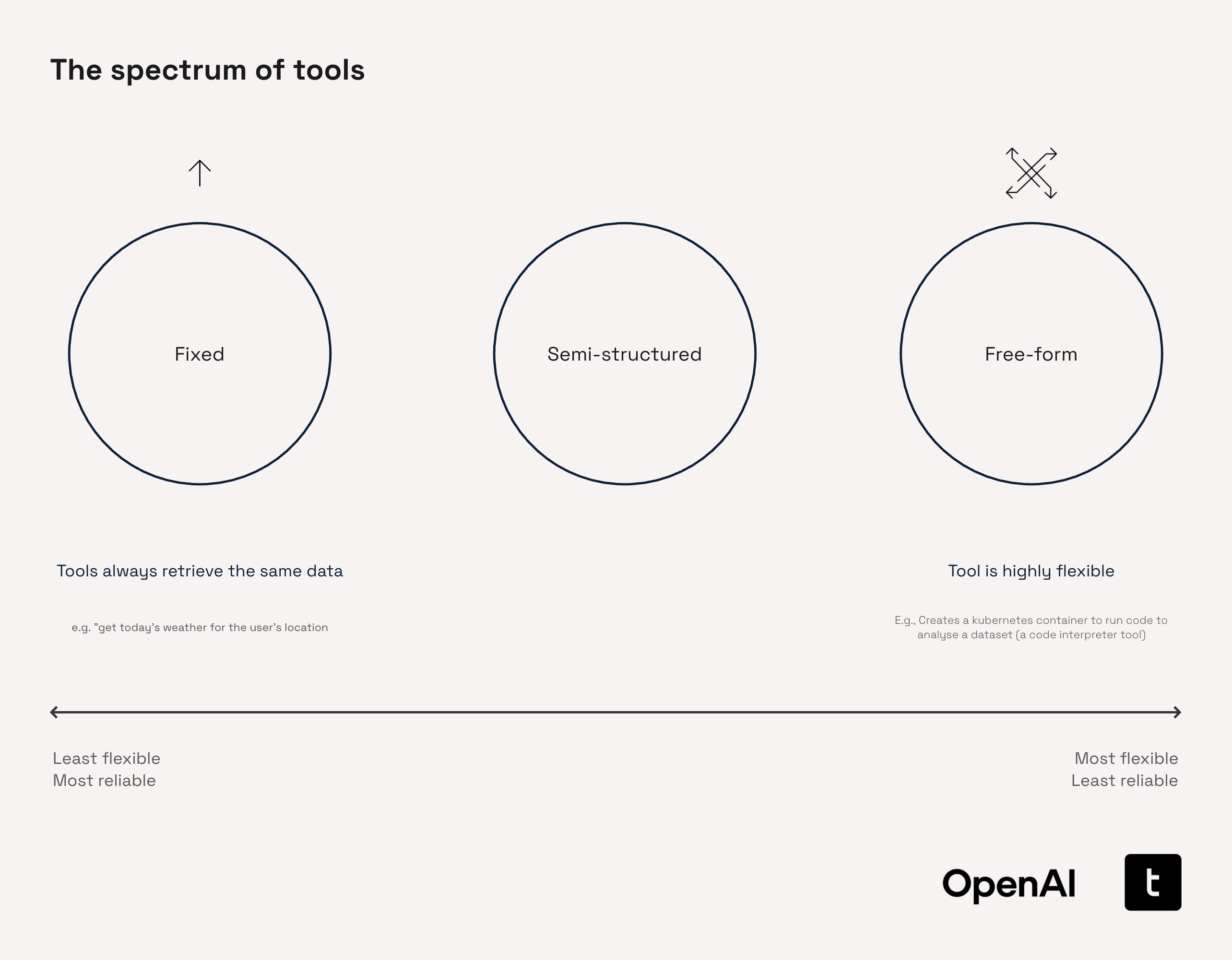
Fixed Tools
In this context, 'fixed' tools refer to those with a rigid, well-defined functionality. Typically, these tools accept a limited number of specific arguments and perform clearly outlined tasks. For instance, a fixed tool might execute a simple query such as "Get today's weather for the user's location." Due to their structured nature, these tools excel at performing consistent lookups or monitoring values within structured environments like ERP systems, regulatory frameworks, or dashboards. However, their rigidity limits flexibility, prompting users to often replace them with more dynamic, traditional data pipelines, particularly for continuous data streaming.
Examples of fixed tools in various industries include:
- Finance: "What's the current exchange rate from USD to EUR?"
- Pharmaceuticals: "Retrieve the known adverse effects for Drug ABC."
- Manufacturing: "What was the defect rate for batch #42?"
Free-form
Free-form tools represent the most flexible end of the tool spectrum. These tools are capable of executing complex, open-ended tasks with minimal constraints on input structure. A common example is a code interpreter, capable of handling diverse analytical tasks. Although their flexibility offers substantial advantages, they can also introduce unpredictability and can be more challenging to optimize for consistent reliability.
In industry applications, free-form tools can look like:
- Finance: "Backtest this momentum trading strategy using ETF price data over the past 10 years, and plot the Sharpe ratio distribution."
- Automotive: "Given this raw telemetry log, identify patterns that indicate early brake failure and simulate outcomes under various terrain conditions."
- Pharmaceuticals: "Create a pipeline that filters for statistically significant gene upregulation from this dataset, then run gene set enrichment analysis and generate a publication-ready figure."
Semi-structured Tools (used in this cookbook)
Modern agentic workflows frequently require tools that effectively balance structure and flexibility. Semi-structured tools are designed specifically to manage this middle ground. They accept inputs in moderately complex formats—such as text fragments, JSON-like arguments, or small code snippets—and often embed basic reasoning, retrieval, or decision-making capabilities. These tools are ideal when tasks are well-defined but not entirely uniform, such as when the required dataset or service is known, but the query or expected output varies.
Two common paradigms of semi-structured tools are:
- Extended Capabilities: Tools that function as specialized agents themselves, incorporating internal logic and analysis routines
- Flexible Argument Interfaces: Tools permitting the LLM to pass expressive yet structured arguments, such as detailed queries, filters, or embedded functions
Semi-structured tools are particularly valuable when:
- Delegating specific yet non-trivial tasks (like searches, transformations, or summarizations) to specialized tools
- The source data or APIs are known, but the results returned can be unpredictable
In production environments, these tools are often preferable to free-form tools, like code interpreters, due to their enhanced reliability and performance. For instance, executing complex, multi-step queries against large Neo4j knowledge graphs is more reliable and efficient using optimized Cypher queries templated within semi-structured tools rather than generating each query from scratch.
Industry applications of semi-structured tools include:
- Finance: "Extract all forward-looking risk factors from company filings for Q2 2023."
- Automotive: "Identify recurring electrical faults from maintenance logs across EV models launched after 2020."
- Pharmaceuticals: "Locate omics data supporting the hypothesis that a specific mRNA treatment effectively upregulates the IRS1 gene."
Creating tools for our retriever to use
Factual Q&A
The factual_qa tool provides an efficient way for our agent to retrieve information from our temporal knowledge graph pertaining to a particular company, topic, and date range. This will help the agent answer questions about the data such as "What were AMD's earnings in Q3 2017?"
This tool sits somewhere in the middle of the fixed and semi-structured tools we introduced earlier. This is generally quite a rigid tool in that it restricts the agent to a small number of parameters. However, the degrees of freedom in the input are large and the tool is still flexible in what information it can retrieve from the knowledge graph. This helps avoid the need for the core agent to write new queries for networkx from scratch on each query, improving accuracy and latency.
The tool has the following arguments:
entity: This is the entity (or object with respect to triplet ontology) that the tool should retrieve information forstart_date_range: This is the lower bound of the date range that the tool should retrieve overend_date_range: This is the upper bound of the date range that the tool should retrieve overpredicate: This is the name of the predicate that the tool will connect theentityto perform a retrieval
We begin by loading the predicate definitions. We will use these to improve error tolerance in the tool, using a GPT-4.1-nano to normalize the predicate passed in the argument to a valid predicate name.
# Redefine the predicate definitions as we will need them here
PREDICATE_DEFINITIONS = {
    "IS_A": "Denotes a class-or-type relationship between two entities (e.g., 'Model Y IS_A electric-SUV'). Includes 'is' and 'was'.",
    "HAS_A": "Denotes a part-whole relationship between two entities (e.g., 'Model Y HAS_A electric-engine'). Includes 'has' and 'had'.",
    "LOCATED_IN": "Specifies geographic or organisational containment or proximity (e.g., headquarters LOCATED_IN Berlin).",
    "HOLDS_ROLE": "Connects a person to a formal office or title within an organisation (CEO, Chair, Director, etc.).",
    "PRODUCES": "Indicates that an entity manufactures, builds, or creates a product, service, or infrastructure (includes scale-ups and component inclusion).",
    "SELLS": "Marks a commercial seller-to-customer relationship for a product or service (markets, distributes, sells).",
    "LAUNCHED": "Captures the official first release, shipment, or public start of a product, service, or initiative.",
    "DEVELOPED": "Shows design, R&D, or innovation origin of a technology, product, or capability. Includes 'researched' or 'created'.",
    "ADOPTED_BY": "Indicates that a technology or product has been taken up, deployed, or implemented by another entity.",
    "INVESTS_IN": "Represents the flow of capital or resources from one entity into another (equity, funding rounds, strategic investment).",
    "COLLABORATES_WITH": "Generic partnership, alliance, joint venture, or licensing relationship between entities.",
    "SUPPLIES": "Captures vendor–client supply-chain links or dependencies (provides to, sources from).",
    "HAS_REVENUE": "Associates an entity with a revenue amount or metric—actual, reported, or projected.",
    "INCREASED": "Expresses an upward change in a metric (revenue, market share, output) relative to a prior period or baseline.",
    "DECREASED": "Expresses a downward change in a metric relative to a prior period or baseline.",
    "RESULTED_IN": "Captures a causal relationship where one event or factor leads to a specific outcome (positive or negative).",
    "TARGETS": "Denotes a strategic objective, market segment, or customer group that an entity seeks to reach.",
    "PART_OF": "Expresses hierarchical membership or subset relationships (division, subsidiary, managed by, belongs to).",
    "DISCONTINUED": "Indicates official end-of-life, shutdown, or termination of a product, service, or relationship.",
    "SECURED": "Marks the successful acquisition of funding, contracts, assets, or rights by an entity.",
}
We define several helper functions for the factual QA tool.
First is _as_datetime. This tool is used to coerce the arguments that define the date range to the correct datetime format.
Next, we introduce two new data models: PredicateMatching and PredicateMatchValidation. PredicateMatching defines the output format for the GPT-4.1-nano call that matches the predicate in the function arguments to valid predicate names. PredicateMatchValidation then performs a secondary validation step to assert that this output from GPT-4.1-nano is a valid predicate name, leveraging a Pydantic field validator. This process helps to ensure that the tool runs smoothly and helps to eliminate some of the rare edge cases which would lead to an unsuccessful graph query.
# Helper functions and models
from datetime import datetime

from pydantic import BaseModel, Field, ValidationError, field_validator

def _as_datetime(ts) -> datetime | None:
    """Helper function to coerce possible timestamp formats to `datetime`."""  # noqa: D401
    if ts is None:
        return None
    if isinstance(ts, datetime):
        return ts
    for fmt in ("%Y-%m-%d", "%Y/%m/%d", "%Y-%m-%dT%H:%M:%S"):
        try:
            return datetime.strptime(ts, fmt)
        except ValueError:
            continue
    return None

class PredicateMatching(BaseModel):
    """Class for structured outputs from model to coerce input to correct predicate format."""
    reasoning: str = Field(description="Use this space to reason about the correct predicate to match.")
    predicate_match: str = Field(description="The predicate that aligns with the dictionary.")

class PredicateMatchValidation(BaseModel):
    """Class for validating the outputs from the model that tries to coerce predicate argument to a real predicate."""
    predicate: str

    @field_validator("predicate")
    @classmethod
    def predicate_in_definitions(cls, v):
        """Return an error string if the predicate is not in PREDICATE_DEFINITIONS."""
        if v not in PREDICATE_DEFINITIONS:
            return f"Error: '{v}' is not a valid predicate. Must be one of: {list(PREDICATE_DEFINITIONS.keys())}"
        return v
Our factual QA tool can be decomposed into four steps.
<ol style="margin-left: 1em; line-height: 1.6; padding-left: 0.5em;"> <li style="margin-bottom: 1.2em;"> <strong>Predicate coercion</strong><br /> <p style="margin-top: 0.5em; margin-bottom: 0.5em;"> If the provided predicate is not found in the <code>PREDICATE_DEFINITIONS</code> dictionary, this step uses GPT-4.1-nano to coerce it into a valid predicate </p> </li>Performs fuzzy matching to identify the corresponding entity nodes within the networkx graph
Retrieves both inbound and outbound edges associated with the identified entity nodes
async def factual_qa(
    entity: str,
    start_date_range: datetime,
    end_date_range: datetime,
    predicate: str
) -> str:
    """
    Query the knowledge-graph for relationships attached to *entity* that match
    *predicate* and fall within the requested time-window.

    The response is rendered as:

        Subject  –  PREDICATE  –  Object   [Valid-From]
            Statement: "..."
            Type: FACT   •   Value: 42

    If no matches are found (or on error) a human-readable explanation is returned.
    """
    # Checks that the date range passed is logical
    if start_date_range > end_date_range:
        return (
            "You used the `factual_qa` tool incorrectly last time. You provided a "
            "`start_date_range` that was more recent than the `end_date_range`. "
            "`end_date_range` must be ≥ `start_date_range`."
        )

    # ---- (1) predicate coercion / validation -----------------------
    if predicate not in PREDICATE_DEFINITIONS:
        try:
            predicate_definitions_str = "\n".join(
                f"- {k}: {v}" for k, v in PREDICATE_DEFINITIONS.items()
            )
            coercion_prompt = (
                "You are a helpful assistant that matches predicates to a dictionary of "
                "predicate definitions. Return the best-matching predicate **and** your reasoning.\n\n"
                f"Dictionary:\n{predicate_definitions_str}\n\n"
                f"Predicate to match: {predicate}"
            )

            completion = await client.beta.chat.completions.parse(
                model="gpt-4.1-nano",
                messages=[{"role": "user", "content": coercion_prompt}],
                response_format=PredicateMatching,
            )
            coerced_predicate = completion.choices[0].message.parsed.predicate_match

            # Validate against the enum / model we expect
            _ = PredicateMatchValidation(predicate=coerced_predicate)
            predicate = coerced_predicate
        except ValidationError:
            return (
                "You provided an invalid predicate. "
                f"Valid predicates are: {list(PREDICATE_DEFINITIONS.keys())}"
            )
        except Exception:
            # Coercion failed – fall back to original predicate
            pass

    predicate_upper = predicate.upper()
    entity_lower = entity.lower()

    # ---- (2) locate the entity node by fuzzy match -----------------
    try:
        target_node = None
        for node, data in G.nodes(data=True):
            node_name = data.get("name", str(node))
            if entity_lower in node_name.lower() or node_name.lower() in entity_lower:
                target_node = node
                break
        if target_node is None:
            return f"Entity '{entity}' not found in the knowledge graph."
    except Exception as e:
        return f"Error locating entity '{entity}': {str(e)}"

    # ---- (3) collect matching edges (outgoing + incoming) ----------
    matching_edges = []

    def _edge_ok(edge_data):
        """Return True if edge is temporally valid in the requested window."""
        valid_at = _as_datetime(edge_data.get("valid_at"))
        invalid_at = _as_datetime(edge_data.get("invalid_at"))
        if valid_at and end_date_range < valid_at:
            return False
        if invalid_at and start_date_range >= invalid_at:
            return False
        return True

    # Outgoing
    try:
        for _, tgt, _, ed in G.out_edges(target_node, data=True, keys=True):
            pred = ed.get("predicate", "").upper()
            if predicate_upper in pred and _edge_ok(ed):
                matching_edges.append(
                    {
                        "subject": G.nodes[target_node].get("name", str(target_node)),
                        "predicate": pred,
                        "object": G.nodes[tgt].get("name", str(tgt)),
                        **ed,
                    }
                )
    except Exception:
        pass

    # Incoming
    try:
        for src, _, _, ed in G.in_edges(target_node, data=True, keys=True):
            pred = ed.get("predicate", "").upper()
            if predicate_upper in pred and _edge_ok(ed):
                matching_edges.append(
                    {
                        "subject": G.nodes[src].get("name", str(src)),
                        "predicate": pred,
                        "object": G.nodes[target_node].get("name", str(target_node)),
                        **ed,
                    }
                )
    except Exception:
        pass

    # ---- (4) format the response -----------------------------------
    if not matching_edges:
        s = start_date_range.strftime("%Y-%m-%d")
        e = end_date_range.strftime("%Y-%m-%d")
        return (
            f"No data found for '{entity}' with predicate '{predicate}' "
            f"in the specified date range ({s} to {e})."
        )

    lines = [
        f"Found {len(matching_edges)} relationship"
        f"{'s' if len(matching_edges) != 1 else ''} for "
        f"'{entity}' with predicate '{predicate}':",
        ""
    ]

    for idx, edge in enumerate(matching_edges, 1):
        value        = edge.get("value")
        statement    = edge.get("statement")
        statement_tp = edge.get("statement_type")
        valid_from   = edge.get("valid_at")

        # First line: Subject – PREDICATE – Object
        triplet = f"{edge['subject']} – {edge['predicate']} – {edge['object']}"
        if valid_from:
            triplet += f"  [Valid-from: {valid_from}]"
        if value is not None:
            triplet += f"  (Value: {value})"
        lines.append(f"{idx}. {triplet}")

        # Second line: Statement (truncated to 200 chars) + Type
        if statement:
            snippet = statement if len(statement) <= 200 else statement[:197] + "…"
            lines.append(f'   Statement: "{snippet}"')
        if statement_tp:
            lines.append(f"   Type: {statement_tp}")

        lines.append("")  # spacer

return "\n".join(lines)result = await factual_qa(
entity="Amd",
start_date_range=datetime(2016, 1, 1),
end_date_range=datetime(2020, 1, 1),
predicate="launched"
)
print(result)factual_qa_schema = {
"type": "function",
"name": "factual_qa",
"description": "Queries the knowledge graph for time-bounded factual relationships involving a given entity and predicate.",
"parameters": {
"type": "object",
"properties": {
"entity": {
"type": "string",
"description": "The name of the entity (e.g., company or organization) whose relationships should be retrieved."
},
"start_date_range": {
"type": "string",
"format": "date",
"description": "The start (inclusive) of the date range to filter factual relationships."
},
"end_date_range": {
"type": "string",
"format": "date",
"description": "The end (inclusive) of the date range to filter factual relationships."
},
"predicate": {
"type": "string",
"description": "The type of relationship or topic to match against the knowledge graph (e.g., 'invested_in', 'founded')."
}
},
"required": [
"entity",
"start_date_range",
"end_date_range",
"predicate"
],
"additionalProperties": False
}
}Trend analysis
The trend_analysis tool is designed to compare how specific metrics or signals evolve over time—often across multiple companies and/or topics. It exposes a structured interface that lets the agent specify the time window, subject set, and target metric, then delegates the comparison logic to a specialised agent for handling this analysis. In this case we utilised o4-mini with high reasoning effort as this is a 'harder' analysis task.
This allows us to build a highly focused and optimised pipeline for dealing with comparison-style tasks. Whilst this could be built into the core orchestrator itself, it's often more manageable to split this into specialised tools so they can be more easily swapped out or updated later without much concern for impact on the wider system.
import asyncio
from datetime import datetime

async def trend_analysis(
    question: str,
    companies: list[str],
    start_date_range: datetime,
    end_date_range: datetime,
    topic_filter: list[str],
) -> str:
    """
    Aggregate knowledge-graph facts for multiple companies and topics.

    For every (company, topic) pair, this calls `factual_qa` with the same
    date window and returns one concatenated, human-readable string.

    Sections are separated by blank lines and prefixed with:
        === <Company> · <Topic> ===

    If `factual_qa` raises an exception, an ⚠️  line with the error message
    is included in place of that section.
    """

    # -------- helper ------------------------------------------------------
    async def _fetch(company: str, predicate: str) -> str:
        return await factual_qa(
            entity=company,
            start_date_range=start_date_range,
            end_date_range=end_date_range,
            predicate=predicate,
        )

    # -------- schedule every call (concurrently) --------------------------
    pairs = [(c, p) for c in companies for p in topic_filter]
    tasks = [asyncio.create_task(_fetch(c, p)) for c, p in pairs]

    # -------- gather results ---------------------------------------------
    results = await asyncio.gather(*tasks, return_exceptions=True)

    # -------- assemble final string --------------------------------------
    sections: list[str] = []
    for (company, predicate), res in zip(pairs, results, strict=True):
        header = f"=== {company} · {predicate} ==="
        if isinstance(res, Exception):
            sections.append(f"{header}\n⚠️  {type(res).__name__}: {res}")
        else:
            sections.append(f"{header}\n{res}")

    joined = "\n\n".join(sections)

    analysis_user_prompt = (
        "You are a helpful assistant"
        "You specialise in providing in-depth analyses of financial data. "
        "You are provided with a detailed dump of data from a knowledge graph that contains data that has been "
        "extracted from companies' earnings call transcripts. \n"
        "Please summarise the trends from this, comparing how data has evolved over time in as much detail as possible. "
        "Your answer should only contain information that is derived from the data provided, do not lean on your internal "
        "knowledge. The knowledge graph contains data in the range 2016-2020. "
        "The data provided is: \n"
        f"{joined}\n\n"
        f"The user question you are summarizing for is: {question}"
    )

    analysis = await client.responses.create(
        model="o4-mini",
        input=analysis_user_prompt,
        reasoning={
            "effort": "high",
            "summary": "auto"
        }
    )

return analysis.output_textresult = await trend_analysis(
question="How have AMD's research priorties changed over time?",
companies=["AMD"],
start_date_range=datetime(2016, 1, 1),
end_date_range=datetime(2020, 1, 1),
topic_filter=["launched", "researched", "developed"]
)
print(result)trend_analysis_schema = {
"type": "function",
"name": "trend_analysis",
"description": "Aggregates and compares knowledge-graph facts for multiple companies and topics over a time range, returning a trend summary.",
"parameters": {
"type": "object",
"properties": {
"question": {
"type": "string",
"description": "A free-text question that guides the trend analysis (e.g., 'How did hiring trends differ between companies?')."
},
"companies": {
"type": "array",
"items": {
"type": "string"
},
"description": "List of companies to compare (e.g., ['Apple', 'Microsoft'])."
},
"start_date_range": {
"type": "string",
"format": "date",
"description": "The start (inclusive) of the date range to filter knowledge-graph facts."
},
"end_date_range": {
"type": "string",
"format": "date",
"description": "The end (inclusive) of the date range to filter knowledge-graph facts."
},
"topic_filter": {
"type": "array",
"items": {
"type": "string"
},
"description": "List of predicates (topics) to query for each company (e.g., ['hired_executive', 'launched_product'])."
}
},
"required": [
"question",
"companies",
"start_date_range",
"end_date_range",
"topic_filter"
],
"additionalProperties": False
}
}tools = [
factual_qa_schema,
trend_analysis_schema
]