Examples
These examples show common status line patterns. To use any example:
- Save the script to a file like
~/.claude/statusline.sh(or.py/.js) - Make it executable:
chmod +x ~/.claude/statusline.sh - Add the path to your settings
The Bash examples use jq to parse JSON. Python and Node.js have built-in JSON parsing.
Context window usage
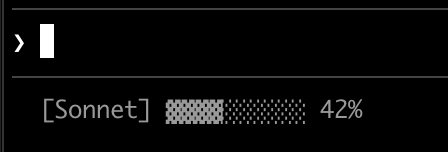
Display the current model and context window usage with a visual progress bar. Each script reads JSON from stdin, extracts the used_percentage field, and builds a 10-character bar where filled blocks (▓) represent usage:
#!/bin/bash
# Read all of stdin into a variable
input=$(cat)

# Extract fields with jq, "// 0" provides fallback for null
MODEL=$(echo "$input" | jq -r '.model.display_name')
PCT=$(echo "$input" | jq -r '.context_window.used_percentage // 0' | cut -d. -f1)

# Build progress bar: printf -v creates a run of spaces, then
# ${var// /▓} replaces each space with a block character
BAR_WIDTH=10
FILLED=$((PCT * BAR_WIDTH / 100))
EMPTY=$((BAR_WIDTH - FILLED))
BAR=""
[ "$FILLED" -gt 0 ] && printf -v FILL "%${FILLED}s" && BAR="${FILL// /▓}"
[ "$EMPTY" -gt 0 ] && printf -v PAD "%${EMPTY}s" && BAR="${BAR}${PAD// /░}"

echo "[$MODEL] $BAR $PCT%"#!/usr/bin/env python3
import json, sys
# json.load reads and parses stdin in one step
data = json.load(sys.stdin)
model = data['model']['display_name']
# "or 0" handles null values
pct = int(data.get('context_window', {}).get('used_percentage', 0) or 0)
# String multiplication builds the bar
filled = pct * 10 // 100
bar = '▓' * filled + '░' * (10 - filled)
print(f"[{model}] {bar} {pct}%")#!/usr/bin/env node
// Node.js reads stdin asynchronously with events
let input = '';
process.stdin.on('data', chunk => input += chunk);
process.stdin.on('end', () => {
const data = JSON.parse(input);
const model = data.model.display_name;
// Optional chaining (?.) safely handles null fields
const pct = Math.floor(data.context_window?.used_percentage || 0);
// String.repeat() builds the bar
const filled = Math.floor(pct * 10 / 100);
const bar = '▓'.repeat(filled) + '░'.repeat(10 - filled);
console.log(`[${model}] ${bar} ${pct}%`);
});Git status with colors
Show git branch with color-coded indicators for staged and modified files. This script uses ANSI escape codes for terminal colors: \033[32m is green, \033[33m is yellow, and \033[0m resets to default.
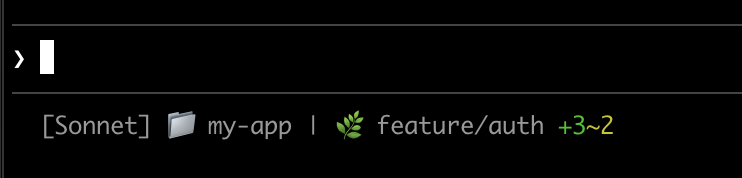
Each script checks if the current directory is a git repository, counts staged and modified files, and displays color-coded indicators:
#!/bin/bash
input=$(cat)

MODEL=$(echo "$input" | jq -r '.model.display_name')
DIR=$(echo "$input" | jq -r '.workspace.current_dir')

GREEN='\033[32m'
YELLOW='\033[33m'
RESET='\033[0m'

if git rev-parse --git-dir > /dev/null 2>&1; then
    BRANCH=$(git branch --show-current 2>/dev/null)
    STAGED=$(git diff --cached --numstat 2>/dev/null | wc -l | tr -d ' ')
    MODIFIED=$(git diff --numstat 2>/dev/null | wc -l | tr -d ' ')

    GIT_STATUS=""
    [ "$STAGED" -gt 0 ] && GIT_STATUS="${GREEN}+${STAGED}${RESET}"
    [ "$MODIFIED" -gt 0 ] && GIT_STATUS="${GIT_STATUS}${YELLOW}~${MODIFIED}${RESET}"

    echo -e "[$MODEL] 📁 ${DIR##*/} | 🌿 $BRANCH $GIT_STATUS"
else
    echo "[$MODEL] 📁 ${DIR##*/}"
fi#!/usr/bin/env python3
import json, sys, subprocess, os
data = json.load(sys.stdin)
model = data['model']['display_name']
directory = os.path.basename(data['workspace']['current_dir'])
GREEN, YELLOW, RESET = '\033[32m', '\033[33m', '\033[0m'
try:
subprocess.check_output(['git', 'rev-parse', '--git-dir'], stderr=subprocess.DEVNULL)
branch = subprocess.check_output(['git', 'branch', '--show-current'], text=True).strip()
staged_output = subprocess.check_output(['git', 'diff', '--cached', '--numstat'], text=True).strip()
modified_output = subprocess.check_output(['git', 'diff', '--numstat'], text=True).strip()
staged = len(staged_output.split('\n')) if staged_output else 0
modified = len(modified_output.split('\n')) if modified_output else 0
git_status = f"{GREEN}+{staged}{RESET}" if staged else ""
git_status += f"{YELLOW}~{modified}{RESET}" if modified else ""
print(f"[{model}] 📁 {directory} | 🌿 {branch} {git_status}")
except:
print(f"[{model}] 📁 {directory}")#!/usr/bin/env node
const { execSync } = require('child_process');
const path = require('path');
let input = '';
process.stdin.on('data', chunk => input += chunk);
process.stdin.on('end', () => {
const data = JSON.parse(input);
const model = data.model.display_name;
const dir = path.basename(data.workspace.current_dir);
const GREEN = '\x1b[32m', YELLOW = '\x1b[33m', RESET = '\x1b[0m';
try {
execSync('git rev-parse --git-dir', { stdio: 'ignore' });
const branch = execSync('git branch --show-current', { encoding: 'utf8' }).trim();
const staged = execSync('git diff --cached --numstat', { encoding: 'utf8' }).trim().split('\n').filter(Boolean).length;
const modified = execSync('git diff --numstat', { encoding: 'utf8' }).trim().split('\n').filter(Boolean).length;
let gitStatus = staged ? `${GREEN}+${staged}${RESET}` : '';
gitStatus += modified ? `${YELLOW}~${modified}${RESET}` : '';
console.log(`[${model}] 📁 ${dir} | 🌿 ${branch} ${gitStatus}`);
} catch {
console.log(`[${model}] 📁 ${dir}`);
}
});Cost and duration tracking
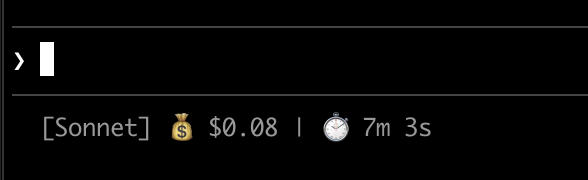
Track your session's API costs and elapsed time. The cost.total_cost_usd field accumulates the estimated cost of all API calls in the current session. The cost.total_duration_ms field measures total elapsed time since the session started, while cost.total_api_duration_ms tracks only the time spent waiting for API responses.
Each script formats cost as currency and converts milliseconds to minutes and seconds:
#!/bin/bash
input=$(cat)

MODEL=$(echo "$input" | jq -r '.model.display_name')
COST=$(echo "$input" | jq -r '.cost.total_cost_usd // 0')
DURATION_MS=$(echo "$input" | jq -r '.cost.total_duration_ms // 0')

COST_FMT=$(printf '$%.2f' "$COST")
DURATION_SEC=$((DURATION_MS / 1000))
MINS=$((DURATION_SEC / 60))
SECS=$((DURATION_SEC % 60))

echo "[$MODEL] 💰 $COST_FMT | ⏱️ ${MINS}m ${SECS}s"#!/usr/bin/env python3
import json, sys
data = json.load(sys.stdin)
model = data['model']['display_name']
cost = data.get('cost', {}).get('total_cost_usd', 0) or 0
duration_ms = data.get('cost', {}).get('total_duration_ms', 0) or 0
duration_sec = duration_ms // 1000
mins, secs = duration_sec // 60, duration_sec % 60
print(f"[{model}] 💰 ${cost:.2f} | ⏱️ {mins}m {secs}s")#!/usr/bin/env node
let input = '';
process.stdin.on('data', chunk => input += chunk);
process.stdin.on('end', () => {
const data = JSON.parse(input);
const model = data.model.display_name;
const cost = data.cost?.total_cost_usd || 0;
const durationMs = data.cost?.total_duration_ms || 0;
const durationSec = Math.floor(durationMs / 1000);
const mins = Math.floor(durationSec / 60);
const secs = durationSec % 60;
console.log(`[${model}] 💰 $${cost.toFixed(2)} | ⏱️ ${mins}m ${secs}s`);
});Display multiple lines
Your script can output multiple lines to create a richer display.
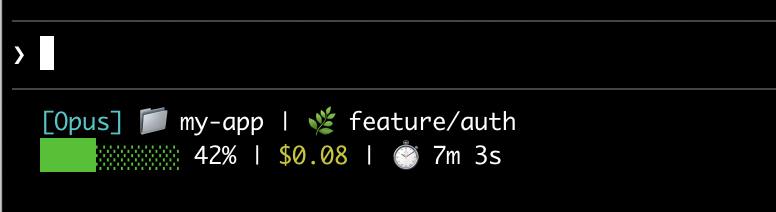
This example combines several techniques: threshold-based colors (green under 70%, yellow 70-89%, red 90%+), a progress bar, and git branch info. Each print or echo statement creates a separate row:
#!/bin/bash
input=$(cat)

MODEL=$(echo "$input" | jq -r '.model.display_name')
DIR=$(echo "$input" | jq -r '.workspace.current_dir')
COST=$(echo "$input" | jq -r '.cost.total_cost_usd // 0')
PCT=$(echo "$input" | jq -r '.context_window.used_percentage // 0' | cut -d. -f1)
DURATION_MS=$(echo "$input" | jq -r '.cost.total_duration_ms // 0')

CYAN='\033[36m'; GREEN='\033[32m'; YELLOW='\033[33m'; RED='\033[31m'; RESET='\033[0m'

# Pick bar color based on context usage
if [ "$PCT" -ge 90 ]; then BAR_COLOR="$RED"
elif [ "$PCT" -ge 70 ]; then BAR_COLOR="$YELLOW"
else BAR_COLOR="$GREEN"; fi

FILLED=$((PCT / 10)); EMPTY=$((10 - FILLED))
printf -v FILL "%${FILLED}s"; printf -v PAD "%${EMPTY}s"
BAR="${FILL// /█}${PAD// /░}"

MINS=$((DURATION_MS / 60000)); SECS=$(((DURATION_MS % 60000) / 1000))

BRANCH=""
git rev-parse --git-dir > /dev/null 2>&1 && BRANCH=" | 🌿 $(git branch --show-current 2>/dev/null)"

echo -e "${CYAN}[$MODEL]${RESET} 📁 ${DIR##*/}$BRANCH"
COST_FMT=$(printf '$%.2f' "$COST")
echo -e "${BAR_COLOR}${BAR}${RESET} ${PCT}% | ${YELLOW}${COST_FMT}${RESET} | ⏱️ ${MINS}m ${SECS}s"#!/usr/bin/env python3
import json, sys, subprocess, os
data = json.load(sys.stdin)
model = data['model']['display_name']
directory = os.path.basename(data['workspace']['current_dir'])
cost = data.get('cost', {}).get('total_cost_usd', 0) or 0
pct = int(data.get('context_window', {}).get('used_percentage', 0) or 0)
duration_ms = data.get('cost', {}).get('total_duration_ms', 0) or 0
CYAN, GREEN, YELLOW, RED, RESET = '\033[36m', '\033[32m', '\033[33m', '\033[31m', '\033[0m'
bar_color = RED if pct >= 90 else YELLOW if pct >= 70 else GREEN
filled = pct // 10
bar = '█' * filled + '░' * (10 - filled)
mins, secs = duration_ms // 60000, (duration_ms % 60000) // 1000
try:
branch = subprocess.check_output(['git', 'branch', '--show-current'], text=True, stderr=subprocess.DEVNULL).strip()
branch = f" | 🌿 {branch}" if branch else ""
except:
branch = ""
print(f"{CYAN}[{model}]{RESET} 📁 {directory}{branch}")
print(f"{bar_color}{bar}{RESET} {pct}% | {YELLOW}${cost:.2f}{RESET} | ⏱️ {mins}m {secs}s")#!/usr/bin/env node
const { execSync } = require('child_process');
const path = require('path');
let input = '';
process.stdin.on('data', chunk => input += chunk);
process.stdin.on('end', () => {
const data = JSON.parse(input);
const model = data.model.display_name;
const dir = path.basename(data.workspace.current_dir);
const cost = data.cost?.total_cost_usd || 0;
const pct = Math.floor(data.context_window?.used_percentage || 0);
const durationMs = data.cost?.total_duration_ms || 0;
const CYAN = '\x1b[36m', GREEN = '\x1b[32m', YELLOW = '\x1b[33m', RED = '\x1b[31m', RESET = '\x1b[0m';
const barColor = pct >= 90 ? RED : pct >= 70 ? YELLOW : GREEN;
const filled = Math.floor(pct / 10);
const bar = '█'.repeat(filled) + '░'.repeat(10 - filled);
const mins = Math.floor(durationMs / 60000);
const secs = Math.floor((durationMs % 60000) / 1000);
let branch = '';
try {
branch = execSync('git branch --show-current', { encoding: 'utf8', stdio: ['pipe', 'pipe', 'ignore'] }).trim();
branch = branch ? ` | 🌿 ${branch}` : '';
} catch {}
console.log(`${CYAN}[${model}]${RESET} 📁 ${dir}${branch}`);
console.log(`${barColor}${bar}${RESET} ${pct}% | ${YELLOW}$${cost.toFixed(2)}${RESET} | ⏱️ ${mins}m ${secs}s`);
});Clickable links
This example creates a clickable link to your GitHub repository. Hold Cmd (macOS) or Ctrl (Windows/Linux) and click to open the link in your browser.
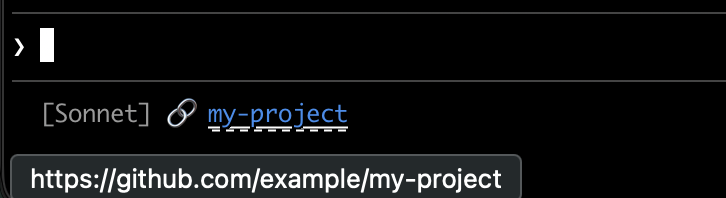
Each script gets the git remote URL, converts SSH format to HTTPS, and wraps the repo name in OSC 8 escape codes. The Bash version uses printf '%b' which interprets backslash escapes more reliably than echo -e across different shells:
#!/bin/bash
input=$(cat)

MODEL=$(echo "$input" | jq -r '.model.display_name')

# Convert git SSH URL to HTTPS
REMOTE=$(git remote get-url origin 2>/dev/null | sed 's/git@github.com:/https:\/\/github.com\//' | sed 's/\.git$//')

if [ -n "$REMOTE" ]; then
    REPO_NAME=$(basename "$REMOTE")
    # OSC 8 format: \e]8;;URL\a then TEXT then \e]8;;\a
    # printf %b interprets escape sequences reliably across shells
    printf '%b' "[$MODEL] 🔗 \e]8;;${REMOTE}\a${REPO_NAME}\e]8;;\a\n"
else
    echo "[$MODEL]"
fi#!/usr/bin/env python3
import json, sys, subprocess, re, os
data = json.load(sys.stdin)
model = data['model']['display_name']
# Get git remote URL
try:
remote = subprocess.check_output(
['git', 'remote', 'get-url', 'origin'],
stderr=subprocess.DEVNULL, text=True
).strip()
# Convert SSH to HTTPS format
remote = re.sub(r'^git@github\.com:', 'https://github.com/', remote)
remote = re.sub(r'\.git$', '', remote)
repo_name = os.path.basename(remote)
# OSC 8 escape sequences
link = f"\033]8;;{remote}\a{repo_name}\033]8;;\a"
print(f"[{model}] 🔗 {link}")
except:
print(f"[{model}]")#!/usr/bin/env node
const { execSync } = require('child_process');
const path = require('path');
let input = '';
process.stdin.on('data', chunk => input += chunk);
process.stdin.on('end', () => {
const data = JSON.parse(input);
const model = data.model.display_name;
try {
let remote = execSync('git remote get-url origin', { encoding: 'utf8', stdio: ['pipe', 'pipe', 'ignore'] }).trim();
// Convert SSH to HTTPS format
remote = remote.replace(/^git@github\.com:/, 'https://github.com/').replace(/\.git$/, '');
const repoName = path.basename(remote);
// OSC 8 escape sequences
const link = `\x1b]8;;${remote}\x07${repoName}\x1b]8;;\x07`;
console.log(`[${model}] 🔗 ${link}`);
} catch {
console.log(`[${model}]`);
}
});Rate limit usage
Display Claude.ai subscription rate limit usage in the status line. The rate_limits object contains a rolling five_hour window and a weekly seven_day window. Each window provides used_percentage, from 0 to 100, and resets_at, the Unix epoch seconds when the window resets.
Behind a Claude apps gateway with spend limits, rate_limits carries spend_limit with the same two fields for the spend limit that applies to you, except that its used_percentage can go above 100 once you exceed the limit. Requires Claude Code v2.1.251 or later.
The rate_limits object is only present for Claude.ai Pro and Max subscribers, or behind a Claude apps gateway with spend limits, and only after the first API response. Each script handles the absent field gracefully:
#!/bin/bash
input=$(cat)

MODEL=$(echo "$input" | jq -r '.model.display_name')
# "// empty" produces no output when rate_limits is absent
FIVE_H=$(echo "$input" | jq -r '.rate_limits.five_hour.used_percentage // empty')
WEEK=$(echo "$input" | jq -r '.rate_limits.seven_day.used_percentage // empty')

LIMITS=""
[ -n "$FIVE_H" ] && LIMITS="5h: $(printf '%.0f' "$FIVE_H")%"
[ -n "$WEEK" ] && LIMITS="${LIMITS:+$LIMITS }7d: $(printf '%.0f' "$WEEK")%"

[ -n "$LIMITS" ] && echo "[$MODEL] | $LIMITS" || echo "[$MODEL]"#!/usr/bin/env python3
import json, sys
data = json.load(sys.stdin)
model = data['model']['display_name']
parts = []
rate = data.get('rate_limits', {})
five_h = rate.get('five_hour', {}).get('used_percentage')
week = rate.get('seven_day', {}).get('used_percentage')
if five_h is not None:
parts.append(f"5h: {five_h:.0f}%")
if week is not None:
parts.append(f"7d: {week:.0f}%")
if parts:
print(f"[{model}] | {' '.join(parts)}")
else:
print(f"[{model}]")#!/usr/bin/env node
let input = '';
process.stdin.on('data', chunk => input += chunk);
process.stdin.on('end', () => {
const data = JSON.parse(input);
const model = data.model.display_name;
const parts = [];
const fiveH = data.rate_limits?.five_hour?.used_percentage;
const week = data.rate_limits?.seven_day?.used_percentage;
if (fiveH != null) parts.push(`5h: ${Math.round(fiveH)}%`);
if (week != null) parts.push(`7d: ${Math.round(week)}%`);
console.log(parts.length ? `[${model}] | ${parts.join(' ')}` : `[${model}]`);
});Cache expensive operations
Your status line script runs frequently during active sessions. Commands like git status or git diff can be slow, especially in large repositories. This example caches git information to a temp file and only refreshes it every 5 seconds.
The cache filename needs to be stable across status line invocations within a session, but unique across sessions so concurrent sessions in different repositories don't read each other's cached git state. Process-based identifiers like $$, os.getpid(), or process.pid change on every invocation and defeat the cache. Use the session_id from the JSON input instead: it's stable for the lifetime of a session and unique per session.
Each script checks if the cache file is missing or older than 5 seconds before running git commands:
#!/bin/bash
input=$(cat)

MODEL=$(echo "$input" | jq -r '.model.display_name')
DIR=$(echo "$input" | jq -r '.workspace.current_dir')
SESSION_ID=$(echo "$input" | jq -r '.session_id')

CACHE_FILE="/tmp/statusline-git-cache-$SESSION_ID"
CACHE_MAX_AGE=5  # seconds

cache_is_stale() {
    [ ! -f "$CACHE_FILE" ] || \
    # stat -c %Y (Linux) or stat -f %m (macOS) prints the file's last-modified
    # time. The Linux form must run first: on Linux, the macOS form prints a
    # filesystem report to stdout before failing, and that output would be
    # captured by the command substitution and break the arithmetic.
    [ $(($(date +%s) - $(stat -c %Y "$CACHE_FILE" 2>/dev/null || stat -f %m "$CACHE_FILE" 2>/dev/null || echo 0))) -gt $CACHE_MAX_AGE ]
}

if cache_is_stale; then
    if git rev-parse --git-dir > /dev/null 2>&1; then
        BRANCH=$(git branch --show-current 2>/dev/null)
        STAGED=$(git diff --cached --numstat 2>/dev/null | wc -l | tr -d ' ')
        MODIFIED=$(git diff --numstat 2>/dev/null | wc -l | tr -d ' ')
        echo "$BRANCH|$STAGED|$MODIFIED" > "$CACHE_FILE"
    else
        echo "||" > "$CACHE_FILE"
    fi
fi

IFS='|' read -r BRANCH STAGED MODIFIED < "$CACHE_FILE"

if [ -n "$BRANCH" ]; then
    echo "[$MODEL] 📁 ${DIR##*/} | 🌿 $BRANCH +$STAGED ~$MODIFIED"
else
    echo "[$MODEL] 📁 ${DIR##*/}"
fi#!/usr/bin/env python3
import json, sys, subprocess, os, time
data = json.load(sys.stdin)
model = data['model']['display_name']
directory = os.path.basename(data['workspace']['current_dir'])
session_id = data['session_id']
CACHE_FILE = f"/tmp/statusline-git-cache-{session_id}"
CACHE_MAX_AGE = 5 # seconds
def cache_is_stale():
if not os.path.exists(CACHE_FILE):
return True
return time.time() - os.path.getmtime(CACHE_FILE) > CACHE_MAX_AGE
if cache_is_stale():
try:
subprocess.check_output(['git', 'rev-parse', '--git-dir'], stderr=subprocess.DEVNULL)
branch = subprocess.check_output(['git', 'branch', '--show-current'], text=True).strip()
staged = subprocess.check_output(['git', 'diff', '--cached', '--numstat'], text=True).strip()
modified = subprocess.check_output(['git', 'diff', '--numstat'], text=True).strip()
staged_count = len(staged.split('\n')) if staged else 0
modified_count = len(modified.split('\n')) if modified else 0
with open(CACHE_FILE, 'w') as f:
f.write(f"{branch}|{staged_count}|{modified_count}")
except:
with open(CACHE_FILE, 'w') as f:
f.write("||")
with open(CACHE_FILE) as f:
branch, staged, modified = f.read().strip().split('|')
if branch:
print(f"[{model}] 📁 {directory} | 🌿 {branch} +{staged} ~{modified}")
else:
print(f"[{model}] 📁 {directory}")#!/usr/bin/env node
const { execSync } = require('child_process');
const fs = require('fs');
const path = require('path');
let input = '';
process.stdin.on('data', chunk => input += chunk);
process.stdin.on('end', () => {
const data = JSON.parse(input);
const model = data.model.display_name;
const dir = path.basename(data.workspace.current_dir);
const sessionId = data.session_id;
const CACHE_FILE = `/tmp/statusline-git-cache-${sessionId}`;
const CACHE_MAX_AGE = 5; // seconds
const cacheIsStale = () => {
if (!fs.existsSync(CACHE_FILE)) return true;
return (Date.now() / 1000) - fs.statSync(CACHE_FILE).mtimeMs / 1000 > CACHE_MAX_AGE;
};
if (cacheIsStale()) {
try {
execSync('git rev-parse --git-dir', { stdio: 'ignore' });
const branch = execSync('git branch --show-current', { encoding: 'utf8' }).trim();
const staged = execSync('git diff --cached --numstat', { encoding: 'utf8' }).trim().split('\n').filter(Boolean).length;
const modified = execSync('git diff --numstat', { encoding: 'utf8' }).trim().split('\n').filter(Boolean).length;
fs.writeFileSync(CACHE_FILE, `${branch}|${staged}|${modified}`);
} catch {
fs.writeFileSync(CACHE_FILE, '||');
}
}
const [branch, staged, modified] = fs.readFileSync(CACHE_FILE, 'utf8').trim().split('|');
if (branch) {
console.log(`[${model}] 📁 ${dir} | 🌿 ${branch} +${staged} ~${modified}`);
} else {
console.log(`[${model}] 📁 ${dir}`);
}
});Windows configuration
On Windows, Claude Code runs status line commands through Git Bash when Git Bash is installed, or through PowerShell when Git Bash is absent.
Git Bash treats unquoted backslashes as escape characters, so a Windows-style path such as C:\Users\username\script.mjs reaches the script runner with its separators removed and the command fails without a visible error. Write file paths in the command string with forward slashes, as shown in the examples below. The ~ shorthand also works and expands to your Windows home directory.
To run a PowerShell script as your status line, invoke it via powershell. This works whether Claude Code routes the command through Git Bash or PowerShell:
{
  "statusLine": {
    "type": "command",
    "command": "powershell -NoProfile -File C:/Users/username/.claude/statusline.ps1"
  }
}$input_json = $input | Out-String | ConvertFrom-Json
$cwd = $input_json.cwd
$model = $input_json.model.display_name
$used = $input_json.context_window.used_percentage
$dirname = Split-Path $cwd -Leaf
if ($used) {
Write-Host "$dirname [$model] ctx: $used%"
} else {
Write-Host "$dirname [$model]"
}Or, when Git Bash is installed, run a Bash script directly:
{
  "statusLine": {
    "type": "command",
    "command": "~/.claude/statusline.sh"
  }
}#!/usr/bin/env bash
input=$(cat)
cwd=$(echo "$input" | grep -o '"cwd":"[^"]*"' | cut -d'"' -f4)
model=$(echo "$input" | grep -o '"display_name":"[^"]*"' | cut -d'"' -f4)
dirname="${cwd##*[/\\]}"
echo "$dirname [$model]"