How a hook resolves
To see how the event, the matcher, and the handler fit together, consider this PreToolUse hook that blocks destructive shell commands.
The `matcher` narrows to Bash tool calls and the `if` condition narrows further to Bash subcommands matching `rm *`, so `block-rm.sh` only spawns when both filters match:

```json theme=\{null\}
\{
  "hooks": \{
    "PreToolUse": [
      \{
        "matcher": "Bash",
        "hooks": [
          \{
            "type": "command",
            "if": "Bash(rm *)",
            "command": "${CLAUDE_PROJECT_DIR}/.claude/hooks/block-rm.sh",
            "args": []
          }
        ]
      }
    ]
  }
}
```

The script reads the JSON input from stdin, extracts the command, and returns a `permissionDecision` of `"deny"` if it contains `rm -rf`. Save it to `.claude/hooks/block-rm.sh` in your project and make it executable with `chmod +x .claude/hooks/block-rm.sh` so Claude Code can run it:

```bash theme={null}
#!/bin/bash
# .claude/hooks/block-rm.sh
COMMAND=$(jq -r '.tool_input.command')

if echo "$COMMAND" | grep -q 'rm -rf'; then
  jq -n '{
    hookSpecificOutput: {
      hookEventName: "PreToolUse",
      permissionDecision: "deny",
      permissionDecisionReason: "Destructive command blocked by hook"
    }
  }'
else
  exit 0  # no decision; normal permission flow applies
fi
```

This script, like the other Bash examples on this page that parse JSON input, uses `jq`, so install `jq` and make sure it is on your `PATH` before trying them.

The matcher `Bash|PowerShell` covers the [PowerShell tool](#powershell) as well as Bash. A single `if` rule matches only one tool's calls, so each tool gets its own handler: the first narrows to Bash subcommands matching `rm *`, the second to PowerShell commands matching `Remove-Item *`. Both run the same script through `powershell.exe`:

```json theme={null}
{
  "hooks": {
    "PreToolUse": [
      {
        "matcher": "Bash|PowerShell",
        "hooks": [
          {
            "type": "command",
            "if": "Bash(rm *)",
            "command": "powershell.exe",
            "args": [
              "-NoProfile",
              "-ExecutionPolicy",
              "Bypass",
              "-File",
              "${CLAUDE_PROJECT_DIR\}/.claude/hooks/block-rm.ps1"
            ]
          \},
          \{
            "type": "command",
            "if": "PowerShell(Remove-Item *)",
            "command": "powershell.exe",
            "args": [
              "-NoProfile",
              "-ExecutionPolicy",
              "Bypass",
              "-File",
              "${CLAUDE_PROJECT_DIR}/.claude/hooks/block-rm.ps1"
            ]
          }
        ]
      }
    ]
  }
}
```

The `-NoProfile` flag skips loading your PowerShell profile so the hook starts fast, and `-ExecutionPolicy Bypass` lets PowerShell run the local script file.

The script reads the JSON input from stdin, extracts the command, and returns a `permissionDecision` of `"deny"` if it contains `rm -rf` or `Remove-Item` followed by `-Recurse`. Save it to `.claude/hooks/block-rm.ps1` in your project:

```powershell theme={null}
# .claude/hooks/block-rm.ps1
$callInput = [Console]::In.ReadToEnd() | ConvertFrom-Json
$command = $callInput.tool_input.command

if ($command -match 'rm -rf|Remove-Item.*-Recurse') \{
  @\{
    hookSpecificOutput = @\{
      hookEventName = "PreToolUse"
      permissionDecision = "deny"
      permissionDecisionReason = "Destructive command blocked by hook"
    \}
  \} | ConvertTo-Json
\} else \{
  exit 0  # no decision; normal permission flow applies
\}
```
Now suppose Claude Code decides to run Bash "rm -rf /tmp/build" against the macOS/Linux config. Here's what happens:

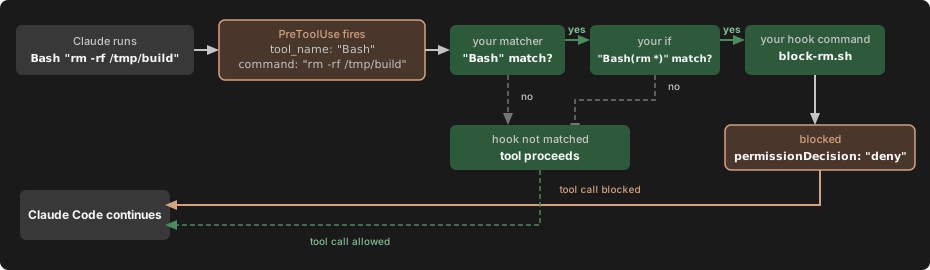
The `PreToolUse` event fires. Claude Code sends the tool input as JSON on stdin to the hook:

```json theme=\{null\}
\{ "tool_name": "Bash", "tool_input": \{ "command": "rm -rf /tmp/build" \}, ... \}
```

The matcher `"Bash"` matches the tool name, so this hook group activates. If you omit the matcher or use `"*"`, the group activates on every occurrence of the event.

The `if` condition `"Bash(rm *)"` matches because `rm -rf /tmp/build` is a subcommand matching `rm *`, so this handler spawns. If the command had been `npm test`, the `if` check would fail and `block-rm.sh` would never run, avoiding the process spawn overhead. The `if` field is optional; without it, every handler in the matched group runs.

The script inspects the full command and finds `rm -rf`, so it prints a decision to stdout:

```json theme=\{null\}
\{
  "hookSpecificOutput": \{
    "hookEventName": "PreToolUse",
    "permissionDecision": "deny",
    "permissionDecisionReason": "Destructive command blocked by hook"
  \}
\}
```

If the command had been a safer `rm` variant like `rm file.txt`, the script would hit `exit 0` instead. Exit code 0 with no output means the hook has no decision to report, so the tool call continues through the normal [permission flow](https://code.claude.com/docs/en/permissions). The hook can deny the call, but staying silent doesn't approve it.

Claude Code reads the JSON decision, blocks the tool call, and shows Claude the reason.
The Configuration section below documents the full schema, and each hook event section documents what input your command receives and what output it can return.
Configuration
Hooks are defined in JSON settings files. The configuration has three levels of nesting:
- Choose a hook event to respond to, like
PreToolUseorStop - Add a matcher group to filter when it fires, like "only for the Bash tool"
- Define one or more hook handlers to run when matched
See How a hook resolves above for a complete walkthrough with an annotated example.
This page uses specific terms for each level: hook event for the lifecycle point, matcher group for the filter, and hook handler for the shell command, HTTP endpoint, MCP tool, prompt, or agent that runs. "Hook" on its own refers to the general feature.