Customize your status line
Configure a custom status bar to monitor context window usage, costs, and git status in Claude Code
The status line is a customizable bar at the bottom of Claude Code that runs any shell script you configure. It receives JSON session data on stdin and displays whatever your script prints, giving you a persistent, at-a-glance view of context usage, costs, git status, or anything else you want to track.
Status lines are useful when you:
- Want to monitor context window usage as you work
- Need to track session costs
- Work across multiple sessions and need to distinguish them
- Want git branch and status always visible
The status line renders in its own row above the built-in footer badges and does not replace them. With a custom status line configured, Claude Code stops showing most of the footer's keyboard hints, including esc to interrupt, the ? for shortcuts fallback, and the hold space to speak voice dictation hint. To add clickable link badges to the footer when an ID appears in the conversation, without writing a script, configure footerLinksRegexes instead.
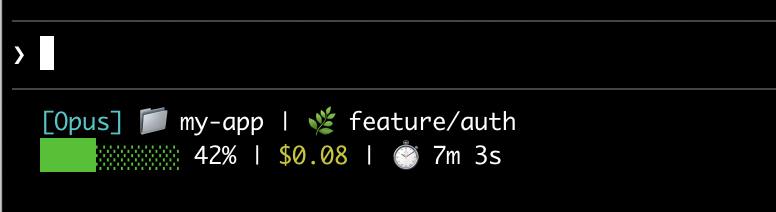
Here's an example of a multi-line status line that displays git info on the first line and a color-coded context bar on the second.
This page walks through setting up a basic status line, explains how the data flows from Claude Code to your script, lists all the fields you can display, and provides ready-to-use examples for common patterns like git status, cost tracking, and progress bars.