drawio-skill — From Text to Professional Diagrams
What it does
- Generates
.drawioXML files from natural language descriptions - Exports diagrams to PNG, SVG, PDF, or JPG using the native draw.io desktop CLI
- 6 diagram type presets: ERD, UML Class, Sequence, Architecture, ML/Deep Learning, Flowchart — with preset shapes, styles, and layout conventions
- Animated connectors (
flowAnimation=1) for data-flow and pipeline diagrams (visible in SVG and draw.io desktop) - ML model diagram support with tensor shape annotations
(B, C, H, W)— ideal for NeurIPS/ICML/ICLR papers - Grid-aligned layout — all coordinates snap to 10px multiples for clean alignment
- Browser fallback — generates diagrams.net URLs when the desktop CLI is unavailable
- Iterative design: preview, get feedback, and refine diagrams until they look right
- Auto-launch draw.io desktop after export for manual fine-tuning
- Triggers automatically when diagrams would help explain complex systems
Multi-Platform Support
Works with all major AI coding agents that support the Agent Skills format:
| Platform | Status | Details |
|---|---|---|
| Claude Code | ✅ Full support | Native SKILL.md format |
| OpenClaw | ✅ Full support | metadata.openclaw namespace, dependency gating, installer |
| Hermes Agent | ✅ Full support | metadata.hermes namespace, tags, tool gating |
| OpenAI Codex | ✅ Full support | agents/openai.yaml sidecar file |
| SkillsMP | ✅ Indexed | GitHub topics configured |
Comparison
vs No Skill (native agent)
| Feature | Native agent | This skill |
|---|---|---|
| Generate draw.io XML | Yes — LLMs know the format | Yes |
| Self-check after export | No | Yes — reads PNG and auto-fixes 6 issue types |
| Iterative review loop | No — must manually re-prompt | Yes — targeted edits, 5-round safety valve |
| Proactive triggers | No — only when explicitly asked | Yes — auto-suggests when 3+ components |
| Layout guidelines | None — varies by run | Complexity-scaled spacing, routing corridors, hub placement |
| Grid alignment | No | Yes — all coordinates snap to 10px multiples |
| Diagram type presets | No | Yes — 6 presets (ERD, UML, Sequence, Architecture, ML/DL, Flowchart) |
| Animated connectors | No | Yes — flowAnimation=1 for data-flow visualization |
| ML model diagrams | No | Yes — tensor shape annotations, layer-type color coding |
| Color palette | Random/inconsistent | 7-color semantic system (blue=services, green=DB, purple=auth...) |
| Edge routing rules | Basic | Pin entry/exit points, distribute connections, waypoint corridors |
| Container/group patterns | None | Swimlane, group, custom container with parent-child nesting |
| Embed diagram in export | No | Yes — --embed-diagram keeps exported PNG/SVG/PDF editable |
| Browser fallback | No | Yes — generates diagrams.net URL when CLI unavailable |
| Auto-launch desktop app | No | Yes — opens .drawio file after export for fine-tuning |
vs Other draw.io Skills & Tools
| Feature | This skill | jgraph/drawio-mcp (official, 1.3k⭐) | bahayonghang/drawio-skills (60⭐) | GBSOSS/ai-drawio (63⭐) |
|---|---|---|---|---|
| Approach | Pure SKILL.md | SKILL.md / MCP / Project | YAML DSL + MCP | Plugin + browser |
| Dependencies | draw.io desktop only | draw.io desktop | MCP server (npx) | Browser + local server |
| Multi-agent | ✅ 5 platforms | ❌ Claude Code only | ❌ Claude Code only | ❌ |
| Self-check | ✅ 2-round auto-fix | ❌ | ❌ | ❌ screenshot |
| Iterative review | ✅ 5-round loop | ❌ generate once | ✅ 3 workflows | ❌ |
| Layout guidance | ✅ complexity-scaled + grid snap | ✅ basic spacing | ❌ relies on MCP | ❌ |
| Diagram presets | ✅ 6 types (ERD, UML, Seq, Arch, ML, Flow) | ❌ | ❌ | ❌ |
| Animated edges | ✅ flowAnimation=1 | ❌ | ❌ | ❌ |
| ML/DL diagrams | ✅ tensor shapes, layer colors | ❌ | ❌ | ❌ |
| Color system | ✅ 7-color semantic | ❌ | ✅ 5 themes | ❌ |
| Container/group | ✅ swimlane + group | ✅ detailed | ❌ | ❌ |
| Embed diagram | ✅ --embed-diagram | ✅ | ❌ | ❌ |
| Edge routing | ✅ corridors + waypoints | ✅ arrowhead rules | ❌ | ❌ |
| Browser fallback | ✅ diagrams.net URL | ❌ | ❌ | ❌ |
| Auto-launch | ✅ opens desktop app | ❌ | ❌ | ❌ |
| Cloud icons | AWS basic | ❌ | ✅ AWS/GCP/Azure/K8s | ❌ |
| Zero-config | ✅ copy SKILL.md | ✅ | ❌ needs npx | ❌ needs plugin install |
Key advantages
- Self-check + iterative loop — the only pure-SKILL.md solution that reads its own output and auto-fixes before showing the user, then supports multi-round refinement
- 6 diagram type presets — ERD, UML Class, Sequence, Architecture, ML/Deep Learning, Flowchart — each with preset shapes, styles, and layout conventions
- ML/DL model diagrams — tensor shape annotations, layer-type color coding, encoder/decoder swimlanes — built for academic papers
- Multi-agent, zero-config — works across 5 platforms with just one
SKILL.mdfile + draw.io desktop. No MCP server, no Python, no Node.js, no browser - Production-grade layout — grid-aligned coordinates, complexity-scaled spacing, routing corridors, hub-center strategy, animated connectors
- Browser fallback — generates diagrams.net URLs when the desktop CLI is unavailable, plus auto-launch for desktop editing
Supported diagram types
- Architecture: microservices, cloud (AWS/GCP/Azure), network topology, deployment — with tier-based swimlanes and hub-center strategy
- ML / Deep Learning: Transformer, CNN, LSTM, GRU architectures — with tensor shape annotations and layer-type color coding
- Flowcharts: business processes, workflows, decision trees, state machines — with semantic shape types (parallelogram I/O, diamond decisions)
- UML: class diagrams (inheritance/composition/aggregation arrows), sequence diagrams (lifelines, activation boxes)
- Data: ER diagrams (table containers, PK/FK notation), data flow diagrams (DFD)
- Other: org charts, mind maps, wireframes
How it works
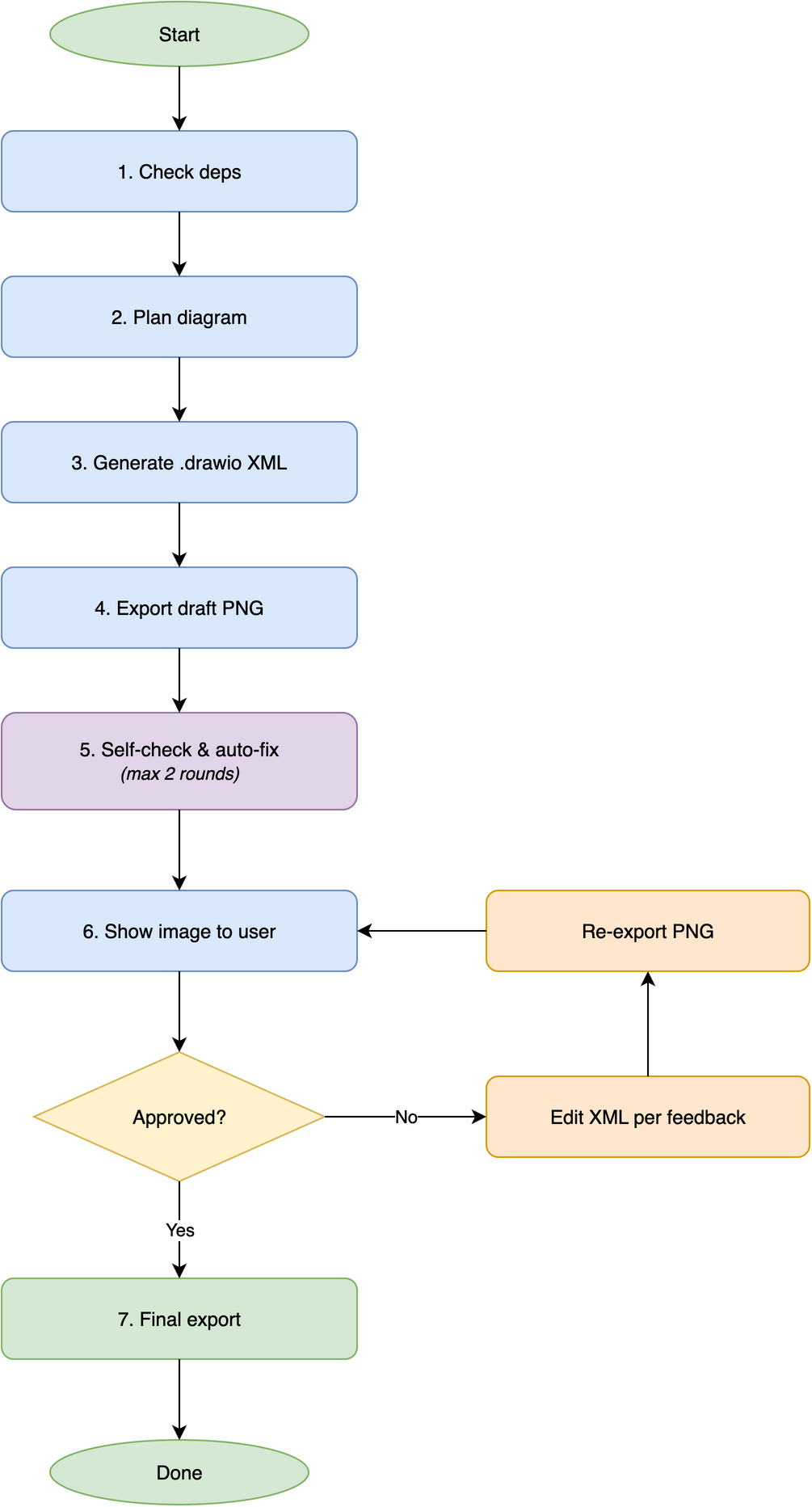
Prerequisites
The draw.io desktop app must be installed for diagram export:
macOS
bash
# Recommended — Homebrew
brew install --cask drawio

# Verify
drawio --version
Windows
Download and install from: https://github.com/jgraph/drawio-desktop/releases
powershell
# Verify
"C:\Program Files\draw.io\draw.io.exe" --version
Linux
Download .deb or .rpm from: https://github.com/jgraph/drawio-desktop/releases
bash
# Headless export (required on Linux servers without display)
sudo apt install xvfb  # Debian/Ubuntu
xvfb-run -a drawio --version| Platform | Extra step |
|---|---|
| macOS | No extra steps after Homebrew install |
| Windows | Use full path if not in PATH |
| Linux | Wrap commands with xvfb-run -a for headless export |
Skill Installation
Claude Code
bash
# Global install (available in all projects)
git clone https://github.com/Agents365-ai/drawio-skill.git ~/.claude/skills/drawio-skill

# Project-level install
git clone https://github.com/Agents365-ai/drawio-skill.git .claude/skills/drawio-skill
OpenClaw
bash
# Via ClawHub
clawhub install drawio-pro-skill

# Manual install
git clone https://github.com/Agents365-ai/drawio-skill.git ~/.openclaw/skills/drawio-skill

# Project-level install
git clone https://github.com/Agents365-ai/drawio-skill.git skills/drawio-skill
Hermes Agent
bash
# Install under design category
git clone https://github.com/Agents365-ai/drawio-skill.git ~/.hermes/skills/design/drawio-skill
Or add an external directory in ~/.hermes/config.yaml:
yaml
skills:
  external_dirs:
    - ~/myskills/drawio-skill
OpenAI Codex
bash
# User-level install
git clone https://github.com/Agents365-ai/drawio-skill.git ~/.agents/skills/drawio-skill

# Project-level install
git clone https://github.com/Agents365-ai/drawio-skill.git .agents/skills/drawio-skill
SkillsMP
Browse on SkillsMP or use the CLI:
bash
skills install drawio-skillClawHub
Browse on ClawHub or use the CLI:
bash
clawhub install drawio-pro-skillInstallation paths summary
| Platform | Global path | Project path |
|---|---|---|
| Claude Code | ~/.claude/skills/drawio-skill/ | .claude/skills/drawio-skill/ |
| OpenClaw | ~/.openclaw/skills/drawio-skill/ | skills/drawio-skill/ |
| Hermes Agent | ~/.hermes/skills/design/drawio-skill/ | Via external_dirs config |
| OpenAI Codex | ~/.agents/skills/drawio-skill/ | .agents/skills/drawio-skill/ |
| SkillsMP | N/A (installed via CLI) | N/A |
Updates
Check for updates:
bash
# Run from anywhere — pass your install path
bash ~/.claude/skills/drawio-skill/scripts/check-update.sh

# Or from the skill directory
cd ~/.claude/skills/drawio-skill && bash scripts/check-update.sh
Update to latest version:
bash