Walk harness
Recorded single-turn evaluations
WALK evaluates a GPT Live voice agent using reusable caller recordings. Approved human recordings are strongly preferred because they capture real voices, pronunciation, microphones, and environments. When human audio is unavailable, separately generated synthetic WAVs can provide a controlled fallback. Evaluation streams the selected recording's decoded PCM audio, not the WAV container, to the assistant and grades the response, tool behavior, and final application state.
Use WALK to check whether correct behavior survives real caller voices, accents, microphones, pronunciation, and acoustic conditions. Unlike CRAWL, it never generates or substitutes the caller audio during evaluation. Its CLI, recorded-input validation, session lifecycle, and batch execution remain owned by WALK; it does not import CRAWL.
For setup, model access, and source-versus-wheel commands, see setup. The commands below run from the harness directory. Live commands incur API usage; start with one recording.
What you can evaluate
WALK evaluates how a voice agent handles one recorded request, including:
- Whether it understands the caller and produces a correct spoken response.
- Whether accents, pronunciation, background noise, or recording quality affect task completion.
- Whether it selects authorized tools, uses correct arguments, and reaches the expected final state.
- Whether it handles spoken corrections, missing information, and unauthorized requests.
- Response timing, interruption behavior, Live duration, and backend tokens.
A single recorded request does not establish yielding, backchannels, or multi-turn clarification. Use RUN for those conversational behaviors.
How it works
- The harness loads a scenario containing an attached WAV, reference transcript, and evaluator-only expectations.
- The original caller recording is streamed to GPT Live in paced PCM chunks.
- The assistant can delegate tool selection to its reasoning backend; application code executes the authorized functions.
- The harness captures assistant audio, tool activity, and application state.
- Deterministic checks and an independent semantic judge compare the observed outcome with the hidden reference material.
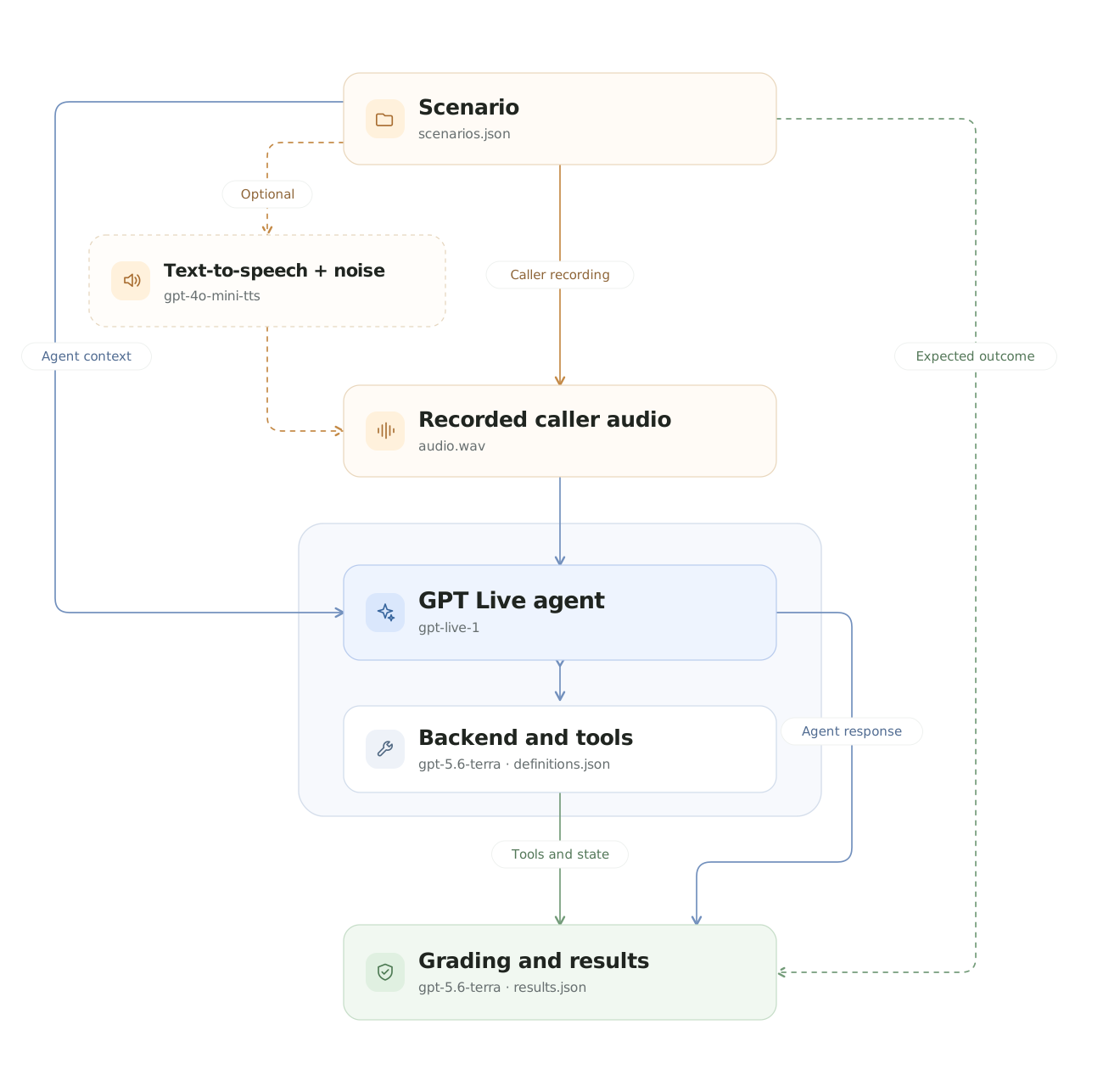
Model identifiers shown are repository defaults and can be overridden at runtime. Reference transcripts and expected outcomes remain evaluator-only.
WALK uses the same response-completion policy as CRAWL: observed speech and finished work are required, not just a backend completion or accepted context append. The default 30-second response budget starts after the recording finishes streaming; a blended acknowledgment and answer can time out when they share an excluded caption group.
Inputs
WALK reads versioned JSON scenarios from data/scenarios.json. Each scenario can provide:
- One explicitly attached caller WAV recording.
- A reviewed reference transcript for evaluation.
- Recording metadata such as language, accent, microphone, and acoustic condition.
- Authorized application context and initial state.
- Evaluator-owned expectations for the answer, tools, and final state.
Only the recording's audio and authorized context reach the assistant. The reference transcript, expected answer, and grading criteria remain hidden. See Data for the complete scenario structure.
The included recordings are generated demonstration fixtures. Generate additional controlled fixtures when human recordings are unavailable; use approved human recordings to evaluate genuine accents, devices, and environments.
The bundled catalog contains five clean baseline recordings and 21 additional recordings covering every CRAWL scenario. Generated examples cycle through the seven existing presets: clean, noisy, telephony, background_speech, echo, packet_loss, and realistic.
Outputs
The paths below describe a source checkout. Installed wheels write to ./results/walk/ by default. See installation and path rules for overrides, environment-file selection, and optional playback.
A completed scenario produces the following supporting artifacts:
walk_harness/results/walk_live_<timestamp>/
├── audio/
│   └── restaurant_003/
│       ├── input.wav
│       ├── output.wav
│       ├── conversation.wav
│       └── conversation.transcript.txt
├── events/
│   └── restaurant_003.jsonl
├── transcripts/
│   └── restaurant_003.json
└── results.json| File | Contents |
|---|---|
results.json | Task, audio, and consumption metrics; recording condition and metadata. |
input.wav | Exact caller audio streamed from the original recording. |
output.wav | Captured assistant audio. |
conversation.wav | Timeline-aligned stereo conversation. |
conversation.transcript.txt | Readable caller and assistant transcript. |
events/*.jsonl | Session, audio timing, delegation, tools, and evaluator events; raw audio payloads are removed. |
transcripts/*.json | Reference and recognized transcripts, tool evidence, grading, and final state. |
Transcripts, tool arguments, and application state are not privacy-redacted. Provider, input, or grading failures can leave only some of these artifacts. Check the per-scenario status and error in results.json; do not infer success from the process exit code or an existing recording.
Run the evaluation
Start with one representative recording:
uv run walk-eval --example restaurant_003After verifying it, run the complete dataset (additional API usage):
uv run walk-evalCommon options:
--verboseprints audio events, transcripts, tools, and individual results.--listenplays the caller on the left stereo channel and the assistant on the right.--max-examples 2limits the number of recordings.--concurrency 4runs independent recordings in parallel.--assistant clientevaluates application-managed GPT Live delegation.--assistant-endpoint wss://agent.example.com/ws/assistantselects a separately running client service when combined with--assistant client; it requires a dedicated service token. See service setup.--data /path/to/scenarios.jsonselects another recorded-audio dataset.--offline --no-real-timeverifies the pipeline without calling a model.
Each concurrent worker receives an independent GPT Live session, application executor, state, and artifact directory. Concurrency is limited to 1–8. Do not combine --listen with concurrency greater than one.
Verify offline
For a quick deterministic check of one recording:
uv run walk-eval \
  --offline \
  --no-real-time \
  --example restaurant_003
Offline mode still reads and streams the original recording. It does not replace the WAV with text-to-speech or evaluate a live semantic judge.
Use uv run walk-eval --help for all options.
Metrics and grading
WALK exports the same metric groups as CRAWL and RUN:
| Group | Metrics |
|---|---|
| Task | task_completed, semantic_quality, tool_accuracy, tool_calls, delegation_accuracy, delegations, turns. |
| Audio | response_rate, response_latency_ms, interruption_rate, speaking_duration_ms, floor_hold_silence_ms. |
| Consumption | Frontend Live duration and the available backend token breakdown. |
A scenario passes when the agent completes the expected task, reaches the correct application state, and performs no prohibited or unauthorized action. Live runs add independent semantic grading.
Applicable semantic dimensions use the same shared rubric as CRAWL and RUN: task_understanding, context_fidelity, clarification_quality, and grounded_communication. Each receives a binary verdict and an individual score of 0, 0.25, 0.5, 0.75, or 1 reflecting error severity. metrics.task.semantic_quality reports its mean score and applicable dimensions for each scenario. The run summary contains only execution counts. Task understanding contributes to the binary task decision; the other semantic dimensions remain diagnostic. Partial credit never turns an incomplete, unauthorized, or incorrectly executed task into a pass. Offline recordings do not invent semantic scores.
Recording condition and metadata remain available for filtering results by noise, language, accent, microphone, or other customer-defined attributes. Yielding and backchannel metrics remain null without a multi-turn opportunity.
Adapt the harness
Configuration
config.toml controls the module:
[dataset]
path = "data/scenarios.json"

[execution]
concurrency = 1
max_examples = 0
verbose = false
response_timeout_seconds = 30.0

[audio]
chunk_ms = 20
sample_rate_hz = 24000
real_time = true

[assistant]
mode = "responses"
endpoint = ""
max_examples = 0 means all recordings. Command-line arguments override configuration. Use --config to select another TOML file, --data to override the dataset, and --results-dir to change the output location:
uv run walk-eval \
  --data /path/to/recorded-scenarios.json \
  --results-dir /path/to/results \
  --run-name recorded-baseline
Both independent assistants and their reasoning backends can be overridden in the selected .env file or shell; .env.example is only a setup template. See environment-file selection. Their built-in defaults are gpt-live-1 and gpt-5.6-terra; the independent semantic judge defaults to gpt-5.6-terra.
Data
data/scenarios.json uses the same portable JSON contract as CRAWL and RUN, with one recording attached to each single-turn scenario:
{
  "schema_version": "1.0",
  "scenarios": [
    {
      "id": "restaurant_003",
      "title": "Correct the requested booking date",
      "type": "booking",
      "interaction": "single_turn",
      "input": {
        "text": "Book a table for Maya on August 7—sorry, August 6—at 7 p.m. for two.",
        "recordings": [
          {
            "id": "caller_recording",
            "path": "audio/restaurant_003.wav",
            "condition": "clean",
            "metadata": { "language": "en" }
          }
        ]
      },
      "application": {
        "initial_state": {}
      },
      "expected": {
        "answer": "Confirm August 6 rather than August 7.",
        "delegation": "required",
        "tools": {
          "required": [
            {
              "name": "create_reservation",
              "arguments": {
                "guest_name": "Maya",
                "date": "2026-08-06",
                "time": "19:00",
                "party_size": 2
              }
            }
          ]
        },
        "state": {
          "reservation_created": true,
          "guest_name": "Maya",
          "date": "2026-08-06",
          "time": "19:00",
          "party_size": 2
        }
      }
    }
  ]
}
Recording paths resolve relative to the scenario JSON file. input.text is a reviewed reference transcript; GPT Live receives only the WAV's PCM, never that transcript or the expected outcome.
Each recording must be a nonempty, mono, signed 16-bit PCM WAV sampled at 24,000 Hz. Review customer recordings for privacy and authorization before use.
A single request can require multiple ordered tool calls. List them in expected.tools.required; delegation may be required, forbidden, or optional.
To regenerate the bundled demonstration fixtures:
uv run walk-generate-audio --forceGenerate synthetic acoustic conditions
When human recordings are unavailable, generate reusable WALK fixtures from any single-turn scenario dataset, including CRAWL's text-only scenarios:
uv run walk-generate-audio \
  --data crawl_harness/data/scenarios.json \
  --example restaurant_003 \
  --output-data /tmp/walk-noisy/scenarios.json \
  --condition noisy \
  --noise-rms 120 \
  --seed 41

uv run walk-eval --data /tmp/walk-noisy/scenarios.json
The generator synthesizes the caller request once, applies the selected deterministic acoustic condition, saves a mono 24 kHz PCM16 WAV, and writes a separate scenario dataset with the condition and generation provenance. Existing clean WAVs are reused when possible, avoiding additional TTS calls. Existing output WAVs are skipped. Use --force to replace those owned by the same scenario; this may require new TTS calls. Before synthesis, the generator checks every destination against the source and existing output datasets. Generated WAVs must stay below the output dataset's audio/ directory; traversal, filename collisions, and linked write targets are rejected. Absolute paths outside that directory remain supported as read-only source recordings. To derive audio from one, use --output-data or --condition instead of overwriting it in place.
To generate missing conditioned recordings while preserving the five clean WALK baselines:
uv run walk-generate-audio \
  --data crawl_harness/data/scenarios.json \
  --output-data walk_harness/data/scenarios.json \
  --vary-conditions \
  --append \
  --seed 41
Each request receives one of the seven existing presets, cycling in order. The saved WAV, source scenario, preset, effect settings, and seed remain attached to the scenario; existing clean recordings are reused without new TTS calls.
Run or listen to one conditioned example:
uv run walk-eval --example restaurant_003_telephony --listenAvailable conditions are clean, noisy, telephony, background_speech, echo, packet_loss, and realistic. Optional controls include --background-speech, --background-gain, --echo-delay-ms, --echo-decay, --packet-loss-rate, --packet-loss-burst, --cough-every-ms, and --non-directed-every-ms:
uv run walk-generate-audio \
  --data walk_harness/data/scenarios.json \
  --example restaurant_003 \
  --output-data /tmp/walk-telephony/scenarios.json \
  --condition realistic \
  --seed 41 \
  --noise-rms 75 \
  --echo-delay-ms 90 \
  --packet-loss-rate 0.05
The telephony preset combines 300–3,400 Hz voice-band filtering, an 8 kHz channel, and G.711 μ-law compression while preserving the required 24 kHz WAV format. It simulates telephone-band acoustics over this harness's 24 kHz PCM transport; it does not test native 8 kHz codec transport. The noisy preset defaults to clearly audible 1,200 PCM16 RMS background noise; adjust its intensity with --noise-rms. Background speech uses an audible bundled synthetic conversation from a second speaker; provide --background-speech /path/to/approved.wav only for recordings you are authorized to use.
The realistic preset combines the telephone effect with audible background noise, secondary speech, echo, and moderate packet loss.
Fixture generation is separate from evaluation: walk-eval always replays the saved WAV exactly and never replaces or regenerates audio during a run.
Test the harness
uv run pytest -q walk_harness/tests