Run harness
Simulated full-duplex conversation evaluations
RUN evaluates a GPT Live voice agent through a complete, continuously paced conversation. A simulated caller follows a private goal and agenda while the assistant answers, delegates, uses tools, and changes application state. The bundled restaurant scenarios are examples, not a product constraint; customers can replace the assistant implementation, tools, and datasets.
Simulator: A GPT Live caller creates continuously full-duplex conversations with an independent managed Responses reasoning backend (
gpt-5.6-luna, low effort) and no caller-owned application tools.
Use RUN for behaviors that cannot be established from one request: clarification, conversational memory, corrections, interruptions, backchannels, authorization, and verified task completion.
For setup, model access, and source-versus-wheel commands, see setup. The commands below run from the harness directory. Start with one scenario; live runs incur usage for both voice sessions and any backend, observer, or judge calls.
What you can evaluate
RUN evaluates how a voice agent handles an interactive conversation, including:
- Whether it completes the caller's task and reaches the correct final state.
- Whether it asks for missing details instead of guessing.
- Whether it remembers preferences and honors corrections across turns.
- Whether it chooses authorized tools and grounds confirmations in actual results.
- Whether it yields appropriately, handles interruptions, and recognizes backchannels.
- Response timing, overlapping speech, frontend audio duration, model-attributed backend usage, and assistant-side latency.
Use CRAWL or WALK when a single spoken request is sufficient.
How it works
- The harness loads a scenario containing a caller goal, persona, agenda, authorized application state, and evaluator-only expectations.
- A GPT Live caller decides naturally when to speak, acknowledge, interrupt, or wait.
- The caller generates audio and can delegate to its own Responses backend for help following its private goal and agenda.
- Caller and assistant audio stream continuously along one shared timeline.
- The evaluated assistant delegates reasoning and tool selection; application code executes the authorized functions.
- The harness grades the conversation, tool behavior, and final application state against the hidden expected outcome.
The target assistant is selectable independently of the simulated caller:
uv run run-eval --scenario restaurant_booking_complete --assistant responses
uv run run-eval --scenario restaurant_booking_complete --assistant client
--assistant selects the evaluated application architecture independently of the simulated caller and its Responses backend.
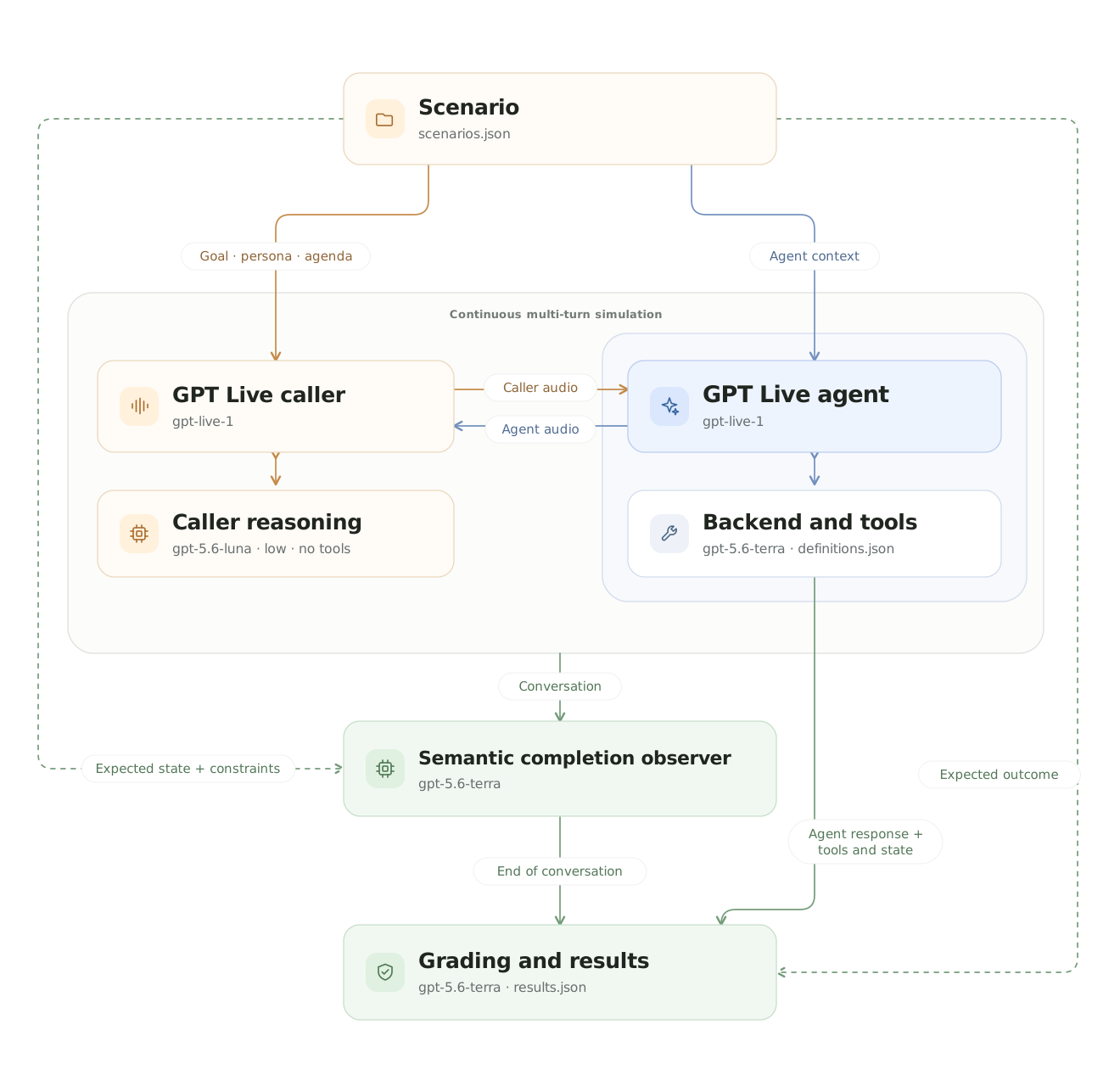
The caller's reasoning backend has no application tools. Only the evaluated agent owns application tools and state; expected outcomes remain evaluator-only.
The GPT Live caller reacts continuously to assistant audio. Both participants remain independently active on the shared timeline.
Implementation layout
The RUN package keeps customer-facing evaluation files separate from the continuous-conversation simulator:
run_harness/
├── evaluate.py          public evaluation entry point
├── graders.py           task, procedure, and semantic quality grading
├── observability.py     evaluator diagnostics and event traces
├── scenarios.py         RUN scenario loading and validation
├── simulation/          GPT Live participants and synchronized audio relay
└── visualization/       domain-independent interactive conversation viewer
Inputs
RUN reads versioned JSON scenarios from data/scenarios.json. Each scenario can provide:
- The caller's opening request, goal, persona, known facts, and agenda.
- Authorized application context and initial state.
- Evaluator-owned expectations for the answer, tools, final state, and optional procedure.
- A preferred golden path for diagnostics.
The simulated caller receives its private goal, persona, and agenda. The assistant receives only caller audio and authorized application context. Expected outcomes, future caller actions, and grading criteria remain hidden from the assistant. See Data for the complete scenario structure.
Outputs
The paths below describe a source checkout. Installed wheels write to ./results/run/ by default. See installation and path rules for overrides, environment-file selection, and optional playback.
A run with completed conversation artifacts produces:
run_harness/results/run_live_<timestamp>/
├── audio/