Evaluating full-duplex voice agents
This repository contains three independently usable evaluation harnesses for the same GPT Live voice assistant:
- CRAWL: synthetic single-turn requests.
- WALK: recorded single-turn requests.
- RUN: simulated multi-turn conversations.
Each harness measures whether the assistant achieves the intended outcome, uses tools appropriately, and handles the spoken interaction.
Use them independently or together to progress from repeatable synthetic checks to recorded-audio robustness and full multi-turn behavior.
RUN uses a GPT Live simulated caller with a managed Responses backend. This caller continuously listens and speaks alongside the evaluated assistant. The exchange is not turn based. The caller can delegate to independent gpt-5.6-luna reasoning at low effort to support its private goal and agenda; it has no application tools.
An independent semantic observer recognizes when live conversations are resolved or terminally refused and drains remaining audio and pending work without controlling either participant.
Caller intent and some voice-interaction metrics are inferred from the recorded audio and transcript after the conversation.
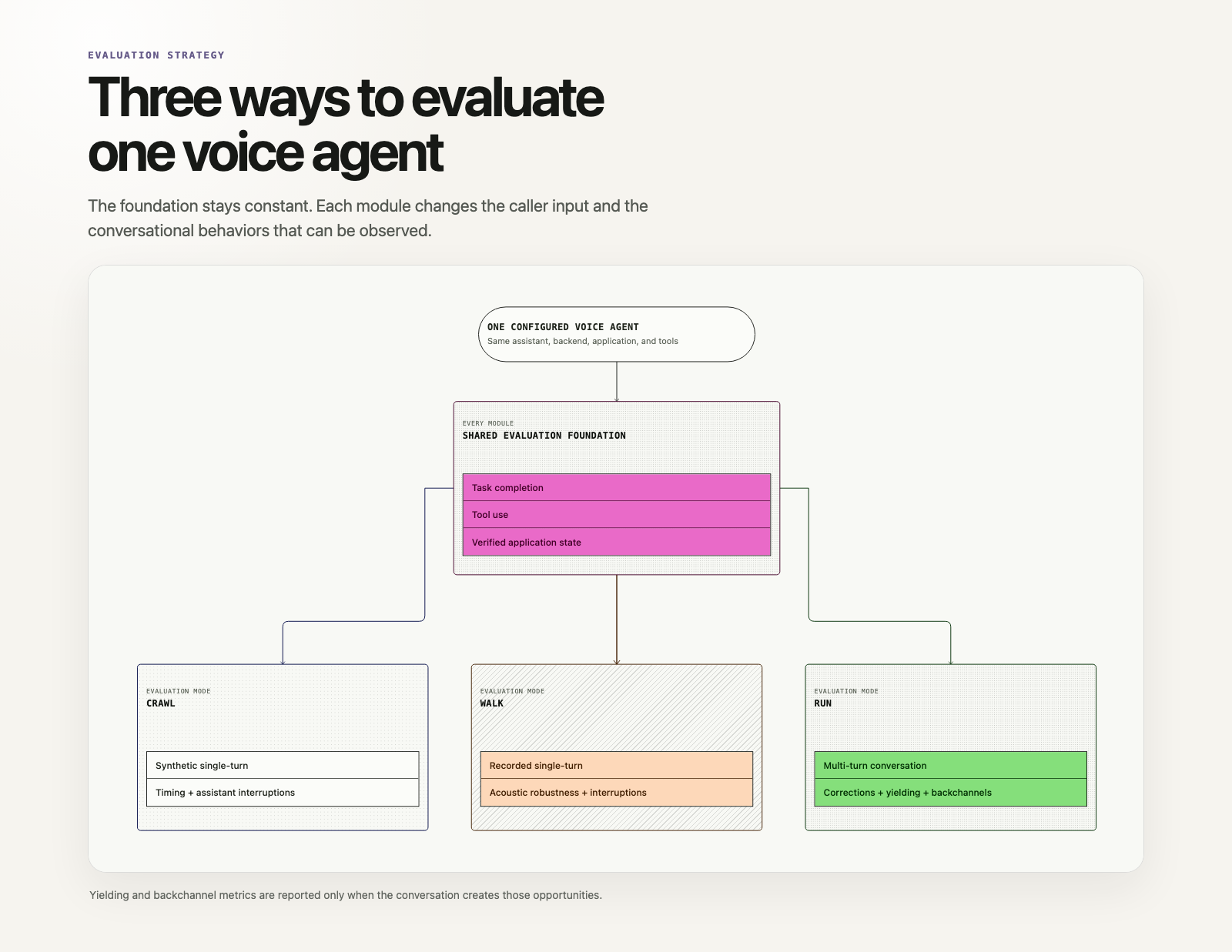
Yielding and backchannel metrics are reported only when the conversation creates those opportunities. See the interaction metric v2 contract for exact timing, response deadlines and denominators, caller-validity gates, and compatibility with historical results.
Contents
- The evaluation strategy
- Choose an evaluation module
- Set up and run
- What each module evaluates
- Results and metrics
- Bring your own agent
- Configuration and architecture
- Current scope and limitations
- Verification
1. The evaluation strategy
Voice-agent evaluations vary along two independent dimensions:
- Task complexity: one spoken request versus an interactive conversation.
- Audio source: synthetically generated speech versus a saved caller recording.
| Task complexity | Synthetic or simulated audio | Saved human or generated recording |
|---|---|---|
| Single-turn | CRAWL: synthesize one request and grade the response. | WALK: replay one WAV and grade the response. |
| Multi-turn | RUN: simulate a caller across a continuous conversation. | Human-led conversation; out of scope for this harness. |
All three modules use the same GPT Live frontend and can select either delegation architecture while keeping the same application, scenarios, and result schema. Managed versus client-owned delegation is therefore a controlled comparison rather than a change in the underlying business task.
Audio realism is a separate dimension, not another evaluation module. WALK evaluates the acoustic conditions already present in a saved recording, while RUN can apply reproducible conditions to simulated caller audio as the conversation unfolds. Available presets are clean, noisy, telephony, background_speech, echo, packet_loss, and realistic. The bundled WALK WAVs are generated demonstration fixtures; use approved human recordings to evaluate genuine accents, devices, and environments. Approved human recordings are strongly preferred; synthetic WALK fixtures are a fallback.
Choose an assistant implementation
--assistant responsesuses GPT Live's OpenAI-managed Responses backend and remains the default.--assistant clientuses application-managed delegation, including conversation context, a customer-selected backend, application tools, and result injection throughsession.commentary.append.
The delegation mode is fixed for each session; switching implementations starts a new session.
Both implementations use the same authorized instructions and application tools. Private scenario expectations, grading criteria, and caller agenda never enter either assistant. Client delegation prefers actual transcript events, passes incremental timestamped conversation to the backend, and keeps backend history under application control regardless of model provider.
# Compare the same frontend against both delegation architectures.
uv run run-eval --scenario restaurant_booking_complete --assistant responses
uv run run-eval --scenario restaurant_booking_complete --assistant client
Bring an existing application or backend provider through OPENAI_CLIENT_ASSISTANT_ENDPOINT, or replace the bundled OpenAI reference adapter. See assistant implementations.
2. Choose an evaluation module
| Module | Input data | Ground truth | What it evaluates |
|---|---|---|---|
| CRAWL | Text scenarios; the harness generates caller audio. | Expected answer, tool arguments, and final application state. | One synthetic spoken request and response. |
| WALK | Existing or generated WAVs and reference transcripts. | Expected answer, tool arguments, and final application state. | One recorded spoken request and response. |
| RUN | An opening request, caller persona, follow-ups, and initial state. | Expected outcome, authorized actions, and final application state. | A continuous, full-duplex conversation. |
Use CRAWL for broad functional coverage, WALK for audio robustness, and RUN for interactive behavior. The modules are independently runnable; a customer does not need a conversation simulator to run a useful single-turn evaluation. CRAWL and WALK retain separate execution lifecycles.
Data requirements
Each module owns its dataset and can be used independently:
- CRAWL: provide JSON scenarios containing the caller's text, expected answer, expected tools, and expected final state. No existing recordings are required. See the synthetic example dataset.
- WALK: provide the same JSON scenario structure, attaching one WAV to each scenario.
input.textis the reviewed reference transcript; only the recording's decoded PCM samples, never its WAV container or reference text, are streamed to the assistant. If human audio is unavailable, generate reusable synthetic WAVs with controlled acoustic conditions before running WALK. Recording condition and metadata such as language, accent, and microphone are preserved in the results. See the recorded-audio example dataset. - RUN: provide JSON scenarios describing the opening request, initial application state, caller persona, possible follow-ups, expected outcome, required tools, and optional procedure. The harness generates and paces the caller's speech. See the multi-turn example dataset.
Expected answers, reference transcripts, expected tools, and grading criteria are evaluator-owned ground truth. The RUN caller separately owns its goal, private facts, and conditional conversation objectives. Neither evaluator-only ground truth nor the caller's private brief is injected into the assistant's instructions. The caller can disclose its own facts through the spoken conversation.
Common scenario format
All three modules use the same versioned JSON contract:
{
  "schema_version": "1.0",
  "scenarios": [
    {
      "id": "customer_booking",
      "title": "Book a table",
      "type": "booking",
      "interaction": "single_turn",
      "tags": ["booking"],
      "input": {
        "text": "Book a table for Maya on August 7 at 7 p.m. for two."
      },
      "application": {
        "initial_state": {}
      },
      "expected": {
        "answer": "Confirm Maya's reservation.",
        "criteria": ["Book and confirm the requested table."],
        "delegation": "required",
        "tools": {
          "required": [
            {
              "name": "create_reservation",
              "arguments": { "guest_name": "Maya", "party_size": 2 }
            }
          ]
        },
        "state": { "reservation_created": true },
        "golden_path": { "turns": 2 }
      }
    }
  ]
}
Scenario fields
Every module uses the same top-level id, title, type, interaction, tags, input, application, and expected fields. type explicitly classifies the business task independently of tag ordering; shared types include booking, availability, cancellation, clarification, information, and refusal.
Tool expectations
One caller request can require multiple ordered application tools. List each expected call in expected.tools.required. CRAWL and WALK enforce those calls as an ordered tool contract. RUN treats them as preferred-tool diagnostics and, when present, uses expected.procedure for diagnostic procedure and order checks. Delegation can be required, forbidden, or optional.
Tier-specific fields
WALK adds input.recordings; RUN uses "interaction": "multi_turn", adds an optional evaluator-owned expected.procedure, and adds caller-owned simulation_parameters:
{
  "simulation_parameters": {
    "goal": "Book the table for Maya at 7 p.m.",
    "known_facts": { "guest_name": "Maya", "time": "19:00" },
    "agenda": [
      {
        "id": "provide_name",
        "commitment": "Give the caller's name when the assistant needs it.",
        "trigger_condition": "The assistant asks who the reservation should be under.",
        "completion_condition": "The caller provides Maya as the reservation name.",
        "action": "answer",
        "facts": ["guest_name"],
        "response_hint": "Under Maya, please."
      }
    ]
  }
}
Note: The preceding
simulation_parametersfragment is abbreviated, not a complete valid RUN scenario. A valid RUN scenario requires at least two substantive agenda objectives, caller-owned known facts, and a golden path of at least seven turns as a scenario-quality guard. These requirements do not guarantee that a live conversation will take seven turns.
The caller model interprets objectives against the actual conversation; response hints do not prescribe exact wording. All modules support authorized prior context through input.context: summary extends assistant instructions, while structured history becomes text-only GPT Live input. Startup history supports at most 128 ordered messages and 8,192 rendered tokens; it restores text context, not historical audio, interruptions, pending work, or hidden session state. RUN requires at least two substantive caller objectives, caller-owned facts, and a golden path of at least seven turns; procedures are optional.
One JSON file may contain several kinds of scenarios. CRAWL selects single-turn requests, WALK selects single-turn requests with attached recordings, and RUN selects multi-turn conversations. Alternatively, keep a separate dataset per independently deployed module, as the bundled examples do. Pass either layout through the common --data argument.
3. Set up and run
Requirements
- Python 3.12 or later and
uv. - An OpenAI API key for a project with access to GPT Live and the configured supporting models.
- Outbound HTTPS and WebSocket access to the configured OpenAI endpoint.
- An audio output device only when using
--listen; WALK recordings must be mono, 16-bit PCM WAV files at 24 kHz.
The harness uses the GPT Live v3 WebSocket endpoint /v1/live/sessions with Bearer authentication. It sends session.start with the model and configuration in session, then waits for session.started before streaming audio. The endpoint has no model query parameter.
Audio is raw mono signed 16-bit little-endian PCM at 24 kHz. The v3 API also supports 16 kHz PCM and 8 kHz G.711, but this harness implements only the 24 kHz PCM path. The telephony preset simulates telephone-band acoustics within it.
The assistant and evaluation models have built-in defaults. Override them in your local .env when necessary; .env.example is only a template and is never loaded at runtime:
| Purpose | Default model | Required for |
|---|---|---|
| Target voice assistant | gpt-live-1 | All live evaluations. |
| Delegated reasoning and tools | gpt-5.6-terra | Scenarios requiring backend delegation. |
| Caller speech generation | gpt-4o-mini-tts | CRAWL and optional synthetic WALK fixture generation. |
| Simulated caller | gpt-live-1 | RUN's GPT Live caller frontend. |
| Caller reasoning | gpt-5.6-luna (low effort) | RUN caller Responses delegation; configured independently in run_harness/config.toml. |
| Conversation completion | gpt-5.6-terra | RUN's independent completion observer, enabled by default. |
| Semantic grading | gpt-5.6-terra | Live semantic evaluation; RUN can disable it with --no-judge. |
The configured models must be enabled for your API project; installing this package does not grant model access. Verify the selected models and their supported settings before a live run.
Clone the Cookbook and enter the harness directory:
git clone https://github.com/openai/openai-cookbook.git
cd openai-cookbook/examples/audio/duplex_voice_agent_evaluation
From this directory, install the locked dependencies:
uv sync --lockedFor optional --listen playback, run uv sync --locked --extra playback. A normal wheel installation is also supported. See installation and path rules for writable output/cache defaults, explicit environment-file selection, and installed-package usage.
First verify one example per module without an API key or model calls:
uv run crawl-eval --offline --no-real-time --example restaurant_003
uv run walk-eval --offline --no-real-time --example restaurant_003
uv run run-eval --offline --scenario restaurant_booking_complete --visualize
Offline audio is a deterministic test fixture, not natural speech or evidence of live model quality. For live runs, copy .env.example to .env if you do not already have one, then set OPENAI_API_KEY there or in your shell. Existing shell values take precedence. See environment-file selection for the working-directory and explicit-file rules.
Live evaluation incurs API usage for the voice sessions and applicable TTS, backend, observer, and judge calls. Start with one scenario and concurrency 1. RUN's --no-judge disables post-run grading only; it does not disable the completion observer or either voice participant's backend. Budgeting should include those calls even though they are excluded from target-agent metrics.
Run one representative scenario from each module:
# Synthetic single-turn request.
uv run crawl-eval --example restaurant_003

# Existing single-turn WAV.
uv run walk-eval --example restaurant_003

# Simulated multi-turn date correction using the GPT Live caller.
uv run run-eval --scenario restaurant_date_correction

# Optional assistant-first call-center opening from an editable instruction file.
uv run run-eval --scenario restaurant_booking_complete \
  --assistant-opening-prompt assistants/frontend/prompts/assistant_first.txt

# Save an interactive viewer for one booking conversation.
uv run run-eval --scenario restaurant_booking_complete --visualize
All three evaluation commands accept either --example or --scenario to select a single task.
When approved human recordings are unavailable, create a reusable synthetic WALK recording before evaluation:
uv run walk-generate-audio \
  --data crawl_harness/data/scenarios.json \
  --example restaurant_003 \
  --output-data /tmp/walk-noisy/scenarios.json \
  --condition noisy

uv run walk-eval --data /tmp/walk-noisy/scenarios.json
Generation is separate from evaluation; walk-eval always streams the saved WAV unchanged.
The bundled WALK catalog also includes one acoustic-preset variant for each CRAWL scenario, alongside five clean baselines. The seven existing presets cycle through the examples. Generate missing recordings for the pack with:
uv run walk-generate-audio \
  --data crawl_harness/data/scenarios.json \
  --output-data walk_harness/data/scenarios.json \
  --vary-conditions \
  --append \
  --seed 41
Existing WAVs are reused. Add --force to replace them; this may require new TTS calls.
Runs are quiet by default: the terminal shows only final pass/fail counts and the saved results directory. Add --verbose to print protocol events, per-scenario results, and RUN conversation events:
uv run crawl-eval --example restaurant_003 --verbose
uv run walk-eval --example restaurant_003 --verbose
uv run run-eval --scenario restaurant_date_correction --verbose
Set [execution].verbose = true in a module's config.toml to enable logs by default. Protocol events are always saved as artifacts, regardless of terminal verbosity.
Add --listen to hear the caller and assistant live in stereo:
uv run walk-eval --example restaurant_003 --listen
uv run run-eval --scenario restaurant_date_correction --listen
Listening and terminal events are independent; combine --listen --verbose when both are useful.
Run independent scenarios concurrently:
uv run crawl-eval --concurrency 4
uv run walk-eval --concurrency 4
uv run run-eval --concurrency 4
Concurrency runs different isolated scenarios in parallel; it does not pause a conversation, repeat a scenario automatically, or mix audio sessions. Live listening requires --concurrency 1.
Check the pipeline without calling a model:
uv run crawl-eval --offline --no-real-time
uv run walk-eval --offline --no-real-time
uv run run-eval --offline --concurrency 4
Offline mode validates transport, tools, artifacts, and deterministic grading. It is not a measurement of live model or semantic-judge quality.
Installed package and paths
README commands assume the harness directory. For an installed package, build with uv build, then install the wheel into a Python 3.12+ virtual environment using python -m pip install /path/to/gpt_live_evals-0.1.0-py3-none-any.whl. Obtain source or wheels through your approved distribution channel; this filename does not imply a public package release. The source lockfile uses public PyPI. Use the installed console commands without uv run, or their python -m equivalents. Direct execution of individual Python files and ZIP imports are not supported.
Bundled configuration and data are discovered automatically. Paths explicitly shown in README examples assume a checkout; supply your own config, data, and prompt paths when using a wheel. Installed assets are read-only inputs.
| Output | Source checkout | Installed package |
|---|---|---|
| Results | <phase>_harness/results/ | ./results/<phase>/ |