Local Tiny Agents with AMD NPU and iGPU Acceleration
In this section, we'll show you how to accelerate our end-to-end Tiny Agents application using AMD Neural Processing Unit (NPU) and integrated GPU (iGPU). We then enhance our end-to-end application by providing it with access to local files and creating an assistant to handle sensitive information locally, ensuring maximum privacy.
本节我们展示如何用 AMD 神经处理单元(NPU)和集成 GPU(iGPU)加速端到端的 Tiny Agents 应用。随后我们会增强这个端到端应用,让它能访问本地文件,并创建一个在本地处理敏感信息的助手,从而最大化隐私保护。
To enable this, we'll use Lemonade Server, a tool for running models locally with NPU and iGPU acceleration.
为此,我们使用 Lemonade Server——一个借助 NPU 与 iGPU 加速在本地运行模型的工具。
Setup
Setup Lemonade Server
You can install Lemonade Server on both Windows and Linux. Additional documentation can be found at lemonade-server.ai.
你可以在 Windows 和 Linux 上安装 Lemonade Server。更多文档见 lemonade-server.ai(https://lemonade-server.ai/)。
To install Lemonade Server on Windows, simply download and run the latest installer here.
在 Windows 上安装 Lemonade Server,只需下载并运行最新安装包(https://github.com/lemonade-sdk/lemonade/releases/latest/download/Lemonade_Server_Installer.exe)。
Lemonade Server supports CPU inference across all platforms and engines on Windows x86/x64. GPU acceleration is enabled via the llamacpp engine using Vulkan, with a focus on AMD Ryzen™ AI 7000/8000/300 series and AMD Radeon™ 7000/9000 series. For NPU acceleration, the ONNX Runtime GenAI (OGA) engine enables support for AMD Ryzen™ AI 300 series devices.
Lemonade Server 在 Windows x86/x64 的所有平台上支持 CPU 推理。GPU 加速通过 llamacpp 引擎以 Vulkan 实现,重点面向 AMD Ryzen™ AI 7000/8000/300 系列和 AMD Radeon™ 7000/9000 系列。NPU 加速方面,ONNX Runtime GenAI(OGA)引擎支持 AMD Ryzen™ AI 300 系列设备。
Once you have installed Lemonade Server, you can launch it by clicking the Lemonade icon added to the Desktop.
安装好 Lemonade Server 后,点击桌面上新增的 Lemonade 图标即可启动。
To install Lemonade on Linux, first create and activate a venv:
在 Linux 上安装 Lemonade,先创建并激活虚拟环境:
TIP
If you don't have uv installed, you can install it following the instructions here.
如果还没有安装 uv,可以按其文档中的说明进行安装。
uv venv --python 3.11
source .venv/bin/activate
Then, install the lemonade-sdk package:
然后安装 lemonade-sdk 包:
uv pip install lemonade-sdk==8.0.3Altenatively, you can also install from source by cloning the repository and building the package:
此外,你也可以克隆仓库并从源码构建安装:
git clone https://github.com/lemonade-sdk/lemonade-sdk.git
cd lemonade-sdk
pip install -e .
Once installed, you can launch Lemonade by running the following command:
安装完成后,运行下面的命令即可启动 Lemonade:
lemonade-server-dev serveLemonade Server supports CPU inference across all platforms and engines on Windows x86/x64. For GPU acceleration is enabled through llamacpp engine (Vulkan), with a focus on AMD Ryzen™ AI 7000/8000/300 series and Radeon™ 7000/9000 series.
Lemonade Server 在 Windows x86/x64 的所有平台上支持 CPU 推理。GPU 加速通过 llamacpp 引擎(Vulkan)实现,重点面向 AMD Ryzen™ AI 7000/8000/300 系列与 Radeon™ 7000/9000 系列。
TIP
NPU acceleration is only available for AMD Ryzen™ AI 300 series on Windows.
NPU 加速仅在 Windows 上的 AMD Ryzen™ AI 300 系列可用。
Tiny Agents and NPX Setup
This section of the course assumes you have already installed npx and Tiny Agents. If you haven't, please refer to the Tiny Agents section of the course. Please make sure to use huggingface_hub[mcp]==0.33.2.
本课程这一节假定你已经安装了 npx 和 Tiny Agents。如果还没有,请参考课程中的 Tiny Agents 一节(https://huggingface.co/learn/mcp-course/en/unit2/tiny-agents)。请务必使用 huggingface_hub[mcp]==0.33.2。
Running your Tiny Agents application with AMD NPU and iGPU
To run your Tiny Agents application with AMD NPU and iGPU, simply point to the MCP server we created in the previous section to the Lemonade Server, as shown below:
要用 AMD NPU 和 iGPU 运行你的 Tiny Agents 应用,只需把上一节(https://huggingface.co/learn/mcp-course/en/unit2/tiny-agents)创建的 MCP 服务端指向 Lemonade Server,如下所示:
{
  "model": "Qwen3-8B-GGUF",
  "endpointUrl": "http://localhost:8000/api/",
  "servers": [
    {
      "type": "stdio",
      "command": "C:\\Program Files\\nodejs\\npx.cmd",
      "args": [
        "mcp-remote",
        "http://localhost:7860/gradio_api/mcp/sse"
      ]
    }
  ]
}{
"model": "Qwen3-8B-GGUF",
"endpointUrl": "http://localhost:8000/api/",
"servers": [
{
"type": "stdio",
"command": "npx",
"args": [
"mcp-remote",
"http://localhost:7860/gradio_api/mcp/sse"
]
}
]
}You can then choose from a variety of models to run on your local machine. For this example, used the Qwen3-8B-GGUF model, which runs efficiently on AMD GPUs through Vulkan acceleration. You can find the list of models supported and even import your own models by navigating to http://localhost:8000/#model-management.
接着你可以在多种模型中选择,在本机运行。本示例使用了 Qwen3-8B-GGUF(https://huggingface.co/Qwen/Qwen3-8B-GGUF),它能通过 Vulkan 加速在 AMD GPU 上高效运行。你可以访问 http://localhost:8000/#model-management 查看支持的模型列表,甚至导入自己的模型。
Creating an assistant to handle sensitive information locally
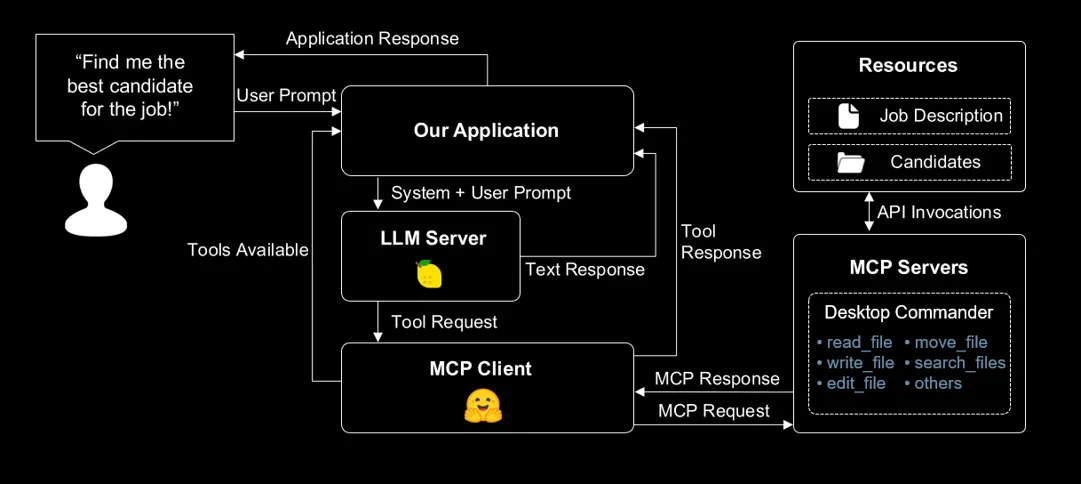
Now let's enhance our end-to-end application by enabling access to local files and introducing an assistant that processes sensitive information entirely on-device. Specifically, this assistant will help us evaluate candidate resumes and support decision-making in the hiring process—all while keeping the data private and secure.
现在我们来增强这个端到端应用,让它能访问本地文件,并引入一个完全在设备上处理敏感信息的助手。具体来说,这个助手会帮我们评估应聘者简历,并在招聘过程中支持决策——同时让数据保持私密与安全。
To do this, we'll use the Desktop Commander MCP server, which allows you to run commands on your local machine and provides comprehensive file system access, terminal control, and code editing capabilities.
为此,我们使用 Desktop Commander(https://github.com/wonderwhy-er/DesktopCommanderMCP)这个 MCP 服务端,它允许你在本机执行命令,并提供完整的文件系统访问、终端控制和代码编辑能力。
Let's setup a project with a basic Tiny Agent.
我们来搭建一个包含基础 Tiny Agent 的项目。
mkdir file-assistant
cd file-assistant
Let's then create a new agent.json file in the file-assistant folder.
然后在 file-assistant 文件夹中新建一个 agent.json 文件。
{
  "model": "user.jan-nano",
  "endpointUrl": "http://localhost:8000/api/",
  "servers": [
    {
      "type": "stdio",
      "command": "C:\\Program Files\\nodejs\\npx.cmd",
      "args": [
        "-y",
        "@wonderwhy-er/desktop-commander"
      ]
    }
  ]
}{
"model": "user.jan-nano",
"endpointUrl": "http://localhost:8000/api/",
"servers": [
{
"type": "stdio",
"command": "npx",
"args": [
"-y",
"@wonderwhy-er/desktop-commander"
]
}
]
}Finally, we have to download the Jan Nano model. You can do this by navigating to http://localhost:8000/#model-management, clicking on Add a Model and providing the following information:
最后,我们需要下载 Jan Nano 模型。访问 http://localhost:8000/#model-management,点击 Add a Model,填入以下信息:
Model Name: user.jan-nano
Checkpoint: Menlo/Jan-nano-gguf:jan-nano-4b-Q4_0.gguf
Recipe: llamacpp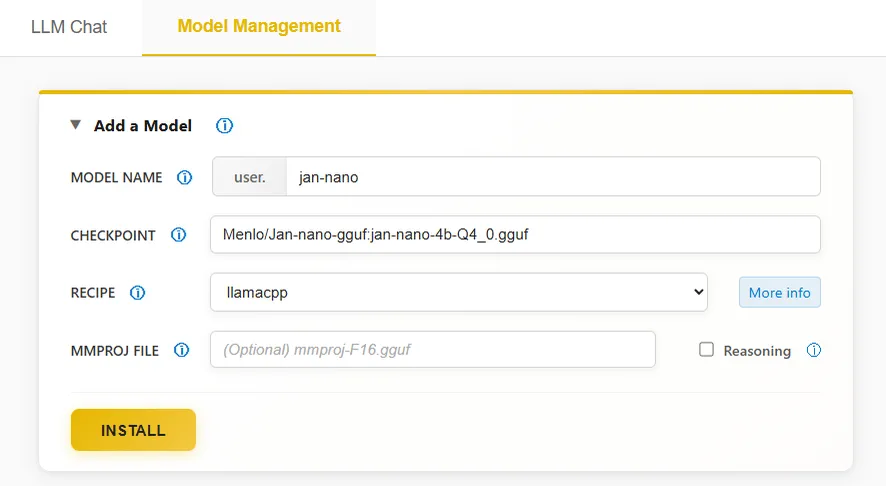
All done! Now let's give it a try.
全部就绪!现在来试试看。
Taking it for a spin

Our goal is to create an assistant that can help us handle sensitive information locally. To do this, we'll first create a job description file for our assistant to work with.
我们的目标是创建一个能帮我们在本地处理敏感信息的助手。为此,先给助手创建一个职位描述文件。
Create a file called job_description.md in the file-assistant folder.
在 file-assistant 文件夹中创建名为 job_description.md 的文件。
# Senior Food Technology Engineer

## About the Role
We're seeking a culinary innovator to transform cooking processes into precise algorithms and AI systems.

## What You'll Do
- Convert cooking instructions into measurable algorithms
- Develop AI-powered kitchen tools
- Create food quality assessment systems
- Build recipe-following AI models

## Requirements
- MS in Computer Science (food-related thesis preferred)
- Python and PyTorch expertise
- Proven experience combining food science with ML
- Strong communication skills using culinary metaphors

## Perks
- Access to experimental kitchen
- Continuous taste-testing opportunities
- Collaborative tech-foodie team environment

*Note: Must attend conferences and publish on algorithmic cooking optimization.*
Now, let's create a candidates folder inside the file-assistant folder and add a sample resume file for our assistant to work with.
接着在 file-assistant 文件夹中创建 candidates 文件夹,并放入一份示例简历供助手处理。
mkdir candidates
touch candidates/john_resume.md
Add the following sample resume or include your own.
加入下面这份示例简历,也可以换成你自己的。
# John Doe

**Contact Information**
- Email: email@example.com
- Phone: (+1) 123-456-7890
- Location: 1234 Abc Street, Example, EX 01234
- GitHub: github.com/example
- LinkedIn: linkedin.com/in/example
- Website: example.com

## Experience

**Machine Learning Engineer Intern** | Slow Feet Technology | Jul 2021 - Present
- Developed food-agnostic formulation for cross-ingredient meal cooking
- Created competitive cream of mushroom soup recipe, published in NeurIPS 2099
- Built specialized pan for meal cooking research

**Research Intern** | Paddling University | Aug 2020 - Present
- Designed efficient mapo tofu quality estimation method using thermometer
- Proposed fast stir frying algorithm for tofu cooking, published in CVPR 2077
- Outperformed SOTA methods with improved efficiency

**Research Assistant** | Huangdu Institute of Technology | Mar 2020 - Jun 2020
- Developed novel framework using spoon and chopsticks for eating mapo tofu
- Designed tofu filtering strategy inspired by beans grinding method
- Created evaluation criteria for eating plan novelty and diversity

**Research Intern** | Paddling University | Jul 2018 - Aug 2018
- Designed dual sandwiches using traditional burger ingredients
- Utilized structure duality to boost cooking speed for shared ingredients
- Outperformed baselines on QWE'15 and ASDF'14 datasets

## Education

**M.S. in Computer Science** | University of Charles River | Sep 2021 - Jan 2023
- Location: Boston, MA

**B.Eng. in Software Engineering** | Huangdu Institute of Technology | Sep 2016 - Jul 2020
- Location: Shanghai, China

## Skills

**Programming Languages:** Python, JavaScript/TypeScript, HTML/CSS, Java
**Tools and Frameworks:** Git, PyTorch, Keras, scikit-learn, Linux, Vue, React, Django, LaTeX
**Languages:** English (proficient), Indonesia (native)

## Awards and Honors

- **Gold**, International Collegiate Catching Fish Contest (ICCFC) | 2018
- **First Prize**, China National Scholarship for Outstanding Culinary Skills | 2017, 2018

## Publications

**Eating is All You Need** | NeurIPS 2099
- Authors: Haha Ha, San Zhang

**You Only Cook Once: Unified, Real-Time Mapo Tofu Recipe** | CVPR 2077 (Best Paper Honorable Mention)
- Authors: Haha Ha, San Zhang, Si Li, Wu Wang
We can then run the agent with the following command:
然后就可以用下面的命令运行智能体:
tiny-agents run agent.jsonYou should see the following output:
你应该会看到类似下面的输出:
Agent loaded with 18 tools:
 • get_config
 • set_config_value
 • read_file
 • read_multiple_files
 • write_file
 • create_directory
 • list_directory
 • move_file
 • search_files
 • search_code
 • get_file_info
 • edit_block
 • execute_command
 • read_output
 • force_terminate
 • list_sessions
 • list_processes
 • kill_process
 »
Now let's provide the asistant with some info to get started.
现在我们给助手一些信息,让它开始工作。
» Read the contents of C:\Users\your_username\file-assistant\job_description.mdYou should see an output similar to the following:
你应该会看到类似下面的输出:
<Tool iNtxGmOuXHqZVBWmKnfxsc61xsJbsoAM>read_file {"path":"C:\\Users\\your_username\\file-assistant\\job_description.md","length":23}

Tool iNtxGmOuXHqZVBWmKnfxsc61xsJbsoAM
[Reading 23 lines from start]

(...)

The job description for the Senior Food Technology Engineer position emphasizes the need for a candidate who can bridge the gap between food science and artificial intelligence (...). Candidates are also expected to attend conferences and publish research on algorithmic cooking optimization.
TIP
We are using the default system prompt, which may cause the assistant to call some tools multiple times. To create a more assertive assistant, you can provide a custom PROMPT.md file in the same directory as your agent.json.
我们这里用的是默认系统提示词,这可能导致助手重复调用某些工具。想让助手更果断,可以在 agent.json 所在目录提供一个自定义的 PROMPT.md 文件。
Great! Now let's read the candidate's resume.
很好!现在让助手读取应聘者的简历。
» Inside the same folder you can find a candidates folder. Check for john_resume.md and let me know if he is a good fit for the job.You should see an output similar to the following:
你应该会看到类似下面的输出:
<Tool ll2oWo73YeGIft5VbOIpF9GNf0kevjEy>read_file {"path":"C:\\Users\\your_username\\file-assistant\\candidates\\john_resume.md"}

Tool ll2oWo73YeGIft5VbOIpF9GNf0kevjEy
[Reading 58 lines from start]

(...)
John Wayne is a **strong fit** for the Senior Food Technology Engineer role. His technical expertise in AI and machine learning, combined with his experience in food-related research and publications, makes him an excellent candidate. He also has the soft skills and cultural fit needed to thrive in a collaborative, innovative environment.
Amazing! Now we can move forward with inviting the candidate to the interview.
太棒了!现在我们可以继续向应聘者发出面试邀请。
» Create a file called "invitation.md" in the "file-assistant" folder and write a short invitation to John to come in for an interview.You should see content similar to the following being written to the invitation.md file:
你应该会看到 invitation.md 文件中写入了类似下面的内容:
# Interview Invitation

Dear John,

We would like to invite you for an interview for the Senior Food Technology Engineer position. The interview will be held on [insert date and time] at [insert location or virtual meeting details].

Please confirm your availability and let us know if you need any additional information.

Best regards,
[Your Name]
[Your Contact Information]
Woohoo! We successfully created an assistant that can help us handle sensitive information locally.
哇哦!我们成功创建了一个能在本地处理敏感信息的助手。
Exploring other models and acceleration options
In the example above, the Jan-Nano model leveraged Vulkan acceleration for efficient local LLM inference on AMD GPUs. You can also try out other models and acceleration options by navigating to http://localhost:8000/#model-management or checking the models documentation.
在上面的示例中,Jan-Nano 模型利用 Vulkan 加速,在 AMD GPU 上高效地进行本地 LLM 推理。你也可以访问 http://localhost:8000/#model-management 尝试其他模型和加速选项,或查阅模型文档(https://lemonade-server.ai/docs/server/server_models/)。
For Windows applications that require a concise context and would benefit from NPU + iGPU acceleration, you can try the Hybrid models available with Lemonade Server — optimized for AMD Ryzen AI 300 series PCs. Models such as Llama-xLAM-2-8b-fc-r-Hybrid are specifically fine-tuned for tool-calling and deliver fast, responsive performance!
对于上下文较简短、且能从 NPU + iGPU 加速中受益的 Windows 应用,你可以试试 Lemonade Server 提供的混合模型——它们针对 AMD Ryzen AI 300 系列 PC 做了优化。像 Llama-xLAM-2-8b-fc-r-Hybrid 这类模型专门针对工具调用做了微调,能带来快速、响应灵敏的表现!
Conclusion
In this unit, we've shown how to accelerate our end-to-end Tiny Agents application with AMD NPU and iGPU. We've also shown how to create an assistant to handle sensitive information locally.
在本单元中,我们展示了如何用 AMD NPU 和 iGPU 加速端到端的 Tiny Agents 应用,也展示了如何创建一个在本地处理敏感信息的助手。
Now that you've learned how to leverage Lemonade Server for local model acceleration and privacy-focused applications, you can explore more examples and features in the Lemonade GitHub repository. The repository contains additional documentation, example implementations, and is actively maintained by the community.
既然你已经学会用 Lemonade Server 做本地模型加速和注重隐私的应用,可以到 Lemonade GitHub 仓库(https://github.com/lemonade-sdk/lemonade)探索更多示例和特性。该仓库包含更多文档、示例实现,并由社区积极维护。