NotebookLM Clone
In this project we build an open-source implementation of Google's NotebookLM that grounds AI responses in your documents with accurate citations. Built with modern AI technologies including RAG (Retrieval-Augmented Generation), vector databases, and conversational memory.
Overview
NotebookLM Clone is a document-grounded AI assistant that allows you to:
- Upload and process multiple document types (PDF, text, audio, YouTube videos, web pages)
- Ask questions and receive cited, verifiable answers
- Maintain conversational context intelligently across sessions
- Generate AI podcasts from your documents
- Clean and intuitive web interface inspired by NotebookLM
Tech Stack
- PyMuPDF for complex document parsing with PDF, TXT and Markdown support.
- AssemblyAI for audio transcription with speaker diarization.
- Firecrawl for scraping and content extraction from websites.
- Milvus vector database for efficient semantic search.
- Zep's temporal knowledge graphs as the memory layer.
- Kokoro as the open source Text-to-Speech model.
- Streamlit for the interactive web UI.
NotebookLM UI
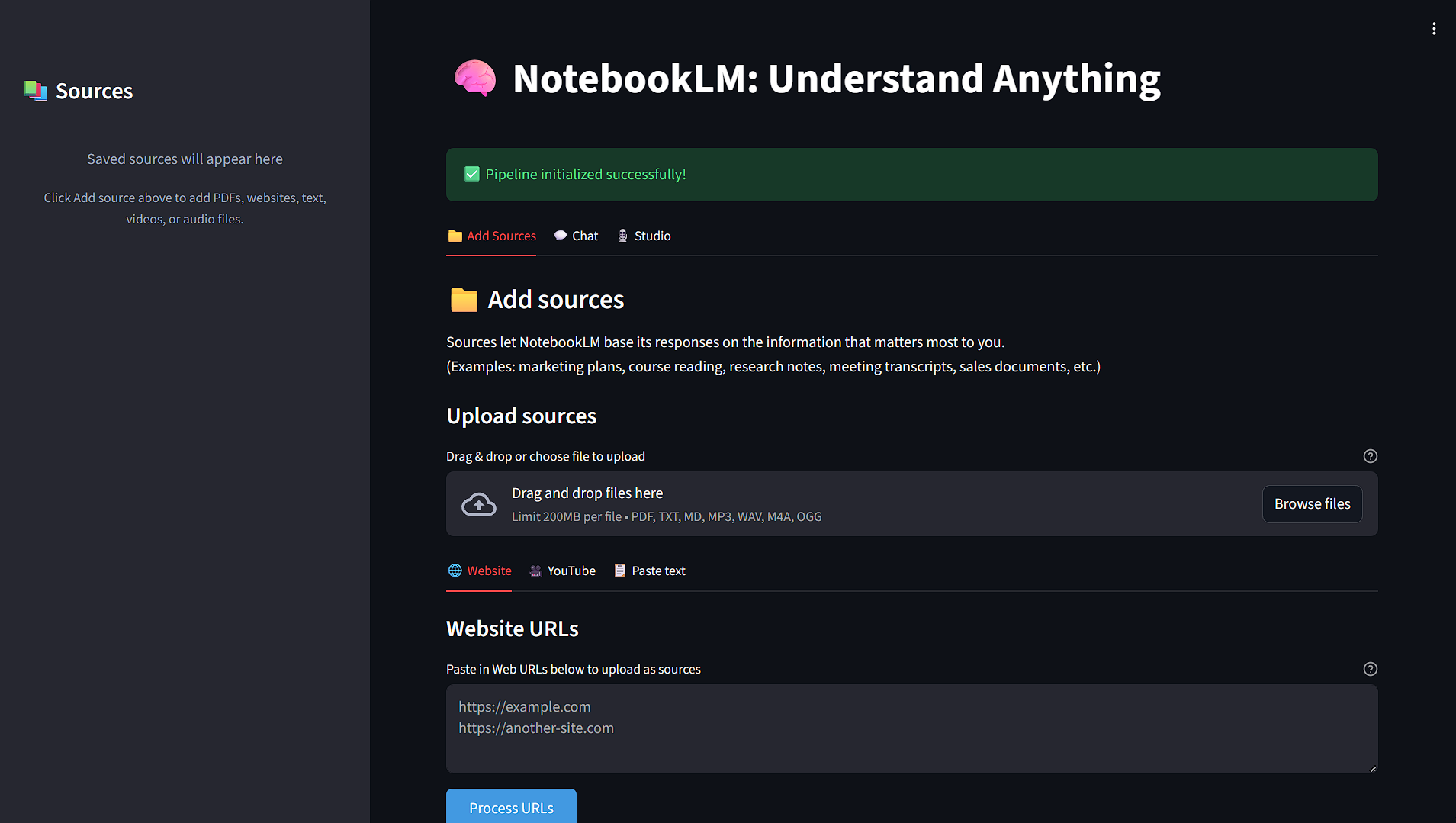
- NotebookLM-Inspired Design: Three-Panel Layout with sources panel, chat interface, and studio features.
- Add your documents via the Upload panel.
- Interactive source citations with detailed metadata in chat responses.
- Podcast Generation: AI podcast creation with script generation and multi speaker TTS
Architecture
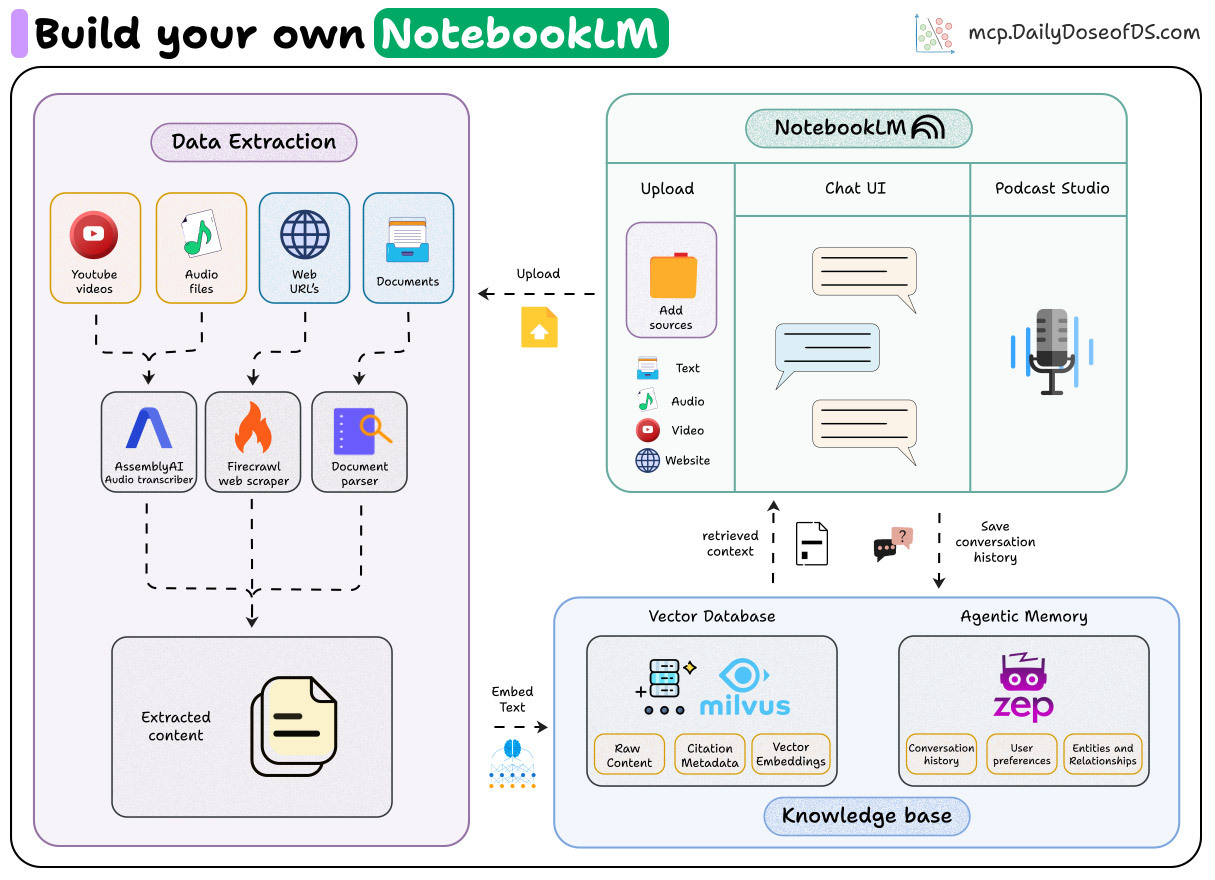
Data Flow
- Document Ingestion: User uploads PDF, audio, video, text, or web URL
- Processing: Content extracted with metadata (page numbers, timestamps, and other metadata)
- Chunking: Text split into overlapping segments preserving context
- Embedding: Chunks converted to vector representations
- Storage: Vectors stored in Milvus with citation metadata
- Query: User asks question → Query embedded → Semantic search
- Retrieval: Top-k relevant chunks retrieved with metadata
- Generation: Agent generates cited response using memory
- Memory: Conversation saved to Zep for future context
Installation & Setup
Prerequisites: Python 3.11
Install dependencies: First, install
uvand set up the environment:bash# MacOS/Linux curl -LsSf https://astral.sh/uv/install.sh | sh # Windows powershell -ExecutionPolicy ByPass -c "irm https://astral.sh/uv/install.ps1 | iex"Install dependencies:
bash# Create a new directory for our project uv init notebook-lm cd notebook-lm # Create virtual environment and activate it uv venv source .venv/bin/activate # MacOS/Linux .venv\Scripts\activate # Windows # Install dependencies uv sync # Additional steps (recommended) uv add -U yt-dlp # for latest version uv pip install pip # pip for TTS model dependenciesSet up environment variables: Create a
.envfile with your API keys as specified in.env.examplefile:envOPENAI_API_KEY=<YOUR_OPENAI_API_KEY> ASSEMBLYAI_API_KEY=<YOUR_ASSEMBLYAI_API_KEY> FIRECRAWL_API_KEY=<YOUR_FIRECRAWL_API_KEY> ZEP_API_KEY=<YOUR_ZEP_API_KEY>Get the API keys here:
Usage
Running the Web Application
uv run app.py or streamlit run app.pyThe app will open at http://localhost:8501
Project Structure
├── 📂 src/                            # Main source code
│   ├── 📂 audio_processing/           # Audio transcription and processing
│   │   ├── 🎵 audio_transcriber.py    # AssemblyAI audio transcription
│   │   └── 🎥 youtube_transcriber.py  # YouTube video transcription
│   │
│   ├── 📂 document_processing/        # Document parsing and chunking
│   │   └── 📄 doc_processor.py
│   │
│   ├── 📂 embeddings/                 # Vector embeddings generation
│   │   └── 🧠 embedding_generator.py
│   │
│   ├── 📂 generation/                 # RAG pipeline and response generation
│   │   └── 🤖 rag.py
│   │
│   ├── 📂 memory/                     # Conversation memory management
│   │   └── 🧠 memory_layer.py         # Zep memory integration
│   │
│   ├── 📂 podcast/                    # Podcast generation system
│   │   ├── 📝 script_generator.py     # Podcast script generation
│   │   └── 🎙️ text_to_speech.py       # TTS audio generation
│   │
│   ├── 📂 vector_database/            # Vector storage and search
│   │   └── 🗄️ milvus_vector_db.py
│   │
│   └── 📂 web_scraping/               # Web content extraction
│       └── 🌐 web_scraper.py          # FireCrawl web scraping
│
├── 📂 tests/                          # Pipeline integration tests
├── 📂 data/                           # Sample documents
├── 📂 notebooks/                      # Walkthrough notebook
├── 📂 outputs/                        # Generated content
├── 📂 assets/                         # Sample images
│
├── 📱 app.py                          # Main Streamlit application
├── 📋 pyproject.toml                  # Project configuration and dependencies
├── 📋 uv.lock                         # UV lock file
├── 🐍 .python-version                 # Python version specification
├── 📝 .env.example                    # Example configuration file
├── 📝 README.md                       # Project documentation
Key Features
- Citation-First Approach: Every claim is backed by specific sources with page numbers and references as in the original NotebookLM.
- Memory-Powered: Uses temporal knowledge graphs to remember context and preferences during conversations.
- Multi-Format Support: Process PDFs, text files, audio recordings, YouTube videos and web content seamlessly.
- Efficient Retrieval: All relevant chunks retrieved intelligently along with citation metadata.
- AI Podcast Generation: Transform documents into engaging multi-speaker podcast conversations.
📬 Stay Updated with Our Newsletter!
Get a FREE Data Science eBook 📖 with 150+ essential lessons in Data Science when you subscribe to our newsletter! Stay in the loop with the latest tutorials, insights, and exclusive resources. Subscribe now!
