Claude Advanced Tool Use Patterns
API-level features (now GA) that reduce token consumption, latency, and improve tool accuracy. Released with Opus/Sonnet 4.6.
API 层面的新特性(现已正式可用),可降低 token 消耗与延迟,并提升工具调用的准确率。随 Opus/Sonnet 4.6 一同发布。
| ← Back to Claude Code Best Practice | %20scaleY(1)%20scaleX(1);%20}%2030%25%20{%20transform:%20translateY(-16px)%20scaleY(1.1)%20scaleX(0.95);%20}%2050%25%20{%20transform:%20translateY(-18px)%20scaleY(1.05)%20scaleX(0.98);%20}%2080%25%20{%20transform:%20translateY(-5px)%20scaleY(0.95)%20scaleX(1.05);%20}%20}%20@keyframes%20shadow-scale%20{%200%25,%20100%25%20{%20transform:%20scaleX(1);%20opacity:%200.25;%20}%2050%25%20{%20transform:%20scaleX(0.4);%20opacity:%200.08;%20}%20}%20@keyframes%20wave-left%20{%200%25,%20100%25%20{%20transform:%20rotate(0deg);%20}%2050%25%20{%20transform:%20rotate(-25deg);%20}%20}%20@keyframes%20wave-right%20{%200%25,%20100%25%20{%20transform:%20rotate(0deg);%20}%2050%25%20{%20transform:%20rotate(25deg);%20}%20}%20@keyframes%20ear-bounce%20{%200%25,%20100%25%20{%20transform:%20scaleY(1);%20}%2040%25%20{%20transform:%20scaleY(1.2);%20}%2060%25%20{%20transform:%20scaleY(0.85);%20}%20}%20%3c/style%3e%3c!--%20Shadow%20--%3e%3cellipse%20class='shadow'%20cx='50'%20cy='82'%20rx='22'%20ry='5'%20fill='%23000'/%3e%3c!--%20Claude%20Character%20Group%20--%3e%3cg%20class='claude-body'%3e%3c!--%20Claude%20Orange:%20%23E07C4C%20--%3e%3c!--%20Left%20ear%20--%3e%3crect%20class='left-ear'%20x='22'%20y='10'%20width='8'%20height='14'%20fill='%23E07C4C'/%3e%3c!--%20Right%20ear%20--%3e%3crect%20class='right-ear'%20x='70'%20y='10'%20width='8'%20height='14'%20fill='%23E07C4C'/%3e%3c!--%20Main%20body%20-%20top%20row%20(narrower)%20--%3e%3crect%20x='18'%20y='24'%20width='64'%20height='4'%20fill='%23E07C4C'/%3e%3c!--%20Main%20body%20-%20full%20block%20--%3e%3crect%20x='14'%20y='28'%20width='72'%20height='32'%20fill='%23E07C4C'/%3e%3c!--%20Left%20eye%20(smaller,%20positioned%20higher)%20--%3e%3crect%20x='30'%20y='34'%20width='8'%20height='10'%20fill='%23000000'/%3e%3c!--%20Right%20eye%20(smaller,%20positioned%20higher)%20--%3e%3crect%20x='62'%20y='34'%20width='8'%20height='10'%20fill='%23000000'/%3e%3c!--%20Left%20arm%20--%3e%3crect%20class='left-arm'%20x='2'%20y='36'%20width='12'%20height='8'%20fill='%23E07C4C'/%3e%3c!--%20Right%20arm%20--%3e%3crect%20class='right-arm'%20x='86'%20y='36'%20width='12'%20height='8'%20fill='%23E07C4C'/%3e%3c!--%20Left%20leg%20--%3e%3crect%20x='24'%20y='60'%20width='12'%20height='14'%20fill='%23E07C4C'/%3e%3c!--%20Right%20leg%20--%3e%3crect%20x='64'%20y='60'%20width='12'%20height='14'%20fill='%23E07C4C'/%3e%3c/g%3e%3c/svg%3e) |
Table of Contents
- Overview
- Programmatic Tool Calling (PTC)
- Dynamic Filtering for Web Search/Fetch
- Tool Search Tool
- Tool Use Examples
- Claude Code Relevance
1)概览;2)程序化工具调用(PTC);3)网页搜索与抓取的动态过滤;4)工具搜索工具;5)工具使用示例;6)与 Claude Code 的关系。
Overview
| Feature | Problem Solved | Token Savings | Availability |
|---|---|---|---|
| Programmatic Tool Calling | Multi-step agent loops burn tokens on round trips | ~37% reduction | API, Foundry (GA) |
| Dynamic Filtering | Web search/fetch results bloat context with irrelevant content | ~24% fewer input tokens | API, Foundry (GA) |
| Tool Search Tool | Too many tool definitions bloat context | ~85% reduction | API, Foundry (GA) |
| Tool Use Examples | Schema alone can't express usage patterns | 72% → 90% accuracy | API, Foundry (GA) |
All features are generally available as of February 18, 2026.
截至 2026 年 2 月 18 日,所有特性均已正式可用。
Strategic layering — start with your biggest bottleneck:
- Context bloat from tool definitions → Tool Search Tool
- Large intermediate results → Programmatic Tool Calling
- Web search noise → Dynamic Filtering
- Parameter errors → Tool Use Examples
分层推进策略——从你最大的瓶颈入手:工具定义导致上下文膨胀,就用工具搜索工具;中间结果过大,就用程序化工具调用;网页搜索噪音太多,就用动态过滤;参数老出错,就用工具使用示例。
Programmatic Tool Calling (PTC)
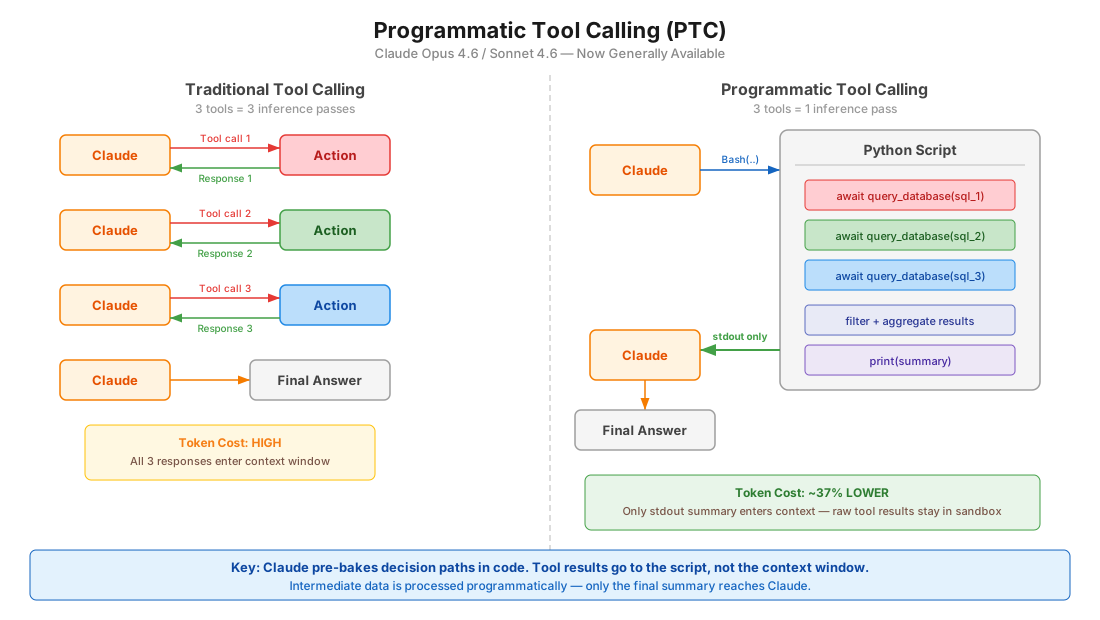
The Paradigm Shift
Before (Traditional Tool Calling):
改造前(传统工具调用):
User prompt → Claude → Tool call 1 → Response 1 → Claude → Tool call 2 → Response 2 → Claude → Tool call 3 → Response 3 → Claude → Final answerEach tool call requires a full model round trip. 3 tools = 3 inference passes.
每次工具调用都要让模型完整跑一个来回。3 个工具 = 3 次推理。
After (Programmatic Tool Calling):
改造后(程序化工具调用):
User prompt → Claude → writes Python script → Script calls Tool 1, Tool 2, Tool 3 internally → stdout → Claude → Final answerClaude writes code that orchestrates all tools. Only the final stdout enters the context window. 3 tools = 1 inference pass.
Claude 写一段代码把各个工具串起来,只有最终的 stdout 会进入上下文窗口。3 个工具 = 1 次推理。
How It Works
- You define tools with
allowed_callers: ["code_execution_20250825"] - Claude writes Python that calls those tools as async functions inside a sandbox
- When a tool function is called, the sandbox pauses and the API returns a
tool_useblock - You provide the tool result — it goes to the running code, not Claude's context
- Code resumes, processes results, calls more tools if needed
- Only
stdoutfrom the final execution reaches Claude
1)用 allowed_callers: ["code_execution_20250825"] 来定义工具;2)Claude 写一段 Python,在沙箱里以异步函数的形式调用这些工具;3)工具函数被调用时沙箱暂停,API 返回一个 tool_use 块;4)你提供工具结果——结果送给正在运行的代码,而不是 Claude 的上下文;5)代码继续跑,处理结果,必要时再调用更多工具;6)只有最终执行的 stdout 会回到 Claude 那里。
Key Configuration
{
  "tools": [
    {
      "type": "code_execution_20250825",
      "name": "code_execution"
    },
    {
      "name": "query_database",
      "description": "Execute a SQL query. Returns rows as JSON objects with fields: id (str), name (str), revenue (float).",
      "input_schema": {
        "type": "object",
        "properties": {
          "sql": { "type": "string", "description": "SQL query to execute" }
        },
        "required": ["sql"]
      },
      "allowed_callers": ["code_execution_20250825"]
    }
  ]
}
The allowed_callers Field
| Value | Behavior |
|---|---|
["direct"] | Traditional tool calling only (default if omitted) |
["code_execution_20250825"] | Only callable from Python sandbox |
["direct", "code_execution_20250825"] | Both modes available |
Recommendation: Choose one mode per tool, not both. This gives Claude clearer guidance.
建议:同一个工具只选一种模式,不要两者都开。这样给 Claude 的指引更清晰。
The caller Field in Responses
Every tool use block includes a caller field so you know how it was invoked:
每个工具调用块都带一个 caller 字段,让你知道它是被怎么调用的:
// Direct (traditional)
{ "caller": { "type": "direct" } }

// Programmatic (from code execution)
{ "caller": { "type": "code_execution_20250825", "tool_id": "srvtoolu_abc123" } }
Advanced Patterns
Batch processing — process N items in 1 inference pass:
批量处理——一次推理搞定 N 个条目:
regions = ["West", "East", "Central", "North", "South"]
results = {}
for region in regions:
    data = await query_database(f"SELECT SUM(revenue) FROM sales WHERE region='{region}'")
    results[region] = data[0]["revenue"]

top = max(results.items(), key=lambda x: x[1])
print(f"Top region: {top[0]} with ${top[1]:,}")
Early termination — stop as soon as success criteria are met:
提前终止——一旦满足成功条件就立刻停下:
endpoints = ["us-east", "eu-west", "apac"]
for endpoint in endpoints:
    status = await check_health(endpoint)
    if status == "healthy":
        print(f"Found healthy endpoint: {endpoint}")
        break
Conditional tool selection:
按条件选择工具:
file_info = await get_file_info(path)
if file_info["size"] < 10000:
    content = await read_full_file(path)
else:
    content = await read_file_summary(path)
print(content)
Data filtering — reduce what Claude sees:
数据过滤——减少 Claude 看到的内容:
logs = await fetch_logs(server_id)
errors = [log for log in logs if "ERROR" in log]
print(f"Found {len(errors)} errors")
for error in errors[-10:]:
    print(error)
Model Compatibility
| Model | Supported |
|---|---|
| Claude Opus 4.6 | Yes |
| Claude Sonnet 4.6 | Yes |
| Claude Sonnet 4.5 | Yes |
| Claude Opus 4.5 | Yes |
Constraints
| Constraint | Detail |
|---|---|
| Not on Bedrock/Vertex | API and Foundry only |
| No MCP tools | MCP connector tools cannot be called programmatically |
| No web search/fetch | Web tools not supported in PTC |
| No structured outputs | strict: true tools incompatible |
| No forced tool choice | tool_choice cannot force PTC |
| Container lifetime | ~4.5 minutes before expiry |
| ZDR | Not covered by Zero Data Retention |
| Tool results as strings | Validate external results for code injection risks |
When to Use PTC
| Good Use Cases | Less Ideal |
|---|---|
| Processing large datasets needing aggregates | Single tool calls with simple responses |
| 3+ dependent tool calls in sequence | Tools needing immediate user feedback |
| Filtering/transforming results before Claude sees them | Very fast operations (overhead > benefit) |
| Parallel operations across many items | |
| Conditional logic based on intermediate results |
Token Efficiency
- Tool results from programmatic calls are not added to Claude's context — only final
stdout - Intermediate processing happens in code, not model tokens
- 10 tools programmatically ≈ 1/10th the tokens of 10 direct calls
程序化调用产生的工具结果不会进入 Claude 的上下文——只有最终的 stdout 会;中间处理都发生在代码里,不消耗模型的 token;10 个工具走程序化调用,token 量大约只有 10 次直接调用的十分之一。
Dynamic Filtering for Web Search/Fetch
The Problem
Web search and fetch tools dump full HTML pages into Claude's context window. Most of that content is irrelevant — navigation, ads, boilerplate. Claude then reasons over all of it, wasting tokens and reducing accuracy.
网页搜索与抓取工具会把整页 HTML 灌进 Claude 的上下文窗口,而其中大部分内容——导航、广告、模板文案——都跟问题无关。Claude 却要对全部内容做推理,既浪费 token,又拉低准确率。
The Solution
Claude now writes and executes Python code to filter web results before they enter the context window. Instead of reasoning over raw HTML, Claude filters, parses, and extracts only relevant content in a sandbox.
现在 Claude 会先写并执行 Python 代码来过滤网页结果,再让内容进入上下文窗口。它不再对着原始 HTML 推理,而是在沙箱里过滤、解析,只提取真正相关的内容。
How It Works
Before:
改造前:
Query → Search results → Fetch full HTML × N pages → All content enters context → Claude reasons over everythingAfter:
改造后:
Query → Search results → Claude writes filtering code → Code extracts relevant content only → Filtered results enter contextAPI Configuration
Uses updated tool type versions with a beta header:
改用更新后的工具类型版本,并带上 beta 请求头:
{
  "model": "claude-opus-4-6",
  "max_tokens": 4096,
  "tools": [
    {
      "type": "web_search_20260209",
      "name": "web_search"
    },
    {
      "type": "web_fetch_20260209",
      "name": "web_fetch"
    }
  ]
}
Header required: anthropic-beta: code-execution-web-tools-2026-02-09
必需的请求头:anthropic-beta: code-execution-web-tools-2026-02-09
Enabled by default when using the new tool type versions with Sonnet 4.6 and Opus 4.6.
在使用 Sonnet 4.6 与 Opus 4.6 的新工具类型版本时,该功能默认开启。
Benchmark Results
BrowseComp (finding specific information on websites):
BrowseComp(在网站上定位特定信息)基准:
| Model | Without Filtering | With Filtering | Improvement |
|---|---|---|---|
| Sonnet 4.6 | 33.3% | 46.6% | +13.3 pp |
| Opus 4.6 | 45.3% | 61.6% | +16.3 pp |
DeepsearchQA (multi-step research, F1 score):
DeepsearchQA(多步研究,F1 分数):
| Model | Without Filtering | With Filtering | Improvement |
|---|---|---|---|
| Sonnet 4.6 | 52.6% | 59.4% | +6.8 pp |
| Opus 4.6 | 69.8% | 77.3% | +7.5 pp |
Token efficiency: Average 24% fewer input tokens. Sonnet 4.6 sees cost reduction; Opus 4.6 may increase slightly due to more complex filtering code.
token 效率:输入 token 平均减少 24%。Sonnet 4.6 的成本下降;Opus 4.6 由于过滤代码更复杂,成本可能略有上升。
Use Cases
- Sifting through technical documentation
- Verifying citations across multiple sources
- Cross-referencing search results
- Multi-step research queries
- Finding specific data points buried in large pages
适用场景:翻阅技术文档、跨多个来源核对引文、交叉比对搜索结果、多步研究型查询、在大页面里挖出特定的数据点。
Tool Search Tool
The Problem
Loading all tool definitions upfront wastes context. If you have 50 MCP tools at ~1.5K tokens each, that's 75K tokens before the user even asks a question.
把所有工具定义一开始就全量加载会浪费上下文。如果你有 50 个 MCP 工具、每个约 1.5K token,那么用户还没开口提问,就已经占掉 75K token。
The Solution
Mark infrequently-used tools with defer_loading: true. They're excluded from the initial context. Claude discovers them on-demand via a Tool Search Tool.
把不常用的工具标上 defer_loading: true,它们就不会进入初始上下文。Claude 会在需要时通过工具搜索工具把它们找出来。
Configuration
{
  "tools": [
    {
      "type": "mcp_toolset",
      "mcp_server_name": "google-drive",
      "default_config": { "defer_loading": true },
      "configs": {
        "search_files": { "defer_loading": false }
      }
    }
  ]
}
Best Practices
- Keep 3-5 most-used tools always loaded, defer the rest
- Write clear, descriptive tool names and descriptions (search relies on them)
- Document available capabilities in the system prompt
把最常用的 3 到 5 个工具保持常驻加载,其余延后;给工具写清晰、有描述性的名称和说明(搜索就靠这些文字);在系统提示词里写明可用的能力。
When to Use
- Tool definitions consuming > 10K tokens
- 10+ tools available
- Multiple MCP servers
- Tool selection accuracy issues from too many options
适合启用的信号:工具定义占用超过 10K token;可用的工具超过 10 个;接了多个 MCP 服务器;选项太多导致工具选择不准。
Token Savings
~85% reduction in tool definition tokens (77K → 8.7K in Anthropic's benchmarks).
工具定义占用的 token 约减少 85%(在 Anthropic 的基准测试中从 77K 降到 8.7K)。
Claude Code Equivalent
Claude Code has MCP tool search auto mode (enabled by default since v2.1.7). When MCP tool descriptions exceed 10% of context, they're deferred and discovered via MCPSearch. Configure the threshold with ENABLE_TOOL_SEARCH=auto:N where N is the context percentage (0-100).
Claude Code 提供 MCP 工具搜索自动模式(自 v2.1.7 起默认开启)。当 MCP 工具描述占用超过上下文的 10% 时,它们会被延后加载,改由 MCPSearch 检索发现。可用 ENABLE_TOOL_SEARCH=auto:N 配置该阈值,N 为上下文百分比(0 到 100)。
Tool Use Examples
The Problem
JSON schemas define structure but can't express:
- When to include optional parameters
- Which parameter combinations make sense
- Format conventions (date formats, ID patterns)
- Nested structure usage
JSON schema 能定义结构,却表达不了这些:可选参数什么时候该填;哪些参数组合才合理;格式约定(日期格式、ID 形式);嵌套结构该怎么用。
The Solution
Add input_examples to tool definitions — concrete usage patterns beyond the schema.
在工具定义里加上 input_examples,给出 schema 之外的、具体的使用样例。
Configuration
{
  "name": "create_ticket",
  "description": "Create a support ticket",
  "input_schema": {
    "type": "object",
    "properties": {
      "title": { "type": "string" },
      "priority": { "type": "string", "enum": ["low", "medium", "high", "critical"] },
      "assignee": { "type": "string" },
      "labels": { "type": "array", "items": { "type": "string" } }
    },
    "required": ["title"]
  },
  "input_examples": [
    {
      "title": "Login page returns 500 error",
      "priority": "critical",
      "assignee": "oncall-team",
      "labels": ["bug", "auth", "production"]
    },
    {
      "title": "Add dark mode support",
      "priority": "low",
      "labels": ["feature-request", "ui"]
    },
    {
      "title": "Update API docs for v2 endpoints"
    }
  ]
}
Best Practices
- Use realistic data, not placeholder strings like "example_value"
- Show variety: minimal, partial, and full specifications
- Keep concise: 1-5 examples per tool
- Focus on resolving ambiguity — target behavioral clarity over schema completeness
- Show parameter correlations (e.g.,
priority: "critical"tends to haveassignee)
用真实的数据,不要写 example_value 这类占位字符串;展示多样性:最小可用、部分填写、完整填写各来一个;保持精简:每个工具 1 到 5 个示例;重点消除歧义——追求行为上的清晰,而不是 schema 的完备;把参数之间的关联也展示出来(例如 priority 为 critical 时通常会有 assignee)。
Results
72% → 90% accuracy on complex parameter handling in Anthropic's benchmarks.
在 Anthropic 的基准测试中,复杂参数处理的准确率从 72% 提升到 90%。
Claude Code Relevance
What applies directly to Claude Code users
| Feature | Claude Code Status | Action |
|---|---|---|
| Tool Search | Built-in since v2.1.7 as MCPSearch auto mode | Tune ENABLE_TOOL_SEARCH=auto:N if you have many MCP tools |
| Dynamic Filtering | Not available in CLI (API-level web tools) | Relevant for Agent SDK users doing web research |
| PTC | Not available in CLI | Relevant for Agent SDK users building custom agents |
| Tool Use Examples | Not configurable in CLI | Relevant for custom MCP server authors |
For Agent SDK developers
If you're building agents with @anthropic-ai/claude-agent-sdk, PTC is immediately actionable:
如果你正在用 @anthropic-ai/claude-agent-sdk 构建 agent,PTC 可以立刻用起来:
- Add
code_execution_20250825to your tools array - Set
allowed_callerson tools that benefit from batching/filtering - Implement the tool result loop (pause → provide result → resume)
- Return structured data (JSON) from tools for easier programmatic parsing
1)在 tools 数组里加上 code_execution_20250825;2)给适合批处理、过滤的工具设置 allowed_callers;3)实现工具结果的回传循环(暂停 → 提供结果 → 继续执行);4)工具尽量返回结构化数据(JSON),便于程序化解析。
For MCP server authors
If you're building custom MCP servers, Tool Use Examples can improve how Claude uses your tools:
- Add
input_examplesto tool schemas - Document return formats clearly in descriptions (PTC needs to parse them)
如果你在自建 MCP 服务器,工具使用示例能帮 Claude 更好地使用你的工具:在工具 schema 里加 input_examples;在描述里把返回格式写清楚(PTC 需要解析它们)。
Sources
- Anthropic Engineering: Advanced Tool Use
- Programmatic Tool Calling Documentation
- Code Execution Tool Documentation
- Improved Web Search with Dynamic Filtering
延伸阅读:Anthropic 工程博客《Advanced Tool Use》、程序化工具调用文档、代码执行工具文档、带动态过滤的改进版网页搜索。