Week 2: arXiv API Integration & PDF Processing
This folder contains the materials for Week 2 of the arXiv Paper Curator project, which focuses on building the core data ingestion pipeline that feeds fresh academic content into our RAG system.
Contents
week2_arxiv_integration.ipynb
A comprehensive Jupyter notebook that guides students through:
Infrastructure Validation
- Verify all Week 1 services are running correctly
- Container health checks and fresh build verification
- Environment setup for Week 2 components
arXiv API Integration
- Building a robust client with rate limiting and retry logic
- Implementing date-based filtering for targeted paper retrieval
- Testing CS.AI category searches with proper API etiquette
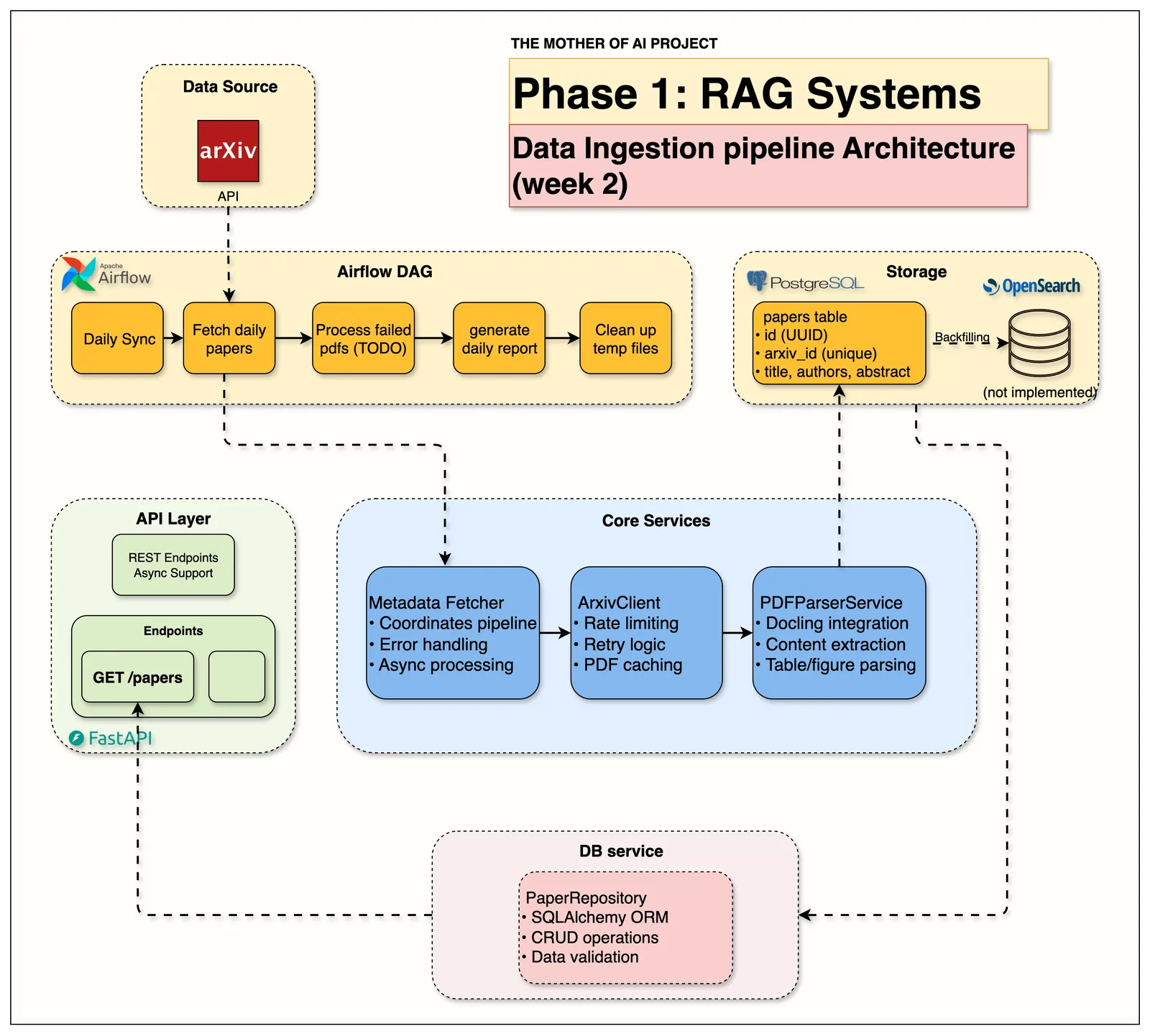
Data Pipeline Overview:
- MetadataFetcher: 🎯 Main orchestrator coordinating the entire pipeline
- ArxivClient: Rate-limited fetching with retry logic (3-second delays)
- PDFParserService: Scientific PDF parsing with structured content extraction
- PaperRepository: PostgreSQL integration with upsert operations
- Airflow DAGs: Automated daily ingestion workflows
PDF Processing Pipeline
- Download and cache PDF files with proper error handling
- Parse scientific PDFs using Docling for structured content extraction
- Handle parsing failures gracefully with fallback mechanisms
Database Integration
- Store paper metadata and content in PostgreSQL
- Implement upsert logic to avoid duplicates
- Test retrieval and query operations
Complete Pipeline Testing
- End-to-end processing from arXiv API to database storage
- Error handling and graceful degradation testing
- Performance metrics and success rate analysis
Production Readiness
- Airflow DAG status verification
- Error logging and monitoring capabilities
- Ready for automated daily ingestion
Learning Objectives
By completing this week's materials, students will:
- Master API integration with proper rate limiting and error handling
- Learn PDF processing techniques for scientific documents
- Understand database design patterns for research data storage
- Build robust data pipelines with comprehensive error handling
- Gain experience with async Python programming patterns
- Learn workflow automation concepts with Apache Airflow
- Develop skills in production-grade data processing systems
Key Technologies & Services
Core Services (Built This Week)
- arXiv API Client - Fetches CS.AI papers with intelligent rate limiting
- PDF Parser (Docling) - Extracts structured content from scientific PDFs
- Metadata Fetcher - Orchestrates the complete processing pipeline
- Database Repository - Handles PostgreSQL operations with SQLAlchemy
Infrastructure Dependencies (From Week 1)
- PostgreSQL 16 - Paper metadata and content storage
- FastAPI - REST API endpoints for paper retrieval
- Apache Airflow - Workflow orchestration and scheduling
- Docker Compose - Service orchestration and networking
Pipeline Architecture
arXiv Search Query → Rate Limited API Calls → PDF Downloads → Docling Parsing → Database Storage
        ↓                    ↓                    ↓              ↓               ↓
   Date Filtering    →  Retry Logic       →   Caching      → Structure    →  Upsert Logic
   Category Filter   →  Error Handling    →   Validation   → Extraction   →  Transactions
   Result Limiting   →  3s Rate Limit     →   Size Checks  → Metadata     →  Relationships
Performance Characteristics
Week 2 System Capabilities:
- arXiv API: ~20 papers/minute (respecting 3-second rate limits)
- PDF Processing: 2-5 seconds per paper (depends on PDF complexity)
- Database Storage: ~100 papers/second (batch operations)
- Error Handling: Graceful continuation despite individual failures
- Success Rates: 95%+ for paper fetching, 80-90% for PDF parsing
Target Audience
This material is designed for:
- Data Engineers learning research data pipeline construction
- Students interested in academic research automation
- Developers building content aggregation systems
- Researchers wanting to automate literature discovery
- Anyone building production data ingestion pipelines
Time Commitment
- Fresh container build: 10-15 minutes (required for Week 2 dependencies)
- Notebook completion: 45-60 minutes
- Pipeline testing: 30-45 minutes
- Total: 1.5-2 hours
📖 Additional Resources
Week 2 Blog Post: Building Robust Data Pipelines for Academic Research
- Deep dive into arXiv API best practices
- PDF processing strategies for scientific documents
- Error handling patterns for production systems
- Database design for research metadata
Important Notes
Fresh Container Build Required
Week 2 requires rebuilding containers with new dependencies:
bash
# Shutdown and rebuild (REQUIRED for Week 2)
docker compose down
docker compose up --build

# This ensures:
# - New Python dependencies (docling, arxiv client)
# - Updated Airflow DAGs
# - Fresh service configurations
PDF Processing Expectations
- Not all PDFs parse successfully (expected behavior)
- Docling works best with standard academic paper formats
- System handles failures gracefully and continues processing
- Success rates of 80-90% are normal for academic PDFs
Support Resources
If you encounter issues:
- Ensure fresh containers are built (
docker compose up --build) - Check the troubleshooting sections in the notebook
- Review service health checks and logs
- Verify all Week 1 infrastructure is working
- Ask in Jam With AI substack chat channel
Next Steps
After completing Week 2, you will be ready to:
- Understand production data pipeline architecture
- Handle real-world API integration challenges
- Implement robust error handling and monitoring
- Proceed to Week 3: OpenSearch Integration and Full-Text Search
- Build confidence in handling complex data processing workflows
Success Criteria
✅ Week 2 Complete When:
- arXiv API client fetches papers with proper rate limiting
- PDF download and caching works reliably
- Docling parser extracts structured content from scientific papers
- Database stores complete paper metadata with relationships
- Complete pipeline processes papers end-to-end with error handling
- Airflow DAGs are configured and ready for automation
- All components demonstrate production-grade error handling and monitoring