Airflow Configuration
This directory contains Apache Airflow configuration and DAGs for the arXiv Paper Curator project.
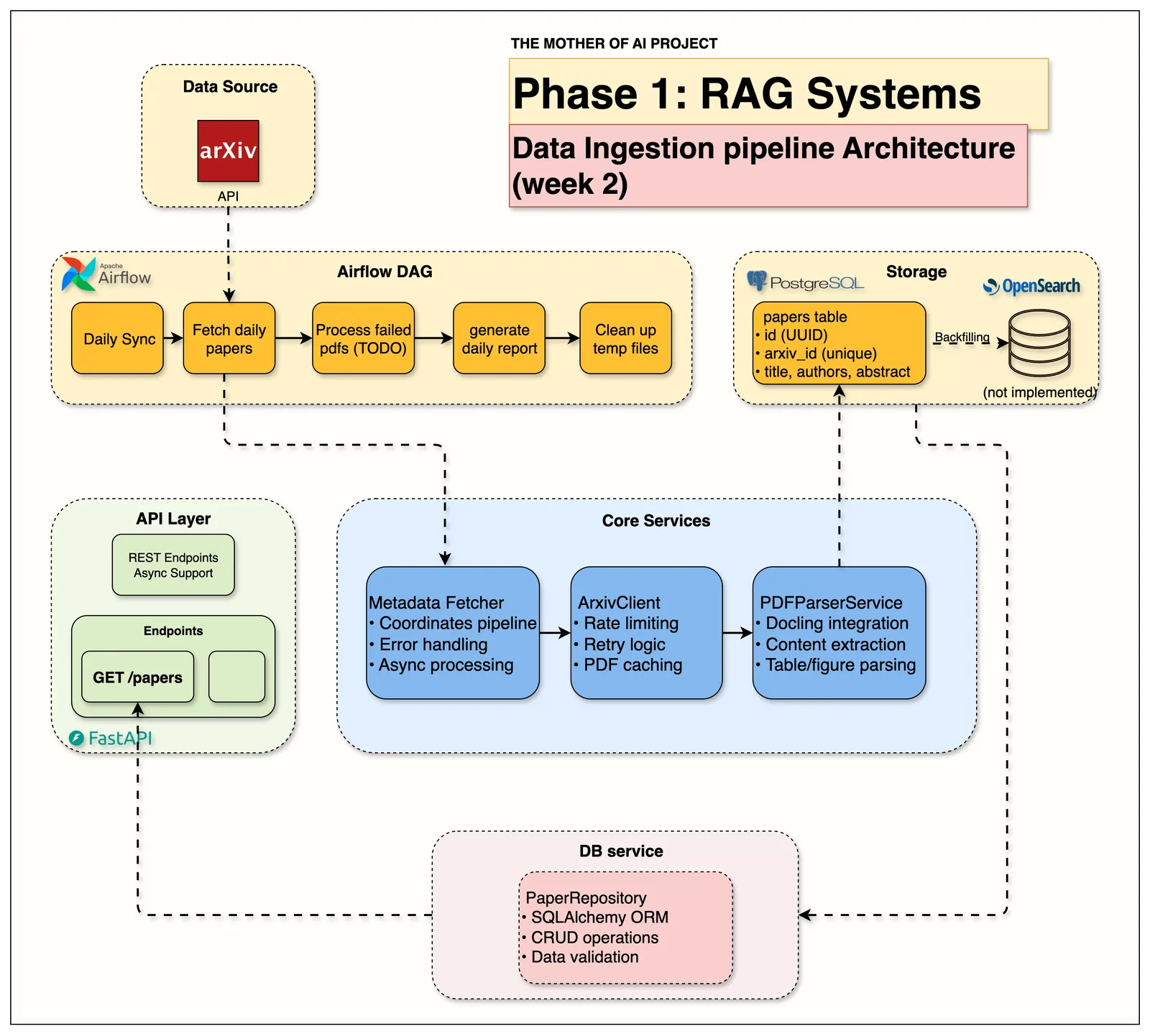
Current Setup (Week 2)
Production-Ready DAGs
- hello_world_dag.py: Basic health check DAG for Week 1
- arxiv_paper_ingestion.py: Main production DAG for automated arXiv paper fetching and processing
Production Pipeline Features
- Daily arXiv ingestion: Automated fetching of CS.AI papers
- PDF processing: Download and parse papers using Docling
- Database storage: Store complete paper metadata and content in PostgreSQL
- Error handling: Comprehensive retry logic and error reporting
- Cross-platform compatibility: Works on macOS, Linux, WSL, and Ubuntu
Directory Structure
airflow/
├── README.md                           # This file
├── Dockerfile                          # Custom Airflow container with dependencies
├── requirements-airflow.txt            # Python dependencies for DAGs
└── dags/
    ├── hello_world_dag.py             # Week 1 health check DAG
    ├── arxiv_paper_ingestion.py       # Week 2 production ingestion DAG
    └── arxiv_ingestion/
        └── tasks.py                   # Production pipeline tasks with async processing
Docker Configuration
Cross-Platform Compatibility
The Airflow container is configured for cross-platform deployment:
- User Configuration: Runs as
airflowuser (50000:0) to avoid permission issues - Volume Management: Uses named volumes for logs to prevent bind mount conflicts
- Database Integration: Connects to shared PostgreSQL instance
- Service Dependencies: Automatic initialization and health checks
Container Features
- Python 3.12 with Apache Airflow 2.10.3
- PostgreSQL support via psycopg2
- PDF processing with Docling, Tesseract OCR, and Poppler utilities
- Rate limiting and retry logic for arXiv API compliance
- Async processing for optimal performance with concurrent downloads and parsing
Usage
Web Interface
- URL: http://localhost:8080
- Credentials: Auto-generated during container initialization
- Features: DAG monitoring, task logs, pipeline statistics
Production DAG (arxiv_paper_ingestion)
- Environment Setup: Verify services and initialize caching
- Daily Paper Fetch: Retrieve papers from previous day (10 papers default)
- PDF Processing: Download and parse PDFs with Docling
- Failed PDF Retry: Handle any processing failures
- Database Storage: Store complete paper data with parsed content
- OpenSearch Placeholders: Prepare for Week 3+ search indexing
- Daily Report: Generate comprehensive processing statistics
Pipeline Performance
- Concurrent Processing: 5 parallel downloads, 1 parsing operation (laptop-optimized)
- Rate Limiting: Respects arXiv API guidelines (3-second delays)
- Caching: PDF files cached locally to avoid re-downloading
- Error Resilience: Continues processing even with individual paper failures
Configuration
Environment Variables
bash
AIRFLOW__DATABASE__SQL_ALCHEMY_CONN=postgresql+psycopg2://rag_user:rag_password@postgres:5432/rag_db
AIRFLOW__CORE__EXECUTOR=LocalExecutor
POSTGRES_DATABASE_URL=postgresql+psycopg2://rag_user:rag_password@postgres:5432/rag_db
PYTHONPATH=/opt/airflow/src
Service Dependencies
- PostgreSQL: Paper metadata and content storage
- Source Code: Mounted from
../srcfor service access - Shared Network: Communication with API and database services
Week 2 Implementation Status
✅ Completed Features
- Custom Docker container with all dependencies
- Production arXiv ingestion DAG with comprehensive error handling
- Async PDF processing pipeline with concurrency control
- PostgreSQL integration with complete content storage
- Cross-platform compatibility (macOS, Linux, WSL, Ubuntu)
- Rate limiting and retry logic for arXiv API compliance
- Detailed logging and monitoring throughout pipeline
🔄 Week 3+ Roadmap
- OpenSearch Integration: Real search indexing (currently placeholders)
- Advanced Scheduling: Multiple collection strategies
- Monitoring & Alerting: Production observability
- Scale Optimization: Higher concurrency for production workloads