Week 1: Infrastructure Setup and Verification
This folder contains the materials for Week 1 of the arXiv Paper Curator project, which focuses on setting up and verifying the complete infrastructure stack.
Contents
week1_setup.ipynb
A comprehensive Jupyter notebook that guides students through:
System Requirements and Setup
- Understanding each technology component and its purpose
- Cross-platform installation instructions (Windows, macOS, Linux)
- Prerequisites verification with automated checking
Infrastructure Architecture
- Complete overview of the multi-service architecture
- Understanding how Docker containers communicate
- Data persistence and volume management concepts
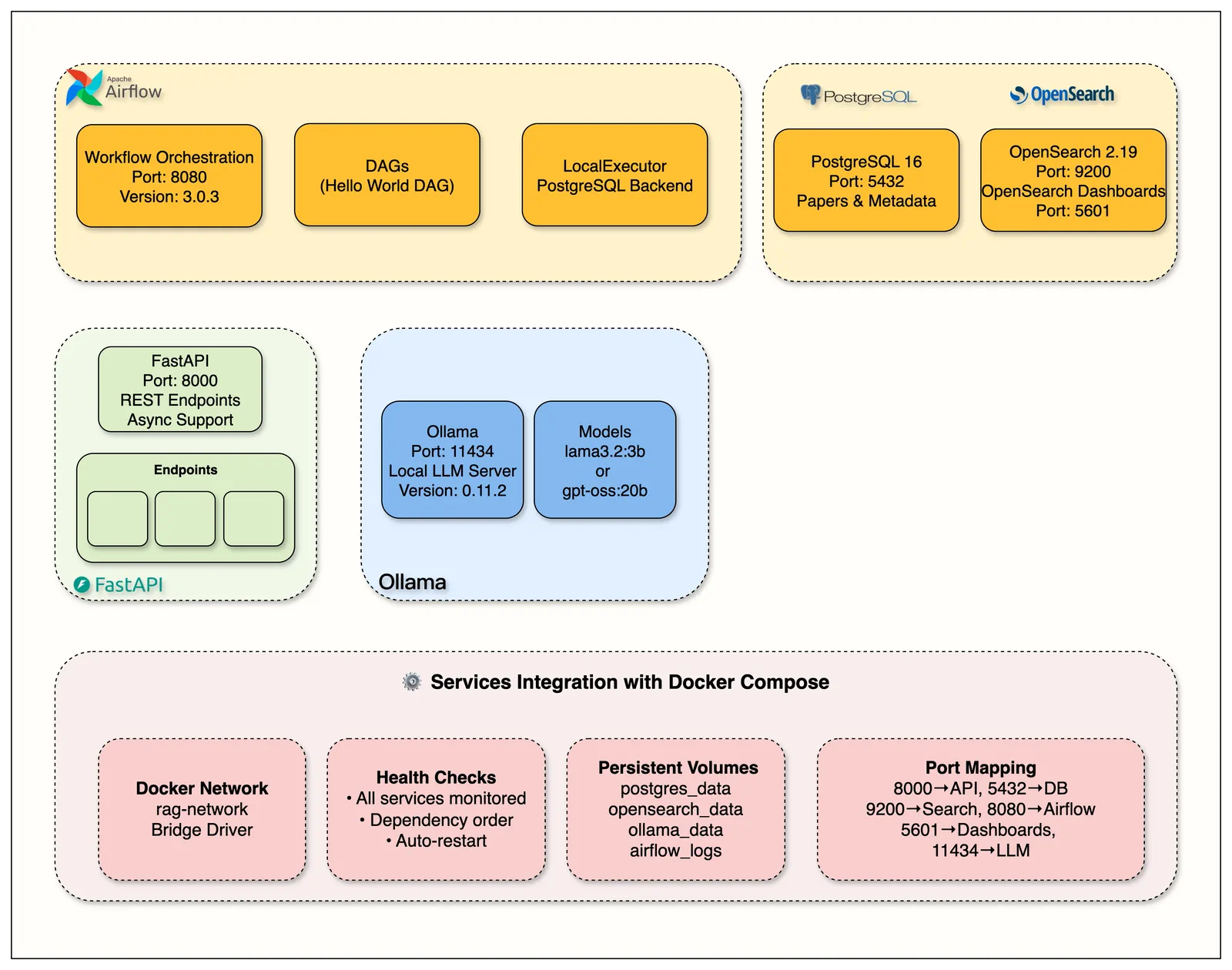
Architecture Overview:
- FastAPI (Port 8000): REST API with async support and automatic documentation
- PostgreSQL 16 (Port 5432): Primary database for paper metadata and content storage
- OpenSearch 2.19 (Ports 9200, 5601): Hybrid search engine with management dashboards
- Apache Airflow 3.0 (Port 8080): Workflow orchestration with DAGs and PostgreSQL backend
- Ollama (Port 11434): Local LLM server for future RAG implementation
- Docker Network: All services communicate via
rag-networkwith persistent volumes
Service-by-Service Setup
- PostgreSQL database for paper metadata storage
- OpenSearch for full-text search capabilities
- Apache Airflow for workflow automation
- Ollama for local LLM inference
- FastAPI for REST API endpoints
Verification and Testing
- Automated health checks for all services
- Step-by-step verification procedures
- Modular Ollama testing (4 focused test cells)
- Common troubleshooting scenarios and solutions
Learning Objectives
By completing this week's materials, students will:
- Understand containerization and Docker Compose orchestration
- Learn how to set up a production-grade infrastructure stack
- Gain experience with database design and API development
- Master troubleshooting techniques for multi-service applications
- Learn direct HTTP API testing vs service abstraction layers
- Build confidence working with professional development tools
Ollama Testing (Simplified for Week 1)
The notebook includes modular Ollama testing broken into focused cells:
- Test 3A: Check available models
- Test 3B: Simple model testing (if models installed)
- Test 3C: Performance analysis
- Test 3D: Learning notes and setup commands
Easy Model Installation (Optional for Week 1)
bash
# Using Makefile (recommended)
make ollama-pull MODEL=llama3.2:1b
make ollama-test MODEL=llama3.2:1b

# Direct HTTP calls for learning
curl -X POST http://localhost:11434/api/pull -d '{"name":"llama3.2:1b"}'
curl -X POST http://localhost:11434/api/generate -d '{"model":"llama3.2:1b","prompt":"Hello","stream":false}'
Recommended Models for Course
- llama3.2:1b (1.2GB) - Fast, good for testing
- llama3.2:3b (2.0GB) - Balance of speed/quality
- llama3.1:8b (4.7GB) - Better quality, slower
Note: No models are required for Week 1 - service health check works without them.
Target Audience
This material is designed for:
- Beginners who want to learn modern software infrastructure
- Students looking to understand how real-world applications are built
- Professionals transitioning into software development or DevOps
- Anyone interested in building their own AI-powered research tools
Time Commitment
- Setup: 2-3 hours (including software installation and downloads)
- Notebook completion: 1 hours
- Total: 2-4 hours
📖 Additional Resources
Week 1 Blog Post: The Infrastructure That Powers RAG Systems
- Deep dive into each infrastructure component
- Production deployment considerations
- Architecture decision explanations
Support Resources
If you encounter issues:
- Check the troubleshooting sections in the notebook
- Review the common problems and solutions
- Ensure all prerequisites are properly installed
- Follow the step-by-step verification procedures
- Ask in Jam With AI substack chat channel
Next Steps
After completing Week 1, you will be ready to:
- Understand how each service contributes to the overall system
- Modify and extend the infrastructure as needed
- Proceed to Week 2: arXiv Integration and PDF Processing
- Build confidence in working with professional development environments