Anti-Patterns
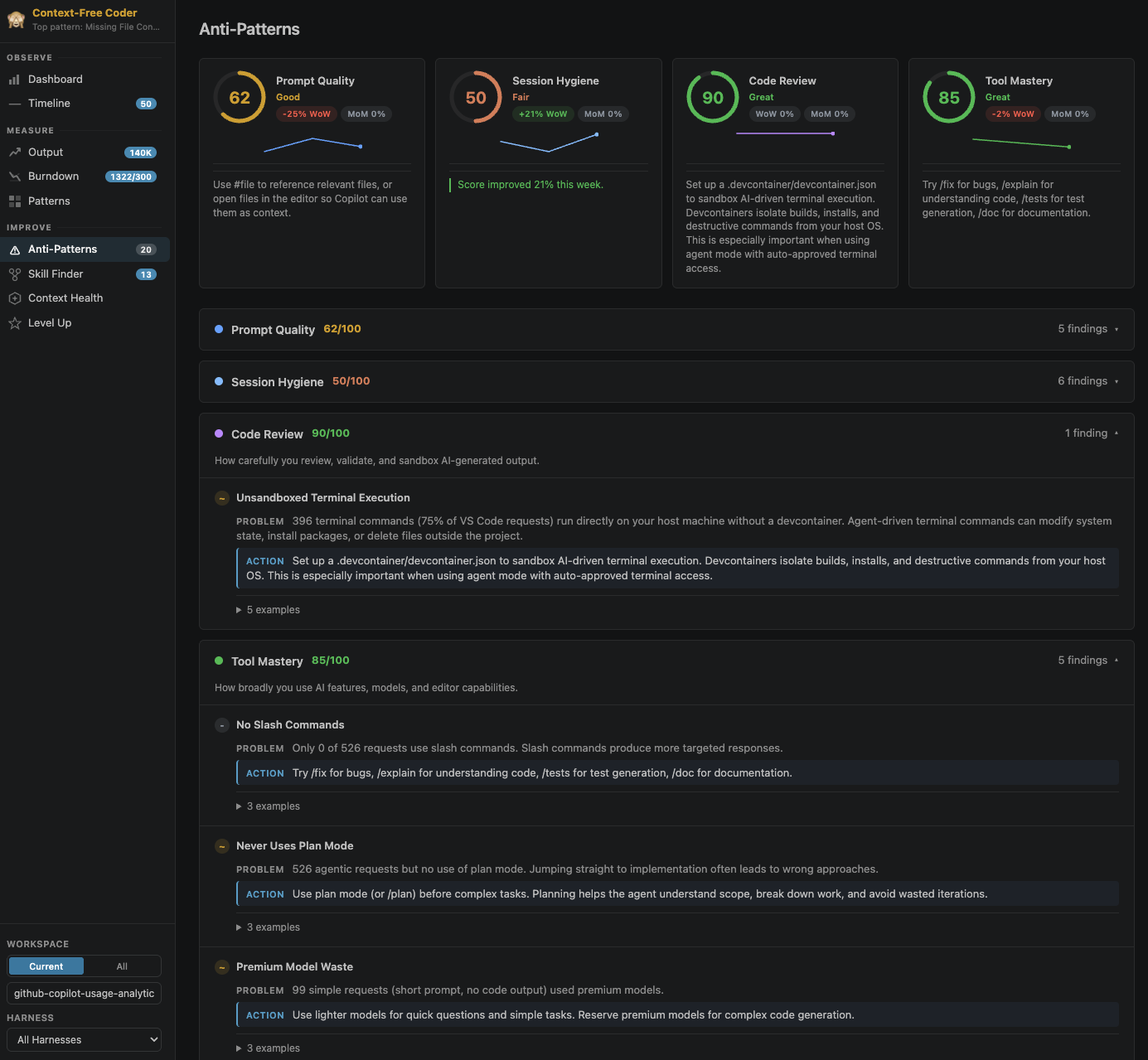
The Anti-Patterns page is the core improvement engine of AI Engineer Coach. It runs a set of detection rules across your session data and produces scored findings with actionable recommendations.
Rule Engine
Anti-pattern detection is powered by an editable rule engine. Every detector is a self-contained markdown file with YAML frontmatter and a Detection Logic block written in a small domain-specific language (DSL). AI Engineer Coach ships 45 built-in rules spanning prompt-quality, session-hygiene, code-review, tool-mastery, and context-management. You can:
- Edit a rule's thresholds, description, and detection logic directly from the Rule Editor.
- Write a brand-new rule in natural language and let the AI builder scaffold the markdown and DSL for you.
- Live-test any rule against your own data, including threshold sliders for quick tuning.
- Drill into a rule coverage heatmap showing how each rule triggered across your workspaces.
Score Categories
Five practice categories are evaluated, each scored from 0 to 100:
Prompt Quality
Measures how well you provide context to the AI. Representative rules:
- Missing File Context -- Requests that do not reference files with
#fileor have open editors - Lazy Prompting -- Short, unspecific requests that produce generic responses
- Caps Lock Rage -- Requests written mostly in CAPS indicating frustration
- Profanity / Hostile Language / Frustration Signals -- Sentiment-based rules that highlight breakdowns in the human-AI loop
Session Hygiene
Evaluates how you manage your coding sessions:
- Mega Sessions / Abandoned Sessions / Session Drift -- Flag sessions that run too long, stop abruptly, or drift across unrelated topics
- Late-Night Coding / Weekend Overwork -- Detect overwork patterns
- Repeated Prompts -- Surface near-duplicate prompts that suggest your context isn't landing
Code Review
Assesses how carefully you handle AI-generated output:
- Auto-Approve Terminal -- Terminal commands being auto-executed without a devcontainer
- Speed Accept / Copy-Paste Blindness -- Accept-heavy patterns that suggest minimal review
- YOLO Mode / No Devcontainer -- Unsafe execution sandboxes
Tool Mastery
Evaluates how broadly you use available features:
- No Slash Commands / No Plan Mode / Agentic No Tools -- Underused productivity features
- Premium Waste / Model Overreliance -- Using expensive models for simple questions
- No Skills / No Custom Instructions -- Gaps in your context-engineering setup
Context Management
Evaluates how efficiently your sessions use the context window:
- Context Window Saturation -- Sessions where the context window is nearly full
- Compaction Storms -- Frequent auto-compactions indicating sessions that run too long
- Runaway Growth -- Context size growing steadily without resolution
Findings
Each finding includes:
- PROBLEM -- A description of what was detected, with specific counts
- ACTION -- A concrete recommendation for how to fix it
- Examples -- Expandable section showing real examples from your sessions
Trends
Week-over-week (WoW) and month-over-month (MoM) trend indicators appear on each score card, so you can see whether your practices are improving or regressing.