Module 01: Getting Started with LangChain4j
Table of Contents
- Video Walkthrough
- What You'll Learn
- Prerequisites
- Understanding the Core Problem
- Understanding Tokens
- How Memory Works
- How This Uses LangChain4j
- Deploy Azure OpenAI Infrastructure
- Run the Application Locally
- Using the Application
- Next Steps
Video Walkthrough
Watch this live session that explains how to get started with this module:
What You'll Learn
This is your starting point with LangChain4j and Azure OpenAI. We begin with the fundamentals and start building production-style applications. This module focuses on conversational AI that remembers context and maintains state — the foundational concepts every later module builds on.
We'll use Azure OpenAI's GPT-5.2 throughout this guide because its advanced reasoning capabilities make the behavior of different patterns more apparent. When you add memory, you'll clearly see the difference. This makes it easier to understand what each component brings to your application.
You'll build one application that demonstrates both patterns:
Stateless Chat - Each request is independent. The model has no memory of previous messages. This is the simplest starting point.
Stateful Conversation - Each request includes conversation history. The model maintains context across multiple turns. This is what production applications require.
Prerequisites
- Azure subscription with Azure OpenAI access
- Java 21, Maven 3.9+
- Azure CLI (https://learn.microsoft.com/en-us/cli/azure/install-azure-cli)
- Azure Developer CLI (azd) (https://learn.microsoft.com/en-us/azure/developer/azure-developer-cli/install-azd)
Note: Java, Maven, Azure CLI and Azure Developer CLI (azd) are pre-installed in the provided devcontainer.
Note: This module uses GPT-5.2 on Azure OpenAI. The deployment is configured automatically via
azd up- do not modify the model name in the code.
Understanding the Core Problem
Language models are stateless. Each API call is independent. If you send "My name is John" and then ask "What's my name?", the model has no idea you just introduced yourself. It treats every request as if it's the first conversation you've ever had.
This is fine for simple Q&A but useless for real applications. Customer service bots need to remember what you told them. Personal assistants need context. Any multi-turn conversation requires memory.
The following diagram contrasts the two approaches — on the left, a stateless call that forgets your name; on the right, a stateful call backed by ChatMemory that remembers it.
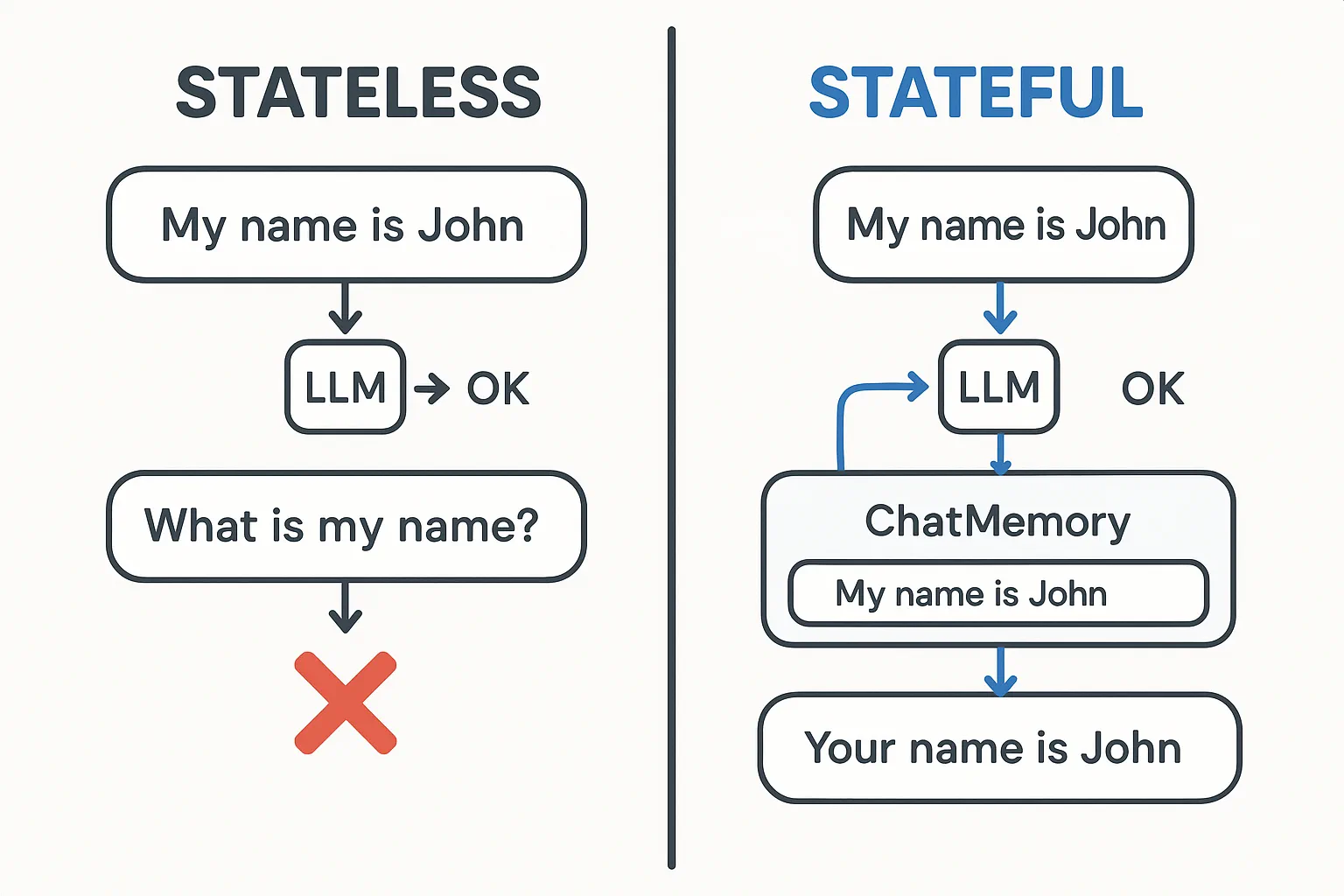
The difference between stateless (independent calls) and stateful (context-aware) conversations
Understanding Tokens
Before diving into conversations, it's important to understand tokens - the basic units of text that language models process:

Example of how text is broken into tokens - "I love AI!" becomes 4 separate processing units
Tokens are how AI models measure and process text. Words, punctuation, and even spaces can be tokens. Your model has a limit of how many tokens it can process at once (400,000 for GPT-5.2, with up to 272,000 input tokens and 128,000 output tokens). Understanding tokens helps you manage conversation length and costs.
How Memory Works
Chat memory solves the stateless problem by maintaining conversation history. Before sending your request to the model, the framework prepends relevant previous messages. When you ask "What's my name?", the system actually sends the entire conversation history, allowing the model to see you previously said "My name is John."
LangChain4j provides memory implementations that handle this automatically. You choose how many messages to retain and the framework manages the context window. The diagram below shows how MessageWindowChatMemory maintains a sliding window of recent messages.
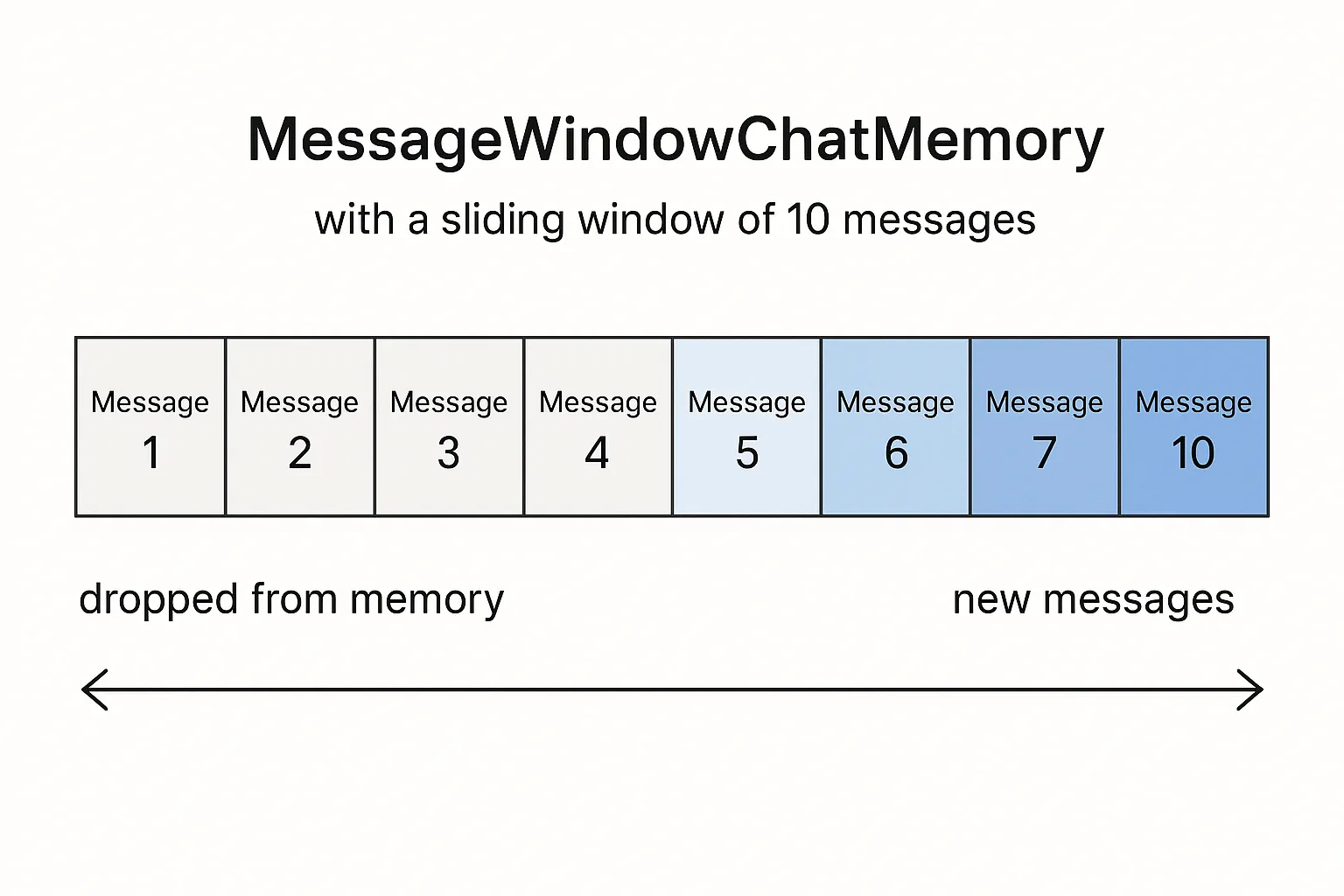
MessageWindowChatMemory maintains a sliding window of recent messages, automatically dropping old ones
How This Uses LangChain4j
This module integrates Spring Boot and adds conversation memory. Here's how the pieces fit together:
Dependencies - Add two LangChain4j libraries:
<dependency>
    <groupId>dev.langchain4j</groupId>
    <artifactId>langchain4j</artifactId>
</dependency>
<dependency>
    <groupId>dev.langchain4j</groupId>
    <artifactId>langchain4j-open-ai-official</artifactId>
</dependency>
Chat Model - Configure Azure OpenAI as a Spring bean (LangChainConfig.java):
@Bean
public OpenAiOfficialChatModel openAiOfficialChatModel() {
    return OpenAiOfficialChatModel.builder()
            .baseUrl(azureEndpoint)
            .apiKey(azureApiKey)
            .modelName(deploymentName)
            .timeout(Duration.ofMinutes(5))
            .maxRetries(3)
            .build();
}
The builder reads credentials from environment variables set by azd up. Setting baseUrl to your Azure endpoint makes the OpenAI client work with Azure OpenAI.
Conversation Memory - Track chat history with MessageWindowChatMemory (ConversationService.java):
ChatMemory memory = MessageWindowChatMemory.withMaxMessages(10);

memory.add(UserMessage.from("My name is John"));
memory.add(AiMessage.from("Nice to meet you, John!"));

memory.add(UserMessage.from("What's my name?"));
AiMessage aiMessage = chatModel.chat(memory.messages()).aiMessage();
memory.add(aiMessage);
Create memory with withMaxMessages(10) to keep the last 10 messages. Add user and AI messages with typed wrappers: UserMessage.from(text) and AiMessage.from(text). Retrieve history with memory.messages() and send it to the model. The service stores separate memory instances per conversation ID, allowing multiple users to chat simultaneously.
🤖 Try with GitHub Copilot Chat: Open
ConversationService.javaand ask:
- "How does MessageWindowChatMemory decide which messages to drop when the window is full?"
- "Can I implement custom memory storage using a database instead of in-memory?"
- "How would I add summarization to compress old conversation history?"
The stateless chat endpoint skips memory entirely - just chatModel.chat(prompt) like the quick start. The stateful endpoint adds messages to memory, retrieves history, and includes that context with each request. Same model configuration, different patterns.
Deploy Azure OpenAI Infrastructure
Bash:
cd 01-introduction
azd up  # Select subscription and location (eastus2 recommended)
PowerShell:
cd 01-introduction
azd up  # Select subscription and location (eastus2 recommended)
Note: If you encounter a timeout error (
RequestConflict: Cannot modify resource ... provisioning state is not terminal), simply runazd upagain. Azure resources may still be provisioning in the background, and retrying allows the deployment to complete once resources reach a terminal state.
This will:
- Deploy Azure OpenAI resource with GPT-5.2 and text-embedding-3-small models
- Automatically generate
.envfile in project root with credentials - Set up all required environment variables
Having deployment issues? See the Infrastructure README for detailed troubleshooting including subdomain name conflicts, manual Azure Portal deployment steps, and model configuration guidance.
Verify deployment succeeded:
Bash:
cat ../.env # Should show AZURE_OPENAI_ENDPOINT, API_KEY, etc.PowerShell:
Get-Content ..\.env # Should show AZURE_OPENAI_ENDPOINT, API_KEY, etc.Note: The
azd upcommand automatically generates the.envfile. If you need to update it later, you can either edit the.envfile manually or regenerate it by running:Bash:
bashcd .. bash .azd-env.shPowerShell:
powershellcd .. .\.azd-env.ps1
Run the Application Locally
Verify deployment:
Ensure the .env file exists in the root directory with Azure credentials. Run this from the module directory (01-introduction/):
Bash:
cat ../.env # Should show AZURE_OPENAI_ENDPOINT, API_KEY, DEPLOYMENTPowerShell:
Get-Content ..\.env # Should show AZURE_OPENAI_ENDPOINT, API_KEY, DEPLOYMENTStart the applications:
Option 1: Using Spring Boot Dashboard (Recommended for VS Code users)
The dev container includes the Spring Boot Dashboard extension, which provides a visual interface to manage all Spring Boot applications. You can find it in the Activity Bar on the left side of VS Code (look for the Spring Boot icon).
From the Spring Boot Dashboard, you can:
- See all available Spring Boot applications in the workspace
- Start/stop applications with a single click
- View application logs in real-time
- Monitor application status
Simply click the play button next to "introduction" to start this module, or start all modules at once.
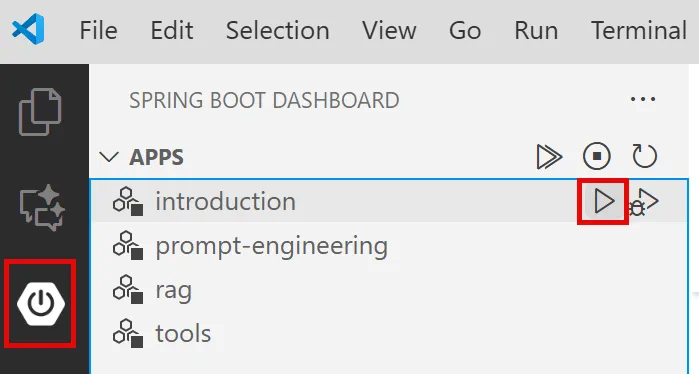
The Spring Boot Dashboard in VS Code — start, stop, and monitor all modules from one place
Option 2: Using shell scripts
Start all web applications (modules 01-04):
Bash:
cd ..  # From root directory
./start-all.sh
PowerShell:
cd ..  # From root directory
.\start-all.ps1
Or start just this module:
Bash:
cd 01-introduction
./start.sh
PowerShell:
cd 01-introduction
.\start.ps1
Both scripts automatically load environment variables from the root .env file and will build the JARs if they don't exist.
Note: If you prefer to build all modules manually before starting:
Bash:
bashcd .. # Go to root directory mvn clean package -DskipTestsPowerShell:
powershellcd .. # Go to root directory mvn clean package -DskipTests
Open http://localhost:8080 in your browser.
To stop:
Bash:
./stop.sh  # This module only
# Or
cd .. && ./stop-all.sh  # All modules
PowerShell:
.\stop.ps1  # This module only
# Or
cd ..; .\stop-all.ps1  # All modules
Using the Application
The application provides a web interface with two chat implementations side-by-side.
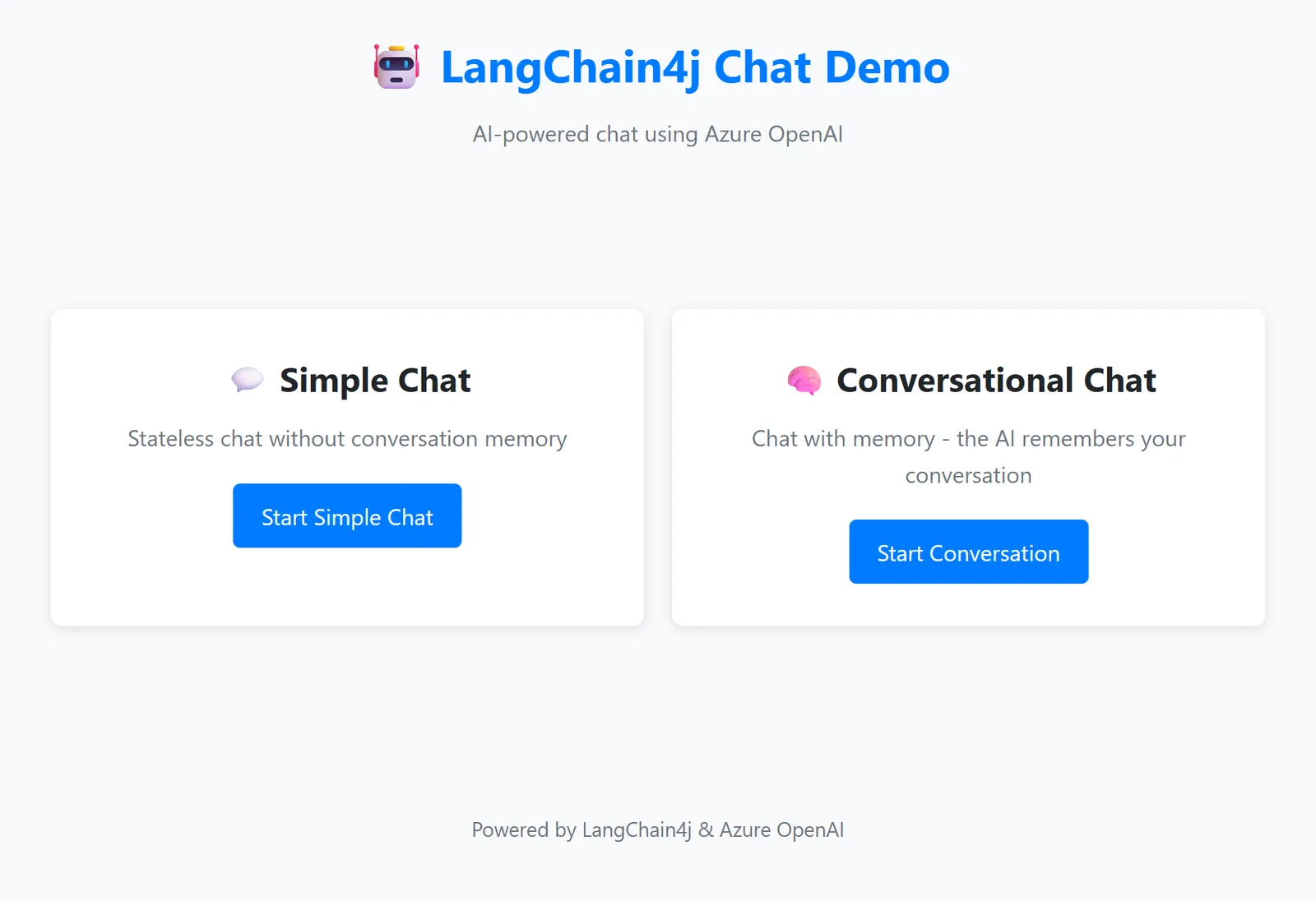
Dashboard showing both Simple Chat (stateless) and Conversational Chat (stateful) options
Stateless Chat (Left Panel)
Try this first. Ask "My name is John" and then immediately ask "What's my name?" The model won't remember because each message is independent. This demonstrates the core problem with basic language model integration - no conversation context.
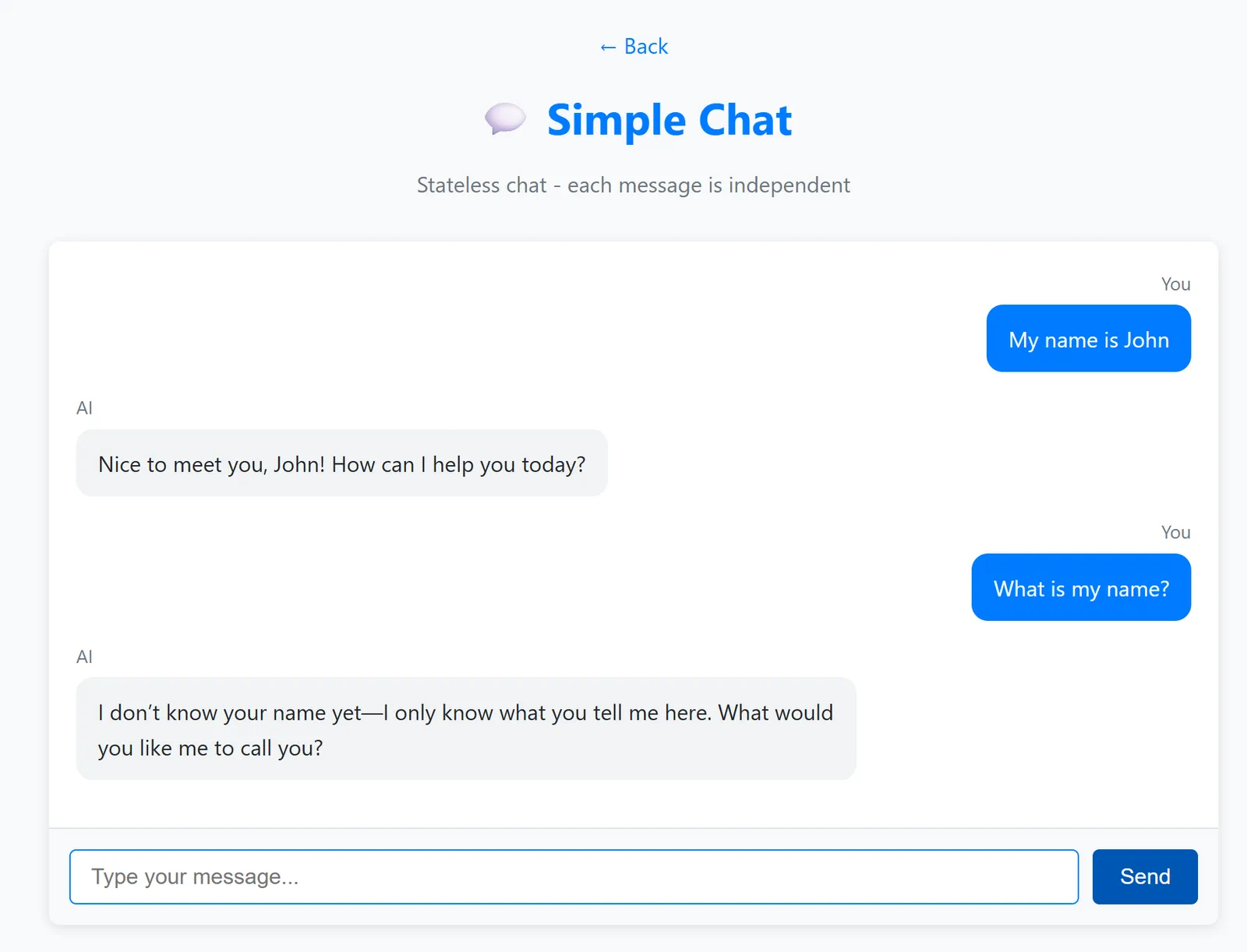
AI doesn't remember your name from the previous message
Stateful Chat (Right Panel)
Now try the same sequence here. Ask "My name is John" and then "What's my name?" This time it remembers. The difference is MessageWindowChatMemory - it maintains conversation history and includes it with each request. This is how production conversational AI works.
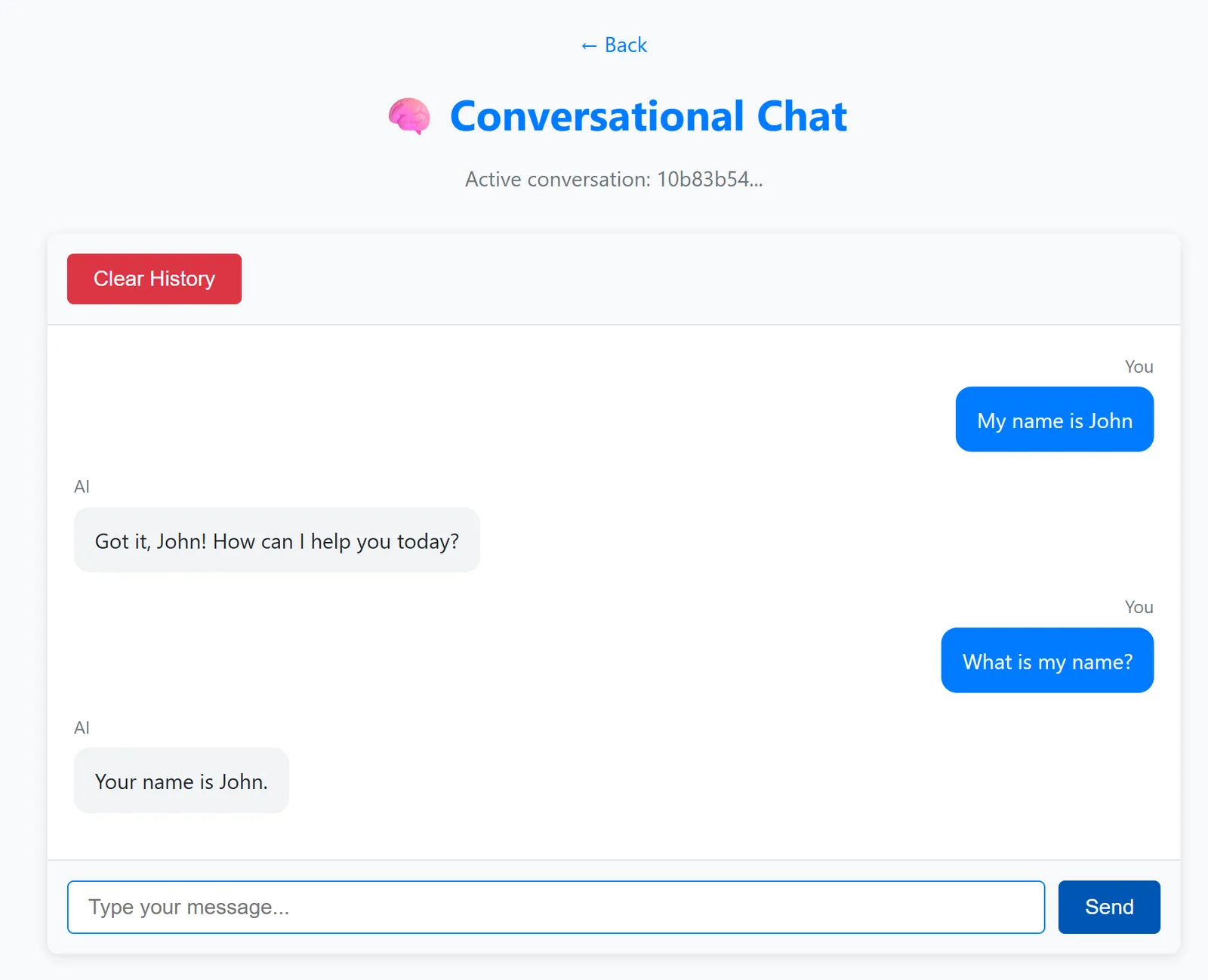
AI remembers your name from earlier in the conversation
Both panels use the same GPT-5.2 model. The only difference is memory. This makes it clear what memory brings to your application and why it's essential for real use cases.
Next Steps
Next Module: 02-prompt-engineering - Prompt Engineering with GPT-5.2
Navigation: ← Back to Main | Next: Module 02 - Prompt Engineering →