步骤 02:技能
用
SKILL.md扩展你的智能体。
技能是在运行时延迟加载的能力,参考 官方文档 了解更多详情。
前置条件
与步骤 00 相同 - 复制配置文件并添加你的 API 密钥:
bash
cp default_workspace/config.example.yaml default_workspace/config.user.yaml
# 编辑 config.user.yaml 添加你的 API 密钥
这节做什么
技能是运行时按需加载的能力。这不是 Openclaw 发明的,是个开放标准,详见 官方文档。
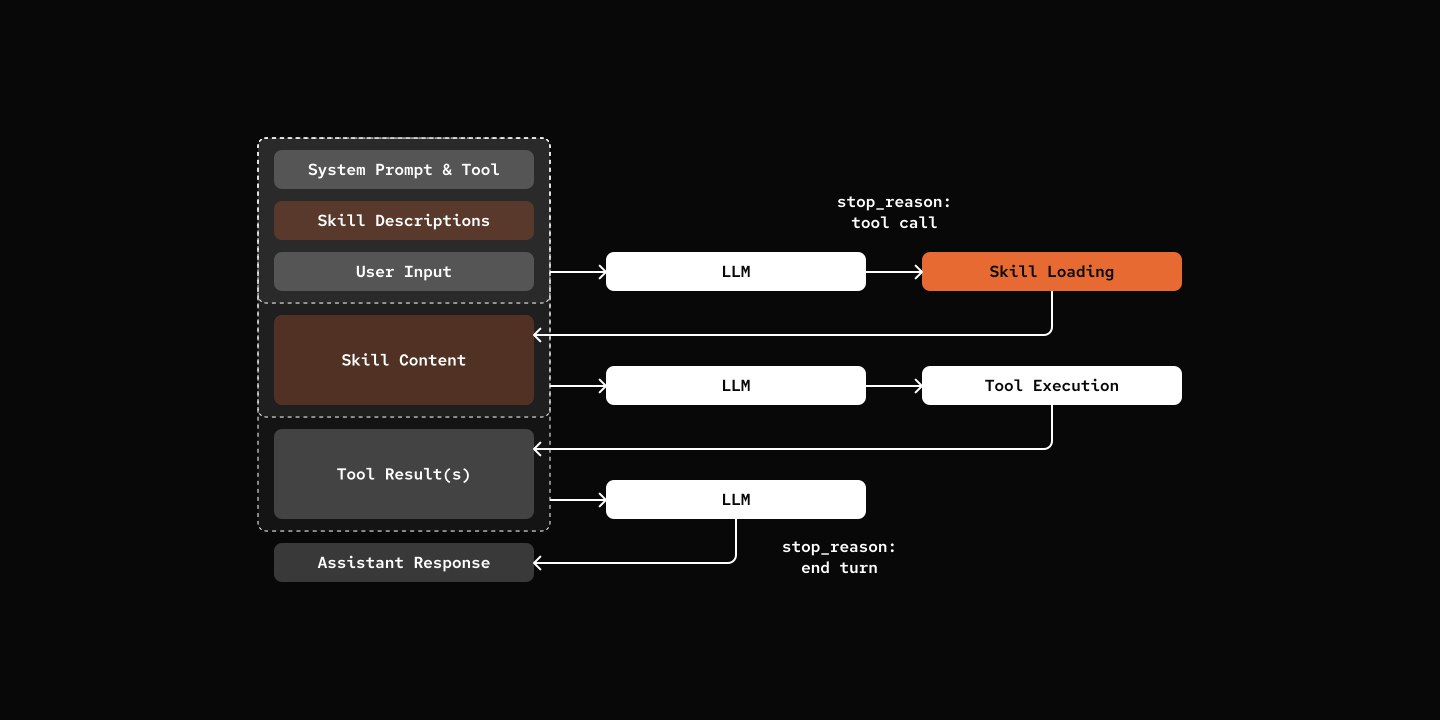
关键组件
- SkillDef:技能定义(id、name、description、content)
- SKILL.md:YAML 前言 + markdown 正文格式
- skill tool:列出可用技能并按需加载内容的动态工具
python
def create_skill_tool(skill_loader: "SkillLoader"):
    """Factory function to create skill tool with dynamic schema."""
    skill_metadata = skill_loader.discover_skills()

    # Build XML description of available skills
    skills_xml = "<skills>\n"
    for meta in skill_metadata:
        skills_xml += f'  <skill name="{meta.name}">{meta.description}</skill>\n'
    skills_xml += "</skills>"

    @tool(name="skill", description=f"Load skill. {skills_xml}", ...)
    async def skill_tool(skill_name: str, session: "AgentSession") -> str:
        skill_def = skill_loader.load_skill(skill_name)
        return skill_def.content

    return skill_tool
两种实现方式
Openclaw 不用单独的工具,而是系统提示注入 + 文件读取。
工具方式(本教程):
skill工具列出可用技能,按需加载内容- 工具描述里带上技能元数据
- 智能体调用工具获取技能
系统提示方式(OpenClaw):
- 技能元数据注入系统提示
- 智能体用
read工具读 SKILL.md - 工具注册表更干净
想把技能做成系统提示的一部分,看 步骤 13:多层提示。
试一试
bash
cd 02-skills
uv run my-bot chat

# You: What skills do you have available?
# pickle: Hi there! 🐱 I have access to two specialized skills:
#
# - **cron-ops**: Create, list, and delete scheduled cron jobs
# - **skill-creator**: Guide for creating effective skills
#
# Is there something specific you'd like to do with either of these, or do you have another task I can help you with?
#
# You: Create a skill to access Weather Information
# pickle: [Loads and create a weather-info skill]
下一步
步骤 03:持久化 - 跨会话记住对话