Agentic Harness Engineering: Observability-Driven Automatic Evolution of Coding-Agent Harnesses
English | 简体中文
📰 News
- [2026-05-14] 🏆 AHE (on GPT-5.5) ranked #3 on the Terminal-Bench 2.0 leaderboard with 84.7% — ranking as of 2026-05-15
- [2026-04-30] ✍️ Blog post on Dawning Road (English & Chinese) — a more detailed account of the exploration behind AHE: Agentic Harness Engineering
- [2026-04-28] 📄 Paper released on arXiv: Agentic Harness Engineering: Observability-Driven Automatic Evolution of Coding-Agent Harnesses
- [2026-04] 🎉 Framework released
🎯 Overview
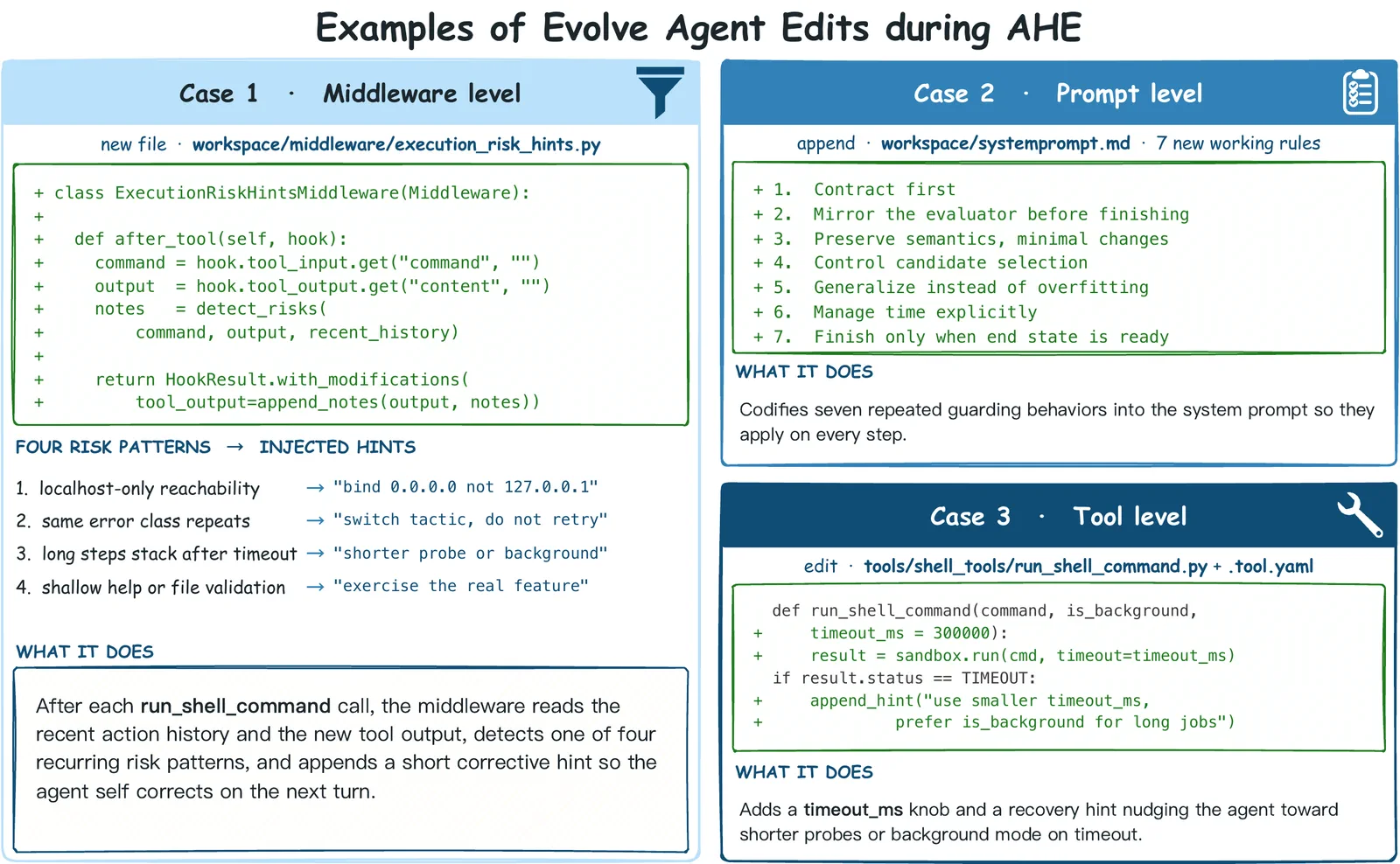
AHE (Agentic Harness Engineering) is an open observability system for automatically evolving the harness around a coding agent. The base model is held fixed; what evolves are the harness components — system prompts, tool descriptions, tool implementations, middleware, skills, sub-agents, and long-term memory.
AHE rests on three observability layers:
- Component observability — NexAU decomposes the harness into seven orthogonal, file-level components, each git-tracked so every edit is auditable and revertible.
- Experience observability — Agent Debugger distills ~10M-token raw traces into layered, sourced reports; the optimizer reads digests by default but can always drill back to any rollout's raw trace.
- Decision observability — Evolve Agent proposes evidence-backed edits, predicts their impact, and is automatically falsified by the next iteration's flipped tasks.
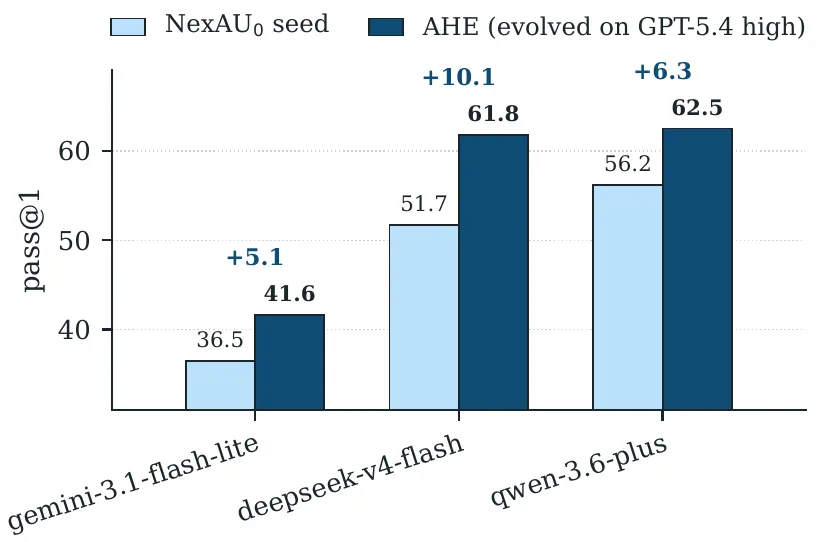
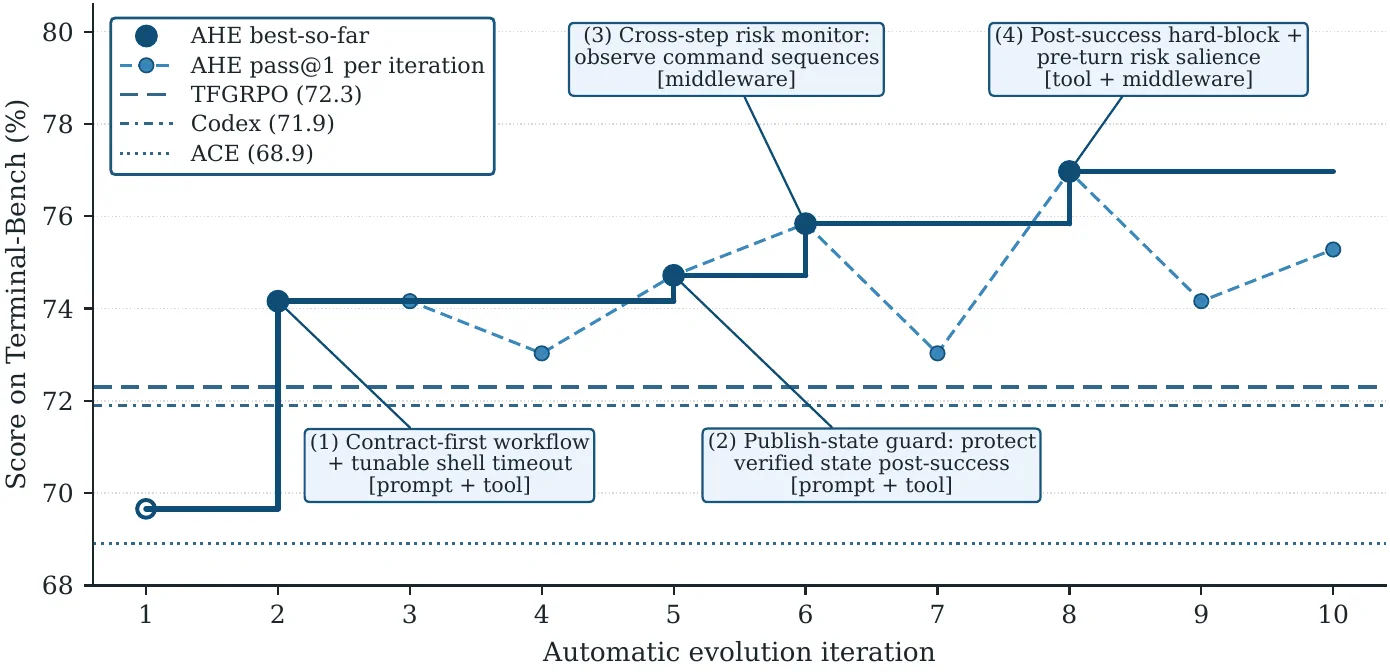
Across ten evaluate → analyze → improve iterations, AHE (Agentic Harness Engineering) lifts Terminal-Bench 2 pass@1 from 69.7% to 77.0% on GPT-5.4, surpasses the hand-written Codex (71.9%) and the self-evolving ACE and TF-GRPO baselines, and produces a frozen harness that transfers without re-evolution to SWE-bench-verified and to four alternate base models, indicating that the evolved components encode general engineering experience rather than benchmark-specific tuning.
🚀 Quick Start
0. Prerequisites
- Python ≥ 3.13
- uv
- tmux
# macOS
brew install uv tmux

# Linux
curl -LsSf https://astral.sh/uv/install.sh | sh
sudo apt install -y tmux
1. Clone + install dependencies
git clone https://github.com/Curry09/agentic-harness-engineering.git
cd agentic-harness-engineering
uv sync
uv syncinstalls every dependency declared inpyproject.toml.
2. Configure environment variables
cp .env.example .envEdit .env. At minimum, set:
| Variable | Purpose |
|---|---|
LLM_API_KEY / LLM_BASE_URL | Main LLM endpoint (code_agent and evolve_agent both consume it) |
E2B_API_KEY | E2B sandbox — see the next subsection for SaaS vs. self-hosted |
SERPER_API_KEY | Web search used by evolve_agent |
ADB_LLM_* and GPT54_LLM_* are optional — leave them unset to fall back to LLM_*, or set them to point ADB / the gpt-5.4 experiment at a stronger model. LANGFUSE_*, BP_HTML_PARSER_*, and FEISHU_WEBHOOK are all optional observability / convenience hooks; see .env.example for the full list.
E2B sandbox: SaaS vs. self-hosted
AHE runs every rollout inside an E2B sandbox. Two deployment modes are supported:
SaaS E2B (default). Set only
E2B_API_KEYand leaveE2B_API_URL/E2B_DOMAINunset (or commented out). The SDK talks toe2b.devautomatically.⚠️ Concurrency cap. SaaS E2B enforces a per-account concurrent sandbox limit tied to your tier. If harbor tries to spawn more sandboxes than the cap allows, the extra sandboxes fail to start and the iteration stalls. Before raising parallelism in your harbor / experiment config, check your tier's quota and stay safely under it.
Self-hosted E2B cluster. Set
E2B_API_KEYand point the SDK at your cluster:dotenvE2B_API_KEY="your_e2b_key" E2B_API_URL="https://your-e2b-host.example.com" E2B_DOMAIN="your-e2b-host.example.com"No shared concurrency cap applies, but the cluster's hardware capacity still does.
3. Build E2B templates (one-time per dataset)
The dataset here is a pack from laude-institute/harbor-datasets — clone the subset you need and point --dataset-dir at its directory.
Every rollout runs inside an E2B sandbox spawned from a prebuilt template that already has uv and the NexAU/harbor venv at /opt/nexau-venv. Build those templates once before launching:
# Build every template declared by the dataset, 16 in parallel
uv run python scripts/build_templates.py --dataset-dir /path/to/dataset -j 16

# Resume after a failure: only retry tasks whose latest E2B build status is ERROR
uv run python scripts/build_templates.py --dataset-dir /path/to/dataset --retry-failed

# Build a specific subset of tasks
uv run python scripts/build_templates.py --dataset-dir /path/to/dataset task_a task_b
The dataset directory must contain one subdir per task with a task.toml declaring [environment].docker_image (or an environment/Dockerfile fallback). Each task's template alias is <task_name> with . replaced by -.