Act 2: Assemble Your Podcast Production Team 🎬
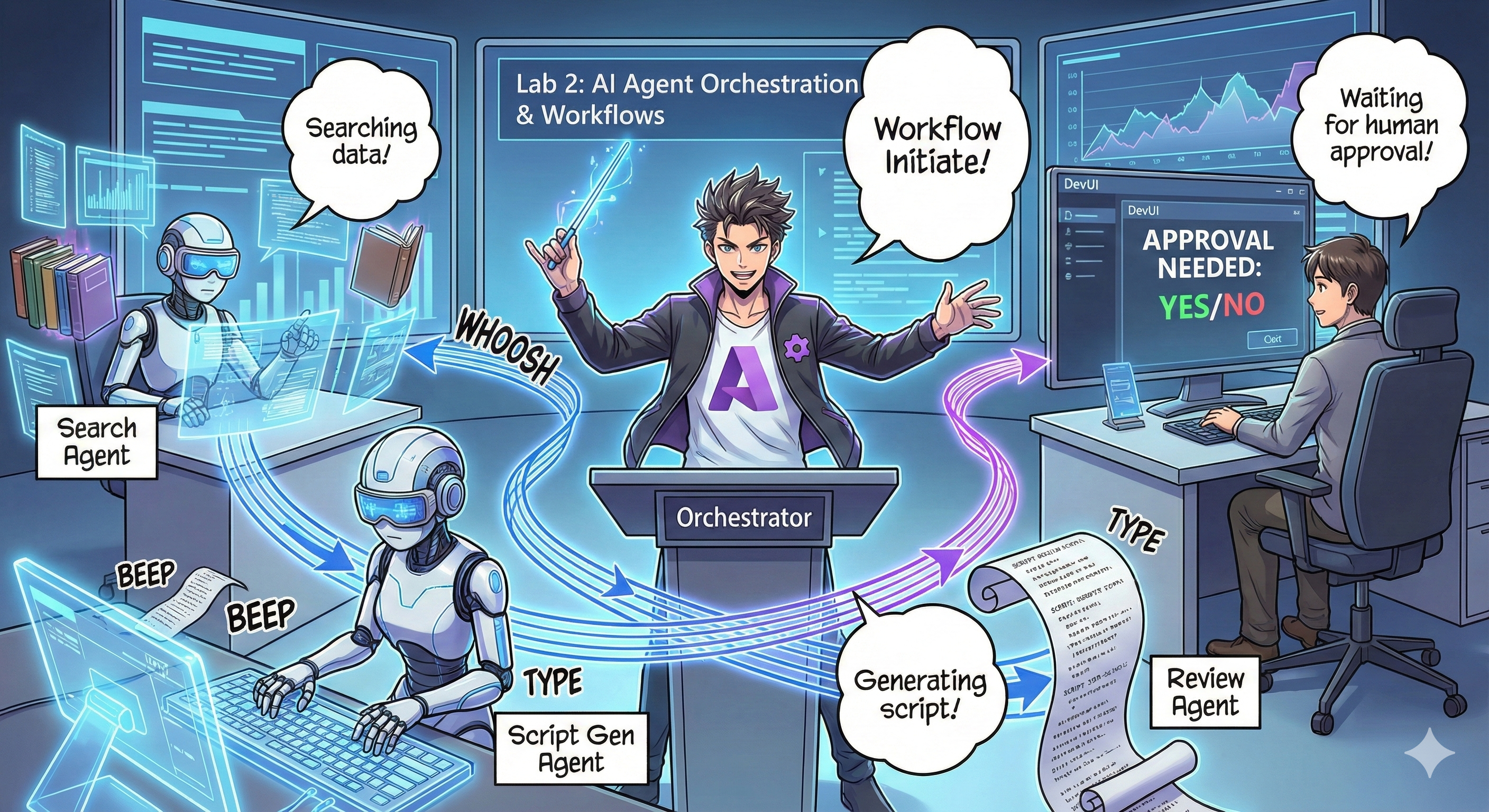
The Plot Thickens
Alex (your AI assistant from Act 1) is awesome, but one agent can't run a whole podcast studio. You need a team:
- 🔍 Research Agent: Scours the internet for fresh info
- ✍️ Script Agent: Turns research into engaging dialogue
- 👤 You (The Editor): Approves scripts or sends them back for rewrites
Welcome to AI Agent Orchestration — where you become the director of your own AI crew. Think Avengers, but for podcast production.
What's Agent Orchestration? (The Simple Version)
Imagine you're running a restaurant. You don't do everything yourself, right? You've got:
- 🍳 A chef who cooks
- 👨🍳 A sous chef who preps
- 👩🍳 A server who delivers
Agent orchestration is the same idea, but with AI. Each agent has a specialty, and you coordinate them to achieve bigger goals. No single agent is overwhelmed, and the work gets done faster.
The Band Analogy 🎸
Your AI agents are like a band:
- Lead singer: The main agent handling customer-facing tasks
- Drummer: Keeps the rhythm, handles background processing
- Bass player: Supports everyone, fetches data
- You (Band Manager): Coordinate it all!
Without coordination? Just noise. With orchestration? Beautiful music.
Why This Matters
One AI agent trying to do everything = burnout. Specialized agents working together = efficiency unlocked! 🚀
Real Talk: Remember trying to research, write, AND edit your podcast alone? Yeah, that sucks. With orchestration, each agent handles what it's best at. You just make the final calls.
Real-World Example: Customer support bots that know when to handle billing vs. tech issues vs. when to call a human. That's orchestration!
Agent vs. Workflow: What's the Difference?
Think of it this way:
🤖 AI Agent = Jazz Musician
- Makes decisions on the fly based on what it hears
- Improvises solutions using its tools
- Thinks with an LLM brain
- Adapts to whatever you throw at it
🎵 Workflow = Orchestra Playing Classical Music
- Follows a score (predefined steps)
- Predictable execution path
- Coordinates multiple agents, humans, systems
- Structured like a recipe
The Magic: Workflows orchestrate agents! You build a workflow that tells agents when to play their part. Best of both worlds. 🎭
Three Ways to Coordinate Your AI Crew
1. 🎯 Centralized (You're the Boss)
One main agent calls all the shots. Think of it like you managing a team — you decide who does what and when.
Pros:
- ✅ Clear leadership (no confusion)
- ✅ Consistent decisions
- ✅ Easy to debug
Use it for:
- Customer service routing ("Is this billing or tech support?")
- Content approval workflows ("Does this script pass?")
- Podcast production (exactly what we're building!)
2. 🤝 Decentralized (Agents Self-Organize)
Agents talk directly to each other and figure things out as a group. Like a group chat where everyone coordinates.
Pros:
- ✅ Scales easily (add more agents anytime)
- ✅ No single point of failure
- ✅ Agents collaborate naturally
Use it for:
- Research teams (each agent explores different sources)
- Brainstorming sessions
- Distributed problem-solving
3. 🔀 Hybrid (Best of Both Worlds)
You set the overall direction, but agents have freedom to self-organize on tasks. Like being a CEO who trusts their team.
Perfect for: Complex projects that need both control and flexibility.
Microsoft Agent Framework: Your Orchestration Toolkit 🧰
Time to build! Here's what you'll use:
The Building Blocks
1. 🧱 Executors (Your Workers)
- What they are: Individual processing units — could be agents or custom logic
- What they do: Take input, do work, produce output
- Think of them as: Stations in an assembly line
2. ➡️ Edges (The Connections)
- What they are: Paths between executors
- What they do: Control message flow ("After A, go to B")
- Think of them as: Arrows on a flowchart
3. 🗺️ Workflows (The Master Plan)
- What they are: The complete graph of executors + edges
- What they do: Define the entire process from start to finish
- Think of them as: Your production pipeline blueprint
Cool Features You'll Love
🛡️ Type Safety: Messages between agents are type-checked. No "Oops, wrong data type" surprises.
🔀 Flexible Routing:
- If-then conditions ("If approved, publish; else, rewrite")
- Parallel processing (multiple agents work simultaneously)
- Dynamic paths (workflow adapts based on results)
🔌 External Integration:
- Connect to APIs
- Add human-in-the-loop checkpoints (you approve before publishing)
- Build request/response flows
💾 Checkpointing: Save progress! If something crashes, pick up where you left off.
🤝 Multi-Agent Coordination:
- Run agents in sequence (A → B → C)
- Run them in parallel (A + B + C at once)
- Hand off between agents
- Collaborative processing
Best Practices (Pro Tips) 🎯
1. Keep It Modular
Each agent should do ONE thing really well. Don't make a "super agent" that does everything — you'll regret it when debugging.
2. Plan for Failures
Agents mess up. Networks fail. Build in error handling and backup plans. Your future self will thank you.
3. Monitor Everything
Track what your agents are doing. Use DevUI (we'll cover this!) to see workflows in action.
4. Optimize Message Size
Don't pass giant files between agents. Keep messages lean and mean for speed.
5. Choose the Right Pattern
Need control? Go centralized. Need scale? Go decentralized. Can't decide? Go hybrid!
DevUI: Your Workflow Debugger 🔍
What's DevUI?
DevUI is like a playground for testing your agents and workflows. It's a web interface where you can:
- 👀 Watch your workflow in action
- 💬 Chat with agents directly
- 🔍 Debug when things go wrong
- 📊 See traces and performance metrics
Important: DevUI is for development only! Don't use it in production. Think of it as your local testing environment.
What Makes It Awesome
- 🖥️ Interactive Web UI: Click, type, test — no command line needed
- 📁 Drag-and-Drop Ready: Upload files, test with different inputs
- 📂 Auto-Discovery: Point it at a folder, it finds all your agents automatically
- 📋 No-Setup Mode: Register agents in code, no folder structure needed
- 🔌 OpenAI Compatible: Works with OpenAI SDK (compatibility FTW!)
- 👁️ Tracing Built-in: See exactly what your agents are doing
How Input Works
DevUI is smart about inputs:
- Testing Agents? You get text boxes and file upload buttons
- Testing Workflows? The UI auto-generates input fields based on what your workflow expects
It's like magic, but it's just good code. ✨
Your Missions: Build a Podcast Studio 🎬
Mission 1: Create a Single Agent with DevUI
The Challenge: Before building a full team, let's test DevUI with one agent: a web search specialist.
What You're Building: A research agent that can search the internet for podcast topics. You'll test it using DevUI's web interface at http://localhost:8090.
Skills You'll Learn:
- 🚀 Launching agents in DevUI
- 🔍 Testing agent responses in real-time
- 🛠️ Building custom tools (web search)
- 📊 Enabling tracing to debug issues
- 🖥️ Using the interactive web UI
The Code:
agent.py: Your SearchAgent with web search superpowers- Uses OllamaChatClient to connect to Qwen
- Implements
web_search()tool function - Launches with
serve()— opens DevUI automatically
Victory Condition: Ask your agent "What's trending in AI?" and watch it search the web! 🎉
Mission 2: Build a Multi-Agent Workflow
The Challenge: Now the real fun begins! Build a complete podcast production workflow with:
- 🔍 Search Agent → Researches your topic
- ✍️ Script Agent → Writes a dialogue between two hosts (in Chinese!)
- 👤 Review Executor → Asks YOU to approve or reject
- 🔄 Loop Back → If rejected, rewrites based on your feedback
Skills You'll Learn:
- 🧱 Creating specialized agents for different jobs
- 🔗 Connecting agents with WorkflowBuilder
- 🔀 Implementing approval loops (human-in-the-loop!)
- 🚦 Conditional routing (if approved vs. rejected)
- 🔧 Building custom executors for business logic
The Workflow:
SearchAgent → ScriptAgent → ReviewExecutor
                             ↑          ↓ (if rejected)
                             ←─────────
The Code:
search_agent/agent.py: Your research specialistgenerate_script_agent/agent.py: Your scriptwriter (writes in Chinese!)workflow/workflow.py: The orchestration magic happens heremain.py: Launches everything in DevUI
Victory Condition: Give a topic, review the script, reject it once to test the loop, then approve! 🎉
Mission 3: Build a Console App
The Challenge: Take your workflow from DevUI and turn it into a slick terminal app with colored output, loading spinners, and file saving. This is production-ready stuff!
Skills You'll Learn:
- ⚡ Running workflows programmatically (no DevUI)
- 📡 Event-driven architecture with streaming
- 🎨 Creating beautiful terminal UIs (colors, spinners, progress bars)
- 💾 Saving final scripts to files
- 🔄 Handling async workflows with Python's asyncio
What It Does:
- Asks you for a podcast topic
- Shows real-time progress ("Search Agent is working...")
- Displays generated script with colors
- Asks for your approval
- Saves approved script to
podcast.txt
The Code:
podcast_app.py: Your main app with event handlingworkflow.py: Reuses the workflow from Mission 2- Handles events:
AgentRunUpdateEvent,RequestInfoEvent,WorkflowOutputEvent - Uses ANSI colors for terminal styling
Victory Condition: Run the app, create a podcast script, and see it saved! You've built a real tool. 🚀
What You've Mastered 🏆
What You've Mastered 🏆
After Act 2, you can:
- ✅ Orchestrate multiple AI agents like a boss
- ✅ Build workflows with sequential AND conditional logic
- ✅ Add human approval checkpoints
- ✅ Use DevUI to test and debug workflows
- ✅ Create production-ready console applications
- ✅ Handle errors gracefully in complex systems
- ✅ Choose the right orchestration pattern for any project
When Things Break 🔧
"My workflow is too complicated!"
The Fix: Break it into smaller sub-workflows. Each workflow should do ONE thing well. Chain them together if needed.
"I can't track what's happening!"
The Fix: Use workflow checkpointing to save state. Enable tracing in DevUI to see every step.
"One agent's error crashes everything!"
The Fix: Add error boundaries. Each agent should handle its own failures and have fallback behavior.
"This is soooo slow"
The Fix: Can any agents run in parallel? Sequential workflows are easy but slow. Look for parallelization opportunities!
Helpful Resources 🔗
- Workflow Docs — Official Microsoft guides
- Orchestration Patterns — IBM's take on it
- Agent Framework GitHub — Browse the source code
- Code Examples — Steal patterns from here
Ready for the finale? You've got your script. Now let's turn it into actual audio! → Act 3: Bring Your Podcast to Life 🎤
Stuck? Confused? Excited? Share in the workshop chat! We're all learning together. 🚀