Orchestration Workflow
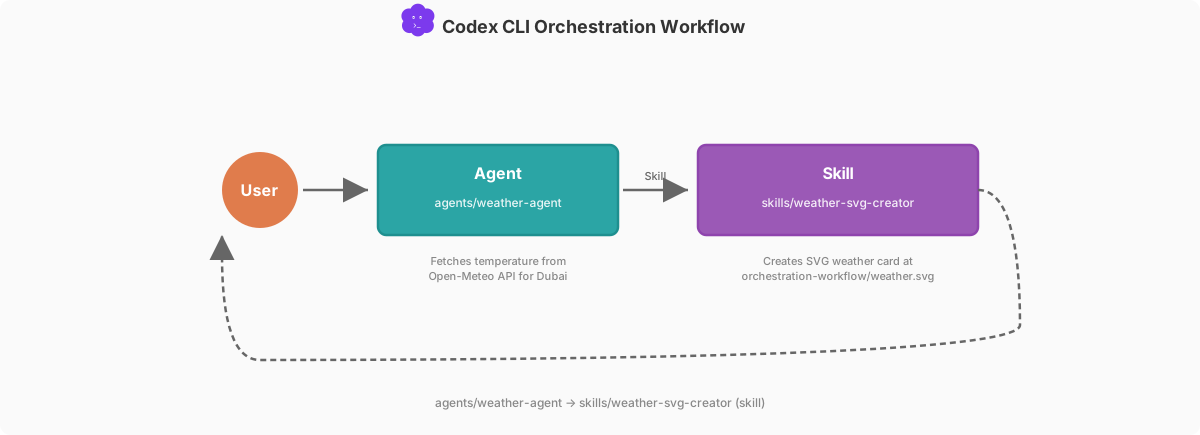
This document describes the Agent → Skill orchestration workflow, demonstrated through a weather data fetching and SVG rendering system.
本文介绍 Agent → Skill 编排工作流,并以一个天气数据抓取与 SVG 渲染系统作演示。
| ← Back to Codex CLI Best Practice |  |
System Overview
The weather system demonstrates two component patterns within a single orchestration workflow:
- Agent:
weather-agentfetches temperature from Open-Meteo using inlineddeveloper_instructions - Skill (independent):
weather-svg-creatoris invoked by the agent to create the visual output
这个天气系统在一条编排工作流里展示了两种组件模式:Agent——weather-agent 使用内联的 developer_instructions 从 Open-Meteo 抓取温度;Skill(独立)——由 agent 调用 weather-svg-creator 生成可视化输出。
This showcases the Agent → Skill architecture pattern, where:
- An agent fetches data and orchestrates the workflow
- A skill creates the visual output independently
它展示了 Agent → Skill 架构模式,其中:agent 负责抓取数据并编排流程;skill 独立产出可视化结果。

codex
> Fetch the current weather for Dubai in Celsius and create the SVG weather card output using the repo.
Specify "in Fahrenheit" in your prompt to switch units. The agent defaults to Celsius if no preference is given.
在提示词里写明「用华氏度」即可切换单位。如果不说偏好,agent 默认用摄氏度。
Output files:
orchestration-workflow/weather.svg— SVG weather cardorchestration-workflow/output.md— Markdown summary
输出文件:orchestration-workflow/weather.svg——SVG 天气卡;orchestration-workflow/output.md——Markdown 小结。
Note: This workflow is not 100% in sync with the Claude Code Best Practice orchestration workflow. Codex CLI does not yet support custom commands (
.codex/commands/) or a stable ask-user tool for mid-turn user interaction. There is an experimentaltool/requestUserInputin the Codex App Server docs and an internalrequest_user_inputcapability gated behind an under-development feature flag in codex-cli 0.115.0, but neither is publicly available for normal CLI usage yet. As a result, the Codex pattern is Agent → Skill instead of Command → Agent → Skill, and the user must specify preferences (e.g., Celsius/Fahrenheit) in the prompt rather than being asked by the agent.
注意:这条工作流与 Claude Code Best Practice 的编排工作流并非 100% 同步。Codex CLI 目前还不支持自定义命令(.codex/commands/),也没有稳定的、用于中途与用户交互的提问工具。Codex App Server 文档里有一个实验性的 tool/requestUserInput,codex-cli 0.115.0 里也有一个受开发中特性开关控制的内部能力 request_user_input,但两者都还不能在常规 CLI 用法中公开使用。因此 Codex 这边的模式是 Agent → Skill,而不是 Command → Agent → Skill;用户必须在提示词里写清偏好(例如摄氏度/华氏度),而不是由 agent 主动询问。
Component Summary
| Component | Role | Example |
|---|---|---|
| Agent | Entry point, data fetching, skill invocation | weather-agent |
| Skill | Creates output independently | weather-svg-creator |
Flow Diagram
╔══════════════════════════════════════════════════════════════════╗
║              ORCHESTRATION WORKFLOW                              ║
║                    Agent  →  Skill                               ║
╚══════════════════════════════════════════════════════════════════╝

                         ┌───────────────────┐
                         │  User Prompt      │
                         │  (specifies C°/F°)│
                         └─────────┬─────────┘
                                   │
                         Step 1 — Agent
                                   │
                                   ▼
         ┌─────────────────────────────────────────────────────┐
         │  weather-agent — Agent ● developer_instructions     │
         └─────────────────────────┬───────────────────────────┘
                                   │
                          Returns: temp + unit
                                   │
                         Step 2 — Skill
                                   │
                                   ▼
         ┌─────────────────────────────────────────────────────┐
         │  weather-svg-creator — Skill ● SVG card + output    │
         └─────────────────────────┬───────────────────────────┘
                                   │
                          ┌────────┴────────┐
                          │                 │
                          ▼                 ▼
                   ┌────────────┐    ┌────────────┐
                   │weather.svg │    │ output.md  │
                   └────────────┘    └────────────┘
Component Details
1. Agent
weather-agent (Agent)
- Location:
.codex/agents/weather-agent.toml - Purpose: Entry point — fetches temperature, invokes skill
- Model: o4-mini
- Registration:
[agents.weather-agent]in.codex/config.toml
The agent's developer_instructions contain the full workflow: fetch from Open-Meteo API using curl (using the caller-provided unit preference, defaulting to Celsius), then invoke /weather-svg-creator with the data.
agent 的 developer_instructions 里写明完整流程:用 curl 从 Open-Meteo API 抓取(使用调用方给出的单位偏好,默认摄氏度),然后用这些数据调用 /weather-svg-creator。
2. Skill
weather-svg-creator (Skill)
- Location:
.agents/skills/weather-svg-creator/SKILL.md - Purpose: Create a visual SVG weather card and write output files
- Invocation: Via skill invocation from the agent
- Outputs:
orchestration-workflow/weather.svg— SVG weather cardorchestration-workflow/output.md— Weather summary
Execution Flow
- User Prompt: User prompts Codex, specifying city and unit preference (e.g., "Dubai in Celsius")
- Agent Start: Codex auto-selects
weather-agentbased on the task - Data Fetching: Agent fetches temperature from Open-Meteo API for Dubai using curl
- Skill Invocation: Agent invokes
/weather-svg-creatorskill- Skill creates SVG weather card at
orchestration-workflow/weather.svg - Skill writes summary to
orchestration-workflow/output.md
- Skill creates SVG weather card at
- Result Display: Summary shown to user with temperature, SVG location, and output file
1)用户提示:用户向 Codex 提问,指定城市与单位偏好(例如「迪拜,用摄氏度」);2)agent 启动:Codex 根据任务自动选中 weather-agent;3)抓取数据:agent 用 curl 从 Open-Meteo API 取回迪拜的温度;4)调用 skill:agent 调用 /weather-svg-creator skill——skill 生成 SVG 天气卡到 orchestration-workflow/weather.svg,并把小结写入 orchestration-workflow/output.md;5)展示结果:向用户展示小结,含温度、SVG 位置和输出文件。
Example Execution
Input: Fetch the current weather for Dubai in Celsius and create the SVG weather card
├─ Step 1: Agent fetches from Open-Meteo API
│  └─ Returns: temperature=29, unit=Celsius, city=Dubai
├─ Step 2: Agent invokes skill → /weather-svg-creator
│  ├─ Creates: orchestration-workflow/weather.svg
│  └─ Writes: orchestration-workflow/output.md
└─ Output:
   ├─ Unit: Celsius
   ├─ Temperature: 29°C
   ├─ SVG: orchestration-workflow/weather.svg
   └─ Summary: orchestration-workflow/output.md
Key Design Principles
- Agent as Entry Point: The agent handles data fetching and skill invocation — no separate orchestrator needed
- Skill for Rendering: The SVG creator runs independently, receiving data from the agent's context
- Inlined Instructions: The agent's
developer_instructionscontain the fetching logic directly, since Codex CLI subagents do not support preloaded skills - Clean Separation: Fetch (agent) → Render (skill) — each component has a single responsibility
- Idempotent Output: Running the workflow again overwrites the previous output cleanly
1)agent 即入口:由 agent 负责抓数据和调用 skill,不需要单独编排器;2)由 skill 负责渲染:SVG 生成器独立运行,从 agent 的上下文接收数据;3)指令内联:抓取逻辑直接写在 agent 的 developer_instructions 里,因为 Codex CLI 的子代理不支持预加载 skill;4)职责分离干净:抓取(agent)→ 渲染(skill),每个组件只做一件事;5)输出幂等:再次运行这条工作流会干净地覆盖上一次的输出。
Architecture Patterns
Agent (Developer Instructions)
# In agent definition (.codex/agents/weather-agent.toml)
name = "weather-agent"
description = "Fetches temperature from Open-Meteo, invokes skill."
developer_instructions = """
Step 1: Fetch from Open-Meteo API (use caller's unit preference, default Celsius)
Step 2: Invoke /weather-svg-creator skill
"""- Self-contained: The agent has everything it needs — data fetching and skill invocation
- No preloaded skills: Codex CLI subagents do not support the
skills:preloading pattern - Prompt-driven skill invocation: The agent tells Codex to invoke
/weather-svg-creatorvia natural language instructions
自包含:agent 具备它所需的一切——抓数据和调用 skill;没有预加载 skill:Codex CLI 的子代理不支持 skills: 预加载模式;提示词驱动的 skill 调用:agent 通过自然语言指令告诉 Codex 去调用 /weather-svg-creator。
Skill (Direct Invocation)
# In skill definition (.agents/skills/weather-svg-creator/SKILL.md)
---
name: weather-svg-creator
description: Creates an SVG weather card...
---- Invoked by agent: Agent instructions tell Codex to invoke
/weather-svg-creator - Independent execution: Runs in the conversation context with the temperature data available
- Receives data from context: Uses temperature data already available in the conversation
由 agent 调用:agent 的指令告诉 Codex 去调用 /weather-svg-creator;独立执行:在对话上下文中运行,温度数据随手可用;从上下文取数据:直接使用对话中已有的温度数据。
Comparison with Claude Code
| Aspect | Claude Code | Codex CLI |
|---|---|---|
| Entry point | Custom Command (.claude/commands/) | Agent (.codex/agents/) |
| User interaction | Command asks via AskUserQuestion tool | User specifies in prompt (no mid-turn asking) |
| Data fetching | Agent with preloaded skill | Agent with inlined developer_instructions |
| Skill invocation | Skill() tool call (deterministic) | /skill-name instruction (prompt-driven) |
| Agent knowledge | Preloaded skills via skills: field | Inlined via developer_instructions |
| Pattern name | Command → Agent → Skill | Agent → Skill |
| Orchestration style | Imperative (explicit tool calls) | Declarative (instruction-based) |