Claude Skills — The Complete Guide
~30 min read · ← Back to README
Mental model: Skills package a workflow into a markdown file Claude can run. Two flavors — officially one system now: slash skills you invoke with
/name, and Agent Skills Claude reaches for automatically when their description matches the task..claude/commands/deploy.mdand.claude/skills/deploy/SKILL.mdboth create/deploy.
⚠️ Security: Skills are executable instructions running with your shell permissions. Only install skills from trusted sources, and read the file before adding it to your project — exactly like reviewing a shell script before sourcing it.
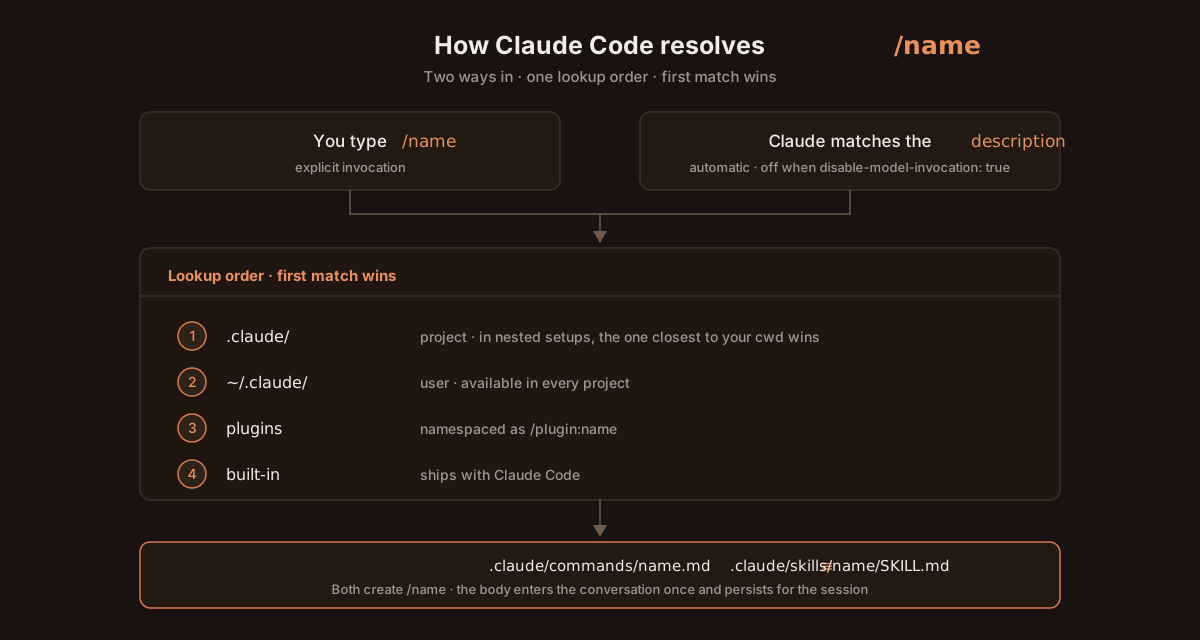
Where Claude looks for /name
First match wins:
| # | Location | Scope |
|---|---|---|
| 1 | .claude/commands/name.md or .claude/skills/name/SKILL.md | Project — in nested .claude/ setups, the one closest to your cwd wins |
| 2 | ~/.claude/commands/… or ~/.claude/skills/… | User — all your projects |
| 3 | Plugin-provided skills | Namespaced as /plugin:name |
| 4 | Built-in skills | Shipped with Claude Code |
Project beats user beats built-in, which is how this repo's custom /review deliberately shadows the built-in one.
Two flavors of skills
| Slash skills (custom slash commands) | Agent Skills | |
|---|---|---|
| File path | .claude/commands/<name>.md | .claude/skills/<name>/SKILL.md |
| Frontmatter | Optional — supports the same fields | Optional, but description is what lets Claude auto-invoke |
| Invocation | User types /<name> | Both — you type /<name>, and Claude auto-invokes when the description matches |
| Scope | Project (.claude/) or user (~/.claude/) | Project (.claude/skills/) or user (~/.claude/skills/) |
| Loading | Loaded on / autocomplete | Metadata pre-loaded; full content read on demand (progressive disclosure) |
| Extras | — | A whole directory for supporting files (scripts/, references/, assets/) |
| Best for | Workflows you want to trigger explicitly | Capabilities Claude should reach for when relevant |
💡 Which to write? Start with slash skills — simpler, no frontmatter, and you control invocation. Reach for Agent Skills when you want Claude to decide when the workflow applies (e.g., "if the user asks about PDFs, invoke
pdf-handler"). The wider community has converged on Agent Skills as the format for shareable capabilities — see The skills ecosystem below.
This guide focuses on slash skills (the seven shipped in this repo's .claude/commands/). Agent Skills follow most of the same patterns — name, description, structured prompt — plus YAML frontmatter and the .claude/skills/<name>/SKILL.md layout.
Contents
- Quickstart: your first skill in 3 minutes
- What are Claude Skills?
- Built-in skills vs custom skills
- Available skills reference
- Using skills in your workflow
- Skills FAQ
- Creating custom skills
- Troubleshooting skills
- Skills best practices
- The skills ecosystem
Quickstart: your first skill (3 minutes)
The fastest path to a working skill:
# 1. Create the skills directory
mkdir -p .claude/commands

# 2. Create a simple skill file
cat > .claude/commands/analyze.md << 'EOF'
# Code Analysis

Analyze the current code for:
- Potential bugs and edge cases
- Performance optimizations
- Code quality improvements
- Security vulnerabilities

Provide specific, actionable recommendations.
EOF

# 3. Start Claude Code (if not already running)
claude

# 4. Use your new skill
# Type: /analyze
That's it. You now have a working skill. Read on for the deeper patterns.
What are Claude Skills?
Claude Skills (a.k.a. custom slash commands) are markdown files in .claude/commands/ that hold structured instructions Claude Code runs on demand. Type /skill-name and Claude loads the file, then applies its instructions to your current context.
| Skills are… | Skills are not… |
|---|---|
| Reusable across projects and sessions | One-shot prompts that vanish after the session |
| Plain-text, version-controlled, peer-reviewable | Hidden, opaque, or model-specific |
| Single-responsibility (one workflow per file) | Catch-all "do everything" instructions |
Discoverable — type / to autocomplete, or /help to list | Discovered through tribal knowledge |
| Context-aware — fold in your current code and files | Static prompt templates |
Built-in skills vs custom skills
Built-in skills (bundled with Claude Code):
| Skill | Purpose | Invocation |
|---|---|---|
dataviz | Design-system guidance for charts, dashboards, and data visualizations (bundled since v2.1.198) | /dataviz |
debug | Troubleshoot the current session and configuration | /debug |
keybindings-help | Customize keyboard shortcuts and modify ~/.claude/keybindings.json | /keybindings-help |
Custom skills (shipped in this repository):
| Skill | Format | What it does |
|---|---|---|
/pr | Slash | Automated pull request creation with branch management and commit splitting |
/review | Slash | Multi-perspective code review (PM, Dev, QA, Security, DevOps, UX) |
/test | Slash | Unit testing best-practices checklist for LLM-driven test generation |
/tdd | Slash | Complete test-driven development workflow with Red-Green-Refactor cycle |
/five | Slash | Five Whys root-cause analysis for debugging and problem-solving |
/ux | Slash | User-experience designer persona for empathetic, user-centric design |
/todo | Slash | Task management in todos.md with due dates and completion tracking |
/claude-md-review | Agent Skill | Audits a CLAUDE.md for vagueness, dead file paths, stale commands, and bloat — and Claude reaches for it on its own when a project's instructions look like the problem |
The first seven live in .claude/commands/ as plain markdown. /claude-md-review lives in .claude/skills/ and is the worked example of the frontmatter contract — read it alongside the field table below.
💡 Pro tip: Start with simple skills like
/fiveor/todoto understand the pattern, then progress to complex workflows like/tddor/review.
Available skills reference
🔹 Workflow & process
/pr — Pull Request Creation
- Automatically creates feature branch from current changes
- Formats code using project linter (e.g., Biome)
- Intelligently splits changes into logical, atomic commits
- Generates descriptive commit messages for each unit of work
- Pushes to remote and creates PR with summary and test plan
- Perfect for: Teams requiring consistent PR quality and commit hygiene
/tdd — Test-Driven Development
- Enforces strict Red-Green-Refactor cycle
- Guides through: failing test → minimal implementation → refactoring
- Maintains feature notes in
notes/features/for long-term memory - Ensures tests pass before commits, commits only when green
- Integrates with feature branch workflows
- Perfect for: Projects requiring high code quality and comprehensive test coverage
🔹 Quality & review
/review — Multi-Perspective Code Review
Six-role review framework:
- Product Manager — Business value, user experience, strategic alignment
- Developer — Code quality, maintainability, performance, best practices
- QA Engineer — Test coverage, edge cases, regression risks
- Security Engineer — Vulnerabilities, data handling, compliance (OWASP, GDPR)
- DevOps — CI/CD integration, infrastructure, monitoring
- UI/UX Designer — Visual consistency, usability, accessibility
- Enforces "fix now, not later" philosophy for all recommendations
- Posts comprehensive review directly to GitHub PR as a comment
- Perfect for: Critical PRs, production releases, architecture changes
- Note: When run on your own PR, this posts a review comment from your account
/test — Unit Testing Best Practices
- Comprehensive checklist for writing robust unit tests
- Focuses on testing internal logic, not API endpoints
- Covers context verification, test structure, test cases, isolation, assertions
- Includes strict guidance against over-mocking and framework bindings
- Encourages spawning sub-agents for complex test flows
- Perfect for: Ensuring consistent, maintainable test suites
🔹 Persona & methodology
/five — Five Whys Root-Cause Analysis
- Systematic investigation technique drilling from symptoms to root causes
- Iteratively asks "why" to uncover fundamental issues
- Validates findings by working backwards from root cause
- Proposes solutions addressing systemic problems, not just symptoms
- Handles both technical and process-related causes
- Perfect for: Debugging production incidents, understanding recurring bugs
/ux — User Experience Designer Persona
Claude becomes an empathetic UX specialist:
- Conducts user research identifying needs, pain points, motivations
- Designs accessible, aesthetically pleasing interfaces
- Prioritizes user needs above all other considerations
- Creates thoughtful micro-interactions and anticipates edge cases
- Generates precise prompts for AI UI generation tools
- Perfect for: Design-first projects, prototyping, user-centric product development
🔹 Task management
/todo — Project Task Manager
- Manages
todos.mdin project root with Active/Completed sections - Supports due dates/times with smart sorting (due tasks prioritized)
- Commands:
add,complete,remove,undo,list,past due,next - Auto-numbers todos for easy reference
- Tracks completion timestamps
- Perfect for: Sprint planning, personal task tracking, session continuity
Using skills in your workflow
Basic invocation:
# In Claude Code CLI
/skill-name

# With arguments (for skills that accept them)
/todo add "Fix navigation bug"
/review https://github.com/user/repo/pull/123
Workflow prerequisites:
Before using these workflow combinations, ensure you have:
- ✅ Git repository initialized (
git init) - ✅ Remote repository configured (
git remote -vshows your repo) - ✅ Commit permissions to your repository
- ✅ GitHub authentication configured (for
/reviewand/prskills) - ✅ Skills installed in
.claude/commands/or~/.claude/commands/ - ✅ Current working directory is your project root
Workflow execution notes:
- Skills execute sequentially — wait for each to complete before invoking the next
- Skills do not auto-chain — you must type each
/skill-namecommand manually - If a skill fails, address the error before proceeding to the next step
- Use
/helpto verify skill availability before running workflows
Recipe 1: Complete feature development
# Start with TDD workflow
/tdd
# Claude guides through Red-Green-Refactor cycle

# Ensure tests pass
/test
# Validates test coverage and quality

# Create PR with automatic commit splitting
/pr
# Creates branch, commits, and opens PR

# Conduct comprehensive review (optional — creates PR comment)
/review
Common issues:
/tddfails: Ensure tests are properly written; review test syntax/testreports failures: Fix failing tests before proceeding to/pr/prmerge conflicts: Resolve conflicts manually, then retry/reviewauth failure: Rungh auth loginto configure GitHub CLI- No Biome configured:
/prassumes Biome formatter; install or modify skill
Recipe 2: Bug investigation & resolution
# Identify root cause
/five
# Five Whys analysis to find systemic issues

# Implement fix using TDD
/tdd
# Write failing test, implement fix, refactor

# Verify with unit tests
/test
# Ensure all tests pass

# Submit PR
/pr
Common issues:
/fiveidentifies unfixable issue: Root cause may require architecture changes- Bug in dependency: Report upstream; consider workaround or fork
/tddtests pass but bug persists: Review test coverage; bug may be in untested code
Recipe 3: UX-focused development
# Start with user-centric design
/ux
# Claude adopts UX designer persona

# Implement with tests
/test
# Build with test coverage

# Review for accessibility and usability
/review
# Multi-perspective review including UX
Common issues:
/uxsuggestions conflict with brand: Provide brand guidelines as context/reviewfinds accessibility violations: Address WCAG issues before merge- Performance issues with new UI: Use browser profiling tools; optimize assets
💡 Workflow tips:
- Chain skills sequentially — Skills execute one at a time; wait for completion before invoking the next.
- Combine with hooks for automatic skill invocation on events (see Hooks section).
- Use
/todoat session start to maintain context across interruptions.- Run
/reviewon your own PRs before requesting human review (note: posts as a PR comment from your account).- Skills don't auto-chain — each
/skillmust be invoked manually; they don't call each other automatically.
Skills FAQ
Q: What's the difference between "skills" and "custom slash commands"?
In this guide, "slash skills" and "custom slash commands" are interchangeable — both are markdown files in .claude/commands/ invoked with /skill-name. The broader community also uses "skills" to mean Agent Skills (a separate, model-invoked format with YAML frontmatter at .claude/skills/<name>/SKILL.md). See Two flavors of skills at the top of this guide for the comparison.
Q: Are skills safe to use from third-party repositories?
Treat skills like executable code — review them before running. Skills can:
- Read and modify files in your project
- Execute commands via Claude Code
- Access your GitHub/API credentials if configured
Always review .claude/commands/ files from cloned repositories before invoking skills.
Q: How do I know if a skill is working correctly?
- Check skill autocomplete: type
/and your skill name should appear - Test with simple input: invoke the skill with basic arguments
- Review Claude's response: skill instructions should be reflected in output
- Check for errors: run
claude --debugto see detailed execution logs
Q: Can I modify built-in skills?
No. Built-in skills (/dataviz, /debug, /keybindings-help, …) ship with Claude Code and cannot be modified directly. You can create your own custom skill with a similar name for custom behavior — project-level skills win name collisions (this repo's custom /review intentionally shadows the built-in /review that way).
Q: How do I share skills with my team?
- Create skills in
.claude/commands/(project directory) - Commit skill files to version control:
git add .claude/commands/ - Document skills in your project README
Q: Do skills work offline?
Yes. Skills are local markdown files read by Claude Code. No network connection is required to invoke skills, though the AI model execution requires internet access.
Q: What happens if I have two skills with the same name?
Project skills (.claude/commands/) take precedence over global skills (~/.claude/commands/). The project-level skill executes.
Q: Can skills accept arguments?
Yes. Type arguments after the skill name:
/todo add "Fix navigation bug"
/review https://github.com/user/repo/pull/123
Claude automatically sees your arguments as context — no special syntax needed.
Q: How long do skill workflows typically take?
- Simple skills (5–20 lines): 10–30 seconds
- Medium skills (20–100 lines): 1–3 minutes
- Complex skills like
/tdd: 5–15 minutes depending on implementation size
Q: Can I cancel a running skill midway?
Press Ctrl+C to interrupt Claude Code. Some changes may be partially applied; review with git status and revert with git checkout -- <file> if needed.
Q: Can I run skills in parallel?
No — skills execute sequentially within a single Claude Code session. For parallel work, open multiple terminals with separate Claude Code sessions.
Creating custom skills
⚠️ Security note: When creating global skills (
~/.claude/commands/), they execute in all your projects. Only add skills you trust completely. For team projects, use project-specific skills (.claude/commands/) and commit them to version control for review.
Skill file requirements
File format:
- Extension: Must be
.md(markdown files only) - Encoding: UTF-8 (required; UTF-16 not supported)
- Line endings: Both LF (Unix) and CRLF (Windows) supported
- File size: Recommended max 50KB per skill (larger files may cause performance issues)
- Naming: Lowercase with hyphens (e.g.,
my-skill.md→/my-skill)
File system:
- Symlinks: Supported (
.claude/commands/can contain symlinks to skill files) - Permissions: Files must be readable by your user account
- Location: Must be in
.claude/commands/(project) or~/.claude/commands/(global)
Execution context:
- Git: None required — skills work in any directory (git or non-git)
- Network: None required — skills execute locally without network access
- Offline support: ✅ Full support — skills are read from local files
Step-by-step: building your first skill
1. Create the skill file
# Project-specific skill (recommended for team projects)
mkdir -p .claude/commands
touch .claude/commands/my-skill.md

# Global skill (available in all projects — use with caution)
mkdir -p ~/.claude/commands
touch ~/.claude/commands/my-skill.md
💡 Always use project-specific skills (
.claude/commands/) for team workflows — team members can review changes through version control.
2. Define the skill structure
Skills use markdown with structured sections:
# Skill Name

Brief description of what this skill does.

## Behavior
- Bullet list of what Claude should do
- Specific actions to take
- Expected outcomes

## Guidelines (optional)
- Best practices to follow
- Constraints or requirements
- Formatting rules

## Examples (optional)
### Example 1: Use case description
[Show example input/output or workflow]
3. Example: simple skill
A simplified version of this repo's .claude/commands/five.md (the real file adds usage notes, variables, and worked examples):
# Five Whys Analysis

Apply the Five Whys root cause analysis technique to investigate issues.

## Steps
1. Start with the problem statement
2. Ask "Why did this happen?" and document the answer
3. For each answer, ask "Why?" again
4. Continue for at least 5 iterations or until root cause is found
5. Validate the root cause by working backwards
6. Propose solutions that address the root cause

## Notes
- Don't stop at symptoms; keep digging for systemic issues
- Multiple root causes may exist — explore different branches
💡 Copy this to
.claude/commands/five.mdto use it immediately — or grab the full version from this repo.
4. Example: complex skill (complete file)
Complete contents of .claude/commands/pr.md:
# Create Pull Request Command

Create a new branch, commit changes, and submit a pull request.

## Behavior
- Creates a new branch based on current changes
- Formats modified files using Biome
- Analyzes changes and automatically splits into logical commits when appropriate
- Each commit focuses on a single logical change or feature
- Creates descriptive commit messages for each logical unit
- Pushes branch to remote
- Creates pull request with proper summary and test plan

## Guidelines for Automatic Commit Splitting
- Split commits by feature, component, or concern
- Keep related file changes together in the same commit
- Separate refactoring from feature additions
- Ensure each commit can be understood independently
- Multiple unrelated changes should be split into separate commits
5. Skill scope: project vs global
| Location | Scope | Use case |
|---|---|---|
.claude/commands/ | Project-specific | Team workflows, project conventions, domain-specific tasks |
~/.claude/commands/ | Global (all projects) | Personal preferences, universal patterns, cross-project utilities |
6. Test your skill
# Start Claude Code in your project
claude

# Invoke your skill
/my-skill

# Observe Claude's behavior and iterate on the skill file
💡 Creation tips:
- Start simple — A 10-line skill is better than none.
- Be specific — Vague instructions yield vague results.
- Use examples — Show Claude what good output looks like.
- Iterate — Skills improve with use; refine based on results.
- Version control — Commit skills to
.claude/commands/for team sharing.
Troubleshooting skills
Common issues
1. /skill-name not recognized
- Cause: Skill file doesn't exist or wrong location
- Solution: Verify file exists in
.claude/commands/skill-name.md
2. Skill not executing
- Cause: File permissions issue
- Solution: Run
chmod +r .claude/commands/skill-name.md
3. Wrong skill executes
- Cause: Name collision between project and global skills
- Solution: Project skills (
.claude/commands/) take precedence over global
4. Skill content ignored
- Cause: Markdown formatting errors
- Solution: Validate markdown syntax, ensure proper heading levels
5. Unexpected behavior
- Cause: Skill instructions unclear
- Solution: Make instructions more explicit and specific
6. Changes not reflected
- Cause: Old session cache
- Solution: Restart Claude Code session to reload skill files
Debugging tips
- Test in isolation — Create a minimal test skill to verify the system works
- Check file paths — Use absolute paths:
ls -la .claude/commands/to verify files exist - Review logs — Run
claude --debugto see detailed execution logs - Validate markdown — Use a markdown validator to check file syntax
- Start fresh — Close and restart Claude Code session after creating/modifying skills
Error messages
- "Command not found" — Skill file doesn't exist at expected path
- "Permission denied" — Skill file not readable; check permissions
- No error but skill doesn't work — Instructions may be too vague; add specific steps
Version requirements
- No special installation needed — skills work out of the box with any current Claude Code installation.
- One system — custom slash commands and Agent Skills are unified:
.claude/commands/<name>.md≡.claude/skills/<name>/SKILL.md. - Open standard — skills follow the agentskills.io specification (released Dec 18, 2025), adopted by ~40 products including OpenAI Codex, GitHub Copilot, Cursor, and Gemini CLI.
- Plans — available on Pro, Max, Team/Enterprise, and usage-based API billing (Claude Code isn't included in the Free plan).
- All models supported — works across the current model lineup.
Edge cases & gotchas
| Scenario | Behavior |
|---|---|
Wrong extension (not .md) | ❌ Not loaded — only .md files become skills |
| UTF-16 encoded file | ❌ May fail — re-save as UTF-8 |
| Skill file > 100KB | ⚠️ Slow — split into smaller composable skills |
Symlinks in .claude/commands/ | ✅ Supported |
| Non-git directory | ✅ Works — skills don't require git |
| Offline use | ✅ Works — skills are local files |
| Windows CRLF line endings | ✅ Supported |
Skills best practices
✅ Do
- Give skills descriptive names — Use kebab-case:
create-api-endpoint.md, notcommand.md - Focus on one workflow — Split complex processes into composable skills
- Include examples — Show expected input/output patterns
- Document arguments — Skills can accept arguments passed after the slash command
- Test with edge cases — Invoke skills with missing/invalid inputs
- Share with your team — Commit to
.claude/commands/and document in README - Use structured sections — Behavior, Guidelines, Examples, Notes
- Leverage existing skills — Reference other skills in workflows (e.g., "Run
/testafter implementation")
Passing arguments to skills
# Single argument
/todo add "Fix navigation bug"

# Multiple words (use quotes)
/review https://github.com/user/repo/pull/123

# URL or file path
/analyze src/components/Button.tsx
Accessing arguments in skills: Arguments are automatically available to Claude as context. In your skill file, reference them naturally:
# Code Review Skill

Analyze the code at the provided file path or URL.

## Steps
1. Read the provided argument (file path or URL)
2. Perform code review...
Note:
$ARGUMENTSis a supported placeholder in custom commands/skills — this repo's own.claude/commands/review.mduses it (**PR Link/Number**: $ARGUMENTS). Plain trailing text after the command also works: Claude sees whatever you type after/skill-nameas part of the request context. See the official commands reference.
❌ Don't
- Overload skills — A skill doing 10 things is 10 skills in disguise
- Use ambiguous language — "Make it better" → "Refactor for readability: extract functions >20 lines"
- Duplicate built-in commands — Check existing commands first with
/help - Forget to test — Always run skills in real scenarios before sharing
- Ignore naming conventions — Consistent naming improves discoverability
- Hardcode project paths — Use relative paths or variables
- Skip documentation — Future you (and teammates) will need context
- Run untrusted skills — Always review third-party skills before executing them
- Grant excessive permissions — Skills should request only the minimum permissions needed
Advanced patterns
Skill composition — Reference other skills within a skill:
## Workflow
1. Run `/five` to identify root cause
2. Create feature branch
3. Implement fix using `/tdd`
4. Submit with `/pr`
⚠️ Circular reference prevention: Skills can reference other skills in their workflows, but be cautious:
- Avoid circular calls: Don't create skill A that calls skill B that calls skill A
- No automatic chaining: Each
/skill-namemust be invoked manually; skills don't auto-execute other skills - Claude interprets references: When a skill says "Run
/test", Claude sees this as an instruction, not automatic execution - Manual workflow: Users still need to type each skill command themselves
Conditional logic — Guide Claude's decision-making:
## Behavior
- If tests exist: Run tests first
- If no tests: Create tests following `/test` guidelines
- If tests fail: Fix code, do not modify tests
Subagent coordination — Delegate complex tasks:
## Implementation
1. Spawn 4 subagents (Task tool) for parallel work:
   - Agent 1: Generate test cases
   - Agent 2: Implement core logic
   - Agent 3: Create documentation
   - Agent 4: Review security implications
2. Integrate results into cohesive implementation
Performance considerations
| Complexity | Token usage | Response time | Best for |
|---|---|---|---|
| Simple (5–20 lines) | Lower | Faster | Single-step tasks, checklists |
| Medium (20–100 lines) | Moderate | Moderate | Multi-step workflows, personas |
| Complex (100+ lines) | Higher | Slower | Comprehensive reviews, TDD cycles |
Note: Actual performance varies based on skill content, model selection, server load, and network conditions. Token counts and response times are approximate guidelines only.
🎯 Optimization tips:
- Use subagents for parallelizable work within complex skills.
- Split mega-skills into smaller, composable units.
- Cache common patterns as skills instead of re-prompting.
- Use Fast Mode (see Fast Mode) when latency matters in skill-heavy workflows.
- Stack skills —
/skill-a /skill-b …invocations run in sequence (v2.1.199+).
The skills ecosystem
A vibrant community has formed around Agent Skills since Anthropic open-sourced the SKILL.md format. Beyond the seven custom slash skills shipped in this repo, you'll find an official Anthropic catalog, multiple marketplaces with thousands of skills indexed, and curated "awesome" lists that point at high-signal contributors.
Official Anthropic resources
| Resource | What it is |
|---|---|
| anthropics/skills | Anthropic's public repo of authored Agent Skills (PDF/document creation, brand guidelines, slide generation, etc.). The reference implementation for the SKILL.md format. |
| agentskills.io | Open specification for the SKILL.md format and frontmatter contract. Source on GitHub → agentskills/agentskills. |
| Anthropic Skills docs | Authoritative usage guide — invocation, scopes, packaging, sharing. |
Marketplaces & registries
| Marketplace | URL | Focus |
|---|---|---|
| SkillHub | skillhub.club | ~100K+ AI-evaluated skills auto-indexed from public GitHub repos. Searchable by category. |
| SkillsMP | skillsmp.com | Millions of skills aggregated across GitHub (2M+ advertised). Independent (not Anthropic-affiliated). Filters by occupation, popularity, author. |
| Smithery | smithery.ai/skills | Originally an MCP-server registry; now covers Agent Skills too. Includes a CLI for discovery and install. |
| skills.sh | skills.sh | Vercel's open agent-skills ecosystem (launched January 2026). |
📦 Official plugin marketplaces: Claude Code also ships two Anthropic-run plugin marketplaces — claude-plugins-official (auto-registered on first launch) and the reviewed community marketplace (
/plugin marketplace add anthropics/claude-plugins-community). Plugins can bundle skills, commands, agents, hooks, and MCP servers in one install — see the plugins docs.
⚠️ Marketplaces aggregate community content and don't vet every entry. Read
SKILL.md(and anyscripts/it references) before installing — the same care you'd apply to a shell script.
Curated "awesome" lists
| List | Slant |
|---|---|
| travisvn/awesome-claude-skills | Broadest community list with creation guides, security notes, and best-practice picks. |
| ComposioHQ/awesome-claude-skills | 1000+ production-ready skills organized by category; integrates with Composio's Connect-Apps for 500+ external apps. |
| jesseotremblay/claude-skills | Skill-creator toolkit + business-analysis library (SWOT, market sizing, market research). |
| mattpocock/skills | Engineering-focused composable skills (TDD, debugging, triage). Includes the well-known grill-me. |
Notable community skills, by category
These are skills that surface repeatedly across SkillHub, SkillsMP, and the awesome lists. Most are Agent Skills (SKILL.md) — install via the marketplace UI, the skill-installer skill, or by copying the folder into .claude/skills/<name>/.
Engineering & development
| Skill | What it adds |
|---|---|
backend-dev-guidelines | House-style backend patterns and review checklist |
nodejs-backend-patterns | Node.js architecture, async patterns, error handling |
react | Component conventions, hook idioms, and refactoring guidance |
frontend-design | Design-system implementation aligned with brand tokens |
senior-data-engineer | Data engineering reviewer / mentor persona |
Quality, review & debugging
| Skill | What it adds |
|---|---|
github-code-review | Structured GitHub PR reviews with inline comments |
peer-review | Multi-perspective peer review (engineering + product lenses) |
docs-review | Documentation audit — clarity, accuracy, structure |
verification-quality | Verifies output meets a defined quality bar before sign-off |
evaluation | Systematic output evaluation with rubrics |
systematic-debugging | Methodical bug investigation with hypothesis tracking |
Skill & tool development
Reasoning & process
| Skill | What it adds |
|---|---|
brainstorming | Structured brainstorming protocols (SCAMPER, lateral, etc.) |
scientific-critical-thinking | Critical-thinking framework for claim evaluation |
scientific-problem-selection | Picking tractable, high-leverage problems |
prompt-engineering-patterns | Reusable prompting patterns and anti-patterns |
behavioral-modes | Switch Claude into focused working modes (architect, reviewer, …) |
Research & business
| Skill | What it adds |
|---|---|
market-research-reports | Structured market research deliverable |
market-sizing-analysis | TAM / SAM / SOM methodology, defensible bottom-up |
product-strategist | Product strategy persona — positioning, GTM, prioritization |
Memory, context & ops
| Skill | What it adds |
|---|---|
memory-systems | Long-term memory patterns for agents |
context-optimization | Manage the context window efficiently across long sessions |
context-degradation | Recover gracefully when context drift sets in |
file-search | Improved repository search heuristics |
reasoningbank-agentdb | Reasoning + agent-DB integration patterns |
Workflow & collaboration
| Skill | What it adds |
|---|---|
pair-programming | Structured pair-programming sessions with the model |
agentic-jujutsu | Agent orchestration techniques for multi-step problems |
superpowers / using-superpowers | Power-user toolkit; community-maintained meta-skill |
Output formats & creative
| Skill | What it adds |
|---|---|
pptx | Generate PowerPoint decks programmatically |
algorithmic-art | Generative-art workflows and reusable scaffolds |
Installing a community skill
Three common paths, listed in order of friction:
- Marketplace one-click install. SkillHub, SkillsMP, and Smithery offer a copy/install button that drops the skill folder into the right place.
- Install via
skill-installer. Once you've installedskill-installeronce, ask Claude "install the X skill from Y registry" and it handles the rest. - Manual copy from source. Clone the source repo and drop
<name>/SKILL.md(plus anyscripts/,references/,assets/subfolders) into.claude/skills/<name>/for project scope or~/.claude/skills/<name>/for user scope.
# Manual install of a community Agent Skill
mkdir -p .claude/skills
git clone https://github.com/<author>/<repo>.git /tmp/src