Better Harness(QoderAI)
Better Harness
English · 简体中文
英文版 · 简体中文(语言切换)
Delegate coding to agents. Improve the loop around them.
Better Harness provides open-source insights for the Agent Work Loop. It runs through your Coding Agent and turns project and session evidence into prioritized improvements and verifiable next steps. Missing evidence stays explicit.
Better Harness 为 Agent Work Loop(Agent 工作循环)提供开源洞察。它通过你的 Coding Agent 运行,把项目证据与会话证据转化为按优先级排序的改进项和可验证的后续步骤。缺失的证据会保持显式标注。
文档入口:Docs。
Quick start
Analyze and improve your coding workflow with: Claude Code, Codex Desktop, Codex CLI, Qoder Desktop/CLI, Cursor, or GitHub Copilot CLI.
可以用以下宿主分析和改进你的编码工作流:Claude Code、Codex Desktop、Codex CLI、Qoder Desktop/CLI、Cursor 或 GitHub Copilot CLI。
Choose the host you already use to get its exact installation, verification, invocation, and report-output steps. Better Harness does not use one universal entrypoint across every host.
请选择你已经在用的宿主,以获取它对应的安装、验证、调用和报告输出步骤。Better Harness 并不在所有宿主上共用同一个统一入口。
This README shows inline setup for the most common hosts. Additional supported hosts (Qwen Code, Pi, Kimi Code, WorkBuddy, and Grok) keep their steps and boundaries in the installation guide and the public Host Adapter Matrix; see More adapters. README placement is a display choice, not a support-level claim.
本 README 只展示最常见宿主的就地安装步骤。其他受支持的宿主(Qwen Code、Pi、Kimi Code、WorkBuddy 和 Grok)把各自的步骤与边界放在安装指南和公开的 Host Adapter Matrix 中,详见更多适配器。在 README 里是否展开某个宿主只是展示上的取舍,并不代表其支持级别。
Better Harness scopes behavior claims to relevant Task Episodes and the surrounding project mechanisms. Qoder and Cursor produce host-native Canvas reports; Claude Code, Codex, Qwen Code, GitHub Copilot, and Kimi Code produce self-contained HTML with paired Markdown. Missing or partial evidence remains explicit. See the Host Adapter Matrix for current coverage and output differences.
Better Harness 把行为层面的结论限定在相关的 Task Episode 及其周边项目机制范围内。Qoder 和 Cursor 产出宿主原生的 Canvas 报告;Claude Code、Codex、Qwen Code、GitHub Copilot 和 Kimi Code 则产出自包含的 HTML,并配一份 Markdown。缺失或不完整的证据都保持显式可见。当前覆盖范围与输出差异见 Host Adapter Matrix。
See it in action
The report keeps missing evidence explicit and turns supported gaps into prioritized findings with an impact, expected output, scoped repair, and acceptance checks.
报告让缺失的证据保持显式,并把有依据支撑的缺口转化为按优先级排序的 findings,每项都带有影响、预期产出、限定范围的修复和验收检查。
Open the complete self-contained English HTML report (source).
For delivery tracing, the interactive Harness Inspector follows product intent through agent activity, sessions, files, and commits in a read-only workspace, keeping evidence strength and limitations visible:
在交付溯源方面,可交互的 Harness Inspector 会在一个只读工作区里沿着产品意图追踪 agent 活动、会话、文件和提交记录,让证据强度与局限始终可见:
Open the interactive Harness Inspector sample (fictional English data; it never reads your workspace).
After you have comparable reports over time, the history view shows how the five Agent Work Loop dimensions move:
当你积累了一段时间内可比较的报告后,历史视图会展示 Agent Work Loop 五个维度的变化趋势:
The static final frame summarizes historical Harness reports. It shows recorded trends, not causal proof of improvement. See how the demo was recorded.
静态的最终画面会汇总历史 Harness 报告。它呈现的是记录下来的趋势,而不是改进的因果证明。查看该演示是如何录制的。
Why Better Harness?
AI coding agents change code fast, but the workflow around them is often the weak point:
AI coding agent 让代码变化很快,但围绕它们的工作流往往是薄弱环节:
- 🎯 Fuzzy goals — the agent confidently solves the wrong problem.
- 🧭 Improvised steps — work happens on paths nobody can reproduce.
- ✅ "It works" without proof — validation is incomplete or missing.
- 🚢 Speed over safeguards — review and delivery checks get bypassed.
- 🧠 Lessons lost — the same friction comes back on the next task.
常见问题包括:🎯 目标模糊——agent 自信地解决了错误的问题;🧭 步骤临时发挥——工作发生在没人能复现的路径上;✅ 「能跑」却没有证据——验证不完整或缺失;🚢 求快牺牲防护——评审与交付检查被绕过;🧠 经验流失——同样的摩擦在下一个任务里再次出现。
Reviewing only the final diff misses these system-level problems. Better Harness analyzes the workflow around the diff: it gathers project evidence (and session evidence where supported), evaluates five connected dimensions, and turns concrete gaps into prioritized findings — each tied to its evidence, expected outcome, repair boundary, and validation route, so a team can improve one issue at a time.
只审查最终 diff 会漏掉这些系统级问题。Better Harness 分析 diff 周边的工作流:它收集项目证据(在支持的情况下也收集会话证据),评估五个相互关联的维度,并把具体的缺口转化为按优先级排序的 findings——每项都关联到自己的证据、预期结果、修复边界和验证路径,让团队可以一次改进一个问题。
How Better Harness works
Better Harness uses a feedforward-and-feedback loop that combines guidance available before work starts with signals available after the agent acts:
Better Harness 采用一个前馈加反馈的循环,把工作开始前可用的指引与 agent 行动后可用的信号结合起来:
- Feedforward guides —
AGENTS.md, specs, Skills, and acceptance criteria steer the agent before it acts. - Feedback sensors — linters, tests, Hooks, and evaluation agents observe results and help the agent self-correct.
前馈指引——AGENTS.md、spec、Skills 和验收标准在 agent 行动之前对它施加引导;反馈传感器——linter、测试、Hooks 和评估型 agent 观察结果,帮助 agent 自我纠正。
Across that loop, it evaluates five parts of delivery — the Agent Work Loop:
在这个循环之上,它评估交付的五个环节——也就是 Agent Work Loop:
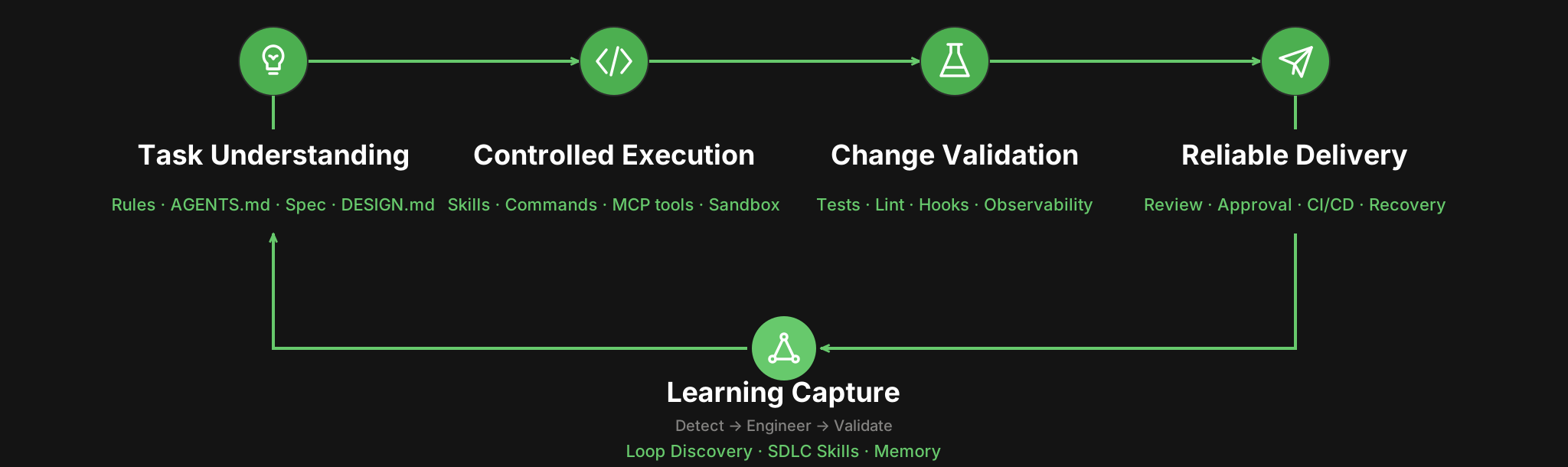
配图(可点击跳转至 models/agent-work-loop.md):Agent Work Loop——从任务理解到经验沉淀的五个维度。
| Dimension | The question it answers | Backed by |
|---|---|---|
| Task Understanding | Does the agent know the goal and what "done" means? | Rules, AGENTS.md, specs, DESIGN.md |
| Controlled Execution | Is the work on supported, repeatable paths? | Skills, commands, MCP tools, sandbox boundaries |
| Change Validation | Is there evidence the change actually works? | Tests, lint, Hooks, observable diagnostics |
| Reliable Delivery | Does AI speed bypass quality checks or acceptance? | Human review, approvals, CI/CD, recovery paths |
| Learning Capture | Does the next task benefit from this one? | Loop Discovery, reusable SDLC Skills, Memory |
Running /better-harness establishes a task-bounded baseline and, depending on the host, produces a visual report, a Markdown report, or both. The report combines the five-part overview, prioritized findings, detected agent assets, and an evidence brief. Each finding includes a repair action that drafts a scoped fix plan for review.
运行 /better-harness 会建立一个以任务为边界的基线,并根据宿主不同产出可视化报告、Markdown 报告,或两者兼有。报告由五部分概览、按优先级排序的 findings、检测到的 agent 资产,以及一份证据简报组成。每条 finding 都包含一个修复动作,用于起草一份限定范围的修复计划供评审。
Better Harness is deliberately honest: unobserved behavior stays explicit instead of becoming an unsupported score or claim. Passing a current check proves that the intervention was exercised; only a comparable later result can prove that the loop improved.
Better Harness 刻意保持诚实:未被观察到的行为会保持显式标注,而不会被包装成没有依据的评分或断言。通过当前某一项检查只证明该干预被实际执行过;只有之后可比较的结果才能证明这个循环确实得到了改进。
What is open
Better Harness opens three connected layers, not only a slash-command prompt:
Better Harness 打开的是三个相互关联的层次,而不只是一个斜杠命令提示词:
- Engineering practices — evidence and judgment guidance across Session Evidence, Project Harness, Agent Customize, and Loop Engineering.
- Evaluation model — the task-centered Agent Work Loop, including evidence states, findings, scoring boundaries, and longitudinal validation.
- Runnable implementation — the canonical
/better-harnessworkflow, evidence collectors, analyzers, renderers, and thin host adapters.
工程实践——横跨会话证据、项目 Harness、Agent 定制与循环工程的证据与判断指引;评估模型——以任务为中心的 Agent Work Loop,包含证据状态、findings、评分边界和纵向验证;可运行的实现——规范的 /better-harness 工作流、证据收集器、分析器、渲染器,以及轻量的宿主适配器。
The three layers share the same boundary: configured assets can establish that a mechanism exists, but only linked task evidence can establish that it was used or improved an outcome.
这三个层次共享同一条边界:已配置的资产只能证明某个机制存在,而只有关联到具体任务的证据才能证明它被使用过,或者改善了结果。
Architecture
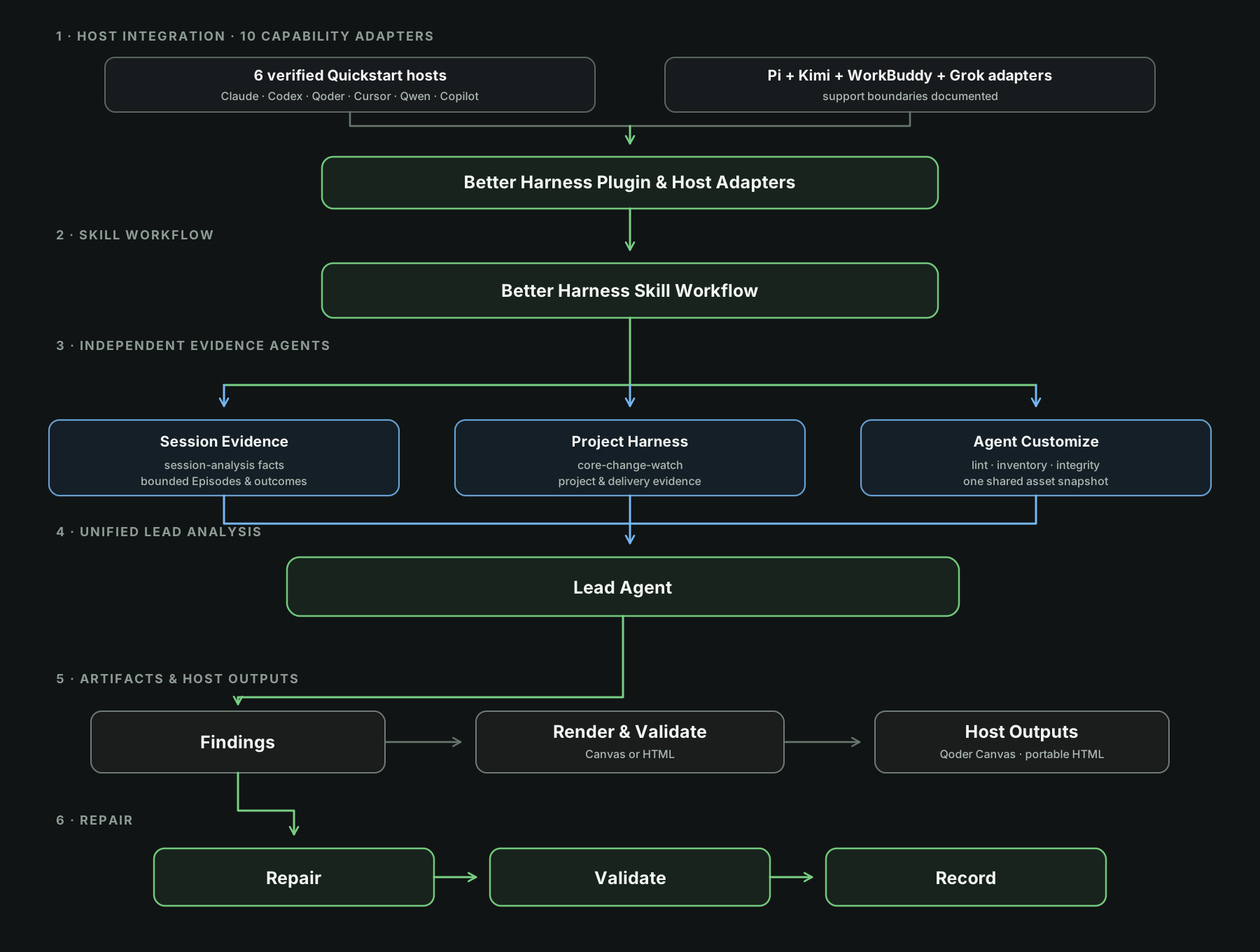
配图(可点击跳转至 docs/README.md):Better Harness 架构——宿主集成、三个独立的证据 agent、由单个 lead agent 统一分析、findings、宿主输出,以及修复。
The architecture keeps the three evidence domains independent until unified analysis by the lead agent. Every result retains a visible evidence source, owner, and validation route.
该架构让三个证据域在被 lead agent 统一分析之前始终保持独立。每个结果都保留可见的证据来源、责任方和验证路径。
Installation
Installation differs by coding agent. Install Better Harness separately for each host, except that Qoder CLI can use the version bundled with Qoder Desktop. After installing or updating a plugin, start a new session or task so the host reloads its plugin inventory.
安装方式因 coding agent 而异。Better Harness 需要针对每个宿主分别安装,唯一的例外是 Qoder CLI 可以使用随 Qoder Desktop 附带的版本。安装或更新插件之后,请启动一个新的会话或任务,好让宿主重新加载其插件清单。
Claude Code
Register this repository as a Claude Code marketplace:
先把本仓库注册为 Claude Code marketplace:
/plugin marketplace add QoderAI/better-harnessThen install Better Harness:
然后安装 Better Harness:
/plugin install better-harness@better-harnessVerify discovery from the shell:
在 shell 中验证它是否被发现:
claude plugin details better-harness@better-harnessThe details should include Skills (1) better-harness. Then start a new Claude session in the repository you want to analyze and run the report prompt:
输出详情中应当包含 Skills (1) better-harness。随后在你想要分析的仓库中启动一个新的 Claude 会话,并运行报告提示词:
/better-harness analyze this project's AI coding workflow and generate an evidence-backed reportClaude Code defaults to a self-contained report.html with paired report.md and findings.json under the repository's .claude/better-harness report root. Ask for inline or no-files output to keep the result in chat only. Workspace- matching local Claude sessions are included when available; missing evidence stays explicit rather than being inferred.
Claude Code 默认在仓库的 .claude/better-harness 报告根目录下生成自包含的 report.html,以及配对的 report.md 和 findings.json。如果想让结果只留在对话里,可以要求内联输出或不落文件。在可用的情况下,会纳入与工作区匹配的本地 Claude 会话;缺失的证据保持显式,而不是被推断填补。
Codex
Codex Desktop
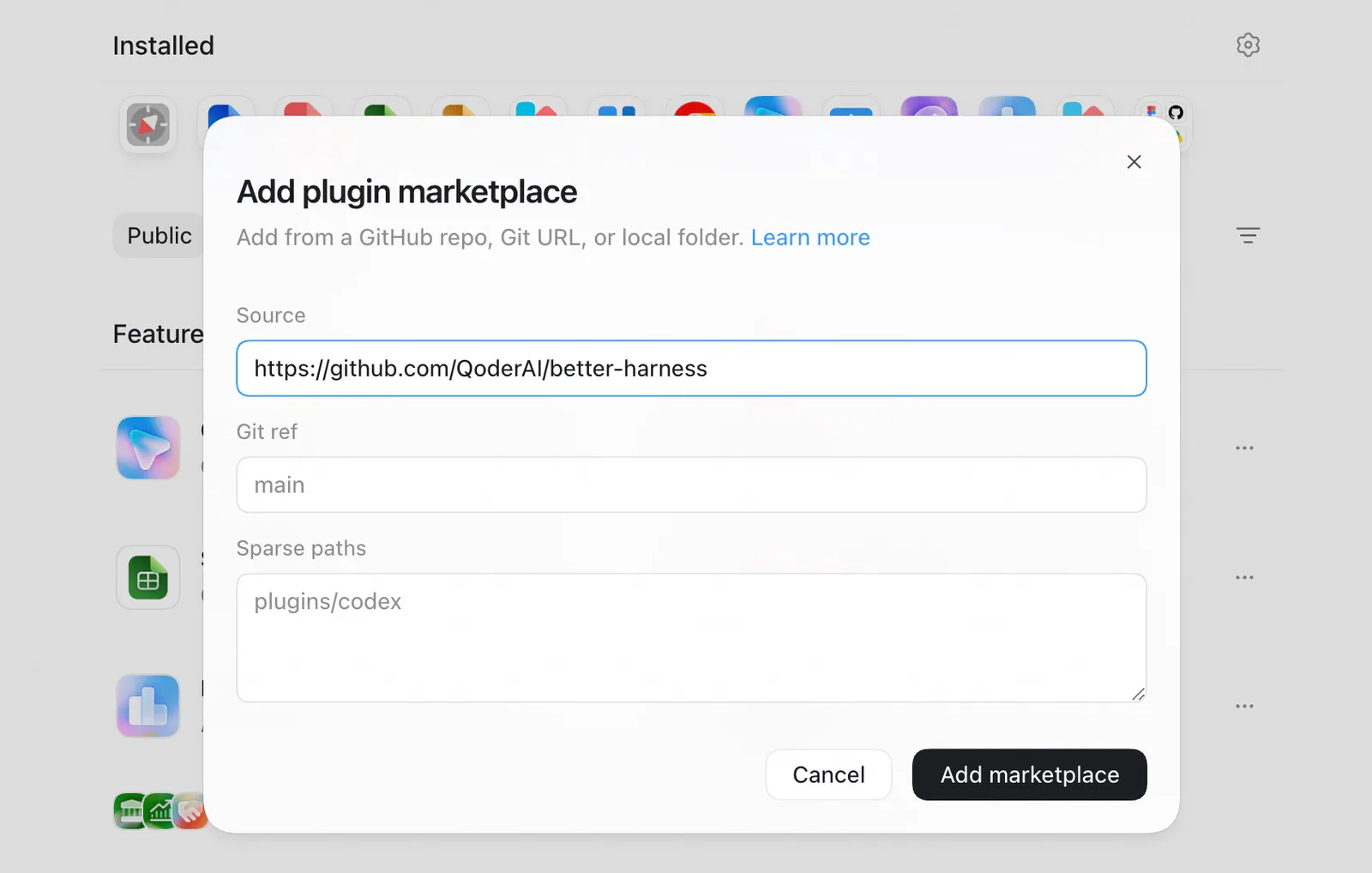
- Open Settings > Plugins.
- Select + Add > From Marketplace.
- Enter the Git repository URL, set its Git ref, and leave Sparse paths empty for this single-plugin repository.
- Select Add marketplace, then install Better Harness from the new marketplace.
- Start a new task in the repository you want to analyze and run the report prompt:
1)打开 Settings > Plugins;2)选择 + Add > From Marketplace;3)填入 Git 仓库 URL、设置它的 Git ref,对于这个单插件仓库把 Sparse paths 留空;4)选择 Add marketplace,再从新增的 marketplace 中安装 Better Harness;5)在你想要分析的仓库中启动一个新任务,并运行报告提示词:
@better-harness analyze this project's AI coding workflow and generate an evidence-backed reportUse https://github.com/QoderAI/better-harness.git with Git ref main.
使用 https://github.com/QoderAI/better-harness.git,Git ref 设为 main。
Codex CLI
Add the repository source:
添加仓库源:
codex plugin marketplace add \
  'https://github.com/QoderAI/better-harness.git' \
  --ref main
Then inspect and install Better Harness:
然后检查并安装 Better Harness:
codex plugin list --marketplace better-harness
codex plugin add better-harness@better-harness
Start a new Codex task in the repository you want to analyze and run the report prompt:
在你想要分析的仓库中启动一个新的 Codex 任务,并运行报告提示词:
$better-harness:better-harness analyze this project's AI coding workflow and generate an evidence-backed reportUse the repository URL with marketplace add, not a raw marketplace.json URL. Current Codex builds use plugin add and --marketplace; examples that use plugin install or --source target a different CLI contract.
请用仓库 URL 配合 marketplace add,不要使用裸的 marketplace.json URL。当前 Codex 构建使用 plugin add 和 --marketplace;那些使用 plugin install 或 --source 的示例对应的是另一套 CLI 契约。
Qoder
Better Harness is built into the Qoder desktop app, so no Marketplace or local plugin installation is required there. Choose either entry point:
Better Harness 内置于 Qoder 桌面应用,所以在那里不需要 Marketplace 或本地插件安装。任选以下入口之一:
- From a session: Open the repository you want to analyze, start a new session, and run the report prompt:
1)从会话进入: 打开你想分析的仓库,启动一个新会话,并运行报告提示词:
/better-harness analyze this project's AI coding workflow and generate an evidence-backed report- From Quest (Qoder 1.18.0+): Open Quest, then select Better Harness (Beta) from the left sidebar.
2)从 Quest 进入(Qoder 1.18.0+): 打开 Quest,然后在左侧边栏中选择 Better Harness (Beta)。
Qoder CLI
If Qoder Desktop is installed, Better Harness is already available in Qoder CLI. No marketplace or plugin installation is required. Start a new Qoder CLI session in the repository you want to analyze and run the report prompt:
如果已安装 Qoder Desktop,那么 Qoder CLI 中已经可以使用 Better Harness,无需 marketplace 或插件安装。在你想要分析的仓库中启动一个新的 Qoder CLI 会话,并运行报告提示词:
/better-harness analyze this project's AI coding workflow and generate an evidence-backed reportOnly when using Qoder CLI without Qoder Desktop, inspect the current manual installation disposition before following:
只有在未安装 Qoder Desktop、单独使用 Qoder CLI 时,才先查看当前的手动安装处置情况,再按后续步骤操作:
From marketplace
# Add the plugin marketplace source
qodercli plugin marketplace add 'https://github.com/QoderAI/better-harness.git'

# Install the plugin
qodercli plugin install better-harness@better-harness

# Check installation
qodercli plugin list
From git
# Make sure directory exist
mkdir -p $HOME/.qoder/plugins/marketplaces/

git clone https://github.com/QoderAI/better-harness.git \
  $HOME/.qoder/plugins/marketplaces/better-harness --depth 1

qodercli plugin install $HOME/.qoder/plugins/marketplaces/better-harness
Replace .qoder to .qoder-cn in urls for Qoder CN series.
对于 Qoder 中国版系列,请把 URL 中的 .qoder 替换为 .qoder-cn。
Then start a new Qoder CLI session before using /better-harness.
然后启动一个新的 Qoder CLI 会话,再使用 /better-harness。
Cursor
The Cursor plugin is not published to the marketplace. The repository carries the source-local manifest, but the current local Cursor help does not verify the historical --plugin-dir contract. Better Harness therefore reports the installation plan as unavailable instead of emitting that command:
Cursor 插件尚未发布到 marketplace。仓库中带有源码本地的 manifest,但当前本地 Cursor 帮助并未验证历史上的 --plugin-dir 契约。因此 Better Harness 会把安装计划报告为不可用,而不会输出该命令:
git clone https://github.com/QoderAI/better-harness.git
better-harness plugin plan install --host cursor --surface agent --scope session
Cursor session evidence is supported through workspace-matched transcripts, metadata, and audit logs. A session that was loaded through a separately verified native route can be checked with better-harness plugin verify --host cursor --surface agent; partial or unavailable coverage remains explicit.
Cursor 的会话证据通过工作区匹配的 transcript、元数据和审计日志来支持。如果某个会话是通过另一条经过单独验证的原生路径加载的,可以用 better-harness plugin verify --host cursor --surface agent 来检查;部分可用或不可用的覆盖范围都保持显式。
GitHub Copilot
Register this repository as a Copilot plugin marketplace, then install Better Harness:
先把本仓库注册为 Copilot 插件 marketplace,然后安装 Better Harness:
copilot plugin marketplace add QoderAI/better-harness
copilot plugin install better-harness@better-harness
Verify that the Skill loaded:
验证该 Skill 是否已加载:
copilot plugin listPrefer marketplace installs. Direct repository, URL, and local-path installs are deprecated in Copilot CLI.
优先使用 marketplace 安装。在 Copilot CLI 中,直接从仓库、URL 或本地路径安装已被弃用。
Copilot session evidence is supported through workspace-matched Copilot CLI transcripts under ~/.copilot/session-state/. Copilot records no per-response token usage, and VS Code Copilot Chat has no supported durable transcript; both remain explicit evidence boundaries.
Copilot 的会话证据通过位于 ~/.copilot/session-state/ 下、与工作区匹配的 Copilot CLI transcript 来支持。Copilot 不记录每次响应的 token 用量,VS Code Copilot Chat 也没有受支持的持久化 transcript;这两者都保持为显式的证据边界。
Inspect and plan plugin lifecycle changes (Beta)
The standalone CLI can inspect local Better Harness installation evidence for every host without contacting a registry or changing host configuration:
这个独立 CLI 可以检查每个宿主在本地留下的 Better Harness 安装证据,既不需要访问 registry,也不会改动宿主配置:
better-harness plugin status --host all
better-harness doctor --platform all
Build a host-specific install, update, or removal plan before using that host's native UI or CLI. Plans preserve native steps as typed argv data for deliberate external execution; the human view does not turn them into shell command strings, and Better Harness does not execute them:
在使用某个宿主的原生 UI 或 CLI 之前,先构建该宿主专属的安装、更新或卸载计划。计划会把原生步骤保留为结构化的 argv 数据,供外部有意执行;人类可读视图不会把它们拼成 shell 命令字符串,Better Harness 也不会执行它们:
better-harness plugin plan install --host qwen --surface cli --scope user
better-harness plugin verify --host qwen --surface cli
Host differences remain explicit. Qoder Desktop is bundled, Cursor is session-only while its native command contract is being reconciled, Pi lifecycle commands without current native evidence remain manual or unavailable, and WorkBuddy has no managed Better Harness plugin lifecycle surface.
宿主之间的差异保持显式。Qoder Desktop 是内置的;Cursor 在其原生命令契约完成协调之前仅支持会话;Pi 的生命周期命令在没有当前原生证据时保持手动或不可用;WorkBuddy 则没有受管理的 Better Harness 插件生命周期面。
More adapters
Beyond the hosts above, Better Harness also supports Qwen Code, Pi, Kimi Code, WorkBuddy, and Grok. Their exact install, invocation, and evidence boundaries live in the docs so this README stays focused:
除上述宿主外,Better Harness 还支持 Qwen Code、Pi、Kimi Code、WorkBuddy 和 Grok。它们确切的安装方式、调用方式和证据边界都放在文档中,以便本 README 保持聚焦:
- Qwen Code — installation guide (
qwen extensions install QoderAI/better-harness). - Pi — Host Adapter Matrix (
pi install <source>orpi -e <source>). The same adapter reads Oh My Pi (OMP) sessions whenPI_CODING_AGENT_DIRpoints at an OMP agent directory. - Kimi Code — Host Adapter Matrix (
.kimi-plugin/plugin.jsonplugin install). - WorkBuddy — Host Adapter Matrix.
- Grok — Host Adapter Matrix.
Qwen Code——见安装指南(qwen extensions install QoderAI/better-harness);Pi——见 Host Adapter Matrix(pi install <source> 或 pi -e <source>),当 PI_CODING_AGENT_DIR 指向某个 OMP agent 目录时,同一个适配器也能读取 Oh My Pi (OMP) 的会话;Kimi Code——见 Host Adapter Matrix(以 .kimi-plugin/plugin.json 安装插件);WorkBuddy——见 Host Adapter Matrix;Grok——见 Host Adapter Matrix。
Each produces a self-contained report.html with paired report.md and findings.json; missing or partial session evidence stays explicit.
它们各自产出自包含的 report.html,并配对一份 report.md 和 findings.json;缺失或不完整的会话证据保持显式。
Develop and package from source
Development requires Node.js >=22.20.0 <25.0.0 and npm >=10.9.3 <12.0.0 on Windows, macOS, or Linux.
开发需要 Node.js >=22.20.0 <25.0.0 和 npm >=10.9.3 <12.0.0,运行于 Windows、macOS 或 Linux。
npm ci
npm test
npm run pack:verify
Build the source-local Codex plugin artifact with:
用以下命令构建源码本地的 Codex 插件产物:
node scripts/packaging/build-host-plugin.mjsThe validated artifact is written to dist/plugins/better-harness.
通过校验的产物会写入 dist/plugins/better-harness。
From the same source checkout, inspect repository evidence without reading local sessions:
在同一份源码检出中,可以在不读取本地会话的情况下检查仓库证据:
node scripts/better-harness.mjs report --no-sessionsFrom a source checkout, npm run preview -- --open serves a bundled fixture. Canvas preview requires an installed Qoder runtime, or an explicit --sdk-media/--sdk-root path. It listens on 127.0.0.1 by default and is a local inspection tool, not an authenticated sharing service.
在源码检出中,npm run preview -- --open 会提供一个内置的 fixture。Canvas 预览需要已安装的 Qoder 运行时,或者显式指定 --sdk-media/--sdk-root 路径。它默认监听 127.0.0.1,是一个本地检查工具,而不是经过鉴权的分享服务。
Contribute
You do not need to understand the whole runtime to contribute. Start with the smallest surface that matches the improvement you want to make:
你不需要理解整个 runtime 才能参与贡献。先从与你想要做的改进相匹配的最小面开始:
| What you can contribute | Start here | Example contribution |
|---|---|---|
| Workflow guidance and engineering practices | skills/ or references/ | Add sourced guidance for a language, framework, review pattern, or recurring agent workflow. |
| Evaluation models and executable analysis | models/ or scripts/ | Add an evidence-backed evaluation lens, detector, or agent-friendly analysis command with fixtures and tests. |
| Delivery controls and host support | hooks/ or the new Coding Agent guide | Add a narrow lifecycle check or document and validate evidence support for another Coding Agent host. |
| Reports and visual language | templates/reporting/ or templates/style/ | Add a report mode, reusable reporting contract, or directive-only visual style with validation evidence. |
| Examples and operating models | case-studies/ | Share a redacted, evidence-bounded example of how a team applies Agent Work Loop analysis and delivery practices. |
To get started:
上手步骤:
- Read the community extension map to choose the canonical owner and understand its contract.
- Follow the contribution guide to set up the project and scope the change.
- For host support, follow the new Coding Agent contribution guide and update the host adapter matrix.
- Add tests, fixtures, or preview evidence when the contribution changes runtime behavior or rendered output.
- Open a focused pull request that explains what changed, why, and how it was validated.
1)阅读社区扩展地图,选择规范的 owner 并理解其契约;2)按照贡献指南搭建项目并界定改动的范围;3)如果涉及宿主支持,遵循新 Coding Agent 贡献指南并更新宿主适配器矩阵;4)当贡献改动了运行时行为或渲染输出时,补充测试、fixture 或预览证据;5)提交一个聚焦的 pull request,说明改了什么、为什么改以及如何验证。
Not sure where an idea belongs? Open an issue before building a new top-level surface or changing a public report, schema, packaging, or compatibility contract.
不确定一个想法该归到哪里?在构建新的顶层面,或者改动公开报告、schema、打包、兼容性契约之前,请先开一个 issue。